SCREEN
CASTING
  lunch + learn
   09.06.2011
WHAT
 WHY
WHAT
 WHY
captures what is
     displayed on a
computer screen,
  accompanied by
 audio   commentary
powerful,
interactive form
 of instructional
    media
WHAT
 WHY
communicate
 what cannot
be explained
    easily
capture
expert / tactical
knowledge
effectively
teach through
example
viewer
can go at their
  own pace
content
  is more
engaging &
  interactive
easily
shareable
WHAT
 WHY
tools
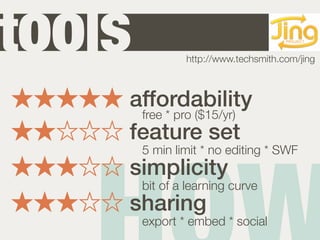
tools                               Jing
                http://www.techsmith.com/jing


    affordability
     free * pro ($15/yr)
    feature set
        5 min limit * no editing * SWF
    simplicity
        bit of a learning curve
    sharing
        export * embed * social
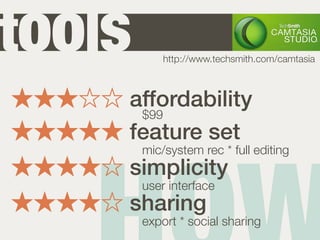
tools       http://www.techsmith.com/camtasia


    affordability
     $99
    feature set
        mic/system rec * full editing
    simplicity
        user interface
    sharing
        export * social sharing
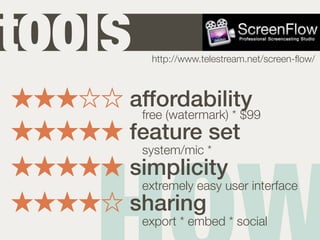
tools    http://www.telestream.net/screen-flow/


    affordability
     free (watermark) * $99
    feature set
        system/mic *
    simplicity
        extremely easy user interface
    sharing
        export * embed * social
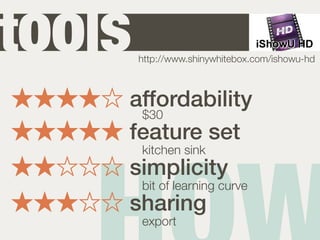
tools   http://www.shinywhitebox.com/ishowu-hd


    affordability
     $30
    feature set
        kitchen sink
    simplicity
        bit of learning curve
    sharing
        export
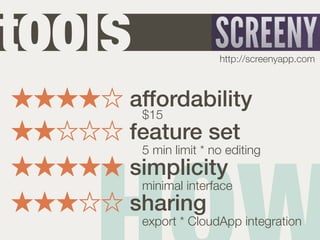
tools                  http://screenyapp.com


    affordability
     $15
    feature set
        5 min limit * no editing
    simplicity
        minimal interface
    sharing
        export * CloudApp integration
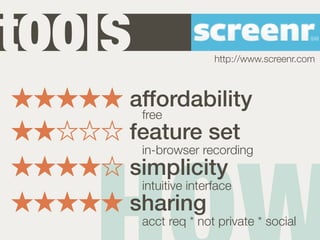
tools                  http://www.screenr.com


    affordability
     free
    feature set
        in-browser recording
    simplicity
        intuitive interface
    sharing
        acct req * not private * social
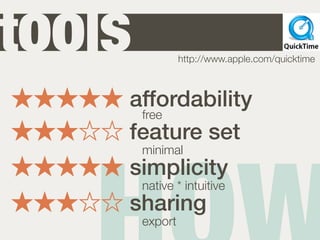
tools            http://www.apple.com/quicktime


    affordability
     free
    feature set
        minimal
    simplicity
        native * intuitive
    sharing
        export
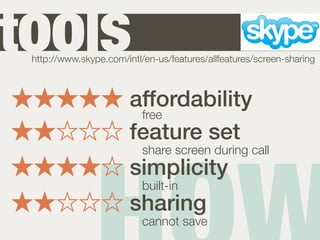
tools
 http://www.skype.com/intl/en-us/features/allfeatures/screen-sharing


                        affordability
                         free
                        feature set
                           share screen during call
                        simplicity
                           built-in
                        sharing
                           cannot save
planning
production
post production
planning
production
post production
know your
audience
use a
script
practice
 what you will
say & show
shorter
   =
focused
use a
 quality
microphone
monitor
audio levels
planning
production
post production
capture the
 video & voice
simultaneously
turnoff
all notifications
be
conversational
use
appropriate
   language
emphasize
parts of the screen
  as you're
recording
speak
slowly
planning
production
post production
3R
review
your work for
 accuracy
remove
unnecessary
  content
recapture
  if
necessary
SCREEN
CASTING
 mkrejci@centresource.com
 jarnold@centresource.com
Screencasting

Screencasting