Screen2Vec: Semantic Embedding of GUI
Screens and GUI Components
Toby Li, Lindsay Popowski, Tom M Mitchell, Brad A. Myers
2021 CHI Conference on Human Factors in Computing Systems
Background
• Existing approaches of representing GUI screens are limited
ļ‚§ Capturing only text on the screen
• Missing information encoded in the layout and design pattern
ļ‚§ Focusing on the visual design patterns and GUI layouts
• Not capturing the content in the GUI
• Prior approaches use supervised learning with large datasets for specific task
objectives
ļ‚§ Requiring labeling efforts
ļ‚§ Inapplicable in different downstream tasks
1
Semantic representations of GUI screens and components
Contribution
• Presenting a self-supervised technique, not requiring human-labeled data
• Generating more comprehensive semantic embeddings of GUI screens and
components using
ļ‚§ Textual content
ļ‚§ Visual design
ļ‚§ Layout patterns
ļ‚§ App meta-data
• Training an open-sourced GUI embedding model using Screen2Vec with RICO
dataset
• Providing sample downstream tasks such as
ļ‚§ Nearest neighbor retrieval
ļ‚§ Composability-based retrieval
ļ‚§ Representing mobile tasks
2
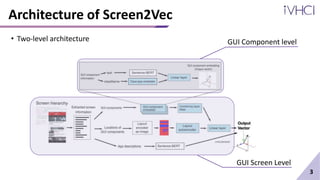
Architecture of Screen2Vec
3
GUI Component level
GUI Screen Level
• Two-level architecture
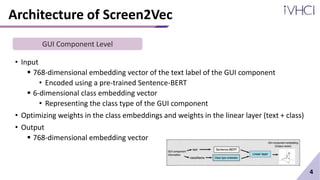
Architecture of Screen2Vec
• Input
ļ‚§ 768-dimensional embedding vector of the text label of the GUI component
• Encoded using a pre-trained Sentence-BERT
ļ‚§ 6-dimensional class embedding vector
• Representing the class type of the GUI component
• Optimizing weights in the class embeddings and weights in the linear layer (text + class)
• Output
ļ‚§ 768-dimensional embedding vector
4
GUI Component Level
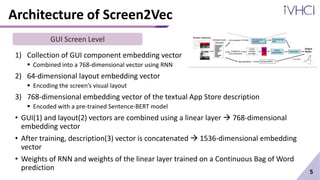
Architecture of Screen2Vec
1) Collection of GUI component embedding vector
ļ‚§ Combined into a 768-dimensional vector using RNN
2) 64-dimensional layout embedding vector
ļ‚§ Encoding the screen’s visual layout
3) 768-dimensional embedding vector of the textual App Store description
ļ‚§ Encoded with a pre-trained Sentence-BERT model
• GUI(1) and layout(2) vectors are combined using a linear layer  768-dimensional
embedding vector
• After training, description(3) vector is concatenated  1536-dimensional embedding
vector
• Weights of RNN and weights of the linear layer trained on a Continuous Bag of Word
prediction 5
GUI Screen Level
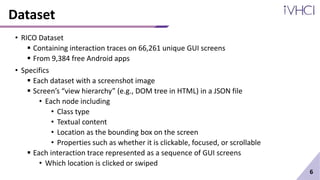
Dataset
• RICO Dataset
ļ‚§ Containing interaction traces on 66,261 unique GUI screens
ļ‚§ From 9,384 free Android apps
• Specifics
ļ‚§ Each dataset with a screenshot image
ļ‚§ Screen’s ā€œview hierarchyā€ (e.g., DOM tree in HTML) in a JSON file
• Each node including
• Class type
• Textual content
• Location as the bounding box on the screen
• Properties such as whether it is clickable, focused, or scrollable
ļ‚§ Each interaction trace represented as a sequence of GUI screens
• Which location is clicked or swiped
6
Implementation Details
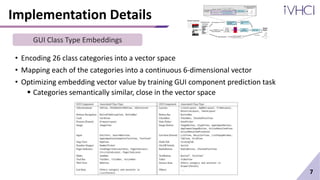
• Encoding 26 class categories into a vector space
• Mapping each of the categories into a continuous 6-dimensional vector
• Optimizing embedding vector value by training GUI component prediction task
ļ‚§ Categories semantically similar, close in the vector space
7
GUI Class Type Embeddings
Implementation Details
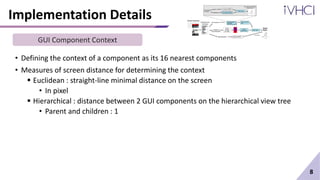
• Defining the context of a component as its 16 nearest components
• Measures of screen distance for determining the context
ļ‚§ Euclidean : straight-line minimal distance on the screen
• In pixel
ļ‚§ Hierarchical : distance between 2 GUI components on the hierarchical view tree
• Parent and children : 1
8
GUI Component Context
Implementation Details
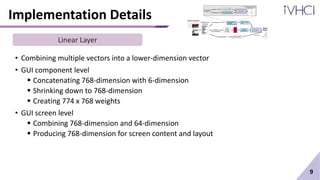
• Combining multiple vectors into a lower-dimension vector
• GUI component level
ļ‚§ Concatenating 768-dimension with 6-dimension
ļ‚§ Shrinking down to 768-dimension
ļ‚§ Creating 774 x 768 weights
• GUI screen level
ļ‚§ Combining 768-dimension and 64-dimension
ļ‚§ Producing 768-dimension for screen content and layout
9
Linear Layer
Implementation Details
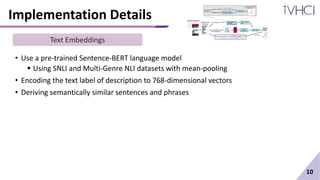
• Use a pre-trained Sentence-BERT language model
ļ‚§ Using SNLI and Multi-Genre NLI datasets with mean-pooling
• Encoding the text label of description to 768-dimensional vectors
• Deriving semantically similar sentences and phrases
10
Text Embeddings
Implementation Details
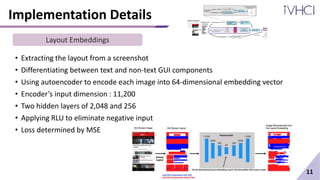
• Extracting the layout from a screenshot
• Differentiating between text and non-text GUI components
• Using autoencoder to encode each image into 64-dimensional embedding vector
• Encoder’s input dimension : 11,200
• Two hidden layers of 2,048 and 256
• Applying RLU to eliminate negative input
• Loss determined by MSE
11
Layout Embeddings
Implementation Details
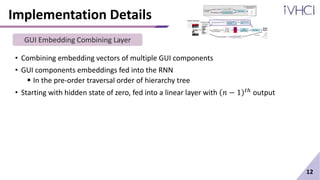
• Combining embedding vectors of multiple GUI components
• GUI components embeddings fed into the RNN
ļ‚§ In the pre-order traversal order of hierarchy tree
• Starting with hidden state of zero, fed into a linear layer with š‘› āˆ’ 1 š‘”ā„Ž output
12
GUI Embedding Combining Layer
Training Configuration
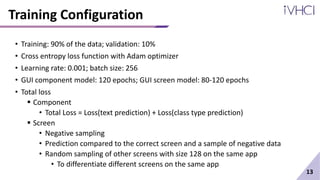
• Training: 90% of the data; validation: 10%
• Cross entropy loss function with Adam optimizer
• Learning rate: 0.001; batch size: 256
• GUI component model: 120 epochs; GUI screen model: 80-120 epochs
• Total loss
ļ‚§ Component
• Total Loss = Loss(text prediction) + Loss(class type prediction)
ļ‚§ Screen
• Negative sampling
• Prediction compared to the correct screen and a sample of negative data
• Random sampling of other screens with size 128 on the same app
• To differentiate different screens on the same app
13
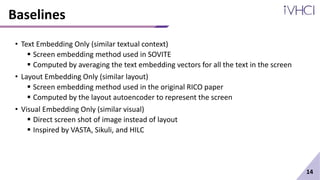
Baselines
• Text Embedding Only (similar textual context)
ļ‚§ Screen embedding method used in SOVITE
ļ‚§ Computed by averaging the text embedding vectors for all the text in the screen
• Layout Embedding Only (similar layout)
ļ‚§ Screen embedding method used in the original RICO paper
ļ‚§ Computed by the layout autoencoder to represent the screen
• Visual Embedding Only (similar visual)
ļ‚§ Direct screen shot of image instead of layout
ļ‚§ Inspired by VASTA, Sikuli, and HILC
14
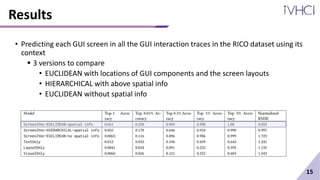
Results
• Predicting each GUI screen in all the GUI interaction traces in the RICO dataset using its
context
ļ‚§ 3 versions to compare
• EUCLIDEAN with locations of GUI components and the screen layouts
• HIERARCHICAL with above spatial info
• EUCLIDEAN without spatial info
15
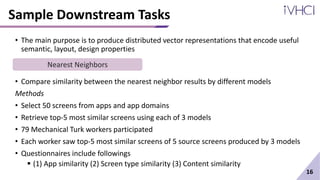
Sample Downstream Tasks
• The main purpose is to produce distributed vector representations that encode useful
semantic, layout, design properties
• Compare similarity between the nearest neighbor results by different models
Methods
• Select 50 screens from apps and app domains
• Retrieve top-5 most similar screens using each of 3 models
• 79 Mechanical Turk workers participated
• Each worker saw top-5 most similar screens of 5 source screens produced by 3 models
• Questionnaires include followings
ļ‚§ (1) App similarity (2) Screen type similarity (3) Content similarity
16
Nearest Neighbors
Sample Downstream Tasks
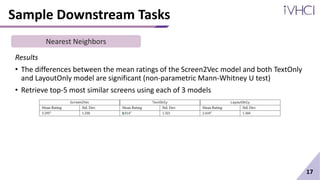
Results
• The differences between the mean ratings of the Screen2Vec model and both TextOnly
and LayoutOnly model are significant (non-parametric Mann-Whitney U test)
• Retrieve top-5 most similar screens using each of 3 models
17
Nearest Neighbors
Sample Downstream Tasks
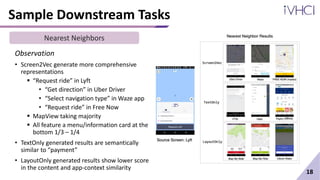
Observation
• Screen2Vec generate more comprehensive
representations
ļ‚§ ā€œRequest rideā€ in Lyft
• ā€œGet directionā€ in Uber Driver
• ā€œSelect navigation typeā€ in Waze app
• ā€œRequest rideā€ in Free Now
ļ‚§ MapView taking majority
ļ‚§ All feature a menu/information card at the
bottom 1/3 – 1/4
• TextOnly generated results are semantically
similar to ā€œpaymentā€
• LayoutOnly generated results show lower score
in the content and app-context similarity
18
Nearest Neighbors
Sample Downstream Tasks
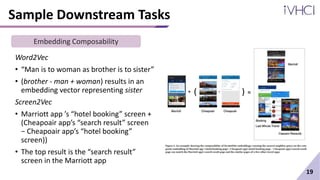
Word2Vec
• ā€œMan is to woman as brother is to sisterā€
• (brother - man + woman) results in an
embedding vector representing sister
Screen2Vec
• Marriott app ’s ā€œhotel bookingā€ screen +
(Cheapoair app’s ā€œsearch resultā€ screen
āˆ’ Cheapoair app’s ā€œhotel bookingā€
screen))
• The top result is the ā€œsearch resultā€
screen in the Marriott app
19
Embedding Composability
Sample Downstream Tasks
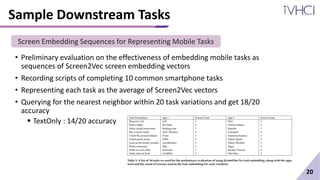
• Preliminary evaluation on the effectiveness of embedding mobile tasks as
sequences of Screen2Vec screen embedding vectors
• Recording scripts of completing 10 common smartphone tasks
• Representing each task as the average of Screen2Vec vectors
• Querying for the nearest neighbor within 20 task variations and get 18/20
accuracy
ļ‚§ TextOnly : 14/20 accuracy
20
Screen Embedding Sequences for Representing Mobile Tasks
Potential Application
• Designers query for example designs that display similar content or screens in
apps of a similar domain
• Composability helps to find a specific page for the app
ļ‚§ Suppose a designer searches for checkout page for app A
ļ‚§ A’s order page + (App B’s checkout page – App B’s order page
• LayoutGAN can generate realistic GUI layouts based on user-specified
constraints
ļ‚§ Applying Screen2Vec to incorporate the semantics of GUIs and the context
of user interaction
21
Limitation
• Only trained and test on Android app GUIs
• RICO dataset
ļ‚§ contains interaction traces within single apps  need to generalize multiple app
ļ‚§ Does not contain paid apps
• Screen2Vec does not encode the semantics of graphic icons that have no textual
information
22
Screen2Vec: Semantic Embedding of GUI Screens and GUI Components

Screen2Vec: Semantic Embedding of GUI Screens and GUI Components

  • 1.
    Screen2Vec: Semantic Embeddingof GUI Screens and GUI Components Toby Li, Lindsay Popowski, Tom M Mitchell, Brad A. Myers 2021 CHI Conference on Human Factors in Computing Systems
  • 2.
    Background • Existing approachesof representing GUI screens are limited ļ‚§ Capturing only text on the screen • Missing information encoded in the layout and design pattern ļ‚§ Focusing on the visual design patterns and GUI layouts • Not capturing the content in the GUI • Prior approaches use supervised learning with large datasets for specific task objectives ļ‚§ Requiring labeling efforts ļ‚§ Inapplicable in different downstream tasks 1 Semantic representations of GUI screens and components
  • 3.
    Contribution • Presenting aself-supervised technique, not requiring human-labeled data • Generating more comprehensive semantic embeddings of GUI screens and components using ļ‚§ Textual content ļ‚§ Visual design ļ‚§ Layout patterns ļ‚§ App meta-data • Training an open-sourced GUI embedding model using Screen2Vec with RICO dataset • Providing sample downstream tasks such as ļ‚§ Nearest neighbor retrieval ļ‚§ Composability-based retrieval ļ‚§ Representing mobile tasks 2
  • 4.
    Architecture of Screen2Vec 3 GUIComponent level GUI Screen Level • Two-level architecture
  • 5.
    Architecture of Screen2Vec •Input ļ‚§ 768-dimensional embedding vector of the text label of the GUI component • Encoded using a pre-trained Sentence-BERT ļ‚§ 6-dimensional class embedding vector • Representing the class type of the GUI component • Optimizing weights in the class embeddings and weights in the linear layer (text + class) • Output ļ‚§ 768-dimensional embedding vector 4 GUI Component Level
  • 6.
    Architecture of Screen2Vec 1)Collection of GUI component embedding vector ļ‚§ Combined into a 768-dimensional vector using RNN 2) 64-dimensional layout embedding vector ļ‚§ Encoding the screen’s visual layout 3) 768-dimensional embedding vector of the textual App Store description ļ‚§ Encoded with a pre-trained Sentence-BERT model • GUI(1) and layout(2) vectors are combined using a linear layer  768-dimensional embedding vector • After training, description(3) vector is concatenated  1536-dimensional embedding vector • Weights of RNN and weights of the linear layer trained on a Continuous Bag of Word prediction 5 GUI Screen Level
  • 7.
    Dataset • RICO Dataset ļ‚§Containing interaction traces on 66,261 unique GUI screens ļ‚§ From 9,384 free Android apps • Specifics ļ‚§ Each dataset with a screenshot image ļ‚§ Screen’s ā€œview hierarchyā€ (e.g., DOM tree in HTML) in a JSON file • Each node including • Class type • Textual content • Location as the bounding box on the screen • Properties such as whether it is clickable, focused, or scrollable ļ‚§ Each interaction trace represented as a sequence of GUI screens • Which location is clicked or swiped 6
  • 8.
    Implementation Details • Encoding26 class categories into a vector space • Mapping each of the categories into a continuous 6-dimensional vector • Optimizing embedding vector value by training GUI component prediction task ļ‚§ Categories semantically similar, close in the vector space 7 GUI Class Type Embeddings
  • 9.
    Implementation Details • Definingthe context of a component as its 16 nearest components • Measures of screen distance for determining the context ļ‚§ Euclidean : straight-line minimal distance on the screen • In pixel ļ‚§ Hierarchical : distance between 2 GUI components on the hierarchical view tree • Parent and children : 1 8 GUI Component Context
  • 10.
    Implementation Details • Combiningmultiple vectors into a lower-dimension vector • GUI component level ļ‚§ Concatenating 768-dimension with 6-dimension ļ‚§ Shrinking down to 768-dimension ļ‚§ Creating 774 x 768 weights • GUI screen level ļ‚§ Combining 768-dimension and 64-dimension ļ‚§ Producing 768-dimension for screen content and layout 9 Linear Layer
  • 11.
    Implementation Details • Usea pre-trained Sentence-BERT language model ļ‚§ Using SNLI and Multi-Genre NLI datasets with mean-pooling • Encoding the text label of description to 768-dimensional vectors • Deriving semantically similar sentences and phrases 10 Text Embeddings
  • 12.
    Implementation Details • Extractingthe layout from a screenshot • Differentiating between text and non-text GUI components • Using autoencoder to encode each image into 64-dimensional embedding vector • Encoder’s input dimension : 11,200 • Two hidden layers of 2,048 and 256 • Applying RLU to eliminate negative input • Loss determined by MSE 11 Layout Embeddings
  • 13.
    Implementation Details • Combiningembedding vectors of multiple GUI components • GUI components embeddings fed into the RNN ļ‚§ In the pre-order traversal order of hierarchy tree • Starting with hidden state of zero, fed into a linear layer with š‘› āˆ’ 1 š‘”ā„Ž output 12 GUI Embedding Combining Layer
  • 14.
    Training Configuration • Training:90% of the data; validation: 10% • Cross entropy loss function with Adam optimizer • Learning rate: 0.001; batch size: 256 • GUI component model: 120 epochs; GUI screen model: 80-120 epochs • Total loss ļ‚§ Component • Total Loss = Loss(text prediction) + Loss(class type prediction) ļ‚§ Screen • Negative sampling • Prediction compared to the correct screen and a sample of negative data • Random sampling of other screens with size 128 on the same app • To differentiate different screens on the same app 13
  • 15.
    Baselines • Text EmbeddingOnly (similar textual context) ļ‚§ Screen embedding method used in SOVITE ļ‚§ Computed by averaging the text embedding vectors for all the text in the screen • Layout Embedding Only (similar layout) ļ‚§ Screen embedding method used in the original RICO paper ļ‚§ Computed by the layout autoencoder to represent the screen • Visual Embedding Only (similar visual) ļ‚§ Direct screen shot of image instead of layout ļ‚§ Inspired by VASTA, Sikuli, and HILC 14
  • 16.
    Results • Predicting eachGUI screen in all the GUI interaction traces in the RICO dataset using its context ļ‚§ 3 versions to compare • EUCLIDEAN with locations of GUI components and the screen layouts • HIERARCHICAL with above spatial info • EUCLIDEAN without spatial info 15
  • 17.
    Sample Downstream Tasks •The main purpose is to produce distributed vector representations that encode useful semantic, layout, design properties • Compare similarity between the nearest neighbor results by different models Methods • Select 50 screens from apps and app domains • Retrieve top-5 most similar screens using each of 3 models • 79 Mechanical Turk workers participated • Each worker saw top-5 most similar screens of 5 source screens produced by 3 models • Questionnaires include followings ļ‚§ (1) App similarity (2) Screen type similarity (3) Content similarity 16 Nearest Neighbors
  • 18.
    Sample Downstream Tasks Results •The differences between the mean ratings of the Screen2Vec model and both TextOnly and LayoutOnly model are significant (non-parametric Mann-Whitney U test) • Retrieve top-5 most similar screens using each of 3 models 17 Nearest Neighbors
  • 19.
    Sample Downstream Tasks Observation •Screen2Vec generate more comprehensive representations ļ‚§ ā€œRequest rideā€ in Lyft • ā€œGet directionā€ in Uber Driver • ā€œSelect navigation typeā€ in Waze app • ā€œRequest rideā€ in Free Now ļ‚§ MapView taking majority ļ‚§ All feature a menu/information card at the bottom 1/3 – 1/4 • TextOnly generated results are semantically similar to ā€œpaymentā€ • LayoutOnly generated results show lower score in the content and app-context similarity 18 Nearest Neighbors
  • 20.
    Sample Downstream Tasks Word2Vec ā€¢ā€œMan is to woman as brother is to sisterā€ • (brother - man + woman) results in an embedding vector representing sister Screen2Vec • Marriott app ’s ā€œhotel bookingā€ screen + (Cheapoair app’s ā€œsearch resultā€ screen āˆ’ Cheapoair app’s ā€œhotel bookingā€ screen)) • The top result is the ā€œsearch resultā€ screen in the Marriott app 19 Embedding Composability
  • 21.
    Sample Downstream Tasks •Preliminary evaluation on the effectiveness of embedding mobile tasks as sequences of Screen2Vec screen embedding vectors • Recording scripts of completing 10 common smartphone tasks • Representing each task as the average of Screen2Vec vectors • Querying for the nearest neighbor within 20 task variations and get 18/20 accuracy ļ‚§ TextOnly : 14/20 accuracy 20 Screen Embedding Sequences for Representing Mobile Tasks
  • 22.
    Potential Application • Designersquery for example designs that display similar content or screens in apps of a similar domain • Composability helps to find a specific page for the app ļ‚§ Suppose a designer searches for checkout page for app A ļ‚§ A’s order page + (App B’s checkout page – App B’s order page • LayoutGAN can generate realistic GUI layouts based on user-specified constraints ļ‚§ Applying Screen2Vec to incorporate the semantics of GUIs and the context of user interaction 21
  • 23.
    Limitation • Only trainedand test on Android app GUIs • RICO dataset ļ‚§ contains interaction traces within single apps  need to generalize multiple app ļ‚§ Does not contain paid apps • Screen2Vec does not encode the semantics of graphic icons that have no textual information 22

Editor's Notes

  • #17Ā Correct GUI component is among the top 0.01% in the prediction result Aggregating textual information is useful for representing topic of a screen  good top 0.1% and 1% / NRMSE
  • #20Ā Textual content, visual design, layout pattern, and app context
  • #21Ā Add, substract, and average to form meaningful new one
  • #22Ā Add, substract, and average to form meaningful new one
  • #23Ā Add, substract, and average to form meaningful new one