CoreML for NLP
An Automated Tensorflow (Keras) workflow for Android
and CoreML for NLP text parsing
Topics to be covered
• Background to Natural Language Processing
• Word Embeddings
• Recurrent Neural Networks
• Keras/Tensorflow CoreML
• Automated build workflow for Android and iOS
using Python templating
What is Natural Language
Processing?
• NLP is the process of having
machines understand
language
• iOS 11 has built in examples
such as
NSLinguisticTagger for
tokenisation and
lemmatisation
• Intent Classification & Slot
Tagging is a sub-field of NLP.
Used as a technique for Siri,
Alexa, and Google Assistant
Play me a jazz song from Louis
Armstrong from 1967
{
"intent": "play_music",
"slots": [
0: {
"genre": "jazz",
"artist": "Louis Armstrong",
"year": "1967"
}
]
}
Tokenisation:
Lemmatisation:
“The cat sat on the mat” = [“The”, “cat”, “sat”, “on”, “the”, “mat”]
“Running” = “run”, “Swam” = “Swim”
Intent Classification & Slot Tagging:
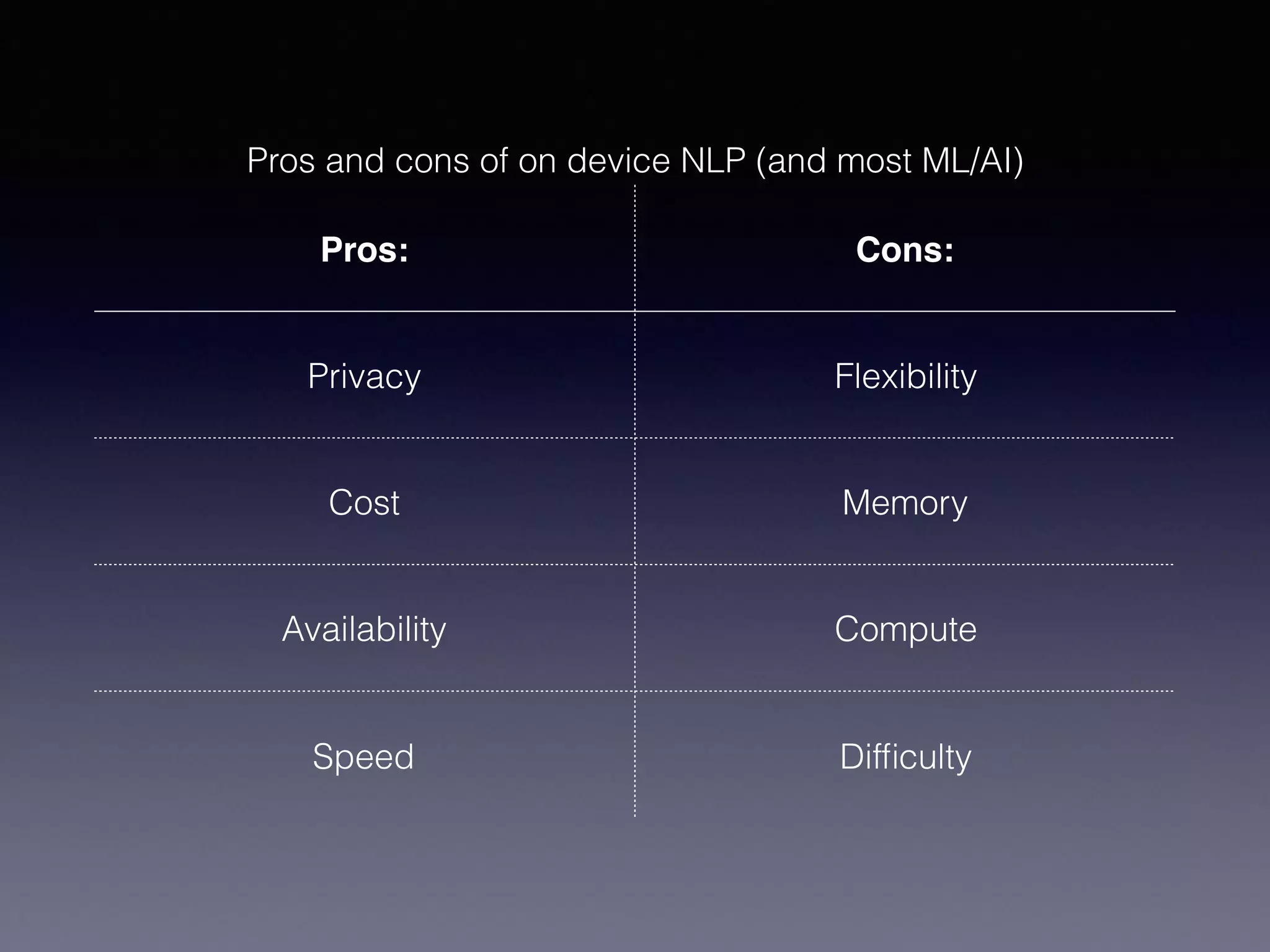
Pros and cons of on device NLP (and most ML/AI)
Pros: Cons:
Privacy Flexibility
Cost Memory
Availability Compute
Speed Difficulty
Data Vectorisation
• In machine learning, data
representation is very
important.
• 🗑 ! fn(x) ! 🗑
• We like our data to be
represented as vectors.
• Images are vectors (JPEG)
and so are sounds (WAV)
• How do we vectorise words for
NLP?
255 45 199 12
23 129 34 5
49 56 94 254
87 142237175
123243192188
255 45 199 12
23 129 34 5
49 56 94 254
87 142237175
123243192188
255 45 199 12
23 129 34 5
49 56 94 254
87 142237175
123243192188
R
G
B
Colour images can be represented as a Rank 3
Tensor
Imagine this construct = [[[xr],[yr]], [[xg,][yg]],
[[xb],[yb]]]
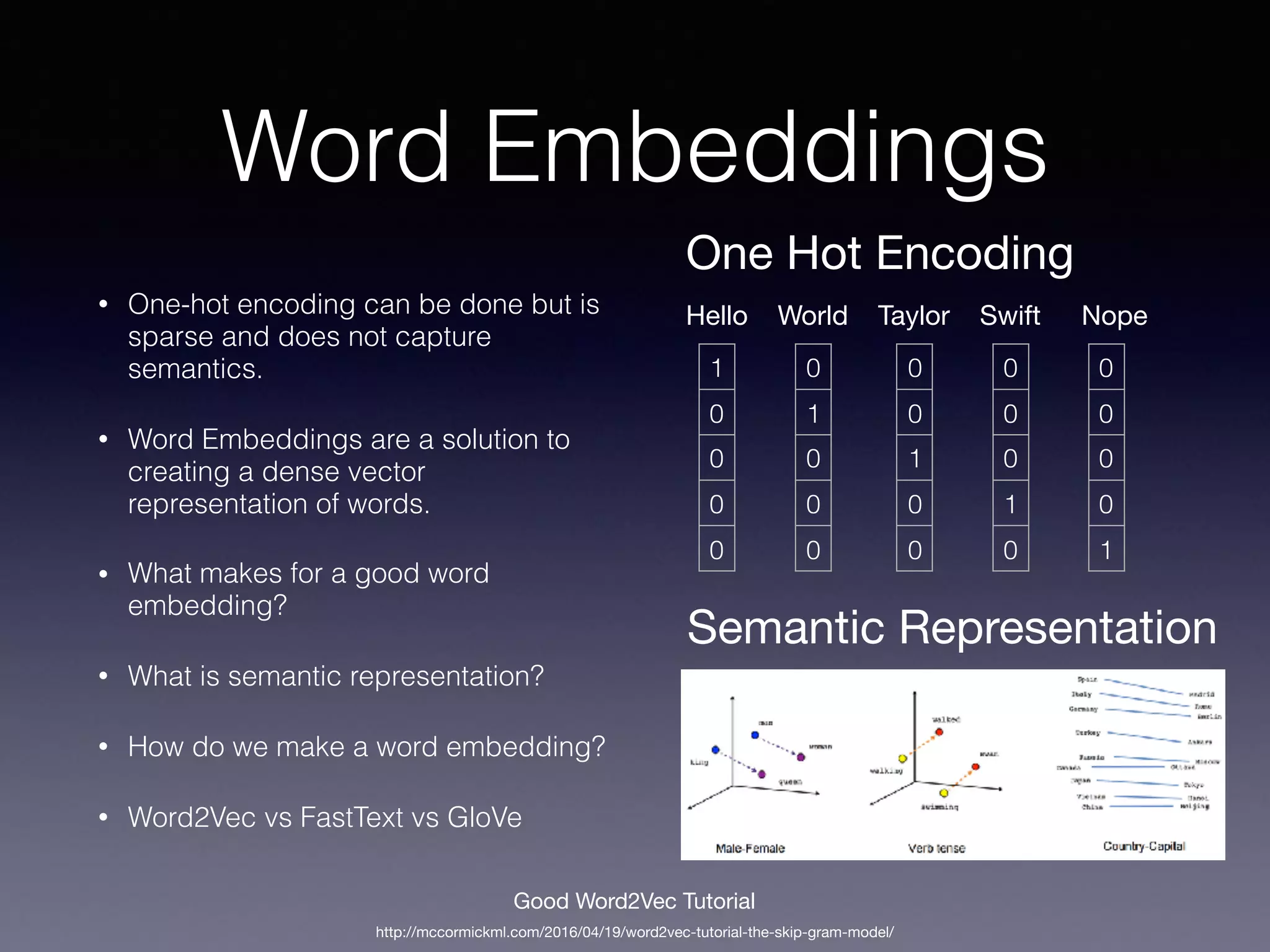
Word Embeddings
• One-hot encoding can be done but is
sparse and does not capture
semantics.
• Word Embeddings are a solution to
creating a dense vector
representation of words.
• What makes for a good word
embedding?
• What is semantic representation?
• How do we make a word embedding?
• Word2Vec vs FastText vs GloVe
Hello
1
0
0
0
0
World Taylor Swift
0
1
0
0
0
0
0
1
0
0
0
0
0
1
0
Nope
0
0
0
0
1
One Hot Encoding
http://mccormickml.com/2016/04/19/word2vec-tutorial-the-skip-gram-model/
Good Word2Vec Tutorial
Semantic Representation
Artificial Neural Networks
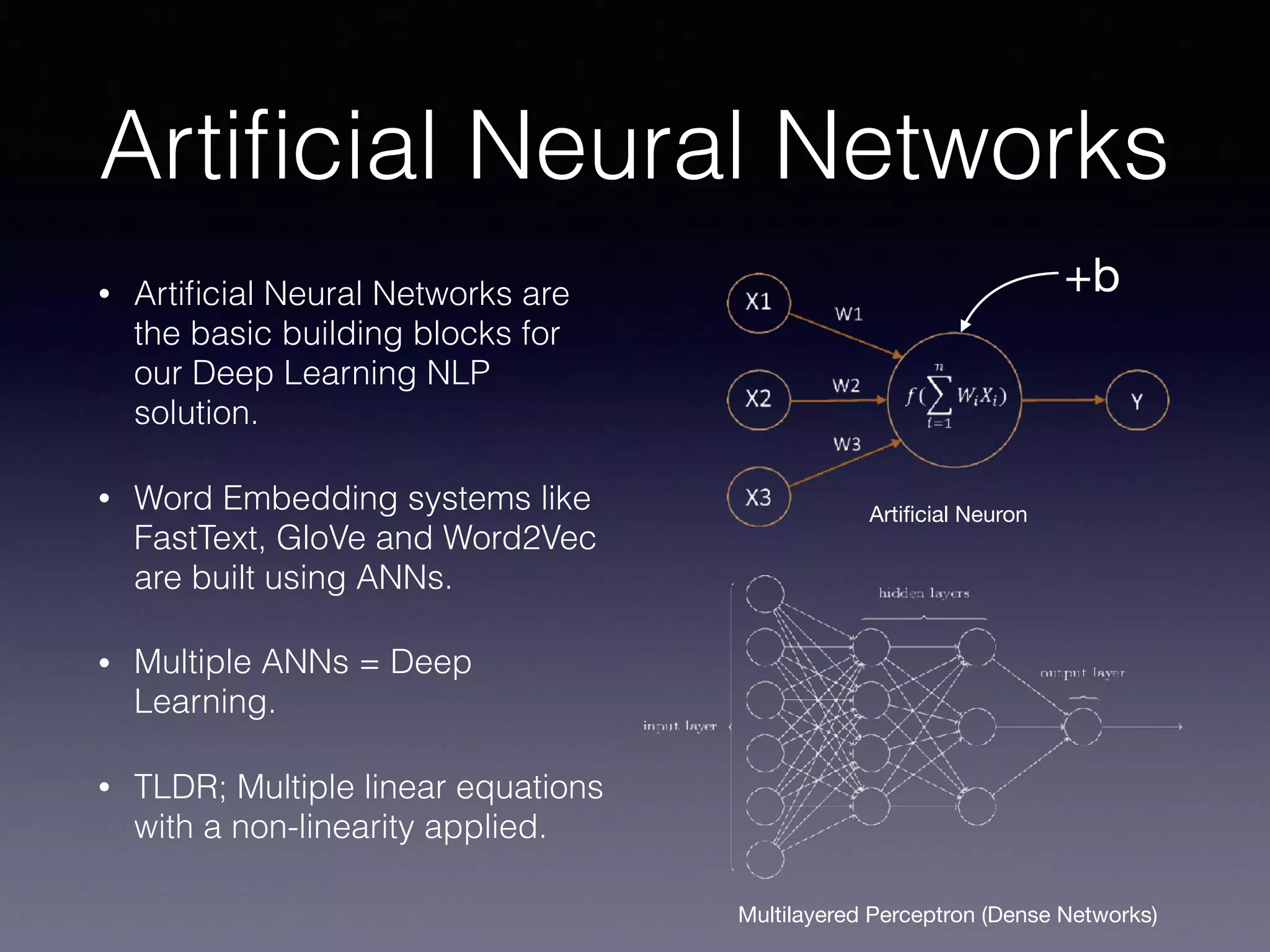
• Artificial Neural Networks are
the basic building blocks for
our Deep Learning NLP
solution.
• Word Embedding systems like
FastText, GloVe and Word2Vec
are built using ANNs.
• Multiple ANNs = Deep
Learning.
• TLDR; Multiple linear equations
with a non-linearity applied.
Artificial Neuron
Multilayered Perceptron (Dense Networks)
+b
Recurrent Neural Networks
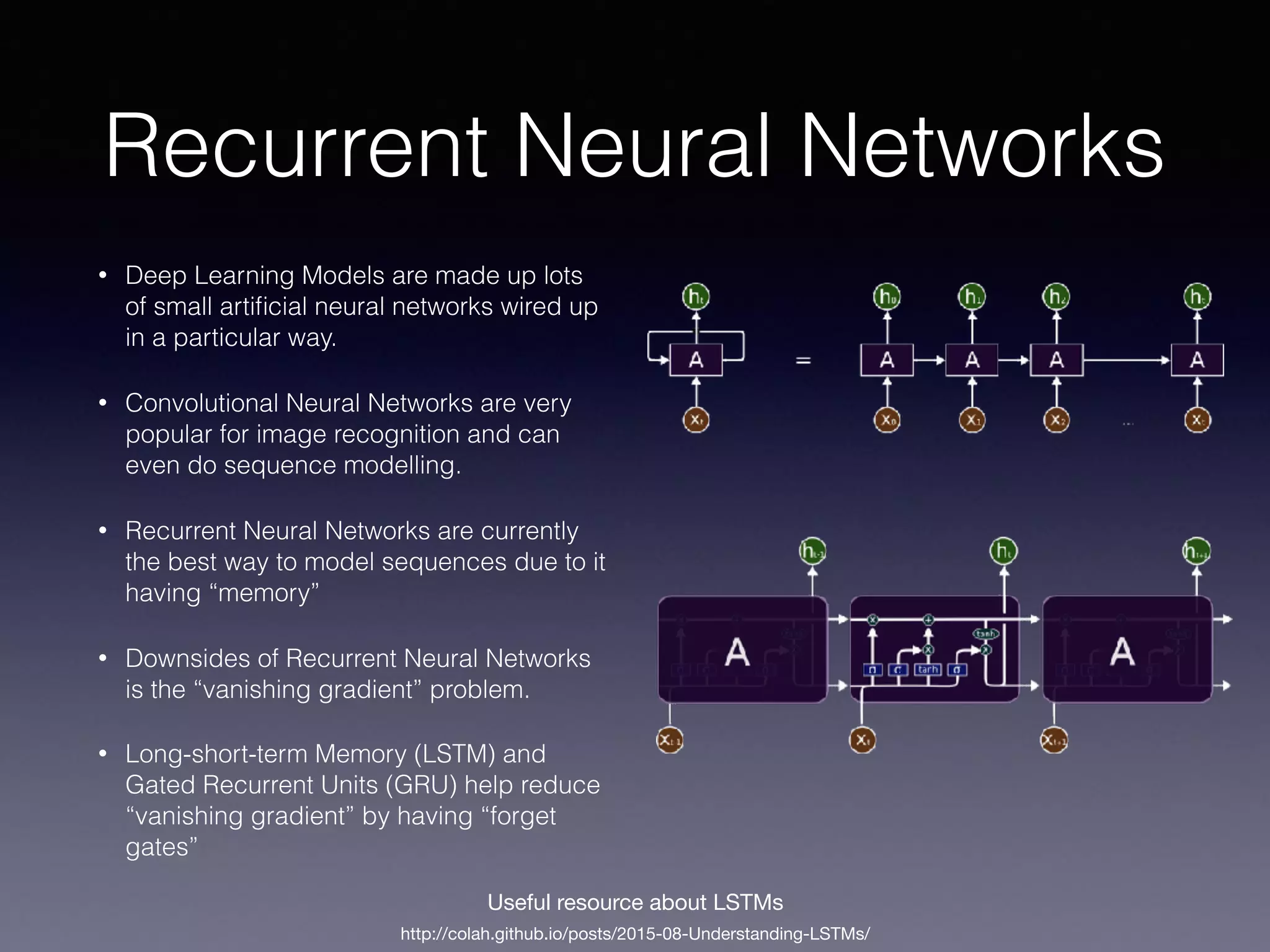
• Deep Learning Models are made up lots
of small artificial neural networks wired up
in a particular way.
• Convolutional Neural Networks are very
popular for image recognition and can
even do sequence modelling.
• Recurrent Neural Networks are currently
the best way to model sequences due to it
having “memory”
• Downsides of Recurrent Neural Networks
is the “vanishing gradient” problem.
• Long-short-term Memory (LSTM) and
Gated Recurrent Units (GRU) help reduce
“vanishing gradient” by having “forget
gates”
http://colah.github.io/posts/2015-08-Understanding-LSTMs/
Useful resource about LSTMs
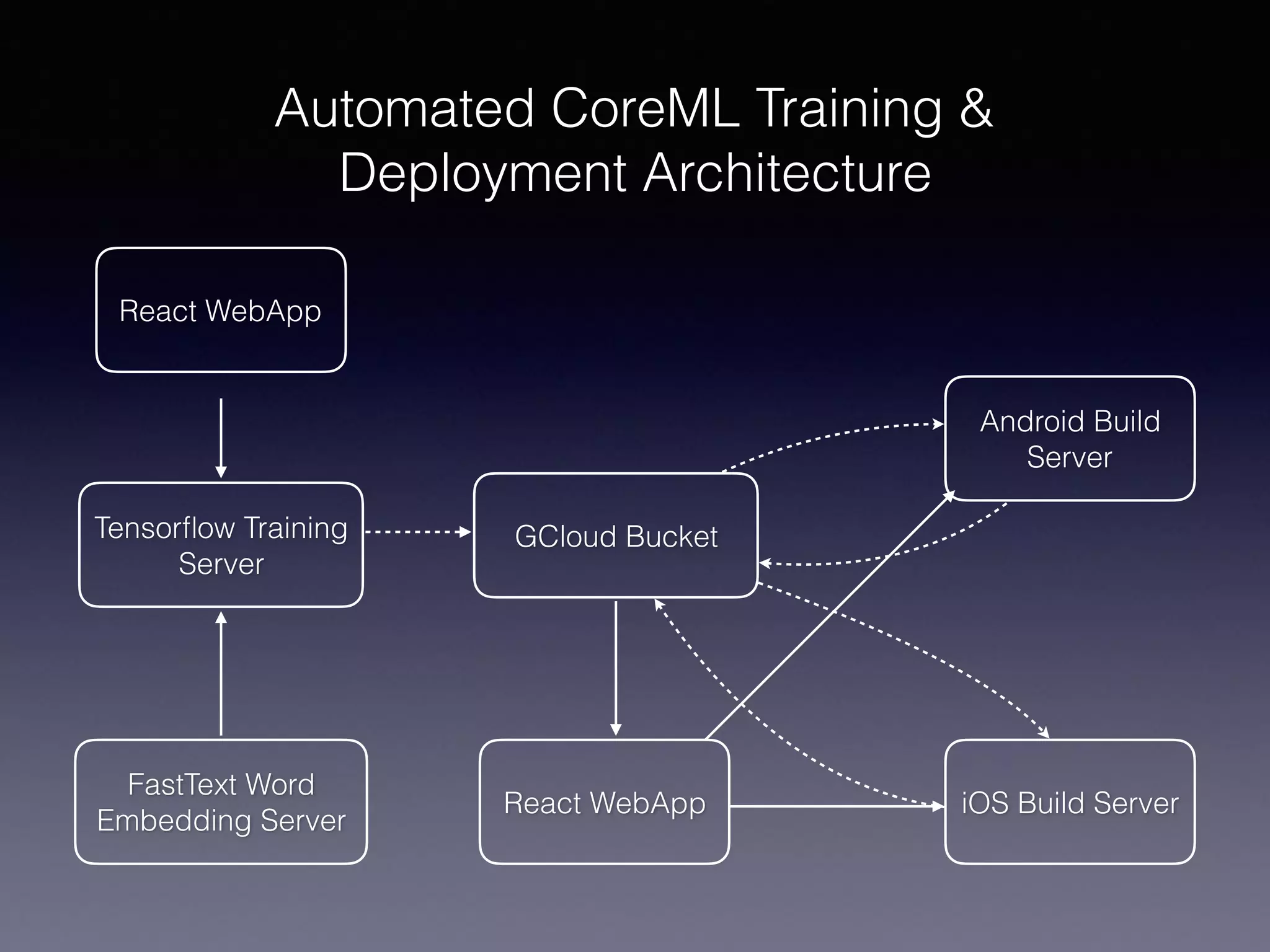
Automated CoreML Training &
Deployment Architecture
React WebApp
FastText Word
Embedding Server
Tensorflow Training
Server
GCloud Bucket
React WebApp iOS Build Server
Android Build
Server
FastText Word Embeddings
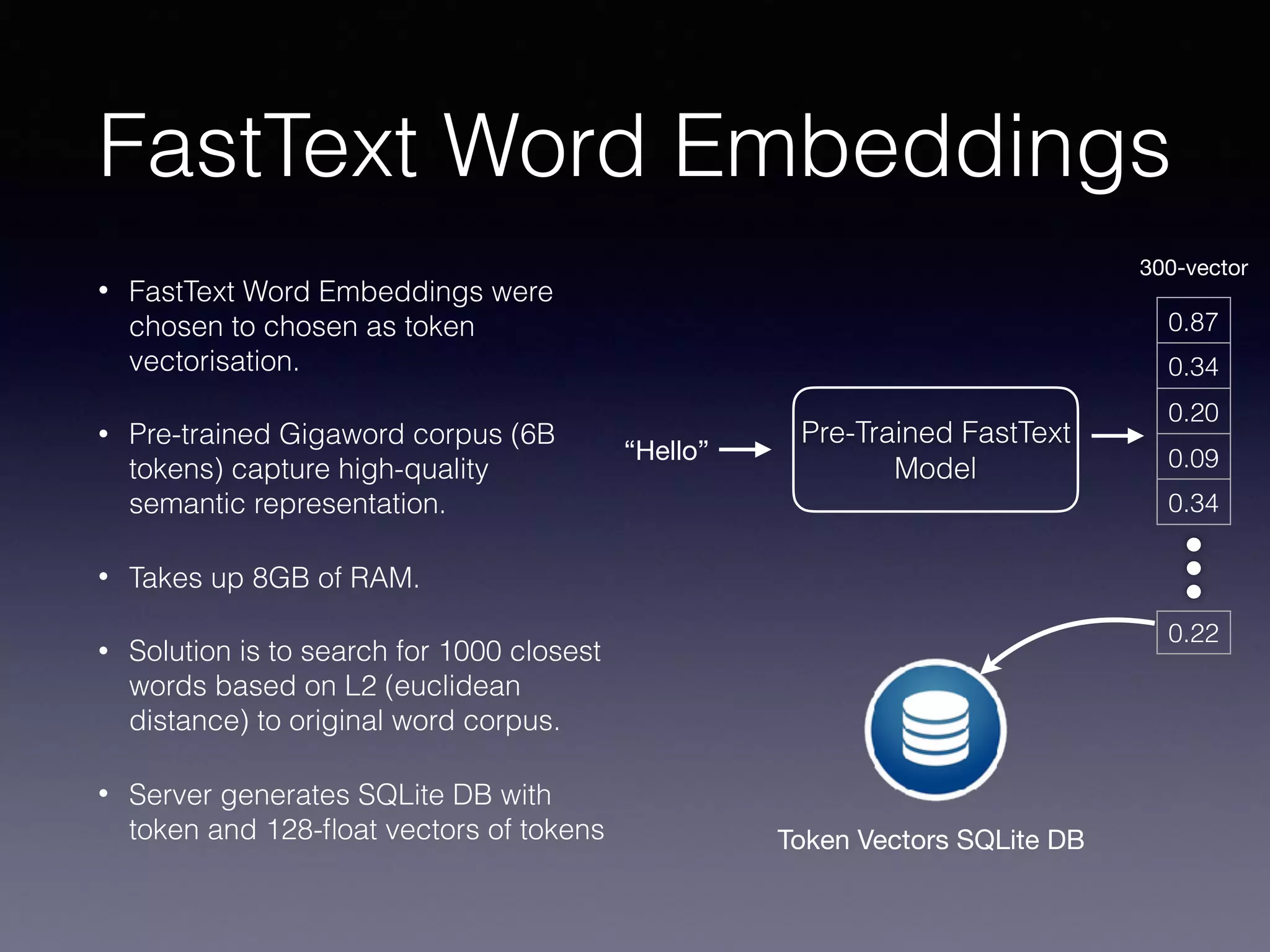
• FastText Word Embeddings were
chosen to chosen as token
vectorisation.
• Pre-trained Gigaword corpus (6B
tokens) capture high-quality
semantic representation.
• Takes up 8GB of RAM.
• Solution is to search for 1000 closest
words based on L2 (euclidean
distance) to original word corpus.
• Server generates SQLite DB with
token and 128-float vectors of tokens
“Hello”
0.87
0.34
0.20
0.09
0.34
0.22
Pre-Trained FastText
Model
300-vector
Token Vectors SQLite DB
Keras on Tensorflow
• Keras is a high-level abstraction developed for Deep Learning that
runs on multiple backends (Tensorflow/Theano/CNTK/MxNet)
• Keras is CoreML compatible.
• Keras can also be converted to run on Tensorflow.
• Android has good Tensorflow support.
model = Sequential([
LSTM(128, batch_size=1, input_shape=(None, 300), dropout=0.25, return_sequences=True),
TimeDistributed(Dense(64)),
Activation('relu'),
TimeDistributed(Dense(32)),
Activation('relu'),
TimeDistributed(Dense(num_labels)),
Activation('softmax', name="output")
])
CoreML
• CoreML was built to reflect Numpy which is a common numerical
analysis and matrix manipulation library for Python.
• MLMultiArray is the most important class in CoreML.
• If you can manipulate MLMultiArray, then you can make CoreML
do anything!
• Converting CoreML is as simple as calling
coremltools.converters.keras.convert(model)
• CoreML models are statically compiled and cannot be modified at
runtime.
Extending The Model
model = Sequential([
LSTM(128, batch_size=1, input_shape=(None, 300), dropout=0.25, return_sequences=True),
TimeDistributed(Dense(64)),
Activation('relu'),
TimeDistributed(Dense(32)),
Activation('relu'),
TimeDistributed(Dense(num_labels)),
Activation('softmax', name="output")
])
This means that the length of
the input sequence is
computed dynamically at
training time.
The output vector is squashed
from 32 to n-number of labels. 

Vector order is important!
Extending the model in Python is easy, but
not so straightforward for CoreML
CoreML models are statically compiled
and cannot be modified at runtime.
If you can manipulate MLMultiArray, then you can
make CoreML do anything!
🤔
Jinja Templating
• After the training phase of the
NLP model, we generate a
config.json 

• JSON describes the output
models, and CoreML and
Android model files and the
required parameters
{
"models": [
{
"type": "IntentClassifier",
"name": "UtteranceIntent",
"intents": ["Make", "Weather", "News", "Recommend", "Help"],
"android": {
"filename": "intent_classifier.pb",
"inputOperationName": "lstm_8_input",
"outputOperationName": "activation_18/Softmax"
},
"ios": {
"filename": "CCLabsIntentClassifierModel.mlmodel",
"inputOperationName": "input1",
"outputOperationName": "output1"
},
"inputShape": "300"
},
{
"type": "SlotTagger",
"name": "Weather",
"slots": ["None", "Weather", "Time", "Location"],
"android": {
"filename": "weather_slot_tagger.pb",
"inputOperationName": "lstm_1_input",
"outputOperationName": "output/truediv"
},
"ios" : {
"inputOperationName": "input1",
"outputOperationName": "output1"
},
"inputShape": "300"
},...]
}
Jinja Templating Cont’d
{
"models": [
{
"type": "SlotTagger",
"name": "Weather",
"slots": ["None", "Weather", "Time", "Location"],
"android": {
"filename": "weather_slot_tagger.pb",
"inputOperationName": "lstm_1_input",
"outputOperationName": "output/truediv"
},
"ios" : {
"inputOperationName": "input1",
"outputOperationName": "output1"
},
"inputShape": "300"
},...]
}
// Flatten vector
NSMutableArray *flattenedVector = [[NSMutableArray alloc] init];
for (NSArray<NSNumber*>* element in vector.data) {
[flattenedVector addObjectsFromArray:element];
}
// Convert vector to multiarray
NSNumber* vectorCount = [NSNumber numberWithUnsignedInteger: vector.tokens.count];
NSNumber* utteranceCount = [NSNumber numberWithUnsignedInteger: 1];
NSNumber* valueCount = [NSNumber numberWithUnsignedInteger: {{ input_shape }}];
MLMultiArray *multiArray = [[MLMultiArray alloc] initWithShape:@[vectorCount, utteranceCount, valueCount]
dataType:MLMultiArrayDataTypeFloat32
error: &predictionError];
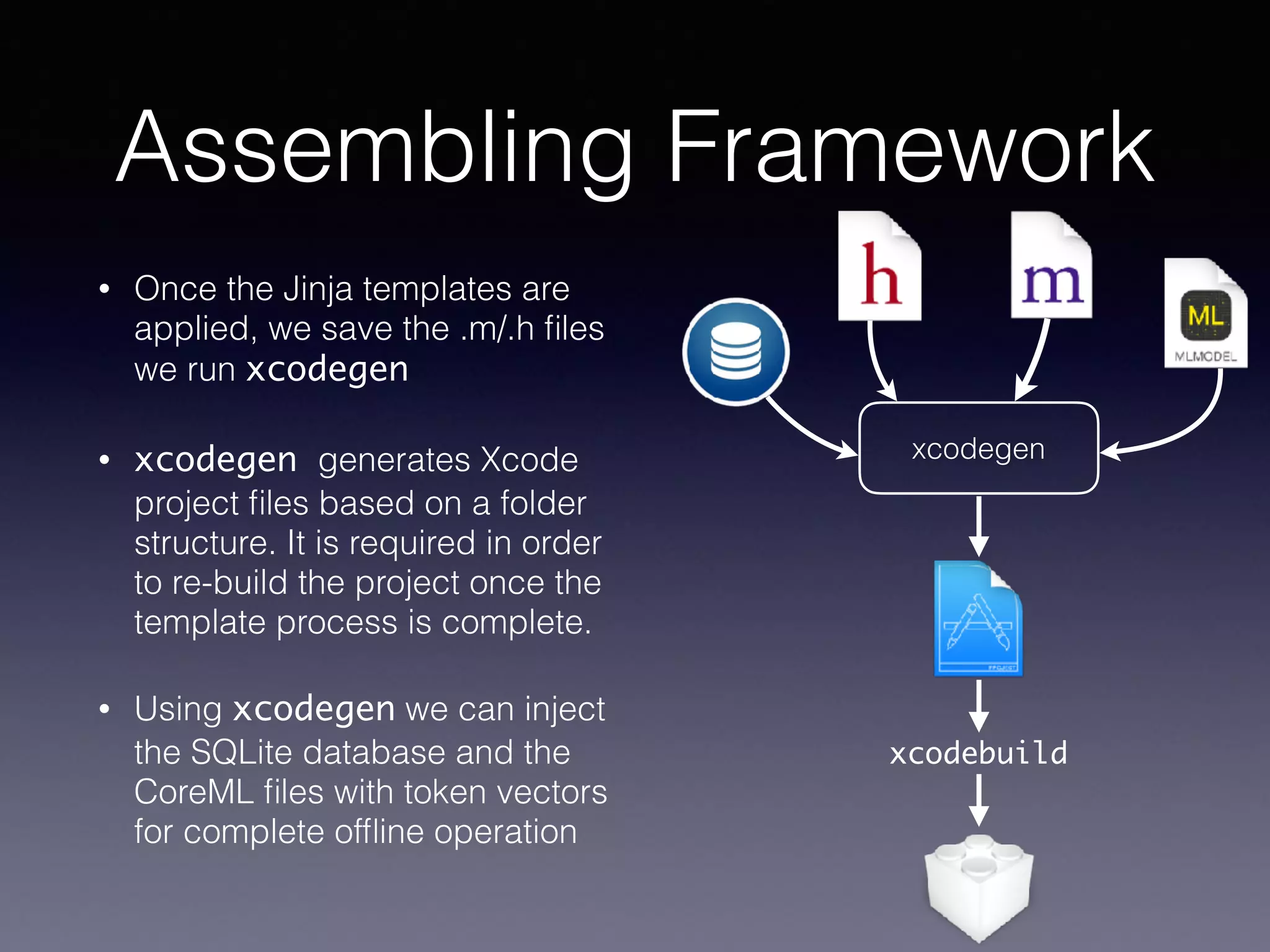
Assembling Framework
• Once the Jinja templates are
applied, we save the .m/.h files
we run xcodegen
• xcodegen generates Xcode
project files based on a folder
structure. It is required in order
to re-build the project once the
template process is complete.
• Using xcodegen we can inject
the SQLite database and the
CoreML files with token vectors
for complete offline operation
xcodegen
xcodebuild
Demo Time

CoreML for NLP (Melb Cocoaheads 08/02/2018)

  • 1.
    CoreML for NLP AnAutomated Tensorflow (Keras) workflow for Android and CoreML for NLP text parsing
  • 2.
    Topics to becovered • Background to Natural Language Processing • Word Embeddings • Recurrent Neural Networks • Keras/Tensorflow CoreML • Automated build workflow for Android and iOS using Python templating
  • 3.
    What is NaturalLanguage Processing? • NLP is the process of having machines understand language • iOS 11 has built in examples such as NSLinguisticTagger for tokenisation and lemmatisation • Intent Classification & Slot Tagging is a sub-field of NLP. Used as a technique for Siri, Alexa, and Google Assistant Play me a jazz song from Louis Armstrong from 1967 { "intent": "play_music", "slots": [ 0: { "genre": "jazz", "artist": "Louis Armstrong", "year": "1967" } ] } Tokenisation: Lemmatisation: “The cat sat on the mat” = [“The”, “cat”, “sat”, “on”, “the”, “mat”] “Running” = “run”, “Swam” = “Swim” Intent Classification & Slot Tagging:
  • 4.
    Pros and consof on device NLP (and most ML/AI) Pros: Cons: Privacy Flexibility Cost Memory Availability Compute Speed Difficulty
  • 5.
    Data Vectorisation • Inmachine learning, data representation is very important. • 🗑 ! fn(x) ! 🗑 • We like our data to be represented as vectors. • Images are vectors (JPEG) and so are sounds (WAV) • How do we vectorise words for NLP? 255 45 199 12 23 129 34 5 49 56 94 254 87 142237175 123243192188 255 45 199 12 23 129 34 5 49 56 94 254 87 142237175 123243192188 255 45 199 12 23 129 34 5 49 56 94 254 87 142237175 123243192188 R G B Colour images can be represented as a Rank 3 Tensor Imagine this construct = [[[xr],[yr]], [[xg,][yg]], [[xb],[yb]]]
  • 6.
    Word Embeddings • One-hotencoding can be done but is sparse and does not capture semantics. • Word Embeddings are a solution to creating a dense vector representation of words. • What makes for a good word embedding? • What is semantic representation? • How do we make a word embedding? • Word2Vec vs FastText vs GloVe Hello 1 0 0 0 0 World Taylor Swift 0 1 0 0 0 0 0 1 0 0 0 0 0 1 0 Nope 0 0 0 0 1 One Hot Encoding http://mccormickml.com/2016/04/19/word2vec-tutorial-the-skip-gram-model/ Good Word2Vec Tutorial Semantic Representation
  • 7.
    Artificial Neural Networks •Artificial Neural Networks are the basic building blocks for our Deep Learning NLP solution. • Word Embedding systems like FastText, GloVe and Word2Vec are built using ANNs. • Multiple ANNs = Deep Learning. • TLDR; Multiple linear equations with a non-linearity applied. Artificial Neuron Multilayered Perceptron (Dense Networks) +b
  • 8.
    Recurrent Neural Networks •Deep Learning Models are made up lots of small artificial neural networks wired up in a particular way. • Convolutional Neural Networks are very popular for image recognition and can even do sequence modelling. • Recurrent Neural Networks are currently the best way to model sequences due to it having “memory” • Downsides of Recurrent Neural Networks is the “vanishing gradient” problem. • Long-short-term Memory (LSTM) and Gated Recurrent Units (GRU) help reduce “vanishing gradient” by having “forget gates” http://colah.github.io/posts/2015-08-Understanding-LSTMs/ Useful resource about LSTMs
  • 9.
    Automated CoreML Training& Deployment Architecture React WebApp FastText Word Embedding Server Tensorflow Training Server GCloud Bucket React WebApp iOS Build Server Android Build Server
  • 10.
    FastText Word Embeddings •FastText Word Embeddings were chosen to chosen as token vectorisation. • Pre-trained Gigaword corpus (6B tokens) capture high-quality semantic representation. • Takes up 8GB of RAM. • Solution is to search for 1000 closest words based on L2 (euclidean distance) to original word corpus. • Server generates SQLite DB with token and 128-float vectors of tokens “Hello” 0.87 0.34 0.20 0.09 0.34 0.22 Pre-Trained FastText Model 300-vector Token Vectors SQLite DB
  • 11.
    Keras on Tensorflow •Keras is a high-level abstraction developed for Deep Learning that runs on multiple backends (Tensorflow/Theano/CNTK/MxNet) • Keras is CoreML compatible. • Keras can also be converted to run on Tensorflow. • Android has good Tensorflow support. model = Sequential([ LSTM(128, batch_size=1, input_shape=(None, 300), dropout=0.25, return_sequences=True), LSTM(128, batch_size=1, input_shape=(None, 300), dropout=0.25, return_sequences=True), LSTM(128, batch_size=1, input_shape=(None, 300), dropout=0.25, return_sequences=True), TimeDistributed(Dense(64)), Activation('relu'), TimeDistributed(Dense(32)), Activation('relu'), TimeDistributed(Dense(num_labels)), Activation('softmax', name="output") ])
  • 12.
    CoreML • CoreML wasbuilt to reflect Numpy which is a common numerical analysis and matrix manipulation library for Python. • MLMultiArray is the most important class in CoreML. • If you can manipulate MLMultiArray, then you can make CoreML do anything! • Converting CoreML is as simple as calling coremltools.converters.keras.convert(model) • CoreML models are statically compiled and cannot be modified at runtime.
  • 13.
    Extending The Model model= Sequential([ LSTM(128, batch_size=1, input_shape=(None, 300), dropout=0.25, return_sequences=True), LSTM(128, batch_size=1, input_shape=(None, 300), dropout=0.25, return_sequences=True), LSTM(128, batch_size=1, input_shape=(None, 300), dropout=0.25, return_sequences=True), TimeDistributed(Dense(64)), Activation('relu'), TimeDistributed(Dense(32)), Activation('relu'), TimeDistributed(Dense(num_labels)), Activation('softmax', name="output") ]) This means that the length of the input sequence is computed dynamically at training time. The output vector is squashed from 32 to n-number of labels. Vector order is important! Extending the model in Python is easy, but not so straightforward for CoreML
  • 14.
    CoreML models arestatically compiled and cannot be modified at runtime. If you can manipulate MLMultiArray, then you can make CoreML do anything! 🤔
  • 15.
    Jinja Templating • Afterthe training phase of the NLP model, we generate a config.json • JSON describes the output models, and CoreML and Android model files and the required parameters { "models": [ { "type": "IntentClassifier", "name": "UtteranceIntent", "intents": ["Make", "Weather", "News", "Recommend", "Help"], "android": { "filename": "intent_classifier.pb", "inputOperationName": "lstm_8_input", "outputOperationName": "activation_18/Softmax" }, "ios": { "filename": "CCLabsIntentClassifierModel.mlmodel", "inputOperationName": "input1", "outputOperationName": "output1" }, "inputShape": "300" }, { "type": "SlotTagger", "name": "Weather", "slots": ["None", "Weather", "Time", "Location"], "android": { "filename": "weather_slot_tagger.pb", "inputOperationName": "lstm_1_input", "outputOperationName": "output/truediv" }, "ios" : { "inputOperationName": "input1", "outputOperationName": "output1" }, "inputShape": "300" },...] }
  • 16.
    Jinja Templating Cont’d { "models":[ { "type": "SlotTagger", "name": "Weather", "slots": ["None", "Weather", "Time", "Location"], "android": { "filename": "weather_slot_tagger.pb", "inputOperationName": "lstm_1_input", "outputOperationName": "output/truediv" }, "ios" : { "inputOperationName": "input1", "outputOperationName": "output1" }, "inputShape": "300" },...] } // Flatten vector NSMutableArray *flattenedVector = [[NSMutableArray alloc] init]; for (NSArray<NSNumber*>* element in vector.data) { [flattenedVector addObjectsFromArray:element]; } // Convert vector to multiarray NSNumber* vectorCount = [NSNumber numberWithUnsignedInteger: vector.tokens.count]; NSNumber* utteranceCount = [NSNumber numberWithUnsignedInteger: 1]; NSNumber* valueCount = [NSNumber numberWithUnsignedInteger: {{ input_shape }}]; MLMultiArray *multiArray = [[MLMultiArray alloc] initWithShape:@[vectorCount, utteranceCount, valueCount] dataType:MLMultiArrayDataTypeFloat32 error: &predictionError];
  • 17.
    Assembling Framework • Oncethe Jinja templates are applied, we save the .m/.h files we run xcodegen • xcodegen generates Xcode project files based on a folder structure. It is required in order to re-build the project once the template process is complete. • Using xcodegen we can inject the SQLite database and the CoreML files with token vectors for complete offline operation xcodegen xcodebuild
  • 18.