“ScienceDirect is a leading full-text scientific database offering journal articles and book chapters from
nearly 2,500 journals and 26,000 books.” In order to access the full version of ScienceDirect, you must
link to it via the BCC Library Portal “A-Z Database List.” Please contact the library for assistance with
ScienceDirect (in person, via telephone, 910-755-7331, or via email, bcclrc@brunswickcc.edu).
On-campus Access to ScienceDirect
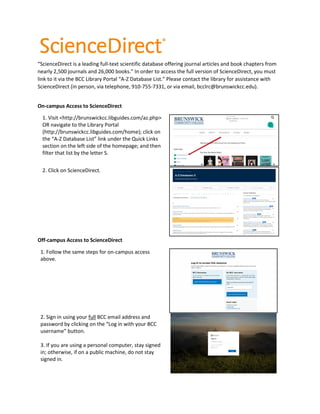
1. Visit <http://brunswickcc.libguides.com/az.php>
OR navigate to the Library Portal
(http://brunswickcc.libguides.com/home); click on
the “A-Z Database List” link under the Quick Links
section on the left side of the homepage; and then
filter that list by the letter S.
2. Click on ScienceDirect.
Off-campus Access to ScienceDirect
1. Follow the same steps for on-campus access
above.
2. Sign in using your full BCC email address and
password by clicking on the “Log in with your BCC
username” button.
3. If you are using a personal computer, stay signed
in; otherwise, if on a public machine, do not stay
signed in.
Updated December 2019
Searching ScienceDirect
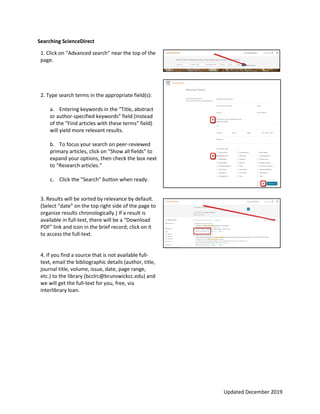
1. Click on “Advanced search” near the top of the
page.
2. Type search terms in the appropriate field(s):
a. Entering keywords in the “Title, abstract
or author-specified keywords” field (instead
of the “Find articles with these terms” field)
will yield more relevant results.
b. To focus your search on peer-reviewed
primary articles, click on “Show all fields” to
expand your options, then check the box next
to “Research articles.”
c. Click the “Search” button when ready.
3. Results will be sorted by relevance by default.
(Select “date” on the top right side of the page to
organize results chronologically.) If a result is
available in full-text, there will be a “Download
PDF” link and icon in the brief record; click on it
to access the full-text.
4. If you find a source that is not available full-
text, email the bibliographic details (author, title,
journal title, volume, issue, date, page range,
etc.) to the library (bcclrc@brunswickcc.edu) and
we will get the full-text for you, free, via
interlibrary loan.

ScienceDirect Handout

  • 1.
    “ScienceDirect is aleading full-text scientific database offering journal articles and book chapters from nearly 2,500 journals and 26,000 books.” In order to access the full version of ScienceDirect, you must link to it via the BCC Library Portal “A-Z Database List.” Please contact the library for assistance with ScienceDirect (in person, via telephone, 910-755-7331, or via email, bcclrc@brunswickcc.edu). On-campus Access to ScienceDirect 1. Visit <http://brunswickcc.libguides.com/az.php> OR navigate to the Library Portal (http://brunswickcc.libguides.com/home); click on the “A-Z Database List” link under the Quick Links section on the left side of the homepage; and then filter that list by the letter S. 2. Click on ScienceDirect. Off-campus Access to ScienceDirect 1. Follow the same steps for on-campus access above. 2. Sign in using your full BCC email address and password by clicking on the “Log in with your BCC username” button. 3. If you are using a personal computer, stay signed in; otherwise, if on a public machine, do not stay signed in.
  • 2.
    Updated December 2019 SearchingScienceDirect 1. Click on “Advanced search” near the top of the page. 2. Type search terms in the appropriate field(s): a. Entering keywords in the “Title, abstract or author-specified keywords” field (instead of the “Find articles with these terms” field) will yield more relevant results. b. To focus your search on peer-reviewed primary articles, click on “Show all fields” to expand your options, then check the box next to “Research articles.” c. Click the “Search” button when ready. 3. Results will be sorted by relevance by default. (Select “date” on the top right side of the page to organize results chronologically.) If a result is available in full-text, there will be a “Download PDF” link and icon in the brief record; click on it to access the full-text. 4. If you find a source that is not available full- text, email the bibliographic details (author, title, journal title, volume, issue, date, page range, etc.) to the library (bcclrc@brunswickcc.edu) and we will get the full-text for you, free, via interlibrary loan.