Knowledge Areas in Project Management
Project Schedule Management
Siow May Ling, Ph.D., PMP
Summary of
today’s class
Understand the concept of project time planning and scheduling.
Compare and contrast logic driven and resource driven scheduling (what
is scarce)
Draw a network and a Gantt chart to illustrate a simple work package.
Understand the concept of Critical Path Method (CPM).
Identify the critical activities, critical path and total duration of the
network.
Calculate the early and late times for each activity.
Appreciate the need for rescheduling at different stages of the PLC
Apply the concept of Crashing as an example of trade-off analysis
Project Scheduling
3
• Planning of timetables and establishment of dates
of activities
• Minimise Risks
• To improve efficiency
– What are the deadlines?
– Who should be doing what and when?
– How long will it take?
• Provides a basis for monitoring and controlling
work & activities
Project Scheduling
Scheduling processes include:
• Defining the activities
• Sequencing the activities
• Calculating the duration of each activity
• Allocating resources to each activity
• Schedule control
Eg: Boiling water
4
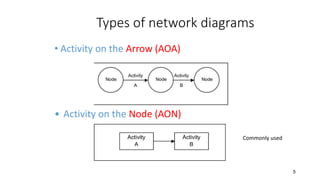
Types of network diagrams
• Activity on the Arrow (AOA)
5
• Activity on the Node (AON)
Commonly used
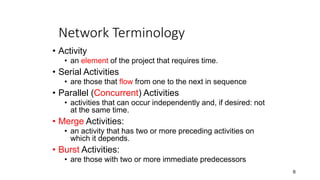
Network Terminology
• Activity
• an element of the project that requires time.
• Serial Activities
• are those that flow from one to the next in sequence
• Parallel (Concurrent) Activities
• activities that can occur independently and, if desired: not
at the same time.
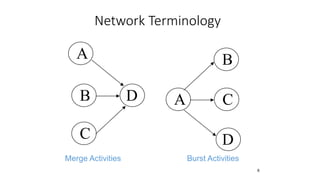
• Merge Activities:
• an activity that has two or more preceding activities on
which it depends.
• Burst Activities:
• are those with two or more immediate predecessors
6
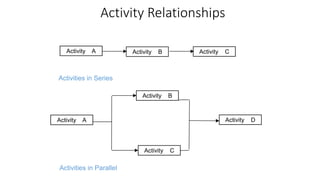
Activity Relationships
7
Activities in Series
Activity A Activity B Activity C
Activity A
Activity B
Activity C
Activity D
Activities in Parallel
Network Terminology
8
A
B
Merge Activities
C
D A
B
C
D
Burst Activities
Estimating activity durations
• Past Experience
• Working on similar projects or activities
• Comparative projects
• Changes is size, scale etc.
• Expert Opinion
• Specialists
• Mathematical Deviations / statistical analysis
• PERT
9
CPM and PERT
• PERT is used for projects in which activity times are unknown. For
example, take a research and development project (R&D).
• CPM is used when the activities are more predictable in time.
Example, a construction project.
Constructing the network diagram
1. Network schedules typically flow from left to right.
2. An activity can not begin until all the preceding connected
activities have been complete.
3. Arrows on a network indicate precedence and flow. As a
rule, they should not cross over each other.
4. Each activity should have a unique identification number,
which should be a larger number that the activities that
precede it.
5. Each activity is only considered once within the network.
11
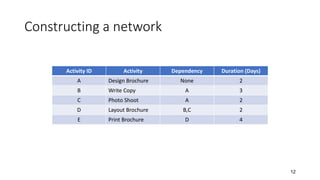
Constructing a network
Activity ID Activity Dependency Duration (Days)
A Design Brochure None 2
B Write Copy A 3
C Photo Shoot A 2
D Layout Brochure B,C 2
E Print Brochure D 4
12
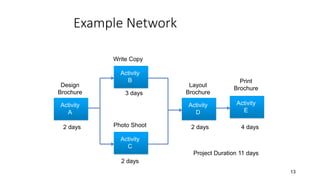
Example Network
13
Activity
A
Activity
B
Activity
C
Activity
D
Activity
E
Design
Brochure
Write Copy
Photo Shoot
Layout
Brochure
Print
Brochure
2 days
3 days
2 days
2 days 4 days
Project Duration 11 days
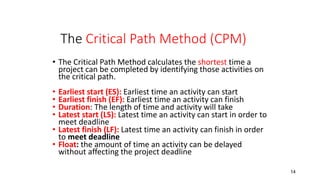
The Critical Path Method (CPM)
• The Critical Path Method calculates the shortest time a
project can be completed by identifying those activities on
the critical path.
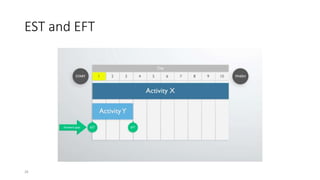
• Earliest start (ES): Earliest time an activity can start
• Earliest finish (EF): Earliest time an activity can finish
• Duration: The length of time and activity will take
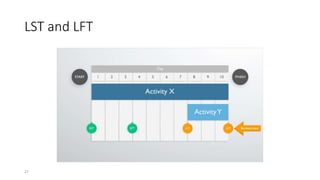
• Latest start (LS): Latest time an activity can start in order to
meet deadline
• Latest finish (LF): Latest time an activity can finish in order
to meet deadline
• Float: the amount of time an activity can be delayed
without affecting the project deadline
14
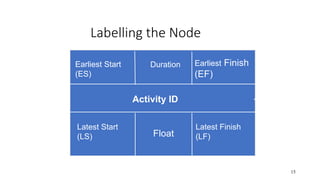
Labelling the Node
15
Earliest Start
(ES)
Earliest Finish
(EF)
Latest Start
(LS)
Latest Finish
(LF)
Float
Duration
Activity ID
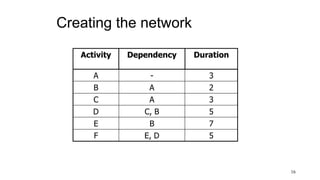
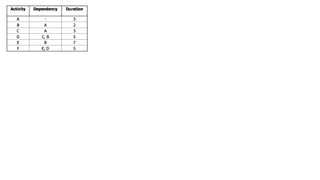
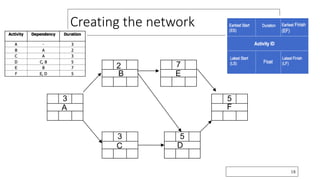
Creating the network
Activity Dependency Duration
A - 3
B A 2
C A 3
D C, B 5
E B 7
F E, D 5
16
Creating the network
18
A
3
B
2
C
3
D
5
E
7
F
5
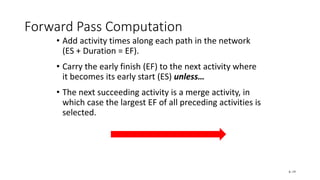
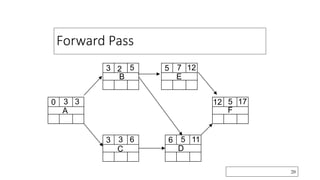
Forward Pass Computation
• Add activity times along each path in the network
(ES + Duration = EF).
• Carry the early finish (EF) to the next activity where
it becomes its early start (ES) unless…
• The next succeeding activity is a merge activity, in
which case the largest EF of all preceding activities is
selected.
6–19
Forward Pass
20
A
3 3
0
B
2 5
3
C
3 6
3
D
5 11
6
E
7 12
5
F
5 17
12
Backward Pass Computation
• Subtract activity times along each path in the network (LF - Duration =
LS).
• Carry the late start (LS) to the next activity where it becomes its late
finish (LF) unless
• The next succeeding activity is a burst activity, in which case the
smallest LF of all preceding activities is selected.
6–21
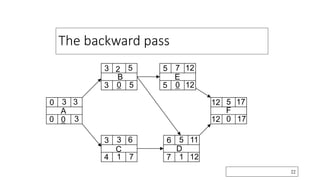
The backward pass
22
A
3 3
0
0 0 3
B
2 5
3
3 0 5
C
3 6
3
4 1 7
D
5 11
6
7 1 12
E
7 12
5
5 0 12
F
5 17
12
12 0 17
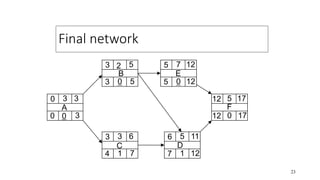
Final network
23
A
3 3
0
0 0 3
B
2 5
3
3 0 5
C
3 6
3
4 1 7
D
5 11
6
7 1 12
E
7 12
5
5 0 12
F
5 17
12
12 0 17
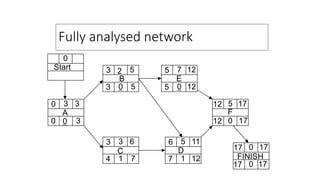
Fully analysed network
0
Start
A
3 3
0
0 0 3
B
2 5
3
3 0 5
C
3 6
3
4 1 7
D
5 11
6
7 1 12
E
7 12
5
5 0 12
F
5 17
12
12 0 17
FINISH
0 17
17
17 0 17
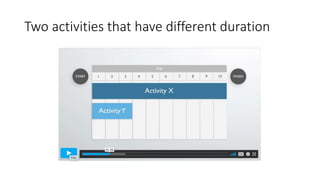
Two activities that have different duration
EST and EFT
26
LST and LFT
27
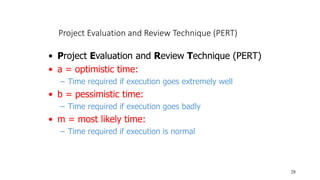
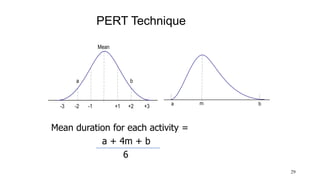
Project Evaluation and Review Technique (PERT)
28
• Project Evaluation and Review Technique (PERT)
• a = optimistic time:
– Time required if execution goes extremely well
• b = pessimistic time:
– Time required if execution goes badly
• m = most likely time:
– Time required if execution is normal
PERT Technique
29
Mean duration for each activity =
a + 4m + b
6
Mean
-1 +1
-2
-3 +2 +3
a b
m
a b
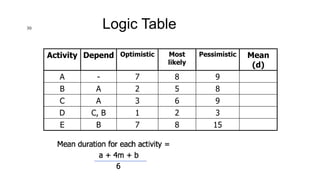
Logic Table
Activity Depend Optimistic Most
likely
Pessimistic Mean
(d)
A - 7 8 9
B A 2 5 8
C A 3 6 9
D C, B 1 2 3
E B 7 8 15
30
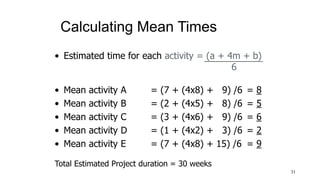
Calculating Mean Times
31
• Estimated time for each activity = (a + 4m + b)
6
• Mean activity A = (7 + (4x8) + 9) /6 = 8
• Mean activity B = (2 + (4x5) + 8) /6 = 5
• Mean activity C = (3 + (4x6) + 9) /6 = 6
• Mean activity D = (1 + (4x2) + 3) /6 = 2
• Mean activity E = (7 + (4x8) + 15) /6 = 9
Total Estimated Project duration = 30 weeks
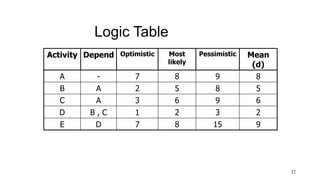
Logic Table
Activity Depend Optimistic Most
likely
Pessimistic Mean
(d)
A - 7 8 9 8
B A 2 5 8 5
C A 3 6 9 6
D B , C 1 2 3 2
E D 7 8 15 9
32
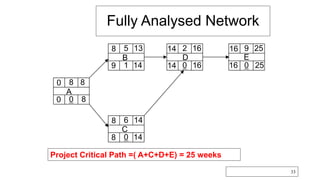
Fully Analysed Network
33
A
8 8
0
0 0 8
B
5 13
8
9 1 14
C
6 14
8
8 0 14
D
2 16
14
14 0 16
E
9 25
16
16 0 25
Project Critical Path =( A+C+D+E) = 25 weeks
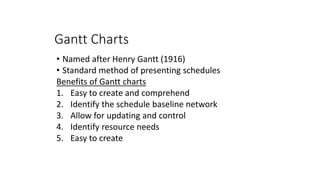
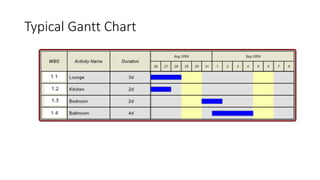
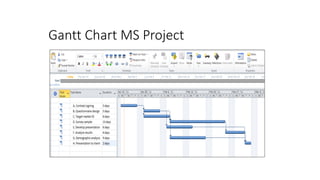
Gantt Charts
• Named after Henry Gantt (1916)
• Standard method of presenting schedules
Benefits of Gantt charts
1. Easy to create and comprehend
2. Identify the schedule baseline network
3. Allow for updating and control
4. Identify resource needs
5. Easy to create
Typical Gantt Chart
35
Gantt Chart MS Project
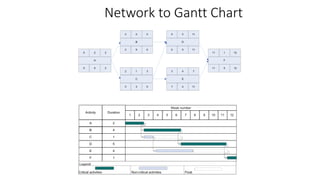
Network to Gantt Chart
37
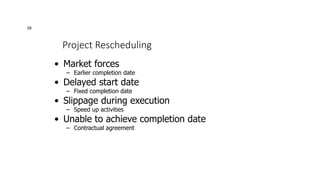
Project Rescheduling
39
• Market forces
– Earlier completion date
• Delayed start date
– Fixed completion date
• Slippage during execution
– Speed up activities
• Unable to achieve completion date
– Contractual agreement
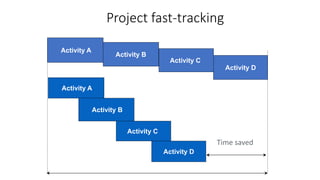
Project fast-tracking
40
Activity A
Activity D
Activity B
Activity C
Time saved
Time
Activity A
Activity D
Activity B
Activity C
Project Crashing
• The process of accelerating a project
• Involves reducing the time taken to complete an activity
• Extending working day (overtime)
• Employing additional resources
• Making a trade-off between time and cost
• Reduce time = increased cost
• Limit to available cost
• Take a staged approach
• Minimum time in which an activity can be done
• Minimum crash time
41
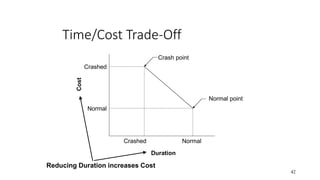
Time/Cost Trade-Off
42
Crash point
Normal point
Crashed Normal
Crashed
Normal
Duration
Cost
Reducing Duration increases Cost
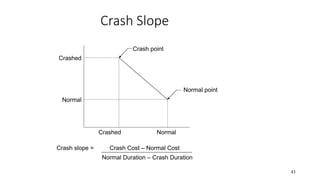
Crash Slope
43
Crash point
Normal point
Crashed Normal
Crashed
Normal
Crash slope = Crash Cost – Normal Cost
Normal Duration – Crash Duration
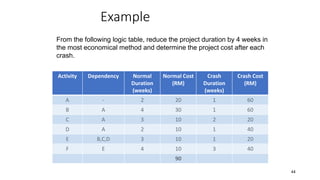
Example
Activity Dependency Normal
Duration
(weeks)
Normal Cost
(RM)
Crash
Duration
(weeks)
Crash Cost
(RM)
A - 2 20 1 60
B A 4 30 1 60
C A 3 10 2 20
D A 2 10 1 40
E B,C,D 3 10 1 20
F E 4 10 3 40
90
44
From the following logic table, reduce the project duration by 4 weeks in
the most economical method and determine the project cost after each
crash.
Example
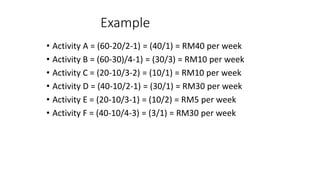
• Activity A = (60-20/2-1) = (40/1) = RM40 per week
• Activity B = (60-30)/4-1) = (30/3) = RM10 per week
• Activity C = (20-10/3-2) = (10/1) = RM10 per week
• Activity D = (40-10/2-1) = (30/1) = RM30 per week
• Activity E = (20-10/3-1) = (10/2) = RM5 per week
• Activity F = (40-10/4-3) = (3/1) = RM30 per week
45
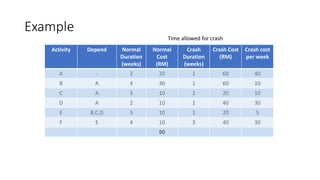
Example
Activity Depend Normal
Duration
(weeks)
Normal
Cost
(RM)
Crash
Duration
(weeks)
Crash Cost
(RM)
Crash cost
per week
A - 2 20 1 60 40
B A 4 30 1 60 10
C A 3 10 2 20 10
D A 2 10 1 40 30
E B,C,D 3 10 1 20 5
F E 4 10 3 40 30
90
46
Time allowed for crash
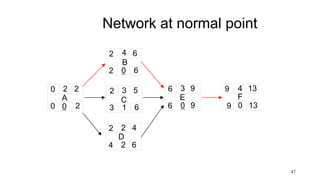
Network at normal point
47
A
2 2
0
0 0 2
B
4 6
2
2 0 6
C
3 5
2
3 1 6
D
2 4
2
4 2 6
E
3 9
6
6 0 9
F
4 13
9
9 0 13
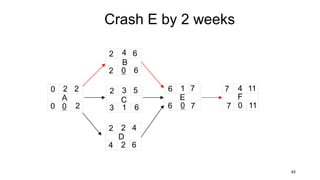
Crash E by 2 weeks
48
A
2 2
0
0 0 2
B
4 6
2
2 0 6
C
3 5
2
3 1 6
D
2 4
2
4 2 6
E
1 7
6
6 0 7
F
4 11
7
7 0 11
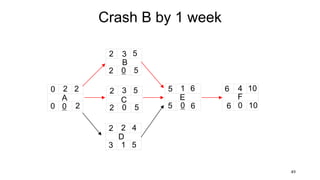
Crash B by 1 week
49
A
2 2
0
0 0 2
B
3 5
2
2 0 5
C
3 5
2
2 0 5
D
2 4
2
3 1 5
E
1 6
5
5 0 6
F
4 10
6
6 0 10
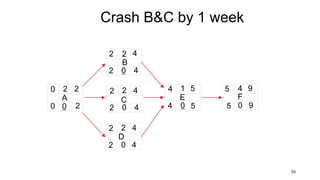
Crash B&C by 1 week
50
A
2 2
0
0 0 2
B
2 4
2
2 0 4
C
2 4
2
2 0 4
D
2 4
2
2 0 4
E
1 5
4
4 0 5
F
4 9
5
5 0 9
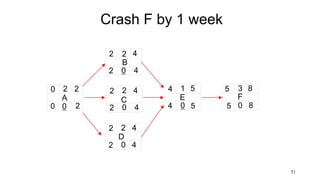
Crash F by 1 week
51
A
2 2
0
0 0 2
B
2 4
2
2 0 4
C
2 4
2
2 0 4
D
2 4
2
2 0 4
E
1 5
4
4 0 5
F
3 8
5
5 0 8
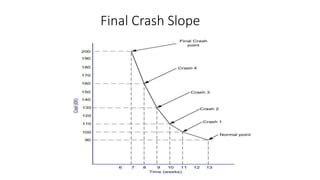
Final Crash Slope
52
Summary
• Understand the concept of project time planning and
scheduling.
• Compare and contrast logic driven and resource driven
scheduling.
• Draw a network and a Gantt chart to illustrate a simple work
package.
• Understand the concept of Critical Path Method (CPM).
• Identify the critical activities, critical path and total duration
of the network.
• Calculate the early and late times for each activity.
• Compare and contrast deterministic and probabilistic
scheduling.
• Appreciate the need for rescheduling at different stages of
the PLC
• Apply the concept of Crashing as an example of trade-off
analysis
• Understand the difference between concurrent engineering
and fast track.
53
References
• Gray, C. F. & Larson, E. W. Project Management: The Managerial Process. McGraw-Hill
• PMI (2004) A Guide to the Project Management Body of Knowledge (PMBOK), Project Management Institute, Upper Darby, USA.
• Pinto, J. (2007) Project Management: Achieving Competitive Advantage. Pearson Education Ltd.
• Schwable K (2006) Introduction To Project Management. Thomson
• Burke, R. (2006) Project Management - Planning and Control Techniques, (4th Edition) Wiley, Chichester.
• www.youtube.com
• https://www.flickr.com/photos
54
SCHEDULING IN PROJECT MANAGEMENT PROJECT SCHEDULE MANAGEMENT

SCHEDULING IN PROJECT MANAGEMENT PROJECT SCHEDULE MANAGEMENT

  • 1.
    Knowledge Areas inProject Management Project Schedule Management Siow May Ling, Ph.D., PMP
  • 2.
    Summary of today’s class Understandthe concept of project time planning and scheduling. Compare and contrast logic driven and resource driven scheduling (what is scarce) Draw a network and a Gantt chart to illustrate a simple work package. Understand the concept of Critical Path Method (CPM). Identify the critical activities, critical path and total duration of the network. Calculate the early and late times for each activity. Appreciate the need for rescheduling at different stages of the PLC Apply the concept of Crashing as an example of trade-off analysis
  • 3.
    Project Scheduling 3 • Planningof timetables and establishment of dates of activities • Minimise Risks • To improve efficiency – What are the deadlines? – Who should be doing what and when? – How long will it take? • Provides a basis for monitoring and controlling work & activities
  • 4.
    Project Scheduling Scheduling processesinclude: • Defining the activities • Sequencing the activities • Calculating the duration of each activity • Allocating resources to each activity • Schedule control Eg: Boiling water 4
  • 5.
    Types of networkdiagrams • Activity on the Arrow (AOA) 5 • Activity on the Node (AON) Commonly used
  • 6.
    Network Terminology • Activity •an element of the project that requires time. • Serial Activities • are those that flow from one to the next in sequence • Parallel (Concurrent) Activities • activities that can occur independently and, if desired: not at the same time. • Merge Activities: • an activity that has two or more preceding activities on which it depends. • Burst Activities: • are those with two or more immediate predecessors 6
  • 7.
    Activity Relationships 7 Activities inSeries Activity A Activity B Activity C Activity A Activity B Activity C Activity D Activities in Parallel
  • 8.
  • 9.
    Estimating activity durations •Past Experience • Working on similar projects or activities • Comparative projects • Changes is size, scale etc. • Expert Opinion • Specialists • Mathematical Deviations / statistical analysis • PERT 9
  • 10.
    CPM and PERT •PERT is used for projects in which activity times are unknown. For example, take a research and development project (R&D). • CPM is used when the activities are more predictable in time. Example, a construction project.
  • 11.
    Constructing the networkdiagram 1. Network schedules typically flow from left to right. 2. An activity can not begin until all the preceding connected activities have been complete. 3. Arrows on a network indicate precedence and flow. As a rule, they should not cross over each other. 4. Each activity should have a unique identification number, which should be a larger number that the activities that precede it. 5. Each activity is only considered once within the network. 11
  • 12.
    Constructing a network ActivityID Activity Dependency Duration (Days) A Design Brochure None 2 B Write Copy A 3 C Photo Shoot A 2 D Layout Brochure B,C 2 E Print Brochure D 4 12
  • 13.
    Example Network 13 Activity A Activity B Activity C Activity D Activity E Design Brochure Write Copy PhotoShoot Layout Brochure Print Brochure 2 days 3 days 2 days 2 days 4 days Project Duration 11 days
  • 14.
    The Critical PathMethod (CPM) • The Critical Path Method calculates the shortest time a project can be completed by identifying those activities on the critical path. • Earliest start (ES): Earliest time an activity can start • Earliest finish (EF): Earliest time an activity can finish • Duration: The length of time and activity will take • Latest start (LS): Latest time an activity can start in order to meet deadline • Latest finish (LF): Latest time an activity can finish in order to meet deadline • Float: the amount of time an activity can be delayed without affecting the project deadline 14
  • 15.
    Labelling the Node 15 EarliestStart (ES) Earliest Finish (EF) Latest Start (LS) Latest Finish (LF) Float Duration Activity ID
  • 16.
    Creating the network ActivityDependency Duration A - 3 B A 2 C A 3 D C, B 5 E B 7 F E, D 5 16
  • 18.
  • 19.
    Forward Pass Computation •Add activity times along each path in the network (ES + Duration = EF). • Carry the early finish (EF) to the next activity where it becomes its early start (ES) unless… • The next succeeding activity is a merge activity, in which case the largest EF of all preceding activities is selected. 6–19
  • 20.
    Forward Pass 20 A 3 3 0 B 25 3 C 3 6 3 D 5 11 6 E 7 12 5 F 5 17 12
  • 21.
    Backward Pass Computation •Subtract activity times along each path in the network (LF - Duration = LS). • Carry the late start (LS) to the next activity where it becomes its late finish (LF) unless • The next succeeding activity is a burst activity, in which case the smallest LF of all preceding activities is selected. 6–21
  • 22.
    The backward pass 22 A 33 0 0 0 3 B 2 5 3 3 0 5 C 3 6 3 4 1 7 D 5 11 6 7 1 12 E 7 12 5 5 0 12 F 5 17 12 12 0 17
  • 23.
    Final network 23 A 3 3 0 00 3 B 2 5 3 3 0 5 C 3 6 3 4 1 7 D 5 11 6 7 1 12 E 7 12 5 5 0 12 F 5 17 12 12 0 17
  • 24.
    Fully analysed network 0 Start A 33 0 0 0 3 B 2 5 3 3 0 5 C 3 6 3 4 1 7 D 5 11 6 7 1 12 E 7 12 5 5 0 12 F 5 17 12 12 0 17 FINISH 0 17 17 17 0 17
  • 25.
    Two activities thathave different duration
  • 26.
  • 27.
  • 28.
    Project Evaluation andReview Technique (PERT) 28 • Project Evaluation and Review Technique (PERT) • a = optimistic time: – Time required if execution goes extremely well • b = pessimistic time: – Time required if execution goes badly • m = most likely time: – Time required if execution is normal
  • 29.
    PERT Technique 29 Mean durationfor each activity = a + 4m + b 6 Mean -1 +1 -2 -3 +2 +3 a b m a b
  • 30.
    Logic Table Activity DependOptimistic Most likely Pessimistic Mean (d) A - 7 8 9 B A 2 5 8 C A 3 6 9 D C, B 1 2 3 E B 7 8 15 30
  • 31.
    Calculating Mean Times 31 •Estimated time for each activity = (a + 4m + b) 6 • Mean activity A = (7 + (4x8) + 9) /6 = 8 • Mean activity B = (2 + (4x5) + 8) /6 = 5 • Mean activity C = (3 + (4x6) + 9) /6 = 6 • Mean activity D = (1 + (4x2) + 3) /6 = 2 • Mean activity E = (7 + (4x8) + 15) /6 = 9 Total Estimated Project duration = 30 weeks
  • 32.
    Logic Table Activity DependOptimistic Most likely Pessimistic Mean (d) A - 7 8 9 8 B A 2 5 8 5 C A 3 6 9 6 D B , C 1 2 3 2 E D 7 8 15 9 32
  • 33.
    Fully Analysed Network 33 A 88 0 0 0 8 B 5 13 8 9 1 14 C 6 14 8 8 0 14 D 2 16 14 14 0 16 E 9 25 16 16 0 25 Project Critical Path =( A+C+D+E) = 25 weeks
  • 34.
    Gantt Charts • Namedafter Henry Gantt (1916) • Standard method of presenting schedules Benefits of Gantt charts 1. Easy to create and comprehend 2. Identify the schedule baseline network 3. Allow for updating and control 4. Identify resource needs 5. Easy to create
  • 35.
  • 36.
  • 37.
  • 38.
  • 39.
    Project Rescheduling 39 • Marketforces – Earlier completion date • Delayed start date – Fixed completion date • Slippage during execution – Speed up activities • Unable to achieve completion date – Contractual agreement
  • 40.
    Project fast-tracking 40 Activity A ActivityD Activity B Activity C Time saved Time Activity A Activity D Activity B Activity C
  • 41.
    Project Crashing • Theprocess of accelerating a project • Involves reducing the time taken to complete an activity • Extending working day (overtime) • Employing additional resources • Making a trade-off between time and cost • Reduce time = increased cost • Limit to available cost • Take a staged approach • Minimum time in which an activity can be done • Minimum crash time 41
  • 42.
    Time/Cost Trade-Off 42 Crash point Normalpoint Crashed Normal Crashed Normal Duration Cost Reducing Duration increases Cost
  • 43.
    Crash Slope 43 Crash point Normalpoint Crashed Normal Crashed Normal Crash slope = Crash Cost – Normal Cost Normal Duration – Crash Duration
  • 44.
    Example Activity Dependency Normal Duration (weeks) NormalCost (RM) Crash Duration (weeks) Crash Cost (RM) A - 2 20 1 60 B A 4 30 1 60 C A 3 10 2 20 D A 2 10 1 40 E B,C,D 3 10 1 20 F E 4 10 3 40 90 44 From the following logic table, reduce the project duration by 4 weeks in the most economical method and determine the project cost after each crash.
  • 45.
    Example • Activity A= (60-20/2-1) = (40/1) = RM40 per week • Activity B = (60-30)/4-1) = (30/3) = RM10 per week • Activity C = (20-10/3-2) = (10/1) = RM10 per week • Activity D = (40-10/2-1) = (30/1) = RM30 per week • Activity E = (20-10/3-1) = (10/2) = RM5 per week • Activity F = (40-10/4-3) = (3/1) = RM30 per week 45
  • 46.
    Example Activity Depend Normal Duration (weeks) Normal Cost (RM) Crash Duration (weeks) CrashCost (RM) Crash cost per week A - 2 20 1 60 40 B A 4 30 1 60 10 C A 3 10 2 20 10 D A 2 10 1 40 30 E B,C,D 3 10 1 20 5 F E 4 10 3 40 30 90 46 Time allowed for crash
  • 47.
    Network at normalpoint 47 A 2 2 0 0 0 2 B 4 6 2 2 0 6 C 3 5 2 3 1 6 D 2 4 2 4 2 6 E 3 9 6 6 0 9 F 4 13 9 9 0 13
  • 48.
    Crash E by2 weeks 48 A 2 2 0 0 0 2 B 4 6 2 2 0 6 C 3 5 2 3 1 6 D 2 4 2 4 2 6 E 1 7 6 6 0 7 F 4 11 7 7 0 11
  • 49.
    Crash B by1 week 49 A 2 2 0 0 0 2 B 3 5 2 2 0 5 C 3 5 2 2 0 5 D 2 4 2 3 1 5 E 1 6 5 5 0 6 F 4 10 6 6 0 10
  • 50.
    Crash B&C by1 week 50 A 2 2 0 0 0 2 B 2 4 2 2 0 4 C 2 4 2 2 0 4 D 2 4 2 2 0 4 E 1 5 4 4 0 5 F 4 9 5 5 0 9
  • 51.
    Crash F by1 week 51 A 2 2 0 0 0 2 B 2 4 2 2 0 4 C 2 4 2 2 0 4 D 2 4 2 2 0 4 E 1 5 4 4 0 5 F 3 8 5 5 0 8
  • 52.
  • 53.
    Summary • Understand theconcept of project time planning and scheduling. • Compare and contrast logic driven and resource driven scheduling. • Draw a network and a Gantt chart to illustrate a simple work package. • Understand the concept of Critical Path Method (CPM). • Identify the critical activities, critical path and total duration of the network. • Calculate the early and late times for each activity. • Compare and contrast deterministic and probabilistic scheduling. • Appreciate the need for rescheduling at different stages of the PLC • Apply the concept of Crashing as an example of trade-off analysis • Understand the difference between concurrent engineering and fast track. 53
  • 54.
    References • Gray, C.F. & Larson, E. W. Project Management: The Managerial Process. McGraw-Hill • PMI (2004) A Guide to the Project Management Body of Knowledge (PMBOK), Project Management Institute, Upper Darby, USA. • Pinto, J. (2007) Project Management: Achieving Competitive Advantage. Pearson Education Ltd. • Schwable K (2006) Introduction To Project Management. Thomson • Burke, R. (2006) Project Management - Planning and Control Techniques, (4th Edition) Wiley, Chichester. • www.youtube.com • https://www.flickr.com/photos 54