

Scala In Practice:
    A Case Study
Tomer Gabel, newBrandAnalytics
                    April 2012
Some context


                               circa 2011:

• Startup with limited budget
• Cloud hosted, Linux based
• Complex prototype codebase
  – Lots of Java code
  – Serving paying customers
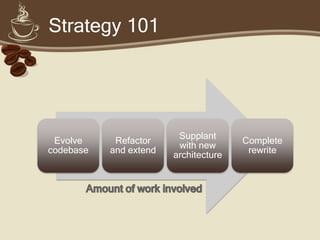
Strategy 101


                         Supplant
 Evolve     Refactor                   Complete
                         with new
codebase   and extend                   rewrite
                        architecture
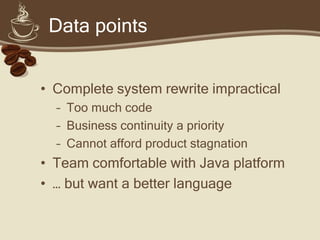
Data points


• Complete system rewrite impractical
  – Too much code
  – Business continuity a priority
  – Cannot afford product stagnation
• Team comfortable with Java platform
• … but want a better language
Why Scala?


• JVM-targeted, statically typed
• Success stories (Twitter, Foursquare,
  LinkedIn)
• Active community
• Good (not perfect) tool ecosystem
• Reasonable learning curve
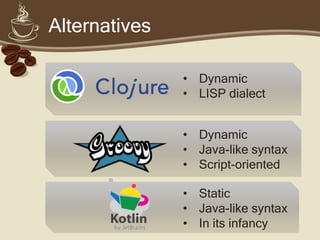
Alternatives

               • Dynamic
               • LISP dialect


               • Dynamic
               • Java-like syntax
               • Script-oriented

               • Static
               • Java-like syntax
               • In its infancy
Scala in a nutshell


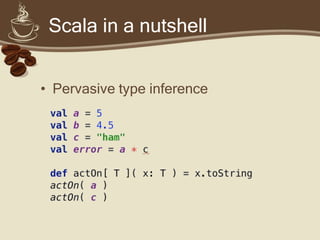
• Pervasive type inference
Scala in a nutshell


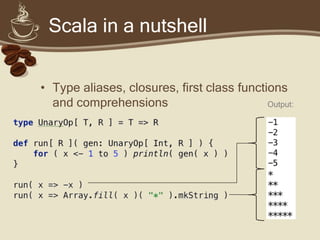
• Type aliases, closures, first class functions
  and comprehensions                        Output:
Scala in a nutshell


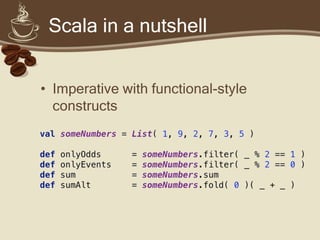
• Imperative with functional-style
  constructs
Scala in a nutshell


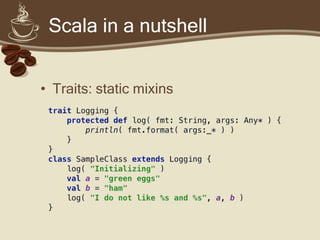
• Traits: static mixins
Scala in a nutshell


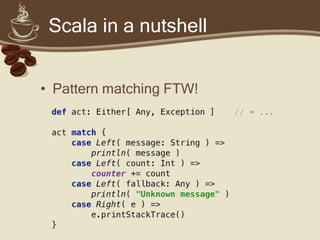
• Pattern matching FTW!
Scala in a nutshell


• Other goodies
  –   Option wrappers (no more NPEs!)
  –   Powerful collection framework
  –   Implicit conversions
  –   Concurrent, immutable maps (HAMT)
  –   Built in actors
Caveat emptor


• Scala is bleeding edge
• You will get cut
  – Learning curve
  – Rough edges
  – Partial/outdated documentation
• It’s well worth it, if you’re prepared!
Focal points


• Learning curve
• Tooling
• In production
Learning curve


• Risks:
  – Functional constructs need getting used
    to
  – Few best practices:
     • Coding conventions
     • Patterns
     • “Dangerous” features
Learning curve


• Mitigations:
  – Relatively familiar syntax
  – Seamless Java integration
     • Evolve your codebase to include Scala
     • Reuse existing components and libraries
  – Lots of wow moments!
Lessons learned


“New techniques are easy to explain.
Old techniques are hard to maintain.”
             - an old Vulcan proverb

• Encourage experimentation
• Encourage rapid iteration
• Document and share new techniques
Lessons learned


• Get a good grasp of the basics:
  –   Functions and closures
  –   Option wrappers
  –   Pattern matching
  –   Traits, traits and traits
• Each of these is immensely powerful
• Together, they make ponies!
Lessons learned


• Avoid wacky syntax!
  – Some common Scala libraries have
    atrocious syntax (scalaz)
  – Does this make sense to you?
  val p2c = ((_: Int) * (_: Int)).curried
  some(5) <*> (some(3) <*> p2c.pure[Option]) should
  equal(Some(15))
Lessons learned


• Promote functional constructs:
  – Intent over implementation
  – Massive code savings
  – Immutability, correct code by
   design
• Mentor junior developers!
Lessons learned


• Don’t go overboard
  – Use implicits sparingly
  – Avoid tuple overload
    • x._1._2 * x._2 orElse x._3 == yuck
    • Use case classes and partial functions
      instead
  – Path-dependent types are scary!
Focal points


• Learning curve
• Tooling
• In production
IDE Support


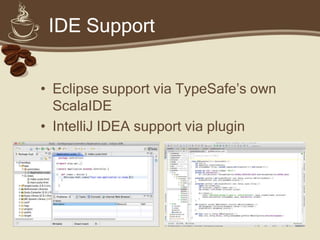
• Eclipse support via TypeSafe’s own
  ScalaIDE
• IntelliJ IDEA support via plugin
IDE support


•   Lower your expectations
•   Don’t skimp on dev hardware!
•   Use latest IDE/plugin builds
•   Take your time
    – Grok the tool-chain
    – Assign a “go-to guy” (or gal)
IDE support


• Wonky debugging
  – Java debuggers work…
  – … with some caveats
    • Step into synthetic stack frames
    • Do not step over closures
  – TypeSafe are focusing on debugging
  – JetBrains will likely follow
IDE support


• Except the unexpected
  – Spurious error highlighting
    • Especially with implicit conversions
    • Double-check with your build tool-
      chain
  – Rebuild the project occasionally
  – The situation is improving daily
Build tools


• Native Scala build tool is sbt
  – Ivy2 (-> Maven repositories)
  – Scala syntax
  – Very powerful, sharp learning curve
• Stay away from ant
• Maven and buildr should work fine
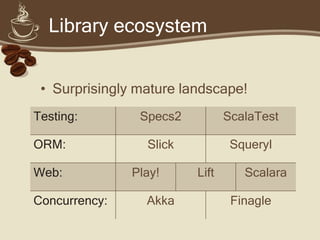
Library ecosystem


• Surprisingly mature landscape!
• We use:
  – ScalaTest + ScalaMock
  – Squeryl
  – Scalatra
• Use your favorite Java libraries
  natively!
Focal points


• Learning curve
• Tooling
• In production
GC considerations


• Lots of generated classes
  – Higher PermGen utilization
  – Increase -XX:MaxPermSize


• Lots of intermediate objects
  – High eden space churn (normally OK)
  – Tune with –XX:NewRatio
Other considerations


• Scalac emits lots of synthetic
  code
  – Deep call graph
  – Intermediate stack frames
• Default stack often too small
  – -Xss=2m should do
Nasty surprises


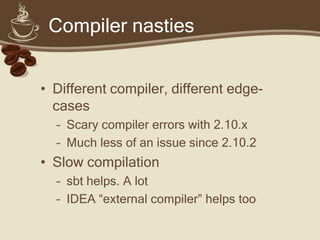
• Different compiler, different edge-
  cases
  – Stack overflow may segfault
  – Crash log may fail to generate (JDK
    1.6.0_x)
  – Logs and thread dumps are your friends
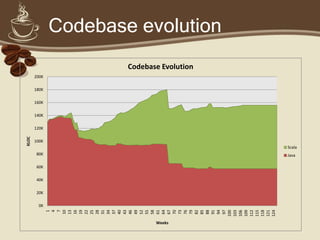
Codebase evolution

 Import Java
  codebase             Refactoring


                                        Tipping point


                          Slow growth
       Initial Scala
     experimentation
Conclusion


• I would recommend Scala for:
   – Startups willing to take the plunge
   – Small teams of senior developers
   – Large enterprises with tech advisory/leadership
     teams
• But not (yet) for:
   – Contractors
   – Traditional enterprises
Questions?
… answers may be forthcoming
Afterword


• newBrandAnalytics for allowing the use of
  the company name and R&D evidence
• TypeSafe and the amazing Scala
  community for making Scala what it is
• … and SmileTemplate.com for the
  PowerPoint template
• Get in touch!
  – tomer@tomergabel.com
  – http://www.tomergabel.com
Scala in practice
Scala in practice

Scala in practice

  • 1.
    Scala In Practice: A Case Study Tomer Gabel, newBrandAnalytics April 2012
  • 3.
    Some context circa 2011: • Startup with limited budget • Cloud hosted, Linux based • Complex prototype codebase – Lots of Java code – Serving paying customers
  • 4.
    Strategy 101 Supplant Evolve Refactor Complete with new codebase and extend rewrite architecture
  • 5.
    Data points • Completesystem rewrite impractical – Too much code – Business continuity a priority – Cannot afford product stagnation • Team comfortable with Java platform • … but want a better language
  • 6.
    Why Scala? • JVM-targeted,statically typed • Success stories (Twitter, Foursquare, LinkedIn) • Active community • Good (not perfect) tool ecosystem • Reasonable learning curve
  • 7.
    Alternatives • Dynamic • LISP dialect • Dynamic • Java-like syntax • Script-oriented • Static • Java-like syntax • In its infancy
  • 8.
    Scala in anutshell • Pervasive type inference
  • 9.
    Scala in anutshell • Type aliases, closures, first class functions and comprehensions Output:
  • 10.
    Scala in anutshell • Imperative with functional-style constructs
  • 11.
    Scala in anutshell • Traits: static mixins
  • 12.
    Scala in anutshell • Pattern matching FTW!
  • 13.
    Scala in anutshell • Other goodies – Option wrappers (no more NPEs!) – Powerful collection framework – Implicit conversions – Concurrent, immutable maps (HAMT) – Built in actors
  • 15.
    Caveat emptor • Scalais bleeding edge • You will get cut – Learning curve – Rough edges – Partial/outdated documentation • It’s well worth it, if you’re prepared!
  • 16.
    Focal points • Learningcurve • Tooling • In production
  • 17.
    Learning curve • Risks: – Functional constructs need getting used to – Few best practices: • Coding conventions • Patterns • “Dangerous” features
  • 18.
    Learning curve • Mitigations: – Relatively familiar syntax – Seamless Java integration • Evolve your codebase to include Scala • Reuse existing components and libraries – Lots of wow moments!
  • 19.
    Lessons learned “New techniquesare easy to explain. Old techniques are hard to maintain.” - an old Vulcan proverb • Encourage experimentation • Encourage rapid iteration • Document and share new techniques
  • 20.
    Lessons learned • Geta good grasp of the basics: – Functions and closures – Option wrappers – Pattern matching – Traits, traits and traits • Each of these is immensely powerful • Together, they make ponies!
  • 21.
    Lessons learned • Avoidwacky syntax! – Some common Scala libraries have atrocious syntax (scalaz) – Does this make sense to you? val p2c = ((_: Int) * (_: Int)).curried some(5) <*> (some(3) <*> p2c.pure[Option]) should equal(Some(15))
  • 22.
    Lessons learned • Promotefunctional constructs: – Intent over implementation – Massive code savings – Immutability, correct code by design • Mentor junior developers!
  • 23.
    Lessons learned • Don’tgo overboard – Use implicits sparingly – Avoid tuple overload • x._1._2 * x._2 orElse x._3 == yuck • Use case classes and partial functions instead – Path-dependent types are scary!
  • 24.
    Focal points • Learningcurve • Tooling • In production
  • 25.
    IDE Support • Eclipsesupport via TypeSafe’s own ScalaIDE • IntelliJ IDEA support via plugin
  • 26.
    IDE support • Lower your expectations • Don’t skimp on dev hardware! • Use latest IDE/plugin builds • Take your time – Grok the tool-chain – Assign a “go-to guy” (or gal)
  • 27.
    IDE support • Wonkydebugging – Java debuggers work… – … with some caveats • Step into synthetic stack frames • Do not step over closures – TypeSafe are focusing on debugging – JetBrains will likely follow
  • 28.
    IDE support • Exceptthe unexpected – Spurious error highlighting • Especially with implicit conversions • Double-check with your build tool- chain – Rebuild the project occasionally – The situation is improving daily
  • 29.
    Build tools • NativeScala build tool is sbt – Ivy2 (-> Maven repositories) – Scala syntax – Very powerful, sharp learning curve • Stay away from ant • Maven and buildr should work fine
  • 30.
    Library ecosystem • Surprisinglymature landscape! • We use: – ScalaTest + ScalaMock – Squeryl – Scalatra • Use your favorite Java libraries natively!
  • 31.
    Focal points • Learningcurve • Tooling • In production
  • 32.
    GC considerations • Lotsof generated classes – Higher PermGen utilization – Increase -XX:MaxPermSize • Lots of intermediate objects – High eden space churn (normally OK) – Tune with –XX:NewRatio
  • 33.
    Other considerations • Scalacemits lots of synthetic code – Deep call graph – Intermediate stack frames • Default stack often too small – -Xss=2m should do
  • 34.
    Nasty surprises • Differentcompiler, different edge- cases – Stack overflow may segfault – Crash log may fail to generate (JDK 1.6.0_x) – Logs and thread dumps are your friends
  • 36.
    Codebase evolution ImportJava codebase Refactoring Tipping point Slow growth Initial Scala experimentation
  • 37.
    Conclusion • I wouldrecommend Scala for: – Startups willing to take the plunge – Small teams of senior developers – Large enterprises with tech advisory/leadership teams • But not (yet) for: – Contractors – Traditional enterprises
  • 38.
  • 39.
    Afterword • newBrandAnalytics forallowing the use of the company name and R&D evidence • TypeSafe and the amazing Scala community for making Scala what it is • … and SmileTemplate.com for the PowerPoint template • Get in touch! – tomer@tomergabel.com – http://www.tomergabel.com

Editor's Notes

  • #5 Evolve codebase (in other words, keep existing infrastructure and fix/extend as needed):Frustrating, legacy codebase written under tight time constraints is a maintenance nightmareNew engineering team needs a fresh start; keeping the team in maintenance mode is hazardous to team’s mental healthRefactor and extend (break down into smaller pieces; replace infrastructure incrementally, build extension points where needed):A highly practical solution. Existing code will continue to serve existing customers;Problematic bits can be replaced piecemeal, complex new functionality built separately and integrated at the lowest possible level (usually the database);A good compromise between risk mitigation and engineering sanitySupplant with new architecture (keep existing codebase in place and fix critical bugs only; where new functionality is required, interoperate with existing architecture):Impractical. Existing codebase had too many issues;In practice this is the same as evolving the codebase, because of the prohibitively high maintenance cost on the existing architecture.Complete rewrite: too risky, too slow. ‘nuff said.