Mid-Surface Modeling Overview
MSC Apex is reinventing the process through the creation of a technology foundation
which includes direct modeling integrated with meshing, and a new flexible approach
to setting up mid-surfacing. This technology dramatically accelerates the time that it
takes while reducing the skill level required to create solver ready mid-surfaced parts.
The solution is applicable to injection molded plastics, metals, and composites.
The MSC Apex Advantage
Traditional Mid-Surface Modeling Challenges
•	 Mid-Surface repair is tedious and manual
•	 Meshes must be deleted and re-created with each geometry change
•	 Creating thickness and offset properties is an elaborate process
•	 Final meshed mid-surface models may fail during analysis due
to missing model definitions
New MSC Apex Mid-Surfacing Approach
•	 Incrementally build mid-surface models based on a semi-automated,
flexible ‘person in the loop’ process to prevent time consuming manual repair​
•	 Regenerate meshes automatically with direct modeling
•	 Rapidly create dozens of thickness and offset properties in seconds
•	 Ensure mid-surface models can be successfully analyzed
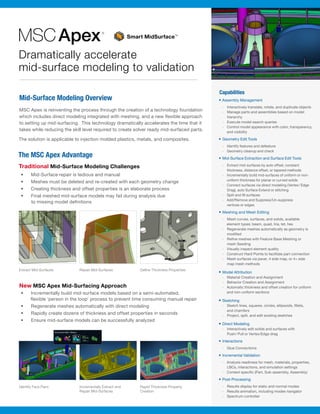
Extract Mid-Surfaces
Identify Face Pairs
Repair Mid-Surfaces
Incrementally Extract and
Repair Mid-Surfaces
Define Thickness Properties
Rapid Thickness Property
Creation
Smart MidSurfaceTM
Capabilities
•	Assembly Management
-- Interactively translate, rotate, and duplicate objects
-- Manage parts and assemblies based on model
hierarchy
-- Execute model search queries
-- Control model appearance with color, transparency,
and visibility
•	Geometry Edit Tools
-- Identify features and defeature
-- Geometry cleanup and check
•	Mid-Surface Extraction and Surface Edit Tools
-- Extract mid-surfaces by auto offset, constant
thickness, distance offset, or tapered methods
-- Incrementally build mid-surfaces of uniform or non-
uniform thickness for planar or curved solids
-- Connect surfaces via direct modeling (Vertex/ Edge
Drag), auto Surface Extend or stitching
-- Split and fill surfaces
-- Add/Remove and Suppress/Un-suppress
vertices or edges
•	Meshing and Mesh Editing
-- Mesh curves, surfaces, and solids, available
element types: beam, quad, tria, tet, hex
-- Regenerate meshes automatically as geometry is
modified
-- Refine meshes with Feature Base Meshing or
mesh Seeding
-- Visually inspect element quality
-- Construct Hard Points to facilitate part connection
-- Mesh surfaces via paver, 4 side map, or 4+ side
map mesh methods
•	Model Attribution
-- Material Creation and Assignment
-- Behavior Creation and Assignment
-- Automatic thickness and offset creation for uniform
and non-uniform sections
•	Sketching
-- Sketch lines, squares, circles, ellipsoids, fillets,
and chamfers
-- Project, split, and edit existing sketches
•	Direct Modeling
-- Interactively edit solids and surfaces with
Push/ Pull or Vertex/Edge drag
•	Interactions
-- Glue Connections
•	Incremental Validation
-- Analysis readiness for mesh, materials, properties,
LBCs, interactions, and simulation settings
-- Context specific (Part, Sub-assembly, Assembly)
•	Post-Processing
-- Results display for static and normal modes
-- Results animation, including modes navigator
-- Spectrum controller
Dramatically accelerate
mid-surface modeling to validation
Ⓡ
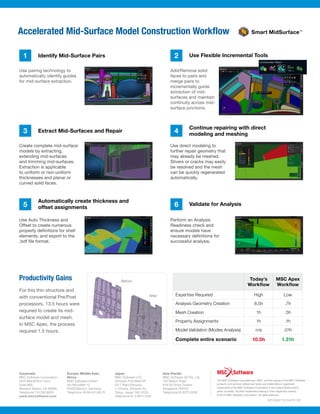
Validate for Analysis
Continue repairing with direct
modeling and meshing
Automatically create thickness and
offset assignments
Extract Mid-Surfaces and Repair
Identify Mid-Surface Pairs Use Flexible Incremental Tools
Use pairing technology to
automatically identify guides
for mid-surface extraction.
Create complete mid-surface
models by extracting,
extending mid-surfaces
and trimming mid-surfaces.
Extraction is applicable
to uniform or non-uniform
thicknesses and planar or
curved solid faces.
Use Auto Thickness and
Offset to create numerous
property definitions for shell
elements, and export to the
.bdf file format.
Add/Remove solid
faces to pairs and
merge pairs to
incrementally guide
extraction of mid-
surfaces and maintain
continuity across mid-
surface junctions.
Use direct modeling to
further repair geometry that
may already be meshed.
Slivers or cracks may easily
be resolved and the mesh
can be quickly regenerated
automatically.
Perform an Analysis
Readiness check and
ensure models have
necessary definitions for
successful analysis.
1
3
5
2
4
6
Accelerated Mid-Surface Model Construction Workflow
Productivity Gains
For this thin structure and
with conventional Pre/Post
processors, 13.5 hours were
required to create its mid-
surface model and mesh.
In MSC Apex, the process
required 1.5 hours.
Today’s
Workflow
MSC Apex
Workflow
Expertise Required High Low
Analysis Geometry Creation 8.5h .7h
Mesh Creation 1h .5h
Property Assignments 1h .1h
Model Validation (Modes Analysis) n/a .01h
Complete entire scenario 10.5h 1.31h
Before
After
Europe, Middle East,
Africa
MSC Software GmbH
Am Moosfeld 13
81829 Munich, Germany
Telephone 49.89.431.98.70
Japan
MSC Software LTD.
Shinjuku First West 8F
23-7 Nishi Shinjuku
1-Chome, Shinjuku-Ku
Tokyo, Japan 160-0023
Telephone 81.3.6911.1200
Asia-Pacific
MSC Software (S) Pte. Ltd.
100 Beach Road
#16-05 Shaw Towers
Singapore 189702
Telephone 65.6272.0082
Corporate
MSC Software Corporation
4675 MacArthur Court
Suite 900
Newport Beach, CA 92660
Telephone 714.540.8900
www.mscsoftware.com
The MSC Software corporate logo, MSC, and the names of the MSC ‌Software
products and services referenced herein are trademarks or registered
trademarks of the MSC Software Corporation in the United States and/or
other countries. All other trademarks belong to their respective owners.
© 2015 MSC Software Corporation. All rights reserved.
APEXMID*2015APR*SB
Smart MidSurfaceTM

SB_MSC-Apex_MidSurface_LTR_w

  • 1.
    Mid-Surface Modeling Overview MSCApex is reinventing the process through the creation of a technology foundation which includes direct modeling integrated with meshing, and a new flexible approach to setting up mid-surfacing. This technology dramatically accelerates the time that it takes while reducing the skill level required to create solver ready mid-surfaced parts. The solution is applicable to injection molded plastics, metals, and composites. The MSC Apex Advantage Traditional Mid-Surface Modeling Challenges • Mid-Surface repair is tedious and manual • Meshes must be deleted and re-created with each geometry change • Creating thickness and offset properties is an elaborate process • Final meshed mid-surface models may fail during analysis due to missing model definitions New MSC Apex Mid-Surfacing Approach • Incrementally build mid-surface models based on a semi-automated, flexible ‘person in the loop’ process to prevent time consuming manual repair​ • Regenerate meshes automatically with direct modeling • Rapidly create dozens of thickness and offset properties in seconds • Ensure mid-surface models can be successfully analyzed Extract Mid-Surfaces Identify Face Pairs Repair Mid-Surfaces Incrementally Extract and Repair Mid-Surfaces Define Thickness Properties Rapid Thickness Property Creation Smart MidSurfaceTM Capabilities • Assembly Management -- Interactively translate, rotate, and duplicate objects -- Manage parts and assemblies based on model hierarchy -- Execute model search queries -- Control model appearance with color, transparency, and visibility • Geometry Edit Tools -- Identify features and defeature -- Geometry cleanup and check • Mid-Surface Extraction and Surface Edit Tools -- Extract mid-surfaces by auto offset, constant thickness, distance offset, or tapered methods -- Incrementally build mid-surfaces of uniform or non- uniform thickness for planar or curved solids -- Connect surfaces via direct modeling (Vertex/ Edge Drag), auto Surface Extend or stitching -- Split and fill surfaces -- Add/Remove and Suppress/Un-suppress vertices or edges • Meshing and Mesh Editing -- Mesh curves, surfaces, and solids, available element types: beam, quad, tria, tet, hex -- Regenerate meshes automatically as geometry is modified -- Refine meshes with Feature Base Meshing or mesh Seeding -- Visually inspect element quality -- Construct Hard Points to facilitate part connection -- Mesh surfaces via paver, 4 side map, or 4+ side map mesh methods • Model Attribution -- Material Creation and Assignment -- Behavior Creation and Assignment -- Automatic thickness and offset creation for uniform and non-uniform sections • Sketching -- Sketch lines, squares, circles, ellipsoids, fillets, and chamfers -- Project, split, and edit existing sketches • Direct Modeling -- Interactively edit solids and surfaces with Push/ Pull or Vertex/Edge drag • Interactions -- Glue Connections • Incremental Validation -- Analysis readiness for mesh, materials, properties, LBCs, interactions, and simulation settings -- Context specific (Part, Sub-assembly, Assembly) • Post-Processing -- Results display for static and normal modes -- Results animation, including modes navigator -- Spectrum controller Dramatically accelerate mid-surface modeling to validation Ⓡ
  • 2.
    Validate for Analysis Continuerepairing with direct modeling and meshing Automatically create thickness and offset assignments Extract Mid-Surfaces and Repair Identify Mid-Surface Pairs Use Flexible Incremental Tools Use pairing technology to automatically identify guides for mid-surface extraction. Create complete mid-surface models by extracting, extending mid-surfaces and trimming mid-surfaces. Extraction is applicable to uniform or non-uniform thicknesses and planar or curved solid faces. Use Auto Thickness and Offset to create numerous property definitions for shell elements, and export to the .bdf file format. Add/Remove solid faces to pairs and merge pairs to incrementally guide extraction of mid- surfaces and maintain continuity across mid- surface junctions. Use direct modeling to further repair geometry that may already be meshed. Slivers or cracks may easily be resolved and the mesh can be quickly regenerated automatically. Perform an Analysis Readiness check and ensure models have necessary definitions for successful analysis. 1 3 5 2 4 6 Accelerated Mid-Surface Model Construction Workflow Productivity Gains For this thin structure and with conventional Pre/Post processors, 13.5 hours were required to create its mid- surface model and mesh. In MSC Apex, the process required 1.5 hours. Today’s Workflow MSC Apex Workflow Expertise Required High Low Analysis Geometry Creation 8.5h .7h Mesh Creation 1h .5h Property Assignments 1h .1h Model Validation (Modes Analysis) n/a .01h Complete entire scenario 10.5h 1.31h Before After Europe, Middle East, Africa MSC Software GmbH Am Moosfeld 13 81829 Munich, Germany Telephone 49.89.431.98.70 Japan MSC Software LTD. Shinjuku First West 8F 23-7 Nishi Shinjuku 1-Chome, Shinjuku-Ku Tokyo, Japan 160-0023 Telephone 81.3.6911.1200 Asia-Pacific MSC Software (S) Pte. Ltd. 100 Beach Road #16-05 Shaw Towers Singapore 189702 Telephone 65.6272.0082 Corporate MSC Software Corporation 4675 MacArthur Court Suite 900 Newport Beach, CA 92660 Telephone 714.540.8900 www.mscsoftware.com The MSC Software corporate logo, MSC, and the names of the MSC ‌Software products and services referenced herein are trademarks or registered trademarks of the MSC Software Corporation in the United States and/or other countries. All other trademarks belong to their respective owners. © 2015 MSC Software Corporation. All rights reserved. APEXMID*2015APR*SB Smart MidSurfaceTM