INTRODUCTION TO
SAS BASE
Software and
How it workBY
What is SAS?
A system that delivers the output in a variety of easy-to-access formats, like as SAS data sets,
procedure output files, or HTML. Using Macros makes coding in Base SAS. SAS windowing
environment. Interactive, graphical user interface that enables you can easily run SAS and
test your SAS programs. SAS base code is much easier in case the logic of code is very
complex.
A flexible, extensible 4GL and web-based interface for data access, transformation and
reporting
www.AspireIT.NetFollow Us
Who uses SAS?
SAS Environment is specially design for Data Accessing, transfer information and Reporting.
SAS is including in programming language for data manipulation retrieving and storing the
information, descriptive statistics and report writing.
www.AspireIT.NetFollow Us
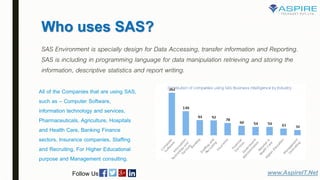
All of the Companies that are using SAS,
such as – Computer Software,
information technology and services,
Pharmaceuticals, Agriculture, Hospitals
and Health Care, Banking Finance
sectors, Insurance companies, Staffing
and Recruiting, For Higher Educational
purpose and Management consulting.
Benefits of SAS Base
■ Make programming fast and easy.
■ It access industry-standard data security. You can encrypt the SAS data on disks, and
increase security for stored passwords.
■ It combines SAS and Hadoop.You can submit the hdfs commands, MapReduce programs
and Pig language programs from SAS.
■ Increase your computer resources. It improves the performance and security.
■ Easily create reports in standard office format such as rtfs, pdfs, Microsoft PowerPoint,
Html and E-book Format and deliver easily to mobile devices.
■ Programmers can read, format, analyze and the report on data quickly.
www.AspireIT.NetFollow Us
Work of SAS Base Software
SAS Base Software is the core of the SAS System.
■ Data Step :
The programming language that use to manipulate and manage your SAS Data.
■ SAS Environment :
It is an interactive and graphical user interface that enables you to easily run SAS and test
your SAS programs.
■ SAS Procedures :
SAS procedures offer users with a unique ability to generate quick results – requiring little, if
any, programming skills. In SAS Procedure some software tools for data analysis and
reporting.
www.AspireIT.NetFollow Us
Work of SAS Base Software
■ Data Step Debugger :
It is a programming tool that helps you find logic problems. DATA step programs - When
you submit a data step with the Debugging option Then SAS compiling starts, it displays the
debugger windows, and pauses until you enter a debugger command is to begin execution.
You can debug only one Data step at a time. You can use the debugger only with a DATA
step, and not with the procedure step.
■ Micro facility :
It is a powerful programming tool for extending and customize SAS software programs
and for reducing text in your programs.
■ SAS windowing environment:
It is an interactive with graphical user interface that enables you to easily run SAS
and test your SAS programs. You can edit and execute programming statement.
www.AspireIT.NetFollow Us
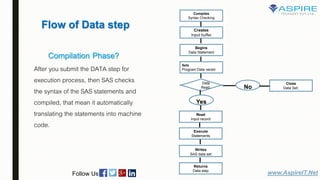
How the Data steps work for SAS?
■ The DATA Step statement begins with the process of building the SAS data set and
names the data set. The statements that make the data step compiled and execute.
■ If the syntax is check hen the data step are compiled. If the syntax is correct then the data
step are executed. A loop of DATA steps is an automatic output and return action.
www.AspireIT.NetFollow Us
Flow of Data step
www.AspireIT.NetFollow Us
Compiles
Syntax Checking
Creates
Input buffer
Begins
Data Statement
Sets
Program Data vector
Data
Read
Read
Input record
Execute
Statements
Writes
SAS data set
Returns
Data step
Yes
No
Close
Data Set;
Compilation Phase?
After you submit the DATA step for
execution process, then SAS checks
the syntax of the SAS statements and
compiled, that mean it automatically
translating the statements into machine
code.
How To Processing the SAS Code:
■ Create (input buffer):
Input buffer is a logical area in memory into which SAS reads each record of data from a raw data file when the program
executes.
■ Sets (program data vector):
It is builds the SAS data set, and one observation at a time. When a program executes, SAS reads data values from the
input buffer. It mean by creates them by executing SAS language statements. SAS assigns the values to the appropriate
variables in the program data vector. From here, SAS writes the values to a SAS data set as a single observation.
SAS reads a record into the input buffer. SAS then reads the values in the input buffer and assigns in the program data
vector. It also calculates the values for variables. The SAS program loops back to the top of the DATA step.
www.AspireIT.NetFollow Us
Compilation Phase
Compilation Phase
Thank You
• Click to register for free demo on SAS, Demo Registration
• Best SAS Training & Placement Institute in Pune
• Online & Classroom training with 100 % Free Placement Assistance
• Visit our website www.aspireit.net or call us on 9960935965 / 9960935600
info@aspireit.net
Follow Us

Sas base programmer

  • 1.
  • 2.
    What is SAS? Asystem that delivers the output in a variety of easy-to-access formats, like as SAS data sets, procedure output files, or HTML. Using Macros makes coding in Base SAS. SAS windowing environment. Interactive, graphical user interface that enables you can easily run SAS and test your SAS programs. SAS base code is much easier in case the logic of code is very complex. A flexible, extensible 4GL and web-based interface for data access, transformation and reporting www.AspireIT.NetFollow Us
  • 3.
    Who uses SAS? SASEnvironment is specially design for Data Accessing, transfer information and Reporting. SAS is including in programming language for data manipulation retrieving and storing the information, descriptive statistics and report writing. www.AspireIT.NetFollow Us All of the Companies that are using SAS, such as – Computer Software, information technology and services, Pharmaceuticals, Agriculture, Hospitals and Health Care, Banking Finance sectors, Insurance companies, Staffing and Recruiting, For Higher Educational purpose and Management consulting.
  • 4.
    Benefits of SASBase ■ Make programming fast and easy. ■ It access industry-standard data security. You can encrypt the SAS data on disks, and increase security for stored passwords. ■ It combines SAS and Hadoop.You can submit the hdfs commands, MapReduce programs and Pig language programs from SAS. ■ Increase your computer resources. It improves the performance and security. ■ Easily create reports in standard office format such as rtfs, pdfs, Microsoft PowerPoint, Html and E-book Format and deliver easily to mobile devices. ■ Programmers can read, format, analyze and the report on data quickly. www.AspireIT.NetFollow Us
  • 5.
    Work of SASBase Software SAS Base Software is the core of the SAS System. ■ Data Step : The programming language that use to manipulate and manage your SAS Data. ■ SAS Environment : It is an interactive and graphical user interface that enables you to easily run SAS and test your SAS programs. ■ SAS Procedures : SAS procedures offer users with a unique ability to generate quick results – requiring little, if any, programming skills. In SAS Procedure some software tools for data analysis and reporting. www.AspireIT.NetFollow Us
  • 6.
    Work of SASBase Software ■ Data Step Debugger : It is a programming tool that helps you find logic problems. DATA step programs - When you submit a data step with the Debugging option Then SAS compiling starts, it displays the debugger windows, and pauses until you enter a debugger command is to begin execution. You can debug only one Data step at a time. You can use the debugger only with a DATA step, and not with the procedure step. ■ Micro facility : It is a powerful programming tool for extending and customize SAS software programs and for reducing text in your programs. ■ SAS windowing environment: It is an interactive with graphical user interface that enables you to easily run SAS and test your SAS programs. You can edit and execute programming statement. www.AspireIT.NetFollow Us
  • 7.
    How the Datasteps work for SAS? ■ The DATA Step statement begins with the process of building the SAS data set and names the data set. The statements that make the data step compiled and execute. ■ If the syntax is check hen the data step are compiled. If the syntax is correct then the data step are executed. A loop of DATA steps is an automatic output and return action. www.AspireIT.NetFollow Us
  • 8.
    Flow of Datastep www.AspireIT.NetFollow Us Compiles Syntax Checking Creates Input buffer Begins Data Statement Sets Program Data vector Data Read Read Input record Execute Statements Writes SAS data set Returns Data step Yes No Close Data Set; Compilation Phase? After you submit the DATA step for execution process, then SAS checks the syntax of the SAS statements and compiled, that mean it automatically translating the statements into machine code.
  • 9.
    How To Processingthe SAS Code: ■ Create (input buffer): Input buffer is a logical area in memory into which SAS reads each record of data from a raw data file when the program executes. ■ Sets (program data vector): It is builds the SAS data set, and one observation at a time. When a program executes, SAS reads data values from the input buffer. It mean by creates them by executing SAS language statements. SAS assigns the values to the appropriate variables in the program data vector. From here, SAS writes the values to a SAS data set as a single observation. SAS reads a record into the input buffer. SAS then reads the values in the input buffer and assigns in the program data vector. It also calculates the values for variables. The SAS program loops back to the top of the DATA step. www.AspireIT.NetFollow Us Compilation Phase Compilation Phase
  • 10.
    Thank You • Clickto register for free demo on SAS, Demo Registration • Best SAS Training & Placement Institute in Pune • Online & Classroom training with 100 % Free Placement Assistance • Visit our website www.aspireit.net or call us on 9960935965 / 9960935600 info@aspireit.net Follow Us