

SAP Webdynpro ABAP Training
AcuteSoft:
India: +91-9848346149, +91-7702226149
Land Line: +91 (0)40 - 42627705
USA: +1 973-619-0109, +1 312-235-6527
UK : +44 207-993-2319
skype : acutesoft
email : info@acutesoft.com
www.acutesoft.com
http://training.acutesoft.com
SAP Webdynpro ABAP Training
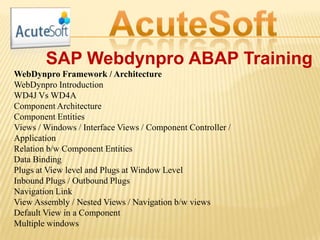
WebDynpro Framework / Architecture
WebDynpro Introduction
WD4J Vs WD4A
Component Architecture
Component Entities
Views / Windows / Interface Views / Component Controller /
Application
Relation b/w Component Entities
Data Binding
Plugs at View level and Plugs at Window Level
Inbound Plugs / Outbound Plugs
Navigation Link
View Assembly / Nested Views / Navigation b/w views
Default View in a Component
Multiple windows
SAP Webdynpro ABAP Training
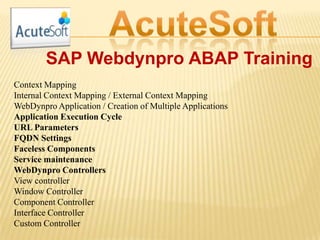
Context Mapping
Internal Context Mapping / External Context Mapping
WebDynpro Application / Creation of Multiple Applications
Application Execution Cycle
URL Parameters
FQDN Settings
Faceless Components
Service maintenance
WebDynpro Controllers
View controller
Window Controller
Component Controller
Interface Controller
Custom Controller
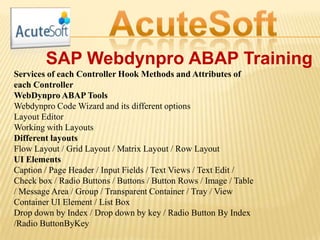
SAP Webdynpro ABAP Training
Services of each Controller Hook Methods and Attributes of
each Controller
WebDynpro ABAP Tools
Webdynpro Code Wizard and its different options
Layout Editor
Working with Layouts
Different layouts
Flow Layout / Grid Layout / Matrix Layout / Row Layout
UI Elements
Caption / Page Header / Input Fields / Text Views / Text Edit /
Check box / Radio Buttons / Buttons / Button Rows / Image / Table
/ Message Area / Group / Transparent Container / Tray / View
Container UI Element / List Box
Drop down by Index / Drop down by key / Radio Button By Index
/Radio ButtonByKey
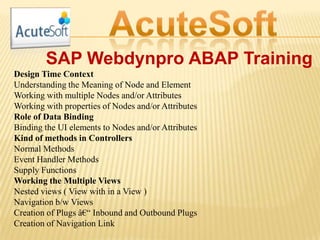
SAP Webdynpro ABAP Training
Design Time Context
Understanding the Meaning of Node and Element
Working with multiple Nodes and/or Attributes
Working with properties of Nodes and/or Attributes
Role of Data Binding
Binding the UI elements to Nodes and/or Attributes
Kind of methods in Controllers
Normal Methods
Event Handler Methods
Supply Functions
Working the Multiple Views
Nested views ( View with in a View )
Navigation b/w Views
Creation of Plugs – Inbound and Outbound Plugs
Creation of Navigation Link
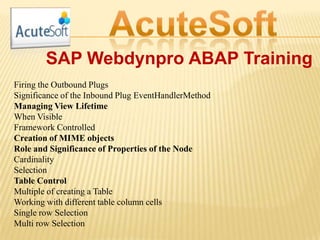
SAP Webdynpro ABAP Training
Firing the Outbound Plugs
Significance of the Inbound Plug EventHandlerMethod
Managing View Lifetime
When Visible
Framework Controlled
Creation of MIME objects
Role and Significance of Properties of the Node
Cardinality
Selection
Table Control
Multiple of creating a Table
Working with different table column cells
Single row Selection
Multi row Selection
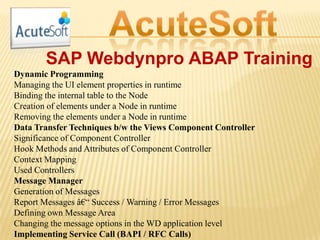
SAP Webdynpro ABAP Training
Dynamic Programming
Managing the UI element properties in runtime
Binding the internal table to the Node
Creation of elements under a Node in runtime
Removing the elements under a Node in runtime
Data Transfer Techniques b/w the Views Component Controller
Significance of Component Controller
Hook Methods and Attributes of Component Controller
Context Mapping
Used Controllers
Message Manager
Generation of Messages
Report Messages – Success / Warning / Error Messages
Defining own Message Area
Changing the message options in the WD application level
Implementing Service Call (BAPI / RFC Calls)
SAP Webdynpro ABAP Training
Calling the smart forms in a Applicatio
Implementing the Supply Function
Advanced Concepts in WebDynpro ABAP
Window Controller
Window Plugs
Significance of DEFAULT Plug
Inbound Plugs of Window Controller
Start Up Plug / Standard Plug / Resume Plug
Outbound Plugs of Window Controller
Exit Plug / Standard Plug / Suspend
Custom Controller
Creation of Custom Controller
Working with Custom Controller
Popup Windows
Popup Messages
Data Sharing b/w views and popup windows
SAP Webdynpro ABAP Training
nternationalization
OTR - Online Text Repository
Concept of iViews and Integration into Portal (Theory)
Portal Integration
WebDynpro Application Configuration
WebDynpro Application Personalization
WebDynpro Component Configuration
Tree Structure - Tree UI Element
Implementing RoadMap UI element with 3 to 4 steps
Role of Component Interface
Cross Component Programming
Component Usage
SAP Webdynpro ABAP Training
Sharing the Context across the components
Sharing the Views or Visibility across the components
Implementing ALVs
Implementing ALV without configuration Model In the ALV View
In the Separate View
Implementing ALV with Configuration Model In the ALV View In
the Separate View
Editable ALVs
Totals / Subtotals in ALVs
ALV with different Cell Editors (Link to Action, Buttons, etc.., )
ALV with different Events (Hotspot, OnClick, etc.)
Working with Select Options
Enhancements in WebDynpro Components -- View / Context /
Methods
For Free Demo Please Contact
AcuteSoft:
India: +91-9848346149, +91-7702226149
Land Line: +91 (0)40 - 42627705
USA: +1 973-619-0109, +1 312-235-6527
UK : +44 207-993-2319
skype : acutesoft
email : info@acutesoft.com
www.acutesoft.com
http://training.acutesoft.com
SAP WEBDYNPRO ABAP TRAINING

SAP WEBDYNPRO ABAP TRAINING

  • 1.
    SAP Webdynpro ABAPTraining AcuteSoft: India: +91-9848346149, +91-7702226149 Land Line: +91 (0)40 - 42627705 USA: +1 973-619-0109, +1 312-235-6527 UK : +44 207-993-2319 skype : acutesoft email : info@acutesoft.com www.acutesoft.com http://training.acutesoft.com
  • 2.
    SAP Webdynpro ABAPTraining WebDynpro Framework / Architecture WebDynpro Introduction WD4J Vs WD4A Component Architecture Component Entities Views / Windows / Interface Views / Component Controller / Application Relation b/w Component Entities Data Binding Plugs at View level and Plugs at Window Level Inbound Plugs / Outbound Plugs Navigation Link View Assembly / Nested Views / Navigation b/w views Default View in a Component Multiple windows
  • 3.
    SAP Webdynpro ABAPTraining Context Mapping Internal Context Mapping / External Context Mapping WebDynpro Application / Creation of Multiple Applications Application Execution Cycle URL Parameters FQDN Settings Faceless Components Service maintenance WebDynpro Controllers View controller Window Controller Component Controller Interface Controller Custom Controller
  • 4.
    SAP Webdynpro ABAPTraining Services of each Controller Hook Methods and Attributes of each Controller WebDynpro ABAP Tools Webdynpro Code Wizard and its different options Layout Editor Working with Layouts Different layouts Flow Layout / Grid Layout / Matrix Layout / Row Layout UI Elements Caption / Page Header / Input Fields / Text Views / Text Edit / Check box / Radio Buttons / Buttons / Button Rows / Image / Table / Message Area / Group / Transparent Container / Tray / View Container UI Element / List Box Drop down by Index / Drop down by key / Radio Button By Index /Radio ButtonByKey
  • 5.
    SAP Webdynpro ABAPTraining Design Time Context Understanding the Meaning of Node and Element Working with multiple Nodes and/or Attributes Working with properties of Nodes and/or Attributes Role of Data Binding Binding the UI elements to Nodes and/or Attributes Kind of methods in Controllers Normal Methods Event Handler Methods Supply Functions Working the Multiple Views Nested views ( View with in a View ) Navigation b/w Views Creation of Plugs – Inbound and Outbound Plugs Creation of Navigation Link
  • 6.
    SAP Webdynpro ABAPTraining Firing the Outbound Plugs Significance of the Inbound Plug EventHandlerMethod Managing View Lifetime When Visible Framework Controlled Creation of MIME objects Role and Significance of Properties of the Node Cardinality Selection Table Control Multiple of creating a Table Working with different table column cells Single row Selection Multi row Selection
  • 7.
    SAP Webdynpro ABAPTraining Dynamic Programming Managing the UI element properties in runtime Binding the internal table to the Node Creation of elements under a Node in runtime Removing the elements under a Node in runtime Data Transfer Techniques b/w the Views Component Controller Significance of Component Controller Hook Methods and Attributes of Component Controller Context Mapping Used Controllers Message Manager Generation of Messages Report Messages – Success / Warning / Error Messages Defining own Message Area Changing the message options in the WD application level Implementing Service Call (BAPI / RFC Calls)
  • 8.
    SAP Webdynpro ABAPTraining Calling the smart forms in a Applicatio Implementing the Supply Function Advanced Concepts in WebDynpro ABAP Window Controller Window Plugs Significance of DEFAULT Plug Inbound Plugs of Window Controller Start Up Plug / Standard Plug / Resume Plug Outbound Plugs of Window Controller Exit Plug / Standard Plug / Suspend Custom Controller Creation of Custom Controller Working with Custom Controller Popup Windows Popup Messages Data Sharing b/w views and popup windows
  • 9.
    SAP Webdynpro ABAPTraining nternationalization OTR - Online Text Repository Concept of iViews and Integration into Portal (Theory) Portal Integration WebDynpro Application Configuration WebDynpro Application Personalization WebDynpro Component Configuration Tree Structure - Tree UI Element Implementing RoadMap UI element with 3 to 4 steps Role of Component Interface Cross Component Programming Component Usage
  • 10.
    SAP Webdynpro ABAPTraining Sharing the Context across the components Sharing the Views or Visibility across the components Implementing ALVs Implementing ALV without configuration Model In the ALV View In the Separate View Implementing ALV with Configuration Model In the ALV View In the Separate View Editable ALVs Totals / Subtotals in ALVs ALV with different Cell Editors (Link to Action, Buttons, etc.., ) ALV with different Events (Hotspot, OnClick, etc.) Working with Select Options Enhancements in WebDynpro Components -- View / Context / Methods
  • 11.
    For Free DemoPlease Contact AcuteSoft: India: +91-9848346149, +91-7702226149 Land Line: +91 (0)40 - 42627705 USA: +1 973-619-0109, +1 312-235-6527 UK : +44 207-993-2319 skype : acutesoft email : info@acutesoft.com www.acutesoft.com http://training.acutesoft.com