ASP.NET Core MVC
with
EF Core Code-First
About Me
Md. Aftab Uddin Kajal
Software Engineer
SELISE rockin' software
linkedin: @iamkajal || github: @iamkajal || kajal.alpha@gmail.com
Agenda
● Get started
● Create, Read, Update, and Delete operations
● Sorting, filtering
● Migrations
● Create a complex data model
● Reading related data
● Updating related data
● Implementing Repository Pattern
● Implementing Clean Architecture
EMS web app
Get started with EF Core in an ASP.NET MVC web app
This lesson teaches ASP.NET Core MVC and Entity Framework Core with controllers and views.
The EMS sample web application demonstrates how to create ASP.NET Core 2.2 MVC web
applications using Entity Framework (EF) Core 2.0 and Visual Studio 2017.
The sample application is a web site for a EMS. It includes functionality such as employee add,
salary creation, and task assignments.
In this lesson, you:
● Create ASP.NET Core MVC web app
● Set up the site style
● Learn about EF Core NuGet packages
● Create the data model
● Create the database context
● Register the SchoolContext
● Initialize DB with test data
● Create controller and views
● View the database
Create ASP.NET Core MVC web app
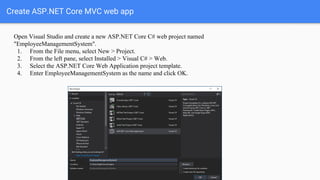
Open Visual Studio and create a new ASP.NET Core C# web project named
"EmployeeManagementSystem".
1. From the File menu, select New > Project.
2. From the left pane, select Installed > Visual C# > Web.
3. Select the ASP.NET Core Web Application project template.
4. Enter EmployeeManagementSystem as the name and click OK.
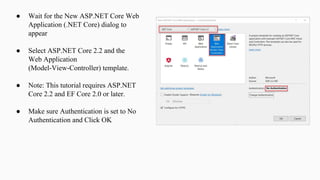
● Wait for the New ASP.NET Core Web
Application (.NET Core) dialog to
appear
● Select ASP.NET Core 2.2 and the
Web Application
(Model-View-Controller) template.
● Note: This tutorial requires ASP.NET
Core 2.2 and EF Core 2.0 or later.
● Make sure Authentication is set to No
Authentication and Click OK
Set up the site style
A few simple changes will set up the site menu, layout, and home page.
Open Views/Shared/_Layout.cshtml and make the following changes:
● Change each occurrence of "EmployeeManagementSystem" to "EMS". There are three
occurrences.
● Add menu entries for About, Employees, Salary Sheet, Task, and Departments, and delete the
Privacy menu entry.
Coding
Create the
BaseEntity
In the Models folder, create
a folder named
“SharedKernel” and create
file named BaseEntity.cs
and replace the template
code with the following
code.
public abstract class BaseEntity
{
[Key, DatabaseGenerated(DatabaseGeneratedOption.Identity)]
public int Id { get; set; }
}
Create the data
model
In the Models folder, create
a class file named
Emplyee.cs and replace the
template code with the
following code.
public class Employee : BaseEntity
{
public string FirstName { get; set; }
public string LastName { get; set; }
public string Designation { get; set; }
public string Gender { get; set; }
public int DepartmentId { get; set; }
public Department Department { get; set; }
public double Salary { get; set; }
[DataType(DataType.Date)]
public DateTime? DateOfBirth { get; set; }
[DataType(DataType.EmailAddress)]
public string Email { get; set; }
public string PhoneNumber { get; set; }
public string ShortCode { get; set; }
public string ImageUrl { get; set; }
}
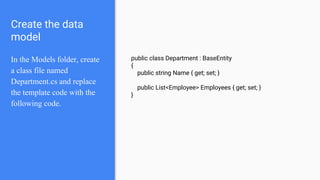
Create the data
model
In the Models folder, create
a class file named
Department.cs and replace
the template code with the
following code.
public class Department : BaseEntity
{
public string Name { get; set; }
public List<Employee> Employees { get; set; }
}
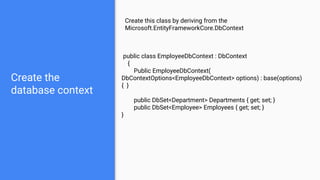
Create the
database context
Create this class by deriving from the
Microsoft.EntityFrameworkCore.DbContext
public class EmployeeDbContext : DbContext
{
Public EmployeeDbContext(
DbContextOptions<EmployeeDbContext> options) : base(options)
{ }
public DbSet<Department> Departments { get; set; }
public DbSet<Employee> Employees { get; set; }
}
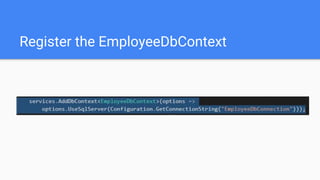
Register the EmployeeDbContext
Coding
Add Employee Controller
Coding
Implement Index action method in Employee
Controller
Coding
Implement Index View for Index method
Coding
Implement Create, Edit, details and delete
action method and View
Coding
Implement sorting, searching
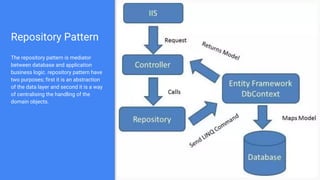
Repository Pattern
The repository pattern is mediator
between database and application
business logic. repository pattern have
two purposes; first it is an abstraction
of the data layer and second it is a way
of centralising the handling of the
domain objects.
Repository
Pattern
Implementation
Coding
Resources
● ASP.NET Core
● ASP.NET Core in MVA
● Patterns In Model-View-Controller Architectures
● Principles Take pride in your code.
●
ASP.NET Core MVC with EF Core code first

ASP.NET Core MVC with EF Core code first

  • 1.
    ASP.NET Core MVC with EFCore Code-First
  • 2.
    About Me Md. AftabUddin Kajal Software Engineer SELISE rockin' software linkedin: @iamkajal || github: @iamkajal || kajal.alpha@gmail.com
  • 3.
    Agenda ● Get started ●Create, Read, Update, and Delete operations ● Sorting, filtering ● Migrations ● Create a complex data model ● Reading related data ● Updating related data ● Implementing Repository Pattern ● Implementing Clean Architecture
  • 4.
  • 5.
    Get started withEF Core in an ASP.NET MVC web app This lesson teaches ASP.NET Core MVC and Entity Framework Core with controllers and views. The EMS sample web application demonstrates how to create ASP.NET Core 2.2 MVC web applications using Entity Framework (EF) Core 2.0 and Visual Studio 2017. The sample application is a web site for a EMS. It includes functionality such as employee add, salary creation, and task assignments. In this lesson, you: ● Create ASP.NET Core MVC web app ● Set up the site style ● Learn about EF Core NuGet packages ● Create the data model ● Create the database context ● Register the SchoolContext ● Initialize DB with test data ● Create controller and views ● View the database
  • 6.
    Create ASP.NET CoreMVC web app Open Visual Studio and create a new ASP.NET Core C# web project named "EmployeeManagementSystem". 1. From the File menu, select New > Project. 2. From the left pane, select Installed > Visual C# > Web. 3. Select the ASP.NET Core Web Application project template. 4. Enter EmployeeManagementSystem as the name and click OK.
  • 7.
    ● Wait forthe New ASP.NET Core Web Application (.NET Core) dialog to appear ● Select ASP.NET Core 2.2 and the Web Application (Model-View-Controller) template. ● Note: This tutorial requires ASP.NET Core 2.2 and EF Core 2.0 or later. ● Make sure Authentication is set to No Authentication and Click OK
  • 8.
    Set up thesite style A few simple changes will set up the site menu, layout, and home page. Open Views/Shared/_Layout.cshtml and make the following changes: ● Change each occurrence of "EmployeeManagementSystem" to "EMS". There are three occurrences. ● Add menu entries for About, Employees, Salary Sheet, Task, and Departments, and delete the Privacy menu entry.
  • 9.
  • 10.
    Create the BaseEntity In theModels folder, create a folder named “SharedKernel” and create file named BaseEntity.cs and replace the template code with the following code. public abstract class BaseEntity { [Key, DatabaseGenerated(DatabaseGeneratedOption.Identity)] public int Id { get; set; } }
  • 11.
    Create the data model Inthe Models folder, create a class file named Emplyee.cs and replace the template code with the following code. public class Employee : BaseEntity { public string FirstName { get; set; } public string LastName { get; set; } public string Designation { get; set; } public string Gender { get; set; } public int DepartmentId { get; set; } public Department Department { get; set; } public double Salary { get; set; } [DataType(DataType.Date)] public DateTime? DateOfBirth { get; set; } [DataType(DataType.EmailAddress)] public string Email { get; set; } public string PhoneNumber { get; set; } public string ShortCode { get; set; } public string ImageUrl { get; set; } }
  • 12.
    Create the data model Inthe Models folder, create a class file named Department.cs and replace the template code with the following code. public class Department : BaseEntity { public string Name { get; set; } public List<Employee> Employees { get; set; } }
  • 13.
    Create the database context Createthis class by deriving from the Microsoft.EntityFrameworkCore.DbContext public class EmployeeDbContext : DbContext { Public EmployeeDbContext( DbContextOptions<EmployeeDbContext> options) : base(options) { } public DbSet<Department> Departments { get; set; } public DbSet<Employee> Employees { get; set; } }
  • 14.
  • 15.
  • 16.
    Coding Implement Index actionmethod in Employee Controller
  • 17.
  • 18.
    Coding Implement Create, Edit,details and delete action method and View
  • 19.
  • 20.
    Repository Pattern The repositorypattern is mediator between database and application business logic. repository pattern have two purposes; first it is an abstraction of the data layer and second it is a way of centralising the handling of the domain objects.
  • 21.
  • 22.
  • 24.
    Resources ● ASP.NET Core ●ASP.NET Core in MVA ● Patterns In Model-View-Controller Architectures ● Principles Take pride in your code. ●