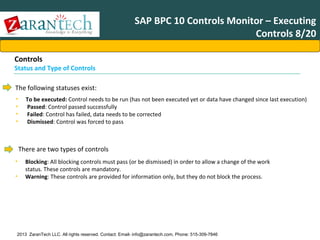
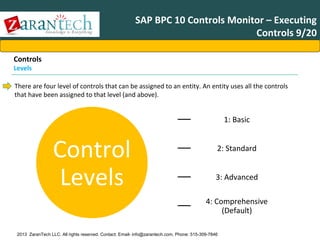
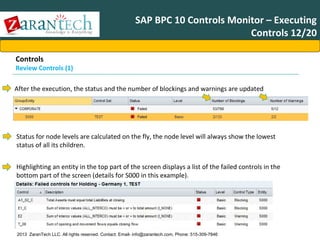
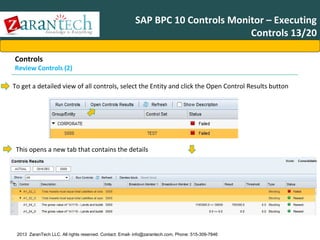
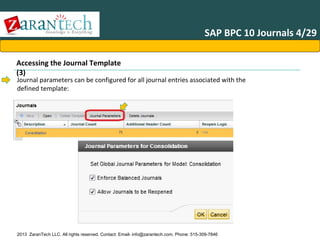
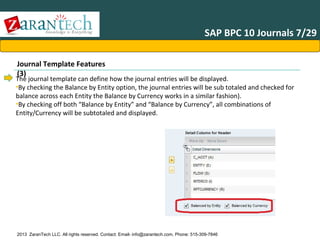
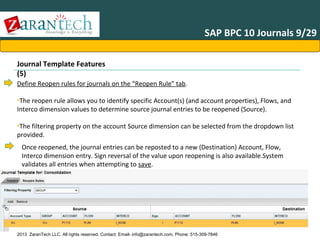
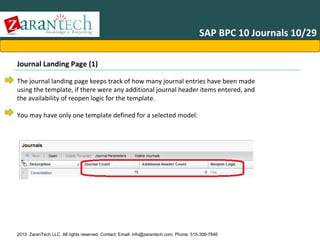
SAP BPC Financial ConsolidationAgenda
•
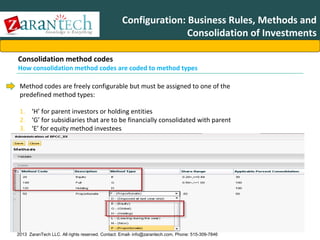
•
•
•
•
•
•
•
•
•
•
•

Advanced Accounting
Introduction IRS
BPC 10
Business Process Flow BPC 10
Consolidation Framework
Consolidation Monitor
Controls Administration
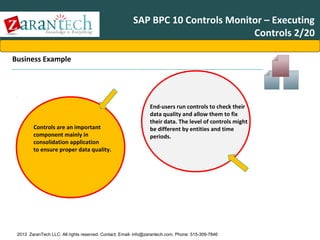
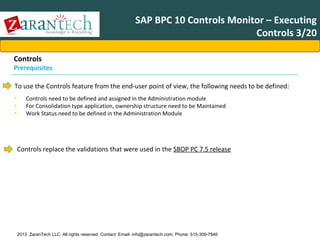
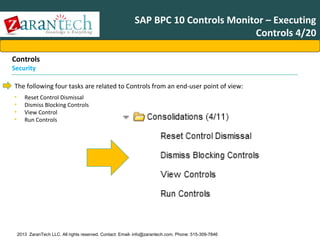
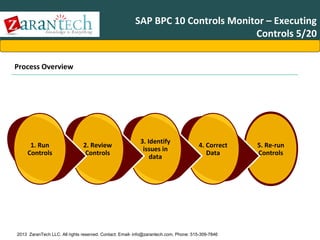
Controls Monitor – Executing Controls
Journals
Ownership Manager
Configuration: Business Rules, Methods and
Consolidation of Investments

Accounting Basics

2013 ZaranTech LLC. All rights reserved. Contact: Email- info@zarantech.com, Phone: 515-309-7846
Accounting Basics 1/11
Account Types
•In order to track money within an organization, different types of accounting categories exist. These categories are used to
denote if the money is owned or owed by the organization.
•three main categories:
•Assets,
•Liabilities,
• Equity

Assets
•An Asset is a property of value owned by a business. Physical objects and intangible rights such as money, accounts
receivable, merchandise, machinery, buildings, and inventories for sale are common examples of business assets as they
have economic value for the owner.
Assets Accounts
Debit Increase

2013 ZaranTech LLC. All rights reserved. Contact: Email- info@zarantech.com, Phone: 515-309-7846

Credit Decrease
Accounting Basics 2/11
•Debt obligations owed to creditors as a result of operations to generate sales revenue. Liabilities represent creditor equity
or claims against the assets of the business entity.
•Forms of liabilties:
•Current or short term : must be paid within 1> year of the balance sheet date.
•Long Term Liabilities: : must be paid within 2 > to more years of the balance sheet date
•Examples current or short term
•Accounts Payable
•Sales Tax Payable
•Unearned Revenues
•Short Term Notes Payable
•Payroll Liabilities
•Contingent Liabilities

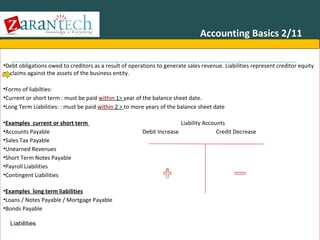
Liability Accounts
Debit Increase
Credit Decrease

•Examples long term liabilities
•Loans / Notes Payable / Mortgage Payable
•Bonds Payable
Liabilities
2013 ZaranTech LLC. All rights reserved. Contact: Email- info@zarantech.com, Phone: 515-309-7846
Accounting Basics 3/11
Ownership equity represents claims to assets of a business entity.
•There are three basic forms of ownership equity:
1.Proprietorship entity financing provided by a sole owner.
2.Partnership entity financing provided by two or more owners (partners).
3.Corporation a legal entity incorporated under the laws of a state, separate from its owners.

• Capital stock: Financing provided by stockholders (or shareholders) with ownership represented by shares of corporate
stock. Each share of stock represents one ownership claim.
• Retained earnings: Earnings of the corporation that have been kept in the business after dividends are paid.
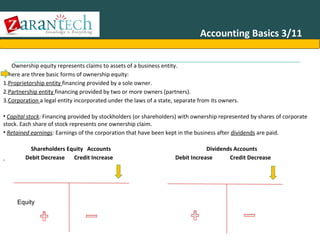
Shareholders Equity Accounts
Debit Decrease
Credit Increase

Dividends Accounts
Debit Increase
Credit Decrease

Equity

2013 ZaranTech LLC. All rights reserved. Contact: Email- info@zarantech.com, Phone: 515-309-7846
Accounting Basics 4/11
Depreciation in accounting terms normally means the devaluation of a fixed asset.
•Determining the useful life of a fixed asset is usually much easier then an intangible asset.
•Since the useful life of fixed assets is much easier to determine, depreciation is much more common than amortization.
•Some Examples of fixed assets: Equipment, Computers, Vehicles, Furniture and Buildings.

•There are several methods of devaluating assets. The most common methods are straight-line and double-declining
balance methods.
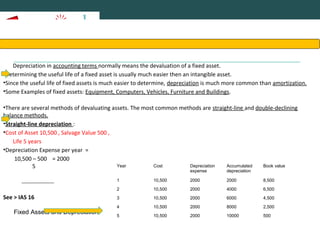
•Straight-line depreciation :
•Cost of Asset 10,500 , Salvage Value 500 ,
Life 5 years
•Depreciation Expense per year =
10,500 – 500 = 2000
Year
Cost
Depreciation
Accumulated
Book value
5
expense

depreciation

1

Fixed Assets and Depreciation

2000

2000

8,500

2

See > IAS 16

10,500
10,500

2000

4000

6,500

3

10,500

2000

6000

4,500

4

10,500

2000

8000

2,500

5

10,500

2000

10000

500

2013 ZaranTech LLC. All rights reserved. Contact: Email- info@zarantech.com, Phone: 515-309-7846
Basics of Accounting 5/11
•The double-declining balance method ignores salvage value in the initial calculation.
•However, depreciation expense will be limited if the calculated amount would result in the book value dropping below the
salvage value.
•Example : Suppose an asset has a prior book value of $600 and a salvage value of $500. In this case, depreciation expense
is limited to the remaining $100 book value in excess of salvage value.
•Furthermore ,each year comparisons are made between the declining balance rate calculations and straight-line
depreciation of the remaining book value.
•A switch to the straight-line calculation is made in the year in which the straight-line calculation exceeds the declining
balance rate calculation.
DDB rate = 1/Life x 2 = 1/5 x 2 = 40%
Declining balance rate depreciation =
Beginning of period carrying value x DDB rate
Year
Cost
Depreciat Accumulate
Book value
ion
expense
Year

Declining Balance rate

Straight line

1

10,500 x 40% = 4,200

10,500 - 500)/5 = 2,000

2

6,300 x 40% = 2,520

6,300 - 500)/4 = 1,450

d
depreciatio
n

3

3,780 x 40% 1,512
3,780
Declining Balance=depreciation - 500)/3 = 1,093

1

10,500

4,200

4,200

6,300

2

10,500

2,520

6,720

3,780

3

10,500

1,512

8,232

2,268

4

2,268 x 40% = 907

2,268 - 500)/2 = 884

4

10,500

907

9,139

1,361

5

1,361 x 40% = 544

1,361 - 500)/1 = 861

5

10,500

861

10,000

500

2013 ZaranTech LLC. All rights reserved. Contact: Email- info@zarantech.com, Phone: 515-309-7846
Basics of Accounting 6/11
•
•

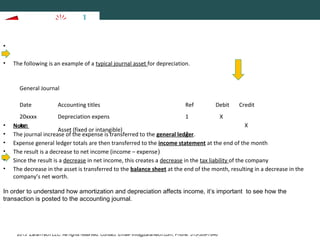
The following is an example of a typical journal asset for depreciation.

General Journal
Date

•
•
•
•
•
•

Accounting titles

Ref

Debit

Credit

20xxxx
Depreciation expens
1
X
Jan
X
Note:
Asset (fixed or intangible)
2
The journal increase of the expense is transferred to the general ledger.
Expense general ledger totals are then transferred to the income statement at the end of the month
The result is a decrease to net income (income – expense)
Since the result is a decrease in net income, this creates a decrease in the tax liability of the company
The decrease in the asset is transferred to the balance sheet at the end of the month, resulting in a decrease in the
company’s net worth.

In order to understand how amortization and depreciation affects income, it’s important to see how the
transaction is posted to the accounting journal.

2013 ZaranTech LLC. All rights reserved. Contact: Email- info@zarantech.com, Phone: 515-309-7846
Basics of Accounting 7/11
•Amortization in accounting terms means the devaluation of an intangible asset.
•An intangible asset is something of value to a business that does not have a physical presence.
•In order to write down an asset, it must have a useful life.
•The useful life of an intangible is often difficult to determine.
•Some examples of intangible assets are: Patents, Goodwill, Contracts, License, Trademarks and Franchise
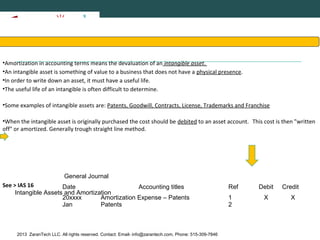
•When the intangible asset is originally purchased the cost should be debited to an asset account. This cost is then "written
off" or amortized. Generally trough straight line method.

General Journal
See > IAS 16
Date
Accounting titles
Intangible Assets and Amortization
20xxxx
Amortization Expense – Patents
Jan
Patents

2013 ZaranTech LLC. All rights reserved. Contact: Email- info@zarantech.com, Phone: 515-309-7846

Ref
1
2

Debit
X

Credit
X
Basics of Accounting 8/11
•A system of accounting that recognizes revenue and matches it with the expenses that generated that revenue.
•Unlike other systems of accounting, which recognize revenue and expenses in the order in which they are received, the
accrual accounting convention ignores the function of time and only considers what expenses generate what revenues,
even if payments have not actually been made.
•Some Examples….

2013 ZaranTech LLC. All rights reserved. Contact: Email- info@zarantech.com, Phone: 515-309-7846
Basics of Accounting 8/11
1.Accrual Adjustments

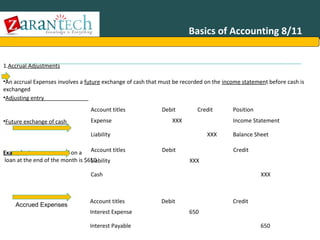
•An accrual Expenses involves a future exchange of cash that must be recorded on the income statement before cash is
exchanged
•Adjusting entry
Account titles

•Future exchange of cash

Expense

Debit

Credit

XXX

Income Statement

Liability
Example: Interest accrued on a Account titles
loan at the end of the month is $650
Liability

Position

XXX
Debit

Balance Sheet
Credit

XXX

Cash

Accrued Expenses

Account titles
Interest Expense

XXX

Debit

Credit
650

Interest Payable
2013 ZaranTech LLC. All rights reserved. Contact: Email- info@zarantech.com, Phone: 515-309-7846

650
Basics of Accounting 9/11
•Accrued revenue refers to revenue that has been incurred but not yet received.
•Examples of accrued revenue items might be services you have provided but that have not yet been billed or paid for. The
service industries account for a large number of accrued revenue transactions, since quite often services are provided over
a week, month, or even year, but aren’t billed until the job is complete.
•One of the most basic concepts of accounting involves determining if an item is an asset or a liability.

•Adjusting entry :
Account titles

•Future exchange of cash:

Receivable

Debit

Credit

XXX

Balance Sheet

Revenue
Account titles
Cash

Position

XXX
Debit

Income Statement
Credit

XXX

Receivable

XXX

•Example: Company A has Performed $500 titles
Account of services for a customer on account.
Debit
Accrued Revenues

Accounts Receivable

Credit

500

Revenue
2013 ZaranTech LLC. All rights reserved. Contact: Email- info@zarantech.com, Phone: 515-309-7846

500
Basics of Accounting 10/11
Adjusting Journal Entries
1.Deferral Adjustments
• Deferred Expenses

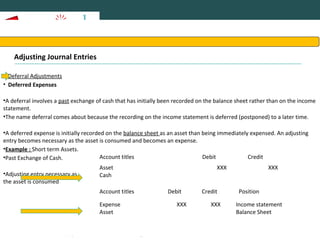
•A deferral involves a past exchange of cash that has initially been recorded on the balance sheet rather than on the income
statement.
•The name deferral comes about because the recording on the income statement is deferred (postponed) to a later time.
•A deferred expense is initially recorded on the balance sheet as an asset than being immediately expensed. An adjusting
entry becomes necessary as the asset is consumed and becomes an expense.
•Example : Short term Assets.
Account titles
Debit
Credit
•Past Exchange of Cash.
•Adjusting entry necessary as
the asset is consumed

Asset
Cash
Account titles
Expense
Asset

XXX

Debit
XXX

Credit
XXX

2013 ZaranTech LLC. All rights reserved. Contact: Email- info@zarantech.com, Phone: 515-309-7846

XXX

Position
Income statement
Balance Sheet
Basics of Accounting 11/11
•Revenue cannot be recorded until the income has been earned. Cash received in advance of income realization should be
initially recorded in a liability account such as "Unearned Revenue".
•An adjusting entry later becomes necessary as the revenue is earned. The liability should be reduced and the revenue
recorded.
•Past exchange of cash
Account titles

•Adjusting entry necessary
as revenue is earned

Debit

Cash
Unearned Revenue
Account titles

Credit
XXX

Debit

Credit

XXX

Position

•Example: Adams CPA previously received $500 for bookkeeping services in advance of providing the services. Adams has
Unearned Revenue
XXX
XXX
Balance
Revenue
Income Statement
now earned $300 of the money

Account titles
Deferred Revenues

Unearned Revenue
Revenue

Debit

Credit
300

2013 ZaranTech LLC. All rights reserved. Contact: Email- info@zarantech.com, Phone: 515-309-7846

300
SAP BPC Financial ConsolidationAgenda
•
•
•
•
•
•
•
•
•
•
•
•

Advanced Accounting
Introduction IRS
BPC 10
Business Process Flow BPC 10
Consolidation Framework
Consolidation Monitor
Controls Administration
Controls Monitor – Executing Controls
Journals
Ownership Manager
Configuration: Business Rules, Methods and
Consolidation of Investments

Accounting Basics

2013 ZaranTech LLC. All rights reserved. Contact: Email- info@zarantech.com, Phone: 515-309-7846
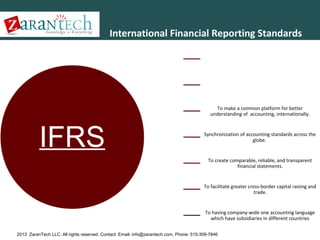
International Financial Reporting Standards
International Financial Reporting Standards (IFRS) are a set of
accounting standards developed by the International
Accounting Standards Board (IASB) that is becoming the global
standard for the preparation of public company financial
statements.
IFRS was developed in the year 2001 by the International
Accounting Standards Board in the public interest to provide a
single set of high quality, understandable and uniform
accounting standards.Need of IFRS

To make a common platform for better
understanding of accounting, internationally.

IFRS

Synchronization of accounting standards across the
globe.

To create comparable, reliable, and transparent
financial statements.

To facilitate greater cross-border capital raising and
trade.

To having company-wide one accounting language
which have subsidiaries in different countries
2013 ZaranTech LLC. All rights reserved. Contact: Email- info@zarantech.com, Phone: 515-309-7846
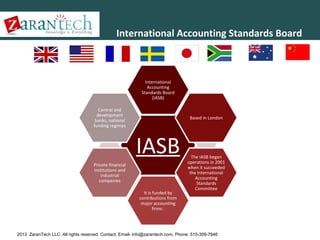
International Accounting Standards Board

International
Accounting
Standards Board
(IASB)
Central and
development
banks, national
funding regimes

Based in London

IASB
Private financial
institutions and
industrial
companies
It is funded by
contributions from
major accounting
firms:

The IASB began
operations in 2001
when it succeeded
the International
Accounting
Standards
Committee

2013 ZaranTech LLC. All rights reserved. Contact: Email- info@zarantech.com, Phone: 515-309-7846
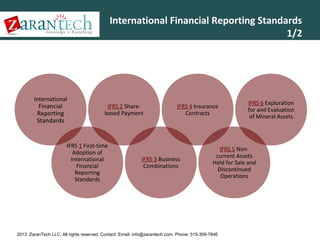
International Financial Reporting Standards
1/2

International

Financial
Reporting
Standards

IFRS 2 Sharebased Payment

IFRS 1 First-time
Adoption of
International
Financial
Reporting
Standards

IFRS 4 Insurance
Contracts

IFRS 3 Business
Combinations

IFRS 6 Exploration
for and Evaluation
of Mineral Assets

IFRS 5 Noncurrent Assets
Held for Sale and
Discontinued
Operations

2013 ZaranTech LLC. All rights reserved. Contact: Email- info@zarantech.com, Phone: 515-309-7846
International Financial Reporting Standards
2/2

IFRS 7 Financial
Instruments:
Disclosures

IFRS 9 Financial
Instruments

IFRS 8 Operating
Segments

IFRS 11 Joint
Arrangements

IFRS 10
Consolidated
Financial
Statements

IFRS 13 Fair Value
Measurement

IFRS 12 Disclosure
of Interests in
Other Entities

2013 ZaranTech LLC. All rights reserved. Contact: Email- info@zarantech.com, Phone: 515-309-7846
Summary of IFRS
Standards 1/13
IFRS 1 First-time Adoption of International Financial Reporting Standards sets out the procedures that an entity must follow when it adopts
IFRSs for the first time as the basis for preparing its general purpose financial statements

A first-time adopter is an entity that, for the
first time, makes an explicit and unreserved
statement that its general purpose financial
statements comply with IFRSs. (IFRS 1.3)

An entity may be a first-time adopter if, in
the preceding year, it prepared IFRS
financial statements for internal
management use, as long as those IFRS
financial statements were not made
available to owners or external parties such
as investors or creditors.

An entity can also be a first-time adopter if,
in the preceding year, its financial
statements: [IFRS 1.3] asserted compliance
with some but not all IFRSs, or included
only a reconciliation of selected figures
from previous GAAP to IFRSs. (Previous
GAAP means the GAAP that an entity
followed immediately before adopting to
IFRSs.)

However, an entity is not a first-time adopter if, in the preceding year, its financial statements asserted:

Compliance with IFRSs even if the auditor's report contained a
qualification with respect to conformity with IFRSs.

Compliance with both previous GAAP and IFRSs.

2013 ZaranTech LLC. All rights reserved. Contact: Email- info@zarantech.com, Phone: 515-309-7846
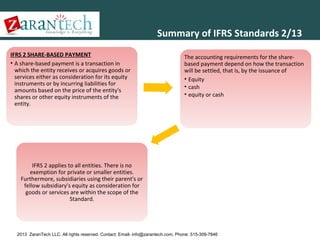
Summary of IFRS Standards 2/13
IFRS 2 SHARE-BASED PAYMENT
• A share-based payment is a transaction in
which the entity receives or acquires goods or
services either as consideration for its equity
instruments or by incurring liabilities for
amounts based on the price of the entity's
shares or other equity instruments of the
entity.

The accounting requirements for the sharebased payment depend on how the transaction
will be settled, that is, by the issuance of
• Equity
• cash
• equity or cash

IFRS 2 applies to all entities. There is no
exemption for private or smaller entities.
Furthermore, subsidiaries using their parent's or
fellow subsidiary's equity as consideration for
goods or services are within the scope of the
Standard.

2013 ZaranTech LLC. All rights reserved. Contact: Email- info@zarantech.com, Phone: 515-309-7846
Summary of IFRS Standards 3/13
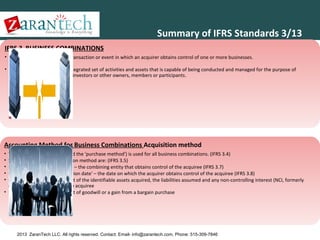
IFRS 3 BUSINESS COMBINATIONS
• A business combination is a transaction or event in which an acquirer obtains control of one or more businesses.
• A business is defined as an integrated set of activities and assets that is capable of being conducted and managed for the purpose of
providing a return directly to investors or other owners, members or participants.

Accounting Method for Business Combinations Acquisition method
The acquisition method (called the 'purchase method') is used for all business combinations. (IFRS 3.4)
Steps in applying the acquisition method are: (IFRS 3.5)
Identification of the 'acquirer' – the combining entity that obtains control of the acquiree (IFRS 3.7)
Determination of the 'acquisition date' – the date on which the acquirer obtains control of the acquiree (IFRS 3.8)
Recognition and measurement of the identifiable assets acquired, the liabilities assumed and any non-controlling interest (NCI, formerly
called minority interest) in the acquiree
• Recognition and measurement of goodwill or a gain from a bargain purchase
•
•
•
•
•

2013 ZaranTech LLC. All rights reserved. Contact: Email- info@zarantech.com, Phone: 515-309-7846
Summary of IFRS Standards 4/13
(a) limited improvements to
accounting by insurers for
insurance contracts.

IFRS 4 INSURANCE
CONTRACTS

This IFRS requires:

The objective of this IFRS is to specify the financial
reporting for insurance contracts by any entity
that issues such contracts (described in this IFRS
as an insurer) until the Board completes the
second phase of its project on insurance
contracts.

2013 ZaranTech LLC. All rights reserved. Contact: Email- info@zarantech.com, Phone: 515-309-7846

(b) disclosure that identifies
and explains the amounts in
an insurer’s financial
statements arising from
insurance contracts and helps
users of those financial
statements understand the
amount, timing and
uncertainty of future cash
flows from insurance
contracts
The IFRS applies to all
insurance contracts (including
reinsurance contracts) that an
entity issues and to
reinsurance contracts that it
holds, except for specified
contracts covered by other
IFRSs.
It does not apply to other
assets and liabilities of an
insurer, such as financial
assets and financial liabilities
within the scope of IAS 39
Financial Instruments:
Recognition and
Measurement. Furthermore, it
does not address accounting
by policyholders.
Summary of IFRS Standards 5/13
• The
objective of
this IFRS is to
specify the
accounting
for assets
held for sale,
and the
presentation
and
disclosure of
discontinued
operations.

IFRS 5 Non-current Assets
Held for Sale and
Discontinued Operations

• A 'disposal
group' is a
group of
assets,
possibly with
some
associated
liabilities,
which an
entity
intends to
dispose of in
a single
transaction.
• The
measuremen
t basis
required for
non-current
assets
classified as
held for sale
is applied to
the group as
a whole, and
any resulting
impairment
loss reduces
the carrying
amount of
the noncurrent
assets in the
disposal
group in the
order of
allocation
required by
IAS 36. (IFRS
5.4)

Disposal Groups

• (a) assets that meet
the criteria to be
classified as held for
sale to be measured
at the lower of
carrying amount and
fair value less costs
to sell, and
depreciation on such
assets to cease
• (b) assets that meet
the criteria to be
classified as held for
sale to be presented
separately on the
face of the balance
sheet and the
results of
discontinued
operations to be
presented
separately in the
income statement .

This IFRS Requires

2013 ZaranTech LLC. All rights reserved. Contact: Email- info@zarantech.com, Phone: 515-309-7846
Summary of IFRS Standards 6/13

IFRS 6 Exploration for and Evaluation of Mineral Resources

Exploration for and
evaluation of mineral
Exploration and evaluation resources is the search for
expenditures are
mineral resources, including
expenditures incurred by an
minerals, oil, natural gas
The objective of this IFRS is
Exploration and evaluation
entity in connection with
and similar nonto specify the financial
assets are exploration and
the exploration for and
regenerative resources after
reporting for the
evaluation expenditures
evaluation of mineral
the entity has obtained legal
exploration for and
recognized as assets in
resources before the
rights to explore in a specific
evaluation of mineral
accordance with the entity’s
technical feasibility and
area, as well as the
resources.
accounting policy
commercial viability of
determination of the
extracting a mineral
technical feasibility and
resource are demonstrable.
commercial viability of
extracting the mineral
resource.

2013 ZaranTech LLC. All rights reserved. Contact: Email- info@zarantech.com, Phone: 515-309-7846
Summary of IFRS Standards 7/13

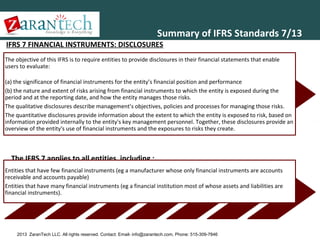
IFRS 7 FINANCIAL INSTRUMENTS: DISCLOSURES

The objective of this IFRS is to require entities to provide disclosures in their financial statements that enable
users to evaluate:
(a) the significance of financial instruments for the entity’s financial position and performance
(b) the nature and extent of risks arising from financial instruments to which the entity is exposed during the
period and at the reporting date, and how the entity manages those risks.
The qualitative disclosures describe management’s objectives, policies and processes for managing those risks.
The quantitative disclosures provide information about the extent to which the entity is exposed to risk, based on
information provided internally to the entity's key management personnel. Together, these disclosures provide an
overview of the entity's use of financial instruments and the exposures to risks they create.

The IFRS 7 applies to all entities, including ;
Entities that have few financial instruments (eg a manufacturer whose only financial instruments are accounts
receivable and accounts payable)
Entities that have many financial instruments (eg a financial institution most of whose assets and liabilities are
financial instruments).

2013 ZaranTech LLC. All rights reserved. Contact: Email- info@zarantech.com, Phone: 515-309-7846
Summary of IFRS Standards 8/13
IFRS 8
Operating
Segments

• The objective of this IFRS is
that an entity shall disclose
information to enable users
of its financial statements to
evaluate the nature and
financial effects of the
business activities in which it
engages and the economic
environments in which it
operates.

This IFRS
applies to:

(a) the separate
or individual
financial
statements of
an entity:

• (i) whose debt or equity
instruments are traded in a
public market (a domestic or
foreign stock exchange or an
over-the-counter market,
including local and regional
markets), or
• (ii) that files, or is in the
process of filing, its financial
statements with a securities
commission or other
regulatory organization for
the purpose of issuing any
class of instruments in a
public market.

2013 ZaranTech LLC. All rights reserved. Contact: Email- info@zarantech.com, Phone: 515-309-7846

(b) the
consolidated
financial
statements of a
group with a
parent:
• (i) whose debt or equity
instruments are traded in a
public market (a domestic or
foreign stock exchange or an
over-the-counter market,
including local and regional
markets), or
• (ii) that files, or is in the
process of filing, the
consolidated financial
statements with a securities
commission or other
regulatory organization for
the purpose of issuing any
class of instruments in a
public market.
Summary of IFRS Standards 9/13
IFRS 9 contains guidance for:

IFRS 9 Financial Instruments

• Recognizing and derecognizing
financial instruments;
• Classifying and measuring financial
assets;
• Classifying and measuring financial
liabilities.

• The objective of IFRS 9 is to establish
principles for the financial reporting of
financial instruments that will present
relevant and useful information to users
of financial statements for their
assessment of amounts, timing and
uncertainty of the entity’s future cash
flows.

•

•IFRS 9 Is a
'Work in
Progress'
and Will
Eventually
Replace IAS
39 in its
Entirety
2013 ZaranTech LLC. All rights reserved. Contact: Email- info@zarantech.com, Phone: 515-309-7846
Summary of IFRS Standards 10/13
• The objective of IFRS 10 is to establish
principles for the presentation and preparation of
consolidated financial statements when an entity
controls one or more other entities.
• The Standard:
• Requires a parent entity (an entity that controls
one or more other entities) to present
consolidated financial statements
• Defines the principle of control, and establishes
control as the basis for consolidation
• Set out how to apply the principle of control to
identify whether an investor controls an investee
and therefore must consolidate the investee

IFRS 10 CONSOLIDATED FINANCIAL
STATEMENTS

• Sets out the accounting requirements for the
preparation of consolidated financial statements.
• Consolidated financial statements
• The financial statements of a group in which the
assets, liabilities, equity, income, expenses and
cash flows of the parent and its subsidiaries are
presented as those of a single economic entity
• Control of an investee
• An investor controls an investee when the investor is
exposed, or has rights, to variable returns from its
involvement with the investee and has the ability to
affect those returns through its power over the
investee

2013 ZaranTech LLC. All rights reserved. Contact: Email- info@zarantech.com, Phone: 515-309-7846
Summary of IFRS Standards 11/13
•

The IASB (International
Accounting Standards
Board) recently issued
IFRS 11 Joint
Arrangements that
eliminates proportionate
consolidation as a
method to account for
joint ventures.!!

• Joint arrangements
• A joint arrangement is an arrangement of
which two or more parties have joint
control.
• characteristics joint arrangement
• The parties are bound by a contractual
arrangement.
• The contractual arrangement gives two
or more of those parties joint control of
the arrangement.
• Joint arrangements are either joint
operations or joint ventures.
• A joint operation is a joint arrangement
whereby the parties that have joint
control of the arrangement have rights to
the assets, and obligations for the
liabilities, relating to the arrangement.
Those parties are called joint operators.

IFRS 11 JOINT ARRANGEMENTS
Types of joint
arrangements
A joint venture is a joint arrangement
whereby the parties that have joint
control of the arrangement have
rights to the net assets of the
arrangement. Those parties are called
joint ventures.

2013 ZaranTech LLC. All rights reserved. Contact: Email- info@zarantech.com, Phone: 515-309-7846

•The Objective of IFRS 11 is
that a party to a joint
arrangement determines the
type of joint arrangement in
which it is involved by
assessing its rights and
obligations and accounts for
those rights and obligations
in accordance with that type
of joint arrangement.
Summary of IFRS Standards 11/13

Joint control

Before assessing whether an
entity has joint control over
an arrangement, an entity
first assesses whether the
parties, or a group of the
parties, control the
arrangement (in accordance
with the definition of control
in IFRS 10 Consolidated
Financial Statements)
Joint control is the
contractually agreed sharing
of control of an
arrangement, which exists
only when decisions about
the relevant activities
require the unanimous
consent of the parties
sharing control.

2013 ZaranTech LLC. All rights reserved. Contact: Email- info@zarantech.com, Phone: 515-309-7846
Summary of IFRS Standards 11/13
Main changes introduced by IFRS 11

2013 ZaranTech LLC. All rights reserved. Contact: Email- info@zarantech.com, Phone: 515-309-7846
Summary of IFRS Standards 12/13

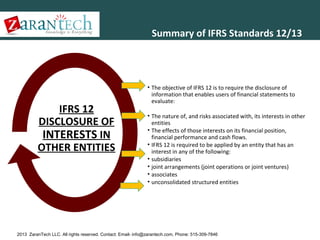
IFRS 12
DISCLOSURE OF
INTERESTS IN
OTHER ENTITIES

• The objective of IFRS 12 is to require the disclosure of
information that enables users of financial statements to
evaluate:
• The nature of, and risks associated with, its interests in other
entities
• The effects of those interests on its financial position,
financial performance and cash flows.
• IFRS 12 is required to be applied by an entity that has an
interest in any of the following:
• subsidiaries
• joint arrangements (joint operations or joint ventures)
• associates
• unconsolidated structured entities

2013 ZaranTech LLC. All rights reserved. Contact: Email- info@zarantech.com, Phone: 515-309-7846
Summary of IFRS Standards 13/13

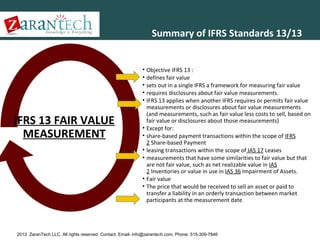
IFRS 13 FAIR VALUE
MEASUREMENT

• Objective IFRS 13 :
• defines fair value
• sets out in a single IFRS a framework for measuring fair value
• requires disclosures about fair value measurements.
• IFRS 13 applies when another IFRS requires or permits fair value
measurements or disclosures about fair value measurements
(and measurements, such as fair value less costs to sell, based on
fair value or disclosures about those measurements)
• Except for:
• share-based payment transactions within the scope of IFRS
2 Share-based Payment
• leasing transactions within the scope of IAS 17 Leases
• measurements that have some similarities to fair value but that
are not fair value, such as net realizable value in IAS
2 Inventories or value in use in IAS 36 Impairment of Assets.
• Fair value
• The price that would be received to sell an asset or paid to
transfer a liability in an orderly transaction between market
participants at the measurement date

2013 ZaranTech LLC. All rights reserved. Contact: Email- info@zarantech.com, Phone: 515-309-7846
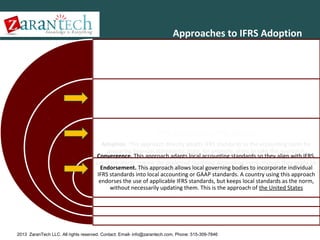
Approaches to IFRS Adoption

Three Approaches to IFRS Adoption
Adoption. This approach directly adopts IFRS standards as the accounting norm for
preparing financial statements. India, for example, plans to take this approach.
Convergence. This approach adapts local accounting standards so they align with IFRS.
Local standards remain the preferred reporting accounting norm, though they might be
Endorsement. This approach allows local governing bodies to incorporate individual
updated to reflect IFRS. Australia is taking this approach.
IFRS standards into local accounting or GAAP standards. A country using this approach
endorses the use of applicable IFRS standards, but keeps local standards as the norm,
without necessarily updating them. This is the approach of the United States

2013 ZaranTech LLC. All rights reserved. Contact: Email- info@zarantech.com, Phone: 515-309-7846

In 2002, the IASB and FASB signed the ‘Norwalk’ agreement, expressing their desire to converge their accounting standards into one
commonly used set of standards.
The Securities and Exchange Commission (SEC) designated the FASB as the organization responsible for setting accounting standards for
public companies in the U.S.

The Financial Accounting Standards Board (FASB) is a private, not-for-profit organization who developed generally accepted accounting
principles (GAAP) within the United States in the public's interest.

Established by FASB

governments.
non-profit organizations,
privately held companies,
publicly traded,
In the U.S. Generally Accepted Accounting Principles are accounting rules used to prepare ,present, and report financial statements for a
wide variety of entities, including:

United States Generally Accepted Accounting
Principles and Security Exchange Commission
(US GAAP & SEC)
2013 ZaranTech LLC. All rights reserved. Contact: Email- info@zarantech.com, Phone: 515-309-7846

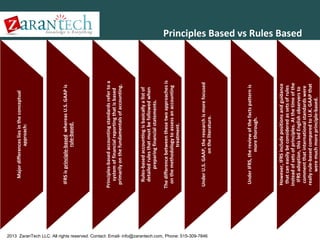
However, IFRS include positions and guidance
that can easily be considered as sets of rules
instead of sets of principles. At the time of the
IFRS adoption, this led English observers to
comment that international standards were
really rule-based compared to U.K. GAAP that
were much more principle-based.

Under IFRS, the review of the facts pattern is
more thorough.

Under U.S. GAAP, the research is more focused
on the literature.

The difference between these two approaches is
on the methodology to assess an accounting
treatment.

Rules-based accounting is basically a list of
detailed rules that must be followed when
preparing financial statements.

Principles-based accounting standards refer to a
system of financial reporting that is based
primarily on the fundamentals of accounting.

IFRS is principle-based whereas U.S. GAAP is
rule-based.

Major differences lies in the conceptual
approach:

Principles Based vs Rules Based
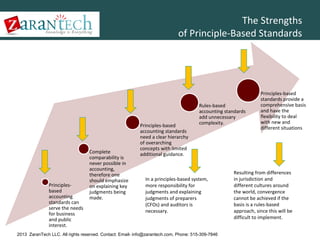
The Strengths
of Principle-Based Standards

Principlesbased
accounting
standards can
serve the needs
for business
and public
interest.

Complete
comparability is
never possible in
accounting,
therefore one
should emphasize
on explaining key
judgments being
made.

Principles-based
accounting standards
need a clear hierarchy
of overarching
concepts with limited
additional guidance.

Rules-based
accounting standards
add unnecessary
complexity.

In a principles-based system,
more responsibility for
judgments and explaining
judgments of preparers
(CFOs) and auditors is
necessary.

2013 ZaranTech LLC. All rights reserved. Contact: Email- info@zarantech.com, Phone: 515-309-7846

Principles-based
standards provide a
comprehensive basis
and have the
flexibility to deal
with new and
different situations

Resulting from differences
in jurisdiction and
different cultures around
the world, convergence
cannot be achieved if the
basis is a rules-based
approach, since this will be
difficult to implement.
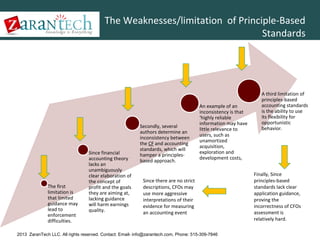
The Weaknesses/limitation of Principle-Based
Standards

The first
limitation is
that limited
guidance may
lead to
enforcement
difficulties.

Since financial
accounting theory
lacks an
unambiguously
clear elaboration of
the concept of
profit and the goals
they are aiming at,
lacking guidance
will harm earnings
quality.

Secondly, several
authors determine an
inconsistency between
the CF and accounting
standards, which will
hamper a principlesbased approach.

An example of an
inconsistency is that
‘highly reliable
information may have
little relevance to
users, such as
unamortized
acquisition,
exploration and
development costs,

Since there are no strict
descriptions, CFOs may
use more aggressive
interpretations of their
evidence for measuring
an accounting event

2013 ZaranTech LLC. All rights reserved. Contact: Email- info@zarantech.com, Phone: 515-309-7846

A third limitation of
principles-based
accounting standards
is the ability to use
its flexibility for
opportunistic
behavior.

Finally, Since
principles-based
standards lack clear
application guidance,
proving the
incorrectness of CFOs
assessment is
relatively hard.
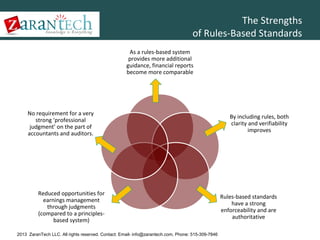
The Strengths
of Rules-Based Standards
As a rules-based system
provides more additional
guidance, financial reports
become more comparable

No requirement for a very
strong ‘professional
judgment’ on the part of
accountants and auditors.

Reduced opportunities for
earnings management
through judgments
(compared to a principlesbased system)
2013 ZaranTech LLC. All rights reserved. Contact: Email- info@zarantech.com, Phone: 515-309-7846

By including rules, both
clarity and verifiability
improves

Rules-based standards
have a strong
enforceability and are
authoritative
The Weaknesses/limitation of Rules-Based
Standards
If an accounting standard
is inappropriately strict,
financial reports of
different companies show
exactly comparable
approaches, whereas the
day-to-day operations
differ enormously

Final Limitation of rulesbased accounting
standards is the effect of
creating ‘seemingly’
comparable financial
reports

Rules might be arbitrary
and the result of a political
process, causing annual
reports that deviate from
their economic reality.

On the ‘cookbook’ (Rules
Based ) point of view,
companies may structure
transactions to meet the
specific requirements of
the accounting standards.

Rules-based accounting
standards cause an
enormous increase in
complexity to apply in
practice.
Can drastically depart from
the underlying principle.

2013 ZaranTech LLC. All rights reserved. Contact: Email- info@zarantech.com, Phone: 515-309-7846
Summary principles based & rules based
Types of accounting standards

Principles-based
General description
Fundamental objectives

Rules-based
Specific description (cookbook) Detailed
methods for (almost) all
accounting problems
Exactly clear when and how to apply
Form-over-substance

More professional judgment Represent

Increased comparability Increased

economic reality Reduced opportunities for
earnings management through
transaction decisions
More flexibility to cope with new
environmental conditions

Main characteristics

Consistent with CF Substance-over-form
True and fair view override

verifiability Reduced opportunities for
earnings management through
accounting decisions
Improved communication
Enforceable and authoritative

Advantages
Enforcement difficulties

Arbitrary

Inconsistency with application guidance

Inconsistent with conceptual framework

(Ab)use of flexibility

Foster creative accounting Seemingly

2013 ZaranTech LLC. All rights reserved. Contact: Email-comparability
Lack of info@zarantech.com, Phone: 515-309-7846
comparable Cannot be comprehensive
2013 ZaranTech LLC. All rights reserved. Contact: Email- info@zarantech.com, Phone: 515-309-7846

GAAP.

Development costs — These costs can be capitalized under IFRS if certain criteria are met, while it is considered as “expenses” under U.S.
Earning-per-Share — Under IFRS, the earning-per-share calculation does not average the individual interim period calculations, whereas
under U.S. GAAP the computation averages the individual interim period incremental shares.

Inventory — Under IFRS, LIFO (a historical method of recording the value of inventory, a firm records the last units purchased as the first
units sold) cannot be used while under U.S. GAAP, companies have the choice between LIFO and FIFO (is a common method for recording the
value of inventory).

Statement of Income — Under IFRS, extraordinary items are not segregated in the income statement, while, under US GAAP, they are
shown below the net income.

Consolidation — IFRS favors a control model whereas U.S. GAAP prefers a risks-and-rewards model. Some entities consolidated in
accordance with FIN 46(R) may have to be shown separately under IFRS.

Some general differences between IFRS and
U.S. GAAP
IFRS Adoption Around the World
IFRS Adoption Around the World 2011
Approximately 120 nations and reporting jurisdictions permit or require IFRS for domestic listed companies.

•Approximately 90 countries have fully conformed with IFRS as promulgated by the IASB and include a statement
acknowledging such conformity in audit reports.
IFRS permitted or required
Convergence plans
U.S. GAAP and/
or convergence intended
No/unknown convergence plans

2013 ZaranTech LLC. All rights reserved. Contact: Email- info@zarantech.com, Phone: 515-309-7846
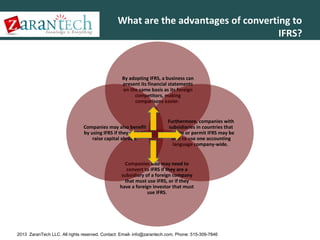
What are the advantages of converting to
IFRS?

By adopting IFRS, a business can
present its financial statements
on the same basis as its foreign
competitors, making
comparisons easier.

Companies may also benefit
by using IFRS if they wish to
raise capital abroad.

Furthermore, companies with
subsidiaries in countries that
require or permit IFRS may be
able to use one accounting
language company-wide.

Companies also may need to
convert to IFRS if they are a
subsidiary of a foreign company
that must use IFRS, or if they
have a foreign investor that must
use IFRS.

2013 ZaranTech LLC. All rights reserved. Contact: Email- info@zarantech.com, Phone: 515-309-7846
What could be the disadvantages of
converting to IFRS?

Despite a belief by some of the
inevitability of the global
acceptance of IFRS, others believe
that U.S. GAAP is the gold
standard, and that a certain level
of quality will be lost with full
acceptance of IFRS.

Because they may believe that the
significant costs associated with
adopting IFRS outweigh the
benefits.

Certain U.S. issuers without
significant customers or
operations outside the United
States may resist IFRS because
they may not have a market
incentive to prepare IFRS financial
statements.

2013 ZaranTech LLC. All rights reserved. Contact: Email- info@zarantech.com, Phone: 515-309-7846
Summary IFRS and Impact
International Financial Reporting Standards
• Methodologies and disclosure requirements for the preparation and presentation of
financial statements.
• Set by the International Accounting Standards Board (IASB)
Global adoption of IFRS
• 100+ jurisdictions already require or permit IFRS
• Including Europe, Russia, Australia, New Zealand,and China (via Hong Kong stock exchange)
• Extended to UK public sector from 2010
• Canada, India, Thailand and Korea from 2011
• Malaysia and Mexico from 2012 Taiwan expected 2012-2014, Japan expected 2016
Major impact in North America
• US SEC has already started accepting IFRS-based filings from foreign issuers
• Timelines for US adoption range from 2013 to 2015
• Ongoing work to refine and align US GAAP with IFRS
• Canada is mandated from 2011

Differing philosophies
• IFRS is principles-based (2,500 pages)
• US GAAP is rules-based (>25,000 pages)

2013 ZaranTech LLC. All rights reserved. Contact: Email- info@zarantech.com, Phone: 515-309-7846
SAP BPC Financial ConsolidationAgenda
•
•
•
•
•
•
•
•
•
•
•
•

Advanced Accounting
Introduction IRS
BPC 10
Business Process Flow BPC 10
Consolidation Framework
Consolidation Monitor
Controls Administration
Controls Monitor – Executing Controls
Journals
Ownership Manager
Configuration: Business Rules, Methods and
Consolidation of Investments

Accounting Basics

2013 ZaranTech LLC. All rights reserved. Contact: Email- info@zarantech.com, Phone: 515-309-7846
SAP BPC Financial Consolidation
SAP BusinessObjects EMP 10

2013 ZaranTech LLC. All rights reserved. Contact: Email- info@zarantech.com, Phone: 515-309-7846
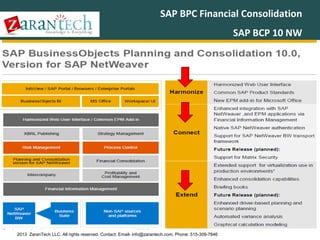
SAP BPC Financial Consolidation
SAP BCP 10 NW

2013 ZaranTech LLC. All rights reserved. Contact: Email- info@zarantech.com, Phone: 515-309-7846
SAP BPC Financial Consolidation
Harmonize

2013 ZaranTech LLC. All rights reserved. Contact: Email- info@zarantech.com, Phone: 515-309-7846
SAP BPC Financial Consolidation
SAP BPC 10 Harmonize 1/6

2013 ZaranTech LLC. All rights reserved. Contact: Email- info@zarantech.com, Phone: 515-309-7846
SAP BPC Financial Consolidation
SAP BPC 10 Harmonize 2/6

2013 ZaranTech LLC. All rights reserved. Contact: Email- info@zarantech.com, Phone: 515-309-7846
SAP BPC Financial Consolidation
SAP BPC 10 Harmonize 3/6

2013 ZaranTech LLC. All rights reserved. Contact: Email- info@zarantech.com, Phone: 515-309-7846
SAP BPC Financial Consolidation
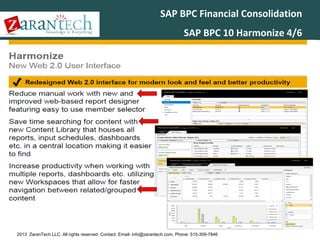
SAP BPC 10 Harmonize 4/6

2013 ZaranTech LLC. All rights reserved. Contact: Email- info@zarantech.com, Phone: 515-309-7846
SAP BPC Financial Consolidation
SAP BPC 10 Harmonize 5/6

2013 ZaranTech LLC. All rights reserved. Contact: Email- info@zarantech.com, Phone: 515-309-7846
SAP BPC Financial Consolidation
SAP BPC 10 Harmonize 6/6

2013 ZaranTech LLC. All rights reserved. Contact: Email- info@zarantech.com, Phone: 515-309-7846
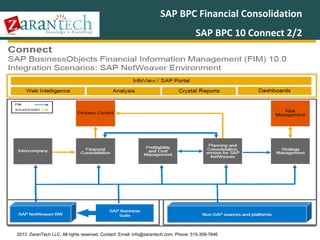
SAP BPC Financial Consolidation
Connect

2013 ZaranTech LLC. All rights reserved. Contact: Email- info@zarantech.com, Phone: 515-309-7846
SAP BPC Financial Consolidation
SAP BPC 10 Connect 1/2

2013 ZaranTech LLC. All rights reserved. Contact: Email- info@zarantech.com, Phone: 515-309-7846
SAP BPC Financial Consolidation
SAP BPC 10 Connect 2/2

2013 ZaranTech LLC. All rights reserved. Contact: Email- info@zarantech.com, Phone: 515-309-7846
SAP BPC Financial Consolidation
Extend

2013 ZaranTech LLC. All rights reserved. Contact: Email- info@zarantech.com, Phone: 515-309-7846
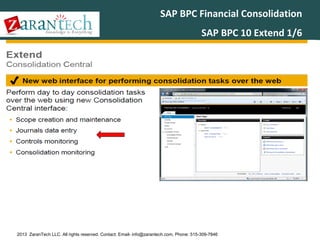
SAP BPC Financial Consolidation
SAP BPC 10 Extend 1/6

2013 ZaranTech LLC. All rights reserved. Contact: Email- info@zarantech.com, Phone: 515-309-7846
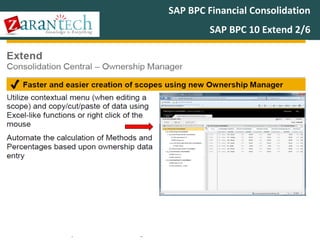
SAP BPC Financial Consolidation
SAP BPC 10 Extend 2/6

2013 ZaranTech LLC. All rights reserved. Contact: Email- info@zarantech.com, Phone: 515-309-7846
SAP BPC Financial Consolidation
SAP BPC 10 Extend 3/6

2013 ZaranTech LLC. All rights reserved. Contact: Email- info@zarantech.com, Phone: 515-309-7846
SAP BPC Financial Consolidation
SAP BPC 10 Extend 4/6

2013 ZaranTech LLC. All rights reserved. Contact: Email- info@zarantech.com, Phone: 515-309-7846
SAP BPC Financial Consolidation
SAP BPC 10 Extend 5/6

2013 ZaranTech LLC. All rights reserved. Contact: Email- info@zarantech.com, Phone: 515-309-7846
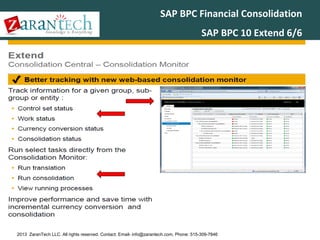
SAP BPC Financial Consolidation
SAP BPC 10 Extend 6/6

2013 ZaranTech LLC. All rights reserved. Contact: Email- info@zarantech.com, Phone: 515-309-7846
SAP BPC Financial ConsolidationAgenda
•
•
•
•
•
•
•
•
•
•
•
•

Advanced Accounting
Introduction IRS
BPC 10
Business Process Flow BPC 10
Consolidation Framework
Consolidation Monitor
Controls Administration
Controls Monitor – Executing Controls
Journals
Ownership Manager
Configuration: Business Rules, Methods and
Consolidation of Investments

Accounting Basics

2013 ZaranTech LLC. All rights reserved. Contact: Email- info@zarantech.com, Phone: 515-309-7846
SAP BPC Financial Consolidation
Business Process flow BPC 10 1/3

dssd

2013 ZaranTech LLC. All rights reserved. Contact: Email- info@zarantech.com, Phone: 515-309-7846
SAP BPC Financial Consolidation
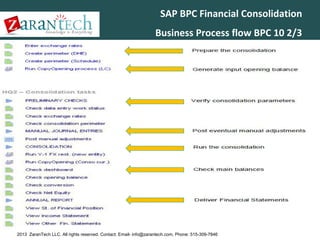
Business Process flow BPC 10 2/3

2013 ZaranTech LLC. All rights reserved. Contact: Email- info@zarantech.com, Phone: 515-309-7846
SAP BPC Financial Consolidation
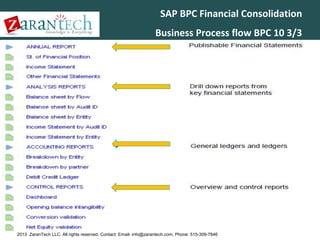
Business Process flow BPC 10 3/3

2013 ZaranTech LLC. All rights reserved. Contact: Email- info@zarantech.com, Phone: 515-309-7846
SAP BPC Financial ConsolidationAgenda
•
•
•
•
•
•
•
•
•
•
•
•

Advanced Accounting
Introduction IRS
BPC 10
Business Process Flow BPC 10
Consolidation Framework
Consolidation Monitor
Controls Administration
Controls Monitor – Executing Controls
Journals
Ownership Manager
Configuration: Business Rules, Methods and
Consolidation of Investments

Accounting Basics

2013 ZaranTech LLC. All rights reserved. Contact: Email- info@zarantech.com, Phone: 515-309-7846
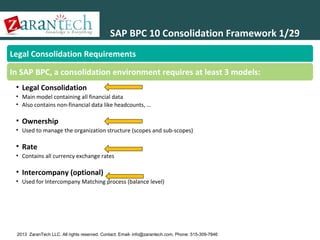
SAP BPC 10 Consolidation Framework 1/29
Legal Consolidation Requirements
In SAP BPC, a consolidation environment requires at least 3 models:
• Legal Consolidation
• Main model containing all financial data
• Also contains non-financial data like headcounts, …

• Ownership
• Used to manage the organization structure (scopes and sub-scopes)

• Rate
• Contains all currency exchange rates

• Intercompany (optional)
• Used for Intercompany Matching process (balance level)

Note : Models names are not mandatory

2013 ZaranTech LLC. All rights reserved. Contact: Email- info@zarantech.com, Phone: 515-309-7846
SAP BPC 10 Consolidation Framework 2/29
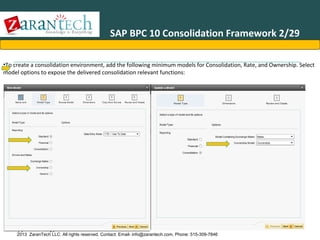
•To create a consolidation environment, add the following minimum models for Consolidation, Rate, and Ownership. Select
model options to expose the delivered consolidation relevant functions:

Application Types

2013 ZaranTech LLC. All rights reserved. Contact: Email- info@zarantech.com, Phone: 515-309-7846
SAP BPC 10 Consolidation Framework 3/29
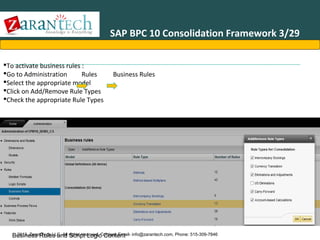
To activate business rules :
Go to Administration
Rules
Select the appropriate model
Click on Add/Remove Rule Types
Check the appropriate Rule Types

Business Rules

2013 ZaranTech LLC. All Script Logic Content
Business Rules and rights reserved. Contact: Email- info@zarantech.com, Phone: 515-309-7846
SAP BPC 10 Consolidation Framework 4/29
As specific model options are activated, business rules and script logic files are made
available in each of the applications. A list of all delivered functionality is as follows:

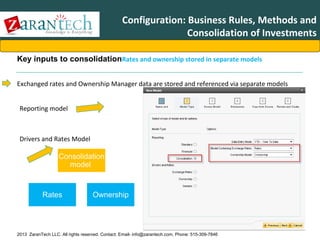
Business Rules and Script Logic Content
2013 ZaranTech LLC. All rights reserved. Contact: Email- info@zarantech.com, Phone: 515-309-7846
SAP BPC 10 Consolidation Framework 5/29
The following parameters must be set after creating an environment. Most of them are not required for a consolidation,
but are a generic system requirement for any new environment. In the Administration console, select Manage All
Environments :
Set Template Version => defines
the current version number of the
dynamic templates in your
application set
Change Status = controls
whether the system is offline or
not ; you can also type in the
message displayed to users who
try to access an model that is
offline

Environment Parameters

2013 ZaranTech LLC. All rights reserved. Contact: Email- info@zarantech.com, Phone: 515-309-7846
SAP BPC 10 Consolidation Framework 6/29
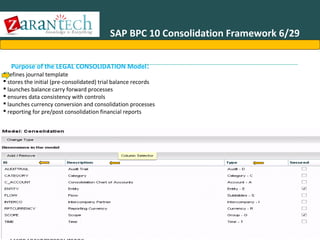
Purpose of the LEGAL CONSOLIDATION Model:

defines journal template
 stores the initial (pre-consolidated) trial balance records
 launches balance carry forward processes
 ensures data consistency with controls
 launches currency conversion and consolidation processes
 reporting for pre/post consolidation financial reports

2013 ZaranTech LLC. All rights reserved. Contact: Email- info@zarantech.com, Phone: 515-309-7846
SAP BPC 10 Consolidation Framework 7/29
Legal Consolidation Model – Dimensions
A minimum of 9 dimensions are required for the Legal Consolidation model:
1.C_Account (A) – Chart of accounts
2.Category (C) - Typical categories would be Budget, Actual, Forecast
3.AuditTrail (D) - Tracks the source of data (input, journal adjustments, eliminations…)
4.Flow (S) - identifies balance sheet movements (opening, additions, decreases, transfers
… and ending balances)
5.RptCurrency (R) - Identifies Transaction Currency and Local Currency.
6.Scope(G) - Consolidation groups / scopes
7.Entity (E)
8.Interco (I) - Provides partner information for intercompany eliminations
9.Time (T)
Note : Dimensions names are not mandatory

2013 ZaranTech LLC. All rights reserved. Contact: Email- info@zarantech.com, Phone: 515-309-7846
SAP BPC 10 Consolidation Framework 8/29
Rates Model – Dimensions

The RATES model contains currency exchange rates
•

•
•
•
•
•

A minimum of 5 dimensions are required for a Rate-Type model :

1. R_Account (A): This details the different types of rate (Average, End-of-Period, Historical,etc.)
2.R_Entity (E): This stores multiple tables of rates, if required; otherwise the R_Entity dimension may just be limited to
a unique member, typically named GLOBAL
3.InputCurrency (R): This stores each applicable local currency (CAN, USD, EUR, etc)
4.Category (C): – same as Legal Consolidation model
5.Time (T) : – same as Legal Consolidation model

2013 ZaranTech LLC. All rights reserved. Contact: Email- info@zarantech.com, Phone: 515-309-7846
SAP BPC 10 Consolidation Framework 9/29
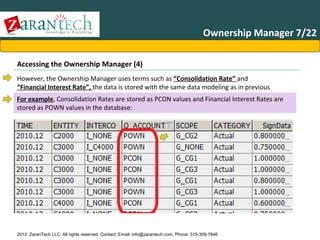
Ownership Model

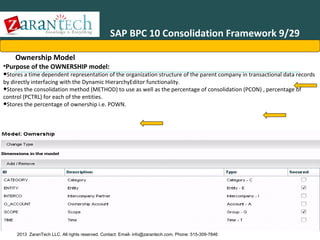
•Purpose of the OWNERSHIP model:

•Stores a time dependent representation of the organization structure of the parent company in transactional data records
by directly interfacing with the Dynamic HierarchyEditor functionality.
•Stores the consolidation method (METHOD) to use as well as the percentage of consolidation (PCON) , percentage of
control (PCTRL) for each of the entities.
•Stores the percentage of ownership i.e. POWN.

2013 ZaranTech LLC. All rights reserved. Contact: Email- info@zarantech.com, Phone: 515-309-7846
SAP BPC 10 Consolidation Framework 10/29
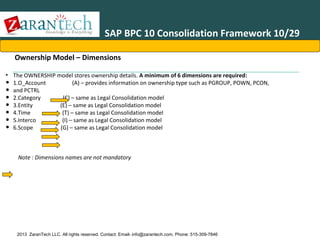
Ownership Model – Dimensions
• The OWNERSHIP model stores ownership details. A minimum of 6 dimensions are required:
1.O_Account
(A) – provides information on ownership type such as PGROUP, POWN, PCON,
and PCTRL
2.Category
(C) – same as Legal Consolidation model
3.Entity
(E) – same as Legal Consolidation model
4.Time
(T) – same as Legal Consolidation model
5.Interco
(I) – same as Legal Consolidation model
6.Scope
(G) – same as Legal Consolidation model

•
•
•
•
•
•
•

Note : Dimensions names are not mandatory

2013 ZaranTech LLC. All rights reserved. Contact: Email- info@zarantech.com, Phone: 515-309-7846
SAP BPC 10 Consolidation Framework 11/29
Ownership - Model General Settings
Settings

Description

- Parent/Child property
used for hierarchy of
groups

This parameter is used with dynamic hierarchy for legal applications when defining
consolidation hierarchies. The value set here must match the name of property in
GROUPS dimension in the legal consolidation application to store the ownership
data.
Value should be PARENT_GROUP.

- Non-interco Member in
Ownership

This parameter should be a member ID in the INTERCO dimension in the ownership
model if you are using dynamic hierarchies.
For example: I_NONE or ThirdParty

2013 ZaranTech LLC. All rights reserved. Contact: Email- info@zarantech.com, Phone: 515-309-7846
SAP BPC 10 Consolidation Framework 12/29
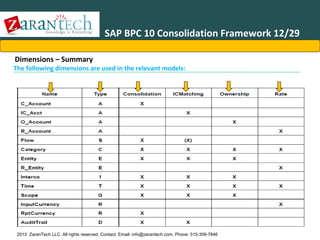
Dimensions – Summary

The following dimensions are used in the relevant models:

2013 ZaranTech LLC. All rights reserved. Contact: Email- info@zarantech.com, Phone: 515-309-7846
SAP BPC 10 Consolidation Framework 13/29
Dimension Types

2013 ZaranTech LLC. All rights reserved. Contact: Email- info@zarantech.com, Phone: 515-309-7846
SAP BPC 10 Consolidation Framework 14/29
• Dimension – C_Account
Main Properties

2013 ZaranTech LLC. All rights reserved. Contact: Email- info@zarantech.com, Phone: 515-309-7846

Relevant to
Consolidation activities
SAP BPC 10 Consolidation Framework 15/29
• Dimension – Flow
Main Properties

2013 ZaranTech LLC. All rights reserved. Contact: Email- info@zarantech.com, Phone: 515-309-7846

Relevant to
Consolidation activities
SAP BPC 10 Consolidation Framework 16/29
• Dimension – Entity

2013 ZaranTech LLC. All rights reserved. Contact: Email- info@zarantech.com, Phone: 515-309-7846

Relevant to
Consolidation activities
SAP BPC 10 Consolidation Framework 17/29
• Dimension – Interco

2013 ZaranTech LLC. All rights reserved. Contact: Email- info@zarantech.com, Phone: 515-309-7846

Relevant to
Consolidation activities
SAP BPC 10 Consolidation Framework 18/29
• Dimension – AuditTrail
Property

2013 ZaranTech LLC. All rights reserved. Contact: Email- info@zarantech.com, Phone: 515-309-7846

Relevant to
Consolidation activities
SAP BPC 10 Consolidation Framework 19/29
Dimension – Category 1/2

2013 ZaranTech LLC. All rights reserved. Contact: Email- info@zarantech.com, Phone: 515-309-7846
SAP BPC 10 Consolidation Framework 20/29
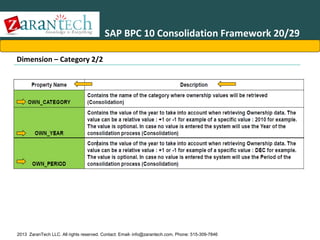
Dimension – Category 2/2

2013 ZaranTech LLC. All rights reserved. Contact: Email- info@zarantech.com, Phone: 515-309-7846
SAP BPC 10 Consolidation Framework 21/29
Dimension – Groups / Consolidation Scopes

2013 ZaranTech LLC. All rights reserved. Contact: Email- info@zarantech.com, Phone: 515-309-7846
SAP BPC 10 Consolidation Framework 22/29
Dimension – Reporting Currency

2013 ZaranTech LLC. All rights reserved. Contact: Email- info@zarantech.com, Phone: 515-309-7846
SAP BPC 10 Consolidation Framework 23/29
Dimension – Time

2013 ZaranTech LLC. All rights reserved. Contact: Email- info@zarantech.com, Phone: 515-309-7846
SAP BPC 10 Consolidation Framework 24/29
Ownership Manager
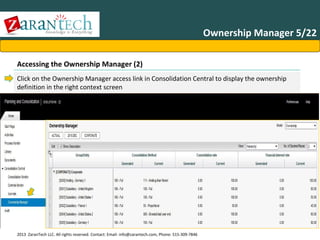
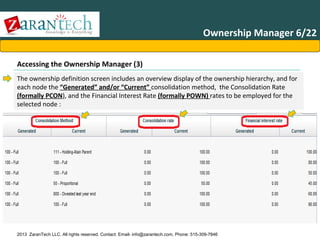
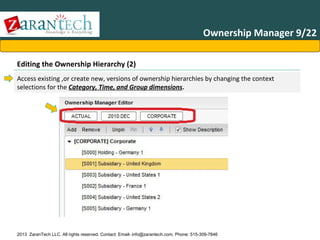
•Purpose :

•Provides a web based interface to allow the business user to set up time dependent relationships between various
subsidiaries and organizational units.
•Each hierarchy is keyed to a specific combination of Category and Time dimension member values.
•Provides a convenient table entry to define the consolidation METHOD, PCTRL, POWN and PCON of each individual unit.
•The dynamic hierarchy is stored in the Ownership application as transactional records.

2013 ZaranTech LLC. All rights reserved. Contact: Email- info@zarantech.com, Phone: 515-309-7846
SAP BPC 10 Consolidation Framework 25/29
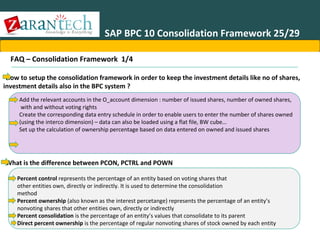
FAQ – Consolidation Framework 1/4
•How to setup the consolidation framework in order to keep the investment details like no of shares,
investment details also in the BPC system ?
Add the relevant accounts in the O_account dimension : number of issued shares, number of owned shares,
with and without voting rights
Create the corresponding data entry schedule in order to enable users to enter the number of shares owned
(using the interco dimension) – data can also be loaded using a flat file, BW cube…
Set up the calculation of ownership percentage based on data entered on owned and issued shares

•What is the difference between PCON, PCTRL and POWN
Percent control represents the percentage of an entity based on voting shares that
other entities own, directly or indirectly. It is used to determine the consolidation
method
Percent ownership (also known as the interest percetange) represents the percentage of an entity’s
nonvoting shares that other entities own, directly or indirectly
Percent consolidation is the percentage of an entity’s values that consolidate to its parent
Direct percent ownership is the percentage of regular nonvoting shares of stock owned by each entity
2013 ZaranTech LLC. All rights reserved. Contact: Email- info@zarantech.com, Phone: 515-309-7846
SAP BPC 10 Consolidation Framework 26/29
FAQ – Consolidation Framework 2/4
•What is the difference between PCON, PCTRL and POWN ?
M
80%
F
60%

• Control percentages : M controls F at 80% ; M controls G at 60%,
through F&G, M controls H at 30%.
• Ownership percentages : M owns F at 80%, M owns G at 48% (80% *
60%), M owns H at 14% (80% * 60% * 30%)

G
30%
H

2013 ZaranTech LLC. All rights reserved. Contact: Email- info@zarantech.com, Phone: 515-309-7846
SAP BPC 10 Consolidation Framework 27/29
FAQ – Consolidation Framework 3/4
•What is the difference between elimination entity and consolidation entity? Are they the same?
Elimination entity will only store eliminations generated by US elimination
business rules while the consolidation entity is the entity storing the consolidated results for
each group/sub-group

What happens when we use different entities in place consolidation entity?

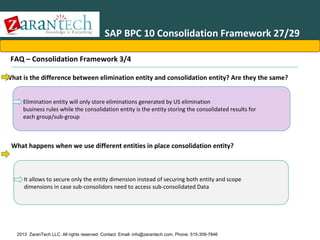
It allows to secure only the entity dimension instead of securing both entity and scope
dimensions in case sub-consolidors need to access sub-consolidated Data

2013 ZaranTech LLC. All rights reserved. Contact: Email- info@zarantech.com, Phone: 515-309-7846
SAP BPC 10 Consolidation Framework 28/29
FAQ – Consolidation Framework 3/4
•What is the use of the new properties for Entity – Control_Level and Ctrl_currency_not_LC ?
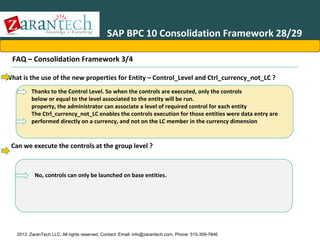
Thanks to the Control Level. So when the controls are executed, only the controls
below or equal to the level associated to the entity will be run.
property, the administrator can associate a level of required control for each entity
The Ctrl_currency_not_LC enables the controls execution for those entities were data entry are
performed directly on a currency, and not on the LC member in the currency dimension

Can we execute the controls at the group level ?

No, controls can only be launched on base entities.

2013 ZaranTech LLC. All rights reserved. Contact: Email- info@zarantech.com, Phone: 515-309-7846
SAP BPC 10 Consolidation Framework
Rules: Controls
Summary
You should now be able to:

• Identify and create the required models in order to set up a consolidation Environment
• Identify and create the required dimensions in each consolidation model
• Identify and fill the required properties for each dimension
• Identify useful scripts, business rules and data manager packages
• Understand the basics of the Ownership Manager

2013 ZaranTech LLC. All rights reserved. Contact: Email- info@zarantech.com, Phone: 515-309-7846
SAP BPC Financial ConsolidationAgenda
•
•
•
•
•
•
•
•
•
•
•
•

Advanced Accounting
Introduction IRS
BPC 10
Business Process Flow BPC 10
Consolidation Framework
Consolidation Monitor
Controls Administration
Controls Monitor – Executing Controls
Journals
Ownership Manager
Configuration: Business Rules, Methods and
Consolidation of Investments

Accounting Basics

2013 ZaranTech LLC. All rights reserved. Contact: Email- info@zarantech.com, Phone: 515-309-7846
SAP BPC 10 Consolidation Monitor 1/19
Feature or Task Introduction
Consolidation Monitor
This feature provides an overview of the whole consolidation process in
one single screen. The monitor tracks the following items:

• Status of the controls
• Work Status
• Execution status for currency conversion
• Execution status for consolidation

This feature will be very useful for all the users that need to monitor the progress of the consolidation process (at a
group or at a local level), as they have all the information they need on one single screen.

2013 ZaranTech LLC. All rights reserved. Contact: Email- info@zarantech.com, Phone: 515-309-7846
SAP BPC 10 Consolidation Monitor 2/19
Consolidation Monitor
Benefits

Benefits of this feature include:
•Overview of the controls, work status and execution status for currency conversion and consolidation on one single screen
•Overview of the progress in the consolidation process for:
- Individual entities
- Consolidation groups
•Currency Conversion and Consolidation can be triggered from that samescreen

2013 ZaranTech LLC. All rights reserved. Contact: Email- info@zarantech.com, Phone: 515-309-7846
SAP BPC 10 Consolidation Monitor 3/19
Consolidation Monitor

Prerequisites

The Consolidation Monitor has the following prerequisites:
•
•
•
•
•

Usage of a Consolidation type Model
Definition of the ownership structure for that period
Definition of work status (for work status display)
Definition of controls (for control display)
Assignment of relevant task profiles

2013 ZaranTech LLC. All rights reserved. Contact: Email- info@zarantech.com, Phone: 515-309-7846
SAP BPC 10 Consolidation Monitor 4/19
Consolidation Monitor
Security

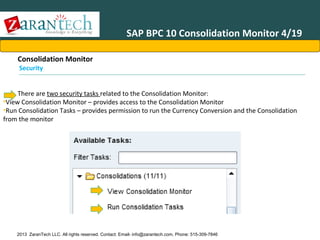
There are two security tasks related to the Consolidation Monitor:
•View Consolidation Monitor – provides access to the Consolidation Monitor
•Run Consolidation Tasks – provides permission to run the Currency Conversion and the Consolidation
from the monitor

2013 ZaranTech LLC. All rights reserved. Contact: Email- info@zarantech.com, Phone: 515-309-7846
SAP BPC 10 Consolidation Monitor 5/19
Consolidation Monitor
Starting Page

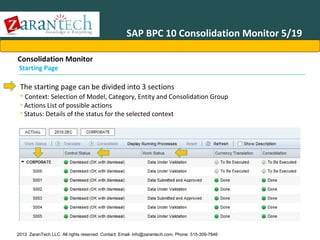
The starting page can be divided into 3 sections
• Context: Selection of Model, Category, Entity and Consolidation Group
• Actions List of possible actions
• Status: Details of the status for the selected context

2013 ZaranTech LLC. All rights reserved. Contact: Email- info@zarantech.com, Phone: 515-309-7846
SAP BPC 10 Consolidation Monitor 6/19
Consolidation Monitor
Actions

The following Actions are available (some actions may be grayed out if no entity
or a node level is selected)
•
•
•
•
•
•
•
•
•

Work Status: Open the screen to update work status for the selection
Translate: Runs currency conversion
Consolidate: Runs consolidation
Display Running Processes: Opens a window that shows which processes are
currently running
Reset: Resets execution status for Currency Translation and Consolidation
Refresh: Refreshes the current screen
Show Description: Shows description instead of ID
View Select between a hierarchical and flat view

2013 ZaranTech LLC. All rights reserved. Contact: Email- info@zarantech.com, Phone: 515-309-7846
SAP BPC 10 Consolidation Monitor 7/19
Consolidation Monitor

Work Status

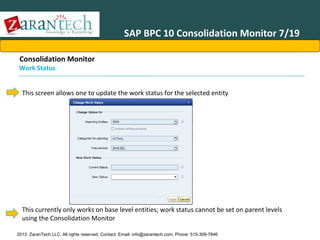
This screen allows one to update the work status for the selected entity

This currently only works on base level entities; work status cannot be set on parent levels
using the Consolidation Monitor
2013 ZaranTech LLC. All rights reserved. Contact: Email- info@zarantech.com, Phone: 515-309-7846
SAP BPC 10 Consolidation Monitor 8/19
Consolidation Monito
Running Currency Conversion 1/2
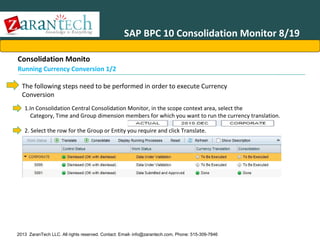
The following steps need to be performed in order to execute Currency
Conversion
1.In Consolidation Central Consolidation Monitor, in the scope context area, select the
Category, Time and Group dimension members for which you want to run the currency translation.
2. Select the row for the Group or Entity you require and click Translate.

2013 ZaranTech LLC. All rights reserved. Contact: Email- info@zarantech.com, Phone: 515-309-7846
SAP BPC 10 Consolidation Monitor 9/19
Consolidation Monito
Running Currency Conversion 2/2
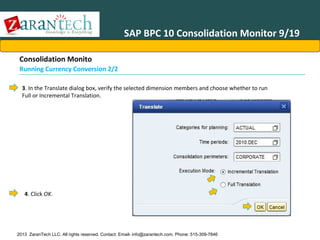
3. In the Translate dialog box, verify the selected dimension members and choose whether to run
Full or Incremental Translation.

4. Click OK.

2013 ZaranTech LLC. All rights reserved. Contact: Email- info@zarantech.com, Phone: 515-309-7846
SAP BPC 10 Consolidation Monitor 10/19
Consolidation Monitor

Running Currency Conversion (Cont’d)
When executing Currency Conversion on a group level (node), the screen shown on the previous
slide is displayed. This performs a conversion into group currencies.
When Currency Conversion is executed on an Entity level, the following screen is displayed.

This performs a currency conversion into the selected reporting currency. It is
also possible to select which Rate Entity to use for this conversion.
2013 ZaranTech LLC. All rights reserved. Contact: Email- info@zarantech.com, Phone: 515-309-7846
SAP BPC 10 Consolidation Monitor 11/19
Consolidation Monitor

Running Consolidation

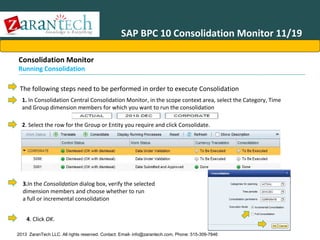
The following steps need to be performed in order to execute Consolidation
1. In Consolidation Central Consolidation Monitor, in the scope context area, select the Category, Time
and Group dimension members for which you want to run the consolidation
2. Select the row for the Group or Entity you require and click Consolidate.

3.In the Consolidation dialog box, verify the selected
dimension members and choose whether to run
a full or incremental consolidation
4. Click OK.
2013 ZaranTech LLC. All rights reserved. Contact: Email- info@zarantech.com, Phone: 515-309-7846
SAP BPC 10 Consolidation Monitor 12/19
Consolidation Monitor

Currency Conversion and Consolidation
Please note the following points:
Member in the Entity type dimension of the Rate application needs to be called GLOBAL (in upper case) for the
conversion to group currencies to work properly
The respective programs for currency conversion and consolidation are called directly. No logic script is called,
therefore no custom calculations can be executed.

2013 ZaranTech LLC. All rights reserved. Contact: Email- info@zarantech.com, Phone: 515-309-7846
SAP BPC 10 Consolidation Monitor 13/19
Consolidation Monitor

Incremental vs. Full

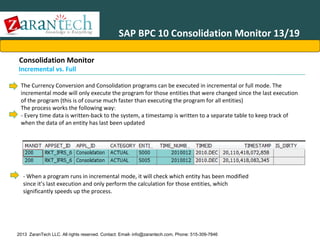
The Currency Conversion and Consolidation programs can be executed in incremental or full mode. The
incremental mode will only execute the program for those entities that were changed since the last execution
of the program (this is of course much faster than executing the program for all entities)
The process works the following way:
- Every time data is written-back to the system, a timestamp is written to a separate table to keep track of
when the data of an entity has last been updated

- When a program runs in incremental mode, it will check which entity has been modified
since it’s last execution and only perform the calculation for those entities, which
significantly speeds up the process.

2013 ZaranTech LLC. All rights reserved. Contact: Email- info@zarantech.com, Phone: 515-309-7846
SAP BPC 10 Consolidation Monitor 14/19
Consolidation Monitor

Incremental vs. Full (Cont’d)
The incremental mode only works when data has been updated, it does
not work in the following cases:
•
•
•

Rates were changed
Ownership information was changed
Business Rules were changed

The program needs to be run in full mode if one of the cases mentioned
above has occurred.

2013 ZaranTech LLC. All rights reserved. Contact: Email- info@zarantech.com, Phone: 515-309-7846
SAP BPC 10 Consolidation Monitor 15/19
Consolidation Monitor

Display Running Processes
This screen displays the currently running processes and shows the progress of each
process (you can select whether you want to see all processes or only your own ones)

If a process has failed, opening this screen will allow this process to be reset (after a
certain period), so that it can be executed again.
2013 ZaranTech LLC. All rights reserved. Contact: Email- info@zarantech.com, Phone: 515-309-7846
SAP BPC 10 Consolidation Monitor 16/19
Consolidation Monitor

Reset

Highlight a group or entity and click the Reset button, this will display a screen with the
current selection

The Currency Conversion and Consolidation status are then set back to “To be executed”

2013 ZaranTech LLC. All rights reserved. Contact: Email- info@zarantech.com, Phone: 515-309-7846
SAP BPC 10 Consolidation Monitor 17/19
Consolidation Monitor

Status

This screen displays the controls, work status and execution status for Currency
Translation and Consolidation

The status is set to Done once the programs were successfully executed.
The Currency Translation and Consolidation status are set back to To Be Executed if data
is entered (for the Entity were data has been entered)

2013 ZaranTech LLC. All rights reserved. Contact: Email- info@zarantech.com, Phone: 515-309-7846
SAP BPC 10 Consolidation Monitor 18/19
Consolidation Monitor
Status Roll-up

The status on the parent level (for controls, work status, currency translation and
consolidation) is based on the lowest status of the children. There is no status that is stored
on the node levels, they are computed when the monitor is displayed.
In the example below, one entity has the status set to To Be Executed and the parent
Corporate shows that same status, as it is the lowest status of all it’s children.

2013 ZaranTech LLC. All rights reserved. Contact: Email- info@zarantech.com, Phone: 515-309-7846
SAP BPC 10 Consolidation Monitor 19/19
Rules: Controls
Summary
You should now be able to:

• Navigate the Consolidation monitor functions and features
• Explain the status information displayed in the monitor
• Execute Currency translation and Consolidation
• Describe incremental consolidation

2013 ZaranTech LLC. All rights reserved. Contact: Email- info@zarantech.com, Phone: 515-309-7846
SAP BPC Financial ConsolidationAgenda
•
•
•
•
•
•
•
•
•
•
•
•

Advanced Accounting
Introduction IRS
BPC 10
Business Process Flow BPC 10
Consolidation Framework
Consolidation Monitor
Controls Administration
Controls Monitor – Executing Controls
Journals
Ownership Manager
Configuration: Business Rules, Methods and
Consolidation of Investments

Accounting Basics

2013 ZaranTech LLC. All rights reserved. Contact: Email- info@zarantech.com, Phone: 515-309-7846
SAP BPC 10 Controls Administration 1/19
Controls

A Control is the individual check of data accuracy and
consistency.
Controls replaces the Validation Business rules used in
prior version (BPC 7.5). Available only in the NW
version. Controls are enabled or disabled at model
level.

2013 ZaranTech LLC. All rights reserved. Contact: Email- info@zarantech.com, Phone: 515-309-7846
SAP BPC 10 Controls Administration 2/19
Business Example

Controls are an essential part of
every consolidation application
and they might also be useful in
planning application.

They are mainly used to control
the consistency of financial data
(for example that a Balance Sheet
is balanced or that flow
movements are
matching the with the closing
balance)

Controls can be enforced (blocking
controls) or just displayed as
warnings, to inform users of
potential problems.

2013 ZaranTech LLC. All rights reserved. Contact: Email- info@zarantech.com, Phone: 515-309-7846
SAP BPC 10 Controls Administration 3/19
Controls
Benefits

Benefits of this feature include:
•
•
•
•

Consistency of data
Flexibility
Different level of controls can be defined by entity
Control sets are assigned by Category and Time

2013 ZaranTech LLC. All rights reserved. Contact: Email- info@zarantech.com, Phone: 515-309-7846
SAP BPC 10 Controls Administration 4/19
Process Overview
The following steps are required to define controls

1.Assign Security Tasks related to Controls
2.Enable Controls
3.Create individual controls (and definition of the level for each control)
4.Create Sets of controls (group of controls)
5.Assign a set of controls by category and time

On top of that, two more attributes need to be set in the Entity type dimension
1. Define for each entity the level of control that should be applied
2. Possibility to bypass controls in Local Currency (if data are loaded in reporting currency
directly)

2013 ZaranTech LLC. All rights reserved. Contact: Email- info@zarantech.com, Phone: 515-309-7846
SAP BPC 10 Controls Administration 5/19
Pre-Requisites
The following two attributes are required in the Entity type dimension:
– CONTROL_LEVEL (1)
– CTRL_CURRENCY_NOT_LC (1)
CONTROL_LEVEL
• This property controls which level of control is applied for each entity. The following four values are available:
• 1 : Basic
• 2 : Standard
• 3 : Advanced
• 4 : Comprehensive
• The default value (blank) is equivalent to “4”
CTRL_CURRENCY_NOT_LC
– This property controls whether controls should be executed in the reporting currency instead of LC.
The following two values are available:
o N : Controls are executed in Local Currency
o Y : Controls are executed in the currency defined in the Currency property of the Entity
– The default value (blank) is equivalent to “N”

2013 ZaranTech LLC. All rights reserved. Contact: Email- info@zarantech.com, Phone: 515-309-7846
SAP BPC 10 Controls Administration 6/19
Controls - Security
The following two take tasks are related to Controls from an administration point of view:
•Edit Controls definition
•View Controls definition

2013 ZaranTech LLC. All rights reserved. Contact: Email- info@zarantech.com, Phone: 515-309-7846
SAP BPC 10 Controls Administration 7/19
Accessing and Enabling Controls
In the Administration module, expand Rules and select the Controls items

Before Controls can be used, they need to be enabled from the Controls Administration screen

2013 ZaranTech LLC. All rights reserved. Contact: Email- info@zarantech.com, Phone: 515-309-7846
SAP BPC 10 Controls Administration 8/19
Navigation
From the Controls Main Page, you can access the different components by clicking on the
numbers

When a specific component is open, there is always a link on the top right of the
screen for the next step
•
•
•

In Controls
In Control Sets
In Assignments

2013 ZaranTech LLC. All rights reserved. Contact: Email- info@zarantech.com, Phone: 515-309-7846
SAP BPC 10 Controls Administration 9/19
Controls – Main Screen
The Main screen for controls can be used to add New controls, Edit or Delete existing controls.

The drop-down box allows to display all controls or to filter them by a Set of controls

2013 ZaranTech LLC. All rights reserved. Contact: Email- info@zarantech.com, Phone: 515-309-7846
SAP BPC 10 Controls Administration 10/19
Controls – Control Editing (1)
The control definition screen can be split in 2 main sections:
•The top of the screen contains the buttons to Save, Close and Validate the control
•The header section : specifies the type of control, the threshold and the break-down dimensions
•The detail section : specifies which members are compared
Top

Header

Details

2013 ZaranTech LLC. All rights reserved. Contact: Email- info@zarantech.com, Phone: 515-309-7846
SAP BPC 10 Controls Administration 11/19
Controls – Control Editing (2)
The header section
•
•
•
•
•

ID : id for the control, no space allowed
Type : Blocking / Warning. All blocking controls must pass before the work status can be changed
Equation type : type of comparison using the equal, different, bigger and smaller operators
Control Level : Level of this control, linked to the “Control_Level” property of the Entity dimension
Tolerance Threshold
o In value : absolute value
o In % : percentage is calculated based on the value of the top part

•

Breakdown Dimension(s)
o Up to 2 dimensions can be specified as break-down dimensions
o The control will be executed separately for each member of the break-down dimension. In the
example of a break-down by Audit on the member ALL_INPUT, the control will be executed for each
member below ALL_INPUT (INPUT and INPUT11) in this example
o For a breakdown, the same member must be specified in the top and in the bottom part

2013 ZaranTech LLC. All rights reserved. Contact: Email- info@zarantech.com, Phone: 515-309-7846
SAP BPC 10 Controls Administration 12/19
Controls – Control Editing (3)
The detailed section
•

Top
Part
o Sign: + or o Account Member from the Account dimension (parent or base level)
o Flow Member from the Flow dimension (parent or base level)
o Interco: Member from the Interco dimension (parent or base level)
o AuditID Member from the AuditID dimension (parent or base level)
o Multiply select multiply or divide (for the Value specified)
o Value: value to multiply or divide by

•

Bottom Part

o Same column as top part
o Year Offset use a different year. Values can be a year (2010) or an offset (+1,-1)
o Period: use a different period. Values can be a period (1) or an offset (+1,-1)
o Category: use a different category (enter ID of category to use)
2013 ZaranTech LLC. All rights reserved. Contact: Email- info@zarantech.com, Phone: 515-309-7846
SAP BPC 10 Controls Administration 13/19
Controls - Documents
A document (report or input schedule) can be linked to each control. This will
provide a hyperlink for the user, so that when a control fails, the user can open that
document to understand where the issues is coming from
•

To set this up, you need to select the document tab

•

Then click the Add button and select the type of document, finally select which document to add

•

The document then show up in a list

2013 ZaranTech LLC. All rights reserved. Contact: Email- info@zarantech.com, Phone: 515-309-7846
SAP BPC 10 Controls Administration 14/19
Controls - Example
Below is an example of a control that checks that a Balance Sheet is balanced
(with a tolerance of 1) with a breakdown by AuditId (for all AuditId below ALL_INPUT)

2013 ZaranTech LLC. All rights reserved. Contact: Email- info@zarantech.com, Phone: 515-309-7846
SAP BPC 10 Controls Administration 15/19
Sets of Controls (1)
From the Control Sets screen, click New to create a new set

Enter an ID for the Set (no space allowed)

2013 ZaranTech LLC. All rights reserved. Contact: Email- info@zarantech.com, Phone: 515-309-7846
SAP BPC 10 Controls Administration 16/19
Sets of Controls (2)
Add or remove controls into your set and click OK to close the window

2013 ZaranTech LLC. All rights reserved. Contact: Email- info@zarantech.com, Phone: 515-309-7846
SAP BPC 10 Controls Administration 17/19
Assignment of Controls (1)
There are two views available to assign the controls:
•
•

Categories by Time
Control Sets by Time

Categories by Time
Click Category and Time to select members (you can select more than one member at a time)

•

Click Show

•

Click Edit (on the top left)

•

Double click to select the cell you want to define controls sets and click once more to display the
dropdown list with all the available control sets and select the appropriate one

2013 ZaranTech LLC. All rights reserved. Contact: Email- info@zarantech.com, Phone: 515-309-7846
SAP BPC 10 Controls Administration 18/19
Assignment of Controls (2)
Control Sets by Time
•

Click Control Sets, Category and Time (you can select more than one member at a time)

•
•
•

Click Show
Click Edit (on the top left)
Tick the checkbox to decide which controls should be assigned for a Category and Time

•

Click Save

2013 ZaranTech LLC. All rights reserved. Contact: Email- info@zarantech.com, Phone: 515-309-7846
SAP BPC 10 Controls Administration 19/19
Rules: Controls
Summary
You should now be able to:

• Understanding the new Controls functionality.
• Define controls.
• Define control sets and assign controls.
• Create and maintain control assignments.

2013 ZaranTech LLC. All rights reserved. Contact: Email- info@zarantech.com, Phone: 515-309-7846
SAP BPC Financial ConsolidationAgenda
•
•
•
•
•
•
•
•
•
•
•
•

Advanced Accounting
Introduction IRS
BPC 10
Business Process Flow BPC 10
Consolidation Framework
Consolidation Monitor
Controls Administration
Controls Monitor – Executing Controls
Journals
Ownership Manager
Configuration: Business Rules, Methods and
Consolidation of Investments

Accounting Basics

2013 ZaranTech LLC. All rights reserved. Contact: Email- info@zarantech.com, Phone: 515-309-7846
SAP BPC 10 Controls Monitor – Executing
Controls 1/20
Controls
A Control is the individual check of data accuracy and consistency.
Controls replaces the Validation Business rules used in prior version (BPC 7.5).
Available only in the NW version.
Controls are enabled or disabled at model level.

2013 ZaranTech LLC. All rights reserved. Contact: Email- info@zarantech.com, Phone: 515-309-7846
SAP BPC 10 Controls Monitor – Executing
Controls 2/20
Business Example

Controls are an important
component mainly in
consolidation application
to ensure proper data quality.

End-users run controls to check their
data quality and allow them to fix
their data. The level of controls might
be different by entities and time
periods.

2013 ZaranTech LLC. All rights reserved. Contact: Email- info@zarantech.com, Phone: 515-309-7846
SAP BPC 10 Controls Monitor – Executing
Controls 3/20
Controls

Prerequisites
To use the Controls feature from the end-user point of view, the following needs to be defined:
•
•
•

Controls need to be defined and assigned in the Administration module
For Consolidation type application, ownership structure need to be Maintained
Work Status need to be defined in the Administration Module

Controls replace the validations that were used in the SBOP PC 7.5 release

2013 ZaranTech LLC. All rights reserved. Contact: Email- info@zarantech.com, Phone: 515-309-7846
SAP BPC 10 Controls Monitor – Executing
Controls 4/20
Controls
Security

The following four tasks are related to Controls from an end-user point of view:
•
•
•
•

Reset Control Dismissal
Dismiss Blocking Controls
View Control
Run Controls

2013 ZaranTech LLC. All rights reserved. Contact: Email- info@zarantech.com, Phone: 515-309-7846
SAP BPC 10 Controls Monitor – Executing
Controls 5/20
Process Overview

1. Run
Controls

2. Review
Controls

3. Identify
issues in
data

4. Correct
Data

2013 ZaranTech LLC. All rights reserved. Contact: Email- info@zarantech.com, Phone: 515-309-7846

5. Re-run
Controls
SAP BPC 10 Controls Monitor – Executing
Controls 6/20
Controls

Set Context
The selection of the context will define which Category, Time and Groups/Entities
are displayed in the Control Monitor. Depending on the type of application, the third
selection box will:
•

For Consolidation type application, display the Group type dimension (user selects a group and will get all
the sub-groups and entities displayed, according to the definition in the Ownership Manager)

•

For Planning type application, display the Entity type dimension (user selects an Entity and will get the
selected Entity and all its descendants, according to the hierarchy of the Entity dimension)

2013 ZaranTech LLC. All rights reserved. Contact: Email- info@zarantech.com, Phone: 515-309-7846
SAP BPC 10 Controls Monitor – Executing
Controls 7/20
Controls

Controls Monitor
Controls Monitor indicates for each entity:
•
•
•
•
•

Control Set: Control set that has been assigned for this category and period
Status: Displays status of current control
Level: Level of control applicable for that entity (linked to the CONTROL_LEVEL property)
Number of Blocking: How many blocking controls have failed
Number of Warnings: How many warning controls have failed

2013 ZaranTech LLC. All rights reserved. Contact: Email- info@zarantech.com, Phone: 515-309-7846
SAP BPC 10 Controls Monitor – Executing
Controls 8/20
Controls

Status and Type of Controls
The following statuses exist:
•
•
•
•

To be executed: Control needs to be run (has not been executed yet or data have changed since last execution)
Passed: Control passed successfully
Failed: Control has failed, data needs to be corrected
Dismissed: Control was forced to pass

There are two types of controls
•
•

Blocking: All blocking controls must pass (or be dismissed) in order to allow a change of the work
status. These controls are mandatory.
Warning: These controls are provided for information only, but they do not block the process.

2013 ZaranTech LLC. All rights reserved. Contact: Email- info@zarantech.com, Phone: 515-309-7846
SAP BPC 10 Controls Monitor – Executing
Controls 9/20
Controls
Levels

There are four level of controls that can be assigned to an entity. An entity uses all the controls
that have been assigned to that level (and above).

1: Basic

Control
Levels

2: Standard
3: Advanced
4: Comprehensive
(Default)

2013 ZaranTech LLC. All rights reserved. Contact: Email- info@zarantech.com, Phone: 515-309-7846
SAP BPC 10 Controls Monitor – Executing
Controls 10/20
Controls

Controls Monitor
Depending on the type of application, the entities are organized according to the:
•
•

Setup in the Ownership Manager for Consolidation applications
Hierarchy of the Entity dimension for Planning applications

The View drop-down box in the top right corner allows you to select between a hierarchy and a
flat view

2013 ZaranTech LLC. All rights reserved. Contact: Email- info@zarantech.com, Phone: 515-309-7846
SAP BPC 10 Controls Monitor – Executing
Controls 11/20
Controls

Execute Controls
To execute controls, highlight the entity or node and click the Run Controls button

Check the settings for the dimensions, they should be correct as they are taken over from the
context

2013 ZaranTech LLC. All rights reserved. Contact: Email- info@zarantech.com, Phone: 515-309-7846
SAP BPC 10 Controls Monitor – Executing
Controls 12/20
Controls

Review Controls (1)
After the execution, the status and the number of blockings and warnings are updated

Status for node levels are calculated on the fly, the node level will always show the lowest
status of all its children.
Highlighting an entity in the top part of the screen displays a list of the failed controls in the
bottom part of the screen (details for S000 in this example).

2013 ZaranTech LLC. All rights reserved. Contact: Email- info@zarantech.com, Phone: 515-309-7846
SAP BPC 10 Controls Monitor – Executing
Controls 13/20
Controls

Review Controls (2)
To get a detailed view of all controls, select the Entity and click the Open Control Results button

This opens a new tab that contains the details

2013 ZaranTech LLC. All rights reserved. Contact: Email- info@zarantech.com, Phone: 515-309-7846
SAP BPC 10 Controls Monitor – Executing
Controls 14/20
Controls Results
Overview

Context
Actions

Document
links

2013 ZaranTech LLC. All rights reserved. Contact: Email- info@zarantech.com, Phone: 515-309-7846

Details
SAP BPC 10 Controls Monitor – Executing
Controls 15/20
Controls Results
Actions

The drop-down box at the top allows to select which controls should be displayed based on their
status.

Controls can be run by clicking the Run Controls button and refreshed with the Refresh button.

2013 ZaranTech LLC. All rights reserved. Contact: Email- info@zarantech.com, Phone: 515-309-7846
SAP BPC 10 Controls Monitor – Executing
Controls 16/20
Controls Results
Details

This view contains the detail about all the controls, a drill down can be done on a control by
clicking the arrow on the left of the screen

•

The breakdown members indicate which member of the break-down dimension is displayed if break-down
has been defined for that control

•

The Equation and Result columns show the calculation that are performed and the result that is calculated

•

The Threshold column indicates the threshold that was defined for that period

•

The Type column indicates whether the control is Blocking or Warning

•

The Status column indicates if the control has passed, failed or has been dismissed
2013 ZaranTech LLC. All rights reserved. Contact: Email- info@zarantech.com, Phone: 515-309-7846
SAP BPC 10 Controls Monitor – Executing
Controls 17/20
Controls

Linked Documents (1)
If linked documents has been defined for a control, they can be accessed with the hyperlink at
the bottom of the screen.

2013 ZaranTech LLC. All rights reserved. Contact: Email- info@zarantech.com, Phone: 515-309-7846
SAP BPC 10 Controls Monitor – Executing
Controls 18/20
Controls

Linked Documents (2)
This will start the EPM add-in and open the selected report. Please note that only the Category,
Entity, and Time dimensions are passed to the report, the rest of the
dimension need to be set manually in the report itself.

2013 ZaranTech LLC. All rights reserved. Contact: Email- info@zarantech.com, Phone: 515-309-7846
SAP BPC 10 Controls Monitor – Executing
Controls 19/20
Controls

Dismissing Controls
There are cases were blocking controls need to be passed, although the data is failing
For example, when there are some last minute corrections and the figures
need to be published, although all the controls are not passed. For this exceptional case, there is
the possibility to force a control to pass by dismissing it.
A blocking control that has failed can be forced to pass, by highlighting the control
and clicking the Dismiss block button.

The control then receives the status Dismissed.
2013 ZaranTech LLC. All rights reserved. Contact: Email- info@zarantech.com, Phone: 515-309-7846
SAP BPC 10 Controls Monitor – Executing
Controls 20/20
Rules: Controls
Summary
You should now be able to:

•Navigate the Controls monitor functions and features
•Execute Controls
•Explain the status information displayed
•Describe linked documents

2013 ZaranTech LLC. All rights reserved. Contact: Email- info@zarantech.com, Phone: 515-309-7846
SAP BPC Financial ConsolidationAgenda
•
•
•
•
•
•
•
•
•
•
•
•

Advanced Accounting
Introduction IRS
BPC 10
Business Process Flow BPC 10
Consolidation Framework
Consolidation Monitor
Controls Administration
Controls Monitor – Executing Controls
Journals
Ownership Manager
Configuration: Business Rules, Methods and
Consolidation of Investments

Accounting Basics

2013 ZaranTech LLC. All rights reserved. Contact: Email- info@zarantech.com, Phone: 515-309-7846
SAP BPC 10 Journals 1/29
The new Journal Template and
Features
Accessing the Journal Template
• The journal template is accessed via the web interface and is located in the Administration
interface within the Features section:

2013 ZaranTech LLC. All rights reserved. Contact: Email- info@zarantech.com, Phone: 515-309-7846
SAP BPC 10 Journals 2/29
Accessing the Journal Template (1)
A new journal template can be defined in this Administration section:

An existing journal template can be deleted in this Administration section, but only after all
journals entries using that template have been deleted as well:

2013 ZaranTech LLC. All rights reserved. Contact: Email- info@zarantech.com, Phone: 515-309-7846
SAP BPC 10 Journals 3/29
Accessing the Journal Template
(2)

All existing journal entries can be deleted in this Administration section:

2013 ZaranTech LLC. All rights reserved. Contact: Email- info@zarantech.com, Phone: 515-309-7846
SAP BPC 10 Journals 4/29
Accessing the Journal Template
(3)

Journal parameters can be configured for all journal entries associated with the
defined template:

2013 ZaranTech LLC. All rights reserved. Contact: Email- info@zarantech.com, Phone: 515-309-7846
SAP BPC 10 Journals 5/29
Journal Template Features
(1)

Click on the Journal Template name and a new tab opens, revealing the template configuration
options:

2013 ZaranTech LLC. All rights reserved. Contact: Email- info@zarantech.com, Phone: 515-309-7846
SAP BPC 10 Journals 6/29
Journal Template Features
(2)

Select journal header dimension by highlighting the desired dimension on the
Members screen (left side) and using the arrow buttons to add/remove the
dimension into the “Detail Column for Header”(right side):

2013 ZaranTech LLC. All rights reserved. Contact: Email- info@zarantech.com, Phone: 515-309-7846
SAP BPC 10 Journals 7/29
Journal Template Features
(3)

The journal template can define how the journal entries will be displayed.
•By checking the Balance by Entity option, the journal entries will be sub totaled and checked for
balance across each Entity the Balance by Currency works in a similar fashion).
•By checking off both “Balance by Entity” and “Balance by Currency”, all combinations of
Entity/Currency will be subtotaled and displayed.

2013 ZaranTech LLC. All rights reserved. Contact: Email- info@zarantech.com, Phone: 515-309-7846
SAP BPC 10 Journals 8/29
Journal Template Features
(4)

Additional header fields can be added into a journal header by selecting the Additional Headers
option.
Adding a new additional header object causes a popup to open that allows for the definition of
the new header filed which can be text or date specific:

2013 ZaranTech LLC. All rights reserved. Contact: Email- info@zarantech.com, Phone: 515-309-7846
SAP BPC 10 Journals 9/29
Journal Template Features
(5)
Define Reopen rules for journals on the “Reopen Rule” tab.
•The reopen rule allows you to identify specific Account(s) (and account properties), Flows, and
Interco dimension values to determine source journal entries to be reopened (Source).
•The filtering property on the account Source dimension can be selected from the dropdown list
provided.

Once reopened, the journal entries can be reposted to a new (Destination) Account, Flow,
Interco dimension entry. Sign reversal of the value upon reopening is also available.System
validates all entries when attempting to save.

2013 ZaranTech LLC. All rights reserved. Contact: Email- info@zarantech.com, Phone: 515-309-7846
SAP BPC 10 Journals 10/29
Journal Landing Page (1)
The journal landing page keeps track of how many journal entries have been made
using the template, if there were any additional journal header items entered, and
the availability of reopen logic for the template.
You may have only one template defined for a selected model:

2013 ZaranTech LLC. All rights reserved. Contact: Email- info@zarantech.com, Phone: 515-309-7846
SAP BPC 10 Journals 11/29
Journal Landing Page (2)
Journals entries can be enter via the web interface or via the EPM 10 Add in for
Excel. When entering a journal via the web interface, navigate to Consolidation
Central >Journals > New:

2013 ZaranTech LLC. All rights reserved. Contact: Email- info@zarantech.com, Phone: 515-309-7846
SAP BPC 10 Journals 12/29
Journal Entries (1)
Journals entries can previewed from the Journal Landing Page. Click on any journal entry and its
preview is displayed at the bottom:

PREVIEW

2013 ZaranTech LLC. All rights reserved. Contact: Email- info@zarantech.com, Phone: 515-309-7846
SAP BPC 10 Journals 13/29
Journal Queries:
Two methods available to allow viewing a specific set of journals:
•

The context bar: allows the selection either a base member or a node (all leaves will implicitly
be used as a filter in that case), or

•

Advanced query: which provides to ability to set a detailed filters on any of the
journal fields (such as posted date, status, etc…)

2013 ZaranTech LLC. All rights reserved. Contact: Email- info@zarantech.com, Phone: 515-309-7846
SAP BPC 10 Journals 14/29
Advanced query for Journal Entries
Advanced query: files can be +/- from the query definition, values can be included/excluded, and
journal properties can be access via the advanced query tool.
Advanced Query allows end-users to define criteria making it faster and easier to display specific
journals
All dimensions and journal options can be used as filters
Filter on text fields “Beginning with…”, “Containing…”, “In List” as well as on
Dates : “From… To…”

2013 ZaranTech LLC. All rights reserved. Contact: Email- info@zarantech.com, Phone: 515-309-7846
SAP BPC 10 Journals 15/29
Journal Entries (2)
Journal statuses can be viewed on the journal landing page, as well as date of posting, who
posted the document, and modified date/time:

USER

Individual Journals can be opened in separate tabs for easy viewing:

2013 ZaranTech LLC. All rights reserved. Contact: Email- info@zarantech.com, Phone: 515-309-7846
SAP BPC 10 Journals 16/29
Journal Entries (3)
Access to the Posting/UnPosting, Open/Re-Open, Lock/Unlock functions are all
controlled by the current status of the Journal
For example, a Saved journal:

For example a Locked journal:

2013 ZaranTech LLC. All rights reserved. Contact: Email- info@zarantech.com, Phone: 515-309-7846
SAP BPC 10 Journals 17/29
Journal Security
The ability to view, edit, post/unpost, reopen, lock/unlock are all controlled by
specific tasks assignments in BPC security:

2013 ZaranTech LLC. All rights reserved. Contact: Email- info@zarantech.com, Phone: 515-309-7846
SAP BPC 10 Journals 18/29
Journal Group Management
Journals created via multiple headers are automatically grouped together under a common
group id:

Grouped journals can be ungrouped and separated into independent journals.
Actions taken (such as Posting) on one group member will be taken on all group
members.

2013 ZaranTech LLC. All rights reserved. Contact: Email- info@zarantech.com, Phone: 515-309-7846
SAP BPC 10 Journals 19/29
Journal Creation (1)
Journals can be created in multiple ways:
•
•
•

Single journal entry
Using multiple headers to generate a group of individual journal entries
Using multiple values for various dimension selections in the journal body

Single journal entry has the Multiple Headers and Multiple Value check boxes unchecked:

2013 ZaranTech LLC. All rights reserved. Contact: Email- info@zarantech.com, Phone: 515-309-7846
SAP BPC 10 Journals 20/29
Journal Creation (2)
Using multiple headers will generate a group of individual journal entries with common values
but different header selections:

•

After checking the Multiple Headers checkbox, select the dimension that will contain the multiple
selections.

•

A member selection popup box will appear, select one or several dimension members…each member
selection will create a separate, but grouped, journal entry upon saving the journal.

•

In the example shown, this journal definition will create three grouped journal entries for 2010.JAN,
2010.FEB, and 2010.MAR.

2013 ZaranTech LLC. All rights reserved. Contact: Email- info@zarantech.com, Phone: 515-309-7846
SAP BPC 10 Journals 21/29
Journal Creation (3)
Using multiple values expands the journal entry screen based upon the dimension selected for
multiple entry:

The result is an expanded journal entry section allowing separate entries for each of the selected
dimension members:

Using multiple values will generate a group of individual journal entries with potentially different
values but the same header selection.

2013 ZaranTech LLC. All rights reserved. Contact: Email- info@zarantech.com, Phone: 515-309-7846
SAP BPC 10 Journals 22/29
Journal Creation – Creating Journal Entries (1)
The journal tab consists of a context menu, option selections, and a three tab
journal entry for data input.

2013 ZaranTech LLC. All rights reserved. Contact: Email- info@zarantech.com, Phone: 515-309-7846
SAP BPC 10 Journals 23/29
Journal Creation – Creating Journal Entries (2)
The Journal Entry sub-tab allows the user to directly input journal postings, the system
automatically provides a running summary of the accumulated values entered

2013 ZaranTech LLC. All rights reserved. Contact: Email- info@zarantech.com, Phone: 515-309-7846
SAP BPC 10 Journals 24/29
Journal Creation – Creating Journal Entries (3)
The Additional Properties sub-tab allows the user to enter and additional property fields defined
in the template (See the entry for “Ldate” in the example below)

2013 ZaranTech LLC. All rights reserved. Contact: Email- info@zarantech.com, Phone: 515-309-7846
SAP BPC 10 Journals 25/29
Journal Creation – Creating Journal Entries (4)
The Additional Properties date entry option is especially useful in the Banking industry:

DATE SELECT POPUP

2013 ZaranTech LLC. All rights reserved. Contact: Email- info@zarantech.com, Phone: 515-309-7846
SAP BPC 10 Journals 26/29
Journal Creation – Status
Journals can have one of the following status assignments:
•
•
•
•
•
•

Saved - journal has been saved but journal entries have not been committed to database
Deleted – journal has been deleted, the system retains this information to prevent any subsequent reuse
of journal ids.
Posted - journal entries have been committed to database
Unposted - - journal entries previously committed to database have been reversed with offsetting
postings made in the database
Locked – journal entries have been posted and the data is locked from any additional changes. Journals
cannot be unposted or deleted with a Locked status.
Unlocked – A locked journal can be unlocked by an administrator with the Lock/Unlock security task
assignment. Unlocking a journal sets its status to posted.

2013 ZaranTech LLC. All rights reserved. Contact: Email- info@zarantech.com, Phone: 515-309-7846
SAP BPC 10 Journals 27/29
Journal BAdIs (Business Add Ins)
When journal entries are being Saved or Posted, an ABAP based BAdI can be
triggered to create additional calculated records.
This journal specific BAdI allows can perform calculations on the journal entries and
can create new records which will be stored and displayed within the journal itself.
The BAdI is delivered empty but can be customized by clients.
A typical BAdI implementation will be able to leverage fields that the journal.lgf
logic does not access (additional items, date fields, etc…)

2013 ZaranTech LLC. All rights reserved. Contact: Email- info@zarantech.com, Phone: 515-309-7846
SAP BPC 10 Journals 28/29
Advanced Journal Balancing
Journal entries are checked dynamically, if an out of balance condition occurs the system will
color code the problem area in red highlights:

2013 ZaranTech LLC. All rights reserved. Contact: Email- info@zarantech.com, Phone: 515-309-7846
SAP BPC 10 Journals 29/29
Rules: Controls
Summary
You should now be able to:

•View and create Journal Templates
•View and create Journal entries
•Use advanced journal query to locate a journal
•Understand the automatic balancing features of journals
•Create and manage journal groups
•Understand journal statuses

2013 ZaranTech LLC. All rights reserved. Contact: Email- info@zarantech.com, Phone: 515-309-7846
SAP BPC Financial ConsolidationAgenda
•
•
•
•
•
•
•
•
•
•
•
•

Advanced Accounting
Introduction IRS
BPC 10
Business Process Flow BPC 10
Consolidation Framework
Consolidation Monitor
Controls Administration
Controls Monitor – Executing Controls
Journals
Ownership Manager
Configuration: Business Rules, Methods and
Consolidation of Investments

Accounting Basics

2013 ZaranTech LLC. All rights reserved. Contact: Email- info@zarantech.com, Phone: 515-309-7846
Ownership Manager 1/22
What is the Ownership Manager?

The Ownership Manager (formally known as
the Dynamic Hierarchy Editor in earlier
versions of BPC) is a transaction data based
representation of an organizational
hierarchy as well as defining consolidation
parameters.

Time, and Scope. This allows multiple
organizational structures to be created to
support dynamic ownership situations (such as
acquisitions, divestitures, changes
in existing positions, etc.).
The hierarchies created by OM are identified with three
keys dimensions: Category,

2013 ZaranTech LLC. All rights reserved. Contact: Email- info@zarantech.com, Phone: 515-309-7846
Ownership Manager 2/22
Ownership Manager - Prerequisites
The ownership manager requires an Ownership model to be defined that is of the
technical model type “ownership”
Model definition:

The Ownership model must include the following dimensions:
1.Dimension type “A” – provides information on ownership type such as PGROUP, POWN, PCON, and PCTRL
2.Dimension type “C” *
3.Dimension type “E” *
4.Dimension type “T” *
5.Dimension type “I” *
6.Dimension type “G”*

*must be the same dimension as used within the Legal
(Consolidation) application

2013 ZaranTech LLC. All rights reserved. Contact: Email- info@zarantech.com, Phone: 515-309-7846
Ownership Manager 3/22
Ownership Manager Security
Tasks

Access to the ownership manager (formally known as the Dynamic Hierarchy Editor
in earlier versions of BPC) is controlled via the following three security tasks:

2013 ZaranTech LLC. All rights reserved. Contact: Email- info@zarantech.com, Phone: 515-309-7846
Ownership Manager 4/22
Accessing the Ownership Manager (1)
The ownership manager (formally known as the Dynamic Hierarchy Editor in earlier versions of BPC) is
accessed via the web interface and is located on the Start Page within the Consolidation Central
node :

2013 ZaranTech LLC. All rights reserved. Contact: Email- info@zarantech.com, Phone: 515-309-7846
Ownership Manager 5/22
Accessing the Ownership Manager (2)
Click on the Ownership Manager access link in Consolidation Central to display the ownership
definition in the right context screen

2013 ZaranTech LLC. All rights reserved. Contact: Email- info@zarantech.com, Phone: 515-309-7846
Ownership Manager 6/22
Accessing the Ownership Manager (3)
The ownership definition screen includes an overview display of the ownership hierarchy, and for
each node the “Generated” and/or “Current” consolidation method, the Consolidation Rate
(formally PCON), and the Financial Interest Rate (formally POWN) rates to be employed for the
selected node :

2013 ZaranTech LLC. All rights reserved. Contact: Email- info@zarantech.com, Phone: 515-309-7846
Ownership Manager 7/22
Accessing the Ownership Manager (4)
However, the Ownership Manager uses terms such as “Consolidation Rate” and
“Financial Interest Rate”, the data is stored with the same data modeling as in previous
versions.
For example, Consolidation Rates are stored as PCON values and Financial Interest Rates are
stored as POWN values in the database:

2013 ZaranTech LLC. All rights reserved. Contact: Email- info@zarantech.com, Phone: 515-309-7846
Ownership Manager 8/22
Editing the Ownership Hierarchy (1)
Editing opens a new tab titled “Edit Ownership (selected context for Category, Time, and Group)”:

2013 ZaranTech LLC. All rights reserved. Contact: Email- info@zarantech.com, Phone: 515-309-7846
Ownership Manager 9/22
Editing the Ownership Hierarchy (2)
Access existing ,or create new, versions of ownership hierarchies by changing the context
selections for the Category, Time, and Group dimensions.

2013 ZaranTech LLC. All rights reserved. Contact: Email- info@zarantech.com, Phone: 515-309-7846
Ownership Manager 10/22
Editing the Ownership Hierarchy (3)
Add/Remove individual Entity values from the Group hierarchy

Context menu provides same functions as in tool bar:

2013 ZaranTech LLC. All rights reserved. Contact: Email- info@zarantech.com, Phone: 515-309-7846
Ownership Manager 11/22
Editing the Ownership Hierarchy (4)
Click on top group node to view summary of all entities entered

2013 ZaranTech LLC. All rights reserved. Contact: Email- info@zarantech.com, Phone: 515-309-7846
Ownership Manager 12/22
Editing the Ownership Hierarchy (5)
Double Click on “current” cells to modify settings:

2013 ZaranTech LLC. All rights reserved. Contact: Email- info@zarantech.com, Phone: 515-309-7846
Ownership Manager 13/22
Editing the Ownership Hierarchy (6)
Ownership hierarchies can be saved

Ownership hierarchies can be copied into
a different context:

2013 ZaranTech LLC. All rights reserved. Contact: Email- info@zarantech.com, Phone: 515-309-7846
Ownership Manager 14/22
Editing the Ownership Hierarchy (7)
Click on :Calculate to run internal program that determines the “generated” values for
Consolidation Rate and Financial Interests:

2013 ZaranTech LLC. All rights reserved. Contact: Email- info@zarantech.com, Phone: 515-309-7846
Ownership Manager 15/22
Ownership Manager – Calculation Prerequisites (1)
METHOD business rule definitions

2
3
Copied into
METHOD_SYS

2

1
PCTRL_SYS generated
by the Ownership
Calculation is
compared to these
ranges to determine
METHOD_SYS and
PCON_SYS

2013 ZaranTech LLC. All rights reserved. Contact: Email- info@zarantech.com, Phone: 515-309-7846

3
Copied into
PCON_SYS
Ownership Manager 16/22
Ownership Manager – Calculation Prerequisites (2)
Cross Ownership Data:

Must be
G_NONE
PCTRL is
used to
generate
PCTRL_SYS
which is used
in BR Share
Range lookup

Direct Share or Group Share calculation
method determines how these percentages
are combined to generate PCTRL_SYS and
POWN_SYS (Direct Share method: no
modification; Group Share method:
multiply the rates through the hierarchy),
2013 ZaranTech LLC. All rights reserved. Contact: Email- info@zarantech.com, Phone: 515-309-7846

POWN is used
to generate
POWN_SYS
which is used
to fill the
Generated
Financial
Interest Rate
Ownership Manager 17/22
Ownership Manager - Prerequisites
Ownership Manager Display:

METHOD_SYS
METHOD_SYS
is derived from
the BR share
range lookup

2013

METHOD

PCON_SYS
PCON_SYS is
derived from the
BR share range
lookup

PCON

POWN_SYS

POWN_SYS is derived
from the ultimate
ownership percentage
calculation using the
selected share
method (Direct/Group)
and the POWN values
entered in the Cross
ZaranTech LLC. All rights reserved. Contact: Email- info@zarantech.com, Phone: 515-309-7846
Ownership Schedule

POWN
Ownership Manager 18/22
Ownership Manager
Putting it all together

Ownership Manager

Metho
d
Method_s
ys

PCON

POWN
POWN_sys

PCON_sys

Business Rule
PCTRL_sys

Cross Ownership Data
Optional step

PCTRL
POWN

2013 ZaranTech LLC. All rights reserved. Contact: Email- info@zarantech.com, Phone: 515-309-7846
Ownership Manager 19/22
Direct Share Vs. Group Share
(1)Example
Consolidation units US, DE, and IN are assigned to consolidation group World for a certain period
and category.

Parent unit US holds 60% of the shares in consolidation unit DE and controls the voting rights
60%
Consolidation unit DE holds 80% of the shares in consolidation unit IN and controls the voting
rights 80%.
In group World, the Parent unit US is the holding company of unit DE and although US does
not directly hold the unit IN, in reality US has control of IN through an “indirect” control via
unit DE

2013 ZaranTech LLC. All rights reserved. Contact: Email- info@zarantech.com, Phone: 515-309-7846
Ownership Manager 20/22
Direct Share Vs. Group Share
(2)Group Share
Calculation with group share, which only captures the group part of the ownership (in this case
the UPO using group share in World for unit IN is 48% (equal to “ 60%” , % of DE owned by US
multiplied by “80%” , “% of IN Owned by DE")
Group Share = 60% * 80% = 48%

2013 ZaranTech LLC. All rights reserved. Contact: Email- info@zarantech.com, Phone: 515-309-7846
Ownership Manager 21/22
Direct Share Vs. Group Share
(3)Direct Share
UPO with direct share in this case should be inherited based on the DIRECT %
of control between the direct parent (US) and the child unit (IN) as the ultimate parent of Group
World (US) controls the parent DE.
The UPO with direct share value, in this case for CG1,is 80% NOT 48%.
Direct Share = 80%

2013 ZaranTech LLC. All rights reserved. Contact: Email- info@zarantech.com, Phone: 515-309-7846
Ownership Manager 22/22
Ownership Manager
Summary
You should now be able to:

•Understand the new Ownership Manager interface
•Navigate the Ownership Manager functions and features
•Create and maintain Ownership hierarchies
•Execute Ownership calculations

2013 ZaranTech LLC. All rights reserved. Contact: Email- info@zarantech.com, Phone: 515-309-7846
SAP BPC Financial ConsolidationAgenda
•
•
•
•
•
•
•
•
•
•
•
•

Advanced Accounting
Introduction IRS
BPC 10
Business Process Flow BPC 10
Consolidation Framework
Consolidation Monitor
Controls Administration
Controls Monitor – Executing Controls
Journals
Ownership Manager
Configuration: Business Rules, Methods and
Consolidation of Investments

Accounting Basics

2013 ZaranTech LLC. All rights reserved. Contact: Email- info@zarantech.com, Phone: 515-309-7846
Configuration: Business Rules, Methods and
Consolidation of Investments
Why consolidated statements?
Consolidated instead of separate financial statements for fair presentation.
The purpose of consolidated financial statements is ;
•To present, primarily for the benefit of the owners and creditors of the parent, the results of operations and the
financial position of a parent company and all its subsidiaries as if the consolidated group were a single economic
entity with one or more branches or divisions
•There is a presumption that consolidated financial statements are more meaningful than separate financial
statements and that they are usually necessary for a fair presentation.
•For instance, when one of the entities in the consolidated group directly or indirectly has a controlling financial
interest in the other entities”
•(FAS 160)
(IFRS 10)

2013 ZaranTech LLC. All rights reserved. Contact: Email- info@zarantech.com, Phone: 515-309-7846
Configuration: Business Rules, Methods and
Consolidation of Investments
Stock investments—investor Accounting and Reporting
Reporting methods
•GAAP & IFRS recognized three Methods Based on Level of Investment
1.Fair value method (FAS 115) (IFRS 13)
2. Equity method (APB 18) (IAS 28)3. Consolidated Financial Statements (ARB 51) (IFRS 10)
- Acquisition Method (FAS 114R effective 2009)
- Purchase method (FAS 141 through 2008)
- Pooling of interests method (APB 16 through 6/30/02)
Investor Ownership of the Investee’s
Shares Outstanding
Equity Method
Consolidated Financial Statements

Fair Value

0%

20%

50%

2013 ZaranTech LLC. All rights reserved. Contact: Email- info@zarantech.com, Phone: 515-309-7846

100%
Configuration: Business Rules, Methods and
Consolidation of Investments
Fair value method (FAS 115) (IFRS 13)
•Three categories of investment:
1. “Held-to-maturity” debt securities
2. “Trading” debt or equity securities
3. “Available-for-sale” debt or equity securities
•Investments that are either for re-sale (“held-to-maturity” or “trading”) or that are held (“available-for-sale”) with
unrecognized gains in losses reported as separate equity item (under other comprehensive income) Dividends
recognized as income
•Example journal entries:

Account titles

Debit

Available-for-sale investment

Credit
XXX

XXX

Cash
Account titles
Cash

Debit

Credit
XXX

Dividend income
2013 ZaranTech LLC. All rights reserved. Contact: Email- info@zarantech.com, Phone: 515-309-7846

XXX
Configuration: Business Rules, Methods and
Consolidation of Investments
Equity method (APB 18) (IAS 28)
A method of accounting by which an equity investment is initially recorded at cost and subsequently adjusted to
reflect the investor's share of the net assets of the associate (investee).

•Investments where investor has ability to “significantly influence” investee (APB 18) (IAS 28)
•Investor recognizes its share of the earnings or losses of an investee in the periods for which they are reported
•Share of the earnings or losses adjusts parent investment and reports the recognized earnings or losses in
income.
•Cash dividends reduces reversed to avoid double counting
Example journal entries:
Account titles

Debit

Investment in Investee

Credit
XXX

XXX

Cash
Accounts titles
Cash

Debit

Credit
XXX

Investment in investee (for
cash dividends)
2013 ZaranTech LLC. All rights reserved. Contact: Email- info@zarantech.com, Phone: 515-309-7846

XXX
Configuration: Business Rules, Methods and
Consolidation of Investments
Consolidated Financial Statements (ARB 51) (IFRS 10 )
•Financial statements are combined between parent and subsidiaries in a common reporting currency (FAS 52)
•Intercompany items are eliminated to avoid double counting
•Various methods can be used to combine financial statements into one consolidated one such as:
1. “Proportional Method” (IFRS)
2. “Pooling of Interests”
Account titles
Debit
Credit
3. “Purchase Method”
Goodwill
XXX
XXX
4. “Acquisition Method”
Investment in
investee
•Under acquisition method, investment is eliminated against equity and the portion of equity not attributable to
parent is created in the equity section as non-controlling interest (FAS 160).
Example journal entries:
Account titles
Capital Stock
Retained Earnings

Debit

Credit
XXX
XXX

Non-Controlling
(Minority) Interest
2013 ZaranTech LLC. All rights reserved. Contact: Email- info@zarantech.com, Phone: 515-309-7846

XXX
Configuration: Business Rules, Methods and
Consolidation of Investments
Influence, control and ownership
•APB Opinion 18 states “The equity method tends to be most appropriate if an investment enables the investor to
influence the operating or financial decisions of the investee…Influence tends to be more effective as the investor’s
percent of ownership in the voting stock of the investee increases”.
• ARB 51 was originally based on majority ownership of voting shares. After Enron FIN 46R, the basis for consolidation
was expanded to any enterprise that controls the economic risks and rewards of an investee, regardless of ownership.

Fair Value

0%

Equity Method

???

Consolidated Financial Statement

???

2013 ZaranTech LLC. All rights reserved. Contact: Email- info@zarantech.com, Phone: 515-309-7846

100%
Configuration: Business Rules, Methods and
Consolidation of Investments
Which methods do we care about in SAP BPC?
US GAAP reporting methods
GAAP recognized three Methods Based on Level of Investment
1.Fair value method (FAS 115) (IFRS 13)
2. Equity method (APB 18) (IAS 28)3. Consolidated Financial Statements (ARB 51) (IFRS 10)
1. Acquisition Method (FAS 114R effective 2009)
2. Purchase method (FAS 141 through 2008)
3. Pooling of interests method (APB 16 through 6/30/02)

Handled in
General Ledger

Consolidated Financial
Statements

Equity Method

Fair
Value

0%

Handled in
General Ledger

20%

50%

2013 ZaranTech LLC. All rights reserved. Contact: Email- info@zarantech.com, Phone: 515-309-7846

100%
Configuration: Business Rules, Methods and
Consolidation of Investments
POWN, PCON versus PCTRL

Percent ownership, percent consolidation versus percent control
•
•

Can flexibly define consolidation on either percent control (PCTRL) or percent ownership (PCON)
Percent consolidation (PCON) is primarily for proportional consolidations (NEW IFRS 11 Joint
Arrangement elimenates proportional consolidation)
Exercises are based on percent ownership (PCON)

•

Fair
Value

0%

Equity Method

???

Consolidated Financial
Statements

???

2013 ZaranTech LLC. All rights reserved. Contact: Email- info@zarantech.com, Phone: 515-309-7846

100%
Configuration: Business Rules, Methods and
Consolidation of Investments
Consolidation method codes

How consolidation method codes are coded to method types
Method codes are freely configurable but must be assigned to one of the
predefined method types:
1. ‘H’ for parent investors or holding entities
2. ‘G’ for subsidiaries that are to be financially consolidated with parent
3. ‘E’ for equity method investees

2013 ZaranTech LLC. All rights reserved. Contact: Email- info@zarantech.com, Phone: 515-309-7846
Configuration: Business Rules, Methods and
Consolidation of Investments
How to navigate there

Path to consolidation method types
Navigate to > Administration > Rules > Business Rules > Methods

2013 ZaranTech LLC. All rights reserved. Contact: Email- info@zarantech.com, Phone: 515-309-7846
Configuration: Business Rules, Methods and
Consolidation of Investments
Equity method versus consolidated statements
Difference between equity method and consolidated financial statements
Equity method does not combine balance sheet and income statements with parent but rather
recognizes share of investee income

Investee
Income
2013 ZaranTech LLC. All rights reserved. Contact: Email- info@zarantech.com, Phone: 515-309-7846
Configuration: Business Rules, Methods and
Consolidation of Investments
Equity method business rules

Using the equity adjustment type
To reverse equity method investee financial statements a special Adjustment Type in Business
Rules is used

2013 ZaranTech LLC. All rights reserved. Contact: Email- info@zarantech.com, Phone: 515-309-7846
Configuration: Business Rules, Methods and
Consolidation of Investments
How to navigate there

How to navigate to business rules
Navigate to > Administration > Rules > Business Rules > Eliminations and Adjustments

2013 ZaranTech LLC. All rights reserved. Contact: Email- info@zarantech.com, Phone: 515-309-7846
Configuration: Business Rules, Methods and
Consolidation of Investments
How to configure business rules

Configuring the header of an equity method business rule

2013 ZaranTech LLC. All rights reserved. Contact: Email- info@zarantech.com, Phone: 515-309-7846
Configuration: Business Rules, Methods and
Consolidation of Investments
Understanding intercompany eliminations

IFRS Starter Kit examples of intercompany eliminations
Eliminations are posted against an elimination clearing account for automatic adjustment rules
within their own data source

1

2

3

2

1

1
2
3
2013 ZaranTech LLC. All rights reserved. Contact: Email- info@zarantech.com, Phone: 515-309-7846

3
Configuration: Business Rules, Methods and
Consolidation of Investments
Understanding intercompany eliminations (1)
Three types of inter-entity eliminations

2013 ZaranTech LLC. All rights reserved. Contact: Email- info@zarantech.com, Phone: 515-309-7846
Configuration: Business Rules, Methods and
Consolidation of Investments
Understanding intercompany eliminations (2)
Three types of inter-entity eliminations
Business Rule

Approach

Differences

Contribution model approach

Eliminates trading partner
(intercompany
dimension) pairs and also
handles
consolidation of investments

Elimination entity or “first
common parent”
approach

Eliminates trading partner
combinations
on a common elimination
entity

Subsidiary reconciliation
approach

For reconciliation reporting,
copies trading
partner details onto each
entity for
secured reporting purposes

Automatic Adjustments

US eliminations

Intercompany Bookings

2013 ZaranTech LLC. All rights reserved. Contact: Email- info@zarantech.com, Phone: 515-309-7846
Configuration: Business Rules, Methods and
Consolidation of Investments
Understanding IC matching

How to accelerate financial consolidation with peer-to-peer matching
•
•
•
•

Designed to enable subsidiaries to do their own intercompany reconciliation with peers to
expedite corporate reconciliation
Copies the trading partner side of eliminations onto the receiving entity for secured reporting
purposes
Designed as a separate application with specific data sources to facilitate intercompany
reconciliation
Consider a separate application for IC matching; facilitates adding additional transaction
currency dimension and having separate work status definitions

2013 ZaranTech LLC. All rights reserved. Contact: Email- info@zarantech.com, Phone: 515-309-7846
Configuration: Business Rules, Methods and
Consolidation of Investments
Understanding consolidation of investments

IFRS Starter Kit example of consolidation of investment
Elimination and adjustments also handle
consolidation of investments where
investments are eliminated against equity

A different configuration of elimination
that takes
into account noncontrolling interest (FAS
160)

2013 ZaranTech LLC. All rights reserved. Contact: Email- info@zarantech.com, Phone: 515-309-7846
Configuration: Business Rules, Methods and
Consolidation of Investments
Business Scenario Example for Exercise

Acquisition and equity method example scenarios
Organizational structure consisting of acquisition/purchase method (fair value and book value assumed to be
same) in Europe (German parent owning 80% of UK subsidiary) and equity method in Asia (Japanese parent
owning 30% of Australian associate)
Consolidated financial statements that take into account:
1.

1.

Europe and Asia is EUR and USD but currency
translation exercise is focused on Europe in EUR (where
UK subsidiary is in GBP)
Intercompany eliminations of receivables and payables
and revenue and expenses within Europe as well

S_World
S_Europe
DE 100%

UK 80%

2013 ZaranTech LLC. All rights reserved. Contact: Email- info@zarantech.com, Phone: 515-309-7846

S_AisaPac
JP 100%

AU 30%
Configuration: Business Rules, Methods and
Consolidation of Investments
Currency Translation
Cumulative translation adjustment example (1)
Financial statements of UK subsidiary is combined with German parent

•Balance sheet is translated and month-end spot
• Income statement translated at average rate
•Retained earnings translated at both historical and average rates causing the balance sheet to be out-ofbalance and necessitating an equity plug (i.e. “CTA” or “Currency Translation Adjustment”)

In the exercise, currency translation adjustment is created by one account, Retained Earnings
•
•
•
•

Opening retained earnings balance is at an “As-Is” historical rate (group reporting currency values are
loaded into the system so the balance is not translated
Current period retained earnings is translated at an average rate consistent with the income statement
(since current period retained earnings of associate equals the earnings or losses of that investee)
The implied or effective rate of the “As-Is” historical rate just happens to be the same as month-end spot
rate (to simplify the exercise example)
As a result, out-of-balance result is further isolated to current period retained earnings

2013 ZaranTech LLC. All rights reserved. Contact: Email- info@zarantech.com, Phone: 515-309-7846
Configuration: Business Rules, Methods and
Consolidation of Investments
Currency Translation
Cumulative translation adjustment example (2)
CTA calculation is as follows
•

Current period retained earnings of 5 is translated at an average rate of 1.5 (equaling 7.50)
instead of a closing rate of 1.25 (which would have been 6.25 to keep balance sheet in balance)
creating a CTA difference of 1.25 (7.50 – 6.25) for the equity plug

2013 ZaranTech LLC. All rights reserved. Contact: Email- info@zarantech.com, Phone: 515-309-7846
Configuration: Business Rules, Methods and
Consolidation of Investments
Consolidation of investments
Example T-Accounts for a hypothetical consolidation of investments
T-accounts highlighting business rules-based investment eliminations with non-controlling interest split
Illustrative example of the flexibility of rules-based financial consolidation where goodwill is written off to
reserves

2013 ZaranTech LLC. All rights reserved. Contact: Email- info@zarantech.com, Phone: 515-309-7846
Configuration: Business Rules, Methods and
Consolidation of Investments
Equity Method – First Consolidation

Cost over book value purchase of equity method company
When cost is in excess of book value purchased, the difference must be accounted for in one of
two ways:
1. Assets that are undervalued on the investee’s books must amortize fair value differences
over the remaining useful life of the asset (lest the assetlife is indefinite)
1. Goodwill remains without adjustment until the investment is disposed or impaired according
to FAS 142 (effective Dec 15, 2001 and later)
The exercise scenario illustrates the second approach under 30% ownership
1. Investment in associate of 250
2. Associate equity of 800
3. Proportionate book value of 240 (800 * 30%)
4. Cost over book value goodwill of 10 (250 – 240)

Debit
Example journal entries

GoodwillInvestment in investee

2013 ZaranTech LLC. All rights reserved. Contact: Email- info@zarantech.com, Phone: 515-309-7846

X

Credit
X
Configuration: Business Rules, Methods and
Consolidation of Investments
Key inputs to consolidationRates and ownership stored in separate models
Exchanged rates and Ownership Manager data are stored and referenced via separate models
Reporting model

Drivers and Rates Model

Consolidation
model

Rates

Ownership

2013 ZaranTech LLC. All rights reserved. Contact: Email- info@zarantech.com, Phone: 515-309-7846
Configuration: Business Rules, Methods and
Consolidation of Investments

2013 ZaranTech LLC. All rights reserved. Contact: Email- info@zarantech.com, Phone: 515-309-7846
Configuration: Business Rules, Methods and
Consolidation of Investments

2013 ZaranTech LLC. All rights reserved. Contact: Email- info@zarantech.com, Phone: 515-309-7846
Configuration: Business Rules, Methods and
Consolidation of Investments

2013 ZaranTech LLC. All rights reserved. Contact: Email- info@zarantech.com, Phone: 515-309-7846
Configuration: Business Rules, Methods and
Consolidation of Investments

2013 ZaranTech LLC. All rights reserved. Contact: Email- info@zarantech.com, Phone: 515-309-7846
Configuration: Business Rules, Methods and
Consolidation of Investments

2013 ZaranTech LLC. All rights reserved. Contact: Email- info@zarantech.com, Phone: 515-309-7846
Configuration: Business Rules, Methods and
Consolidation of Investments

2013 ZaranTech LLC. All rights reserved. Contact: Email- info@zarantech.com, Phone: 515-309-7846

SAP BPC 10.0 Training from ZaranTech

  • 1.
    SAP BPC FinancialConsolidationAgenda • • • • • • • • • • • • Advanced Accounting Introduction IRS BPC 10 Business Process Flow BPC 10 Consolidation Framework Consolidation Monitor Controls Administration Controls Monitor – Executing Controls Journals Ownership Manager Configuration: Business Rules, Methods and Consolidation of Investments Accounting Basics 2013 ZaranTech LLC. All rights reserved. Contact: Email- info@zarantech.com, Phone: 515-309-7846
  • 2.
    Accounting Basics 1/11 AccountTypes •In order to track money within an organization, different types of accounting categories exist. These categories are used to denote if the money is owned or owed by the organization. •three main categories: •Assets, •Liabilities, • Equity Assets •An Asset is a property of value owned by a business. Physical objects and intangible rights such as money, accounts receivable, merchandise, machinery, buildings, and inventories for sale are common examples of business assets as they have economic value for the owner. Assets Accounts Debit Increase 2013 ZaranTech LLC. All rights reserved. Contact: Email- info@zarantech.com, Phone: 515-309-7846 Credit Decrease
  • 3.
    Accounting Basics 2/11 •Debtobligations owed to creditors as a result of operations to generate sales revenue. Liabilities represent creditor equity or claims against the assets of the business entity. •Forms of liabilties: •Current or short term : must be paid within 1> year of the balance sheet date. •Long Term Liabilities: : must be paid within 2 > to more years of the balance sheet date •Examples current or short term •Accounts Payable •Sales Tax Payable •Unearned Revenues •Short Term Notes Payable •Payroll Liabilities •Contingent Liabilities Liability Accounts Debit Increase Credit Decrease •Examples long term liabilities •Loans / Notes Payable / Mortgage Payable •Bonds Payable Liabilities 2013 ZaranTech LLC. All rights reserved. Contact: Email- info@zarantech.com, Phone: 515-309-7846
  • 4.
    Accounting Basics 3/11 Ownershipequity represents claims to assets of a business entity. •There are three basic forms of ownership equity: 1.Proprietorship entity financing provided by a sole owner. 2.Partnership entity financing provided by two or more owners (partners). 3.Corporation a legal entity incorporated under the laws of a state, separate from its owners. • Capital stock: Financing provided by stockholders (or shareholders) with ownership represented by shares of corporate stock. Each share of stock represents one ownership claim. • Retained earnings: Earnings of the corporation that have been kept in the business after dividends are paid. Shareholders Equity Accounts Debit Decrease Credit Increase Dividends Accounts Debit Increase Credit Decrease Equity 2013 ZaranTech LLC. All rights reserved. Contact: Email- info@zarantech.com, Phone: 515-309-7846
  • 5.
    Accounting Basics 4/11 Depreciationin accounting terms normally means the devaluation of a fixed asset. •Determining the useful life of a fixed asset is usually much easier then an intangible asset. •Since the useful life of fixed assets is much easier to determine, depreciation is much more common than amortization. •Some Examples of fixed assets: Equipment, Computers, Vehicles, Furniture and Buildings. •There are several methods of devaluating assets. The most common methods are straight-line and double-declining balance methods. •Straight-line depreciation : •Cost of Asset 10,500 , Salvage Value 500 , Life 5 years •Depreciation Expense per year = 10,500 – 500 = 2000 Year Cost Depreciation Accumulated Book value 5 expense depreciation 1 Fixed Assets and Depreciation 2000 2000 8,500 2 See > IAS 16 10,500 10,500 2000 4000 6,500 3 10,500 2000 6000 4,500 4 10,500 2000 8000 2,500 5 10,500 2000 10000 500 2013 ZaranTech LLC. All rights reserved. Contact: Email- info@zarantech.com, Phone: 515-309-7846
  • 6.
    Basics of Accounting5/11 •The double-declining balance method ignores salvage value in the initial calculation. •However, depreciation expense will be limited if the calculated amount would result in the book value dropping below the salvage value. •Example : Suppose an asset has a prior book value of $600 and a salvage value of $500. In this case, depreciation expense is limited to the remaining $100 book value in excess of salvage value. •Furthermore ,each year comparisons are made between the declining balance rate calculations and straight-line depreciation of the remaining book value. •A switch to the straight-line calculation is made in the year in which the straight-line calculation exceeds the declining balance rate calculation. DDB rate = 1/Life x 2 = 1/5 x 2 = 40% Declining balance rate depreciation = Beginning of period carrying value x DDB rate Year Cost Depreciat Accumulate Book value ion expense Year Declining Balance rate Straight line 1 10,500 x 40% = 4,200 10,500 - 500)/5 = 2,000 2 6,300 x 40% = 2,520 6,300 - 500)/4 = 1,450 d depreciatio n 3 3,780 x 40% 1,512 3,780 Declining Balance=depreciation - 500)/3 = 1,093 1 10,500 4,200 4,200 6,300 2 10,500 2,520 6,720 3,780 3 10,500 1,512 8,232 2,268 4 2,268 x 40% = 907 2,268 - 500)/2 = 884 4 10,500 907 9,139 1,361 5 1,361 x 40% = 544 1,361 - 500)/1 = 861 5 10,500 861 10,000 500 2013 ZaranTech LLC. All rights reserved. Contact: Email- info@zarantech.com, Phone: 515-309-7846
  • 7.
    Basics of Accounting6/11 • • The following is an example of a typical journal asset for depreciation. General Journal Date • • • • • • Accounting titles Ref Debit Credit 20xxxx Depreciation expens 1 X Jan X Note: Asset (fixed or intangible) 2 The journal increase of the expense is transferred to the general ledger. Expense general ledger totals are then transferred to the income statement at the end of the month The result is a decrease to net income (income – expense) Since the result is a decrease in net income, this creates a decrease in the tax liability of the company The decrease in the asset is transferred to the balance sheet at the end of the month, resulting in a decrease in the company’s net worth. In order to understand how amortization and depreciation affects income, it’s important to see how the transaction is posted to the accounting journal. 2013 ZaranTech LLC. All rights reserved. Contact: Email- info@zarantech.com, Phone: 515-309-7846
  • 8.
    Basics of Accounting7/11 •Amortization in accounting terms means the devaluation of an intangible asset. •An intangible asset is something of value to a business that does not have a physical presence. •In order to write down an asset, it must have a useful life. •The useful life of an intangible is often difficult to determine. •Some examples of intangible assets are: Patents, Goodwill, Contracts, License, Trademarks and Franchise •When the intangible asset is originally purchased the cost should be debited to an asset account. This cost is then "written off" or amortized. Generally trough straight line method. General Journal See > IAS 16 Date Accounting titles Intangible Assets and Amortization 20xxxx Amortization Expense – Patents Jan Patents 2013 ZaranTech LLC. All rights reserved. Contact: Email- info@zarantech.com, Phone: 515-309-7846 Ref 1 2 Debit X Credit X
  • 9.
    Basics of Accounting8/11 •A system of accounting that recognizes revenue and matches it with the expenses that generated that revenue. •Unlike other systems of accounting, which recognize revenue and expenses in the order in which they are received, the accrual accounting convention ignores the function of time and only considers what expenses generate what revenues, even if payments have not actually been made. •Some Examples…. 2013 ZaranTech LLC. All rights reserved. Contact: Email- info@zarantech.com, Phone: 515-309-7846
  • 10.
    Basics of Accounting8/11 1.Accrual Adjustments •An accrual Expenses involves a future exchange of cash that must be recorded on the income statement before cash is exchanged •Adjusting entry Account titles •Future exchange of cash Expense Debit Credit XXX Income Statement Liability Example: Interest accrued on a Account titles loan at the end of the month is $650 Liability Position XXX Debit Balance Sheet Credit XXX Cash Accrued Expenses Account titles Interest Expense XXX Debit Credit 650 Interest Payable 2013 ZaranTech LLC. All rights reserved. Contact: Email- info@zarantech.com, Phone: 515-309-7846 650
  • 11.
    Basics of Accounting9/11 •Accrued revenue refers to revenue that has been incurred but not yet received. •Examples of accrued revenue items might be services you have provided but that have not yet been billed or paid for. The service industries account for a large number of accrued revenue transactions, since quite often services are provided over a week, month, or even year, but aren’t billed until the job is complete. •One of the most basic concepts of accounting involves determining if an item is an asset or a liability. •Adjusting entry : Account titles •Future exchange of cash: Receivable Debit Credit XXX Balance Sheet Revenue Account titles Cash Position XXX Debit Income Statement Credit XXX Receivable XXX •Example: Company A has Performed $500 titles Account of services for a customer on account. Debit Accrued Revenues Accounts Receivable Credit 500 Revenue 2013 ZaranTech LLC. All rights reserved. Contact: Email- info@zarantech.com, Phone: 515-309-7846 500
  • 12.
    Basics of Accounting10/11 Adjusting Journal Entries 1.Deferral Adjustments • Deferred Expenses •A deferral involves a past exchange of cash that has initially been recorded on the balance sheet rather than on the income statement. •The name deferral comes about because the recording on the income statement is deferred (postponed) to a later time. •A deferred expense is initially recorded on the balance sheet as an asset than being immediately expensed. An adjusting entry becomes necessary as the asset is consumed and becomes an expense. •Example : Short term Assets. Account titles Debit Credit •Past Exchange of Cash. •Adjusting entry necessary as the asset is consumed Asset Cash Account titles Expense Asset XXX Debit XXX Credit XXX 2013 ZaranTech LLC. All rights reserved. Contact: Email- info@zarantech.com, Phone: 515-309-7846 XXX Position Income statement Balance Sheet
  • 13.
    Basics of Accounting11/11 •Revenue cannot be recorded until the income has been earned. Cash received in advance of income realization should be initially recorded in a liability account such as "Unearned Revenue". •An adjusting entry later becomes necessary as the revenue is earned. The liability should be reduced and the revenue recorded. •Past exchange of cash Account titles •Adjusting entry necessary as revenue is earned Debit Cash Unearned Revenue Account titles Credit XXX Debit Credit XXX Position •Example: Adams CPA previously received $500 for bookkeeping services in advance of providing the services. Adams has Unearned Revenue XXX XXX Balance Revenue Income Statement now earned $300 of the money Account titles Deferred Revenues Unearned Revenue Revenue Debit Credit 300 2013 ZaranTech LLC. All rights reserved. Contact: Email- info@zarantech.com, Phone: 515-309-7846 300
  • 14.
    SAP BPC FinancialConsolidationAgenda • • • • • • • • • • • • Advanced Accounting Introduction IRS BPC 10 Business Process Flow BPC 10 Consolidation Framework Consolidation Monitor Controls Administration Controls Monitor – Executing Controls Journals Ownership Manager Configuration: Business Rules, Methods and Consolidation of Investments Accounting Basics 2013 ZaranTech LLC. All rights reserved. Contact: Email- info@zarantech.com, Phone: 515-309-7846
  • 15.
    International Financial ReportingStandards International Financial Reporting Standards (IFRS) are a set of accounting standards developed by the International Accounting Standards Board (IASB) that is becoming the global standard for the preparation of public company financial statements. IFRS was developed in the year 2001 by the International Accounting Standards Board in the public interest to provide a single set of high quality, understandable and uniform accounting standards.Need of IFRS To make a common platform for better understanding of accounting, internationally. IFRS Synchronization of accounting standards across the globe. To create comparable, reliable, and transparent financial statements. To facilitate greater cross-border capital raising and trade. To having company-wide one accounting language which have subsidiaries in different countries 2013 ZaranTech LLC. All rights reserved. Contact: Email- info@zarantech.com, Phone: 515-309-7846
  • 16.
    International Accounting StandardsBoard International Accounting Standards Board (IASB) Central and development banks, national funding regimes Based in London IASB Private financial institutions and industrial companies It is funded by contributions from major accounting firms: The IASB began operations in 2001 when it succeeded the International Accounting Standards Committee 2013 ZaranTech LLC. All rights reserved. Contact: Email- info@zarantech.com, Phone: 515-309-7846
  • 17.
    International Financial ReportingStandards 1/2 International Financial Reporting Standards IFRS 2 Sharebased Payment IFRS 1 First-time Adoption of International Financial Reporting Standards IFRS 4 Insurance Contracts IFRS 3 Business Combinations IFRS 6 Exploration for and Evaluation of Mineral Assets IFRS 5 Noncurrent Assets Held for Sale and Discontinued Operations 2013 ZaranTech LLC. All rights reserved. Contact: Email- info@zarantech.com, Phone: 515-309-7846
  • 18.
    International Financial ReportingStandards 2/2 IFRS 7 Financial Instruments: Disclosures IFRS 9 Financial Instruments IFRS 8 Operating Segments IFRS 11 Joint Arrangements IFRS 10 Consolidated Financial Statements IFRS 13 Fair Value Measurement IFRS 12 Disclosure of Interests in Other Entities 2013 ZaranTech LLC. All rights reserved. Contact: Email- info@zarantech.com, Phone: 515-309-7846
  • 19.
    Summary of IFRS Standards1/13 IFRS 1 First-time Adoption of International Financial Reporting Standards sets out the procedures that an entity must follow when it adopts IFRSs for the first time as the basis for preparing its general purpose financial statements A first-time adopter is an entity that, for the first time, makes an explicit and unreserved statement that its general purpose financial statements comply with IFRSs. (IFRS 1.3) An entity may be a first-time adopter if, in the preceding year, it prepared IFRS financial statements for internal management use, as long as those IFRS financial statements were not made available to owners or external parties such as investors or creditors. An entity can also be a first-time adopter if, in the preceding year, its financial statements: [IFRS 1.3] asserted compliance with some but not all IFRSs, or included only a reconciliation of selected figures from previous GAAP to IFRSs. (Previous GAAP means the GAAP that an entity followed immediately before adopting to IFRSs.) However, an entity is not a first-time adopter if, in the preceding year, its financial statements asserted: Compliance with IFRSs even if the auditor's report contained a qualification with respect to conformity with IFRSs. Compliance with both previous GAAP and IFRSs. 2013 ZaranTech LLC. All rights reserved. Contact: Email- info@zarantech.com, Phone: 515-309-7846
  • 20.
    Summary of IFRSStandards 2/13 IFRS 2 SHARE-BASED PAYMENT • A share-based payment is a transaction in which the entity receives or acquires goods or services either as consideration for its equity instruments or by incurring liabilities for amounts based on the price of the entity's shares or other equity instruments of the entity. The accounting requirements for the sharebased payment depend on how the transaction will be settled, that is, by the issuance of • Equity • cash • equity or cash IFRS 2 applies to all entities. There is no exemption for private or smaller entities. Furthermore, subsidiaries using their parent's or fellow subsidiary's equity as consideration for goods or services are within the scope of the Standard. 2013 ZaranTech LLC. All rights reserved. Contact: Email- info@zarantech.com, Phone: 515-309-7846
  • 21.
    Summary of IFRSStandards 3/13 IFRS 3 BUSINESS COMBINATIONS • A business combination is a transaction or event in which an acquirer obtains control of one or more businesses. • A business is defined as an integrated set of activities and assets that is capable of being conducted and managed for the purpose of providing a return directly to investors or other owners, members or participants. Accounting Method for Business Combinations Acquisition method The acquisition method (called the 'purchase method') is used for all business combinations. (IFRS 3.4) Steps in applying the acquisition method are: (IFRS 3.5) Identification of the 'acquirer' – the combining entity that obtains control of the acquiree (IFRS 3.7) Determination of the 'acquisition date' – the date on which the acquirer obtains control of the acquiree (IFRS 3.8) Recognition and measurement of the identifiable assets acquired, the liabilities assumed and any non-controlling interest (NCI, formerly called minority interest) in the acquiree • Recognition and measurement of goodwill or a gain from a bargain purchase • • • • • 2013 ZaranTech LLC. All rights reserved. Contact: Email- info@zarantech.com, Phone: 515-309-7846
  • 22.
    Summary of IFRSStandards 4/13 (a) limited improvements to accounting by insurers for insurance contracts. IFRS 4 INSURANCE CONTRACTS This IFRS requires: The objective of this IFRS is to specify the financial reporting for insurance contracts by any entity that issues such contracts (described in this IFRS as an insurer) until the Board completes the second phase of its project on insurance contracts. 2013 ZaranTech LLC. All rights reserved. Contact: Email- info@zarantech.com, Phone: 515-309-7846 (b) disclosure that identifies and explains the amounts in an insurer’s financial statements arising from insurance contracts and helps users of those financial statements understand the amount, timing and uncertainty of future cash flows from insurance contracts The IFRS applies to all insurance contracts (including reinsurance contracts) that an entity issues and to reinsurance contracts that it holds, except for specified contracts covered by other IFRSs. It does not apply to other assets and liabilities of an insurer, such as financial assets and financial liabilities within the scope of IAS 39 Financial Instruments: Recognition and Measurement. Furthermore, it does not address accounting by policyholders.
  • 23.
    Summary of IFRSStandards 5/13 • The objective of this IFRS is to specify the accounting for assets held for sale, and the presentation and disclosure of discontinued operations. IFRS 5 Non-current Assets Held for Sale and Discontinued Operations • A 'disposal group' is a group of assets, possibly with some associated liabilities, which an entity intends to dispose of in a single transaction. • The measuremen t basis required for non-current assets classified as held for sale is applied to the group as a whole, and any resulting impairment loss reduces the carrying amount of the noncurrent assets in the disposal group in the order of allocation required by IAS 36. (IFRS 5.4) Disposal Groups • (a) assets that meet the criteria to be classified as held for sale to be measured at the lower of carrying amount and fair value less costs to sell, and depreciation on such assets to cease • (b) assets that meet the criteria to be classified as held for sale to be presented separately on the face of the balance sheet and the results of discontinued operations to be presented separately in the income statement . This IFRS Requires 2013 ZaranTech LLC. All rights reserved. Contact: Email- info@zarantech.com, Phone: 515-309-7846
  • 24.
    Summary of IFRSStandards 6/13 IFRS 6 Exploration for and Evaluation of Mineral Resources Exploration for and evaluation of mineral Exploration and evaluation resources is the search for expenditures are mineral resources, including expenditures incurred by an minerals, oil, natural gas The objective of this IFRS is Exploration and evaluation entity in connection with and similar nonto specify the financial assets are exploration and the exploration for and regenerative resources after reporting for the evaluation expenditures evaluation of mineral the entity has obtained legal exploration for and recognized as assets in resources before the rights to explore in a specific evaluation of mineral accordance with the entity’s technical feasibility and area, as well as the resources. accounting policy commercial viability of determination of the extracting a mineral technical feasibility and resource are demonstrable. commercial viability of extracting the mineral resource. 2013 ZaranTech LLC. All rights reserved. Contact: Email- info@zarantech.com, Phone: 515-309-7846
  • 25.
    Summary of IFRSStandards 7/13 IFRS 7 FINANCIAL INSTRUMENTS: DISCLOSURES The objective of this IFRS is to require entities to provide disclosures in their financial statements that enable users to evaluate: (a) the significance of financial instruments for the entity’s financial position and performance (b) the nature and extent of risks arising from financial instruments to which the entity is exposed during the period and at the reporting date, and how the entity manages those risks. The qualitative disclosures describe management’s objectives, policies and processes for managing those risks. The quantitative disclosures provide information about the extent to which the entity is exposed to risk, based on information provided internally to the entity's key management personnel. Together, these disclosures provide an overview of the entity's use of financial instruments and the exposures to risks they create. The IFRS 7 applies to all entities, including ; Entities that have few financial instruments (eg a manufacturer whose only financial instruments are accounts receivable and accounts payable) Entities that have many financial instruments (eg a financial institution most of whose assets and liabilities are financial instruments). 2013 ZaranTech LLC. All rights reserved. Contact: Email- info@zarantech.com, Phone: 515-309-7846
  • 26.
    Summary of IFRSStandards 8/13 IFRS 8 Operating Segments • The objective of this IFRS is that an entity shall disclose information to enable users of its financial statements to evaluate the nature and financial effects of the business activities in which it engages and the economic environments in which it operates. This IFRS applies to: (a) the separate or individual financial statements of an entity: • (i) whose debt or equity instruments are traded in a public market (a domestic or foreign stock exchange or an over-the-counter market, including local and regional markets), or • (ii) that files, or is in the process of filing, its financial statements with a securities commission or other regulatory organization for the purpose of issuing any class of instruments in a public market. 2013 ZaranTech LLC. All rights reserved. Contact: Email- info@zarantech.com, Phone: 515-309-7846 (b) the consolidated financial statements of a group with a parent: • (i) whose debt or equity instruments are traded in a public market (a domestic or foreign stock exchange or an over-the-counter market, including local and regional markets), or • (ii) that files, or is in the process of filing, the consolidated financial statements with a securities commission or other regulatory organization for the purpose of issuing any class of instruments in a public market.
  • 27.
    Summary of IFRSStandards 9/13 IFRS 9 contains guidance for: IFRS 9 Financial Instruments • Recognizing and derecognizing financial instruments; • Classifying and measuring financial assets; • Classifying and measuring financial liabilities. • The objective of IFRS 9 is to establish principles for the financial reporting of financial instruments that will present relevant and useful information to users of financial statements for their assessment of amounts, timing and uncertainty of the entity’s future cash flows. • •IFRS 9 Is a 'Work in Progress' and Will Eventually Replace IAS 39 in its Entirety 2013 ZaranTech LLC. All rights reserved. Contact: Email- info@zarantech.com, Phone: 515-309-7846
  • 28.
    Summary of IFRSStandards 10/13 • The objective of IFRS 10 is to establish principles for the presentation and preparation of consolidated financial statements when an entity controls one or more other entities. • The Standard: • Requires a parent entity (an entity that controls one or more other entities) to present consolidated financial statements • Defines the principle of control, and establishes control as the basis for consolidation • Set out how to apply the principle of control to identify whether an investor controls an investee and therefore must consolidate the investee IFRS 10 CONSOLIDATED FINANCIAL STATEMENTS • Sets out the accounting requirements for the preparation of consolidated financial statements. • Consolidated financial statements • The financial statements of a group in which the assets, liabilities, equity, income, expenses and cash flows of the parent and its subsidiaries are presented as those of a single economic entity • Control of an investee • An investor controls an investee when the investor is exposed, or has rights, to variable returns from its involvement with the investee and has the ability to affect those returns through its power over the investee 2013 ZaranTech LLC. All rights reserved. Contact: Email- info@zarantech.com, Phone: 515-309-7846
  • 29.
    Summary of IFRSStandards 11/13 • The IASB (International Accounting Standards Board) recently issued IFRS 11 Joint Arrangements that eliminates proportionate consolidation as a method to account for joint ventures.!! • Joint arrangements • A joint arrangement is an arrangement of which two or more parties have joint control. • characteristics joint arrangement • The parties are bound by a contractual arrangement. • The contractual arrangement gives two or more of those parties joint control of the arrangement. • Joint arrangements are either joint operations or joint ventures. • A joint operation is a joint arrangement whereby the parties that have joint control of the arrangement have rights to the assets, and obligations for the liabilities, relating to the arrangement. Those parties are called joint operators. IFRS 11 JOINT ARRANGEMENTS Types of joint arrangements A joint venture is a joint arrangement whereby the parties that have joint control of the arrangement have rights to the net assets of the arrangement. Those parties are called joint ventures. 2013 ZaranTech LLC. All rights reserved. Contact: Email- info@zarantech.com, Phone: 515-309-7846 •The Objective of IFRS 11 is that a party to a joint arrangement determines the type of joint arrangement in which it is involved by assessing its rights and obligations and accounts for those rights and obligations in accordance with that type of joint arrangement.
  • 30.
    Summary of IFRSStandards 11/13 Joint control Before assessing whether an entity has joint control over an arrangement, an entity first assesses whether the parties, or a group of the parties, control the arrangement (in accordance with the definition of control in IFRS 10 Consolidated Financial Statements) Joint control is the contractually agreed sharing of control of an arrangement, which exists only when decisions about the relevant activities require the unanimous consent of the parties sharing control. 2013 ZaranTech LLC. All rights reserved. Contact: Email- info@zarantech.com, Phone: 515-309-7846
  • 31.
    Summary of IFRSStandards 11/13 Main changes introduced by IFRS 11 2013 ZaranTech LLC. All rights reserved. Contact: Email- info@zarantech.com, Phone: 515-309-7846
  • 32.
    Summary of IFRSStandards 12/13 IFRS 12 DISCLOSURE OF INTERESTS IN OTHER ENTITIES • The objective of IFRS 12 is to require the disclosure of information that enables users of financial statements to evaluate: • The nature of, and risks associated with, its interests in other entities • The effects of those interests on its financial position, financial performance and cash flows. • IFRS 12 is required to be applied by an entity that has an interest in any of the following: • subsidiaries • joint arrangements (joint operations or joint ventures) • associates • unconsolidated structured entities 2013 ZaranTech LLC. All rights reserved. Contact: Email- info@zarantech.com, Phone: 515-309-7846
  • 33.
    Summary of IFRSStandards 13/13 IFRS 13 FAIR VALUE MEASUREMENT • Objective IFRS 13 : • defines fair value • sets out in a single IFRS a framework for measuring fair value • requires disclosures about fair value measurements. • IFRS 13 applies when another IFRS requires or permits fair value measurements or disclosures about fair value measurements (and measurements, such as fair value less costs to sell, based on fair value or disclosures about those measurements) • Except for: • share-based payment transactions within the scope of IFRS 2 Share-based Payment • leasing transactions within the scope of IAS 17 Leases • measurements that have some similarities to fair value but that are not fair value, such as net realizable value in IAS 2 Inventories or value in use in IAS 36 Impairment of Assets. • Fair value • The price that would be received to sell an asset or paid to transfer a liability in an orderly transaction between market participants at the measurement date 2013 ZaranTech LLC. All rights reserved. Contact: Email- info@zarantech.com, Phone: 515-309-7846
  • 34.
    Approaches to IFRSAdoption Three Approaches to IFRS Adoption Adoption. This approach directly adopts IFRS standards as the accounting norm for preparing financial statements. India, for example, plans to take this approach. Convergence. This approach adapts local accounting standards so they align with IFRS. Local standards remain the preferred reporting accounting norm, though they might be Endorsement. This approach allows local governing bodies to incorporate individual updated to reflect IFRS. Australia is taking this approach. IFRS standards into local accounting or GAAP standards. A country using this approach endorses the use of applicable IFRS standards, but keeps local standards as the norm, without necessarily updating them. This is the approach of the United States 2013 ZaranTech LLC. All rights reserved. Contact: Email- info@zarantech.com, Phone: 515-309-7846
  • 35.
    2013 ZaranTech LLC.All rights reserved. Contact: Email- info@zarantech.com, Phone: 515-309-7846 In 2002, the IASB and FASB signed the ‘Norwalk’ agreement, expressing their desire to converge their accounting standards into one commonly used set of standards. The Securities and Exchange Commission (SEC) designated the FASB as the organization responsible for setting accounting standards for public companies in the U.S. The Financial Accounting Standards Board (FASB) is a private, not-for-profit organization who developed generally accepted accounting principles (GAAP) within the United States in the public's interest. Established by FASB governments. non-profit organizations, privately held companies, publicly traded, In the U.S. Generally Accepted Accounting Principles are accounting rules used to prepare ,present, and report financial statements for a wide variety of entities, including: United States Generally Accepted Accounting Principles and Security Exchange Commission (US GAAP & SEC)
  • 36.
    2013 ZaranTech LLC.All rights reserved. Contact: Email- info@zarantech.com, Phone: 515-309-7846 However, IFRS include positions and guidance that can easily be considered as sets of rules instead of sets of principles. At the time of the IFRS adoption, this led English observers to comment that international standards were really rule-based compared to U.K. GAAP that were much more principle-based. Under IFRS, the review of the facts pattern is more thorough. Under U.S. GAAP, the research is more focused on the literature. The difference between these two approaches is on the methodology to assess an accounting treatment. Rules-based accounting is basically a list of detailed rules that must be followed when preparing financial statements. Principles-based accounting standards refer to a system of financial reporting that is based primarily on the fundamentals of accounting. IFRS is principle-based whereas U.S. GAAP is rule-based. Major differences lies in the conceptual approach: Principles Based vs Rules Based
  • 37.
    The Strengths of Principle-BasedStandards Principlesbased accounting standards can serve the needs for business and public interest. Complete comparability is never possible in accounting, therefore one should emphasize on explaining key judgments being made. Principles-based accounting standards need a clear hierarchy of overarching concepts with limited additional guidance. Rules-based accounting standards add unnecessary complexity. In a principles-based system, more responsibility for judgments and explaining judgments of preparers (CFOs) and auditors is necessary. 2013 ZaranTech LLC. All rights reserved. Contact: Email- info@zarantech.com, Phone: 515-309-7846 Principles-based standards provide a comprehensive basis and have the flexibility to deal with new and different situations Resulting from differences in jurisdiction and different cultures around the world, convergence cannot be achieved if the basis is a rules-based approach, since this will be difficult to implement.
  • 38.
    The Weaknesses/limitation ofPrinciple-Based Standards The first limitation is that limited guidance may lead to enforcement difficulties. Since financial accounting theory lacks an unambiguously clear elaboration of the concept of profit and the goals they are aiming at, lacking guidance will harm earnings quality. Secondly, several authors determine an inconsistency between the CF and accounting standards, which will hamper a principlesbased approach. An example of an inconsistency is that ‘highly reliable information may have little relevance to users, such as unamortized acquisition, exploration and development costs, Since there are no strict descriptions, CFOs may use more aggressive interpretations of their evidence for measuring an accounting event 2013 ZaranTech LLC. All rights reserved. Contact: Email- info@zarantech.com, Phone: 515-309-7846 A third limitation of principles-based accounting standards is the ability to use its flexibility for opportunistic behavior. Finally, Since principles-based standards lack clear application guidance, proving the incorrectness of CFOs assessment is relatively hard.
  • 39.
    The Strengths of Rules-BasedStandards As a rules-based system provides more additional guidance, financial reports become more comparable No requirement for a very strong ‘professional judgment’ on the part of accountants and auditors. Reduced opportunities for earnings management through judgments (compared to a principlesbased system) 2013 ZaranTech LLC. All rights reserved. Contact: Email- info@zarantech.com, Phone: 515-309-7846 By including rules, both clarity and verifiability improves Rules-based standards have a strong enforceability and are authoritative
  • 40.
    The Weaknesses/limitation ofRules-Based Standards If an accounting standard is inappropriately strict, financial reports of different companies show exactly comparable approaches, whereas the day-to-day operations differ enormously Final Limitation of rulesbased accounting standards is the effect of creating ‘seemingly’ comparable financial reports Rules might be arbitrary and the result of a political process, causing annual reports that deviate from their economic reality. On the ‘cookbook’ (Rules Based ) point of view, companies may structure transactions to meet the specific requirements of the accounting standards. Rules-based accounting standards cause an enormous increase in complexity to apply in practice. Can drastically depart from the underlying principle. 2013 ZaranTech LLC. All rights reserved. Contact: Email- info@zarantech.com, Phone: 515-309-7846
  • 41.
    Summary principles based& rules based Types of accounting standards Principles-based General description Fundamental objectives Rules-based Specific description (cookbook) Detailed methods for (almost) all accounting problems Exactly clear when and how to apply Form-over-substance More professional judgment Represent Increased comparability Increased economic reality Reduced opportunities for earnings management through transaction decisions More flexibility to cope with new environmental conditions Main characteristics Consistent with CF Substance-over-form True and fair view override verifiability Reduced opportunities for earnings management through accounting decisions Improved communication Enforceable and authoritative Advantages Enforcement difficulties Arbitrary Inconsistency with application guidance Inconsistent with conceptual framework (Ab)use of flexibility Foster creative accounting Seemingly 2013 ZaranTech LLC. All rights reserved. Contact: Email-comparability Lack of info@zarantech.com, Phone: 515-309-7846 comparable Cannot be comprehensive
  • 42.
    2013 ZaranTech LLC.All rights reserved. Contact: Email- info@zarantech.com, Phone: 515-309-7846 GAAP. Development costs — These costs can be capitalized under IFRS if certain criteria are met, while it is considered as “expenses” under U.S. Earning-per-Share — Under IFRS, the earning-per-share calculation does not average the individual interim period calculations, whereas under U.S. GAAP the computation averages the individual interim period incremental shares. Inventory — Under IFRS, LIFO (a historical method of recording the value of inventory, a firm records the last units purchased as the first units sold) cannot be used while under U.S. GAAP, companies have the choice between LIFO and FIFO (is a common method for recording the value of inventory). Statement of Income — Under IFRS, extraordinary items are not segregated in the income statement, while, under US GAAP, they are shown below the net income. Consolidation — IFRS favors a control model whereas U.S. GAAP prefers a risks-and-rewards model. Some entities consolidated in accordance with FIN 46(R) may have to be shown separately under IFRS. Some general differences between IFRS and U.S. GAAP
  • 43.
    IFRS Adoption Aroundthe World IFRS Adoption Around the World 2011 Approximately 120 nations and reporting jurisdictions permit or require IFRS for domestic listed companies. •Approximately 90 countries have fully conformed with IFRS as promulgated by the IASB and include a statement acknowledging such conformity in audit reports. IFRS permitted or required Convergence plans U.S. GAAP and/ or convergence intended No/unknown convergence plans 2013 ZaranTech LLC. All rights reserved. Contact: Email- info@zarantech.com, Phone: 515-309-7846
  • 44.
    What are theadvantages of converting to IFRS? By adopting IFRS, a business can present its financial statements on the same basis as its foreign competitors, making comparisons easier. Companies may also benefit by using IFRS if they wish to raise capital abroad. Furthermore, companies with subsidiaries in countries that require or permit IFRS may be able to use one accounting language company-wide. Companies also may need to convert to IFRS if they are a subsidiary of a foreign company that must use IFRS, or if they have a foreign investor that must use IFRS. 2013 ZaranTech LLC. All rights reserved. Contact: Email- info@zarantech.com, Phone: 515-309-7846
  • 45.
    What could bethe disadvantages of converting to IFRS? Despite a belief by some of the inevitability of the global acceptance of IFRS, others believe that U.S. GAAP is the gold standard, and that a certain level of quality will be lost with full acceptance of IFRS. Because they may believe that the significant costs associated with adopting IFRS outweigh the benefits. Certain U.S. issuers without significant customers or operations outside the United States may resist IFRS because they may not have a market incentive to prepare IFRS financial statements. 2013 ZaranTech LLC. All rights reserved. Contact: Email- info@zarantech.com, Phone: 515-309-7846
  • 46.
    Summary IFRS andImpact International Financial Reporting Standards • Methodologies and disclosure requirements for the preparation and presentation of financial statements. • Set by the International Accounting Standards Board (IASB) Global adoption of IFRS • 100+ jurisdictions already require or permit IFRS • Including Europe, Russia, Australia, New Zealand,and China (via Hong Kong stock exchange) • Extended to UK public sector from 2010 • Canada, India, Thailand and Korea from 2011 • Malaysia and Mexico from 2012 Taiwan expected 2012-2014, Japan expected 2016 Major impact in North America • US SEC has already started accepting IFRS-based filings from foreign issuers • Timelines for US adoption range from 2013 to 2015 • Ongoing work to refine and align US GAAP with IFRS • Canada is mandated from 2011 Differing philosophies • IFRS is principles-based (2,500 pages) • US GAAP is rules-based (>25,000 pages) 2013 ZaranTech LLC. All rights reserved. Contact: Email- info@zarantech.com, Phone: 515-309-7846
  • 47.
    SAP BPC FinancialConsolidationAgenda • • • • • • • • • • • • Advanced Accounting Introduction IRS BPC 10 Business Process Flow BPC 10 Consolidation Framework Consolidation Monitor Controls Administration Controls Monitor – Executing Controls Journals Ownership Manager Configuration: Business Rules, Methods and Consolidation of Investments Accounting Basics 2013 ZaranTech LLC. All rights reserved. Contact: Email- info@zarantech.com, Phone: 515-309-7846
  • 48.
    SAP BPC FinancialConsolidation SAP BusinessObjects EMP 10 2013 ZaranTech LLC. All rights reserved. Contact: Email- info@zarantech.com, Phone: 515-309-7846
  • 49.
    SAP BPC FinancialConsolidation SAP BCP 10 NW 2013 ZaranTech LLC. All rights reserved. Contact: Email- info@zarantech.com, Phone: 515-309-7846
  • 50.
    SAP BPC FinancialConsolidation Harmonize 2013 ZaranTech LLC. All rights reserved. Contact: Email- info@zarantech.com, Phone: 515-309-7846
  • 51.
    SAP BPC FinancialConsolidation SAP BPC 10 Harmonize 1/6 2013 ZaranTech LLC. All rights reserved. Contact: Email- info@zarantech.com, Phone: 515-309-7846
  • 52.
    SAP BPC FinancialConsolidation SAP BPC 10 Harmonize 2/6 2013 ZaranTech LLC. All rights reserved. Contact: Email- info@zarantech.com, Phone: 515-309-7846
  • 53.
    SAP BPC FinancialConsolidation SAP BPC 10 Harmonize 3/6 2013 ZaranTech LLC. All rights reserved. Contact: Email- info@zarantech.com, Phone: 515-309-7846
  • 54.
    SAP BPC FinancialConsolidation SAP BPC 10 Harmonize 4/6 2013 ZaranTech LLC. All rights reserved. Contact: Email- info@zarantech.com, Phone: 515-309-7846
  • 55.
    SAP BPC FinancialConsolidation SAP BPC 10 Harmonize 5/6 2013 ZaranTech LLC. All rights reserved. Contact: Email- info@zarantech.com, Phone: 515-309-7846
  • 56.
    SAP BPC FinancialConsolidation SAP BPC 10 Harmonize 6/6 2013 ZaranTech LLC. All rights reserved. Contact: Email- info@zarantech.com, Phone: 515-309-7846
  • 57.
    SAP BPC FinancialConsolidation Connect 2013 ZaranTech LLC. All rights reserved. Contact: Email- info@zarantech.com, Phone: 515-309-7846
  • 58.
    SAP BPC FinancialConsolidation SAP BPC 10 Connect 1/2 2013 ZaranTech LLC. All rights reserved. Contact: Email- info@zarantech.com, Phone: 515-309-7846
  • 59.
    SAP BPC FinancialConsolidation SAP BPC 10 Connect 2/2 2013 ZaranTech LLC. All rights reserved. Contact: Email- info@zarantech.com, Phone: 515-309-7846
  • 60.
    SAP BPC FinancialConsolidation Extend 2013 ZaranTech LLC. All rights reserved. Contact: Email- info@zarantech.com, Phone: 515-309-7846
  • 61.
    SAP BPC FinancialConsolidation SAP BPC 10 Extend 1/6 2013 ZaranTech LLC. All rights reserved. Contact: Email- info@zarantech.com, Phone: 515-309-7846
  • 62.
    SAP BPC FinancialConsolidation SAP BPC 10 Extend 2/6 2013 ZaranTech LLC. All rights reserved. Contact: Email- info@zarantech.com, Phone: 515-309-7846
  • 63.
    SAP BPC FinancialConsolidation SAP BPC 10 Extend 3/6 2013 ZaranTech LLC. All rights reserved. Contact: Email- info@zarantech.com, Phone: 515-309-7846
  • 64.
    SAP BPC FinancialConsolidation SAP BPC 10 Extend 4/6 2013 ZaranTech LLC. All rights reserved. Contact: Email- info@zarantech.com, Phone: 515-309-7846
  • 65.
    SAP BPC FinancialConsolidation SAP BPC 10 Extend 5/6 2013 ZaranTech LLC. All rights reserved. Contact: Email- info@zarantech.com, Phone: 515-309-7846
  • 66.
    SAP BPC FinancialConsolidation SAP BPC 10 Extend 6/6 2013 ZaranTech LLC. All rights reserved. Contact: Email- info@zarantech.com, Phone: 515-309-7846
  • 67.
    SAP BPC FinancialConsolidationAgenda • • • • • • • • • • • • Advanced Accounting Introduction IRS BPC 10 Business Process Flow BPC 10 Consolidation Framework Consolidation Monitor Controls Administration Controls Monitor – Executing Controls Journals Ownership Manager Configuration: Business Rules, Methods and Consolidation of Investments Accounting Basics 2013 ZaranTech LLC. All rights reserved. Contact: Email- info@zarantech.com, Phone: 515-309-7846
  • 68.
    SAP BPC FinancialConsolidation Business Process flow BPC 10 1/3 dssd 2013 ZaranTech LLC. All rights reserved. Contact: Email- info@zarantech.com, Phone: 515-309-7846
  • 69.
    SAP BPC FinancialConsolidation Business Process flow BPC 10 2/3 2013 ZaranTech LLC. All rights reserved. Contact: Email- info@zarantech.com, Phone: 515-309-7846
  • 70.
    SAP BPC FinancialConsolidation Business Process flow BPC 10 3/3 2013 ZaranTech LLC. All rights reserved. Contact: Email- info@zarantech.com, Phone: 515-309-7846
  • 71.
    SAP BPC FinancialConsolidationAgenda • • • • • • • • • • • • Advanced Accounting Introduction IRS BPC 10 Business Process Flow BPC 10 Consolidation Framework Consolidation Monitor Controls Administration Controls Monitor – Executing Controls Journals Ownership Manager Configuration: Business Rules, Methods and Consolidation of Investments Accounting Basics 2013 ZaranTech LLC. All rights reserved. Contact: Email- info@zarantech.com, Phone: 515-309-7846
  • 72.
    SAP BPC 10Consolidation Framework 1/29 Legal Consolidation Requirements In SAP BPC, a consolidation environment requires at least 3 models: • Legal Consolidation • Main model containing all financial data • Also contains non-financial data like headcounts, … • Ownership • Used to manage the organization structure (scopes and sub-scopes) • Rate • Contains all currency exchange rates • Intercompany (optional) • Used for Intercompany Matching process (balance level) Note : Models names are not mandatory 2013 ZaranTech LLC. All rights reserved. Contact: Email- info@zarantech.com, Phone: 515-309-7846
  • 73.
    SAP BPC 10Consolidation Framework 2/29 •To create a consolidation environment, add the following minimum models for Consolidation, Rate, and Ownership. Select model options to expose the delivered consolidation relevant functions: Application Types 2013 ZaranTech LLC. All rights reserved. Contact: Email- info@zarantech.com, Phone: 515-309-7846
  • 74.
    SAP BPC 10Consolidation Framework 3/29 To activate business rules : Go to Administration Rules Select the appropriate model Click on Add/Remove Rule Types Check the appropriate Rule Types Business Rules 2013 ZaranTech LLC. All Script Logic Content Business Rules and rights reserved. Contact: Email- info@zarantech.com, Phone: 515-309-7846
  • 75.
    SAP BPC 10Consolidation Framework 4/29 As specific model options are activated, business rules and script logic files are made available in each of the applications. A list of all delivered functionality is as follows: Business Rules and Script Logic Content 2013 ZaranTech LLC. All rights reserved. Contact: Email- info@zarantech.com, Phone: 515-309-7846
  • 76.
    SAP BPC 10Consolidation Framework 5/29 The following parameters must be set after creating an environment. Most of them are not required for a consolidation, but are a generic system requirement for any new environment. In the Administration console, select Manage All Environments : Set Template Version => defines the current version number of the dynamic templates in your application set Change Status = controls whether the system is offline or not ; you can also type in the message displayed to users who try to access an model that is offline Environment Parameters 2013 ZaranTech LLC. All rights reserved. Contact: Email- info@zarantech.com, Phone: 515-309-7846
  • 77.
    SAP BPC 10Consolidation Framework 6/29 Purpose of the LEGAL CONSOLIDATION Model: defines journal template  stores the initial (pre-consolidated) trial balance records  launches balance carry forward processes  ensures data consistency with controls  launches currency conversion and consolidation processes  reporting for pre/post consolidation financial reports 2013 ZaranTech LLC. All rights reserved. Contact: Email- info@zarantech.com, Phone: 515-309-7846
  • 78.
    SAP BPC 10Consolidation Framework 7/29 Legal Consolidation Model – Dimensions A minimum of 9 dimensions are required for the Legal Consolidation model: 1.C_Account (A) – Chart of accounts 2.Category (C) - Typical categories would be Budget, Actual, Forecast 3.AuditTrail (D) - Tracks the source of data (input, journal adjustments, eliminations…) 4.Flow (S) - identifies balance sheet movements (opening, additions, decreases, transfers … and ending balances) 5.RptCurrency (R) - Identifies Transaction Currency and Local Currency. 6.Scope(G) - Consolidation groups / scopes 7.Entity (E) 8.Interco (I) - Provides partner information for intercompany eliminations 9.Time (T) Note : Dimensions names are not mandatory 2013 ZaranTech LLC. All rights reserved. Contact: Email- info@zarantech.com, Phone: 515-309-7846
  • 79.
    SAP BPC 10Consolidation Framework 8/29 Rates Model – Dimensions The RATES model contains currency exchange rates • • • • • • A minimum of 5 dimensions are required for a Rate-Type model : 1. R_Account (A): This details the different types of rate (Average, End-of-Period, Historical,etc.) 2.R_Entity (E): This stores multiple tables of rates, if required; otherwise the R_Entity dimension may just be limited to a unique member, typically named GLOBAL 3.InputCurrency (R): This stores each applicable local currency (CAN, USD, EUR, etc) 4.Category (C): – same as Legal Consolidation model 5.Time (T) : – same as Legal Consolidation model 2013 ZaranTech LLC. All rights reserved. Contact: Email- info@zarantech.com, Phone: 515-309-7846
  • 80.
    SAP BPC 10Consolidation Framework 9/29 Ownership Model •Purpose of the OWNERSHIP model: •Stores a time dependent representation of the organization structure of the parent company in transactional data records by directly interfacing with the Dynamic HierarchyEditor functionality. •Stores the consolidation method (METHOD) to use as well as the percentage of consolidation (PCON) , percentage of control (PCTRL) for each of the entities. •Stores the percentage of ownership i.e. POWN. 2013 ZaranTech LLC. All rights reserved. Contact: Email- info@zarantech.com, Phone: 515-309-7846
  • 81.
    SAP BPC 10Consolidation Framework 10/29 Ownership Model – Dimensions • The OWNERSHIP model stores ownership details. A minimum of 6 dimensions are required: 1.O_Account (A) – provides information on ownership type such as PGROUP, POWN, PCON, and PCTRL 2.Category (C) – same as Legal Consolidation model 3.Entity (E) – same as Legal Consolidation model 4.Time (T) – same as Legal Consolidation model 5.Interco (I) – same as Legal Consolidation model 6.Scope (G) – same as Legal Consolidation model • • • • • • • Note : Dimensions names are not mandatory 2013 ZaranTech LLC. All rights reserved. Contact: Email- info@zarantech.com, Phone: 515-309-7846
  • 82.
    SAP BPC 10Consolidation Framework 11/29 Ownership - Model General Settings Settings Description - Parent/Child property used for hierarchy of groups This parameter is used with dynamic hierarchy for legal applications when defining consolidation hierarchies. The value set here must match the name of property in GROUPS dimension in the legal consolidation application to store the ownership data. Value should be PARENT_GROUP. - Non-interco Member in Ownership This parameter should be a member ID in the INTERCO dimension in the ownership model if you are using dynamic hierarchies. For example: I_NONE or ThirdParty 2013 ZaranTech LLC. All rights reserved. Contact: Email- info@zarantech.com, Phone: 515-309-7846
  • 83.
    SAP BPC 10Consolidation Framework 12/29 Dimensions – Summary The following dimensions are used in the relevant models: 2013 ZaranTech LLC. All rights reserved. Contact: Email- info@zarantech.com, Phone: 515-309-7846
  • 84.
    SAP BPC 10Consolidation Framework 13/29 Dimension Types 2013 ZaranTech LLC. All rights reserved. Contact: Email- info@zarantech.com, Phone: 515-309-7846
  • 85.
    SAP BPC 10Consolidation Framework 14/29 • Dimension – C_Account Main Properties 2013 ZaranTech LLC. All rights reserved. Contact: Email- info@zarantech.com, Phone: 515-309-7846 Relevant to Consolidation activities
  • 86.
    SAP BPC 10Consolidation Framework 15/29 • Dimension – Flow Main Properties 2013 ZaranTech LLC. All rights reserved. Contact: Email- info@zarantech.com, Phone: 515-309-7846 Relevant to Consolidation activities
  • 87.
    SAP BPC 10Consolidation Framework 16/29 • Dimension – Entity 2013 ZaranTech LLC. All rights reserved. Contact: Email- info@zarantech.com, Phone: 515-309-7846 Relevant to Consolidation activities
  • 88.
    SAP BPC 10Consolidation Framework 17/29 • Dimension – Interco 2013 ZaranTech LLC. All rights reserved. Contact: Email- info@zarantech.com, Phone: 515-309-7846 Relevant to Consolidation activities
  • 89.
    SAP BPC 10Consolidation Framework 18/29 • Dimension – AuditTrail Property 2013 ZaranTech LLC. All rights reserved. Contact: Email- info@zarantech.com, Phone: 515-309-7846 Relevant to Consolidation activities
  • 90.
    SAP BPC 10Consolidation Framework 19/29 Dimension – Category 1/2 2013 ZaranTech LLC. All rights reserved. Contact: Email- info@zarantech.com, Phone: 515-309-7846
  • 91.
    SAP BPC 10Consolidation Framework 20/29 Dimension – Category 2/2 2013 ZaranTech LLC. All rights reserved. Contact: Email- info@zarantech.com, Phone: 515-309-7846
  • 92.
    SAP BPC 10Consolidation Framework 21/29 Dimension – Groups / Consolidation Scopes 2013 ZaranTech LLC. All rights reserved. Contact: Email- info@zarantech.com, Phone: 515-309-7846
  • 93.
    SAP BPC 10Consolidation Framework 22/29 Dimension – Reporting Currency 2013 ZaranTech LLC. All rights reserved. Contact: Email- info@zarantech.com, Phone: 515-309-7846
  • 94.
    SAP BPC 10Consolidation Framework 23/29 Dimension – Time 2013 ZaranTech LLC. All rights reserved. Contact: Email- info@zarantech.com, Phone: 515-309-7846
  • 95.
    SAP BPC 10Consolidation Framework 24/29 Ownership Manager •Purpose : •Provides a web based interface to allow the business user to set up time dependent relationships between various subsidiaries and organizational units. •Each hierarchy is keyed to a specific combination of Category and Time dimension member values. •Provides a convenient table entry to define the consolidation METHOD, PCTRL, POWN and PCON of each individual unit. •The dynamic hierarchy is stored in the Ownership application as transactional records. 2013 ZaranTech LLC. All rights reserved. Contact: Email- info@zarantech.com, Phone: 515-309-7846
  • 96.
    SAP BPC 10Consolidation Framework 25/29 FAQ – Consolidation Framework 1/4 •How to setup the consolidation framework in order to keep the investment details like no of shares, investment details also in the BPC system ? Add the relevant accounts in the O_account dimension : number of issued shares, number of owned shares, with and without voting rights Create the corresponding data entry schedule in order to enable users to enter the number of shares owned (using the interco dimension) – data can also be loaded using a flat file, BW cube… Set up the calculation of ownership percentage based on data entered on owned and issued shares •What is the difference between PCON, PCTRL and POWN Percent control represents the percentage of an entity based on voting shares that other entities own, directly or indirectly. It is used to determine the consolidation method Percent ownership (also known as the interest percetange) represents the percentage of an entity’s nonvoting shares that other entities own, directly or indirectly Percent consolidation is the percentage of an entity’s values that consolidate to its parent Direct percent ownership is the percentage of regular nonvoting shares of stock owned by each entity 2013 ZaranTech LLC. All rights reserved. Contact: Email- info@zarantech.com, Phone: 515-309-7846
  • 97.
    SAP BPC 10Consolidation Framework 26/29 FAQ – Consolidation Framework 2/4 •What is the difference between PCON, PCTRL and POWN ? M 80% F 60% • Control percentages : M controls F at 80% ; M controls G at 60%, through F&G, M controls H at 30%. • Ownership percentages : M owns F at 80%, M owns G at 48% (80% * 60%), M owns H at 14% (80% * 60% * 30%) G 30% H 2013 ZaranTech LLC. All rights reserved. Contact: Email- info@zarantech.com, Phone: 515-309-7846
  • 98.
    SAP BPC 10Consolidation Framework 27/29 FAQ – Consolidation Framework 3/4 •What is the difference between elimination entity and consolidation entity? Are they the same? Elimination entity will only store eliminations generated by US elimination business rules while the consolidation entity is the entity storing the consolidated results for each group/sub-group What happens when we use different entities in place consolidation entity? It allows to secure only the entity dimension instead of securing both entity and scope dimensions in case sub-consolidors need to access sub-consolidated Data 2013 ZaranTech LLC. All rights reserved. Contact: Email- info@zarantech.com, Phone: 515-309-7846
  • 99.
    SAP BPC 10Consolidation Framework 28/29 FAQ – Consolidation Framework 3/4 •What is the use of the new properties for Entity – Control_Level and Ctrl_currency_not_LC ? Thanks to the Control Level. So when the controls are executed, only the controls below or equal to the level associated to the entity will be run. property, the administrator can associate a level of required control for each entity The Ctrl_currency_not_LC enables the controls execution for those entities were data entry are performed directly on a currency, and not on the LC member in the currency dimension Can we execute the controls at the group level ? No, controls can only be launched on base entities. 2013 ZaranTech LLC. All rights reserved. Contact: Email- info@zarantech.com, Phone: 515-309-7846
  • 100.
    SAP BPC 10Consolidation Framework Rules: Controls Summary You should now be able to: • Identify and create the required models in order to set up a consolidation Environment • Identify and create the required dimensions in each consolidation model • Identify and fill the required properties for each dimension • Identify useful scripts, business rules and data manager packages • Understand the basics of the Ownership Manager 2013 ZaranTech LLC. All rights reserved. Contact: Email- info@zarantech.com, Phone: 515-309-7846
  • 101.
    SAP BPC FinancialConsolidationAgenda • • • • • • • • • • • • Advanced Accounting Introduction IRS BPC 10 Business Process Flow BPC 10 Consolidation Framework Consolidation Monitor Controls Administration Controls Monitor – Executing Controls Journals Ownership Manager Configuration: Business Rules, Methods and Consolidation of Investments Accounting Basics 2013 ZaranTech LLC. All rights reserved. Contact: Email- info@zarantech.com, Phone: 515-309-7846
  • 102.
    SAP BPC 10Consolidation Monitor 1/19 Feature or Task Introduction Consolidation Monitor This feature provides an overview of the whole consolidation process in one single screen. The monitor tracks the following items: • Status of the controls • Work Status • Execution status for currency conversion • Execution status for consolidation This feature will be very useful for all the users that need to monitor the progress of the consolidation process (at a group or at a local level), as they have all the information they need on one single screen. 2013 ZaranTech LLC. All rights reserved. Contact: Email- info@zarantech.com, Phone: 515-309-7846
  • 103.
    SAP BPC 10Consolidation Monitor 2/19 Consolidation Monitor Benefits Benefits of this feature include: •Overview of the controls, work status and execution status for currency conversion and consolidation on one single screen •Overview of the progress in the consolidation process for: - Individual entities - Consolidation groups •Currency Conversion and Consolidation can be triggered from that samescreen 2013 ZaranTech LLC. All rights reserved. Contact: Email- info@zarantech.com, Phone: 515-309-7846
  • 104.
    SAP BPC 10Consolidation Monitor 3/19 Consolidation Monitor Prerequisites The Consolidation Monitor has the following prerequisites: • • • • • Usage of a Consolidation type Model Definition of the ownership structure for that period Definition of work status (for work status display) Definition of controls (for control display) Assignment of relevant task profiles 2013 ZaranTech LLC. All rights reserved. Contact: Email- info@zarantech.com, Phone: 515-309-7846
  • 105.
    SAP BPC 10Consolidation Monitor 4/19 Consolidation Monitor Security There are two security tasks related to the Consolidation Monitor: •View Consolidation Monitor – provides access to the Consolidation Monitor •Run Consolidation Tasks – provides permission to run the Currency Conversion and the Consolidation from the monitor 2013 ZaranTech LLC. All rights reserved. Contact: Email- info@zarantech.com, Phone: 515-309-7846
  • 106.
    SAP BPC 10Consolidation Monitor 5/19 Consolidation Monitor Starting Page The starting page can be divided into 3 sections • Context: Selection of Model, Category, Entity and Consolidation Group • Actions List of possible actions • Status: Details of the status for the selected context 2013 ZaranTech LLC. All rights reserved. Contact: Email- info@zarantech.com, Phone: 515-309-7846
  • 107.
    SAP BPC 10Consolidation Monitor 6/19 Consolidation Monitor Actions The following Actions are available (some actions may be grayed out if no entity or a node level is selected) • • • • • • • • • Work Status: Open the screen to update work status for the selection Translate: Runs currency conversion Consolidate: Runs consolidation Display Running Processes: Opens a window that shows which processes are currently running Reset: Resets execution status for Currency Translation and Consolidation Refresh: Refreshes the current screen Show Description: Shows description instead of ID View Select between a hierarchical and flat view 2013 ZaranTech LLC. All rights reserved. Contact: Email- info@zarantech.com, Phone: 515-309-7846
  • 108.
    SAP BPC 10Consolidation Monitor 7/19 Consolidation Monitor Work Status This screen allows one to update the work status for the selected entity This currently only works on base level entities; work status cannot be set on parent levels using the Consolidation Monitor 2013 ZaranTech LLC. All rights reserved. Contact: Email- info@zarantech.com, Phone: 515-309-7846
  • 109.
    SAP BPC 10Consolidation Monitor 8/19 Consolidation Monito Running Currency Conversion 1/2 The following steps need to be performed in order to execute Currency Conversion 1.In Consolidation Central Consolidation Monitor, in the scope context area, select the Category, Time and Group dimension members for which you want to run the currency translation. 2. Select the row for the Group or Entity you require and click Translate. 2013 ZaranTech LLC. All rights reserved. Contact: Email- info@zarantech.com, Phone: 515-309-7846
  • 110.
    SAP BPC 10Consolidation Monitor 9/19 Consolidation Monito Running Currency Conversion 2/2 3. In the Translate dialog box, verify the selected dimension members and choose whether to run Full or Incremental Translation. 4. Click OK. 2013 ZaranTech LLC. All rights reserved. Contact: Email- info@zarantech.com, Phone: 515-309-7846
  • 111.
    SAP BPC 10Consolidation Monitor 10/19 Consolidation Monitor Running Currency Conversion (Cont’d) When executing Currency Conversion on a group level (node), the screen shown on the previous slide is displayed. This performs a conversion into group currencies. When Currency Conversion is executed on an Entity level, the following screen is displayed. This performs a currency conversion into the selected reporting currency. It is also possible to select which Rate Entity to use for this conversion. 2013 ZaranTech LLC. All rights reserved. Contact: Email- info@zarantech.com, Phone: 515-309-7846
  • 112.
    SAP BPC 10Consolidation Monitor 11/19 Consolidation Monitor Running Consolidation The following steps need to be performed in order to execute Consolidation 1. In Consolidation Central Consolidation Monitor, in the scope context area, select the Category, Time and Group dimension members for which you want to run the consolidation 2. Select the row for the Group or Entity you require and click Consolidate. 3.In the Consolidation dialog box, verify the selected dimension members and choose whether to run a full or incremental consolidation 4. Click OK. 2013 ZaranTech LLC. All rights reserved. Contact: Email- info@zarantech.com, Phone: 515-309-7846
  • 113.
    SAP BPC 10Consolidation Monitor 12/19 Consolidation Monitor Currency Conversion and Consolidation Please note the following points: Member in the Entity type dimension of the Rate application needs to be called GLOBAL (in upper case) for the conversion to group currencies to work properly The respective programs for currency conversion and consolidation are called directly. No logic script is called, therefore no custom calculations can be executed. 2013 ZaranTech LLC. All rights reserved. Contact: Email- info@zarantech.com, Phone: 515-309-7846
  • 114.
    SAP BPC 10Consolidation Monitor 13/19 Consolidation Monitor Incremental vs. Full The Currency Conversion and Consolidation programs can be executed in incremental or full mode. The incremental mode will only execute the program for those entities that were changed since the last execution of the program (this is of course much faster than executing the program for all entities) The process works the following way: - Every time data is written-back to the system, a timestamp is written to a separate table to keep track of when the data of an entity has last been updated - When a program runs in incremental mode, it will check which entity has been modified since it’s last execution and only perform the calculation for those entities, which significantly speeds up the process. 2013 ZaranTech LLC. All rights reserved. Contact: Email- info@zarantech.com, Phone: 515-309-7846
  • 115.
    SAP BPC 10Consolidation Monitor 14/19 Consolidation Monitor Incremental vs. Full (Cont’d) The incremental mode only works when data has been updated, it does not work in the following cases: • • • Rates were changed Ownership information was changed Business Rules were changed The program needs to be run in full mode if one of the cases mentioned above has occurred. 2013 ZaranTech LLC. All rights reserved. Contact: Email- info@zarantech.com, Phone: 515-309-7846
  • 116.
    SAP BPC 10Consolidation Monitor 15/19 Consolidation Monitor Display Running Processes This screen displays the currently running processes and shows the progress of each process (you can select whether you want to see all processes or only your own ones) If a process has failed, opening this screen will allow this process to be reset (after a certain period), so that it can be executed again. 2013 ZaranTech LLC. All rights reserved. Contact: Email- info@zarantech.com, Phone: 515-309-7846
  • 117.
    SAP BPC 10Consolidation Monitor 16/19 Consolidation Monitor Reset Highlight a group or entity and click the Reset button, this will display a screen with the current selection The Currency Conversion and Consolidation status are then set back to “To be executed” 2013 ZaranTech LLC. All rights reserved. Contact: Email- info@zarantech.com, Phone: 515-309-7846
  • 118.
    SAP BPC 10Consolidation Monitor 17/19 Consolidation Monitor Status This screen displays the controls, work status and execution status for Currency Translation and Consolidation The status is set to Done once the programs were successfully executed. The Currency Translation and Consolidation status are set back to To Be Executed if data is entered (for the Entity were data has been entered) 2013 ZaranTech LLC. All rights reserved. Contact: Email- info@zarantech.com, Phone: 515-309-7846
  • 119.
    SAP BPC 10Consolidation Monitor 18/19 Consolidation Monitor Status Roll-up The status on the parent level (for controls, work status, currency translation and consolidation) is based on the lowest status of the children. There is no status that is stored on the node levels, they are computed when the monitor is displayed. In the example below, one entity has the status set to To Be Executed and the parent Corporate shows that same status, as it is the lowest status of all it’s children. 2013 ZaranTech LLC. All rights reserved. Contact: Email- info@zarantech.com, Phone: 515-309-7846
  • 120.
    SAP BPC 10Consolidation Monitor 19/19 Rules: Controls Summary You should now be able to: • Navigate the Consolidation monitor functions and features • Explain the status information displayed in the monitor • Execute Currency translation and Consolidation • Describe incremental consolidation 2013 ZaranTech LLC. All rights reserved. Contact: Email- info@zarantech.com, Phone: 515-309-7846
  • 121.
    SAP BPC FinancialConsolidationAgenda • • • • • • • • • • • • Advanced Accounting Introduction IRS BPC 10 Business Process Flow BPC 10 Consolidation Framework Consolidation Monitor Controls Administration Controls Monitor – Executing Controls Journals Ownership Manager Configuration: Business Rules, Methods and Consolidation of Investments Accounting Basics 2013 ZaranTech LLC. All rights reserved. Contact: Email- info@zarantech.com, Phone: 515-309-7846
  • 122.
    SAP BPC 10Controls Administration 1/19 Controls A Control is the individual check of data accuracy and consistency. Controls replaces the Validation Business rules used in prior version (BPC 7.5). Available only in the NW version. Controls are enabled or disabled at model level. 2013 ZaranTech LLC. All rights reserved. Contact: Email- info@zarantech.com, Phone: 515-309-7846
  • 123.
    SAP BPC 10Controls Administration 2/19 Business Example Controls are an essential part of every consolidation application and they might also be useful in planning application. They are mainly used to control the consistency of financial data (for example that a Balance Sheet is balanced or that flow movements are matching the with the closing balance) Controls can be enforced (blocking controls) or just displayed as warnings, to inform users of potential problems. 2013 ZaranTech LLC. All rights reserved. Contact: Email- info@zarantech.com, Phone: 515-309-7846
  • 124.
    SAP BPC 10Controls Administration 3/19 Controls Benefits Benefits of this feature include: • • • • Consistency of data Flexibility Different level of controls can be defined by entity Control sets are assigned by Category and Time 2013 ZaranTech LLC. All rights reserved. Contact: Email- info@zarantech.com, Phone: 515-309-7846
  • 125.
    SAP BPC 10Controls Administration 4/19 Process Overview The following steps are required to define controls 1.Assign Security Tasks related to Controls 2.Enable Controls 3.Create individual controls (and definition of the level for each control) 4.Create Sets of controls (group of controls) 5.Assign a set of controls by category and time On top of that, two more attributes need to be set in the Entity type dimension 1. Define for each entity the level of control that should be applied 2. Possibility to bypass controls in Local Currency (if data are loaded in reporting currency directly) 2013 ZaranTech LLC. All rights reserved. Contact: Email- info@zarantech.com, Phone: 515-309-7846
  • 126.
    SAP BPC 10Controls Administration 5/19 Pre-Requisites The following two attributes are required in the Entity type dimension: – CONTROL_LEVEL (1) – CTRL_CURRENCY_NOT_LC (1) CONTROL_LEVEL • This property controls which level of control is applied for each entity. The following four values are available: • 1 : Basic • 2 : Standard • 3 : Advanced • 4 : Comprehensive • The default value (blank) is equivalent to “4” CTRL_CURRENCY_NOT_LC – This property controls whether controls should be executed in the reporting currency instead of LC. The following two values are available: o N : Controls are executed in Local Currency o Y : Controls are executed in the currency defined in the Currency property of the Entity – The default value (blank) is equivalent to “N” 2013 ZaranTech LLC. All rights reserved. Contact: Email- info@zarantech.com, Phone: 515-309-7846
  • 127.
    SAP BPC 10Controls Administration 6/19 Controls - Security The following two take tasks are related to Controls from an administration point of view: •Edit Controls definition •View Controls definition 2013 ZaranTech LLC. All rights reserved. Contact: Email- info@zarantech.com, Phone: 515-309-7846
  • 128.
    SAP BPC 10Controls Administration 7/19 Accessing and Enabling Controls In the Administration module, expand Rules and select the Controls items Before Controls can be used, they need to be enabled from the Controls Administration screen 2013 ZaranTech LLC. All rights reserved. Contact: Email- info@zarantech.com, Phone: 515-309-7846
  • 129.
    SAP BPC 10Controls Administration 8/19 Navigation From the Controls Main Page, you can access the different components by clicking on the numbers When a specific component is open, there is always a link on the top right of the screen for the next step • • • In Controls In Control Sets In Assignments 2013 ZaranTech LLC. All rights reserved. Contact: Email- info@zarantech.com, Phone: 515-309-7846
  • 130.
    SAP BPC 10Controls Administration 9/19 Controls – Main Screen The Main screen for controls can be used to add New controls, Edit or Delete existing controls. The drop-down box allows to display all controls or to filter them by a Set of controls 2013 ZaranTech LLC. All rights reserved. Contact: Email- info@zarantech.com, Phone: 515-309-7846
  • 131.
    SAP BPC 10Controls Administration 10/19 Controls – Control Editing (1) The control definition screen can be split in 2 main sections: •The top of the screen contains the buttons to Save, Close and Validate the control •The header section : specifies the type of control, the threshold and the break-down dimensions •The detail section : specifies which members are compared Top Header Details 2013 ZaranTech LLC. All rights reserved. Contact: Email- info@zarantech.com, Phone: 515-309-7846
  • 132.
    SAP BPC 10Controls Administration 11/19 Controls – Control Editing (2) The header section • • • • • ID : id for the control, no space allowed Type : Blocking / Warning. All blocking controls must pass before the work status can be changed Equation type : type of comparison using the equal, different, bigger and smaller operators Control Level : Level of this control, linked to the “Control_Level” property of the Entity dimension Tolerance Threshold o In value : absolute value o In % : percentage is calculated based on the value of the top part • Breakdown Dimension(s) o Up to 2 dimensions can be specified as break-down dimensions o The control will be executed separately for each member of the break-down dimension. In the example of a break-down by Audit on the member ALL_INPUT, the control will be executed for each member below ALL_INPUT (INPUT and INPUT11) in this example o For a breakdown, the same member must be specified in the top and in the bottom part 2013 ZaranTech LLC. All rights reserved. Contact: Email- info@zarantech.com, Phone: 515-309-7846
  • 133.
    SAP BPC 10Controls Administration 12/19 Controls – Control Editing (3) The detailed section • Top Part o Sign: + or o Account Member from the Account dimension (parent or base level) o Flow Member from the Flow dimension (parent or base level) o Interco: Member from the Interco dimension (parent or base level) o AuditID Member from the AuditID dimension (parent or base level) o Multiply select multiply or divide (for the Value specified) o Value: value to multiply or divide by • Bottom Part o Same column as top part o Year Offset use a different year. Values can be a year (2010) or an offset (+1,-1) o Period: use a different period. Values can be a period (1) or an offset (+1,-1) o Category: use a different category (enter ID of category to use) 2013 ZaranTech LLC. All rights reserved. Contact: Email- info@zarantech.com, Phone: 515-309-7846
  • 134.
    SAP BPC 10Controls Administration 13/19 Controls - Documents A document (report or input schedule) can be linked to each control. This will provide a hyperlink for the user, so that when a control fails, the user can open that document to understand where the issues is coming from • To set this up, you need to select the document tab • Then click the Add button and select the type of document, finally select which document to add • The document then show up in a list 2013 ZaranTech LLC. All rights reserved. Contact: Email- info@zarantech.com, Phone: 515-309-7846
  • 135.
    SAP BPC 10Controls Administration 14/19 Controls - Example Below is an example of a control that checks that a Balance Sheet is balanced (with a tolerance of 1) with a breakdown by AuditId (for all AuditId below ALL_INPUT) 2013 ZaranTech LLC. All rights reserved. Contact: Email- info@zarantech.com, Phone: 515-309-7846
  • 136.
    SAP BPC 10Controls Administration 15/19 Sets of Controls (1) From the Control Sets screen, click New to create a new set Enter an ID for the Set (no space allowed) 2013 ZaranTech LLC. All rights reserved. Contact: Email- info@zarantech.com, Phone: 515-309-7846
  • 137.
    SAP BPC 10Controls Administration 16/19 Sets of Controls (2) Add or remove controls into your set and click OK to close the window 2013 ZaranTech LLC. All rights reserved. Contact: Email- info@zarantech.com, Phone: 515-309-7846
  • 138.
    SAP BPC 10Controls Administration 17/19 Assignment of Controls (1) There are two views available to assign the controls: • • Categories by Time Control Sets by Time Categories by Time Click Category and Time to select members (you can select more than one member at a time) • Click Show • Click Edit (on the top left) • Double click to select the cell you want to define controls sets and click once more to display the dropdown list with all the available control sets and select the appropriate one 2013 ZaranTech LLC. All rights reserved. Contact: Email- info@zarantech.com, Phone: 515-309-7846
  • 139.
    SAP BPC 10Controls Administration 18/19 Assignment of Controls (2) Control Sets by Time • Click Control Sets, Category and Time (you can select more than one member at a time) • • • Click Show Click Edit (on the top left) Tick the checkbox to decide which controls should be assigned for a Category and Time • Click Save 2013 ZaranTech LLC. All rights reserved. Contact: Email- info@zarantech.com, Phone: 515-309-7846
  • 140.
    SAP BPC 10Controls Administration 19/19 Rules: Controls Summary You should now be able to: • Understanding the new Controls functionality. • Define controls. • Define control sets and assign controls. • Create and maintain control assignments. 2013 ZaranTech LLC. All rights reserved. Contact: Email- info@zarantech.com, Phone: 515-309-7846
  • 141.
    SAP BPC FinancialConsolidationAgenda • • • • • • • • • • • • Advanced Accounting Introduction IRS BPC 10 Business Process Flow BPC 10 Consolidation Framework Consolidation Monitor Controls Administration Controls Monitor – Executing Controls Journals Ownership Manager Configuration: Business Rules, Methods and Consolidation of Investments Accounting Basics 2013 ZaranTech LLC. All rights reserved. Contact: Email- info@zarantech.com, Phone: 515-309-7846
  • 142.
    SAP BPC 10Controls Monitor – Executing Controls 1/20 Controls A Control is the individual check of data accuracy and consistency. Controls replaces the Validation Business rules used in prior version (BPC 7.5). Available only in the NW version. Controls are enabled or disabled at model level. 2013 ZaranTech LLC. All rights reserved. Contact: Email- info@zarantech.com, Phone: 515-309-7846
  • 143.
    SAP BPC 10Controls Monitor – Executing Controls 2/20 Business Example Controls are an important component mainly in consolidation application to ensure proper data quality. End-users run controls to check their data quality and allow them to fix their data. The level of controls might be different by entities and time periods. 2013 ZaranTech LLC. All rights reserved. Contact: Email- info@zarantech.com, Phone: 515-309-7846
  • 144.
    SAP BPC 10Controls Monitor – Executing Controls 3/20 Controls Prerequisites To use the Controls feature from the end-user point of view, the following needs to be defined: • • • Controls need to be defined and assigned in the Administration module For Consolidation type application, ownership structure need to be Maintained Work Status need to be defined in the Administration Module Controls replace the validations that were used in the SBOP PC 7.5 release 2013 ZaranTech LLC. All rights reserved. Contact: Email- info@zarantech.com, Phone: 515-309-7846
  • 145.
    SAP BPC 10Controls Monitor – Executing Controls 4/20 Controls Security The following four tasks are related to Controls from an end-user point of view: • • • • Reset Control Dismissal Dismiss Blocking Controls View Control Run Controls 2013 ZaranTech LLC. All rights reserved. Contact: Email- info@zarantech.com, Phone: 515-309-7846
  • 146.
    SAP BPC 10Controls Monitor – Executing Controls 5/20 Process Overview 1. Run Controls 2. Review Controls 3. Identify issues in data 4. Correct Data 2013 ZaranTech LLC. All rights reserved. Contact: Email- info@zarantech.com, Phone: 515-309-7846 5. Re-run Controls
  • 147.
    SAP BPC 10Controls Monitor – Executing Controls 6/20 Controls Set Context The selection of the context will define which Category, Time and Groups/Entities are displayed in the Control Monitor. Depending on the type of application, the third selection box will: • For Consolidation type application, display the Group type dimension (user selects a group and will get all the sub-groups and entities displayed, according to the definition in the Ownership Manager) • For Planning type application, display the Entity type dimension (user selects an Entity and will get the selected Entity and all its descendants, according to the hierarchy of the Entity dimension) 2013 ZaranTech LLC. All rights reserved. Contact: Email- info@zarantech.com, Phone: 515-309-7846
  • 148.
    SAP BPC 10Controls Monitor – Executing Controls 7/20 Controls Controls Monitor Controls Monitor indicates for each entity: • • • • • Control Set: Control set that has been assigned for this category and period Status: Displays status of current control Level: Level of control applicable for that entity (linked to the CONTROL_LEVEL property) Number of Blocking: How many blocking controls have failed Number of Warnings: How many warning controls have failed 2013 ZaranTech LLC. All rights reserved. Contact: Email- info@zarantech.com, Phone: 515-309-7846
  • 149.
    SAP BPC 10Controls Monitor – Executing Controls 8/20 Controls Status and Type of Controls The following statuses exist: • • • • To be executed: Control needs to be run (has not been executed yet or data have changed since last execution) Passed: Control passed successfully Failed: Control has failed, data needs to be corrected Dismissed: Control was forced to pass There are two types of controls • • Blocking: All blocking controls must pass (or be dismissed) in order to allow a change of the work status. These controls are mandatory. Warning: These controls are provided for information only, but they do not block the process. 2013 ZaranTech LLC. All rights reserved. Contact: Email- info@zarantech.com, Phone: 515-309-7846
  • 150.
    SAP BPC 10Controls Monitor – Executing Controls 9/20 Controls Levels There are four level of controls that can be assigned to an entity. An entity uses all the controls that have been assigned to that level (and above). 1: Basic Control Levels 2: Standard 3: Advanced 4: Comprehensive (Default) 2013 ZaranTech LLC. All rights reserved. Contact: Email- info@zarantech.com, Phone: 515-309-7846
  • 151.
    SAP BPC 10Controls Monitor – Executing Controls 10/20 Controls Controls Monitor Depending on the type of application, the entities are organized according to the: • • Setup in the Ownership Manager for Consolidation applications Hierarchy of the Entity dimension for Planning applications The View drop-down box in the top right corner allows you to select between a hierarchy and a flat view 2013 ZaranTech LLC. All rights reserved. Contact: Email- info@zarantech.com, Phone: 515-309-7846
  • 152.
    SAP BPC 10Controls Monitor – Executing Controls 11/20 Controls Execute Controls To execute controls, highlight the entity or node and click the Run Controls button Check the settings for the dimensions, they should be correct as they are taken over from the context 2013 ZaranTech LLC. All rights reserved. Contact: Email- info@zarantech.com, Phone: 515-309-7846
  • 153.
    SAP BPC 10Controls Monitor – Executing Controls 12/20 Controls Review Controls (1) After the execution, the status and the number of blockings and warnings are updated Status for node levels are calculated on the fly, the node level will always show the lowest status of all its children. Highlighting an entity in the top part of the screen displays a list of the failed controls in the bottom part of the screen (details for S000 in this example). 2013 ZaranTech LLC. All rights reserved. Contact: Email- info@zarantech.com, Phone: 515-309-7846
  • 154.
    SAP BPC 10Controls Monitor – Executing Controls 13/20 Controls Review Controls (2) To get a detailed view of all controls, select the Entity and click the Open Control Results button This opens a new tab that contains the details 2013 ZaranTech LLC. All rights reserved. Contact: Email- info@zarantech.com, Phone: 515-309-7846
  • 155.
    SAP BPC 10Controls Monitor – Executing Controls 14/20 Controls Results Overview Context Actions Document links 2013 ZaranTech LLC. All rights reserved. Contact: Email- info@zarantech.com, Phone: 515-309-7846 Details
  • 156.
    SAP BPC 10Controls Monitor – Executing Controls 15/20 Controls Results Actions The drop-down box at the top allows to select which controls should be displayed based on their status. Controls can be run by clicking the Run Controls button and refreshed with the Refresh button. 2013 ZaranTech LLC. All rights reserved. Contact: Email- info@zarantech.com, Phone: 515-309-7846
  • 157.
    SAP BPC 10Controls Monitor – Executing Controls 16/20 Controls Results Details This view contains the detail about all the controls, a drill down can be done on a control by clicking the arrow on the left of the screen • The breakdown members indicate which member of the break-down dimension is displayed if break-down has been defined for that control • The Equation and Result columns show the calculation that are performed and the result that is calculated • The Threshold column indicates the threshold that was defined for that period • The Type column indicates whether the control is Blocking or Warning • The Status column indicates if the control has passed, failed or has been dismissed 2013 ZaranTech LLC. All rights reserved. Contact: Email- info@zarantech.com, Phone: 515-309-7846
  • 158.
    SAP BPC 10Controls Monitor – Executing Controls 17/20 Controls Linked Documents (1) If linked documents has been defined for a control, they can be accessed with the hyperlink at the bottom of the screen. 2013 ZaranTech LLC. All rights reserved. Contact: Email- info@zarantech.com, Phone: 515-309-7846
  • 159.
    SAP BPC 10Controls Monitor – Executing Controls 18/20 Controls Linked Documents (2) This will start the EPM add-in and open the selected report. Please note that only the Category, Entity, and Time dimensions are passed to the report, the rest of the dimension need to be set manually in the report itself. 2013 ZaranTech LLC. All rights reserved. Contact: Email- info@zarantech.com, Phone: 515-309-7846
  • 160.
    SAP BPC 10Controls Monitor – Executing Controls 19/20 Controls Dismissing Controls There are cases were blocking controls need to be passed, although the data is failing For example, when there are some last minute corrections and the figures need to be published, although all the controls are not passed. For this exceptional case, there is the possibility to force a control to pass by dismissing it. A blocking control that has failed can be forced to pass, by highlighting the control and clicking the Dismiss block button. The control then receives the status Dismissed. 2013 ZaranTech LLC. All rights reserved. Contact: Email- info@zarantech.com, Phone: 515-309-7846
  • 161.
    SAP BPC 10Controls Monitor – Executing Controls 20/20 Rules: Controls Summary You should now be able to: •Navigate the Controls monitor functions and features •Execute Controls •Explain the status information displayed •Describe linked documents 2013 ZaranTech LLC. All rights reserved. Contact: Email- info@zarantech.com, Phone: 515-309-7846
  • 162.
    SAP BPC FinancialConsolidationAgenda • • • • • • • • • • • • Advanced Accounting Introduction IRS BPC 10 Business Process Flow BPC 10 Consolidation Framework Consolidation Monitor Controls Administration Controls Monitor – Executing Controls Journals Ownership Manager Configuration: Business Rules, Methods and Consolidation of Investments Accounting Basics 2013 ZaranTech LLC. All rights reserved. Contact: Email- info@zarantech.com, Phone: 515-309-7846
  • 163.
    SAP BPC 10Journals 1/29 The new Journal Template and Features Accessing the Journal Template • The journal template is accessed via the web interface and is located in the Administration interface within the Features section: 2013 ZaranTech LLC. All rights reserved. Contact: Email- info@zarantech.com, Phone: 515-309-7846
  • 164.
    SAP BPC 10Journals 2/29 Accessing the Journal Template (1) A new journal template can be defined in this Administration section: An existing journal template can be deleted in this Administration section, but only after all journals entries using that template have been deleted as well: 2013 ZaranTech LLC. All rights reserved. Contact: Email- info@zarantech.com, Phone: 515-309-7846
  • 165.
    SAP BPC 10Journals 3/29 Accessing the Journal Template (2) All existing journal entries can be deleted in this Administration section: 2013 ZaranTech LLC. All rights reserved. Contact: Email- info@zarantech.com, Phone: 515-309-7846
  • 166.
    SAP BPC 10Journals 4/29 Accessing the Journal Template (3) Journal parameters can be configured for all journal entries associated with the defined template: 2013 ZaranTech LLC. All rights reserved. Contact: Email- info@zarantech.com, Phone: 515-309-7846
  • 167.
    SAP BPC 10Journals 5/29 Journal Template Features (1) Click on the Journal Template name and a new tab opens, revealing the template configuration options: 2013 ZaranTech LLC. All rights reserved. Contact: Email- info@zarantech.com, Phone: 515-309-7846
  • 168.
    SAP BPC 10Journals 6/29 Journal Template Features (2) Select journal header dimension by highlighting the desired dimension on the Members screen (left side) and using the arrow buttons to add/remove the dimension into the “Detail Column for Header”(right side): 2013 ZaranTech LLC. All rights reserved. Contact: Email- info@zarantech.com, Phone: 515-309-7846
  • 169.
    SAP BPC 10Journals 7/29 Journal Template Features (3) The journal template can define how the journal entries will be displayed. •By checking the Balance by Entity option, the journal entries will be sub totaled and checked for balance across each Entity the Balance by Currency works in a similar fashion). •By checking off both “Balance by Entity” and “Balance by Currency”, all combinations of Entity/Currency will be subtotaled and displayed. 2013 ZaranTech LLC. All rights reserved. Contact: Email- info@zarantech.com, Phone: 515-309-7846
  • 170.
    SAP BPC 10Journals 8/29 Journal Template Features (4) Additional header fields can be added into a journal header by selecting the Additional Headers option. Adding a new additional header object causes a popup to open that allows for the definition of the new header filed which can be text or date specific: 2013 ZaranTech LLC. All rights reserved. Contact: Email- info@zarantech.com, Phone: 515-309-7846
  • 171.
    SAP BPC 10Journals 9/29 Journal Template Features (5) Define Reopen rules for journals on the “Reopen Rule” tab. •The reopen rule allows you to identify specific Account(s) (and account properties), Flows, and Interco dimension values to determine source journal entries to be reopened (Source). •The filtering property on the account Source dimension can be selected from the dropdown list provided. Once reopened, the journal entries can be reposted to a new (Destination) Account, Flow, Interco dimension entry. Sign reversal of the value upon reopening is also available.System validates all entries when attempting to save. 2013 ZaranTech LLC. All rights reserved. Contact: Email- info@zarantech.com, Phone: 515-309-7846
  • 172.
    SAP BPC 10Journals 10/29 Journal Landing Page (1) The journal landing page keeps track of how many journal entries have been made using the template, if there were any additional journal header items entered, and the availability of reopen logic for the template. You may have only one template defined for a selected model: 2013 ZaranTech LLC. All rights reserved. Contact: Email- info@zarantech.com, Phone: 515-309-7846
  • 173.
    SAP BPC 10Journals 11/29 Journal Landing Page (2) Journals entries can be enter via the web interface or via the EPM 10 Add in for Excel. When entering a journal via the web interface, navigate to Consolidation Central >Journals > New: 2013 ZaranTech LLC. All rights reserved. Contact: Email- info@zarantech.com, Phone: 515-309-7846
  • 174.
    SAP BPC 10Journals 12/29 Journal Entries (1) Journals entries can previewed from the Journal Landing Page. Click on any journal entry and its preview is displayed at the bottom: PREVIEW 2013 ZaranTech LLC. All rights reserved. Contact: Email- info@zarantech.com, Phone: 515-309-7846
  • 175.
    SAP BPC 10Journals 13/29 Journal Queries: Two methods available to allow viewing a specific set of journals: • The context bar: allows the selection either a base member or a node (all leaves will implicitly be used as a filter in that case), or • Advanced query: which provides to ability to set a detailed filters on any of the journal fields (such as posted date, status, etc…) 2013 ZaranTech LLC. All rights reserved. Contact: Email- info@zarantech.com, Phone: 515-309-7846
  • 176.
    SAP BPC 10Journals 14/29 Advanced query for Journal Entries Advanced query: files can be +/- from the query definition, values can be included/excluded, and journal properties can be access via the advanced query tool. Advanced Query allows end-users to define criteria making it faster and easier to display specific journals All dimensions and journal options can be used as filters Filter on text fields “Beginning with…”, “Containing…”, “In List” as well as on Dates : “From… To…” 2013 ZaranTech LLC. All rights reserved. Contact: Email- info@zarantech.com, Phone: 515-309-7846
  • 177.
    SAP BPC 10Journals 15/29 Journal Entries (2) Journal statuses can be viewed on the journal landing page, as well as date of posting, who posted the document, and modified date/time: USER Individual Journals can be opened in separate tabs for easy viewing: 2013 ZaranTech LLC. All rights reserved. Contact: Email- info@zarantech.com, Phone: 515-309-7846
  • 178.
    SAP BPC 10Journals 16/29 Journal Entries (3) Access to the Posting/UnPosting, Open/Re-Open, Lock/Unlock functions are all controlled by the current status of the Journal For example, a Saved journal: For example a Locked journal: 2013 ZaranTech LLC. All rights reserved. Contact: Email- info@zarantech.com, Phone: 515-309-7846
  • 179.
    SAP BPC 10Journals 17/29 Journal Security The ability to view, edit, post/unpost, reopen, lock/unlock are all controlled by specific tasks assignments in BPC security: 2013 ZaranTech LLC. All rights reserved. Contact: Email- info@zarantech.com, Phone: 515-309-7846
  • 180.
    SAP BPC 10Journals 18/29 Journal Group Management Journals created via multiple headers are automatically grouped together under a common group id: Grouped journals can be ungrouped and separated into independent journals. Actions taken (such as Posting) on one group member will be taken on all group members. 2013 ZaranTech LLC. All rights reserved. Contact: Email- info@zarantech.com, Phone: 515-309-7846
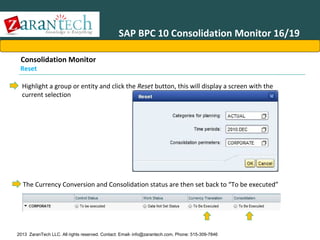
  • 181.
    SAP BPC 10Journals 19/29 Journal Creation (1) Journals can be created in multiple ways: • • • Single journal entry Using multiple headers to generate a group of individual journal entries Using multiple values for various dimension selections in the journal body Single journal entry has the Multiple Headers and Multiple Value check boxes unchecked: 2013 ZaranTech LLC. All rights reserved. Contact: Email- info@zarantech.com, Phone: 515-309-7846
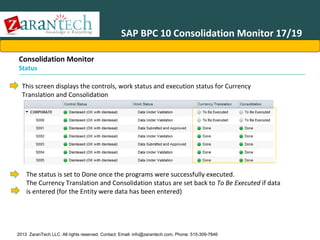
  • 182.
    SAP BPC 10Journals 20/29 Journal Creation (2) Using multiple headers will generate a group of individual journal entries with common values but different header selections: • After checking the Multiple Headers checkbox, select the dimension that will contain the multiple selections. • A member selection popup box will appear, select one or several dimension members…each member selection will create a separate, but grouped, journal entry upon saving the journal. • In the example shown, this journal definition will create three grouped journal entries for 2010.JAN, 2010.FEB, and 2010.MAR. 2013 ZaranTech LLC. All rights reserved. Contact: Email- info@zarantech.com, Phone: 515-309-7846
  • 183.
    SAP BPC 10Journals 21/29 Journal Creation (3) Using multiple values expands the journal entry screen based upon the dimension selected for multiple entry: The result is an expanded journal entry section allowing separate entries for each of the selected dimension members: Using multiple values will generate a group of individual journal entries with potentially different values but the same header selection. 2013 ZaranTech LLC. All rights reserved. Contact: Email- info@zarantech.com, Phone: 515-309-7846
  • 184.
    SAP BPC 10Journals 22/29 Journal Creation – Creating Journal Entries (1) The journal tab consists of a context menu, option selections, and a three tab journal entry for data input. 2013 ZaranTech LLC. All rights reserved. Contact: Email- info@zarantech.com, Phone: 515-309-7846
  • 185.
    SAP BPC 10Journals 23/29 Journal Creation – Creating Journal Entries (2) The Journal Entry sub-tab allows the user to directly input journal postings, the system automatically provides a running summary of the accumulated values entered 2013 ZaranTech LLC. All rights reserved. Contact: Email- info@zarantech.com, Phone: 515-309-7846
  • 186.
    SAP BPC 10Journals 24/29 Journal Creation – Creating Journal Entries (3) The Additional Properties sub-tab allows the user to enter and additional property fields defined in the template (See the entry for “Ldate” in the example below) 2013 ZaranTech LLC. All rights reserved. Contact: Email- info@zarantech.com, Phone: 515-309-7846
  • 187.
    SAP BPC 10Journals 25/29 Journal Creation – Creating Journal Entries (4) The Additional Properties date entry option is especially useful in the Banking industry: DATE SELECT POPUP 2013 ZaranTech LLC. All rights reserved. Contact: Email- info@zarantech.com, Phone: 515-309-7846
  • 188.
    SAP BPC 10Journals 26/29 Journal Creation – Status Journals can have one of the following status assignments: • • • • • • Saved - journal has been saved but journal entries have not been committed to database Deleted – journal has been deleted, the system retains this information to prevent any subsequent reuse of journal ids. Posted - journal entries have been committed to database Unposted - - journal entries previously committed to database have been reversed with offsetting postings made in the database Locked – journal entries have been posted and the data is locked from any additional changes. Journals cannot be unposted or deleted with a Locked status. Unlocked – A locked journal can be unlocked by an administrator with the Lock/Unlock security task assignment. Unlocking a journal sets its status to posted. 2013 ZaranTech LLC. All rights reserved. Contact: Email- info@zarantech.com, Phone: 515-309-7846
  • 189.
    SAP BPC 10Journals 27/29 Journal BAdIs (Business Add Ins) When journal entries are being Saved or Posted, an ABAP based BAdI can be triggered to create additional calculated records. This journal specific BAdI allows can perform calculations on the journal entries and can create new records which will be stored and displayed within the journal itself. The BAdI is delivered empty but can be customized by clients. A typical BAdI implementation will be able to leverage fields that the journal.lgf logic does not access (additional items, date fields, etc…) 2013 ZaranTech LLC. All rights reserved. Contact: Email- info@zarantech.com, Phone: 515-309-7846
  • 190.
    SAP BPC 10Journals 28/29 Advanced Journal Balancing Journal entries are checked dynamically, if an out of balance condition occurs the system will color code the problem area in red highlights: 2013 ZaranTech LLC. All rights reserved. Contact: Email- info@zarantech.com, Phone: 515-309-7846
  • 191.
    SAP BPC 10Journals 29/29 Rules: Controls Summary You should now be able to: •View and create Journal Templates •View and create Journal entries •Use advanced journal query to locate a journal •Understand the automatic balancing features of journals •Create and manage journal groups •Understand journal statuses 2013 ZaranTech LLC. All rights reserved. Contact: Email- info@zarantech.com, Phone: 515-309-7846
  • 192.
    SAP BPC FinancialConsolidationAgenda • • • • • • • • • • • • Advanced Accounting Introduction IRS BPC 10 Business Process Flow BPC 10 Consolidation Framework Consolidation Monitor Controls Administration Controls Monitor – Executing Controls Journals Ownership Manager Configuration: Business Rules, Methods and Consolidation of Investments Accounting Basics 2013 ZaranTech LLC. All rights reserved. Contact: Email- info@zarantech.com, Phone: 515-309-7846
  • 193.
    Ownership Manager 1/22 Whatis the Ownership Manager? The Ownership Manager (formally known as the Dynamic Hierarchy Editor in earlier versions of BPC) is a transaction data based representation of an organizational hierarchy as well as defining consolidation parameters. Time, and Scope. This allows multiple organizational structures to be created to support dynamic ownership situations (such as acquisitions, divestitures, changes in existing positions, etc.). The hierarchies created by OM are identified with three keys dimensions: Category, 2013 ZaranTech LLC. All rights reserved. Contact: Email- info@zarantech.com, Phone: 515-309-7846
  • 194.
    Ownership Manager 2/22 OwnershipManager - Prerequisites The ownership manager requires an Ownership model to be defined that is of the technical model type “ownership” Model definition: The Ownership model must include the following dimensions: 1.Dimension type “A” – provides information on ownership type such as PGROUP, POWN, PCON, and PCTRL 2.Dimension type “C” * 3.Dimension type “E” * 4.Dimension type “T” * 5.Dimension type “I” * 6.Dimension type “G”* *must be the same dimension as used within the Legal (Consolidation) application 2013 ZaranTech LLC. All rights reserved. Contact: Email- info@zarantech.com, Phone: 515-309-7846
  • 195.
    Ownership Manager 3/22 OwnershipManager Security Tasks Access to the ownership manager (formally known as the Dynamic Hierarchy Editor in earlier versions of BPC) is controlled via the following three security tasks: 2013 ZaranTech LLC. All rights reserved. Contact: Email- info@zarantech.com, Phone: 515-309-7846
  • 196.
    Ownership Manager 4/22 Accessingthe Ownership Manager (1) The ownership manager (formally known as the Dynamic Hierarchy Editor in earlier versions of BPC) is accessed via the web interface and is located on the Start Page within the Consolidation Central node : 2013 ZaranTech LLC. All rights reserved. Contact: Email- info@zarantech.com, Phone: 515-309-7846
  • 197.
    Ownership Manager 5/22 Accessingthe Ownership Manager (2) Click on the Ownership Manager access link in Consolidation Central to display the ownership definition in the right context screen 2013 ZaranTech LLC. All rights reserved. Contact: Email- info@zarantech.com, Phone: 515-309-7846
  • 198.
    Ownership Manager 6/22 Accessingthe Ownership Manager (3) The ownership definition screen includes an overview display of the ownership hierarchy, and for each node the “Generated” and/or “Current” consolidation method, the Consolidation Rate (formally PCON), and the Financial Interest Rate (formally POWN) rates to be employed for the selected node : 2013 ZaranTech LLC. All rights reserved. Contact: Email- info@zarantech.com, Phone: 515-309-7846
  • 199.
    Ownership Manager 7/22 Accessingthe Ownership Manager (4) However, the Ownership Manager uses terms such as “Consolidation Rate” and “Financial Interest Rate”, the data is stored with the same data modeling as in previous versions. For example, Consolidation Rates are stored as PCON values and Financial Interest Rates are stored as POWN values in the database: 2013 ZaranTech LLC. All rights reserved. Contact: Email- info@zarantech.com, Phone: 515-309-7846
  • 200.
    Ownership Manager 8/22 Editingthe Ownership Hierarchy (1) Editing opens a new tab titled “Edit Ownership (selected context for Category, Time, and Group)”: 2013 ZaranTech LLC. All rights reserved. Contact: Email- info@zarantech.com, Phone: 515-309-7846
  • 201.
    Ownership Manager 9/22 Editingthe Ownership Hierarchy (2) Access existing ,or create new, versions of ownership hierarchies by changing the context selections for the Category, Time, and Group dimensions. 2013 ZaranTech LLC. All rights reserved. Contact: Email- info@zarantech.com, Phone: 515-309-7846
  • 202.
    Ownership Manager 10/22 Editingthe Ownership Hierarchy (3) Add/Remove individual Entity values from the Group hierarchy Context menu provides same functions as in tool bar: 2013 ZaranTech LLC. All rights reserved. Contact: Email- info@zarantech.com, Phone: 515-309-7846
  • 203.
    Ownership Manager 11/22 Editingthe Ownership Hierarchy (4) Click on top group node to view summary of all entities entered 2013 ZaranTech LLC. All rights reserved. Contact: Email- info@zarantech.com, Phone: 515-309-7846
  • 204.
    Ownership Manager 12/22 Editingthe Ownership Hierarchy (5) Double Click on “current” cells to modify settings: 2013 ZaranTech LLC. All rights reserved. Contact: Email- info@zarantech.com, Phone: 515-309-7846
  • 205.
    Ownership Manager 13/22 Editingthe Ownership Hierarchy (6) Ownership hierarchies can be saved Ownership hierarchies can be copied into a different context: 2013 ZaranTech LLC. All rights reserved. Contact: Email- info@zarantech.com, Phone: 515-309-7846
  • 206.
    Ownership Manager 14/22 Editingthe Ownership Hierarchy (7) Click on :Calculate to run internal program that determines the “generated” values for Consolidation Rate and Financial Interests: 2013 ZaranTech LLC. All rights reserved. Contact: Email- info@zarantech.com, Phone: 515-309-7846
  • 207.
    Ownership Manager 15/22 OwnershipManager – Calculation Prerequisites (1) METHOD business rule definitions 2 3 Copied into METHOD_SYS 2 1 PCTRL_SYS generated by the Ownership Calculation is compared to these ranges to determine METHOD_SYS and PCON_SYS 2013 ZaranTech LLC. All rights reserved. Contact: Email- info@zarantech.com, Phone: 515-309-7846 3 Copied into PCON_SYS
  • 208.
    Ownership Manager 16/22 OwnershipManager – Calculation Prerequisites (2) Cross Ownership Data: Must be G_NONE PCTRL is used to generate PCTRL_SYS which is used in BR Share Range lookup Direct Share or Group Share calculation method determines how these percentages are combined to generate PCTRL_SYS and POWN_SYS (Direct Share method: no modification; Group Share method: multiply the rates through the hierarchy), 2013 ZaranTech LLC. All rights reserved. Contact: Email- info@zarantech.com, Phone: 515-309-7846 POWN is used to generate POWN_SYS which is used to fill the Generated Financial Interest Rate
  • 209.
    Ownership Manager 17/22 OwnershipManager - Prerequisites Ownership Manager Display: METHOD_SYS METHOD_SYS is derived from the BR share range lookup 2013 METHOD PCON_SYS PCON_SYS is derived from the BR share range lookup PCON POWN_SYS POWN_SYS is derived from the ultimate ownership percentage calculation using the selected share method (Direct/Group) and the POWN values entered in the Cross ZaranTech LLC. All rights reserved. Contact: Email- info@zarantech.com, Phone: 515-309-7846 Ownership Schedule POWN
  • 210.
    Ownership Manager 18/22 OwnershipManager Putting it all together Ownership Manager Metho d Method_s ys PCON POWN POWN_sys PCON_sys Business Rule PCTRL_sys Cross Ownership Data Optional step PCTRL POWN 2013 ZaranTech LLC. All rights reserved. Contact: Email- info@zarantech.com, Phone: 515-309-7846
  • 211.
    Ownership Manager 19/22 DirectShare Vs. Group Share (1)Example Consolidation units US, DE, and IN are assigned to consolidation group World for a certain period and category. Parent unit US holds 60% of the shares in consolidation unit DE and controls the voting rights 60% Consolidation unit DE holds 80% of the shares in consolidation unit IN and controls the voting rights 80%. In group World, the Parent unit US is the holding company of unit DE and although US does not directly hold the unit IN, in reality US has control of IN through an “indirect” control via unit DE 2013 ZaranTech LLC. All rights reserved. Contact: Email- info@zarantech.com, Phone: 515-309-7846
  • 212.
    Ownership Manager 20/22 DirectShare Vs. Group Share (2)Group Share Calculation with group share, which only captures the group part of the ownership (in this case the UPO using group share in World for unit IN is 48% (equal to “ 60%” , % of DE owned by US multiplied by “80%” , “% of IN Owned by DE") Group Share = 60% * 80% = 48% 2013 ZaranTech LLC. All rights reserved. Contact: Email- info@zarantech.com, Phone: 515-309-7846
  • 213.
    Ownership Manager 21/22 DirectShare Vs. Group Share (3)Direct Share UPO with direct share in this case should be inherited based on the DIRECT % of control between the direct parent (US) and the child unit (IN) as the ultimate parent of Group World (US) controls the parent DE. The UPO with direct share value, in this case for CG1,is 80% NOT 48%. Direct Share = 80% 2013 ZaranTech LLC. All rights reserved. Contact: Email- info@zarantech.com, Phone: 515-309-7846
  • 214.
    Ownership Manager 22/22 OwnershipManager Summary You should now be able to: •Understand the new Ownership Manager interface •Navigate the Ownership Manager functions and features •Create and maintain Ownership hierarchies •Execute Ownership calculations 2013 ZaranTech LLC. All rights reserved. Contact: Email- info@zarantech.com, Phone: 515-309-7846
  • 215.
    SAP BPC FinancialConsolidationAgenda • • • • • • • • • • • • Advanced Accounting Introduction IRS BPC 10 Business Process Flow BPC 10 Consolidation Framework Consolidation Monitor Controls Administration Controls Monitor – Executing Controls Journals Ownership Manager Configuration: Business Rules, Methods and Consolidation of Investments Accounting Basics 2013 ZaranTech LLC. All rights reserved. Contact: Email- info@zarantech.com, Phone: 515-309-7846
  • 216.
    Configuration: Business Rules,Methods and Consolidation of Investments Why consolidated statements? Consolidated instead of separate financial statements for fair presentation. The purpose of consolidated financial statements is ; •To present, primarily for the benefit of the owners and creditors of the parent, the results of operations and the financial position of a parent company and all its subsidiaries as if the consolidated group were a single economic entity with one or more branches or divisions •There is a presumption that consolidated financial statements are more meaningful than separate financial statements and that they are usually necessary for a fair presentation. •For instance, when one of the entities in the consolidated group directly or indirectly has a controlling financial interest in the other entities” •(FAS 160) (IFRS 10) 2013 ZaranTech LLC. All rights reserved. Contact: Email- info@zarantech.com, Phone: 515-309-7846
  • 217.
    Configuration: Business Rules,Methods and Consolidation of Investments Stock investments—investor Accounting and Reporting Reporting methods •GAAP & IFRS recognized three Methods Based on Level of Investment 1.Fair value method (FAS 115) (IFRS 13) 2. Equity method (APB 18) (IAS 28)3. Consolidated Financial Statements (ARB 51) (IFRS 10) - Acquisition Method (FAS 114R effective 2009) - Purchase method (FAS 141 through 2008) - Pooling of interests method (APB 16 through 6/30/02) Investor Ownership of the Investee’s Shares Outstanding Equity Method Consolidated Financial Statements Fair Value 0% 20% 50% 2013 ZaranTech LLC. All rights reserved. Contact: Email- info@zarantech.com, Phone: 515-309-7846 100%
  • 218.
    Configuration: Business Rules,Methods and Consolidation of Investments Fair value method (FAS 115) (IFRS 13) •Three categories of investment: 1. “Held-to-maturity” debt securities 2. “Trading” debt or equity securities 3. “Available-for-sale” debt or equity securities •Investments that are either for re-sale (“held-to-maturity” or “trading”) or that are held (“available-for-sale”) with unrecognized gains in losses reported as separate equity item (under other comprehensive income) Dividends recognized as income •Example journal entries: Account titles Debit Available-for-sale investment Credit XXX XXX Cash Account titles Cash Debit Credit XXX Dividend income 2013 ZaranTech LLC. All rights reserved. Contact: Email- info@zarantech.com, Phone: 515-309-7846 XXX
  • 219.
    Configuration: Business Rules,Methods and Consolidation of Investments Equity method (APB 18) (IAS 28) A method of accounting by which an equity investment is initially recorded at cost and subsequently adjusted to reflect the investor's share of the net assets of the associate (investee). •Investments where investor has ability to “significantly influence” investee (APB 18) (IAS 28) •Investor recognizes its share of the earnings or losses of an investee in the periods for which they are reported •Share of the earnings or losses adjusts parent investment and reports the recognized earnings or losses in income. •Cash dividends reduces reversed to avoid double counting Example journal entries: Account titles Debit Investment in Investee Credit XXX XXX Cash Accounts titles Cash Debit Credit XXX Investment in investee (for cash dividends) 2013 ZaranTech LLC. All rights reserved. Contact: Email- info@zarantech.com, Phone: 515-309-7846 XXX
  • 220.
    Configuration: Business Rules,Methods and Consolidation of Investments Consolidated Financial Statements (ARB 51) (IFRS 10 ) •Financial statements are combined between parent and subsidiaries in a common reporting currency (FAS 52) •Intercompany items are eliminated to avoid double counting •Various methods can be used to combine financial statements into one consolidated one such as: 1. “Proportional Method” (IFRS) 2. “Pooling of Interests” Account titles Debit Credit 3. “Purchase Method” Goodwill XXX XXX 4. “Acquisition Method” Investment in investee •Under acquisition method, investment is eliminated against equity and the portion of equity not attributable to parent is created in the equity section as non-controlling interest (FAS 160). Example journal entries: Account titles Capital Stock Retained Earnings Debit Credit XXX XXX Non-Controlling (Minority) Interest 2013 ZaranTech LLC. All rights reserved. Contact: Email- info@zarantech.com, Phone: 515-309-7846 XXX
  • 221.
    Configuration: Business Rules,Methods and Consolidation of Investments Influence, control and ownership •APB Opinion 18 states “The equity method tends to be most appropriate if an investment enables the investor to influence the operating or financial decisions of the investee…Influence tends to be more effective as the investor’s percent of ownership in the voting stock of the investee increases”. • ARB 51 was originally based on majority ownership of voting shares. After Enron FIN 46R, the basis for consolidation was expanded to any enterprise that controls the economic risks and rewards of an investee, regardless of ownership. Fair Value 0% Equity Method ??? Consolidated Financial Statement ??? 2013 ZaranTech LLC. All rights reserved. Contact: Email- info@zarantech.com, Phone: 515-309-7846 100%
  • 222.
    Configuration: Business Rules,Methods and Consolidation of Investments Which methods do we care about in SAP BPC? US GAAP reporting methods GAAP recognized three Methods Based on Level of Investment 1.Fair value method (FAS 115) (IFRS 13) 2. Equity method (APB 18) (IAS 28)3. Consolidated Financial Statements (ARB 51) (IFRS 10) 1. Acquisition Method (FAS 114R effective 2009) 2. Purchase method (FAS 141 through 2008) 3. Pooling of interests method (APB 16 through 6/30/02) Handled in General Ledger Consolidated Financial Statements Equity Method Fair Value 0% Handled in General Ledger 20% 50% 2013 ZaranTech LLC. All rights reserved. Contact: Email- info@zarantech.com, Phone: 515-309-7846 100%
  • 223.
    Configuration: Business Rules,Methods and Consolidation of Investments POWN, PCON versus PCTRL Percent ownership, percent consolidation versus percent control • • Can flexibly define consolidation on either percent control (PCTRL) or percent ownership (PCON) Percent consolidation (PCON) is primarily for proportional consolidations (NEW IFRS 11 Joint Arrangement elimenates proportional consolidation) Exercises are based on percent ownership (PCON) • Fair Value 0% Equity Method ??? Consolidated Financial Statements ??? 2013 ZaranTech LLC. All rights reserved. Contact: Email- info@zarantech.com, Phone: 515-309-7846 100%
  • 224.
    Configuration: Business Rules,Methods and Consolidation of Investments Consolidation method codes How consolidation method codes are coded to method types Method codes are freely configurable but must be assigned to one of the predefined method types: 1. ‘H’ for parent investors or holding entities 2. ‘G’ for subsidiaries that are to be financially consolidated with parent 3. ‘E’ for equity method investees 2013 ZaranTech LLC. All rights reserved. Contact: Email- info@zarantech.com, Phone: 515-309-7846
  • 225.
    Configuration: Business Rules,Methods and Consolidation of Investments How to navigate there Path to consolidation method types Navigate to > Administration > Rules > Business Rules > Methods 2013 ZaranTech LLC. All rights reserved. Contact: Email- info@zarantech.com, Phone: 515-309-7846
  • 226.
    Configuration: Business Rules,Methods and Consolidation of Investments Equity method versus consolidated statements Difference between equity method and consolidated financial statements Equity method does not combine balance sheet and income statements with parent but rather recognizes share of investee income Investee Income 2013 ZaranTech LLC. All rights reserved. Contact: Email- info@zarantech.com, Phone: 515-309-7846
  • 227.
    Configuration: Business Rules,Methods and Consolidation of Investments Equity method business rules Using the equity adjustment type To reverse equity method investee financial statements a special Adjustment Type in Business Rules is used 2013 ZaranTech LLC. All rights reserved. Contact: Email- info@zarantech.com, Phone: 515-309-7846
  • 228.
    Configuration: Business Rules,Methods and Consolidation of Investments How to navigate there How to navigate to business rules Navigate to > Administration > Rules > Business Rules > Eliminations and Adjustments 2013 ZaranTech LLC. All rights reserved. Contact: Email- info@zarantech.com, Phone: 515-309-7846
  • 229.
    Configuration: Business Rules,Methods and Consolidation of Investments How to configure business rules Configuring the header of an equity method business rule 2013 ZaranTech LLC. All rights reserved. Contact: Email- info@zarantech.com, Phone: 515-309-7846
  • 230.
    Configuration: Business Rules,Methods and Consolidation of Investments Understanding intercompany eliminations IFRS Starter Kit examples of intercompany eliminations Eliminations are posted against an elimination clearing account for automatic adjustment rules within their own data source 1 2 3 2 1 1 2 3 2013 ZaranTech LLC. All rights reserved. Contact: Email- info@zarantech.com, Phone: 515-309-7846 3
  • 231.
    Configuration: Business Rules,Methods and Consolidation of Investments Understanding intercompany eliminations (1) Three types of inter-entity eliminations 2013 ZaranTech LLC. All rights reserved. Contact: Email- info@zarantech.com, Phone: 515-309-7846
  • 232.
    Configuration: Business Rules,Methods and Consolidation of Investments Understanding intercompany eliminations (2) Three types of inter-entity eliminations Business Rule Approach Differences Contribution model approach Eliminates trading partner (intercompany dimension) pairs and also handles consolidation of investments Elimination entity or “first common parent” approach Eliminates trading partner combinations on a common elimination entity Subsidiary reconciliation approach For reconciliation reporting, copies trading partner details onto each entity for secured reporting purposes Automatic Adjustments US eliminations Intercompany Bookings 2013 ZaranTech LLC. All rights reserved. Contact: Email- info@zarantech.com, Phone: 515-309-7846
  • 233.
    Configuration: Business Rules,Methods and Consolidation of Investments Understanding IC matching How to accelerate financial consolidation with peer-to-peer matching • • • • Designed to enable subsidiaries to do their own intercompany reconciliation with peers to expedite corporate reconciliation Copies the trading partner side of eliminations onto the receiving entity for secured reporting purposes Designed as a separate application with specific data sources to facilitate intercompany reconciliation Consider a separate application for IC matching; facilitates adding additional transaction currency dimension and having separate work status definitions 2013 ZaranTech LLC. All rights reserved. Contact: Email- info@zarantech.com, Phone: 515-309-7846
  • 234.
    Configuration: Business Rules,Methods and Consolidation of Investments Understanding consolidation of investments IFRS Starter Kit example of consolidation of investment Elimination and adjustments also handle consolidation of investments where investments are eliminated against equity A different configuration of elimination that takes into account noncontrolling interest (FAS 160) 2013 ZaranTech LLC. All rights reserved. Contact: Email- info@zarantech.com, Phone: 515-309-7846
  • 235.
    Configuration: Business Rules,Methods and Consolidation of Investments Business Scenario Example for Exercise Acquisition and equity method example scenarios Organizational structure consisting of acquisition/purchase method (fair value and book value assumed to be same) in Europe (German parent owning 80% of UK subsidiary) and equity method in Asia (Japanese parent owning 30% of Australian associate) Consolidated financial statements that take into account: 1. 1. Europe and Asia is EUR and USD but currency translation exercise is focused on Europe in EUR (where UK subsidiary is in GBP) Intercompany eliminations of receivables and payables and revenue and expenses within Europe as well S_World S_Europe DE 100% UK 80% 2013 ZaranTech LLC. All rights reserved. Contact: Email- info@zarantech.com, Phone: 515-309-7846 S_AisaPac JP 100% AU 30%
  • 236.
    Configuration: Business Rules,Methods and Consolidation of Investments Currency Translation Cumulative translation adjustment example (1) Financial statements of UK subsidiary is combined with German parent •Balance sheet is translated and month-end spot • Income statement translated at average rate •Retained earnings translated at both historical and average rates causing the balance sheet to be out-ofbalance and necessitating an equity plug (i.e. “CTA” or “Currency Translation Adjustment”) In the exercise, currency translation adjustment is created by one account, Retained Earnings • • • • Opening retained earnings balance is at an “As-Is” historical rate (group reporting currency values are loaded into the system so the balance is not translated Current period retained earnings is translated at an average rate consistent with the income statement (since current period retained earnings of associate equals the earnings or losses of that investee) The implied or effective rate of the “As-Is” historical rate just happens to be the same as month-end spot rate (to simplify the exercise example) As a result, out-of-balance result is further isolated to current period retained earnings 2013 ZaranTech LLC. All rights reserved. Contact: Email- info@zarantech.com, Phone: 515-309-7846
  • 237.
    Configuration: Business Rules,Methods and Consolidation of Investments Currency Translation Cumulative translation adjustment example (2) CTA calculation is as follows • Current period retained earnings of 5 is translated at an average rate of 1.5 (equaling 7.50) instead of a closing rate of 1.25 (which would have been 6.25 to keep balance sheet in balance) creating a CTA difference of 1.25 (7.50 – 6.25) for the equity plug 2013 ZaranTech LLC. All rights reserved. Contact: Email- info@zarantech.com, Phone: 515-309-7846
  • 238.
    Configuration: Business Rules,Methods and Consolidation of Investments Consolidation of investments Example T-Accounts for a hypothetical consolidation of investments T-accounts highlighting business rules-based investment eliminations with non-controlling interest split Illustrative example of the flexibility of rules-based financial consolidation where goodwill is written off to reserves 2013 ZaranTech LLC. All rights reserved. Contact: Email- info@zarantech.com, Phone: 515-309-7846
  • 239.
    Configuration: Business Rules,Methods and Consolidation of Investments Equity Method – First Consolidation Cost over book value purchase of equity method company When cost is in excess of book value purchased, the difference must be accounted for in one of two ways: 1. Assets that are undervalued on the investee’s books must amortize fair value differences over the remaining useful life of the asset (lest the assetlife is indefinite) 1. Goodwill remains without adjustment until the investment is disposed or impaired according to FAS 142 (effective Dec 15, 2001 and later) The exercise scenario illustrates the second approach under 30% ownership 1. Investment in associate of 250 2. Associate equity of 800 3. Proportionate book value of 240 (800 * 30%) 4. Cost over book value goodwill of 10 (250 – 240) Debit Example journal entries GoodwillInvestment in investee 2013 ZaranTech LLC. All rights reserved. Contact: Email- info@zarantech.com, Phone: 515-309-7846 X Credit X
  • 240.
    Configuration: Business Rules,Methods and Consolidation of Investments Key inputs to consolidationRates and ownership stored in separate models Exchanged rates and Ownership Manager data are stored and referenced via separate models Reporting model Drivers and Rates Model Consolidation model Rates Ownership 2013 ZaranTech LLC. All rights reserved. Contact: Email- info@zarantech.com, Phone: 515-309-7846
  • 241.
    Configuration: Business Rules,Methods and Consolidation of Investments 2013 ZaranTech LLC. All rights reserved. Contact: Email- info@zarantech.com, Phone: 515-309-7846
  • 242.
    Configuration: Business Rules,Methods and Consolidation of Investments 2013 ZaranTech LLC. All rights reserved. Contact: Email- info@zarantech.com, Phone: 515-309-7846
  • 243.
    Configuration: Business Rules,Methods and Consolidation of Investments 2013 ZaranTech LLC. All rights reserved. Contact: Email- info@zarantech.com, Phone: 515-309-7846
  • 244.
    Configuration: Business Rules,Methods and Consolidation of Investments 2013 ZaranTech LLC. All rights reserved. Contact: Email- info@zarantech.com, Phone: 515-309-7846
  • 245.
    Configuration: Business Rules,Methods and Consolidation of Investments 2013 ZaranTech LLC. All rights reserved. Contact: Email- info@zarantech.com, Phone: 515-309-7846
  • 246.
    Configuration: Business Rules,Methods and Consolidation of Investments 2013 ZaranTech LLC. All rights reserved. Contact: Email- info@zarantech.com, Phone: 515-309-7846

Editor's Notes

  • #3 Source: Financial Accounting: An Introduction to Concepts, Methods, and Uses Clyde p.Stickney Roman l.weil july 2002 Advanced Accounting tenth edition Pearson International Edition 2009 new jersey
  • #4 Source: Financial Accounting: An Introduction to Concepts, Methods, and Uses Clyde p.Stickney Roman l.weil july 2002 Advanced Accounting tenth edition Pearson International Edition 2009 new jersey
  • #7 Double declining Balance depreciation
  • #16 Source : http://www.ifrs.com/ifrs_faqs.html
  • #17 Source : http://www.ifrs.com/ifrs_faqs.html
  • #18 Source : http://www.iasplus.com/standard/standard.htm
  • #19 Source : http://www.iasplus.com/standard/standard.htm
  • #20 Source: http://www.iasplus.com/standard/ifrs01.htm
  • #21 Source: http://www.iasplus.com/standard/ifrs01.htm There are two exemptions to the general scope principle. First, the issuance of shares in a business combination should be accounted for under IFRS 3 Business Combinations. However, care should be taken to distinguish share-based payments related to the acquisition from those related to employee services. Second, IFRS 2 does not address share-based payments within the scope of paragraphs 8-10 of IAS 32 Financial Instruments: Disclosure and Presentation, or paragraphs 5-7 of IAS 39 Financial Instruments: Recognition and Measurement. Therefore, IAS 32 and 39 should be applied for commodity-based derivative contracts that may be settled in shares or rights to shares. IFRS 2 does not apply to share-based payment transactions other than for the acquisition of goods and services. Share dividends, the purchase of treasury shares, and the issuance of additional shares are therefore outside its scope
  • #23 Source: http://www.iasplus.com/standard/ifrs01.htm http://www.iasb.org/NR/rdonlyres/DC6611CC-9789-43E8-8940-0D36839DAC19/0/IFRS4.pdf
  • #24 Source: http://www.iasplus.com/standard/ifrs01.htm http://www.iasb.org/NR/rdonlyres/FB2F41EE-F425-4C9F-B317-2D8D7003BBB7/0/IFRS5.pdf
  • #25 Source: http://www.iasplus.com/standard/ifrs01.htm http://www.iasb.org/NR/rdonlyres/FB2F41EE-F425-4C9F-B317-2D8D7003BBB7/0/IFRS6.pdf
  • #26 Source : http://www.iasplus.com/standard/ifrs07.htm http://www.iasb.org/NR/rdonlyres/8177F9A2-EB2F-45A3-BBF3-3DE7DCB13E1A/0/IFRS7.pdf
  • #27 Source: http://www.iasplus.com/standard/ifrs08.htm http://www.iasb.org/NR/rdonlyres/239C0B7A-9064-4846-9300-00BAB8D9ED5A/0/IFRS8.pdf
  • #28 Source: https://pwcinform.pwc.com/inform2/show?action=informContent&id=1145065601124848 http://www.iasplus.com/standard/ifrs09.htm
  • #29 Source : http://www.iasplus.com/standard/ifrs10.htm Advanced Accounting tenth edition Pearson International Edition 2009 new jersey Ifrs 10,11, & 12, 13 Issued may 2011
  • #30 Source : Advanced Accounting tenth edition Pearson International Edition 2009 new jersey http://www.iasplus.com/standard/ifrs11.htm Ifrs 10,11, & 12, 13 Issued may 2011 The IASB (International Accounting Standards Board) recently issued IFRS 11 Joint Arrangements that eliminates proportionate consolidation as a method to account for joint ventures.!!
  • #31 Source : Advanced Accounting tenth edition Pearson International Edition 2009 new jersey http://www.iasplus.com/standard/ifrs11.htm Ifrs 10,11, & 12, 13 Issued may 2011
  • #32 Source : Advanced Accounting tenth edition Pearson International Edition 2009 new jersey http://www.iasplus.com/standard/ifrs11.htm http://scn.sap.com/community/epm/blog/2012/04/06/ifrs-11-the-end-of-proportionate-consolidation Ifrs 10,11, & 12, 13 Issued may 2011
  • #33 http://www.iasplus.com/standard/ifrs12.htm Ifrs 10,11, & 12, 13 Issued may 2011
  • #34 Source: http://www.iasplus.com/standard/ifrs13.htm Ifrs 10,11, & 12, 13 Issued may 2011
  • #35 Source : http://scn.sap.com/people/peter.amor/blog/2012/03/08/ifrs-beyond-compliance-to-real-advantages
  • #36 Source : Advanced Accounting tenth edition Pearson International Edition 2009 new jersey http://www.fasb.org/home
  • #37 Source: www. Ifrs.com www.sdn.sap.com (Bennet et al, 2006; Benston et al. 2006; Schipper, 2003; Psaros and Trotman, 2004).
  • #38 Source : In the ICAS report of 2011 AprilSource : IFRS 2012 (Blue book) http://repository.ubn.ru.nl/bitstream/2066/84455/1/84455.pdf
  • #39 Source : IFRS 2012 (Blue book) http://repository.ubn.ru.nl/bitstream/2066/84455/1/84455.pdf
  • #40 Source : In the ICAS report of 2011 AprilSource : IFRS 2012 (Blue book) http://repository.ubn.ru.nl/bitstream/2066/84455/1/84455.pdf
  • #41 Source : In the ICAS report of 2011 AprilSource : IFRS 2012 (Blue book) http://repository.ubn.ru.nl/bitstream/2066/84455/1/84455.pdf
  • #44 http://www.ifrs.com/ifrs_faqs.htmlfor more information concerning Adoption per country visit http://www.pwc.com/us/en/issues/ifrs-reporting/assets/ifrs_country_adoption.pdf