Public
May 22, 2023
SAP
SAP S/4HANA Integrated Financial Planning
with SAP Analytics Cloud
2
Public
The information in this presentation is confidential and proprietary to SAP and may not be disclosed without the permission of SAP.
Except for your obligation to protect confidential information, this presentation is not subject to your license agreement or any other service
or subscription agreement with SAP. SAP has no obligation to pursue any course of business outlined in this presentation or any related
document, or to develop or release any functionality mentioned therein.
This presentation, or any related document and SAP's strategy and possible future developments, products and or platforms directions and
functionality are all subject to change and may be changed by SAP at any time for any reason without notice. The information in this
presentation is not a commitment, promise or legal obligation to deliver any material, code or functionality. This presentation is provided
without a warranty of any kind, either express or implied, including but not limited to, the implied warranties of merchantability, fitness for a
particular purpose, or non-infringement. This presentation is for informational purposes and may not be incorporated into a contract. SAP
assumes no responsibility for errors or omissions in this presentation, except if such damages were caused by SAP’s intentional or gross
negligence.
All forward-looking statements are subject to various risks and uncertainties that could cause actual results to differ materially from
expectations. Readers are cautioned not to place undue reliance on these forward-looking statements, which speak only as of their dates,
and they should not be relied upon in making purchasing decisions.
Disclaimer
3
Public
Overview and Architecture
SAP Analytics Cloud for Planning
SAP S/4HANA Integration
SAP Delivered Sample Content
Relation to Classic Financial Planning in SAP S/4HANA On Premise
Manage Financial Plan Data in SAP S/4HANA
Flexibility, Adaptability, Extensibility
Further Information
Agenda
Overview and Architecture
5
Public
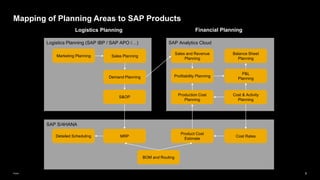
SAP Analytics Cloud
Logistics Planning (SAP IBP / SAP APO /…)
SAP S/4HANA
Logistics Planning Financial Planning
Production Cost
Planning
Demand Planning
S&OP
P&L
Planning
Profitability Planning
Sales and Revenue
Planning
Sales Planning
Cost & Activity
Planning
Marketing Planning
Balance Sheet
Planning
Product Cost
Estimate
Cost Rates
MRP
Detailed Scheduling
BOM and Routing
Mapping of Planning Areas to SAP Products
6
Public
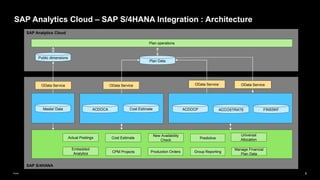
SAP S/4HANA
SAP Analytics Cloud – SAP S/4HANA Integration : Architecture
SAP Analytics Cloud
ACDOCP
ACDOCA
Plan Data
Master Data
Plan operations
Public dimensions
OData Service OData Service
Cost Estimate ACCOSTRATE FINSSKF
OData Service
New Availability
Check
Cost Estimate
OData Service
Group Reporting
Predictive
Production Orders
CPM Projects
Embedded
Analytics
Actual Postings
Universal
Allocation
Manage Financial
Plan Data
7
Public
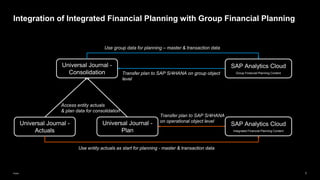
Integration of Integrated Financial Planning with Group Financial Planning
Universal Journal -
Actuals
Universal Journal -
Plan
Universal Journal -
Consolidation
Use entity actuals as start for planning - master & transaction data
Access entity actuals
& plan data for consolidation
Use group data for planning – master & transaction data
Transfer plan to SAP S/4HANA
on operational object level
Transfer plan to SAP S/4HANA on group object
level
SAP Analytics Cloud
Integrated Financial Planning Content
SAP Analytics Cloud
Group Financial Planning Content
8
Public
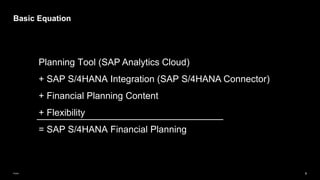
Basic Equation
Planning Tool (SAP Analytics Cloud)
+ SAP S/4HANA Integration (SAP S/4HANA Connector)
+ Financial Planning Content
+ Flexibility
= SAP S/4HANA Financial Planning
SAP Analytics Cloud for Planning
10
Public
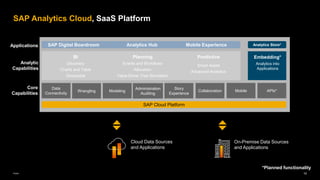
SAP Analytics Cloud, SaaS Platform
Planning
Events and Workflows
Allocation
Value Driver Tree Simulation
BI
Discovery
Charts and Table
Geospatial
Predictive
Smart Assist
Advanced Analytics
Embedding*
Analytics into
Applications
SAP Digital Boardroom Analytics Hub Mobile Experience
Core
Capabilities
Analytic
Capabilities
Analytics Store*
Applications
Data
Connectivity
SAP Cloud Platform
Wrangling Modeling
Administration
Auditing
Story
Experience
Collaboration Mobile APIs*
*Planned functionality
Cloud Data Sources
and Applications
On-Premise Data Sources
and Applications
11
Public
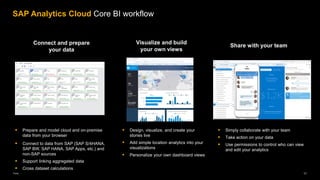
SAP Analytics Cloud Core BI workflow
▪ Prepare and model cloud and on-premise
data from your browser
▪ Connect to data from SAP (SAP S/4HANA,
SAP BW, SAP HANA, SAP Apps, etc.) and
non-SAP sources
▪ Support linking aggregated data
▪ Cross dataset calculations
Connect and prepare
your data
▪ Design, visualize, and create your
stories live
▪ Add simple location analytics into your
visualizations
▪ Personalize your own dashboard views
▪ Simply collaborate with your team
▪ Take action on your data
▪ Use permissions to control who can view
and edit your analytics
Visualize and build
your own views
Share with your team
12
Public
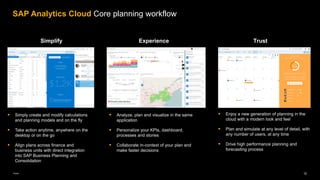
▪ Simply create and modify calculations
and planning models and on the fly
▪ Take action anytime, anywhere on the
desktop or on the go
▪ Align plans across finance and
business units with direct integration
into SAP Business Planning and
Consolidation
▪ Analyze, plan and visualize in the same
application
▪ Personalize your KPIs, dashboard,
processes and stories
▪ Collaborate in-context of your plan and
make faster decisions
Simplify Experience
▪ Enjoy a new generation of planning in the
cloud with a modern look and feel
▪ Plan and simulate at any level of detail, with
any number of users, at any time
▪ Drive high performance planning and
forecasting process
Trust
SAP Analytics Cloud Core planning workflow
13
Public
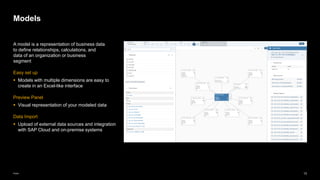
Models
A model is a representation of business data
to define relationships, calculations, and
data of an organization or business
segment
Easy set up
▪ Models with multiple dimensions are easy to
create in an Excel-like interface
Preview Panel
▪ Visual representation of your modeled data
Data Import
▪ Upload of external data sources and integration
with SAP Cloud and on-premise systems
14
Public
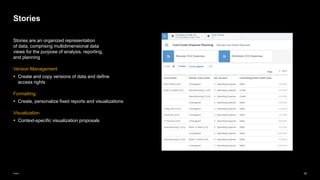
Stories
Stories are an organized representation
of data, comprising multidimensional data
views for the purpose of analysis, reporting,
and planning
Version Management
▪ Create and copy versions of data and define
access rights
Formatting
▪ Create, personalize fixed reports and visualizations
Visualization
▪ Context-specific visualization proposals
15
Public
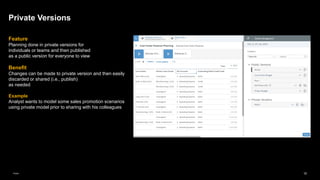
Feature
Planning done in private versions for
individuals or teams and then published
as a public version for everyone to view
Benefit
Changes can be made to private version and then easily
discarded or shared (i.e., publish)
as needed
Example
Analyst wants to model some sales promotion scenarios
using private model prior to sharing with his colleagues
Private Versions
16
Public
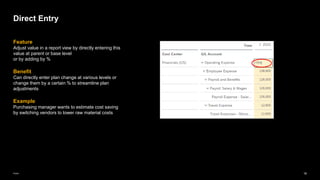
Feature
Adjust value in a report view by directly entering this
value at parent or base level
or by adding by %
Benefit
Can directly enter plan change at various levels or
change them by a certain % to streamline plan
adjustments
Example
Purchasing manager wants to estimate cost saving
by switching vendors to lower raw material costs
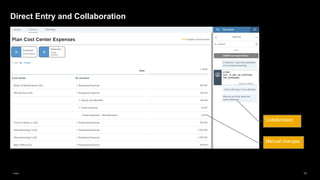
Direct Entry
17
Public
Direct Entry and Collaboration
Manual changes
Collaboration
18
Public
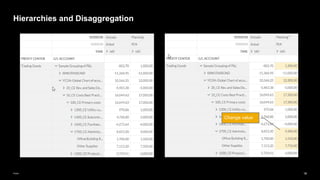
Hierarchies and Disaggregation
Change value
19
Public
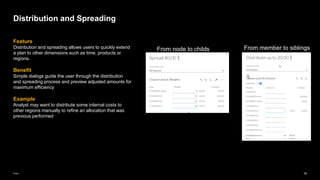
Feature
Distribution and spreading allows users to quickly extend
a plan to other dimensions such as time, products or
regions.
Benefit
Simple dialogs guide the user through the distribution
and spreading process and preview adjusted amounts for
maximum efficiency
Example
Analyst may want to distribute some internal costs to
other regions manually to refine an allocation that was
previous performed
Distribution and Spreading
From node to childs From member to siblings
20
Public
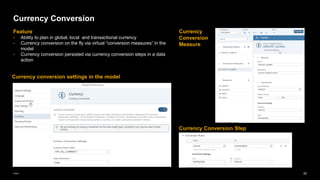
Currency Conversion
Feature
• Ability to plan in global, local and transactional currency
• Currency conversion on the fly via virtual “conversion measures” in the
model
• Currency conversion persisted via currency conversion steps in a data
action
Currency conversion settings in the model
Currency
Conversion
Measure
Currency Conversion Step
21
Public
Feature
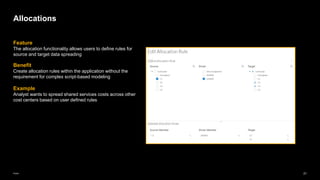
The allocation functionality allows users to define rules for
source and target data spreading
Benefit
Create allocation rules within the application without the
requirement for complex script-based modeling
Example
Analyst wants to spread shared services costs across other
cost centers based on user defined rules
Allocations
22
Public
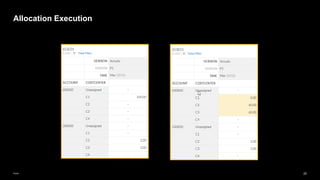
Allocation Execution
23
Public
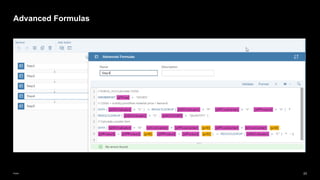
Advanced Formulas
24
Public
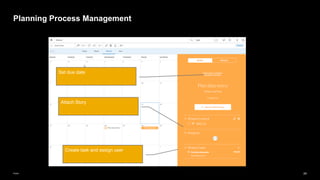
Planning Process Management
Create task and assign user
Attach Story
Set due date
SAP S/4HANA Integration
26
Public
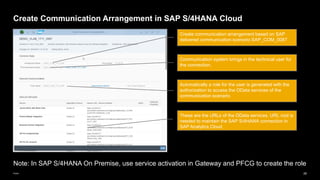
Create Communication Arrangement in SAP S/4HANA Cloud
Communication system brings in the technical user for
the connection.
These are the URLs of the OData services. URL root is
needed to maintain the SAP S/4HANA connection in
SAP Analytics Cloud
Automatically a role for the user is generated with the
authorization to access the OData services of the
communication scenario
Create communication arrangement based on SAP
delivered communication scenario SAP_COM_0087
Note: In SAP S/4HANA On Premise, use service activation in Gateway and PFCG to create the role
27
Public
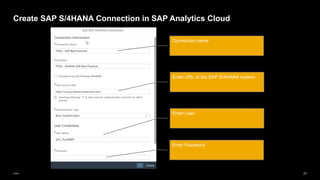
Create SAP S/4HANA Connection in SAP Analytics Cloud
Enter URL of the SAP S/4HANA system
Enter User
Connection name
Enter Password
28
Public
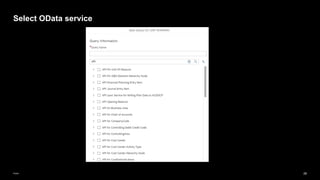
Select OData service
29
Public
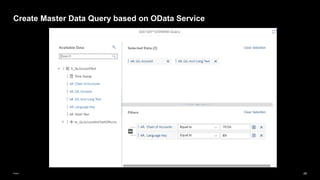
Create Master Data Query based on OData Service
Define Filter
Select description and
attributes
30
Public
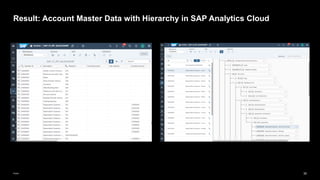
Result: Account Master Data with Hierarchy in SAP Analytics Cloud
31
Public
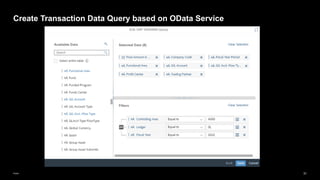
Create Transaction Data Query based on OData Service
32
Public
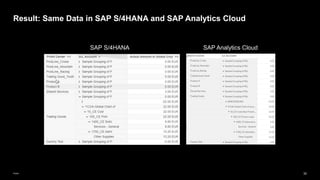
Result: Same Data in SAP S/4HANA and SAP Analytics Cloud
SAP Analytics Cloud
SAP S/4HANA
33
Public
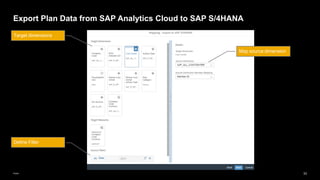
Export Plan Data from SAP Analytics Cloud to SAP S/4HANA
Define Filter
Target dimensions
Map source dimension
SAP Delivered Sample Content
35
Public
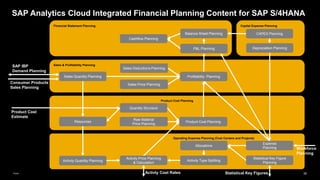
SAP Analytics Cloud Integrated Financial Planning Content for SAP S/4HANA
Operating Expense Planning (Cost Centers and Projects)
Product Cost Planning
Sales & Profitability Planning
Expense
Planning
Allocations
Raw Material
Price Planning
Product Cost Planning
Activity Price Planning
& Calculation
Profitability Planning
Sales Quantity Planning
Sales Price Planning
Activity Quantity Planning Activity Type Splitting
Statistical Key Figure
Planning
Product Cost
Estimate
Quantity Structure
Activty Cost Rates
Resources
Sales Deductions Planning
Financial Statement Planning
P&L Planning
Cashflow Planning
Balance Sheet Planning
Capital Expense Planning
CAPEX Planning
Depreciation Planning
Statistical Key Figures
Workforce
Planning
SAP IBP
Demand Planning
Consumer Products
Sales Planning
36
Public
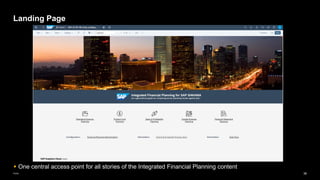
Landing Page
▪ One central access point for all stories of the Integrated Financial Planning content
37
Public
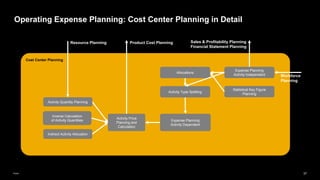
Cost Center Planning
Operating Expense Planning: Cost Center Planning in Detail
Expense Planning
Activity Independent
Allocations
Activity Price
Planning and
Calculation
Activity Quantity Planning
Activity Type Splitting
Statistical Key Figure
Planning
Expense Planning
Activity Dependent
Inverse Calculation
of Activity Quantities
Indirect Activity Allocation
Resource Planning Product Cost Planning Sales & Profitability Planning
Financial Statement Planning
Workforce
Planning
38
Public
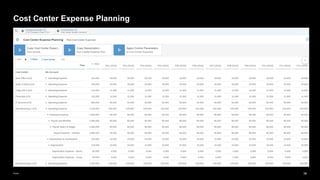
Cost Center Expense Planning
39
Public
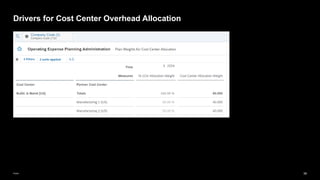
Drivers for Cost Center Overhead Allocation
40
Public
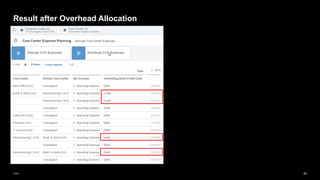
Result after Overhead Allocation
41
Public
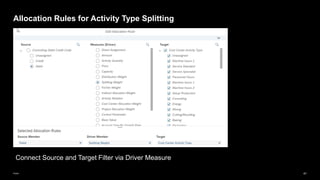
Allocation Rules for Activity Type Splitting
Connect Source and Target Filter via Driver Measure
42
Public
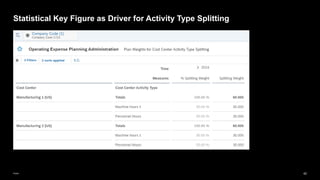
Statistical Key Figure as Driver for Activity Type Splitting
43
Public
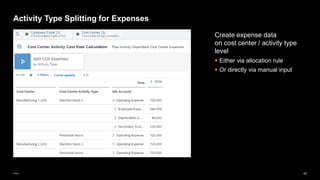
Activity Type Splitting for Expenses
Create expense data
on cost center / activity type
level
▪ Either via allocation rule
▪ Or directly via manual input
44
Public
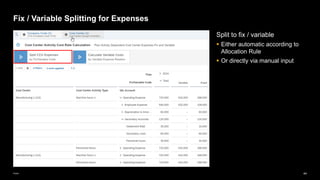
Fix / Variable Splitting for Expenses
Split to fix / variable
▪ Either automatic according to
Allocation Rule
▪ Or directly via manual input
45
Public
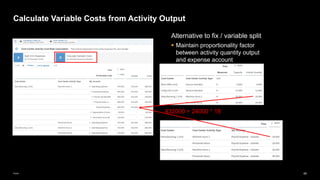
Calculate Variable Costs from Activity Output
Alternative to fix / variable split
▪ Maintain proportionality factor
between activity quantity output
and expense account
432000 = 24000 * 18
46
Public
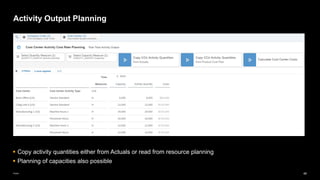
Activity Output Planning
▪ Copy activity quantities either from Actuals or read from resource planning
▪ Planning of capacities also possible
47
Public
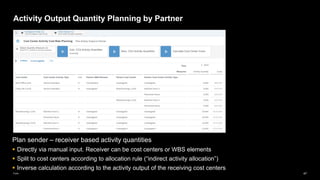
Activity Output Quantity Planning by Partner
Plan sender – receiver based activity quantities
▪ Directly via manual input. Receiver can be cost centers or WBS elements
▪ Split to cost centers according to allocation rule (“indirect activity allocation”)
▪ Inverse calculation according to the activity output of the receiving cost centers
48
Public
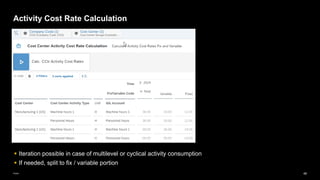
Activity Cost Rate Calculation
▪ Iteration possible in case of multilevel or cyclical activity consumption
▪ If needed, split to fix / variable portion
49
Public
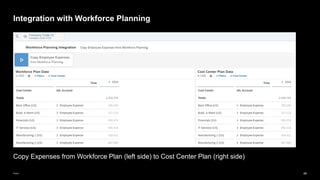
Copy Expenses from Workforce Plan (left side) to Cost Center Plan (right side)
Integration with Workforce Planning
50
Public
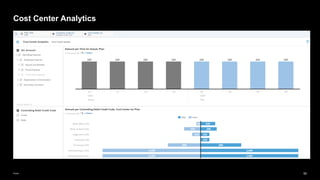
Cost Center Analytics
51
Public
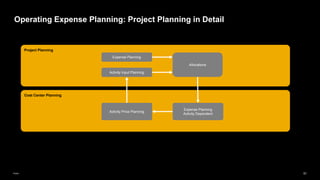
Cost Center Planning
Operating Expense Planning: Project Planning in Detail
Project Planning
Expense Planning
Allocations
Activity Input Planning
Expense Planning
Activity Dependent
Activity Price Planning
52
Public
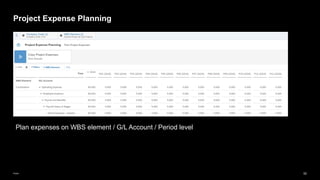
Project Expense Planning
Plan expenses on WBS element / G/L Account / Period level
53
Public
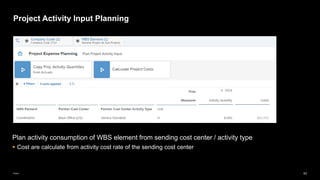
Project Activity Input Planning
Plan activity consumption of WBS element from sending cost center / activity type
▪ Cost are calculate from activity cost rate of the sending cost center
54
Public
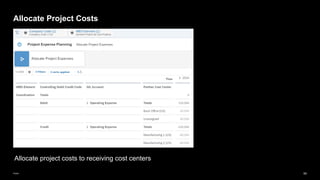
Allocate Project Costs
Allocate project costs to receiving cost centers
55
Public
Product Cost Planning
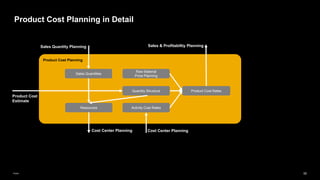
Product Cost Planning in Detail
Raw Material
Price Planning
Product Cost Rates
Product Cost
Estimate
Quantity Structure
Resources Activity Cost Rates
Sales Quantities
Sales Quantity Planning
Cost Center Planning
Sales & Profitabiltiy Planning
Cost Center Planning
56
Public
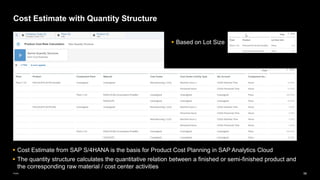
Cost Estimate with Quantity Structure
▪ Cost Estimate from SAP S/4HANA is the basis for Product Cost Planning in SAP Analytics Cloud
▪ The quantity structure calculates the quantitative relation between a finished or semi-finished product and
the corresponding raw material / cost center activities
▪ Based on Lot Size
57
Public
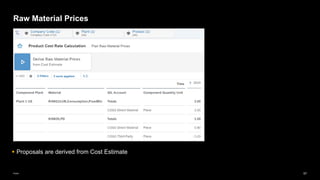
Raw Material Prices
▪ Proposals are derived from Cost Estimate
58
Public
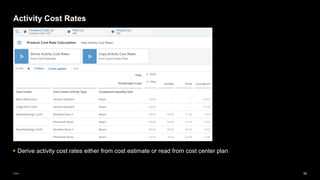
Activity Cost Rates
▪ Derive activity cost rates either from cost estimate or read from cost center plan
59
Public
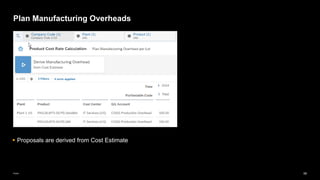
Plan Manufacturing Overheads
▪ Proposals are derived from Cost Estimate
60
Public
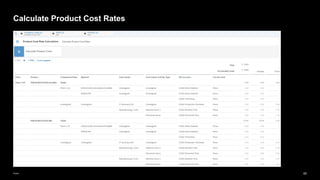
Calculate Product Cost Rates
61
Public
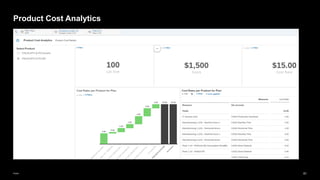
Product Cost Analytics
62
Public
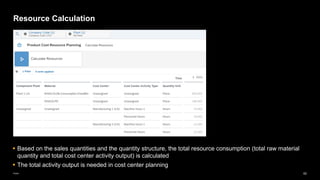
Resource Calculation
▪ Based on the sales quantities and the quantity structure, the total resource consumption (total raw material
quantity and total cost center activity output) is calculated
▪ The total activity output is needed in cost center planning
63
Public
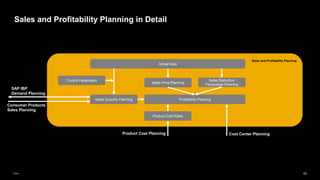
Sales and Profitability Planning in Detail
Sales and Profitability Planning
Profitability Planning
Sales Quantity Planning
Sales Deduction
Percentage Planning
Sales Price Planning
Actual Data
Control Parameters
Product Cost Rates
Product Cost Planning
SAP IBP
Demand Planning
Consumer Products
Sales Planning
Cost Center Planning
64
Public
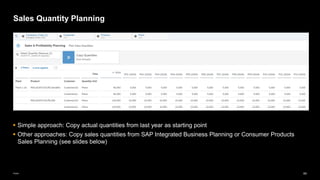
Sales Quantity Planning
▪ Simple approach: Copy actual quantities from last year as starting point
▪ Other approaches: Copy sales quantities from SAP Integrated Business Planning or Consumer Products
Sales Planning (see slides below)
65
Public
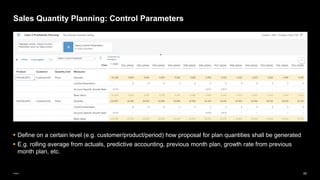
Sales Quantity Planning: Control Parameters
▪ Define on a certain level (e.g. customer/product/period) how proposal for plan quantities shall be generated
▪ E.g. rolling average from actuals, predictive accounting, previous month plan, growth rate from previous
month plan, etc.
66
Public
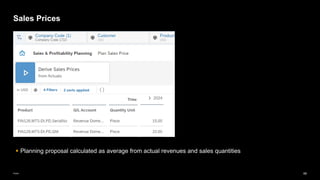
Sales Prices
▪ Planning proposal calculated as average from actual revenues and sales quantities
67
Public
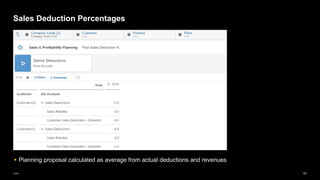
Sales Deduction Percentages
▪ Planning proposal calculated as average from actual deductions and revenues
68
Public
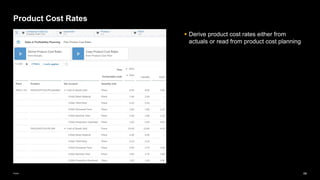
Product Cost Rates
▪ Derive product cost rates either from
actuals or read from product cost planning
69
Public
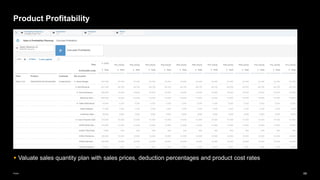
Product Profitability
▪ Valuate sales quantity plan with sales prices, deduction percentages and product cost rates
70
Public
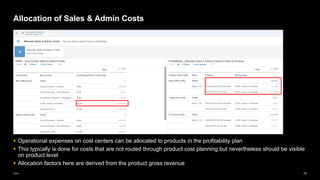
▪ Operational expenses on cost centers can be allocated to products in the profitability plan
▪ This typically is done for costs that are not routed through product cost planning but nevertheless should be visible
on product level
▪ Allocation factors here are derived from the product gross revenue
Allocation of Sales & Admin Costs
71
Public
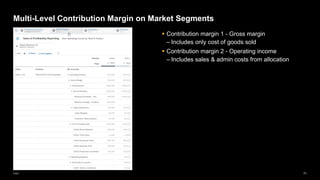
▪ Contribution margin 1 - Gross margin
– Includes only cost of goods sold
▪ Contribution margin 2 - Operating income
– Includes sales & admin costs from allocation
Multi-Level Contribution Margin on Market Segments
72
Public
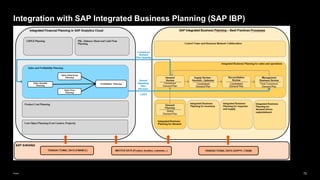
Integration with SAP Integrated Business Planning (SAP IBP)
73
Public
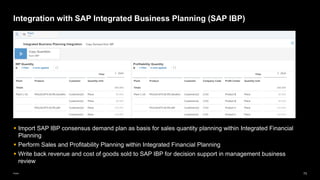
Integration with SAP Integrated Business Planning (SAP IBP)
▪ Import SAP IBP consensus demand plan as basis for sales quantity planning within Integrated Financial
Planning
▪ Perform Sales and Profitability Planning within Integrated Financial Planning
▪ Write back revenue and cost of goods sold to SAP IBP for decision support in management business
review
74
Public
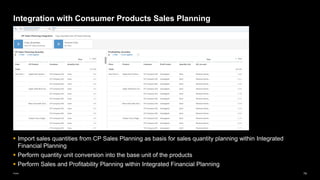
Integration with Consumer Products Sales Planning
▪ Import sales quantities from CP Sales Planning as basis for sales quantity planning within Integrated
Financial Planning
▪ Perform quantity unit conversion into the base unit of the products
▪ Perform Sales and Profitability Planning within Integrated Financial Planning
75
Public
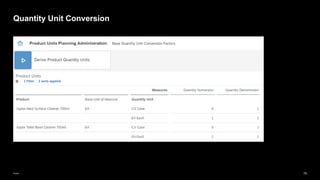
Quantity Unit Conversion
76
Public
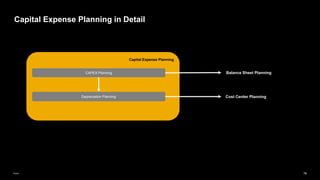
Capital Expense Planning in Detail
Capital Expense Planning
Depreciation Planning
CAPEX Planning Balance Sheet Planning
Cost Center Planning
77
Public
Capital Expense Planning - Baseline
▪ Starting point: Actuals from last year
▪ Create new baseline
– Adjust asset additions on an investment account / profit center / period level
– Adjust depreciations on an investment account / cost center / profit center / period level
78
Public
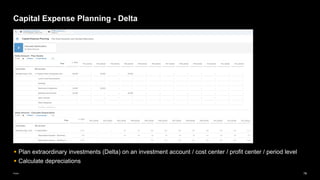
Capital Expense Planning - Delta
▪ Plan extraordinary investments (Delta) on an investment account / cost center / profit center / period level
▪ Calculate depreciations
79
Public
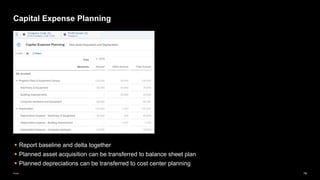
Capital Expense Planning
▪ Report baseline and delta together
▪ Planned asset acquisition can be transferred to balance sheet plan
▪ Planned depreciations can be transferred to cost center planning
80
Public
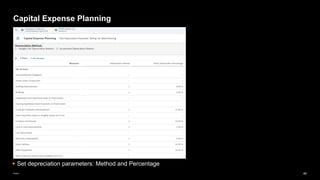
Capital Expense Planning
▪ Set depreciation parameters: Method and Percentage
81
Public
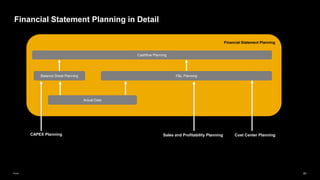
Financial Statement Planning in Detail
Financial Statement Planning
P&L Planning
Balance Sheet Planning
Sales and Profitability Planning Cost Center Planning
Actual Data
Cashflow Planning
CAPEX Planning
82
Public
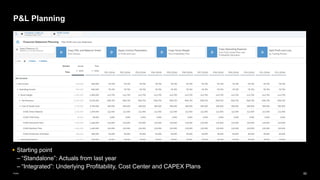
P&L Planning
▪ Starting point
– “Standalone”: Actuals from last year
– “Integrated”: Underlying Profitability, Cost Center and CAPEX Plans
83
Public
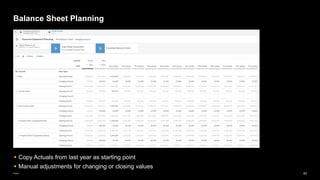
Balance Sheet Planning
▪ Copy Actuals from last year as starting point
▪ Manual adjustments for changing or closing values
84
Public
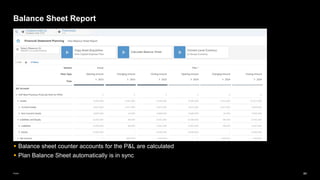
Balance Sheet Report
▪ Balance sheet counter accounts for the P&L are calculated
▪ Plan Balance Sheet automatically is in sync
85
Public
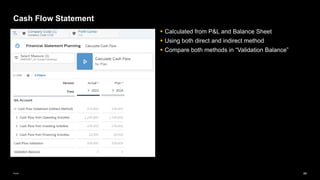
Cash Flow Statement
▪ Calculated from P&L and Balance Sheet
▪ Using both direct and indirect method
▪ Compare both methods in “Validation Balance”
86
Public
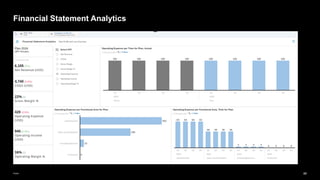
Financial Statement Analytics
87
Public
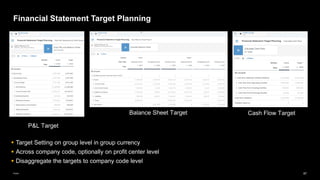
Financial Statement Target Planning
▪ Target Setting on group level in group currency
▪ Across company code, optionally on profit center level
▪ Disaggregate the targets to company code level
P&L Target
Balance Sheet Target Cash Flow Target
88
Public
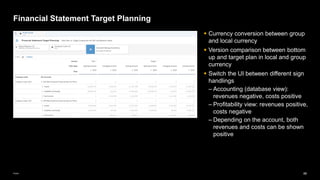
Financial Statement Target Planning
▪ Currency conversion between group
and local currency
▪ Version comparison between bottom
up and target plan in local and group
currency
▪ Switch the UI between different sign
handlings
– Accounting (database view):
revenues negative, costs positive
– Profitability view: revenues positive,
costs negative
– Depending on the account, both
revenues and costs can be shown
positive
89
Public
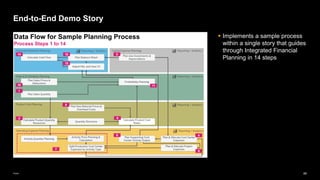
▪ Implements a sample process
within a single story that guides
through Integrated Financial
Planning in 14 steps
End-to-End Demo Story
90
Public
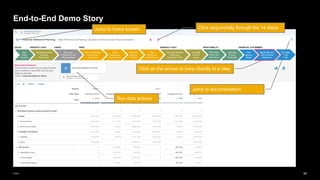
End-to-End Demo Story
Click sequentially through the 14 steps
Click on the arrows to jump directly to a step
Run data actions
Jump to home screen
Jump to documentation
91
Public
Starting Point
▪ A finished, reconciled, integrated Financial Plan
▪ As described in the steps before
What-if simulations
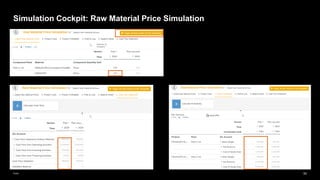
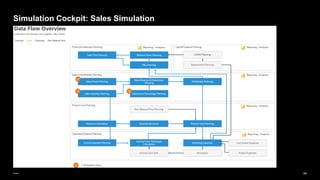
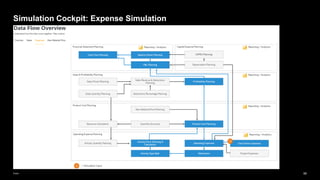
▪ Change dedicated drivers, e.g. sales quantities, raw materials prices or expenses
▪ Recalculate the integrated plan up to P&L, Balance Sheet and Cash Flow statement
▪ “Save as” into simulation versions
Implementation/Adaptation
▪ Simulation Cockpit is implemented as an Analytical Application in SAP Analytics Cloud
▪ It can be adapted by the customer for other simulation scenarios
Simulation Cockpit
92
Public
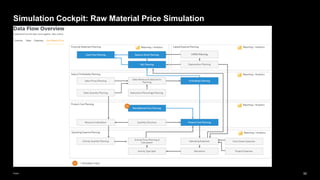
Simulation Cockpit: Raw Material Price Simulation
93
Public
Simulation Cockpit: Raw Material Price Simulation
94
Public
Simulation Cockpit: Sales Simulation
95
Public
Simulation Cockpit: Expense Simulation
Relation to Classic Financial Planning
in SAP S/4HANA On Premise
97
Public
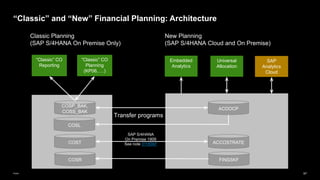
“Classic” and “New” Financial Planning: Architecture
COSP_BAK,
COSS_BAK
“Classic” CO
Planning
(KP06, …)
ACDOCP
SAP
Analytics
Cloud
Embedded
Analytics
“Classic” CO
Reporting
COST ACCOSTRATE
FINSSKF
COSR
Universal
Allocation
Classic Planning
(SAP S/4HANA On Premise Only)
New Planning
(SAP S/4HANA Cloud and On Premise)
Transfer programs
SAP S/4HANA
On Premise 1909
See note 3118397
COSL
98
Public
SAP S/4HANA On Premise
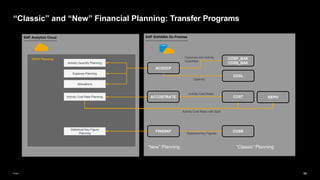
“Classic” and “New” Financial Planning: Transfer Programs
ACCOSTRATE
FINSSKF
ACDOCP
COST
COSP_BAK
COSS_BAK
COSL
COSR
SAP Analytics Cloud
Activity Quantity Planning
Statistical Key Figure
Planning
Expense Planning
OPEX Planning
Activity Cost Rate Planning
Allocations
Expenses and Activity
Quantities
Capacity
Activity Cost Rates
Activity Cost Rates with Split
Statistical Key Figures
KEPH
“New” Planning “Classic” Planning
99
Public
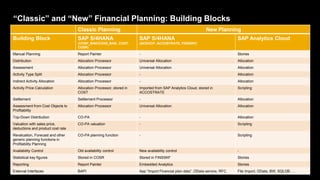
“Classic” and “New” Financial Planning: Building Blocks
Classic Planning New Planning
Building Block SAP S/4HANA
(COSP_BAK/COSS_BAK, COST,
COSR)
SAP S/4HANA
(ACDOCP, ACCOSTRATE, FINSSKF)
SAP Analytics Cloud
Manual Planning Report Painter - Stories
Distribution Allocation Processor Universal Allocation Allocation
Assessment Allocation Processor Universal Allocation Allocation
Activity Type Split Allocation Processor - Allocation
Indirect Activity Allocation Allocation Processor - Allocation
Activity Price Calculation Allocation Processor, stored in
COST
Imported from SAP Analytics Cloud, stored in
ACCOSTRATE
Scripting
Settlement Settlement Processor - Allocation
Assessment from Cost Objects to
Profitability
Allocation Processor Universal Allocation Allocation
Top-Down Distribution CO-PA - Allocation
Valuation with sales price,
deductions and product cost rate
CO-PA valuation - Scripting
Revaluation, Forecast and other
generic planning functions in
Profitability Planning
CO-PA planning function - Scripting
Availability Control Old availability control New availability control -
Statistical key figures Stored in COSR Stored in FINSSKF Stories
Reporting Report Painter Embedded Analytics Stories
External Interfaces BAPI App “Import Financial plan data”, OData service, RFC File Import, OData, BW, SQLDB, …
100
Public
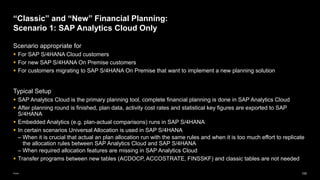
Scenario appropriate for
▪ For SAP S/4HANA Cloud customers
▪ For new SAP S/4HANA On Premise customers
▪ For customers migrating to SAP S/4HANA On Premise that want to implement a new planning solution
Typical Setup
▪ SAP Analytics Cloud is the primary planning tool, complete financial planning is done in SAP Analytics Cloud
▪ After planning round is finished, plan data, activity cost rates and statistical key figures are exported to SAP
S/4HANA
▪ Embedded Analytics (e.g. plan-actual comparisons) runs in SAP S/4HANA
▪ In certain scenarios Universal Allocation is used in SAP S/4HANA
– When it is crucial that actual an plan allocation run with the same rules and when it is too much effort to replicate
the allocation rules between SAP Analytics Cloud and SAP S/4HANA
– When required allocation features are missing in SAP Analytics Cloud
▪ Transfer programs between new tables (ACDOCP, ACCOSTRATE, FINSSKF) and classic tables are not needed
“Classic” and “New” Financial Planning:
Scenario 1: SAP Analytics Cloud Only
101
Public
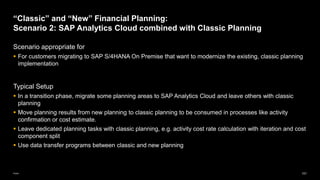
Scenario appropriate for
▪ For customers migrating to SAP S/4HANA On Premise that want to modernize the existing, classic planning
implementation
Typical Setup
▪ In a transition phase, migrate some planning areas to SAP Analytics Cloud and leave others with classic
planning
▪ Move planning results from new planning to classic planning to be consumed in processes like activity
confirmation or cost estimate.
▪ Leave dedicated planning tasks with classic planning, e.g. activity cost rate calculation with iteration and cost
component split
▪ Use data transfer programs between classic and new planning
“Classic” and “New” Financial Planning:
Scenario 2: SAP Analytics Cloud combined with Classic Planning
Manage Financial Plan Data in
SAP S/4HANA
103
Public
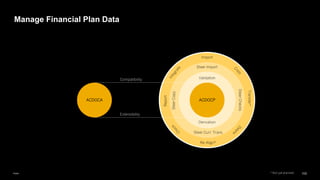
Manage Financial Plan Data
ACDOCP
ACDOCA
Compatibility
Extensibility
Validation
Derivation
Steer Import
Steer
Copy
Steer
Checks
Steer Curr. Trans.
Import
Transfer*
Report
Re-Align*
* Not yet planned
104
Public
Import Financial Plan Data
105
Public
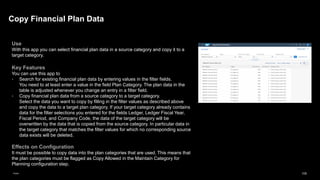
Use
With this app you can select financial plan data in a source category and copy it to a
target category.
Key Features
You can use this app to
▪ Search for existing financial plan data by entering values in the filter fields.
You need to at least enter a value in the field Plan Category. The plan data in the
table is adjusted whenever you change an entry in a filter field.
▪ Copy financial plan data from a source category to a target category.
Select the data you want to copy by filling in the filter values as described above
and copy the data to a target plan category. If your target category already contains
data for the filter selections you entered for the fields Ledger, Ledger Fiscal Year,
Fiscal Period, and Company Code, the data of the target category will be
overwritten by the data that is copied from the source category. In particular data in
the target category that matches the filter values for which no corresponding source
data exists will be deleted.
Effects on Configuration
It must be possible to copy data into the plan categories that are used. This means that
the plan categories must be flagged as Copy Allowed in the Maintain Category for
Planning configuration step.
Copy Financial Plan Data
106
Public
Delete Financial Plan Data
107
Public
Compress Financial Plan Data
Use
The app allows you to reduce the number of plan data items stored in
planning table ACDOCP. Note that the application does not delete existing
plan data. Only the history of changes is deleted. After compression, all
plan data remains consistent.
Value Proposition
Using this app to compress plan data can reduce the size of table
ACDOCP, which can improve the overall performance of planning
processes.
108
Public
Use
A statistical key figure is a number providing information about non-monetary data
relating to organizational units. Statistical key figures can be used as reference data for
universal allocation. For more information, see Statistical Key Figures.
Use this app to upload statistical key figure plan data stored in a comma-separated
values file (CSV file). The app allows you to perform your planning in an external
system, such as Microsoft Excel. As a key user, you can use the Custom Analytical
Query app to create a report based on the released I_FinStatisticalKeyFigureItem DDL
view that allows you to view your uploaded plan data.
Key Features
You can use this app to
▪ Import statistical key figure plan data records stored in a CSV file
▪ Automatically validate all values from the CSV file before the import
Import Statistical Key Figure Plan Data
109
Public
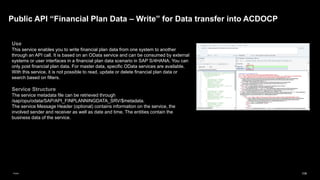
Use
This service enables you to write financial plan data from one system to another
through an API call. It is based on an OData service and can be consumed by external
systems or user interfaces in a financial plan data scenario in SAP S/4HANA. You can
only post financial plan data. For master data, specific OData services are available.
With this service, it is not possible to read, update or delete financial plan data or
search based on filters.
Service Structure
The service metadata file can be retrieved through
/sap/opu/odata/SAP/API_FINPLANNINGDATA_SRV/$metadata.
The service Message Header (optional) contains information on the service, the
involved sender and receiver as well as date and time. The entities contain the
business data of the service.
Public API “Financial Plan Data – Write” for Data transfer into ACDOCP
Flexibility, Adaptability, Extensibility
111
Public
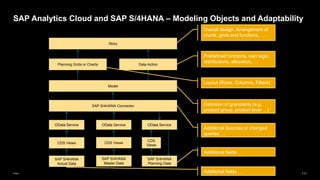
SAP Analytics Cloud and SAP S/4HANA – Modeling Objects and Adaptability
CDS Views
SAP S/4HANA
Actual Data
SAP S/4HANA Connector
OData Service
CDS Views
OData Service
SAP S/4HANA
Planning Data
SAP S/4HANA
Master Data
Planning Grids or Charts
Story
Model
Data Action
Overall design, Arrangement of
charts, grids and functions, …
Predefined functions, own logic,
distributions, allocation, …
Layout (Rows, Columns, Filters)
Definition of granularity (e.g.
product group, product level …)
Additional fields …
Additional Sources or changed
queries …
OData Service
CDS
Views
Additional fields …
Further Information
113
Public
Overview Blog Post
▪ https://blogs.sap.com/2022/10/18/integrated-financial-planning-an-overview/
Documentation
▪ SAP S/4HANA On Premise: Financial Planning
https://help.sap.com/docs/SAP_S4HANA_ON-
PREMISE/48f4b4785b8e45938ac44a67be8032d9/debbbd61f0f141f9b0d552e9c5062aa3.html
▪ SAP S/4HANA Cloud: Financial Planning
https://help.sap.com/docs/SAP_S4HANA_CLOUD/1cbcff7ccd35405ab445b223c1ab1588/debbbd61f0f141f9
b0d552e9c5062aa3.html
Further Information
Thank you.
© 2023 SAP SE or an SAP affiliate company. All rights reserved. See Legal Notice on www.sap.com/legal-notice for use terms, disclaimers, disclosures, or restrictions related to SAP Materials for general audiences.

S4_Financial_Planning_with_SACSACSACS_V21

  • 1.
    Public May 22, 2023 SAP SAPS/4HANA Integrated Financial Planning with SAP Analytics Cloud
  • 2.
    2 Public The information inthis presentation is confidential and proprietary to SAP and may not be disclosed without the permission of SAP. Except for your obligation to protect confidential information, this presentation is not subject to your license agreement or any other service or subscription agreement with SAP. SAP has no obligation to pursue any course of business outlined in this presentation or any related document, or to develop or release any functionality mentioned therein. This presentation, or any related document and SAP's strategy and possible future developments, products and or platforms directions and functionality are all subject to change and may be changed by SAP at any time for any reason without notice. The information in this presentation is not a commitment, promise or legal obligation to deliver any material, code or functionality. This presentation is provided without a warranty of any kind, either express or implied, including but not limited to, the implied warranties of merchantability, fitness for a particular purpose, or non-infringement. This presentation is for informational purposes and may not be incorporated into a contract. SAP assumes no responsibility for errors or omissions in this presentation, except if such damages were caused by SAP’s intentional or gross negligence. All forward-looking statements are subject to various risks and uncertainties that could cause actual results to differ materially from expectations. Readers are cautioned not to place undue reliance on these forward-looking statements, which speak only as of their dates, and they should not be relied upon in making purchasing decisions. Disclaimer
  • 3.
    3 Public Overview and Architecture SAPAnalytics Cloud for Planning SAP S/4HANA Integration SAP Delivered Sample Content Relation to Classic Financial Planning in SAP S/4HANA On Premise Manage Financial Plan Data in SAP S/4HANA Flexibility, Adaptability, Extensibility Further Information Agenda
  • 4.
  • 5.
    5 Public SAP Analytics Cloud LogisticsPlanning (SAP IBP / SAP APO /…) SAP S/4HANA Logistics Planning Financial Planning Production Cost Planning Demand Planning S&OP P&L Planning Profitability Planning Sales and Revenue Planning Sales Planning Cost & Activity Planning Marketing Planning Balance Sheet Planning Product Cost Estimate Cost Rates MRP Detailed Scheduling BOM and Routing Mapping of Planning Areas to SAP Products
  • 6.
    6 Public SAP S/4HANA SAP AnalyticsCloud – SAP S/4HANA Integration : Architecture SAP Analytics Cloud ACDOCP ACDOCA Plan Data Master Data Plan operations Public dimensions OData Service OData Service Cost Estimate ACCOSTRATE FINSSKF OData Service New Availability Check Cost Estimate OData Service Group Reporting Predictive Production Orders CPM Projects Embedded Analytics Actual Postings Universal Allocation Manage Financial Plan Data
  • 7.
    7 Public Integration of IntegratedFinancial Planning with Group Financial Planning Universal Journal - Actuals Universal Journal - Plan Universal Journal - Consolidation Use entity actuals as start for planning - master & transaction data Access entity actuals & plan data for consolidation Use group data for planning – master & transaction data Transfer plan to SAP S/4HANA on operational object level Transfer plan to SAP S/4HANA on group object level SAP Analytics Cloud Integrated Financial Planning Content SAP Analytics Cloud Group Financial Planning Content
  • 8.
    8 Public Basic Equation Planning Tool(SAP Analytics Cloud) + SAP S/4HANA Integration (SAP S/4HANA Connector) + Financial Planning Content + Flexibility = SAP S/4HANA Financial Planning
  • 9.
    SAP Analytics Cloudfor Planning
  • 10.
    10 Public SAP Analytics Cloud,SaaS Platform Planning Events and Workflows Allocation Value Driver Tree Simulation BI Discovery Charts and Table Geospatial Predictive Smart Assist Advanced Analytics Embedding* Analytics into Applications SAP Digital Boardroom Analytics Hub Mobile Experience Core Capabilities Analytic Capabilities Analytics Store* Applications Data Connectivity SAP Cloud Platform Wrangling Modeling Administration Auditing Story Experience Collaboration Mobile APIs* *Planned functionality Cloud Data Sources and Applications On-Premise Data Sources and Applications
  • 11.
    11 Public SAP Analytics CloudCore BI workflow ▪ Prepare and model cloud and on-premise data from your browser ▪ Connect to data from SAP (SAP S/4HANA, SAP BW, SAP HANA, SAP Apps, etc.) and non-SAP sources ▪ Support linking aggregated data ▪ Cross dataset calculations Connect and prepare your data ▪ Design, visualize, and create your stories live ▪ Add simple location analytics into your visualizations ▪ Personalize your own dashboard views ▪ Simply collaborate with your team ▪ Take action on your data ▪ Use permissions to control who can view and edit your analytics Visualize and build your own views Share with your team
  • 12.
    12 Public ▪ Simply createand modify calculations and planning models and on the fly ▪ Take action anytime, anywhere on the desktop or on the go ▪ Align plans across finance and business units with direct integration into SAP Business Planning and Consolidation ▪ Analyze, plan and visualize in the same application ▪ Personalize your KPIs, dashboard, processes and stories ▪ Collaborate in-context of your plan and make faster decisions Simplify Experience ▪ Enjoy a new generation of planning in the cloud with a modern look and feel ▪ Plan and simulate at any level of detail, with any number of users, at any time ▪ Drive high performance planning and forecasting process Trust SAP Analytics Cloud Core planning workflow
  • 13.
    13 Public Models A model isa representation of business data to define relationships, calculations, and data of an organization or business segment Easy set up ▪ Models with multiple dimensions are easy to create in an Excel-like interface Preview Panel ▪ Visual representation of your modeled data Data Import ▪ Upload of external data sources and integration with SAP Cloud and on-premise systems
  • 14.
    14 Public Stories Stories are anorganized representation of data, comprising multidimensional data views for the purpose of analysis, reporting, and planning Version Management ▪ Create and copy versions of data and define access rights Formatting ▪ Create, personalize fixed reports and visualizations Visualization ▪ Context-specific visualization proposals
  • 15.
    15 Public Feature Planning done inprivate versions for individuals or teams and then published as a public version for everyone to view Benefit Changes can be made to private version and then easily discarded or shared (i.e., publish) as needed Example Analyst wants to model some sales promotion scenarios using private model prior to sharing with his colleagues Private Versions
  • 16.
    16 Public Feature Adjust value ina report view by directly entering this value at parent or base level or by adding by % Benefit Can directly enter plan change at various levels or change them by a certain % to streamline plan adjustments Example Purchasing manager wants to estimate cost saving by switching vendors to lower raw material costs Direct Entry
  • 17.
    17 Public Direct Entry andCollaboration Manual changes Collaboration
  • 18.
  • 19.
    19 Public Feature Distribution and spreadingallows users to quickly extend a plan to other dimensions such as time, products or regions. Benefit Simple dialogs guide the user through the distribution and spreading process and preview adjusted amounts for maximum efficiency Example Analyst may want to distribute some internal costs to other regions manually to refine an allocation that was previous performed Distribution and Spreading From node to childs From member to siblings
  • 20.
    20 Public Currency Conversion Feature • Abilityto plan in global, local and transactional currency • Currency conversion on the fly via virtual “conversion measures” in the model • Currency conversion persisted via currency conversion steps in a data action Currency conversion settings in the model Currency Conversion Measure Currency Conversion Step
  • 21.
    21 Public Feature The allocation functionalityallows users to define rules for source and target data spreading Benefit Create allocation rules within the application without the requirement for complex script-based modeling Example Analyst wants to spread shared services costs across other cost centers based on user defined rules Allocations
  • 22.
  • 23.
  • 24.
    24 Public Planning Process Management Createtask and assign user Attach Story Set due date
  • 25.
  • 26.
    26 Public Create Communication Arrangementin SAP S/4HANA Cloud Communication system brings in the technical user for the connection. These are the URLs of the OData services. URL root is needed to maintain the SAP S/4HANA connection in SAP Analytics Cloud Automatically a role for the user is generated with the authorization to access the OData services of the communication scenario Create communication arrangement based on SAP delivered communication scenario SAP_COM_0087 Note: In SAP S/4HANA On Premise, use service activation in Gateway and PFCG to create the role
  • 27.
    27 Public Create SAP S/4HANAConnection in SAP Analytics Cloud Enter URL of the SAP S/4HANA system Enter User Connection name Enter Password
  • 28.
  • 29.
    29 Public Create Master DataQuery based on OData Service Define Filter Select description and attributes
  • 30.
    30 Public Result: Account MasterData with Hierarchy in SAP Analytics Cloud
  • 31.
    31 Public Create Transaction DataQuery based on OData Service
  • 32.
    32 Public Result: Same Datain SAP S/4HANA and SAP Analytics Cloud SAP Analytics Cloud SAP S/4HANA
  • 33.
    33 Public Export Plan Datafrom SAP Analytics Cloud to SAP S/4HANA Define Filter Target dimensions Map source dimension
  • 34.
  • 35.
    35 Public SAP Analytics CloudIntegrated Financial Planning Content for SAP S/4HANA Operating Expense Planning (Cost Centers and Projects) Product Cost Planning Sales & Profitability Planning Expense Planning Allocations Raw Material Price Planning Product Cost Planning Activity Price Planning & Calculation Profitability Planning Sales Quantity Planning Sales Price Planning Activity Quantity Planning Activity Type Splitting Statistical Key Figure Planning Product Cost Estimate Quantity Structure Activty Cost Rates Resources Sales Deductions Planning Financial Statement Planning P&L Planning Cashflow Planning Balance Sheet Planning Capital Expense Planning CAPEX Planning Depreciation Planning Statistical Key Figures Workforce Planning SAP IBP Demand Planning Consumer Products Sales Planning
  • 36.
    36 Public Landing Page ▪ Onecentral access point for all stories of the Integrated Financial Planning content
  • 37.
    37 Public Cost Center Planning OperatingExpense Planning: Cost Center Planning in Detail Expense Planning Activity Independent Allocations Activity Price Planning and Calculation Activity Quantity Planning Activity Type Splitting Statistical Key Figure Planning Expense Planning Activity Dependent Inverse Calculation of Activity Quantities Indirect Activity Allocation Resource Planning Product Cost Planning Sales & Profitability Planning Financial Statement Planning Workforce Planning
  • 38.
  • 39.
    39 Public Drivers for CostCenter Overhead Allocation
  • 40.
  • 41.
    41 Public Allocation Rules forActivity Type Splitting Connect Source and Target Filter via Driver Measure
  • 42.
    42 Public Statistical Key Figureas Driver for Activity Type Splitting
  • 43.
    43 Public Activity Type Splittingfor Expenses Create expense data on cost center / activity type level ▪ Either via allocation rule ▪ Or directly via manual input
  • 44.
    44 Public Fix / VariableSplitting for Expenses Split to fix / variable ▪ Either automatic according to Allocation Rule ▪ Or directly via manual input
  • 45.
    45 Public Calculate Variable Costsfrom Activity Output Alternative to fix / variable split ▪ Maintain proportionality factor between activity quantity output and expense account 432000 = 24000 * 18
  • 46.
    46 Public Activity Output Planning ▪Copy activity quantities either from Actuals or read from resource planning ▪ Planning of capacities also possible
  • 47.
    47 Public Activity Output QuantityPlanning by Partner Plan sender – receiver based activity quantities ▪ Directly via manual input. Receiver can be cost centers or WBS elements ▪ Split to cost centers according to allocation rule (“indirect activity allocation”) ▪ Inverse calculation according to the activity output of the receiving cost centers
  • 48.
    48 Public Activity Cost RateCalculation ▪ Iteration possible in case of multilevel or cyclical activity consumption ▪ If needed, split to fix / variable portion
  • 49.
    49 Public Copy Expenses fromWorkforce Plan (left side) to Cost Center Plan (right side) Integration with Workforce Planning
  • 50.
  • 51.
    51 Public Cost Center Planning OperatingExpense Planning: Project Planning in Detail Project Planning Expense Planning Allocations Activity Input Planning Expense Planning Activity Dependent Activity Price Planning
  • 52.
    52 Public Project Expense Planning Planexpenses on WBS element / G/L Account / Period level
  • 53.
    53 Public Project Activity InputPlanning Plan activity consumption of WBS element from sending cost center / activity type ▪ Cost are calculate from activity cost rate of the sending cost center
  • 54.
    54 Public Allocate Project Costs Allocateproject costs to receiving cost centers
  • 55.
    55 Public Product Cost Planning ProductCost Planning in Detail Raw Material Price Planning Product Cost Rates Product Cost Estimate Quantity Structure Resources Activity Cost Rates Sales Quantities Sales Quantity Planning Cost Center Planning Sales & Profitabiltiy Planning Cost Center Planning
  • 56.
    56 Public Cost Estimate withQuantity Structure ▪ Cost Estimate from SAP S/4HANA is the basis for Product Cost Planning in SAP Analytics Cloud ▪ The quantity structure calculates the quantitative relation between a finished or semi-finished product and the corresponding raw material / cost center activities ▪ Based on Lot Size
  • 57.
    57 Public Raw Material Prices ▪Proposals are derived from Cost Estimate
  • 58.
    58 Public Activity Cost Rates ▪Derive activity cost rates either from cost estimate or read from cost center plan
  • 59.
    59 Public Plan Manufacturing Overheads ▪Proposals are derived from Cost Estimate
  • 60.
  • 61.
  • 62.
    62 Public Resource Calculation ▪ Basedon the sales quantities and the quantity structure, the total resource consumption (total raw material quantity and total cost center activity output) is calculated ▪ The total activity output is needed in cost center planning
  • 63.
    63 Public Sales and ProfitabilityPlanning in Detail Sales and Profitability Planning Profitability Planning Sales Quantity Planning Sales Deduction Percentage Planning Sales Price Planning Actual Data Control Parameters Product Cost Rates Product Cost Planning SAP IBP Demand Planning Consumer Products Sales Planning Cost Center Planning
  • 64.
    64 Public Sales Quantity Planning ▪Simple approach: Copy actual quantities from last year as starting point ▪ Other approaches: Copy sales quantities from SAP Integrated Business Planning or Consumer Products Sales Planning (see slides below)
  • 65.
    65 Public Sales Quantity Planning:Control Parameters ▪ Define on a certain level (e.g. customer/product/period) how proposal for plan quantities shall be generated ▪ E.g. rolling average from actuals, predictive accounting, previous month plan, growth rate from previous month plan, etc.
  • 66.
    66 Public Sales Prices ▪ Planningproposal calculated as average from actual revenues and sales quantities
  • 67.
    67 Public Sales Deduction Percentages ▪Planning proposal calculated as average from actual deductions and revenues
  • 68.
    68 Public Product Cost Rates ▪Derive product cost rates either from actuals or read from product cost planning
  • 69.
    69 Public Product Profitability ▪ Valuatesales quantity plan with sales prices, deduction percentages and product cost rates
  • 70.
    70 Public ▪ Operational expenseson cost centers can be allocated to products in the profitability plan ▪ This typically is done for costs that are not routed through product cost planning but nevertheless should be visible on product level ▪ Allocation factors here are derived from the product gross revenue Allocation of Sales & Admin Costs
  • 71.
    71 Public ▪ Contribution margin1 - Gross margin – Includes only cost of goods sold ▪ Contribution margin 2 - Operating income – Includes sales & admin costs from allocation Multi-Level Contribution Margin on Market Segments
  • 72.
    72 Public Integration with SAPIntegrated Business Planning (SAP IBP)
  • 73.
    73 Public Integration with SAPIntegrated Business Planning (SAP IBP) ▪ Import SAP IBP consensus demand plan as basis for sales quantity planning within Integrated Financial Planning ▪ Perform Sales and Profitability Planning within Integrated Financial Planning ▪ Write back revenue and cost of goods sold to SAP IBP for decision support in management business review
  • 74.
    74 Public Integration with ConsumerProducts Sales Planning ▪ Import sales quantities from CP Sales Planning as basis for sales quantity planning within Integrated Financial Planning ▪ Perform quantity unit conversion into the base unit of the products ▪ Perform Sales and Profitability Planning within Integrated Financial Planning
  • 75.
  • 76.
    76 Public Capital Expense Planningin Detail Capital Expense Planning Depreciation Planning CAPEX Planning Balance Sheet Planning Cost Center Planning
  • 77.
    77 Public Capital Expense Planning- Baseline ▪ Starting point: Actuals from last year ▪ Create new baseline – Adjust asset additions on an investment account / profit center / period level – Adjust depreciations on an investment account / cost center / profit center / period level
  • 78.
    78 Public Capital Expense Planning- Delta ▪ Plan extraordinary investments (Delta) on an investment account / cost center / profit center / period level ▪ Calculate depreciations
  • 79.
    79 Public Capital Expense Planning ▪Report baseline and delta together ▪ Planned asset acquisition can be transferred to balance sheet plan ▪ Planned depreciations can be transferred to cost center planning
  • 80.
    80 Public Capital Expense Planning ▪Set depreciation parameters: Method and Percentage
  • 81.
    81 Public Financial Statement Planningin Detail Financial Statement Planning P&L Planning Balance Sheet Planning Sales and Profitability Planning Cost Center Planning Actual Data Cashflow Planning CAPEX Planning
  • 82.
    82 Public P&L Planning ▪ Startingpoint – “Standalone”: Actuals from last year – “Integrated”: Underlying Profitability, Cost Center and CAPEX Plans
  • 83.
    83 Public Balance Sheet Planning ▪Copy Actuals from last year as starting point ▪ Manual adjustments for changing or closing values
  • 84.
    84 Public Balance Sheet Report ▪Balance sheet counter accounts for the P&L are calculated ▪ Plan Balance Sheet automatically is in sync
  • 85.
    85 Public Cash Flow Statement ▪Calculated from P&L and Balance Sheet ▪ Using both direct and indirect method ▪ Compare both methods in “Validation Balance”
  • 86.
  • 87.
    87 Public Financial Statement TargetPlanning ▪ Target Setting on group level in group currency ▪ Across company code, optionally on profit center level ▪ Disaggregate the targets to company code level P&L Target Balance Sheet Target Cash Flow Target
  • 88.
    88 Public Financial Statement TargetPlanning ▪ Currency conversion between group and local currency ▪ Version comparison between bottom up and target plan in local and group currency ▪ Switch the UI between different sign handlings – Accounting (database view): revenues negative, costs positive – Profitability view: revenues positive, costs negative – Depending on the account, both revenues and costs can be shown positive
  • 89.
    89 Public ▪ Implements asample process within a single story that guides through Integrated Financial Planning in 14 steps End-to-End Demo Story
  • 90.
    90 Public End-to-End Demo Story Clicksequentially through the 14 steps Click on the arrows to jump directly to a step Run data actions Jump to home screen Jump to documentation
  • 91.
    91 Public Starting Point ▪ Afinished, reconciled, integrated Financial Plan ▪ As described in the steps before What-if simulations ▪ Change dedicated drivers, e.g. sales quantities, raw materials prices or expenses ▪ Recalculate the integrated plan up to P&L, Balance Sheet and Cash Flow statement ▪ “Save as” into simulation versions Implementation/Adaptation ▪ Simulation Cockpit is implemented as an Analytical Application in SAP Analytics Cloud ▪ It can be adapted by the customer for other simulation scenarios Simulation Cockpit
  • 92.
    92 Public Simulation Cockpit: RawMaterial Price Simulation
  • 93.
    93 Public Simulation Cockpit: RawMaterial Price Simulation
  • 94.
  • 95.
  • 96.
    Relation to ClassicFinancial Planning in SAP S/4HANA On Premise
  • 97.
    97 Public “Classic” and “New”Financial Planning: Architecture COSP_BAK, COSS_BAK “Classic” CO Planning (KP06, …) ACDOCP SAP Analytics Cloud Embedded Analytics “Classic” CO Reporting COST ACCOSTRATE FINSSKF COSR Universal Allocation Classic Planning (SAP S/4HANA On Premise Only) New Planning (SAP S/4HANA Cloud and On Premise) Transfer programs SAP S/4HANA On Premise 1909 See note 3118397 COSL
  • 98.
    98 Public SAP S/4HANA OnPremise “Classic” and “New” Financial Planning: Transfer Programs ACCOSTRATE FINSSKF ACDOCP COST COSP_BAK COSS_BAK COSL COSR SAP Analytics Cloud Activity Quantity Planning Statistical Key Figure Planning Expense Planning OPEX Planning Activity Cost Rate Planning Allocations Expenses and Activity Quantities Capacity Activity Cost Rates Activity Cost Rates with Split Statistical Key Figures KEPH “New” Planning “Classic” Planning
  • 99.
    99 Public “Classic” and “New”Financial Planning: Building Blocks Classic Planning New Planning Building Block SAP S/4HANA (COSP_BAK/COSS_BAK, COST, COSR) SAP S/4HANA (ACDOCP, ACCOSTRATE, FINSSKF) SAP Analytics Cloud Manual Planning Report Painter - Stories Distribution Allocation Processor Universal Allocation Allocation Assessment Allocation Processor Universal Allocation Allocation Activity Type Split Allocation Processor - Allocation Indirect Activity Allocation Allocation Processor - Allocation Activity Price Calculation Allocation Processor, stored in COST Imported from SAP Analytics Cloud, stored in ACCOSTRATE Scripting Settlement Settlement Processor - Allocation Assessment from Cost Objects to Profitability Allocation Processor Universal Allocation Allocation Top-Down Distribution CO-PA - Allocation Valuation with sales price, deductions and product cost rate CO-PA valuation - Scripting Revaluation, Forecast and other generic planning functions in Profitability Planning CO-PA planning function - Scripting Availability Control Old availability control New availability control - Statistical key figures Stored in COSR Stored in FINSSKF Stories Reporting Report Painter Embedded Analytics Stories External Interfaces BAPI App “Import Financial plan data”, OData service, RFC File Import, OData, BW, SQLDB, …
  • 100.
    100 Public Scenario appropriate for ▪For SAP S/4HANA Cloud customers ▪ For new SAP S/4HANA On Premise customers ▪ For customers migrating to SAP S/4HANA On Premise that want to implement a new planning solution Typical Setup ▪ SAP Analytics Cloud is the primary planning tool, complete financial planning is done in SAP Analytics Cloud ▪ After planning round is finished, plan data, activity cost rates and statistical key figures are exported to SAP S/4HANA ▪ Embedded Analytics (e.g. plan-actual comparisons) runs in SAP S/4HANA ▪ In certain scenarios Universal Allocation is used in SAP S/4HANA – When it is crucial that actual an plan allocation run with the same rules and when it is too much effort to replicate the allocation rules between SAP Analytics Cloud and SAP S/4HANA – When required allocation features are missing in SAP Analytics Cloud ▪ Transfer programs between new tables (ACDOCP, ACCOSTRATE, FINSSKF) and classic tables are not needed “Classic” and “New” Financial Planning: Scenario 1: SAP Analytics Cloud Only
  • 101.
    101 Public Scenario appropriate for ▪For customers migrating to SAP S/4HANA On Premise that want to modernize the existing, classic planning implementation Typical Setup ▪ In a transition phase, migrate some planning areas to SAP Analytics Cloud and leave others with classic planning ▪ Move planning results from new planning to classic planning to be consumed in processes like activity confirmation or cost estimate. ▪ Leave dedicated planning tasks with classic planning, e.g. activity cost rate calculation with iteration and cost component split ▪ Use data transfer programs between classic and new planning “Classic” and “New” Financial Planning: Scenario 2: SAP Analytics Cloud combined with Classic Planning
  • 102.
    Manage Financial PlanData in SAP S/4HANA
  • 103.
    103 Public Manage Financial PlanData ACDOCP ACDOCA Compatibility Extensibility Validation Derivation Steer Import Steer Copy Steer Checks Steer Curr. Trans. Import Transfer* Report Re-Align* * Not yet planned
  • 104.
  • 105.
    105 Public Use With this appyou can select financial plan data in a source category and copy it to a target category. Key Features You can use this app to ▪ Search for existing financial plan data by entering values in the filter fields. You need to at least enter a value in the field Plan Category. The plan data in the table is adjusted whenever you change an entry in a filter field. ▪ Copy financial plan data from a source category to a target category. Select the data you want to copy by filling in the filter values as described above and copy the data to a target plan category. If your target category already contains data for the filter selections you entered for the fields Ledger, Ledger Fiscal Year, Fiscal Period, and Company Code, the data of the target category will be overwritten by the data that is copied from the source category. In particular data in the target category that matches the filter values for which no corresponding source data exists will be deleted. Effects on Configuration It must be possible to copy data into the plan categories that are used. This means that the plan categories must be flagged as Copy Allowed in the Maintain Category for Planning configuration step. Copy Financial Plan Data
  • 106.
  • 107.
    107 Public Compress Financial PlanData Use The app allows you to reduce the number of plan data items stored in planning table ACDOCP. Note that the application does not delete existing plan data. Only the history of changes is deleted. After compression, all plan data remains consistent. Value Proposition Using this app to compress plan data can reduce the size of table ACDOCP, which can improve the overall performance of planning processes.
  • 108.
    108 Public Use A statistical keyfigure is a number providing information about non-monetary data relating to organizational units. Statistical key figures can be used as reference data for universal allocation. For more information, see Statistical Key Figures. Use this app to upload statistical key figure plan data stored in a comma-separated values file (CSV file). The app allows you to perform your planning in an external system, such as Microsoft Excel. As a key user, you can use the Custom Analytical Query app to create a report based on the released I_FinStatisticalKeyFigureItem DDL view that allows you to view your uploaded plan data. Key Features You can use this app to ▪ Import statistical key figure plan data records stored in a CSV file ▪ Automatically validate all values from the CSV file before the import Import Statistical Key Figure Plan Data
  • 109.
    109 Public Use This service enablesyou to write financial plan data from one system to another through an API call. It is based on an OData service and can be consumed by external systems or user interfaces in a financial plan data scenario in SAP S/4HANA. You can only post financial plan data. For master data, specific OData services are available. With this service, it is not possible to read, update or delete financial plan data or search based on filters. Service Structure The service metadata file can be retrieved through /sap/opu/odata/SAP/API_FINPLANNINGDATA_SRV/$metadata. The service Message Header (optional) contains information on the service, the involved sender and receiver as well as date and time. The entities contain the business data of the service. Public API “Financial Plan Data – Write” for Data transfer into ACDOCP
  • 110.
  • 111.
    111 Public SAP Analytics Cloudand SAP S/4HANA – Modeling Objects and Adaptability CDS Views SAP S/4HANA Actual Data SAP S/4HANA Connector OData Service CDS Views OData Service SAP S/4HANA Planning Data SAP S/4HANA Master Data Planning Grids or Charts Story Model Data Action Overall design, Arrangement of charts, grids and functions, … Predefined functions, own logic, distributions, allocation, … Layout (Rows, Columns, Filters) Definition of granularity (e.g. product group, product level …) Additional fields … Additional Sources or changed queries … OData Service CDS Views Additional fields …
  • 112.
  • 113.
    113 Public Overview Blog Post ▪https://blogs.sap.com/2022/10/18/integrated-financial-planning-an-overview/ Documentation ▪ SAP S/4HANA On Premise: Financial Planning https://help.sap.com/docs/SAP_S4HANA_ON- PREMISE/48f4b4785b8e45938ac44a67be8032d9/debbbd61f0f141f9b0d552e9c5062aa3.html ▪ SAP S/4HANA Cloud: Financial Planning https://help.sap.com/docs/SAP_S4HANA_CLOUD/1cbcff7ccd35405ab445b223c1ab1588/debbbd61f0f141f9 b0d552e9c5062aa3.html Further Information
  • 114.
    Thank you. © 2023SAP SE or an SAP affiliate company. All rights reserved. See Legal Notice on www.sap.com/legal-notice for use terms, disclaimers, disclosures, or restrictions related to SAP Materials for general audiences.