SACP21
SAP Analytics Cloud Planning:
Introduction
.
.
PARTICIPANT HANDBOOK
INSTRUCTOR-LED TRAINING
.
Course Version: 42
Course Duration: 4 Days
Librería ERP — Sample | libreriaerp.com/us | info@libreriaerp.com
SAP Copyrights, Trademarks and
Disclaimers
© 2025 SAP SE or an SAP affiliate company. All rights reserved.
No part of this publication may be reproduced or transmitted in any form or for any purpose without the
express permission of SAP SE or an SAP affiliate company.
SAP and other SAP products and services mentioned herein as well as their respective logos are
trademarks or registered trademarks of SAP SE (or an SAP affiliate company) in Germany and other
countries. Please see https://www.sap.com/corporate/en/legal/copyright.html for additional
trademark information and notices.
Some software products marketed by SAP SE and its distributors contain proprietary software
components of other software vendors.
National product specifications may vary.
These materials may have been machine translated and may contain grammatical errors or
inaccuracies.
These materials are provided by SAP SE or an SAP affiliate company for informational purposes only,
without representation or warranty of any kind, and SAP SE or its affiliated companies shall not be liable
for errors or omissions with respect to the materials. The only warranties for SAP SE or SAP affiliate
company products and services are those that are set forth in the express warranty statements
accompanying such products and services, if any. Nothing herein should be construed as constituting an
additional warranty.
In particular, SAP SE or its affiliated companies have no obligation to pursue any course of business
outlined in this document or any related presentation, or to develop or release any functionality
mentioned therein. This document, or any related presentation, and SAP SE’s or its affiliated companies’
strategy and possible future developments, products, and/or platform directions and functionality are
all subject to change and may be changed by SAP SE or its affiliated companies at any time for any
reason without notice. The information in this document is not a commitment, promise, or legal
obligation to deliver any material, code, or functionality. All forward-looking statements are subject to
various risks and uncertainties that could cause actual results to differ materially from expectations.
Readers are cautioned not to place undue reliance on these forward-looking statements, which speak
only as of their dates, and they should not be relied upon in making purchasing decisions.
© Copyright. All rights reserved. iii
Librería ERP — Sample | libreriaerp.com/us | info@libreriaerp.com
Typographic Conventions
American English is the standard used in this handbook.
The following typographic conventions are also used.
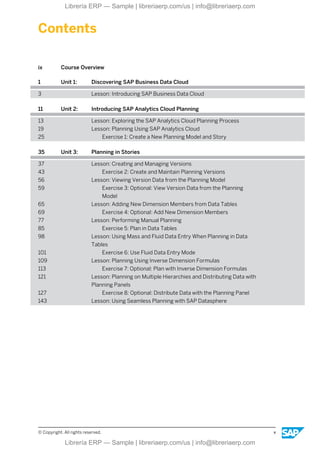
This information is displayed in the instructor’s presentation
Demonstration
Procedure
Warning or Caution
Hint
Related or Additional Information
Facilitated Discussion
User interface control Example text
Window title Example text
iv © Copyright. All rights reserved.
Librería ERP — Sample | libreriaerp.com/us | info@libreriaerp.com
Contents
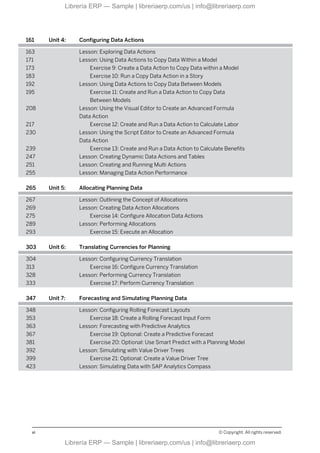
ix Course Overview
1 Unit 1: Discovering SAP Business Data Cloud
3 Lesson: Introducing SAP Business Data Cloud
11 Unit 2: Introducing SAP Analytics Cloud Planning
13 Lesson: Exploring the SAP Analytics Cloud Planning Process
19 Lesson: Planning Using SAP Analytics Cloud
25 Exercise 1: Create a New Planning Model and Story
35 Unit 3: Planning in Stories
37 Lesson: Creating and Managing Versions
43 Exercise 2: Create and Maintain Planning Versions
56 Lesson: Viewing Version Data from the Planning Model
59 Exercise 3: Optional: View Version Data from the Planning
Model
65 Lesson: Adding New Dimension Members from Data Tables
69 Exercise 4: Optional: Add New Dimension Members
77 Lesson: Performing Manual Planning
85 Exercise 5: Plan in Data Tables
98 Lesson: Using Mass and Fluid Data Entry When Planning in Data
Tables
101 Exercise 6: Use Fluid Data Entry Mode
109 Lesson: Planning Using Inverse Dimension Formulas
113 Exercise 7: Optional: Plan with Inverse Dimension Formulas
121 Lesson: Planning on Multiple Hierarchies and Distributing Data with
Planning Panels
127 Exercise 8: Optional: Distribute Data with the Planning Panel
143 Lesson: Using Seamless Planning with SAP Datasphere
© Copyright. All rights reserved. v
Librería ERP — Sample | libreriaerp.com/us | info@libreriaerp.com
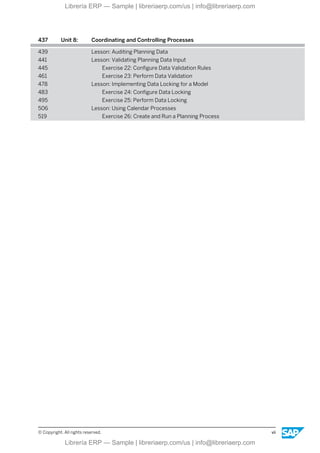
161 Unit 4: Configuring Data Actions
163 Lesson: Exploring Data Actions
171 Lesson: Using Data Actions to Copy Data Within a Model
173 Exercise 9: Create a Data Action to Copy Data within a Model
183 Exercise 10: Run a Copy Data Action in a Story
192 Lesson: Using Data Actions to Copy Data Between Models
195 Exercise 11: Create and Run a Data Action to Copy Data
Between Models
208 Lesson: Using the Visual Editor to Create an Advanced Formula
Data Action
217 Exercise 12: Create and Run a Data Action to Calculate Labor
230 Lesson: Using the Script Editor to Create an Advanced Formula
Data Action
239 Exercise 13: Create and Run a Data Action to Calculate Benefits
247 Lesson: Creating Dynamic Data Actions and Tables
251 Lesson: Creating and Running Multi Actions
255 Lesson: Managing Data Action Performance
265 Unit 5: Allocating Planning Data
267 Lesson: Outlining the Concept of Allocations
269 Lesson: Creating Data Action Allocations
275 Exercise 14: Configure Allocation Data Actions
289 Lesson: Performing Allocations
293 Exercise 15: Execute an Allocation
303 Unit 6: Translating Currencies for Planning
304 Lesson: Configuring Currency Translation
313 Exercise 16: Configure Currency Translation
328 Lesson: Performing Currency Translation
333 Exercise 17: Perform Currency Translation
347 Unit 7: Forecasting and Simulating Planning Data
348 Lesson: Configuring Rolling Forecast Layouts
353 Exercise 18: Create a Rolling Forecast Input Form
363 Lesson: Forecasting with Predictive Analytics
367 Exercise 19: Optional: Create a Predictive Forecast
381 Exercise 20: Optional: Use Smart Predict with a Planning Model
392 Lesson: Simulating with Value Driver Trees
399 Exercise 21: Optional: Create a Value Driver Tree
423 Lesson: Simulating Data with SAP Analytics Compass
vi © Copyright. All rights reserved.
Librería ERP — Sample | libreriaerp.com/us | info@libreriaerp.com
437 Unit 8: Coordinating and Controlling Processes
439 Lesson: Auditing Planning Data
441 Lesson: Validating Planning Data Input
445 Exercise 22: Configure Data Validation Rules
461 Exercise 23: Perform Data Validation
478 Lesson: Implementing Data Locking for a Model
483 Exercise 24: Configure Data Locking
495 Exercise 25: Perform Data Locking
506 Lesson: Using Calendar Processes
519 Exercise 26: Create and Run a Planning Process
© Copyright. All rights reserved. vii
Librería ERP — Sample | libreriaerp.com/us | info@libreriaerp.com
viii © Copyright. All rights reserved.
Librería ERP — Sample | libreriaerp.com/us | info@libreriaerp.com
Course Overview
TARGET AUDIENCE
This course is intended for the following audiences:
● Application Consultant
● Technology Consultant
● Industry / Business Analyst Consultant
● Business User
● Business Analyst
© Copyright. All rights reserved. ix
Librería ERP — Sample | libreriaerp.com/us | info@libreriaerp.com
x © Copyright. All rights reserved.
Librería ERP — Sample | libreriaerp.com/us | info@libreriaerp.com
UNIT 1 Discovering SAP Business Data
Cloud
Lesson 1
Introducing SAP Business Data Cloud 3
UNIT OBJECTIVES
● Describe the key functionality of SAP Business Data Cloud in relation to data analytics.
© Copyright. All rights reserved. 1
Librería ERP — Sample | libreriaerp.com/us | info@libreriaerp.com
Unit 1: Discovering SAP Business Data Cloud
2 © Copyright. All rights reserved.
Librería ERP — Sample | libreriaerp.com/us | info@libreriaerp.com
Unit 1
Lesson 1
Introducing SAP Business Data Cloud
LESSON OBJECTIVES
After completing this lesson, you will be able to:
● Describe the key functionality of SAP Business Data Cloud in relation to data analytics.
The Advantages of SAP Business Data Cloud
In this lesson, you'll discover the main advantages provided by SAP Business Data Cloud and
its key innovations that meet the challenges of organizations that want to make data-driven
decisions.
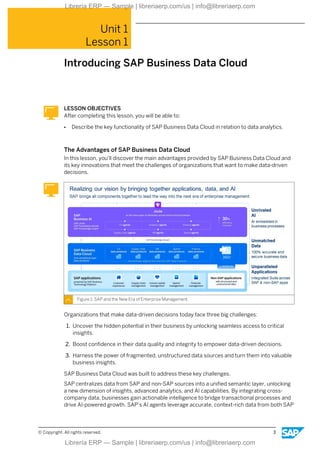
Figure 1: SAP and the New Era of Enterprise Management
Organizations that make data-driven decisions today face three big challenges:
1. Uncover the hidden potential in their business by unlocking seamless access to critical
insights.
2. Boost confidence in their data quality and integrity to empower data-driven decisions.
3. Harness the power of fragmented, unstructured data sources and turn them into valuable
business insights.
SAP Business Data Cloud was built to address these key challenges.
SAP centralizes data from SAP and non-SAP sources into a unified semantic layer, unlocking
a new dimension of insights, advanced analytics, and AI capabilities. By integrating cross-
company data, businesses gain actionable intelligence to bridge transactional processes and
drive AI-powered growth. SAP’s AI agents leverage accurate, context-rich data from both SAP
© Copyright. All rights reserved. 3
Librería ERP — Sample | libreriaerp.com/us | info@libreriaerp.com
and non-SAP systems to deliver advanced automation, seamless cross-solution
collaboration, and innovative decision-making, enabling businesses to adapt, innovate, and
thrive at scale. Every part of the business is deeply connected, driving today’s digital first
world.
Note:
Feel free to get a comprehensive overview of SAP Business Data Cloud and
discover its features: Demo: SAP Business Data Cloud
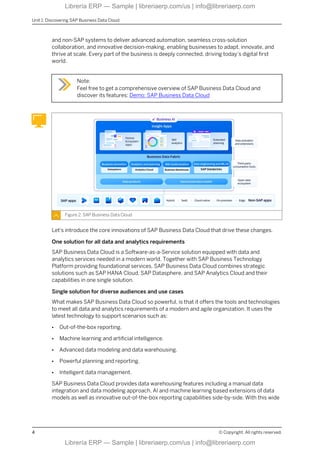
Figure 2: SAP Business Data Cloud
Let's introduce the core innovations of SAP Business Data Cloud that drive these changes.
One solution for all data and analytics requirements
SAP Business Data Cloud is a Software-as-a-Service solution equipped with data and
analytics services needed in a modern world. Together with SAP Business Technology
Platform providing foundational services, SAP Business Data Cloud combines strategic
solutions such as SAP HANA Cloud, SAP Datasphere, and SAP Analytics Cloud and their
capabilities in one single solution.
Single solution for diverse audiences and use cases
What makes SAP Business Data Cloud so powerful, is that it offers the tools and technologies
to meet all data and analytics requirements of a modern and agile organization. It uses the
latest technology to support scenarios such as:
● Out-of-the-box reporting.
● Machine learning and artificial intelligence.
● Advanced data modeling and data warehousing.
● Powerful planning and reporting.
● Intelligent data management.
SAP Business Data Cloud provides data warehousing features including a manual data
integration and data modeling approach, AI and machine learning based extensions of data
models as well as innovative out-of-the-box reporting capabilities side-by-side. With this wide
Unit 1: Discovering SAP Business Data Cloud
4 © Copyright. All rights reserved.
Librería ERP — Sample | libreriaerp.com/us | info@libreriaerp.com
range of functions, it covers all the requirements of a modern data and analytics solution and
thus serves different target audiences with different requirements.
End-to-end data lifecycle managed by SAP
One of the core innovations of SAP Business Data Cloud is that SAP's role as a provider goes
beyond the tasks that maintain security, availability, and performance in a Software-as-a-
Service landscape. Rather, SAP uses its knowledge and experience to bundle, integrate,
harmonize, and transform customers' business data across different business applications
such as SAP S/4HANA, SAP Customer Experience or SAP SuccessFactors in an
unprecedented approach. To prepare for seamless use across all SAP Business Data Cloud
scenarios and third-party tools, the business data that is managed by SAP is integrated into a
hyperscaler environment, and undergoes cleansing, harmonization, and enrichment.
Out-of-the-box reporting
A key highlight of SAP Business Data Cloud is its out-of-the-box reporting capability, featuring
Insight Apps, which create business insights with a single click, empowering informed
decision-making. The concept of this feature is based on predelivered artifacts and objects
that may remind you at the first glance on the well-known business content in SAP BW/
4HANA, SAP Datasphere, or SAP Analytics Cloud. But there's a significant difference to the
existing concepts. Unlike before, all artifacts, objects, and process steps for a ready-to-
consume full-stack application are included and fully managed by SAP. Specifically, here is
what happens when you install an Insight App:
● Automated creation of artifacts across all tools and components.
● Automated data management steps.
● Automated data provisioning from data source to dashboard.
● Automated ready-to-consume business insights.
In this lesson, you learned about SAP Business Data Cloud's core innovations with the wide
range of functionalities such as the out-of-the-box reporting with Insight Apps, and the main
advantages provided by SAP Business Data Cloud.
Architecture of SAP Business Data Cloud
This lesson offers an overview of SAP Business Data Cloud's architecture, introducing you to
the core components and their respective tasks, and helping you understand how they work
together to enable business insights and decision-making.
Lesson: Introducing SAP Business Data Cloud
© Copyright. All rights reserved. 5
Librería ERP — Sample | libreriaerp.com/us | info@libreriaerp.com
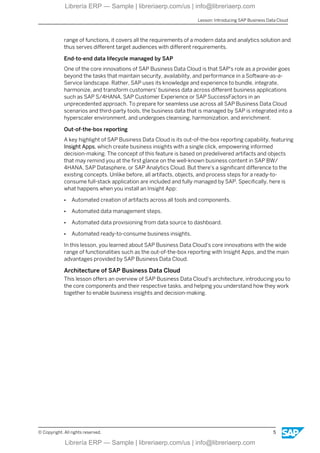
Figure 3: SAP Business Data Cloud Architecture
As illustrated in the graphic, the SAP Business Data Cloud system landscape consists of
different interconnected components. Each component plays an important role in SAP
Business Data Cloud, with specific tasks that are outlined in the following sections.
Source Systems
We start by examining the source systems, which encompass both SAP systems (for
example, SAP S/4HANA Cloud Private Edition or SAP SuccessFactors) and non-SAP
systems. With SAP S/4HANA Cloud Private Edition serving as an example, the data journey
begins when SAP bundles customer business data, making it available for various analytical
use cases within SAP Business Data Cloud. Entities such as tables and views are combined
and made available to represent a specific business scenario (for example, working capital)
before the data is replicated to SAP Business Data Cloud.
Foundation Services
When analysis is required, the bundled data from your source system (for example, SAP S/
4HANA Cloud Private Edition) is replicated into the Foundation Services of SAP Business
Data Cloud. This data is then harmonized with other relevant business data from other
business applications, transformed, and enriched to become a Data Product. From this
moment on, it is located in a hyperscaler environment based on SAP HANA Cloud, Data Lake
files and is ready to be used for every use case that is supported by SAP Business Data Cloud.
What this means for you is that all necessary data management steps such as integration,
transformation, cleansing, and so on are fully managed by SAP.
SAP Datasphere
At the heart of SAP Business Data Cloud is SAP Datasphere, which provides the foundational
structures that define the data model on top of the Data Products. This includes predelivered
Insight App and Data Product scenarios but also scenarios with custom data models that can
be manually extended with machine learning or AI. SAP Datasphere also serves as a central
tool for managing analytical roles and data access control, helping you to determine which
business users can view specific data.
Unit 1: Discovering SAP Business Data Cloud
6 © Copyright. All rights reserved.
Librería ERP — Sample | libreriaerp.com/us | info@libreriaerp.com
SAP Databricks
An SAP-tailored Databricks component (called SAP Databricks) is used in SAP Business Data
Cloud when extending your analytics with functions that are based on AI, machine learning,
and Pro-Code engineering. There are different approaches to make this possible. On the one
hand, you can share Data Products from SAP Business Data Cloud Catalog with SAP
Databricks, to extend them accordingly and to push them back to SAP Business Data Cloud
Catalog. On the other hand, you can share data directly from SAP Databricks into SAP
Business Data Cloud Catalog. In both cases, your data models can be extended to enrich
classic analytics with insights that are usually implemented by Data Scientists.
SAP BW or SAP BW/4HANA
SAP BW has a rich history in SAP's data and analytics ecosystem, with a large collection of
established, legacy objects. For these reasons, it is integrated into SAP Business Data Cloud if
you use the SAP BW Netweaver Cloud, private edition or the SAP BW/4HANA Cloud, private
edition. The approach makes it possible to technically onboard SAP BW objects into SAP
Business Data Cloud, allowing them to be used as Data Products. Within this framework, SAP
BW is supported until 2030, but we recommend taking the modern approach with SAP BW/
4HANA as soon as possible.
SAP Analytics Cloud
SAP Analytics Cloud stories are used to provide the required dashboard in out-of-the-box
reporting scenarios with Insight Apps. With its advanced visualization and planning functions,
SAP Analytics Cloud serves the business user as a central tool for exploring the requested
business insights or executing planning functions. Furthermore, using SAP Analytics Cloud,
business users can run ad-hoc analysis, explore the provided data with AI-driven chat
capabilities, or act on their insights with AI-driven suggestions, bridging the gap between
analytics and their end-to-end business processes.
Insight Apps
Insight Apps are not limited exclusively to SAP Analytics Cloud. In addition to the analytical
dashboards, or planning templates provided by SAP Analytics Cloud, it is planned to provide
SAP Business Technology Platform based Insight Apps. These SAP managed Software-as-a-
Service applications are delivered in SAP Business Data Cloud to focus on various action-
driven scenarios such as analytics, prediction, or forecasting.
SAP Business Data Cloud cockpit
The SAP Business Data Cloud cockpit has an important role in the overall SAP Business Data
Cloud landscape. With this tool you can browse and find predelivered Insight Apps and Data
Products, install Insight Apps, and share Data Products with SAP Databricks to be able to
extend them with AI, and machine learning capabilities.
In this lesson, you discovered the overall architecture of SAP Business Data Cloud and the
main tasks of each component.
Additional Learning
SAP Business Data Cloud and its associated data engineering and data analysis components
(including the new Insight Apps) are covered in more detail in the Introducing Business Data
Cloud learning journey.
Lesson: Introducing SAP Business Data Cloud
© Copyright. All rights reserved. 7
Librería ERP — Sample | libreriaerp.com/us | info@libreriaerp.com
LESSON SUMMARY
You should now be able to:
● Describe the key functionality of SAP Business Data Cloud in relation to data analytics.
Unit 1: Discovering SAP Business Data Cloud
8 © Copyright. All rights reserved.
Librería ERP — Sample | libreriaerp.com/us | info@libreriaerp.com
Unit 1
Learning Assessment
1. What are the primary purposes of SAP Business Data Cloud?
Choose the correct answers.
X A To provide foundational services for data and analytics scenarios.
X B To act solely as a data storage solution without analytics capabilities.
X C To provide a homogeneous system landscape for data, functions, and use cases.
X D To provide mainly manual data integration scenarios.
© Copyright. All rights reserved. 9
Librería ERP — Sample | libreriaerp.com/us | info@libreriaerp.com
Unit 1
Learning Assessment - Answers
1. What are the primary purposes of SAP Business Data Cloud?
Choose the correct answers.
X A To provide foundational services for data and analytics scenarios.
X B To act solely as a data storage solution without analytics capabilities.
X C To provide a homogeneous system landscape for data, functions, and use cases.
X D To provide mainly manual data integration scenarios.
SAP Business Data Cloud provides a homogeneous system landscape for data, functions,
and use cases and serves as a solution that provided foundational services for data and
analytics use cases.
10 © Copyright. All rights reserved.
Librería ERP — Sample | libreriaerp.com/us | info@libreriaerp.com

SAP Analytics Cloud Planning: Introduction to Seamless Planning

  • 1.
    SACP21 SAP Analytics CloudPlanning: Introduction . . PARTICIPANT HANDBOOK INSTRUCTOR-LED TRAINING . Course Version: 42 Course Duration: 4 Days Librería ERP — Sample | libreriaerp.com/us | info@libreriaerp.com Librería ERP — Sample | libreriaerp.com/us | info@libreriaerp.com
  • 2.
    Librería ERP —Sample | libreriaerp.com/us | info@libreriaerp.com Librería ERP — Sample | libreriaerp.com/us | info@libreriaerp.com
  • 3.
    SAP Copyrights, Trademarksand Disclaimers © 2025 SAP SE or an SAP affiliate company. All rights reserved. No part of this publication may be reproduced or transmitted in any form or for any purpose without the express permission of SAP SE or an SAP affiliate company. SAP and other SAP products and services mentioned herein as well as their respective logos are trademarks or registered trademarks of SAP SE (or an SAP affiliate company) in Germany and other countries. Please see https://www.sap.com/corporate/en/legal/copyright.html for additional trademark information and notices. Some software products marketed by SAP SE and its distributors contain proprietary software components of other software vendors. National product specifications may vary. These materials may have been machine translated and may contain grammatical errors or inaccuracies. These materials are provided by SAP SE or an SAP affiliate company for informational purposes only, without representation or warranty of any kind, and SAP SE or its affiliated companies shall not be liable for errors or omissions with respect to the materials. The only warranties for SAP SE or SAP affiliate company products and services are those that are set forth in the express warranty statements accompanying such products and services, if any. Nothing herein should be construed as constituting an additional warranty. In particular, SAP SE or its affiliated companies have no obligation to pursue any course of business outlined in this document or any related presentation, or to develop or release any functionality mentioned therein. This document, or any related presentation, and SAP SE’s or its affiliated companies’ strategy and possible future developments, products, and/or platform directions and functionality are all subject to change and may be changed by SAP SE or its affiliated companies at any time for any reason without notice. The information in this document is not a commitment, promise, or legal obligation to deliver any material, code, or functionality. All forward-looking statements are subject to various risks and uncertainties that could cause actual results to differ materially from expectations. Readers are cautioned not to place undue reliance on these forward-looking statements, which speak only as of their dates, and they should not be relied upon in making purchasing decisions. © Copyright. All rights reserved. iii Librería ERP — Sample | libreriaerp.com/us | info@libreriaerp.com Librería ERP — Sample | libreriaerp.com/us | info@libreriaerp.com
  • 4.
    Typographic Conventions American Englishis the standard used in this handbook. The following typographic conventions are also used. This information is displayed in the instructor’s presentation Demonstration Procedure Warning or Caution Hint Related or Additional Information Facilitated Discussion User interface control Example text Window title Example text iv © Copyright. All rights reserved. Librería ERP — Sample | libreriaerp.com/us | info@libreriaerp.com Librería ERP — Sample | libreriaerp.com/us | info@libreriaerp.com
  • 5.
    Contents ix Course Overview 1Unit 1: Discovering SAP Business Data Cloud 3 Lesson: Introducing SAP Business Data Cloud 11 Unit 2: Introducing SAP Analytics Cloud Planning 13 Lesson: Exploring the SAP Analytics Cloud Planning Process 19 Lesson: Planning Using SAP Analytics Cloud 25 Exercise 1: Create a New Planning Model and Story 35 Unit 3: Planning in Stories 37 Lesson: Creating and Managing Versions 43 Exercise 2: Create and Maintain Planning Versions 56 Lesson: Viewing Version Data from the Planning Model 59 Exercise 3: Optional: View Version Data from the Planning Model 65 Lesson: Adding New Dimension Members from Data Tables 69 Exercise 4: Optional: Add New Dimension Members 77 Lesson: Performing Manual Planning 85 Exercise 5: Plan in Data Tables 98 Lesson: Using Mass and Fluid Data Entry When Planning in Data Tables 101 Exercise 6: Use Fluid Data Entry Mode 109 Lesson: Planning Using Inverse Dimension Formulas 113 Exercise 7: Optional: Plan with Inverse Dimension Formulas 121 Lesson: Planning on Multiple Hierarchies and Distributing Data with Planning Panels 127 Exercise 8: Optional: Distribute Data with the Planning Panel 143 Lesson: Using Seamless Planning with SAP Datasphere © Copyright. All rights reserved. v Librería ERP — Sample | libreriaerp.com/us | info@libreriaerp.com Librería ERP — Sample | libreriaerp.com/us | info@libreriaerp.com
  • 6.
    161 Unit 4:Configuring Data Actions 163 Lesson: Exploring Data Actions 171 Lesson: Using Data Actions to Copy Data Within a Model 173 Exercise 9: Create a Data Action to Copy Data within a Model 183 Exercise 10: Run a Copy Data Action in a Story 192 Lesson: Using Data Actions to Copy Data Between Models 195 Exercise 11: Create and Run a Data Action to Copy Data Between Models 208 Lesson: Using the Visual Editor to Create an Advanced Formula Data Action 217 Exercise 12: Create and Run a Data Action to Calculate Labor 230 Lesson: Using the Script Editor to Create an Advanced Formula Data Action 239 Exercise 13: Create and Run a Data Action to Calculate Benefits 247 Lesson: Creating Dynamic Data Actions and Tables 251 Lesson: Creating and Running Multi Actions 255 Lesson: Managing Data Action Performance 265 Unit 5: Allocating Planning Data 267 Lesson: Outlining the Concept of Allocations 269 Lesson: Creating Data Action Allocations 275 Exercise 14: Configure Allocation Data Actions 289 Lesson: Performing Allocations 293 Exercise 15: Execute an Allocation 303 Unit 6: Translating Currencies for Planning 304 Lesson: Configuring Currency Translation 313 Exercise 16: Configure Currency Translation 328 Lesson: Performing Currency Translation 333 Exercise 17: Perform Currency Translation 347 Unit 7: Forecasting and Simulating Planning Data 348 Lesson: Configuring Rolling Forecast Layouts 353 Exercise 18: Create a Rolling Forecast Input Form 363 Lesson: Forecasting with Predictive Analytics 367 Exercise 19: Optional: Create a Predictive Forecast 381 Exercise 20: Optional: Use Smart Predict with a Planning Model 392 Lesson: Simulating with Value Driver Trees 399 Exercise 21: Optional: Create a Value Driver Tree 423 Lesson: Simulating Data with SAP Analytics Compass vi © Copyright. All rights reserved. Librería ERP — Sample | libreriaerp.com/us | info@libreriaerp.com Librería ERP — Sample | libreriaerp.com/us | info@libreriaerp.com
  • 7.
    437 Unit 8:Coordinating and Controlling Processes 439 Lesson: Auditing Planning Data 441 Lesson: Validating Planning Data Input 445 Exercise 22: Configure Data Validation Rules 461 Exercise 23: Perform Data Validation 478 Lesson: Implementing Data Locking for a Model 483 Exercise 24: Configure Data Locking 495 Exercise 25: Perform Data Locking 506 Lesson: Using Calendar Processes 519 Exercise 26: Create and Run a Planning Process © Copyright. All rights reserved. vii Librería ERP — Sample | libreriaerp.com/us | info@libreriaerp.com Librería ERP — Sample | libreriaerp.com/us | info@libreriaerp.com
  • 8.
    viii © Copyright.All rights reserved. Librería ERP — Sample | libreriaerp.com/us | info@libreriaerp.com Librería ERP — Sample | libreriaerp.com/us | info@libreriaerp.com
  • 9.
    Course Overview TARGET AUDIENCE Thiscourse is intended for the following audiences: ● Application Consultant ● Technology Consultant ● Industry / Business Analyst Consultant ● Business User ● Business Analyst © Copyright. All rights reserved. ix Librería ERP — Sample | libreriaerp.com/us | info@libreriaerp.com Librería ERP — Sample | libreriaerp.com/us | info@libreriaerp.com
  • 10.
    x © Copyright.All rights reserved. Librería ERP — Sample | libreriaerp.com/us | info@libreriaerp.com Librería ERP — Sample | libreriaerp.com/us | info@libreriaerp.com
  • 11.
    UNIT 1 DiscoveringSAP Business Data Cloud Lesson 1 Introducing SAP Business Data Cloud 3 UNIT OBJECTIVES ● Describe the key functionality of SAP Business Data Cloud in relation to data analytics. © Copyright. All rights reserved. 1 Librería ERP — Sample | libreriaerp.com/us | info@libreriaerp.com Librería ERP — Sample | libreriaerp.com/us | info@libreriaerp.com
  • 12.
    Unit 1: DiscoveringSAP Business Data Cloud 2 © Copyright. All rights reserved. Librería ERP — Sample | libreriaerp.com/us | info@libreriaerp.com Librería ERP — Sample | libreriaerp.com/us | info@libreriaerp.com
  • 13.
    Unit 1 Lesson 1 IntroducingSAP Business Data Cloud LESSON OBJECTIVES After completing this lesson, you will be able to: ● Describe the key functionality of SAP Business Data Cloud in relation to data analytics. The Advantages of SAP Business Data Cloud In this lesson, you'll discover the main advantages provided by SAP Business Data Cloud and its key innovations that meet the challenges of organizations that want to make data-driven decisions. Figure 1: SAP and the New Era of Enterprise Management Organizations that make data-driven decisions today face three big challenges: 1. Uncover the hidden potential in their business by unlocking seamless access to critical insights. 2. Boost confidence in their data quality and integrity to empower data-driven decisions. 3. Harness the power of fragmented, unstructured data sources and turn them into valuable business insights. SAP Business Data Cloud was built to address these key challenges. SAP centralizes data from SAP and non-SAP sources into a unified semantic layer, unlocking a new dimension of insights, advanced analytics, and AI capabilities. By integrating cross- company data, businesses gain actionable intelligence to bridge transactional processes and drive AI-powered growth. SAP’s AI agents leverage accurate, context-rich data from both SAP © Copyright. All rights reserved. 3 Librería ERP — Sample | libreriaerp.com/us | info@libreriaerp.com Librería ERP — Sample | libreriaerp.com/us | info@libreriaerp.com
  • 14.
    and non-SAP systemsto deliver advanced automation, seamless cross-solution collaboration, and innovative decision-making, enabling businesses to adapt, innovate, and thrive at scale. Every part of the business is deeply connected, driving today’s digital first world. Note: Feel free to get a comprehensive overview of SAP Business Data Cloud and discover its features: Demo: SAP Business Data Cloud Figure 2: SAP Business Data Cloud Let's introduce the core innovations of SAP Business Data Cloud that drive these changes. One solution for all data and analytics requirements SAP Business Data Cloud is a Software-as-a-Service solution equipped with data and analytics services needed in a modern world. Together with SAP Business Technology Platform providing foundational services, SAP Business Data Cloud combines strategic solutions such as SAP HANA Cloud, SAP Datasphere, and SAP Analytics Cloud and their capabilities in one single solution. Single solution for diverse audiences and use cases What makes SAP Business Data Cloud so powerful, is that it offers the tools and technologies to meet all data and analytics requirements of a modern and agile organization. It uses the latest technology to support scenarios such as: ● Out-of-the-box reporting. ● Machine learning and artificial intelligence. ● Advanced data modeling and data warehousing. ● Powerful planning and reporting. ● Intelligent data management. SAP Business Data Cloud provides data warehousing features including a manual data integration and data modeling approach, AI and machine learning based extensions of data models as well as innovative out-of-the-box reporting capabilities side-by-side. With this wide Unit 1: Discovering SAP Business Data Cloud 4 © Copyright. All rights reserved. Librería ERP — Sample | libreriaerp.com/us | info@libreriaerp.com Librería ERP — Sample | libreriaerp.com/us | info@libreriaerp.com
  • 15.
    range of functions,it covers all the requirements of a modern data and analytics solution and thus serves different target audiences with different requirements. End-to-end data lifecycle managed by SAP One of the core innovations of SAP Business Data Cloud is that SAP's role as a provider goes beyond the tasks that maintain security, availability, and performance in a Software-as-a- Service landscape. Rather, SAP uses its knowledge and experience to bundle, integrate, harmonize, and transform customers' business data across different business applications such as SAP S/4HANA, SAP Customer Experience or SAP SuccessFactors in an unprecedented approach. To prepare for seamless use across all SAP Business Data Cloud scenarios and third-party tools, the business data that is managed by SAP is integrated into a hyperscaler environment, and undergoes cleansing, harmonization, and enrichment. Out-of-the-box reporting A key highlight of SAP Business Data Cloud is its out-of-the-box reporting capability, featuring Insight Apps, which create business insights with a single click, empowering informed decision-making. The concept of this feature is based on predelivered artifacts and objects that may remind you at the first glance on the well-known business content in SAP BW/ 4HANA, SAP Datasphere, or SAP Analytics Cloud. But there's a significant difference to the existing concepts. Unlike before, all artifacts, objects, and process steps for a ready-to- consume full-stack application are included and fully managed by SAP. Specifically, here is what happens when you install an Insight App: ● Automated creation of artifacts across all tools and components. ● Automated data management steps. ● Automated data provisioning from data source to dashboard. ● Automated ready-to-consume business insights. In this lesson, you learned about SAP Business Data Cloud's core innovations with the wide range of functionalities such as the out-of-the-box reporting with Insight Apps, and the main advantages provided by SAP Business Data Cloud. Architecture of SAP Business Data Cloud This lesson offers an overview of SAP Business Data Cloud's architecture, introducing you to the core components and their respective tasks, and helping you understand how they work together to enable business insights and decision-making. Lesson: Introducing SAP Business Data Cloud © Copyright. All rights reserved. 5 Librería ERP — Sample | libreriaerp.com/us | info@libreriaerp.com Librería ERP — Sample | libreriaerp.com/us | info@libreriaerp.com
  • 16.
    Figure 3: SAPBusiness Data Cloud Architecture As illustrated in the graphic, the SAP Business Data Cloud system landscape consists of different interconnected components. Each component plays an important role in SAP Business Data Cloud, with specific tasks that are outlined in the following sections. Source Systems We start by examining the source systems, which encompass both SAP systems (for example, SAP S/4HANA Cloud Private Edition or SAP SuccessFactors) and non-SAP systems. With SAP S/4HANA Cloud Private Edition serving as an example, the data journey begins when SAP bundles customer business data, making it available for various analytical use cases within SAP Business Data Cloud. Entities such as tables and views are combined and made available to represent a specific business scenario (for example, working capital) before the data is replicated to SAP Business Data Cloud. Foundation Services When analysis is required, the bundled data from your source system (for example, SAP S/ 4HANA Cloud Private Edition) is replicated into the Foundation Services of SAP Business Data Cloud. This data is then harmonized with other relevant business data from other business applications, transformed, and enriched to become a Data Product. From this moment on, it is located in a hyperscaler environment based on SAP HANA Cloud, Data Lake files and is ready to be used for every use case that is supported by SAP Business Data Cloud. What this means for you is that all necessary data management steps such as integration, transformation, cleansing, and so on are fully managed by SAP. SAP Datasphere At the heart of SAP Business Data Cloud is SAP Datasphere, which provides the foundational structures that define the data model on top of the Data Products. This includes predelivered Insight App and Data Product scenarios but also scenarios with custom data models that can be manually extended with machine learning or AI. SAP Datasphere also serves as a central tool for managing analytical roles and data access control, helping you to determine which business users can view specific data. Unit 1: Discovering SAP Business Data Cloud 6 © Copyright. All rights reserved. Librería ERP — Sample | libreriaerp.com/us | info@libreriaerp.com Librería ERP — Sample | libreriaerp.com/us | info@libreriaerp.com
  • 17.
    SAP Databricks An SAP-tailoredDatabricks component (called SAP Databricks) is used in SAP Business Data Cloud when extending your analytics with functions that are based on AI, machine learning, and Pro-Code engineering. There are different approaches to make this possible. On the one hand, you can share Data Products from SAP Business Data Cloud Catalog with SAP Databricks, to extend them accordingly and to push them back to SAP Business Data Cloud Catalog. On the other hand, you can share data directly from SAP Databricks into SAP Business Data Cloud Catalog. In both cases, your data models can be extended to enrich classic analytics with insights that are usually implemented by Data Scientists. SAP BW or SAP BW/4HANA SAP BW has a rich history in SAP's data and analytics ecosystem, with a large collection of established, legacy objects. For these reasons, it is integrated into SAP Business Data Cloud if you use the SAP BW Netweaver Cloud, private edition or the SAP BW/4HANA Cloud, private edition. The approach makes it possible to technically onboard SAP BW objects into SAP Business Data Cloud, allowing them to be used as Data Products. Within this framework, SAP BW is supported until 2030, but we recommend taking the modern approach with SAP BW/ 4HANA as soon as possible. SAP Analytics Cloud SAP Analytics Cloud stories are used to provide the required dashboard in out-of-the-box reporting scenarios with Insight Apps. With its advanced visualization and planning functions, SAP Analytics Cloud serves the business user as a central tool for exploring the requested business insights or executing planning functions. Furthermore, using SAP Analytics Cloud, business users can run ad-hoc analysis, explore the provided data with AI-driven chat capabilities, or act on their insights with AI-driven suggestions, bridging the gap between analytics and their end-to-end business processes. Insight Apps Insight Apps are not limited exclusively to SAP Analytics Cloud. In addition to the analytical dashboards, or planning templates provided by SAP Analytics Cloud, it is planned to provide SAP Business Technology Platform based Insight Apps. These SAP managed Software-as-a- Service applications are delivered in SAP Business Data Cloud to focus on various action- driven scenarios such as analytics, prediction, or forecasting. SAP Business Data Cloud cockpit The SAP Business Data Cloud cockpit has an important role in the overall SAP Business Data Cloud landscape. With this tool you can browse and find predelivered Insight Apps and Data Products, install Insight Apps, and share Data Products with SAP Databricks to be able to extend them with AI, and machine learning capabilities. In this lesson, you discovered the overall architecture of SAP Business Data Cloud and the main tasks of each component. Additional Learning SAP Business Data Cloud and its associated data engineering and data analysis components (including the new Insight Apps) are covered in more detail in the Introducing Business Data Cloud learning journey. Lesson: Introducing SAP Business Data Cloud © Copyright. All rights reserved. 7 Librería ERP — Sample | libreriaerp.com/us | info@libreriaerp.com Librería ERP — Sample | libreriaerp.com/us | info@libreriaerp.com
  • 18.
    LESSON SUMMARY You shouldnow be able to: ● Describe the key functionality of SAP Business Data Cloud in relation to data analytics. Unit 1: Discovering SAP Business Data Cloud 8 © Copyright. All rights reserved. Librería ERP — Sample | libreriaerp.com/us | info@libreriaerp.com Librería ERP — Sample | libreriaerp.com/us | info@libreriaerp.com
  • 19.
    Unit 1 Learning Assessment 1.What are the primary purposes of SAP Business Data Cloud? Choose the correct answers. X A To provide foundational services for data and analytics scenarios. X B To act solely as a data storage solution without analytics capabilities. X C To provide a homogeneous system landscape for data, functions, and use cases. X D To provide mainly manual data integration scenarios. © Copyright. All rights reserved. 9 Librería ERP — Sample | libreriaerp.com/us | info@libreriaerp.com Librería ERP — Sample | libreriaerp.com/us | info@libreriaerp.com
  • 20.
    Unit 1 Learning Assessment- Answers 1. What are the primary purposes of SAP Business Data Cloud? Choose the correct answers. X A To provide foundational services for data and analytics scenarios. X B To act solely as a data storage solution without analytics capabilities. X C To provide a homogeneous system landscape for data, functions, and use cases. X D To provide mainly manual data integration scenarios. SAP Business Data Cloud provides a homogeneous system landscape for data, functions, and use cases and serves as a solution that provided foundational services for data and analytics use cases. 10 © Copyright. All rights reserved. Librería ERP — Sample | libreriaerp.com/us | info@libreriaerp.com Librería ERP — Sample | libreriaerp.com/us | info@libreriaerp.com