TOOL COMMAND LANGUAGE
or
TICKLE
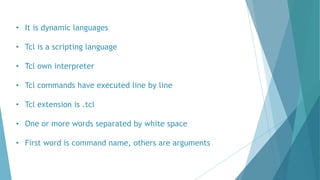
• It is dynamic languages
• Tcl is a scripting language
• Tcl own interpreter
• Tcl commands have executed line by line
• Tcl extension is .tcl
• One or more words separated by white space
• First word is command name, others are arguments
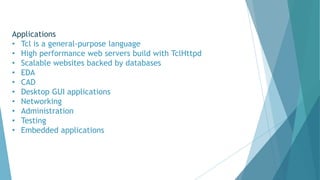
Applications
• Tcl is a general-purpose language
• High performance web servers build with TclHttpd
• Scalable websites backed by databases
• EDA
• CAD
• Desktop GUI applications
• Networking
• Administration
• Testing
• Embedded applications
Command
• words separated by whitespace
• First word is a function, others are arguments
• Only functions apply meanings to arguments
• Single-pass tokenizing and substitution
• $ causes variable interpolation
• [ ] causes command interpolation
• “” prevents word breaks
• { } prevents all interpolation
•  escapes special characters
• TCL HAS NO GRAMMAR!
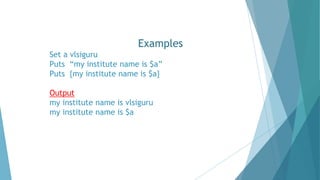
Examples
Set a vlsiguru
Puts “my institute name is $a”
Puts {my institute name is $a}
Output
my institute name is vlsiguru
my institute name is $a
Sample command Result
set a 900
set b 99
set c [expr $a +$b] 999
puts $c
set c [expr $a -$b] 801
puts $c
set c [expr $a *$b] 89100
puts $c
set c [expr $b /$a] 100
puts $c
set c [expr ($a % $b)] 0
puts $c
List Operators and Syntax
1. Lindex example: set a [blue yellow red]
2. Llength set b [lindex $a]
3. Linsert
4. Lrange
5. Lreplace
6. Lset
7. Lsort
8. Lsplit
9. concat
10.Lassign example: set a [blue yellow red]
11.Lappend lassign $a b y r
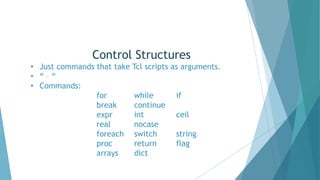
Control Structures
• Just commands that take Tcl scripts as arguments.
• “ – “
• Commands:
for while if
break continue
expr int ceil
real nocase
foreach switch string
proc return flag
arrays dict
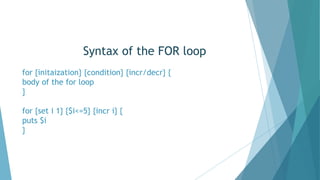
Syntax of the FOR loop
for {initaization} {condition} {incr/decr} {
body of the for loop
}
for {set i 1} {$i<=5} {incr i} {
puts $i
}
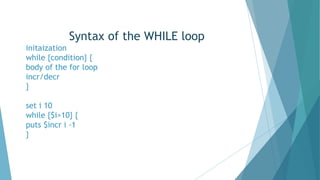
Syntax of the WHILE loop
initaization
while {condition} {
body of the for loop
incr/decr
}
set i 10
while {$i>10} {
puts $incr i -1
}
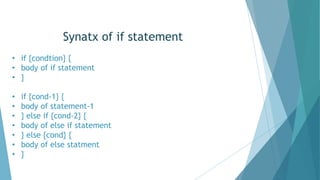
Synatx of if statement
• if {condtion} {
• body of if statement
• }
• if {cond-1} {
• body of statement-1
• } else if {cond-2} {
• body of else if statement
• } else {cond} {
• body of else statment
• }
example of if statement
for {set i 1} {$i<=50} {incr i} {
if {$i %2 != 0} {
puts $i
}
}
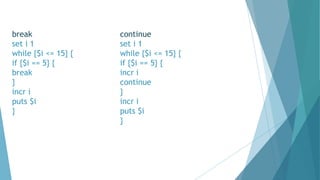
break continue
set i 1 set i 1
while {$i <= 15} { while {$i <= 15} {
if {$i == 5} { if {$i == 5} {
break incr i
} continue
incr i }
puts $i incr i
} puts $i
}
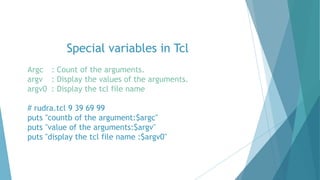
Special variables in Tcl
Argc : Count of the arguments.
argv : Display the values of the arguments.
argv0 : Display the tcl file name
# rudra.tcl 9 39 69 99
puts "countb of the argument:$argc"
puts "value of the arguments:$argv"
puts "display the tcl file name :$argv0"
FILE HANDLING OPERATION
Syntax for file handling operations
Set variables [open "filename.extension" accessmode]
puts $variables
set r [open “rudra.tcl" r] #Read
Puts $r
set w [open “text.tcl" w] #write
Puts $w “"welcome to Garden city India"
set a [open “rudra.tcl" a] #append
puts $a "welcome to vlsiguru"
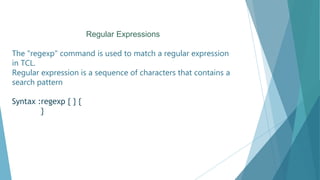
Regular Expressions
The "regexp" command is used to match a regular expression
in TCL.
Regular expression is a sequence of characters that contains a
search pattern
Syntax :regexp { } {
}
set fhr [open "VHDL.txt" r]
Puts $fhr
set fhr [open "VHDL.txt" r]
while {[gets $fhr line] >= 0} {
Puts $fhr
}
set fhr [open "VHDL.txt" r]
set i 0
while {[gets $fhr line] >= 0} {
incr i
Puts $fhr
Puts line number $i
set fhr [open "VHDL.txt" r]
set i 0
set j 0
while {[gets $fhr line] >= 0} {
incr i
if {[regexp -nocase { *entity +([a-z0-9_]*) +} $line temp en]} {
incr j
puts $temp
puts $en
puts "file line number:$i number of times:$j entity_name:$en"
}
}
Thank you

rudra.pptx

  • 1.
  • 2.
    • It isdynamic languages • Tcl is a scripting language • Tcl own interpreter • Tcl commands have executed line by line • Tcl extension is .tcl • One or more words separated by white space • First word is command name, others are arguments
  • 3.
    Applications • Tcl isa general-purpose language • High performance web servers build with TclHttpd • Scalable websites backed by databases • EDA • CAD • Desktop GUI applications • Networking • Administration • Testing • Embedded applications
  • 4.
    Command • words separatedby whitespace • First word is a function, others are arguments • Only functions apply meanings to arguments • Single-pass tokenizing and substitution • $ causes variable interpolation • [ ] causes command interpolation • “” prevents word breaks • { } prevents all interpolation • escapes special characters • TCL HAS NO GRAMMAR!
  • 5.
    Examples Set a vlsiguru Puts“my institute name is $a” Puts {my institute name is $a} Output my institute name is vlsiguru my institute name is $a
  • 6.
    Sample command Result seta 900 set b 99 set c [expr $a +$b] 999 puts $c set c [expr $a -$b] 801 puts $c set c [expr $a *$b] 89100 puts $c set c [expr $b /$a] 100 puts $c set c [expr ($a % $b)] 0 puts $c
  • 7.
    List Operators andSyntax 1. Lindex example: set a [blue yellow red] 2. Llength set b [lindex $a] 3. Linsert 4. Lrange 5. Lreplace 6. Lset 7. Lsort 8. Lsplit 9. concat 10.Lassign example: set a [blue yellow red] 11.Lappend lassign $a b y r
  • 8.
    Control Structures • Justcommands that take Tcl scripts as arguments. • “ – “ • Commands: for while if break continue expr int ceil real nocase foreach switch string proc return flag arrays dict
  • 9.
    Syntax of theFOR loop for {initaization} {condition} {incr/decr} { body of the for loop } for {set i 1} {$i<=5} {incr i} { puts $i }
  • 10.
    Syntax of theWHILE loop initaization while {condition} { body of the for loop incr/decr } set i 10 while {$i>10} { puts $incr i -1 }
  • 11.
    Synatx of ifstatement • if {condtion} { • body of if statement • } • if {cond-1} { • body of statement-1 • } else if {cond-2} { • body of else if statement • } else {cond} { • body of else statment • }
  • 12.
    example of ifstatement for {set i 1} {$i<=50} {incr i} { if {$i %2 != 0} { puts $i } }
  • 13.
    break continue set i1 set i 1 while {$i <= 15} { while {$i <= 15} { if {$i == 5} { if {$i == 5} { break incr i } continue incr i } puts $i incr i } puts $i }
  • 14.
    Special variables inTcl Argc : Count of the arguments. argv : Display the values of the arguments. argv0 : Display the tcl file name # rudra.tcl 9 39 69 99 puts "countb of the argument:$argc" puts "value of the arguments:$argv" puts "display the tcl file name :$argv0"
  • 15.
    FILE HANDLING OPERATION Syntaxfor file handling operations Set variables [open "filename.extension" accessmode] puts $variables set r [open “rudra.tcl" r] #Read Puts $r set w [open “text.tcl" w] #write Puts $w “"welcome to Garden city India" set a [open “rudra.tcl" a] #append puts $a "welcome to vlsiguru"
  • 16.
    Regular Expressions The "regexp"command is used to match a regular expression in TCL. Regular expression is a sequence of characters that contains a search pattern Syntax :regexp { } { }
  • 17.
    set fhr [open"VHDL.txt" r] Puts $fhr set fhr [open "VHDL.txt" r] while {[gets $fhr line] >= 0} { Puts $fhr } set fhr [open "VHDL.txt" r] set i 0 while {[gets $fhr line] >= 0} { incr i Puts $fhr Puts line number $i
  • 18.
    set fhr [open"VHDL.txt" r] set i 0 set j 0 while {[gets $fhr line] >= 0} { incr i if {[regexp -nocase { *entity +([a-z0-9_]*) +} $line temp en]} { incr j puts $temp puts $en puts "file line number:$i number of times:$j entity_name:$en" } }
  • 19.