RUBYRUBY
Ruby Classes and Objects
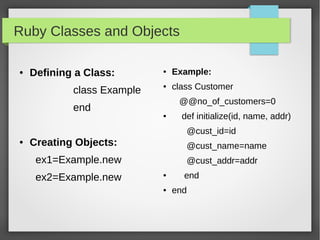
● Defining a Class:
class Example
end
● Creating Objects:
ex1=Example.new
ex2=Example.new
● Example:
● class Customer
@@no_of_customers=0
● def initialize(id, name, addr)
@cust_id=id
@cust_name=name
@cust_addr=addr
● end
● end
Example for Class and Object
● We declare the initialize method with id, name, and addr
as local variables.
● In the initialize method, we pass on the values of these
local variables to the instance variables @cust_id,
@cust_name, and @cust_addr.
● Now, we can create objects:
cust1=Customer.new("1", "Alex", "Coimbatore, TN")
cust2=Customer.new("2", "Balu", "Chennai, TN")
Member Functions in Ruby Class
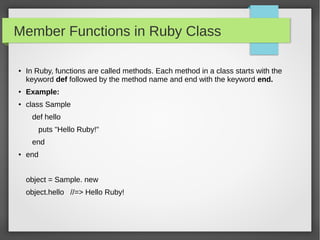
● In Ruby, functions are called methods. Each method in a class starts with the
keyword def followed by the method name and end with the keyword end.
● Example:
● class Sample
def hello
puts "Hello Ruby!"
end
● end
object = Sample. new
object.hello //=> Hello Ruby!
Example for Class and Odject
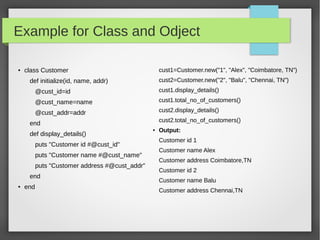
● class Customer
def initialize(id, name, addr)
@cust_id=id
@cust_name=name
@cust_addr=addr
end
def display_details()
puts "Customer id #@cust_id"
puts "Customer name #@cust_name"
puts "Customer address #@cust_addr"
end
● end
cust1=Customer.new("1", "Alex", "Coimbatore, TN")
cust2=Customer.new("2", "Balu", "Chennai, TN")
cust1.display_details()
cust1.total_no_of_customers()
cust2.display_details()
cust2.total_no_of_customers()
● Output:
Customer id 1
Customer name Alex
Customer address Coimbatore,TN
Customer id 2
Customer name Balu
Customer address Chennai,TN
Class Inheritance
● Inheritance From Base Class:
● class Parent
def implicit()
puts "Hello Parent"
end
● end
● class Child < Parent
● end
dad = Parent.new()
son = Child.new()
dad.implicit()
son.implicit()
● Output:
Hello Parent
Hello Parent
Inheritance Example
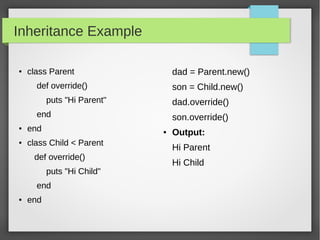
● class Parent
def override()
puts "Hi Parent"
end
● end
● class Child < Parent
def override()
puts "Hi Child"
end
● end
dad = Parent.new()
son = Child.new()
dad.override()
son.override()
● Output:
Hi Parent
Hi Child
Ruby Variables
● Ruby Global Variables:
Global variables begin with $.
● Example: $global_variable=100
● Ruby Instance Variables:
Instance variables begin with @.
● Example: @instance_variable=200
● Ruby Class Variables:
Class variables begin with @@ and must be initialized before they can
be used in method definitions.
● Example: @@class_variable=300
Ruby Arrays
● Creating an Array:
a=[1,2,3,4,5] ( or)
● ary=Array.new
ary[0]=1
ary[1]=2
ary[2]=3
● arr = ['a', 'b', 'c', 'd', 'e', 'f']
Accessing Array
● Accessing Element:
arr = [1, 2, 3, 4, 5, 6]
● arr[2] # 3
● arr[100] # nil
● arr[-3] # 4
● arr[2, 3] #[3, 4, 5]
● arr[1..4] #[2, 3, 4, 5]
● arr.take(3) # [1, 2, 3]
● arr.drop(3) # [4, 5, 6]
● arr.at(0) # 1
● arr.first # 1
● arr.last # 6
Adding Items to Arrays
● For adding can use either push or <<
● arr = [1, 2, 3, 4]
● arr.push(5) #[1, 2, 3, 4, 5]
● Arr << 6 #[1, 2, 3, 4, 5, 6]
● Add a new item to the beginning of an array:
● arr.unshift(0) # [0, 1, 2, 3, 4, 5, 6]
● Add a new element to an array at any position:
● arr.insert(3, 'apple') #[0, 1, 2, 'apple', 3, 4, 5, 6]
● arr.insert(3, 'orange', 'pear', 'grapefruit')
#[0, 1, 2, "orange", "pear", "grapefruit", "apple", 3, 4, 5, 6]
Removing Items from an Array
● arr = [1, 2, 3, 4, 5, 6]
● arr.pop # 6
● arr # [1, 2, 3, 4, 5]
● arr.shift # 1
● arr # [2, 3, 4, 5]
● To delete an element at a particular index:
● arr.delete_at(2) # 4
● Arr # [2, 3, 5]
● To delete a particular element anywhere in an array:
● arr = [1, 2, 2, 3]
● arr.delete(2) # 2
● arr # [1,3]
Iteration in Array
● Ruby each:
● ary = [1,2,3,4,5]
ary.each do |i|
puts i
end
● Ruby collect:
● a = [1,2,3,4,5]
b = a.collect { |x| 10*x }
puts b
● O/P:
● 1
2
3
4
5
● O/P:
● 10
20
30
40
50
Iteration in Array
● Ruby map:
● arr.map { |a| 2*a } # [2, 4, 6, 8, 10]
● arr # [1, 2, 3, 4, 5]
● arr.map! { |a| a**2 } # [1, 4, 9, 16, 25]
● arr # [1, 4, 9, 16, 25]
.each with index in Array
● a=[1,2,3,4,5]
a.each_with_index do |value, index|
puts "#{index} index value is #{value}!"
end
● Output:
0 index value is 1!
1 index value is 2!
2 index value is 3!
3 index value is 4!
4 index value is 5!
Iteration in Array
● Selecting Element:
● arr = [1, 2, 3, 4, 5, 6]
● arr.select { |a| a > 3 } #[4, 5, 6]
● arr.reject { |a| a < 3 } #[3, 4, 5, 6]
● Delete Element:
● arr.delete_if { |a| a < 4 } # [4, 5, 6]
● Arr # [4, 5, 6]
Operations in Array
● Remove Array:
● a = [ "a", "b", "c", "d", "e" ]
a.clear # [ ]
● Count:
● ary = [1, 2, 4, 2]
ary.count # 4
● Delete:
● a = [ "a", "b", "b", "b", "c" ]
a.delete("b") # "b"
a # ["a", "c"]
● Delete_at:
● a = ["ant", "bat", "cat", "dog"]
a.delete_at(2) # "cat"
a #["ant", "bat", "dog"]
● Drop:
● a = [1, 2, 3, 4, 5, 0]
a.drop(3) # [4, 5, 0]
● Join:
● [ "a", "b", "c" ].join # "abc"
● [ "a", "b", "c" ].join("-") # "a-b-c"
Ruby Hashes
●
Hashes are similar to arrays. Here we
can create a values and keys.
● Creating Hash:
● grade = { "Alex" => 10, "Balu" => 6 }
●
grade=Hash["a", 100, "b", 200]
●
grade=Hash["a" => 100, "b" => 200]
● h = Hash.new()
h["a"] = 100
h["b"] = 200
h #{"a"=>100, "b"=>200}
● Accessing Hash:
● h = { "a" => 100, "b" => 200 }
h[“a”] # 100
h[“c”] # nil
h[“b”] #200
.each in Hash
●
h = { "a" => 100, "b" => 200 }
h.each { |key, value| puts "#{key} is
#{value}" }
●
Output:
a is 100
b is 200
● h = { "a" => 100, "b" => 200 }
h.each_key {|key| puts key }
● Output:
a
b
● h = { "a" => 100, "b" => 200 }
h.each_value {|value| puts
value }
● Output:
100
200
● h.has_key?("a") #true
● h.has_key?("z") #false
● h.has_value?(100) # true
● h.has_value?(999) # false
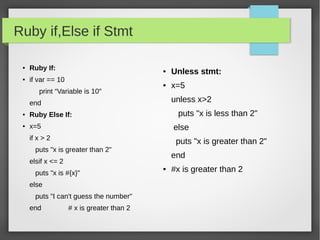
Ruby if,Else if Stmt
● Ruby If:
● if var == 10
print “Variable is 10″
end
● Ruby Else If:
● x=5
if x > 2
puts "x is greater than 2"
elsif x <= 2
puts "x is #{x}"
else
puts "I can't guess the number"
end # x is greater than 2
● Unless stmt:
● x=5
unless x>2
puts "x is less than 2"
else
puts "x is greater than 2"
end
● #x is greater than 2
Hash Example with argument
● def hash_arg(opt={})
alpha={
:a=>'Apple',
:b=>'Banana',
:c=>'Carrot',
:d=>'Dog'
}.merge(opt)
puts "#{alpha[:a]} #{alpha[:b]} #{alpha[:c]}
#{alpha[:d]}"
puts opt
puts alpha
● end
hash_arg()
hash_arg(:e => 'and')
● Output:
● Apple Banana Carrot Dog
● {}
● {:a=>"Apple", :b=>"Banana",
:c=>"Carrot", :d=>"Dog"}
● Apple Banana Carrot Dog
● {:e=>"and"}
● {:a=>"Apple", :b=>"Banana",
:c=>"Carrot", :d=>"Dog", :e=>"and"}
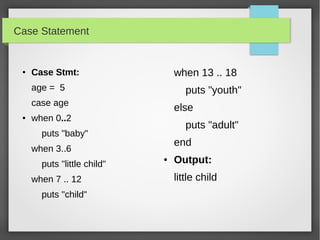
Case Statement
● Case Stmt:
age = 5
case age
● when 0..2
puts "baby"
when 3..6
puts "little child"
when 7 .. 12
puts "child"
when 13 .. 18
puts "youth"
else
puts "adult"
end
● Output:
little child
While and For loop
● While Loop:
● i = 0
while i < 5 do
puts "Inside the loop i = #{i}"
i +=1
end
● Output:
Inside the loop i = 0
Inside the loop i = 1
Inside the loop i = 2
Inside the loop i = 3
Inside the loop i = 4
● For Loop:
● array=[0,1,2,3,4,5]
● for i in array
puts "Value of i is #{i}"
end
● Output:
Value of local variable is 0
Value of local variable is 1
Value of local variable is 2
Value of local variable is 3
Value of local variable is 4
Value of local variable is 5
Methods in Ruby
● Defining a Method with default argument:
● def test(a1="Ruby", a2="Java")
puts "The programming language is #{a1}"
puts "The programming language is #{a2}"
● end
test "C", "C++"
test
● Output:
The programming language is C
The programming language is C++
The programming language is Ruby
The programming language is Java
● Defining a Method with Multiple argument:
● def some_method(a,b,*c,d)
puts "A contain #{a}"
puts "B contain #{b}"
puts "c contain #{c}"
puts "D contain #{d}"
● end
some_method(5,4,2,1,6,7,8,9,3)
● Output
A contain 5
B contain 4
c contain [2, 1, 6, 7, 8, 9]
D contain 3
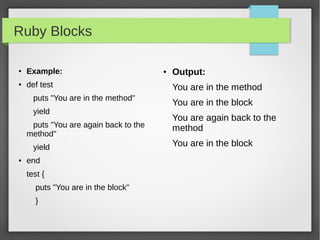
Ruby Blocks
●
Example:
●
def test
puts "You are in the method"
yield
puts "You are again back to the
method"
yield
● end
test {
puts "You are in the block"
}
● Output:
You are in the method
You are in the block
You are again back to the
method
You are in the block
Ruby Blocks in Class Example:
● class Own_class < Array
● def double_each
self.each do |element|
yield(element*2)
end
● end
● end
d=Own_class.new([10, 20,
30, 40, 50])
d.double_each { |x|
puts x
}
● Output:
20
40
60
80
100
THANK YOUTHANK YOU

Ruby Basics by Rafiq

  • 1.
  • 2.
    Ruby Classes andObjects ● Defining a Class: class Example end ● Creating Objects: ex1=Example.new ex2=Example.new ● Example: ● class Customer @@no_of_customers=0 ● def initialize(id, name, addr) @cust_id=id @cust_name=name @cust_addr=addr ● end ● end
  • 3.
    Example for Classand Object ● We declare the initialize method with id, name, and addr as local variables. ● In the initialize method, we pass on the values of these local variables to the instance variables @cust_id, @cust_name, and @cust_addr. ● Now, we can create objects: cust1=Customer.new("1", "Alex", "Coimbatore, TN") cust2=Customer.new("2", "Balu", "Chennai, TN")
  • 4.
    Member Functions inRuby Class ● In Ruby, functions are called methods. Each method in a class starts with the keyword def followed by the method name and end with the keyword end. ● Example: ● class Sample def hello puts "Hello Ruby!" end ● end object = Sample. new object.hello //=> Hello Ruby!
  • 5.
    Example for Classand Odject ● class Customer def initialize(id, name, addr) @cust_id=id @cust_name=name @cust_addr=addr end def display_details() puts "Customer id #@cust_id" puts "Customer name #@cust_name" puts "Customer address #@cust_addr" end ● end cust1=Customer.new("1", "Alex", "Coimbatore, TN") cust2=Customer.new("2", "Balu", "Chennai, TN") cust1.display_details() cust1.total_no_of_customers() cust2.display_details() cust2.total_no_of_customers() ● Output: Customer id 1 Customer name Alex Customer address Coimbatore,TN Customer id 2 Customer name Balu Customer address Chennai,TN
  • 6.
    Class Inheritance ● InheritanceFrom Base Class: ● class Parent def implicit() puts "Hello Parent" end ● end ● class Child < Parent ● end dad = Parent.new() son = Child.new() dad.implicit() son.implicit() ● Output: Hello Parent Hello Parent
  • 7.
    Inheritance Example ● classParent def override() puts "Hi Parent" end ● end ● class Child < Parent def override() puts "Hi Child" end ● end dad = Parent.new() son = Child.new() dad.override() son.override() ● Output: Hi Parent Hi Child
  • 8.
    Ruby Variables ● RubyGlobal Variables: Global variables begin with $. ● Example: $global_variable=100 ● Ruby Instance Variables: Instance variables begin with @. ● Example: @instance_variable=200 ● Ruby Class Variables: Class variables begin with @@ and must be initialized before they can be used in method definitions. ● Example: @@class_variable=300
  • 9.
    Ruby Arrays ● Creatingan Array: a=[1,2,3,4,5] ( or) ● ary=Array.new ary[0]=1 ary[1]=2 ary[2]=3 ● arr = ['a', 'b', 'c', 'd', 'e', 'f']
  • 10.
    Accessing Array ● AccessingElement: arr = [1, 2, 3, 4, 5, 6] ● arr[2] # 3 ● arr[100] # nil ● arr[-3] # 4 ● arr[2, 3] #[3, 4, 5] ● arr[1..4] #[2, 3, 4, 5] ● arr.take(3) # [1, 2, 3] ● arr.drop(3) # [4, 5, 6] ● arr.at(0) # 1 ● arr.first # 1 ● arr.last # 6
  • 11.
    Adding Items toArrays ● For adding can use either push or << ● arr = [1, 2, 3, 4] ● arr.push(5) #[1, 2, 3, 4, 5] ● Arr << 6 #[1, 2, 3, 4, 5, 6] ● Add a new item to the beginning of an array: ● arr.unshift(0) # [0, 1, 2, 3, 4, 5, 6] ● Add a new element to an array at any position: ● arr.insert(3, 'apple') #[0, 1, 2, 'apple', 3, 4, 5, 6] ● arr.insert(3, 'orange', 'pear', 'grapefruit') #[0, 1, 2, "orange", "pear", "grapefruit", "apple", 3, 4, 5, 6]
  • 12.
    Removing Items froman Array ● arr = [1, 2, 3, 4, 5, 6] ● arr.pop # 6 ● arr # [1, 2, 3, 4, 5] ● arr.shift # 1 ● arr # [2, 3, 4, 5] ● To delete an element at a particular index: ● arr.delete_at(2) # 4 ● Arr # [2, 3, 5] ● To delete a particular element anywhere in an array: ● arr = [1, 2, 2, 3] ● arr.delete(2) # 2 ● arr # [1,3]
  • 13.
    Iteration in Array ●Ruby each: ● ary = [1,2,3,4,5] ary.each do |i| puts i end ● Ruby collect: ● a = [1,2,3,4,5] b = a.collect { |x| 10*x } puts b ● O/P: ● 1 2 3 4 5 ● O/P: ● 10 20 30 40 50
  • 14.
    Iteration in Array ●Ruby map: ● arr.map { |a| 2*a } # [2, 4, 6, 8, 10] ● arr # [1, 2, 3, 4, 5] ● arr.map! { |a| a**2 } # [1, 4, 9, 16, 25] ● arr # [1, 4, 9, 16, 25]
  • 15.
    .each with indexin Array ● a=[1,2,3,4,5] a.each_with_index do |value, index| puts "#{index} index value is #{value}!" end ● Output: 0 index value is 1! 1 index value is 2! 2 index value is 3! 3 index value is 4! 4 index value is 5!
  • 16.
    Iteration in Array ●Selecting Element: ● arr = [1, 2, 3, 4, 5, 6] ● arr.select { |a| a > 3 } #[4, 5, 6] ● arr.reject { |a| a < 3 } #[3, 4, 5, 6] ● Delete Element: ● arr.delete_if { |a| a < 4 } # [4, 5, 6] ● Arr # [4, 5, 6]
  • 17.
    Operations in Array ●Remove Array: ● a = [ "a", "b", "c", "d", "e" ] a.clear # [ ] ● Count: ● ary = [1, 2, 4, 2] ary.count # 4 ● Delete: ● a = [ "a", "b", "b", "b", "c" ] a.delete("b") # "b" a # ["a", "c"] ● Delete_at: ● a = ["ant", "bat", "cat", "dog"] a.delete_at(2) # "cat" a #["ant", "bat", "dog"] ● Drop: ● a = [1, 2, 3, 4, 5, 0] a.drop(3) # [4, 5, 0] ● Join: ● [ "a", "b", "c" ].join # "abc" ● [ "a", "b", "c" ].join("-") # "a-b-c"
  • 18.
    Ruby Hashes ● Hashes aresimilar to arrays. Here we can create a values and keys. ● Creating Hash: ● grade = { "Alex" => 10, "Balu" => 6 } ● grade=Hash["a", 100, "b", 200] ● grade=Hash["a" => 100, "b" => 200] ● h = Hash.new() h["a"] = 100 h["b"] = 200 h #{"a"=>100, "b"=>200} ● Accessing Hash: ● h = { "a" => 100, "b" => 200 } h[“a”] # 100 h[“c”] # nil h[“b”] #200
  • 19.
    .each in Hash ● h= { "a" => 100, "b" => 200 } h.each { |key, value| puts "#{key} is #{value}" } ● Output: a is 100 b is 200 ● h = { "a" => 100, "b" => 200 } h.each_key {|key| puts key } ● Output: a b ● h = { "a" => 100, "b" => 200 } h.each_value {|value| puts value } ● Output: 100 200 ● h.has_key?("a") #true ● h.has_key?("z") #false ● h.has_value?(100) # true ● h.has_value?(999) # false
  • 20.
    Ruby if,Else ifStmt ● Ruby If: ● if var == 10 print “Variable is 10″ end ● Ruby Else If: ● x=5 if x > 2 puts "x is greater than 2" elsif x <= 2 puts "x is #{x}" else puts "I can't guess the number" end # x is greater than 2 ● Unless stmt: ● x=5 unless x>2 puts "x is less than 2" else puts "x is greater than 2" end ● #x is greater than 2
  • 21.
    Hash Example withargument ● def hash_arg(opt={}) alpha={ :a=>'Apple', :b=>'Banana', :c=>'Carrot', :d=>'Dog' }.merge(opt) puts "#{alpha[:a]} #{alpha[:b]} #{alpha[:c]} #{alpha[:d]}" puts opt puts alpha ● end hash_arg() hash_arg(:e => 'and') ● Output: ● Apple Banana Carrot Dog ● {} ● {:a=>"Apple", :b=>"Banana", :c=>"Carrot", :d=>"Dog"} ● Apple Banana Carrot Dog ● {:e=>"and"} ● {:a=>"Apple", :b=>"Banana", :c=>"Carrot", :d=>"Dog", :e=>"and"}
  • 22.
    Case Statement ● CaseStmt: age = 5 case age ● when 0..2 puts "baby" when 3..6 puts "little child" when 7 .. 12 puts "child" when 13 .. 18 puts "youth" else puts "adult" end ● Output: little child
  • 23.
    While and Forloop ● While Loop: ● i = 0 while i < 5 do puts "Inside the loop i = #{i}" i +=1 end ● Output: Inside the loop i = 0 Inside the loop i = 1 Inside the loop i = 2 Inside the loop i = 3 Inside the loop i = 4 ● For Loop: ● array=[0,1,2,3,4,5] ● for i in array puts "Value of i is #{i}" end ● Output: Value of local variable is 0 Value of local variable is 1 Value of local variable is 2 Value of local variable is 3 Value of local variable is 4 Value of local variable is 5
  • 24.
    Methods in Ruby ●Defining a Method with default argument: ● def test(a1="Ruby", a2="Java") puts "The programming language is #{a1}" puts "The programming language is #{a2}" ● end test "C", "C++" test ● Output: The programming language is C The programming language is C++ The programming language is Ruby The programming language is Java ● Defining a Method with Multiple argument: ● def some_method(a,b,*c,d) puts "A contain #{a}" puts "B contain #{b}" puts "c contain #{c}" puts "D contain #{d}" ● end some_method(5,4,2,1,6,7,8,9,3) ● Output A contain 5 B contain 4 c contain [2, 1, 6, 7, 8, 9] D contain 3
  • 25.
    Ruby Blocks ● Example: ● def test puts"You are in the method" yield puts "You are again back to the method" yield ● end test { puts "You are in the block" } ● Output: You are in the method You are in the block You are again back to the method You are in the block
  • 26.
    Ruby Blocks inClass Example: ● class Own_class < Array ● def double_each self.each do |element| yield(element*2) end ● end ● end d=Own_class.new([10, 20, 30, 40, 50]) d.double_each { |x| puts x } ● Output: 20 40 60 80 100
  • 27.

Editor's Notes

  • #25 * specify the variable length.