Ruby Programming
Mrs. V. Roseline,M.Sc.,M.Phil.,B.Ed.,SET,NET,
AssistantProfessor,SadakathullahAppaCollege.
1
UNIT V RUBY
History and Design of Ruby – Classes, Objects and Variables – Containers, Blocks and
Iterators – Standard Types – Methods – Expressions – Exceptions – Modules – Input and
Output – Threads and Processes – Ruby and Web – Reflection – ObjectSpace – Distributing
Ruby. Open source tools and technologies web server: Apache Web server – Working with
Web Server – Configuring and Using apache web services.
History and Design of Ruby
Ruby is a pure object-oriented programming language. It was created in 1993 by
Yukihiro Matsumoto of Japan.
Ruby is "A Programmer's Best Friend".
Ruby has features that are similar to those of Smalltalk, Perl, and Python. Perl, Python,
and Smalltalk are scripting languages. Smalltalk is a true object-oriented language. Ruby, like
Smalltalk, is a perfect object-oriented language. Using Ruby syntax is much easier than using
Smalltalk syntax.
Features of Ruby
 Ruby is an open-source and is freely available on the Web, but it is subject to a license.
 Ruby is a general-purpose, interpreted programming language.
 Ruby is a true object-oriented programming language.
 Ruby is a server-side scripting language similar to Python and PERL.
 Ruby can be used to write Common Gateway Interface (CGI) scripts.
 Ruby can be embedded into Hypertext Markup Language (HTML).
 Ruby has a clean and easy syntax that allows a new developer to learn very quickly and
easily.
 Ruby has similar syntax to that of many programming languages such as C++ and Perl.
 Ruby is very much scalable and big programs written in Ruby are easily maintainable.
 Ruby can be used for developing Internet and intranet applications.
 Ruby can be installed in Windows and POSIX environments.
 Ruby support many GUI tools such as Tcl/Tk, GTK, and OpenGL.
Ruby Programming
Mrs. V. Roseline,M.Sc.,M.Phil.,B.Ed.,SET,NET,
AssistantProfessor,SadakathullahAppaCollege.
2
 Ruby can easily be connected to DB2, MySQL, Oracle, and Sybase.
 Ruby has a rich set of built-in functions, which can be used directly into Ruby scripts.
Tools Needed
 Linux or Windows 95/98/2000/NT or Windows 7 operating system.
 Apache 1.3.19-5 Web server.
 Internet Explorer 5.0 or above Web browser.
 Ruby 1.8.5
CLASSES, OBJECTS AND VARIABLES
#CLASS VARIABLES AND CLASS METHODS
# A class variable is shared among all objects of a class, and it is also accessible to the class
methods.
# Only one copy of a particular class variable exists for a givenclass.
# Class variablenames start with two “at” signs, such as @@count.
# Unlike global and instance variables, class variables must be initialized before they are used.
# Often this initialization is just a simple assignment in the body of the class definition.
class Song
@@plays = 0
def initialize(name, artist, duration)
@name = name
@artist = artist
@duration = duration
@plays = 0
end
def play
@plays += 1
@@plays += 1
"This song: #@plays plays. Total #@@plays plays."
end
end
s1 = Song.new("Song1", "Artist1", 234)
# test songs..
s2 = Song.new("Song2", "Artist2", 345)
puts s1.play
Ruby Programming
Mrs. V. Roseline,M.Sc.,M.Phil.,B.Ed.,SET,NET,
AssistantProfessor,SadakathullahAppaCollege.
3
# "This song: 1 plays. Total 1 plays."
puts s2.play
# "This song: 1 plays. Total 2 plays."
puts s1.play
# "This song: 2 plays. Total 3 plays."
puts s1.play
# "This song: 3 plays. Total 4 plays."
# CLASS METHODS
# Class methods are distinguished from instance methods by their definition;
# class methods are defined by placing the class name and a period in front of the method name
# class Example
# def instance_method
# # instance method
# end
# def Example.class_method
# # class method
# end
# end
# Using class methods as pseudo-constructors can also make easier for users of your class.
# As an, let’s look at a class Shape that represents a regular polygon.
# Instances of Shape are created by giving the constructor the required number of sides and the
total perimeter.
class Shape
def initialize(num_sides, perimeter)
# ...
end
end
class Shape
def Shape.triangle(side_length)
Shape.new(3, side_length*3)
end
def Shape.square(side_length)
Shape.new(4, side_length*4)
end
end
#ACCESS CONTROL
# Ruby gives you three levels of protection.
Ruby Programming
Mrs. V. Roseline,M.Sc.,M.Phil.,B.Ed.,SET,NET,
AssistantProfessor,SadakathullahAppaCollege.
4
# • Public methods can be called by anyone—noaccess control is enforced.
# Methods are public by default (except for initialize, which is always private).
# • Protected methods can be invoked only by objects of the defining class and its subclasses.
# Access is kept within the family.
# • Private methods cannot be called with an explicit receiver—the receiver is always self.
# This means that private methods can be called only in the context of the current object;
# you can’t invoke another object’s private methods.
#SPECIFYING ACCESS CONTROL
# We specify access levels to methods within class or module definitions using one or more of
the three functions
# public, protected, and private. We can use each function in two different ways.
class MyClass
def method1 # default is 'public'
#...
end
protected # subsequent methods will be 'protected'
def method2
#...
end
private
def method3 # will be 'private'
#...
end
public # subsequent methods will be 'public'
def method4
#...
end
end
#OR
class MyClass
def method1
end
# ... and so on
public :method1, :method4
protected :method2
private :method3
end
Ruby Programming
Mrs. V. Roseline,M.Sc.,M.Phil.,B.Ed.,SET,NET,
AssistantProfessor,SadakathullahAppaCollege.
5
class Accounts
def initialize(checking, savings)
@checking = checking
@savings = savings
end
private
def debit(account, amount)
account.balance -= amount
end
def credit(account, amount)
account.balance += amount
end
public
#...
def transfer_to_savings(amount)
debit(@checking, amount)
credit(@savings, amount)
end
#...
end
# Variables are used to keep track of objects; each variable holds a reference to an object.
person = "Tim"
person.object_id
#938678
puts person.class
#String
puts person
#"Tim"
#Let’s make the example slightly more complicated.
person1 = "Tim"
person2 = person1
person1[0] = 'J'
puts person1
#"Jim"
puts person2
#"Jim"
#OR
Ruby Programming
Mrs. V. Roseline,M.Sc.,M.Phil.,B.Ed.,SET,NET,
AssistantProfessor,SadakathullahAppaCollege.
6
person1 = "Tim"
person2 = person1.dup
person1[0] = "J"
puts person1
#"Jim"
puts person2
#"Tim"
#We can also prevent anyone from changing a particular object by freezing it
person1 = "Tim"
person2 = person1
person1.freeze
# prevent modifications to the object
#person2[0] = "J"
CONTAINERS, BLOCKS AND ITERATORS
# Containers
# containers: objects that hold references to one or more other objects.
# Arrays
# The class Array holds a collection of object references. Each object reference occupies a
position in the array, identified by a non-negative integer index.
# You can create arrays by using literals or by explicitly creating an Array object. A literal array
is simply a list of objects between square brackets.
a = [ 3.14159, "pie", 99 ]
puts a.class
#Array
puts a.length
#3
a[0]
#3.14159
a[1]
#"pie"
a[2]
#99
a[3]
#nil
Ruby Programming
Mrs. V. Roseline,M.Sc.,M.Phil.,B.Ed.,SET,NET,
AssistantProfessor,SadakathullahAppaCollege.
7
b = Array.new
b.class
#Array
b.length
#0
b[0] = "second"
b[1] = "array"
b
#["second", "array"]
#Index an array with a negative integer, and it counts from the end.
a = [ 1, 3, 5, 7, 9 ]
a[-1]
#9
a[-2]
#7
a[-99]
#nil
#We can also index arrays with a pair of numbers, [start, count].
a = [ 1, 3, 5, 7, 9 ]
puts a[1, 3]
#[3, 5, 7]
puts a[3, 1]
# [7]
puts a[-3, 2]
# [5, 7]
#We can index arrays using ranges, in which start and end positions are separated by two or three
periods.
#The two-period form includes the end position, and the three-period form does not.
a = [ 1, 3, 5, 7, 9 ]
puts a[1..3]
# [3, 5, 7]
print a[1...2]
# [3]
puts a[3..3]
# [7]
puts a[-3..-1]
# [5, 7, 9]
#The [] operator has a corresponding []= operator, which lets you set elements in the array.
Ruby Programming
Mrs. V. Roseline,M.Sc.,M.Phil.,B.Ed.,SET,NET,
AssistantProfessor,SadakathullahAppaCollege.
8
a = [ 1, 3, 5, 7, 9 ]
# [1, 3, 5, 7, 9]
a[1] = ’bat’
#[1, "bat", 5, 7, 9]
a[-3] = ’cat’
#[1, "bat", "cat", 7, 9]
a[3] = [ 9, 8 ]
# [1, "bat", "cat", [9, 8], 9]
a[6] = 99
# [1, "bat", "cat", [9, 8], 9, nil, 99]
#If the index to []= is two numbers (a start and a length) or a range, # then those elements in the
original array are replaced by whatever is on the right side of the assignment.
# If the length is zero, the right side is inserted into the array before the start position; no
elements are removed.
# If the right side is itself an array, its elements are used in the replacement.
# The array size is automatically adjusted if the index selects a different number of elements
# than are available on the right side of the assignment.
a = [ 1, 3, 5, 7, 9 ]
# [1, 3, 5, 7, 9]
a[2, 2] = ’cat’
# [1, 3, "cat", 9]
a[2, 0] = ’dog’
# [1, 3, "dog", "cat", 9]
a[1, 1] = [ 9, 8, 7 ]
#[1, 9, 8, 7, "dog", "cat", 9]
a[0..3] = []
#["dog", "cat", 9]
a[5..6] = 99, 98
# ["dog", "cat", 9, nil, nil, 99, 98]
# HASHES
# Hashes (sometimes known as associative arrays, maps, or dictionaries) are similar to arrays
# in that they are indexed collections of object references.
# When you store a value in a hash, you actually supply two objects—the index, normally called
the key, and the value.
h = { 'dog' => 'canine', 'cat' => 'feline', 'donkey' => 'asinine' }
h.length
#3
h['dog']
Ruby Programming
Mrs. V. Roseline,M.Sc.,M.Phil.,B.Ed.,SET,NET,
AssistantProfessor,SadakathullahAppaCollege.
9
# "canine"
h['cow'] = 'bovine'
h[12] = 'dodecine'
h['cat'] = 99
h
#{"cow"=>"bovine", "cat"=>99, 12=>"dodecine", "donkey"=>"asinine", "dog"=>"canine"}
# Compared with arrays, hashes have one significant advantage: they can use any object as an
index.
# However, they also have a significant disadvantage: their elements are not ordered, so you
cannot easily use a hash as a stack or a queue.
# BLOCKS AND ITERATORS
class Song
@@plays = 0
def initialize(name, artist, duration)
@name = name
@artist = artist
@duration = duration
@plays = 0
end
def play
@plays += 1
@@plays += 1
"This song: #@plays plays. Total #@@plays plays."
end
end
class SongList
def with_title(title)
for i in 0...@songs.length
return @songs[i] if title == @songs[i].name
end
return nil
end
end
class SongList
def with_title(title)
@songs.find {|song| title == song.name }
end
Ruby Programming
Mrs. V. Roseline,M.Sc.,M.Phil.,B.Ed.,SET,NET,
AssistantProfessor,SadakathullahAppaCollege.
10
end
#The method FIND is an iterator is a method that invokes a block of code repeatedly.
# IMPLEMENTING ITERATORS
# For example, a simple function that returns members of the Fibonacci series up to a certain
value.
def fib_up_to(max)
i1, i2 = 1, 1
# parallel assignment (i1 = 1 and i2 = 1)
while i1 <= max
yield i1
i1, i2 = i2, i1+i2
end
end
fib_up_to(1000) {|f| print f, " " }
# produces:
# 1 1 2 3 5 8 13 21 34 55 89 144 233 377 610 987
# Some iterators are common to many types of Ruby collections. Two others are each and
collect.
# EACH is probably the simplest iterator—all it does is yield successive elements of its
collection.
[ 1, 3, 5, 7, 9 ].each {|i| puts i }
# produces:
# 1 3 5 7 9
# Another common iterator is COLLECT, which takes each element from the collection and
passes it to the block.
# The results returned by the block are used to construct a new array. For instance:
["H", "A", "L"].collect {|x| x.succ }
#["I", "B", "M"]
#one more useful iterator. The INJECT method lets to accumulate a value across the members
#of a collection. For example, you can sum all the elements in an array, and find their product
puts [1,3,5,7].inject(0) {|sum, element| sum+element}
#16
puts [1,3,5,7].inject(1) {|product, element| product*element}
Ruby Programming
Mrs. V. Roseline,M.Sc.,M.Phil.,B.Ed.,SET,NET,
AssistantProfessor,SadakathullahAppaCollege.
11
#105
puts [1,3,5,7].inject() {|product, element| product*element}
#105
STANDARD TYPES
# Basic types in Ruby: numbers, strings, ranges, and regular expressions
# NUMBERS
# Ruby supports integers and floating-point numbers. Integers can be any length.
# Integers within a certain range are held internally in binary form and are objects of class
FIXNUM.
# Integers outside this range are stored in objects of class BIGNUM.
num = 81
6.times do
puts "#{num.class}: #{num}"
num *= num
end
# produces:
# Fixnum: 81
# Fixnum: 6561
# Fixnum: 43046721
# Bignum: 1853020188851841
# Bignum: 3433683820292512484657849089281
# Bignum: 11790184577738583171520872861412518665678211592275841109096961
# Integers also support several useful iterators.
# UPTO and DOWNTO, for iterating up and down between two integers.
# STEP, which is more like a traditional for loop.
3.times { print "X " }
1.upto(5) {|i| print i, " " }
99.downto(95) {|i| print i, " " }
50.step(80, 5) {|i| print i, " " }
# produces:
# X X X
# 1 2 3 4 5
# 99 98 97 96 95
# 50 55 60 65 70 75 80
Ruby Programming
Mrs. V. Roseline,M.Sc.,M.Phil.,B.Ed.,SET,NET,
AssistantProfessor,SadakathullahAppaCollege.
12
# STRINGS
# They normally hold printable characters, but that is not a requirement; a string can also hold
binary data. Strings are objects of class String.
# Within single-quotedstrings, two consecutive backslashes are replaced by a single backslash,
# and a backslash followed by a single quote becomes a single quote.
print 'escape using '
# escape using 
print 'That's right'
# That's right
# The character following the q or Q is the delimiter.
# If it is an opening bracket “[”, brace “{”, parenthesis “(”, or less-than sign “<”,
# the string is read until the matching close symbol is found.
# Otherwise the string is read until the next occurrence of the same delimiter.
# The delimiter can be any nonalphanumeric or nonmultibyte character.
print %Q/string1/
#string1
print %Q!string2!
#string2
print %Q{Seconds/day: #{24*60*60}}
#Seconds/day: 86400
# RANGES
# #It actually uses ranges to implement three separate features: sequences, conditions, and
intervals.
# RANGES AS SEQUENCES
# Sequences have a start point, an end point, and a way to produce successive values in the
sequence.
# We can convert a range to a list using the to_a method.
(1..10).to_a
#[1, 2, 3, 4, 5, 6, 7, 8, 9, 10]
('bar'..'bat').to_a
#["bar", "bas", "bat"]
Ruby Programming
Mrs. V. Roseline,M.Sc.,M.Phil.,B.Ed.,SET,NET,
AssistantProfessor,SadakathullahAppaCollege.
13
#Ranges implement methods that iterate over them and test their contents in a variety of ways.
print digits = 0..9
print digits.include?(5)
#true
digits.min
#0
digits.max
#9
digits.reject {|i| i < 5 }
#[5, 6, 7, 8, 9]
#digits.each {|digit| print(digit) }
#0..9
#objects must be comparable using <=>. Sometimes called the spaceship operator,
#<=> compares two values, returning -1, 0, or +1 depending on whether the first is less than,
equal to, or greater than the second.
# RANGES AS CONDITIONS
# Ranges may also be used as conditional expressions.
# Here, they act as a kind of toggle switch—they turn on when the condition in the first part of
the range becomes true, and they turn off when the condition in the second part becomes true.
# The following code fragment prints sets of lines from standard input, where the first line in
each set contains the word start and the last line contains the word end.
# while line = gets
# #puts line if line =~ /start/ .. line =~ /end/
# end
# RANGES AS INTERVALS
# If some value falls within the interval represented by the range.
# We do this using ===, the case equality operator.
(1..10) === 5
# true
(1..10) === 15
# false
(1..10) === 3.14159
# true
('a'..'j') === 'c'
#true
('a'..'j') === 'z'
# false
Ruby Programming
Mrs. V. Roseline,M.Sc.,M.Phil.,B.Ed.,SET,NET,
AssistantProfessor,SadakathullahAppaCollege.
14
METHODS
# DEFINING A METHOD
# a method is defined using the keyword def. Method names should begin with a lowercase
letter.
def cool_dude(arg1="Miles", arg2="Coltrane", arg3="Roach")
"#{arg1}, #{arg2}, #{arg3}."
end
cool_dude
# "Miles, Coltrane, Roach."
cool_dude("Bart")
# "Bart, Coltrane, Roach."
cool_dude("Bart", "Elwood")
# "Bart, Elwood, Roach."
cool_dude("Bart", "Elwood", "Linus")
# "Bart, Elwood, Linus."
#VARIABLE-LENGTH ARGUMENT LISTS
#if v want to pass in a variable number of arguments or want to capture multiple arguments into
a single parameter?
#Placing an asterisk before the name of the parameter after the “normal” parameters does just
that.
def varargs(arg1, *rest)
"Got #{arg1} and #{rest.join(', ')}"
end
varargs("one")
# "Got one and "
varargs("one", "two")
# "Got one and two"
varargs "one", "two", "three"
# "Got one and two, three"
# Calling a Method
# You call a method by specifying a receiver, the name of the method, and optionally some
parameters and an optional block.
a = obj.hash # Same as
Ruby Programming
Mrs. V. Roseline,M.Sc.,M.Phil.,B.Ed.,SET,NET,
AssistantProfessor,SadakathullahAppaCollege.
15
a = obj.hash() # this.
obj.some_method "Arg1", arg2, arg3 # Same thing as
obj.some_method("Arg1", arg2, arg3) # with parentheses.
Method Return Values
Every called method returns a value (although no rule says you have to use that value).
The value of a method is the value of the last statement executed during the method’s execution.
Ruby has a return statement, which exits from the currently executing method.
The value of a return is the value of its argument(s). V can omit the return if it isn’t needed.
def meth_one
"one"
end
meth_one
# "one"
def meth_two(arg)
case
when arg > 0
"positive"
when arg < 0
"negative"
else
"zero"
end
end
meth_two(23)
#"positive"
meth_two(0)
# "zero"
EXPRESSIONS(REGULAR EXPRESSIONS)
# Regular expressions are used to match patterns against strings.
# Ruby provides builtin support that makes pattern matching and substitution.
# Once you have a regular expression object, you can match it against a string
# using Regexp#match(string) or the match operators =~ (positive match) and !~ (negative
match).
print name = "Fats Waller"
Ruby Programming
Mrs. V. Roseline,M.Sc.,M.Phil.,B.Ed.,SET,NET,
AssistantProfessor,SadakathullahAppaCollege.
16
print name =~ /a/
# 1
print name =~ /z/
# nil
print /a/ =~ name
# 1
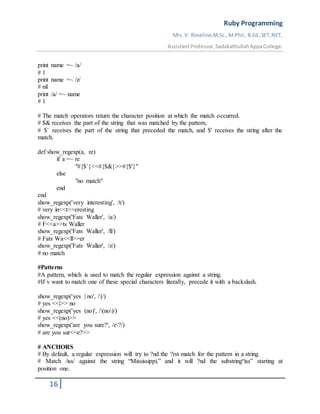
# The match operators return the character position at which the match occurred.
# $& receives the part of the string that was matched by the pattern,
# $` receives the part of the string that preceded the match, and $' receives the string after the
match.
def show_regexp(a, re)
if a =~ re
"#{$`}<<#{$&}>>#{$'}"
else
"no match"
end
end
show_regexp('very interesting', /t/)
# very in<<t>>eresting
show_regexp('Fats Waller', /a/)
# F<<a>>ts Waller
show_regexp('Fats Waller', /ll/)
# Fats Wa<<ll>>er
show_regexp('Fats Waller', /z/)
# no match
#Patterns
#A pattern, which is used to match the regular expression against a string.
#If v want to match one of these special characters literally, precede it with a backslash.
show_regexp('yes | no', /|/)
# yes <<|>> no
show_regexp('yes (no)', /(no)/)
# yes <<(no)>>
show_regexp('are you sure?', /e?/)
# are you sur<<e?>>
# ANCHORS
# By default, a regular expression will try to ?nd the ?rst match for the pattern in a string.
# Match /iss/ against the string “Mississippi,” and it will ?nd the substring“iss” starting at
position one.
Ruby Programming
Mrs. V. Roseline,M.Sc.,M.Phil.,B.Ed.,SET,NET,
AssistantProfessor,SadakathullahAppaCollege.
17
# But what if you want to force a pattern to match only at the start or end of a string?
# The patterns ^ and $ match the beginning and end of a line, respectively.
# These are often used to anchor a pattern match: for example, /^option/ matches the word option
only if it appears at the start of a line.
# The sequence A matches the beginning of a string, and z and Z match the end of a string.
show_regexp("this isnthe time", /^the/)
# this isn<<the>> time
show_regexp("this isnthe time", /is$/)
# this <<is>>nthe time
show_regexp("this isnthe time", /Athis/)
# <<this>> isnthe time
show_regexp("this isnthe time", /Athe/)
# no match
show_regexp("this isnthe time", /bis/)
# this <<is>>nthe time
show_regexp("this isnthe time", /Bis/)
# th<<is>> isnthe time
EXCEPTIONS
# EXCEPTIONS, CATCH, AND THROW
# THE EXCEPTION CLASS
# The package that contains the information about an exception is an object of class Exception or
one of class Exception’s children.
# When you need to raise an exception, you can use one of the built-in Exception classes, or you
can create one of your own.
# If you create your own, you may want to make it a subclass of StandardError or one of its
children.
# Every Exception has associated with it a message string and a stack backtrace.
# If you define your own exceptions, you can add additional information.
# HANDLING EXCEPTIONS
op_file = File.open(opfile_name, "w")
while data = socket.read(512)
op_file.write(data)
end
# To do exception handling, we enclose the code that could raise an exception in a begin/end
block and use one or more rescue clauses to tell Ruby the types of exceptions we want to handle.
Ruby Programming
Mrs. V. Roseline,M.Sc.,M.Phil.,B.Ed.,SET,NET,
AssistantProfessor,SadakathullahAppaCollege.
18
op_file = File.open(opfile_name, "w")
begin
# Exceptions raised by this code will be caught by the following rescue clause
while data = socket.read(512)
op_file.write(data)
end
rescue SystemCallError
$stderr.print "IO failed: " + $!
op_file.close
File.delete(opfile_name)
raise
end
# CATCH AND THROW
# catch defines a block that is labeled with the given name (which may be a Symbol or a String).
# The block is executed normally until a throw is encountered.
def prompt_and_get(prompt)
print prompt
res = readline.chomp #remove unwanted new lines
throw :quit_requested if res == "!"
res
end
catch :quit_requested do
name = prompt_and_get("Name: ")
age = prompt_and_get("Age: ")
sex = prompt_and_get("Sex: ")
# .. # process information
end
MODULES
# Modules are a way of groupingtogether methods, classes, and constants. Modules give you two
major benefits.
# 1. Modules provide a namespace and prevent name clashes.
# 2. Modules implement the mixin facility.
# NAMESPACES
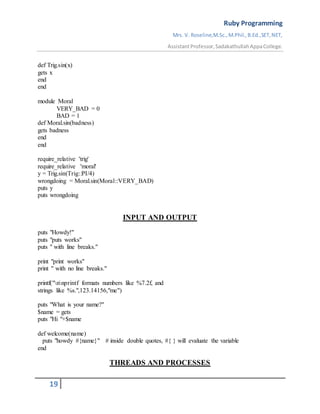
module Trig
PI = 3.141592654
Ruby Programming
Mrs. V. Roseline,M.Sc.,M.Phil.,B.Ed.,SET,NET,
AssistantProfessor,SadakathullahAppaCollege.
19
def Trig.sin(x)
gets x
end
end
module Moral
VERY_BAD = 0
BAD = 1
def Moral.sin(badness)
gets badness
end
end
require_relative 'trig'
require_relative 'moral'
y = Trig.sin(Trig::PI/4)
wrongdoing = Moral.sin(Moral::VERY_BAD)
puts y
puts wrongdoing
INPUT AND OUTPUT
puts "Howdy!"
puts "puts works"
puts " with line breaks."
print "print works"
print " with no line breaks."
printf("nnprintf formats numbers like %7.2f, and
strings like %s.",123.14156,"me")
puts "What is your name?"
$name = gets
puts "Hi "+$name
def welcome(name)
puts "howdy #{name}" # inside double quotes, #{ } will evaluate the variable
end
THREADS AND PROCESSES
Ruby Programming
Mrs. V. Roseline,M.Sc.,M.Phil.,B.Ed.,SET,NET,
AssistantProfessor,SadakathullahAppaCollege.
20
Traditional programs have a single thread of execution the statements or instructions that
comprise the program are executed sequentially until the program terminates.
A multithreaded program has more than one thread of execution. Within each thread,
statements are executed sequentially, but the threads themselves may be executed in parallel on
a multicore CPU, for example. Often on a single CPU machine, multiple threads are not
actually executed in parallel, but parallelism is simulated by interleaving the execution of the
threads.
Ruby makes it easy to write multi-threaded programs with the Thread class. Ruby
threads are a lightweight and efficient way to achieve concurrency in your code.
Creating Ruby Threads
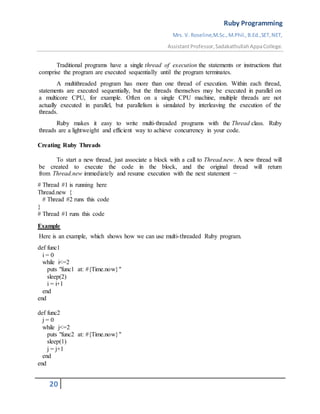
To start a new thread, just associate a block with a call to Thread.new. A new thread will
be created to execute the code in the block, and the original thread will return
from Thread.new immediately and resume execution with the next statement −
# Thread #1 is running here
Thread.new {
# Thread #2 runs this code
}
# Thread #1 runs this code
Example
Here is an example, which shows how we can use multi-threaded Ruby program.
def func1
i = 0
while i<=2
puts "func1 at: #{Time.now}"
sleep(2)
i = i+1
end
end
def func2
j = 0
while j<=2
puts "func2 at: #{Time.now}"
sleep(1)
j = j+1
end
end
Ruby Programming
Mrs. V. Roseline,M.Sc.,M.Phil.,B.Ed.,SET,NET,
AssistantProfessor,SadakathullahAppaCollege.
21
puts "Started At #{Time.now}"
t1 = Thread.new{func1()}
t2 = Thread.new{func2()}
t1.join
t2.join
puts "End at #{Time.now}"
#Output
#Started At 2020-03-24 16:22:01 +0530
#func1 at: 2020-03-24 16:22:02 +0530
#func2 at: 2020-03-24 16:22:02 +0530
#func2 at: 2020-03-24 16:22:03 +0530
#func1 at: 2020-03-24 16:22:04 +0530
#func2 at: 2020-03-24 16:22:04 +0530
#func1 at: 2020-03-24 16:22:06 +0530
#End at 2020-03-24 16:22:08 +0530
REFLECTION – OBJECTSPACE – DISTRIBUTING RUBY
Reflection & ObjectSpace
One of the many advantages of dynamic languages such as Ruby is the ability
to introspect—to examine aspects of the program from within the program itself.
When people introspect, we think about our thoughts and feelings. This is interesting, it’s
the same when programs use introspection- a program can discover the following information
about itself:
 What object it contains
 Its Class Hierarchy
 The attributes and methods of objects
 Information on methods
Looking at Objects
To iterate over all objects of type Numeric, it Calls the block once for each living,
nonimmediate object in this Ruby process. Returns the number of objects found.
a = 102.7
b = 95.1
ObjectSpace.each_object(Numeric) {|x| p x }
Ruby Programming
Mrs. V. Roseline,M.Sc.,M.Phil.,B.Ed.,SET,NET,
AssistantProfessor,SadakathullahAppaCollege.
22
Output
95.1
102.7
2.718281828 (living, nonimmediate object in this Ruby process)
3.141592654 (living, nonimmediate object in this Ruby process)
Looking Inside Objects
For instance, we can get a list of all the methods to which an object will respond.
r = 1..10 # Create a Range object
list = r.methods
list.length → 60
list[0..3] → ["size", "end", "length", "exclude_end?"]
Or, we can check to see if an object supports a particular method.
r.respond_to?("frozen?") → true
r.respond_to?("hasKey") → false
"me".respond_to?("==") → true
We can determine our object's class and its unique object id, and test its relationship to
other classes.
num = 1
num.id → 3
num.class → Fixnum
num.kind_of? Fixnum → true
num.kind_of? Numeric → true
num.instance_of? Fixnum → true
num.instance_of? Numeric → false
Looking at Classes
Looking at the class hierarchy is easy. You can get the parent of any particular class
using Class#superclass. For classes and modules, Module#ancestors lists both superclasses and
mixed-in modules.
klass = Fixnum
begin
print klass
Ruby Programming
Mrs. V. Roseline,M.Sc.,M.Phil.,B.Ed.,SET,NET,
AssistantProfessor,SadakathullahAppaCollege.
23
klass = klass.superclass
print " < " if klass
end while klass
puts
print Fixnum.ancestors
produces:
Fixnum < Integer < Numeric < Object
[Fixnum, Integer, Precision, Numeric, Comparable, Object, Kernel]
Looking inside classes
We can find out a bit more about the methods and constants in a particular object. Instead
of just checking to see whether the object responds to a given message, we can ask for methods
by access level, we can ask for just singleton methods, and we can have a look at the object's
constants.
class Demo
private
def privMethod
end
protected
def protMethod
end
public
def pubMethod
end
def Demo.classMethod
end
CONST = 1.23
end
Produces:
Demo.private_instance_methods → ["privMethod"]
Demo.protected_instance_methods → ["protMethod"]
Demo.public_instance_methods → ["pubMethod"]
Demo.singleton_methods → ["classMethod"]
Demo.constants - Demo.superclass.constants → ["CONST"]
Distributing Ruby
Ruby Programming
Mrs. V. Roseline,M.Sc.,M.Phil.,B.Ed.,SET,NET,
AssistantProfessor,SadakathullahAppaCollege.
24
Java features the ability to serialize objects, letting you store them somewhere and
reconstitute them when needed. Ruby calls this kind of serialization marshaling.
Saving an object and some or all of its components is done using the
method Marshal::dump. Typically, you will dump an entire object tree starting with some given
object. Later on, you can reconstitute the object using Marshal::load.
class Note
attr :value
def initialize(val)
@value = val
end
def to_s
@value.to_s
end
end
class Chord
def initialize(arr)
@arr = arr
end
def play
@arr.join('-')
end
end
Now we'll create our masterpiece, and use Marshal::dump to save a serialized version of
it to disk.
c = Chord.new( [ Note.new("G"), Note.new("Bb"),
Note.new("Db"), Note.new("E") ] )
File.open("posterity", "w+") do |f|
Marshal.dump(c, f)
End
Finally, our future generation read it in, and are transported by our creation's beauty.
File.open("posterity") do |f|
chord = Marshal.load(f)
end
chord.play → "G-Bb-Db-E"
Ruby Programming
Mrs. V. Roseline,M.Sc.,M.Phil.,B.Ed.,SET,NET,
AssistantProfessor,SadakathullahAppaCollege.
25
Since we can serialize an object or a set of objects into a form suitable for out-of-process
storage, we can use this capability for the transmission of objects from one process to another.
Couple this capability with the power of networking, and have a distributed object system. To
save you the trouble of having to write the code, we suggest Distributed Ruby library (drb).
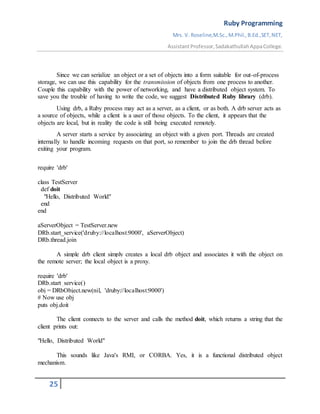
Using drb, a Ruby process may act as a server, as a client, or as both. A drb server acts as
a source of objects, while a client is a user of those objects. To the client, it appears that the
objects are local, but in reality the code is still being executed remotely.
A server starts a service by associating an object with a given port. Threads are created
internally to handle incoming requests on that port, so remember to join the drb thread before
exiting your program.
require 'drb'
class TestServer
def doit
"Hello, Distributed World"
end
end
aServerObject = TestServer.new
DRb.start_service('druby://localhost:9000', aServerObject)
DRb.thread.join
A simple drb client simply creates a local drb object and associates it with the object on
the remote server; the local object is a proxy.
require 'drb'
DRb.start_service()
obj = DRbObject.new(nil, 'druby://localhost:9000')
# Now use obj
puts obj.doit
The client connects to the server and calls the method doit, which returns a string that the
client prints out:
"Hello, Distributed World"
This sounds like Java's RMI, or CORBA. Yes, it is a functional distributed object
mechanism.
Ruby Programming
Mrs. V. Roseline,M.Sc.,M.Phil.,B.Ed.,SET,NET,
AssistantProfessor,SadakathullahAppaCollege.
26
Open source tools and technologies web server: Apache Web server
Web server
 A web server is a computer where content is stored on the server.
 Web server's basic job is to accept user requests and send responses to those requests.
 Every web server is always connected to the Internet.
 Web server has an unique IP address made up of a series of four numbers between 0
and 256 separated by periods.
For example: 65.174.155.137 or 66.132.25.167.
Different types of web servers:
 Apache HTTP Server
 Internet Information Services (IIS)
 Lighttpd
 Sun Java System Web Server
 Jigsaw Server
 Apache Tomcat
 Abyss web server
Apache Tomcat Server
 Apache Tomcat is an open source web server.
 It was developed by Apache Software Foundation. ASF executes Java servlets and
JavaServer pages including JSP coding.
 Tomcat is developed and maintained by an open collaboration of developers.
 It is available in both binary and source versions from the Apache Web site.
 It requires a JRE (Java Runtime Enterprise) that conforms to JRE 1.1 or later.
 It can be used as its own internal web server or with other web servers like Apache,
Netscape Enterprise Server, Microsoft Personal Web Server and Microsoft Internet
Information Server (IIS).
Features of Apache Server
 Apache server is a free and an open source web server.
 It can be installed on all operating systems like Linux, Windows, Unix, FreeBSD,
Solaris, Mac OS X etc.
 It is a powerful, flexible, HTTP/1.1 compliant web server.
 This server is highly configurable and extensible with third party modules.
 It provides complete source code and comes with an unrestricted license.
Ruby Programming
Mrs. V. Roseline,M.Sc.,M.Phil.,B.Ed.,SET,NET,
AssistantProfessor,SadakathullahAppaCollege.
27
 Apache supports some of the capabilities like CGI (Common Gateway Interface) and
SSI (Server Side Includes), URL redirection, loading modules support, user
authentication, proxy caching abilities etc.
Working with Web Server
Simple process consists of 4 steps, they are:
 Obtaining the IP Address from domain name: Our web browser first obtains the IP
address the domain name (for e.g., for this page the domain name is www.abc.org)
resolves to. It can obtain the IP address in 2 ways-
1. By searching in its cache.
2. By requesting one or more DNS (Domain Name System) Servers.
Note: Any website is assigned an IP address when it is first created on web server.
 Browser requests the full URL : After knowing the IP Address, the browser now
demands a full URL from the web server.
 Web server responds to request: The web server responds to the browser by sending
the desired pages, and in case, the pages do not exist or some other error occurs, it will
send the appropriate error message.
For example:
You may have seen Error 404, while trying to open a webpage, which is the message
sent by the server when the page does not exist.
Another common one is Error 401 when access is denied to us due to incorrect
credentials, like username or password, provided by us.
 Browser displays the web page: The Browser finally gets the webpages and displays it,
or displays the error message.
There are quite a few web servers available, like, Apache, Microsoft IIS, LightSpeed
Web Server. But, the two most popular ones are-
 Apache HTTP Server:It is the most popular web server available and is widely
used. It is developed and maintained by Apache Software Foundation. The
Software is produced under the Apache Licence, which makes it free and open
source.
It is available for a variety of operating Systems- Windows, Mac OS X, Unix,
Linux, Solaris, Novell Netware and FreeBSD.
 Microsoft Internet Information Service: Microsoft IIS (Internet Information
Service) is the second most popularly used web server, and its market share is
increasing quite rapidly with each passing day and is likely to overhaul Apache in
the upcoming years.
IIS server has all the features just like Apache, but it is not open source. It
is developed, and maintained by Microsoft, thus it works with all the Windows
operating system platforms.
Ruby Programming
Mrs. V. Roseline,M.Sc.,M.Phil.,B.Ed.,SET,NET,
AssistantProfessor,SadakathullahAppaCollege.
28
Configuring and Using apache web services.
Step 1: Configure IIS, Skype and other software (optional)
Step 2: Download the files and Extract the files
Step 3: Configure Apache
Apache is configured with the text file confhttpd.conf contained in the Apache folder.
Step 4: Change the web page root (optional)
Step 5: Test your installation
Your Apache configuration can now be tested. Open a command box (Start > Run >
cmd) and enter:
cd Apache2bin
httpd -t
Correct any httpd.conf configuration errors and retest until none appear.
Step 6: Install Apache as a Windows service
The easiest way to start Apache is to add it as a Windows service. From a command
prompt, enter:
cd Apache2bin
httpd -k install
Step 7: Test the web server
Ensure Apache has started successfully, open a web browser and enter the
address http://localhost/. If all goes well, your test page should appear.

Ruby Programming

  • 1.
    Ruby Programming Mrs. V.Roseline,M.Sc.,M.Phil.,B.Ed.,SET,NET, AssistantProfessor,SadakathullahAppaCollege. 1 UNIT V RUBY History and Design of Ruby – Classes, Objects and Variables – Containers, Blocks and Iterators – Standard Types – Methods – Expressions – Exceptions – Modules – Input and Output – Threads and Processes – Ruby and Web – Reflection – ObjectSpace – Distributing Ruby. Open source tools and technologies web server: Apache Web server – Working with Web Server – Configuring and Using apache web services. History and Design of Ruby Ruby is a pure object-oriented programming language. It was created in 1993 by Yukihiro Matsumoto of Japan. Ruby is "A Programmer's Best Friend". Ruby has features that are similar to those of Smalltalk, Perl, and Python. Perl, Python, and Smalltalk are scripting languages. Smalltalk is a true object-oriented language. Ruby, like Smalltalk, is a perfect object-oriented language. Using Ruby syntax is much easier than using Smalltalk syntax. Features of Ruby  Ruby is an open-source and is freely available on the Web, but it is subject to a license.  Ruby is a general-purpose, interpreted programming language.  Ruby is a true object-oriented programming language.  Ruby is a server-side scripting language similar to Python and PERL.  Ruby can be used to write Common Gateway Interface (CGI) scripts.  Ruby can be embedded into Hypertext Markup Language (HTML).  Ruby has a clean and easy syntax that allows a new developer to learn very quickly and easily.  Ruby has similar syntax to that of many programming languages such as C++ and Perl.  Ruby is very much scalable and big programs written in Ruby are easily maintainable.  Ruby can be used for developing Internet and intranet applications.  Ruby can be installed in Windows and POSIX environments.  Ruby support many GUI tools such as Tcl/Tk, GTK, and OpenGL.
  • 2.
    Ruby Programming Mrs. V.Roseline,M.Sc.,M.Phil.,B.Ed.,SET,NET, AssistantProfessor,SadakathullahAppaCollege. 2  Ruby can easily be connected to DB2, MySQL, Oracle, and Sybase.  Ruby has a rich set of built-in functions, which can be used directly into Ruby scripts. Tools Needed  Linux or Windows 95/98/2000/NT or Windows 7 operating system.  Apache 1.3.19-5 Web server.  Internet Explorer 5.0 or above Web browser.  Ruby 1.8.5 CLASSES, OBJECTS AND VARIABLES #CLASS VARIABLES AND CLASS METHODS # A class variable is shared among all objects of a class, and it is also accessible to the class methods. # Only one copy of a particular class variable exists for a givenclass. # Class variablenames start with two “at” signs, such as @@count. # Unlike global and instance variables, class variables must be initialized before they are used. # Often this initialization is just a simple assignment in the body of the class definition. class Song @@plays = 0 def initialize(name, artist, duration) @name = name @artist = artist @duration = duration @plays = 0 end def play @plays += 1 @@plays += 1 "This song: #@plays plays. Total #@@plays plays." end end s1 = Song.new("Song1", "Artist1", 234) # test songs.. s2 = Song.new("Song2", "Artist2", 345) puts s1.play
  • 3.
    Ruby Programming Mrs. V.Roseline,M.Sc.,M.Phil.,B.Ed.,SET,NET, AssistantProfessor,SadakathullahAppaCollege. 3 # "This song: 1 plays. Total 1 plays." puts s2.play # "This song: 1 plays. Total 2 plays." puts s1.play # "This song: 2 plays. Total 3 plays." puts s1.play # "This song: 3 plays. Total 4 plays." # CLASS METHODS # Class methods are distinguished from instance methods by their definition; # class methods are defined by placing the class name and a period in front of the method name # class Example # def instance_method # # instance method # end # def Example.class_method # # class method # end # end # Using class methods as pseudo-constructors can also make easier for users of your class. # As an, let’s look at a class Shape that represents a regular polygon. # Instances of Shape are created by giving the constructor the required number of sides and the total perimeter. class Shape def initialize(num_sides, perimeter) # ... end end class Shape def Shape.triangle(side_length) Shape.new(3, side_length*3) end def Shape.square(side_length) Shape.new(4, side_length*4) end end #ACCESS CONTROL # Ruby gives you three levels of protection.
  • 4.
    Ruby Programming Mrs. V.Roseline,M.Sc.,M.Phil.,B.Ed.,SET,NET, AssistantProfessor,SadakathullahAppaCollege. 4 # • Public methods can be called by anyone—noaccess control is enforced. # Methods are public by default (except for initialize, which is always private). # • Protected methods can be invoked only by objects of the defining class and its subclasses. # Access is kept within the family. # • Private methods cannot be called with an explicit receiver—the receiver is always self. # This means that private methods can be called only in the context of the current object; # you can’t invoke another object’s private methods. #SPECIFYING ACCESS CONTROL # We specify access levels to methods within class or module definitions using one or more of the three functions # public, protected, and private. We can use each function in two different ways. class MyClass def method1 # default is 'public' #... end protected # subsequent methods will be 'protected' def method2 #... end private def method3 # will be 'private' #... end public # subsequent methods will be 'public' def method4 #... end end #OR class MyClass def method1 end # ... and so on public :method1, :method4 protected :method2 private :method3 end
  • 5.
    Ruby Programming Mrs. V.Roseline,M.Sc.,M.Phil.,B.Ed.,SET,NET, AssistantProfessor,SadakathullahAppaCollege. 5 class Accounts def initialize(checking, savings) @checking = checking @savings = savings end private def debit(account, amount) account.balance -= amount end def credit(account, amount) account.balance += amount end public #... def transfer_to_savings(amount) debit(@checking, amount) credit(@savings, amount) end #... end # Variables are used to keep track of objects; each variable holds a reference to an object. person = "Tim" person.object_id #938678 puts person.class #String puts person #"Tim" #Let’s make the example slightly more complicated. person1 = "Tim" person2 = person1 person1[0] = 'J' puts person1 #"Jim" puts person2 #"Jim" #OR
  • 6.
    Ruby Programming Mrs. V.Roseline,M.Sc.,M.Phil.,B.Ed.,SET,NET, AssistantProfessor,SadakathullahAppaCollege. 6 person1 = "Tim" person2 = person1.dup person1[0] = "J" puts person1 #"Jim" puts person2 #"Tim" #We can also prevent anyone from changing a particular object by freezing it person1 = "Tim" person2 = person1 person1.freeze # prevent modifications to the object #person2[0] = "J" CONTAINERS, BLOCKS AND ITERATORS # Containers # containers: objects that hold references to one or more other objects. # Arrays # The class Array holds a collection of object references. Each object reference occupies a position in the array, identified by a non-negative integer index. # You can create arrays by using literals or by explicitly creating an Array object. A literal array is simply a list of objects between square brackets. a = [ 3.14159, "pie", 99 ] puts a.class #Array puts a.length #3 a[0] #3.14159 a[1] #"pie" a[2] #99 a[3] #nil
  • 7.
    Ruby Programming Mrs. V.Roseline,M.Sc.,M.Phil.,B.Ed.,SET,NET, AssistantProfessor,SadakathullahAppaCollege. 7 b = Array.new b.class #Array b.length #0 b[0] = "second" b[1] = "array" b #["second", "array"] #Index an array with a negative integer, and it counts from the end. a = [ 1, 3, 5, 7, 9 ] a[-1] #9 a[-2] #7 a[-99] #nil #We can also index arrays with a pair of numbers, [start, count]. a = [ 1, 3, 5, 7, 9 ] puts a[1, 3] #[3, 5, 7] puts a[3, 1] # [7] puts a[-3, 2] # [5, 7] #We can index arrays using ranges, in which start and end positions are separated by two or three periods. #The two-period form includes the end position, and the three-period form does not. a = [ 1, 3, 5, 7, 9 ] puts a[1..3] # [3, 5, 7] print a[1...2] # [3] puts a[3..3] # [7] puts a[-3..-1] # [5, 7, 9] #The [] operator has a corresponding []= operator, which lets you set elements in the array.
  • 8.
    Ruby Programming Mrs. V.Roseline,M.Sc.,M.Phil.,B.Ed.,SET,NET, AssistantProfessor,SadakathullahAppaCollege. 8 a = [ 1, 3, 5, 7, 9 ] # [1, 3, 5, 7, 9] a[1] = ’bat’ #[1, "bat", 5, 7, 9] a[-3] = ’cat’ #[1, "bat", "cat", 7, 9] a[3] = [ 9, 8 ] # [1, "bat", "cat", [9, 8], 9] a[6] = 99 # [1, "bat", "cat", [9, 8], 9, nil, 99] #If the index to []= is two numbers (a start and a length) or a range, # then those elements in the original array are replaced by whatever is on the right side of the assignment. # If the length is zero, the right side is inserted into the array before the start position; no elements are removed. # If the right side is itself an array, its elements are used in the replacement. # The array size is automatically adjusted if the index selects a different number of elements # than are available on the right side of the assignment. a = [ 1, 3, 5, 7, 9 ] # [1, 3, 5, 7, 9] a[2, 2] = ’cat’ # [1, 3, "cat", 9] a[2, 0] = ’dog’ # [1, 3, "dog", "cat", 9] a[1, 1] = [ 9, 8, 7 ] #[1, 9, 8, 7, "dog", "cat", 9] a[0..3] = [] #["dog", "cat", 9] a[5..6] = 99, 98 # ["dog", "cat", 9, nil, nil, 99, 98] # HASHES # Hashes (sometimes known as associative arrays, maps, or dictionaries) are similar to arrays # in that they are indexed collections of object references. # When you store a value in a hash, you actually supply two objects—the index, normally called the key, and the value. h = { 'dog' => 'canine', 'cat' => 'feline', 'donkey' => 'asinine' } h.length #3 h['dog']
  • 9.
    Ruby Programming Mrs. V.Roseline,M.Sc.,M.Phil.,B.Ed.,SET,NET, AssistantProfessor,SadakathullahAppaCollege. 9 # "canine" h['cow'] = 'bovine' h[12] = 'dodecine' h['cat'] = 99 h #{"cow"=>"bovine", "cat"=>99, 12=>"dodecine", "donkey"=>"asinine", "dog"=>"canine"} # Compared with arrays, hashes have one significant advantage: they can use any object as an index. # However, they also have a significant disadvantage: their elements are not ordered, so you cannot easily use a hash as a stack or a queue. # BLOCKS AND ITERATORS class Song @@plays = 0 def initialize(name, artist, duration) @name = name @artist = artist @duration = duration @plays = 0 end def play @plays += 1 @@plays += 1 "This song: #@plays plays. Total #@@plays plays." end end class SongList def with_title(title) for i in 0...@songs.length return @songs[i] if title == @songs[i].name end return nil end end class SongList def with_title(title) @songs.find {|song| title == song.name } end
  • 10.
    Ruby Programming Mrs. V.Roseline,M.Sc.,M.Phil.,B.Ed.,SET,NET, AssistantProfessor,SadakathullahAppaCollege. 10 end #The method FIND is an iterator is a method that invokes a block of code repeatedly. # IMPLEMENTING ITERATORS # For example, a simple function that returns members of the Fibonacci series up to a certain value. def fib_up_to(max) i1, i2 = 1, 1 # parallel assignment (i1 = 1 and i2 = 1) while i1 <= max yield i1 i1, i2 = i2, i1+i2 end end fib_up_to(1000) {|f| print f, " " } # produces: # 1 1 2 3 5 8 13 21 34 55 89 144 233 377 610 987 # Some iterators are common to many types of Ruby collections. Two others are each and collect. # EACH is probably the simplest iterator—all it does is yield successive elements of its collection. [ 1, 3, 5, 7, 9 ].each {|i| puts i } # produces: # 1 3 5 7 9 # Another common iterator is COLLECT, which takes each element from the collection and passes it to the block. # The results returned by the block are used to construct a new array. For instance: ["H", "A", "L"].collect {|x| x.succ } #["I", "B", "M"] #one more useful iterator. The INJECT method lets to accumulate a value across the members #of a collection. For example, you can sum all the elements in an array, and find their product puts [1,3,5,7].inject(0) {|sum, element| sum+element} #16 puts [1,3,5,7].inject(1) {|product, element| product*element}
  • 11.
    Ruby Programming Mrs. V.Roseline,M.Sc.,M.Phil.,B.Ed.,SET,NET, AssistantProfessor,SadakathullahAppaCollege. 11 #105 puts [1,3,5,7].inject() {|product, element| product*element} #105 STANDARD TYPES # Basic types in Ruby: numbers, strings, ranges, and regular expressions # NUMBERS # Ruby supports integers and floating-point numbers. Integers can be any length. # Integers within a certain range are held internally in binary form and are objects of class FIXNUM. # Integers outside this range are stored in objects of class BIGNUM. num = 81 6.times do puts "#{num.class}: #{num}" num *= num end # produces: # Fixnum: 81 # Fixnum: 6561 # Fixnum: 43046721 # Bignum: 1853020188851841 # Bignum: 3433683820292512484657849089281 # Bignum: 11790184577738583171520872861412518665678211592275841109096961 # Integers also support several useful iterators. # UPTO and DOWNTO, for iterating up and down between two integers. # STEP, which is more like a traditional for loop. 3.times { print "X " } 1.upto(5) {|i| print i, " " } 99.downto(95) {|i| print i, " " } 50.step(80, 5) {|i| print i, " " } # produces: # X X X # 1 2 3 4 5 # 99 98 97 96 95 # 50 55 60 65 70 75 80
  • 12.
    Ruby Programming Mrs. V.Roseline,M.Sc.,M.Phil.,B.Ed.,SET,NET, AssistantProfessor,SadakathullahAppaCollege. 12 # STRINGS # They normally hold printable characters, but that is not a requirement; a string can also hold binary data. Strings are objects of class String. # Within single-quotedstrings, two consecutive backslashes are replaced by a single backslash, # and a backslash followed by a single quote becomes a single quote. print 'escape using ' # escape using print 'That's right' # That's right # The character following the q or Q is the delimiter. # If it is an opening bracket “[”, brace “{”, parenthesis “(”, or less-than sign “<”, # the string is read until the matching close symbol is found. # Otherwise the string is read until the next occurrence of the same delimiter. # The delimiter can be any nonalphanumeric or nonmultibyte character. print %Q/string1/ #string1 print %Q!string2! #string2 print %Q{Seconds/day: #{24*60*60}} #Seconds/day: 86400 # RANGES # #It actually uses ranges to implement three separate features: sequences, conditions, and intervals. # RANGES AS SEQUENCES # Sequences have a start point, an end point, and a way to produce successive values in the sequence. # We can convert a range to a list using the to_a method. (1..10).to_a #[1, 2, 3, 4, 5, 6, 7, 8, 9, 10] ('bar'..'bat').to_a #["bar", "bas", "bat"]
  • 13.
    Ruby Programming Mrs. V.Roseline,M.Sc.,M.Phil.,B.Ed.,SET,NET, AssistantProfessor,SadakathullahAppaCollege. 13 #Ranges implement methods that iterate over them and test their contents in a variety of ways. print digits = 0..9 print digits.include?(5) #true digits.min #0 digits.max #9 digits.reject {|i| i < 5 } #[5, 6, 7, 8, 9] #digits.each {|digit| print(digit) } #0..9 #objects must be comparable using <=>. Sometimes called the spaceship operator, #<=> compares two values, returning -1, 0, or +1 depending on whether the first is less than, equal to, or greater than the second. # RANGES AS CONDITIONS # Ranges may also be used as conditional expressions. # Here, they act as a kind of toggle switch—they turn on when the condition in the first part of the range becomes true, and they turn off when the condition in the second part becomes true. # The following code fragment prints sets of lines from standard input, where the first line in each set contains the word start and the last line contains the word end. # while line = gets # #puts line if line =~ /start/ .. line =~ /end/ # end # RANGES AS INTERVALS # If some value falls within the interval represented by the range. # We do this using ===, the case equality operator. (1..10) === 5 # true (1..10) === 15 # false (1..10) === 3.14159 # true ('a'..'j') === 'c' #true ('a'..'j') === 'z' # false
  • 14.
    Ruby Programming Mrs. V.Roseline,M.Sc.,M.Phil.,B.Ed.,SET,NET, AssistantProfessor,SadakathullahAppaCollege. 14 METHODS # DEFINING A METHOD # a method is defined using the keyword def. Method names should begin with a lowercase letter. def cool_dude(arg1="Miles", arg2="Coltrane", arg3="Roach") "#{arg1}, #{arg2}, #{arg3}." end cool_dude # "Miles, Coltrane, Roach." cool_dude("Bart") # "Bart, Coltrane, Roach." cool_dude("Bart", "Elwood") # "Bart, Elwood, Roach." cool_dude("Bart", "Elwood", "Linus") # "Bart, Elwood, Linus." #VARIABLE-LENGTH ARGUMENT LISTS #if v want to pass in a variable number of arguments or want to capture multiple arguments into a single parameter? #Placing an asterisk before the name of the parameter after the “normal” parameters does just that. def varargs(arg1, *rest) "Got #{arg1} and #{rest.join(', ')}" end varargs("one") # "Got one and " varargs("one", "two") # "Got one and two" varargs "one", "two", "three" # "Got one and two, three" # Calling a Method # You call a method by specifying a receiver, the name of the method, and optionally some parameters and an optional block. a = obj.hash # Same as
  • 15.
    Ruby Programming Mrs. V.Roseline,M.Sc.,M.Phil.,B.Ed.,SET,NET, AssistantProfessor,SadakathullahAppaCollege. 15 a = obj.hash() # this. obj.some_method "Arg1", arg2, arg3 # Same thing as obj.some_method("Arg1", arg2, arg3) # with parentheses. Method Return Values Every called method returns a value (although no rule says you have to use that value). The value of a method is the value of the last statement executed during the method’s execution. Ruby has a return statement, which exits from the currently executing method. The value of a return is the value of its argument(s). V can omit the return if it isn’t needed. def meth_one "one" end meth_one # "one" def meth_two(arg) case when arg > 0 "positive" when arg < 0 "negative" else "zero" end end meth_two(23) #"positive" meth_two(0) # "zero" EXPRESSIONS(REGULAR EXPRESSIONS) # Regular expressions are used to match patterns against strings. # Ruby provides builtin support that makes pattern matching and substitution. # Once you have a regular expression object, you can match it against a string # using Regexp#match(string) or the match operators =~ (positive match) and !~ (negative match). print name = "Fats Waller"
  • 16.
    Ruby Programming Mrs. V.Roseline,M.Sc.,M.Phil.,B.Ed.,SET,NET, AssistantProfessor,SadakathullahAppaCollege. 16 print name =~ /a/ # 1 print name =~ /z/ # nil print /a/ =~ name # 1 # The match operators return the character position at which the match occurred. # $& receives the part of the string that was matched by the pattern, # $` receives the part of the string that preceded the match, and $' receives the string after the match. def show_regexp(a, re) if a =~ re "#{$`}<<#{$&}>>#{$'}" else "no match" end end show_regexp('very interesting', /t/) # very in<<t>>eresting show_regexp('Fats Waller', /a/) # F<<a>>ts Waller show_regexp('Fats Waller', /ll/) # Fats Wa<<ll>>er show_regexp('Fats Waller', /z/) # no match #Patterns #A pattern, which is used to match the regular expression against a string. #If v want to match one of these special characters literally, precede it with a backslash. show_regexp('yes | no', /|/) # yes <<|>> no show_regexp('yes (no)', /(no)/) # yes <<(no)>> show_regexp('are you sure?', /e?/) # are you sur<<e?>> # ANCHORS # By default, a regular expression will try to ?nd the ?rst match for the pattern in a string. # Match /iss/ against the string “Mississippi,” and it will ?nd the substring“iss” starting at position one.
  • 17.
    Ruby Programming Mrs. V.Roseline,M.Sc.,M.Phil.,B.Ed.,SET,NET, AssistantProfessor,SadakathullahAppaCollege. 17 # But what if you want to force a pattern to match only at the start or end of a string? # The patterns ^ and $ match the beginning and end of a line, respectively. # These are often used to anchor a pattern match: for example, /^option/ matches the word option only if it appears at the start of a line. # The sequence A matches the beginning of a string, and z and Z match the end of a string. show_regexp("this isnthe time", /^the/) # this isn<<the>> time show_regexp("this isnthe time", /is$/) # this <<is>>nthe time show_regexp("this isnthe time", /Athis/) # <<this>> isnthe time show_regexp("this isnthe time", /Athe/) # no match show_regexp("this isnthe time", /bis/) # this <<is>>nthe time show_regexp("this isnthe time", /Bis/) # th<<is>> isnthe time EXCEPTIONS # EXCEPTIONS, CATCH, AND THROW # THE EXCEPTION CLASS # The package that contains the information about an exception is an object of class Exception or one of class Exception’s children. # When you need to raise an exception, you can use one of the built-in Exception classes, or you can create one of your own. # If you create your own, you may want to make it a subclass of StandardError or one of its children. # Every Exception has associated with it a message string and a stack backtrace. # If you define your own exceptions, you can add additional information. # HANDLING EXCEPTIONS op_file = File.open(opfile_name, "w") while data = socket.read(512) op_file.write(data) end # To do exception handling, we enclose the code that could raise an exception in a begin/end block and use one or more rescue clauses to tell Ruby the types of exceptions we want to handle.
  • 18.
    Ruby Programming Mrs. V.Roseline,M.Sc.,M.Phil.,B.Ed.,SET,NET, AssistantProfessor,SadakathullahAppaCollege. 18 op_file = File.open(opfile_name, "w") begin # Exceptions raised by this code will be caught by the following rescue clause while data = socket.read(512) op_file.write(data) end rescue SystemCallError $stderr.print "IO failed: " + $! op_file.close File.delete(opfile_name) raise end # CATCH AND THROW # catch defines a block that is labeled with the given name (which may be a Symbol or a String). # The block is executed normally until a throw is encountered. def prompt_and_get(prompt) print prompt res = readline.chomp #remove unwanted new lines throw :quit_requested if res == "!" res end catch :quit_requested do name = prompt_and_get("Name: ") age = prompt_and_get("Age: ") sex = prompt_and_get("Sex: ") # .. # process information end MODULES # Modules are a way of groupingtogether methods, classes, and constants. Modules give you two major benefits. # 1. Modules provide a namespace and prevent name clashes. # 2. Modules implement the mixin facility. # NAMESPACES module Trig PI = 3.141592654
  • 19.
    Ruby Programming Mrs. V.Roseline,M.Sc.,M.Phil.,B.Ed.,SET,NET, AssistantProfessor,SadakathullahAppaCollege. 19 def Trig.sin(x) gets x end end module Moral VERY_BAD = 0 BAD = 1 def Moral.sin(badness) gets badness end end require_relative 'trig' require_relative 'moral' y = Trig.sin(Trig::PI/4) wrongdoing = Moral.sin(Moral::VERY_BAD) puts y puts wrongdoing INPUT AND OUTPUT puts "Howdy!" puts "puts works" puts " with line breaks." print "print works" print " with no line breaks." printf("nnprintf formats numbers like %7.2f, and strings like %s.",123.14156,"me") puts "What is your name?" $name = gets puts "Hi "+$name def welcome(name) puts "howdy #{name}" # inside double quotes, #{ } will evaluate the variable end THREADS AND PROCESSES
  • 20.
    Ruby Programming Mrs. V.Roseline,M.Sc.,M.Phil.,B.Ed.,SET,NET, AssistantProfessor,SadakathullahAppaCollege. 20 Traditional programs have a single thread of execution the statements or instructions that comprise the program are executed sequentially until the program terminates. A multithreaded program has more than one thread of execution. Within each thread, statements are executed sequentially, but the threads themselves may be executed in parallel on a multicore CPU, for example. Often on a single CPU machine, multiple threads are not actually executed in parallel, but parallelism is simulated by interleaving the execution of the threads. Ruby makes it easy to write multi-threaded programs with the Thread class. Ruby threads are a lightweight and efficient way to achieve concurrency in your code. Creating Ruby Threads To start a new thread, just associate a block with a call to Thread.new. A new thread will be created to execute the code in the block, and the original thread will return from Thread.new immediately and resume execution with the next statement − # Thread #1 is running here Thread.new { # Thread #2 runs this code } # Thread #1 runs this code Example Here is an example, which shows how we can use multi-threaded Ruby program. def func1 i = 0 while i<=2 puts "func1 at: #{Time.now}" sleep(2) i = i+1 end end def func2 j = 0 while j<=2 puts "func2 at: #{Time.now}" sleep(1) j = j+1 end end
  • 21.
    Ruby Programming Mrs. V.Roseline,M.Sc.,M.Phil.,B.Ed.,SET,NET, AssistantProfessor,SadakathullahAppaCollege. 21 puts "Started At #{Time.now}" t1 = Thread.new{func1()} t2 = Thread.new{func2()} t1.join t2.join puts "End at #{Time.now}" #Output #Started At 2020-03-24 16:22:01 +0530 #func1 at: 2020-03-24 16:22:02 +0530 #func2 at: 2020-03-24 16:22:02 +0530 #func2 at: 2020-03-24 16:22:03 +0530 #func1 at: 2020-03-24 16:22:04 +0530 #func2 at: 2020-03-24 16:22:04 +0530 #func1 at: 2020-03-24 16:22:06 +0530 #End at 2020-03-24 16:22:08 +0530 REFLECTION – OBJECTSPACE – DISTRIBUTING RUBY Reflection & ObjectSpace One of the many advantages of dynamic languages such as Ruby is the ability to introspect—to examine aspects of the program from within the program itself. When people introspect, we think about our thoughts and feelings. This is interesting, it’s the same when programs use introspection- a program can discover the following information about itself:  What object it contains  Its Class Hierarchy  The attributes and methods of objects  Information on methods Looking at Objects To iterate over all objects of type Numeric, it Calls the block once for each living, nonimmediate object in this Ruby process. Returns the number of objects found. a = 102.7 b = 95.1 ObjectSpace.each_object(Numeric) {|x| p x }
  • 22.
    Ruby Programming Mrs. V.Roseline,M.Sc.,M.Phil.,B.Ed.,SET,NET, AssistantProfessor,SadakathullahAppaCollege. 22 Output 95.1 102.7 2.718281828 (living, nonimmediate object in this Ruby process) 3.141592654 (living, nonimmediate object in this Ruby process) Looking Inside Objects For instance, we can get a list of all the methods to which an object will respond. r = 1..10 # Create a Range object list = r.methods list.length → 60 list[0..3] → ["size", "end", "length", "exclude_end?"] Or, we can check to see if an object supports a particular method. r.respond_to?("frozen?") → true r.respond_to?("hasKey") → false "me".respond_to?("==") → true We can determine our object's class and its unique object id, and test its relationship to other classes. num = 1 num.id → 3 num.class → Fixnum num.kind_of? Fixnum → true num.kind_of? Numeric → true num.instance_of? Fixnum → true num.instance_of? Numeric → false Looking at Classes Looking at the class hierarchy is easy. You can get the parent of any particular class using Class#superclass. For classes and modules, Module#ancestors lists both superclasses and mixed-in modules. klass = Fixnum begin print klass
  • 23.
    Ruby Programming Mrs. V.Roseline,M.Sc.,M.Phil.,B.Ed.,SET,NET, AssistantProfessor,SadakathullahAppaCollege. 23 klass = klass.superclass print " < " if klass end while klass puts print Fixnum.ancestors produces: Fixnum < Integer < Numeric < Object [Fixnum, Integer, Precision, Numeric, Comparable, Object, Kernel] Looking inside classes We can find out a bit more about the methods and constants in a particular object. Instead of just checking to see whether the object responds to a given message, we can ask for methods by access level, we can ask for just singleton methods, and we can have a look at the object's constants. class Demo private def privMethod end protected def protMethod end public def pubMethod end def Demo.classMethod end CONST = 1.23 end Produces: Demo.private_instance_methods → ["privMethod"] Demo.protected_instance_methods → ["protMethod"] Demo.public_instance_methods → ["pubMethod"] Demo.singleton_methods → ["classMethod"] Demo.constants - Demo.superclass.constants → ["CONST"] Distributing Ruby
  • 24.
    Ruby Programming Mrs. V.Roseline,M.Sc.,M.Phil.,B.Ed.,SET,NET, AssistantProfessor,SadakathullahAppaCollege. 24 Java features the ability to serialize objects, letting you store them somewhere and reconstitute them when needed. Ruby calls this kind of serialization marshaling. Saving an object and some or all of its components is done using the method Marshal::dump. Typically, you will dump an entire object tree starting with some given object. Later on, you can reconstitute the object using Marshal::load. class Note attr :value def initialize(val) @value = val end def to_s @value.to_s end end class Chord def initialize(arr) @arr = arr end def play @arr.join('-') end end Now we'll create our masterpiece, and use Marshal::dump to save a serialized version of it to disk. c = Chord.new( [ Note.new("G"), Note.new("Bb"), Note.new("Db"), Note.new("E") ] ) File.open("posterity", "w+") do |f| Marshal.dump(c, f) End Finally, our future generation read it in, and are transported by our creation's beauty. File.open("posterity") do |f| chord = Marshal.load(f) end chord.play → "G-Bb-Db-E"
  • 25.
    Ruby Programming Mrs. V.Roseline,M.Sc.,M.Phil.,B.Ed.,SET,NET, AssistantProfessor,SadakathullahAppaCollege. 25 Since we can serialize an object or a set of objects into a form suitable for out-of-process storage, we can use this capability for the transmission of objects from one process to another. Couple this capability with the power of networking, and have a distributed object system. To save you the trouble of having to write the code, we suggest Distributed Ruby library (drb). Using drb, a Ruby process may act as a server, as a client, or as both. A drb server acts as a source of objects, while a client is a user of those objects. To the client, it appears that the objects are local, but in reality the code is still being executed remotely. A server starts a service by associating an object with a given port. Threads are created internally to handle incoming requests on that port, so remember to join the drb thread before exiting your program. require 'drb' class TestServer def doit "Hello, Distributed World" end end aServerObject = TestServer.new DRb.start_service('druby://localhost:9000', aServerObject) DRb.thread.join A simple drb client simply creates a local drb object and associates it with the object on the remote server; the local object is a proxy. require 'drb' DRb.start_service() obj = DRbObject.new(nil, 'druby://localhost:9000') # Now use obj puts obj.doit The client connects to the server and calls the method doit, which returns a string that the client prints out: "Hello, Distributed World" This sounds like Java's RMI, or CORBA. Yes, it is a functional distributed object mechanism.
  • 26.
    Ruby Programming Mrs. V.Roseline,M.Sc.,M.Phil.,B.Ed.,SET,NET, AssistantProfessor,SadakathullahAppaCollege. 26 Open source tools and technologies web server: Apache Web server Web server  A web server is a computer where content is stored on the server.  Web server's basic job is to accept user requests and send responses to those requests.  Every web server is always connected to the Internet.  Web server has an unique IP address made up of a series of four numbers between 0 and 256 separated by periods. For example: 65.174.155.137 or 66.132.25.167. Different types of web servers:  Apache HTTP Server  Internet Information Services (IIS)  Lighttpd  Sun Java System Web Server  Jigsaw Server  Apache Tomcat  Abyss web server Apache Tomcat Server  Apache Tomcat is an open source web server.  It was developed by Apache Software Foundation. ASF executes Java servlets and JavaServer pages including JSP coding.  Tomcat is developed and maintained by an open collaboration of developers.  It is available in both binary and source versions from the Apache Web site.  It requires a JRE (Java Runtime Enterprise) that conforms to JRE 1.1 or later.  It can be used as its own internal web server or with other web servers like Apache, Netscape Enterprise Server, Microsoft Personal Web Server and Microsoft Internet Information Server (IIS). Features of Apache Server  Apache server is a free and an open source web server.  It can be installed on all operating systems like Linux, Windows, Unix, FreeBSD, Solaris, Mac OS X etc.  It is a powerful, flexible, HTTP/1.1 compliant web server.  This server is highly configurable and extensible with third party modules.  It provides complete source code and comes with an unrestricted license.
  • 27.
    Ruby Programming Mrs. V.Roseline,M.Sc.,M.Phil.,B.Ed.,SET,NET, AssistantProfessor,SadakathullahAppaCollege. 27  Apache supports some of the capabilities like CGI (Common Gateway Interface) and SSI (Server Side Includes), URL redirection, loading modules support, user authentication, proxy caching abilities etc. Working with Web Server Simple process consists of 4 steps, they are:  Obtaining the IP Address from domain name: Our web browser first obtains the IP address the domain name (for e.g., for this page the domain name is www.abc.org) resolves to. It can obtain the IP address in 2 ways- 1. By searching in its cache. 2. By requesting one or more DNS (Domain Name System) Servers. Note: Any website is assigned an IP address when it is first created on web server.  Browser requests the full URL : After knowing the IP Address, the browser now demands a full URL from the web server.  Web server responds to request: The web server responds to the browser by sending the desired pages, and in case, the pages do not exist or some other error occurs, it will send the appropriate error message. For example: You may have seen Error 404, while trying to open a webpage, which is the message sent by the server when the page does not exist. Another common one is Error 401 when access is denied to us due to incorrect credentials, like username or password, provided by us.  Browser displays the web page: The Browser finally gets the webpages and displays it, or displays the error message. There are quite a few web servers available, like, Apache, Microsoft IIS, LightSpeed Web Server. But, the two most popular ones are-  Apache HTTP Server:It is the most popular web server available and is widely used. It is developed and maintained by Apache Software Foundation. The Software is produced under the Apache Licence, which makes it free and open source. It is available for a variety of operating Systems- Windows, Mac OS X, Unix, Linux, Solaris, Novell Netware and FreeBSD.  Microsoft Internet Information Service: Microsoft IIS (Internet Information Service) is the second most popularly used web server, and its market share is increasing quite rapidly with each passing day and is likely to overhaul Apache in the upcoming years. IIS server has all the features just like Apache, but it is not open source. It is developed, and maintained by Microsoft, thus it works with all the Windows operating system platforms.
  • 28.
    Ruby Programming Mrs. V.Roseline,M.Sc.,M.Phil.,B.Ed.,SET,NET, AssistantProfessor,SadakathullahAppaCollege. 28 Configuring and Using apache web services. Step 1: Configure IIS, Skype and other software (optional) Step 2: Download the files and Extract the files Step 3: Configure Apache Apache is configured with the text file confhttpd.conf contained in the Apache folder. Step 4: Change the web page root (optional) Step 5: Test your installation Your Apache configuration can now be tested. Open a command box (Start > Run > cmd) and enter: cd Apache2bin httpd -t Correct any httpd.conf configuration errors and retest until none appear. Step 6: Install Apache as a Windows service The easiest way to start Apache is to add it as a Windows service. From a command prompt, enter: cd Apache2bin httpd -k install Step 7: Test the web server Ensure Apache has started successfully, open a web browser and enter the address http://localhost/. If all goes well, your test page should appear.