

RSS for Everyone Stewart Brower, MLIS, AHIP Director, OU-Tulsa Library
Defining Web 2.0 Tim O'Reilly and John Battelle summarized key principles they believed characterized Web 2.0 applications the Web as a  platform   data  as the driving force  an architecture of  participation   open source  development content and service  syndication   the end of the software adoption cycle ("the  perpetual beta ")  leveraging the power of  The Long Tail Adopted from “Web 2.0” entry on Wikipedia
Web 2.0 transitions Information silos    Information sharing Designed    Customizable “ One to Many”    “Many to Many”  (publication)    (conversation) Authority    Consensus  (i.e. “The Wisdom of Crowds”)
Web 2.0 technologies Conversation:  Blogs Syndication:  RSS Consensus:  Wikis Sharing:  Social bookmarking Only the tip of the iceberg…
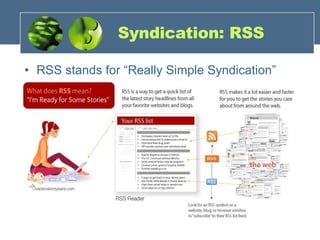
Syndication: RSS RSS stands for “Really Simple Syndication”
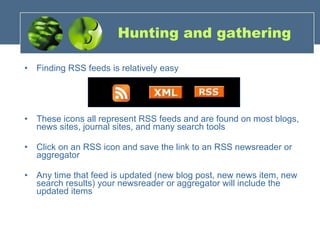
Hunting and gathering Finding RSS feeds is relatively easy These icons all represent RSS feeds and are found on most blogs, news sites, journal sites, and many search tools Click on an RSS icon and save the link to an RSS newsreader or aggregator Any time that feed is updated (new blog post, new news item, new search results) your newsreader or aggregator will include the updated items
Need the feed? RSS feeds require a reader, sometimes called an “aggregator,” to display them in a readable format Web browsers often have the ability to read RSS feeds (see  Firefox Live Bookmarks ) Web services such as  Bloglines ,  Google Reader  and  MyYahoo  can aggregate many feeds and be accessed from any computer
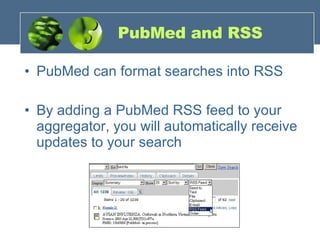
PubMed and RSS PubMed can format searches into RSS By adding a PubMed RSS feed to your aggregator, you will automatically receive updates to your search
PubMed RSS example Run a PubMed search and save the results as an RSS feed Save the RSS feed in Firefox as a Live Bookmark “ Send to” RSS feed with the pulldown menu Click the “Create Feed” button Click the   button in the address bar and “Add PubMed search…”
RSS elsewhere… Librarians creating “canned searches” for RSS Library blogs usually have RSS feeds Major database vendors adding support for RSS (Ebsco, Ovid, etc.) Almost all e-journal TOCs available as RSS Web calendars, wish lists (Amazon, etc.), favorite comic strips… Using RSS to keep up with your favorite wikis…
OPML To move your RSS feeds from one reader to another Export your subscriptions as filename.opml Then import to your new reader Just like moving a contacts list or your bookmarks…
Thanks for coming! http://www.bloglines.com http://reader.google.com http://www.newsgator.com Questions? Let us know!

RSS Workshop

  • 1.
    RSS for EveryoneStewart Brower, MLIS, AHIP Director, OU-Tulsa Library
  • 2.
    Defining Web 2.0Tim O'Reilly and John Battelle summarized key principles they believed characterized Web 2.0 applications the Web as a platform data as the driving force an architecture of participation open source development content and service syndication the end of the software adoption cycle ("the perpetual beta ") leveraging the power of The Long Tail Adopted from “Web 2.0” entry on Wikipedia
  • 3.
    Web 2.0 transitionsInformation silos  Information sharing Designed  Customizable “ One to Many”  “Many to Many” (publication)  (conversation) Authority  Consensus (i.e. “The Wisdom of Crowds”)
  • 4.
    Web 2.0 technologiesConversation: Blogs Syndication: RSS Consensus: Wikis Sharing: Social bookmarking Only the tip of the iceberg…
  • 5.
    Syndication: RSS RSSstands for “Really Simple Syndication”
  • 6.
    Hunting and gatheringFinding RSS feeds is relatively easy These icons all represent RSS feeds and are found on most blogs, news sites, journal sites, and many search tools Click on an RSS icon and save the link to an RSS newsreader or aggregator Any time that feed is updated (new blog post, new news item, new search results) your newsreader or aggregator will include the updated items
  • 7.
    Need the feed?RSS feeds require a reader, sometimes called an “aggregator,” to display them in a readable format Web browsers often have the ability to read RSS feeds (see Firefox Live Bookmarks ) Web services such as Bloglines , Google Reader and MyYahoo can aggregate many feeds and be accessed from any computer
  • 8.
    PubMed and RSSPubMed can format searches into RSS By adding a PubMed RSS feed to your aggregator, you will automatically receive updates to your search
  • 9.
    PubMed RSS exampleRun a PubMed search and save the results as an RSS feed Save the RSS feed in Firefox as a Live Bookmark “ Send to” RSS feed with the pulldown menu Click the “Create Feed” button Click the button in the address bar and “Add PubMed search…”
  • 10.
    RSS elsewhere… Librarianscreating “canned searches” for RSS Library blogs usually have RSS feeds Major database vendors adding support for RSS (Ebsco, Ovid, etc.) Almost all e-journal TOCs available as RSS Web calendars, wish lists (Amazon, etc.), favorite comic strips… Using RSS to keep up with your favorite wikis…
  • 11.
    OPML To moveyour RSS feeds from one reader to another Export your subscriptions as filename.opml Then import to your new reader Just like moving a contacts list or your bookmarks…
  • 12.
    Thanks for coming!http://www.bloglines.com http://reader.google.com http://www.newsgator.com Questions? Let us know!