Guide to Personal Fundraising –
Using YouCaring.com
Introduction

What is Personal Fundraising?

Whether it's doing a Walkathon or participating in a run for a well-established non-profit organization, we have
all been involved in some way or another in fundraising for good causes.

However, these large non-profit organizations do not have the corner on worthy causes. And with the advent of
Internet technology, many options have been developed to help smaller worthy causes that are more personal
with more direct impact on your life.

Personal fundraising is the ability for individuals to tap into these new Internet capabilities to help fund those
more personal causes worthy to them. Some examples are fundraising for medical expenses, tuition assistance,
helping a family with adoption costs, funding a mission trip, and others.


YouCaring.com

YouCaring.com is a website that puts it all together for somebody wanting to raise funds and is ideal for personal
fundraising. YouCaring is not a unique site. There are other sites with similar capabilities and functions.

However, this guide uses YouCaring.com as its example and is quite easy to set up and use.


Note: I do not have any professional ties to the YouCaring.com organization; this paper is an independent guide to using this
site for your personal fundraising needs.
Getting Started

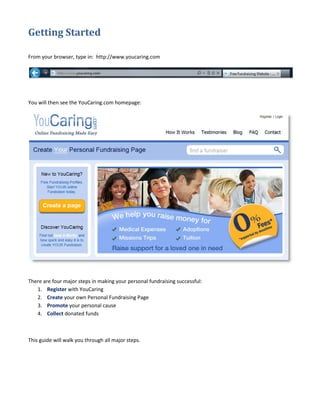
From your browser, type in: http://www.youcaring.com


You will then see the YouCaring.com homepage:


There are four major steps in making your personal fundraising successful:
   1. Register with YouCaring
   2. Create your own Personal Fundraising Page
   3. Promote your personal cause
   4. Collect donated funds


This guide will walk you through all major steps.
1. Register with YouCaring

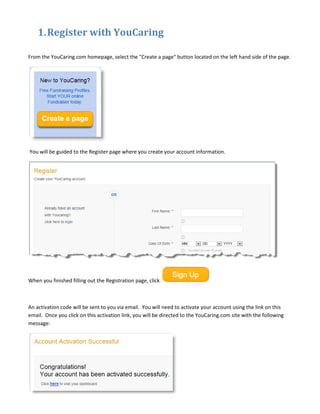
From the YouCaring.com homepage, select the "Create a page" button located on the left hand side of the page.


You will be guided to the Register page where you create your account information.


When you finished filling out the Registration page, click


An activation code will be sent to you via email. You will need to activate your account using the link on this
email. Once you click on this activation link, you will be directed to the YouCaring.com site with the following
message:
2. Create your Personal Fundraising Page

You can now login to your YouCaring account. Once you are logged on, you will see your personal dashboard
page.

From your personal dashboard page, you can always change your account information or can create your
personal fundraising page.

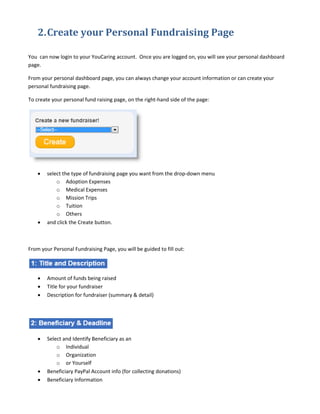
To create your personal fund raising page, on the right-hand side of the page:


    •   select the type of fundraising page you want from the drop-down menu
            o Adoption Expenses
            o Medical Expenses
            o Mission Trips
            o Tuition
            o Others
    •   and click the Create button.


From your Personal Fundraising Page, you will be guided to fill out:


    •   Amount of funds being raised
    •   Title for your fundraiser
    •   Description for fundraiser (summary & detail)


    •   Select and Identify Beneficiary as an
            o Individual
            o Organization
            o or Yourself
    •   Beneficiary PayPal Account info (for collecting donations)
    •   Beneficiary Information
•   Thank you to donors - Write a few words to thank the donors for their generous contribution. This note
       will appear on the receipt page after their donation is complete.
   •   End date for fundraiser


   •   Photo image to represent your fundraiser
   •   Video telling your story (optional)


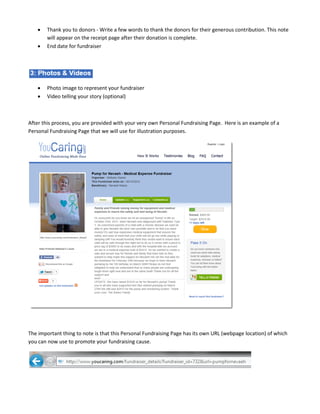
After this process, you are provided with your very own Personal Fundraising Page. Here is an example of a
Personal Fundraising Page that we will use for illustration purposes.


The important thing to note is that this Personal Fundraising Page has its own URL (webpage location) of which
you can now use to promote your fundraising cause.
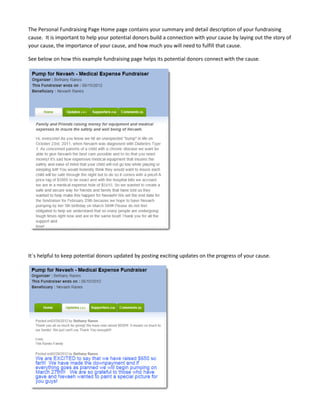
The Personal Fundraising Page Home page contains your summary and detail description of your fundraising
cause. It is important to help your potential donors build a connection with your cause by laying out the story of
your cause, the importance of your cause, and how much you will need to fulfill that cause.

See below on how this example fundraising page helps its potential donors connect with the cause.


It´s helpful to keep potential donors updated by posting exciting updates on the progress of your cause.
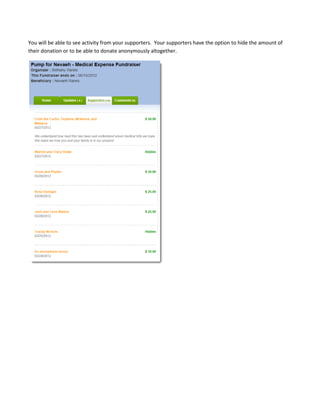
You will be able to see activity from your supporters. Your supporters have the option to hide the amount of
their donation or to be able to donate anonymously altogether.
3. Promote

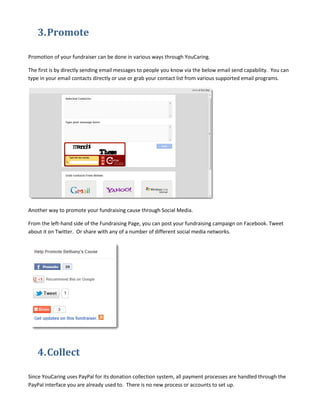
Promotion of your fundraiser can be done in various ways through YouCaring.

The first is by directly sending email messages to people you know via the below email send capability. You can
type in your email contacts directly or use or grab your contact list from various supported email programs.


Another way to promote your fundraising cause through Social Media.

From the left-hand side of the Fundraising Page, you can post your fundraising campaign on Facebook. Tweet
about it on Twitter. Or share with any of a number of different social media networks.


    4. Collect

Since YouCaring uses PayPal for its donation collection system, all payment processes are handled through the
PayPal interface you are already used to. There is no new process or accounts to set up.

Guide to personal fundraising using YouCaring.com

  • 1.
    Guide to PersonalFundraising – Using YouCaring.com
  • 2.
    Introduction What is PersonalFundraising? Whether it's doing a Walkathon or participating in a run for a well-established non-profit organization, we have all been involved in some way or another in fundraising for good causes. However, these large non-profit organizations do not have the corner on worthy causes. And with the advent of Internet technology, many options have been developed to help smaller worthy causes that are more personal with more direct impact on your life. Personal fundraising is the ability for individuals to tap into these new Internet capabilities to help fund those more personal causes worthy to them. Some examples are fundraising for medical expenses, tuition assistance, helping a family with adoption costs, funding a mission trip, and others. YouCaring.com YouCaring.com is a website that puts it all together for somebody wanting to raise funds and is ideal for personal fundraising. YouCaring is not a unique site. There are other sites with similar capabilities and functions. However, this guide uses YouCaring.com as its example and is quite easy to set up and use. Note: I do not have any professional ties to the YouCaring.com organization; this paper is an independent guide to using this site for your personal fundraising needs.
  • 3.
    Getting Started From yourbrowser, type in: http://www.youcaring.com You will then see the YouCaring.com homepage: There are four major steps in making your personal fundraising successful: 1. Register with YouCaring 2. Create your own Personal Fundraising Page 3. Promote your personal cause 4. Collect donated funds This guide will walk you through all major steps.
  • 4.
    1. Register withYouCaring From the YouCaring.com homepage, select the "Create a page" button located on the left hand side of the page. You will be guided to the Register page where you create your account information. When you finished filling out the Registration page, click An activation code will be sent to you via email. You will need to activate your account using the link on this email. Once you click on this activation link, you will be directed to the YouCaring.com site with the following message:
  • 5.
    2. Create yourPersonal Fundraising Page You can now login to your YouCaring account. Once you are logged on, you will see your personal dashboard page. From your personal dashboard page, you can always change your account information or can create your personal fundraising page. To create your personal fund raising page, on the right-hand side of the page: • select the type of fundraising page you want from the drop-down menu o Adoption Expenses o Medical Expenses o Mission Trips o Tuition o Others • and click the Create button. From your Personal Fundraising Page, you will be guided to fill out: • Amount of funds being raised • Title for your fundraiser • Description for fundraiser (summary & detail) • Select and Identify Beneficiary as an o Individual o Organization o or Yourself • Beneficiary PayPal Account info (for collecting donations) • Beneficiary Information
  • 6.
    Thank you to donors - Write a few words to thank the donors for their generous contribution. This note will appear on the receipt page after their donation is complete. • End date for fundraiser • Photo image to represent your fundraiser • Video telling your story (optional) After this process, you are provided with your very own Personal Fundraising Page. Here is an example of a Personal Fundraising Page that we will use for illustration purposes. The important thing to note is that this Personal Fundraising Page has its own URL (webpage location) of which you can now use to promote your fundraising cause.
  • 7.
    The Personal FundraisingPage Home page contains your summary and detail description of your fundraising cause. It is important to help your potential donors build a connection with your cause by laying out the story of your cause, the importance of your cause, and how much you will need to fulfill that cause. See below on how this example fundraising page helps its potential donors connect with the cause. It´s helpful to keep potential donors updated by posting exciting updates on the progress of your cause.
  • 8.
    You will beable to see activity from your supporters. Your supporters have the option to hide the amount of their donation or to be able to donate anonymously altogether.
  • 9.
    3. Promote Promotion ofyour fundraiser can be done in various ways through YouCaring. The first is by directly sending email messages to people you know via the below email send capability. You can type in your email contacts directly or use or grab your contact list from various supported email programs. Another way to promote your fundraising cause through Social Media. From the left-hand side of the Fundraising Page, you can post your fundraising campaign on Facebook. Tweet about it on Twitter. Or share with any of a number of different social media networks. 4. Collect Since YouCaring uses PayPal for its donation collection system, all payment processes are handled through the PayPal interface you are already used to. There is no new process or accounts to set up.