Data Structure Module 04
Linked Lists
A.B.Vartak
Department of Information Technology
Mumbai University
• Array is a linear collection of data elements in which the elements are stored
in consecutive memory locations
• While declaring arrays, we have to specify the size of the array, which will
restrict the number of elements that the array can store.
• What if we are not sure of the number of elements in advance?
• Moreover, to make efficient use of memory, the elements must be stored
randomly at any location rather than in consecutive locations.
• So, there must be a data structure that removes the restrictions on the
maximum number of elements and the storage condition to write efficient
programs.
• But like an array, insertions and deletions should be possible at any point in a
constant time. The one such data structure is linked list.
• Another advantage of a linked list over an array is that we can add any number
of elements in the list.
Need of Linked List (Array vs linked list)
• A linked list is a linear collection of data elements called nodes in which
linear representation is given by links from one node to the next node.
• Similar to array, it is a linear collection of data elements of the same type.
• Data elements of linked list are generally not lined in consecutive memory
space; instead they are dispersed in various locations.
• Elements in a linked list can be accessed only in a sequential manner (does
not allow random access )
• Linked list data structure can be used to implement other data structures.
Thus, it acts as building block to implement data structures like stacks,
queues and their variations.
• A linked list can be perceived as a train or a sequence of nodes in which
each node contains one or more data fields and a pointer to the next node.
Introduction to Linked List
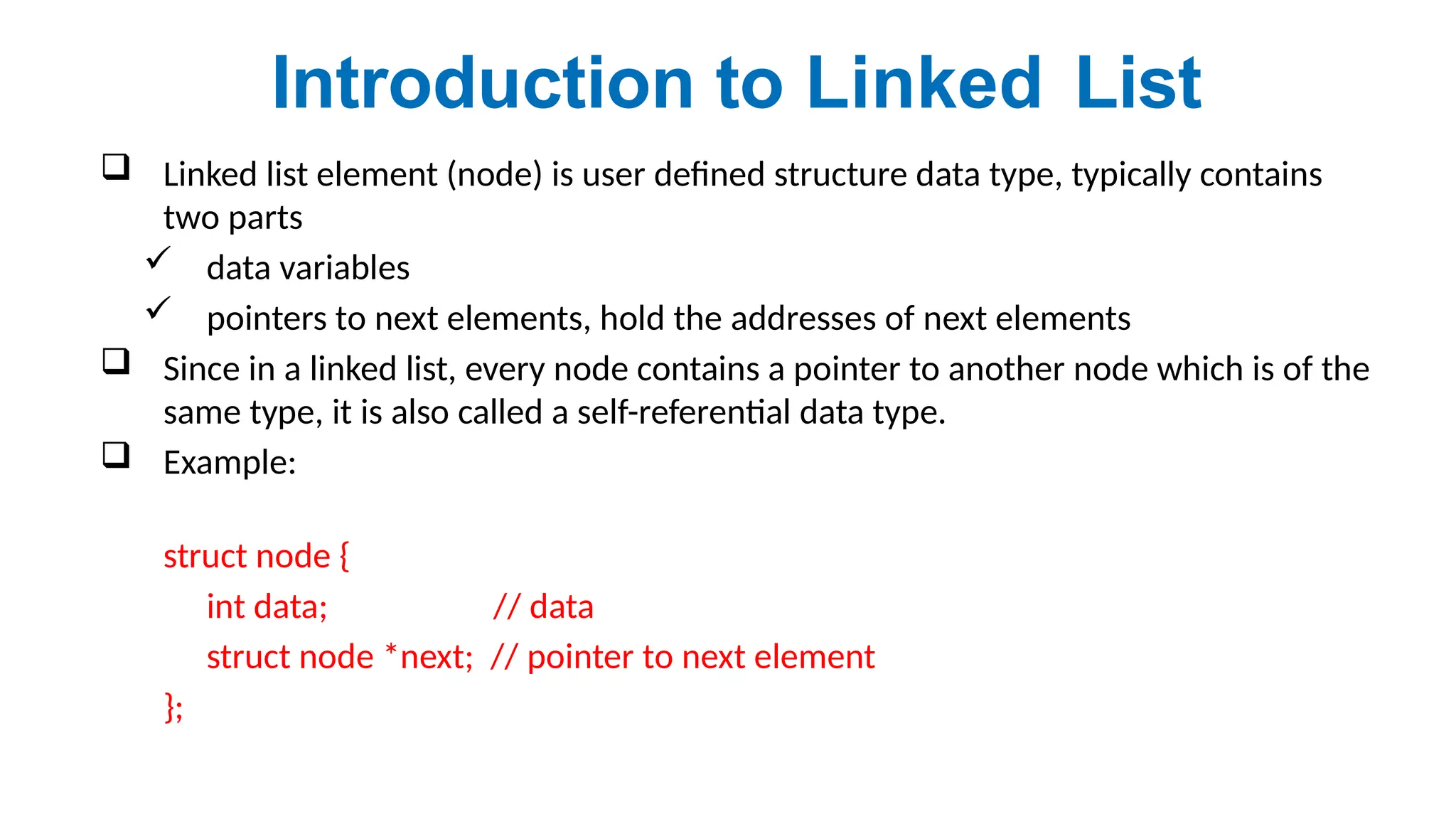
 Linked list element (node) is user defined structure data type, typically contains
two parts
 data variables
 pointers to next elements, hold the addresses of next elements
 Since in a linked list, every node contains a pointer to another node which is of the
same type, it is also called a self-referential data type.
 Example:
struct node {
int data; // data
struct node *next; // pointer to next element
};
Introduction to Linked List
Figure: Linked List Stored in Memory
HELLO
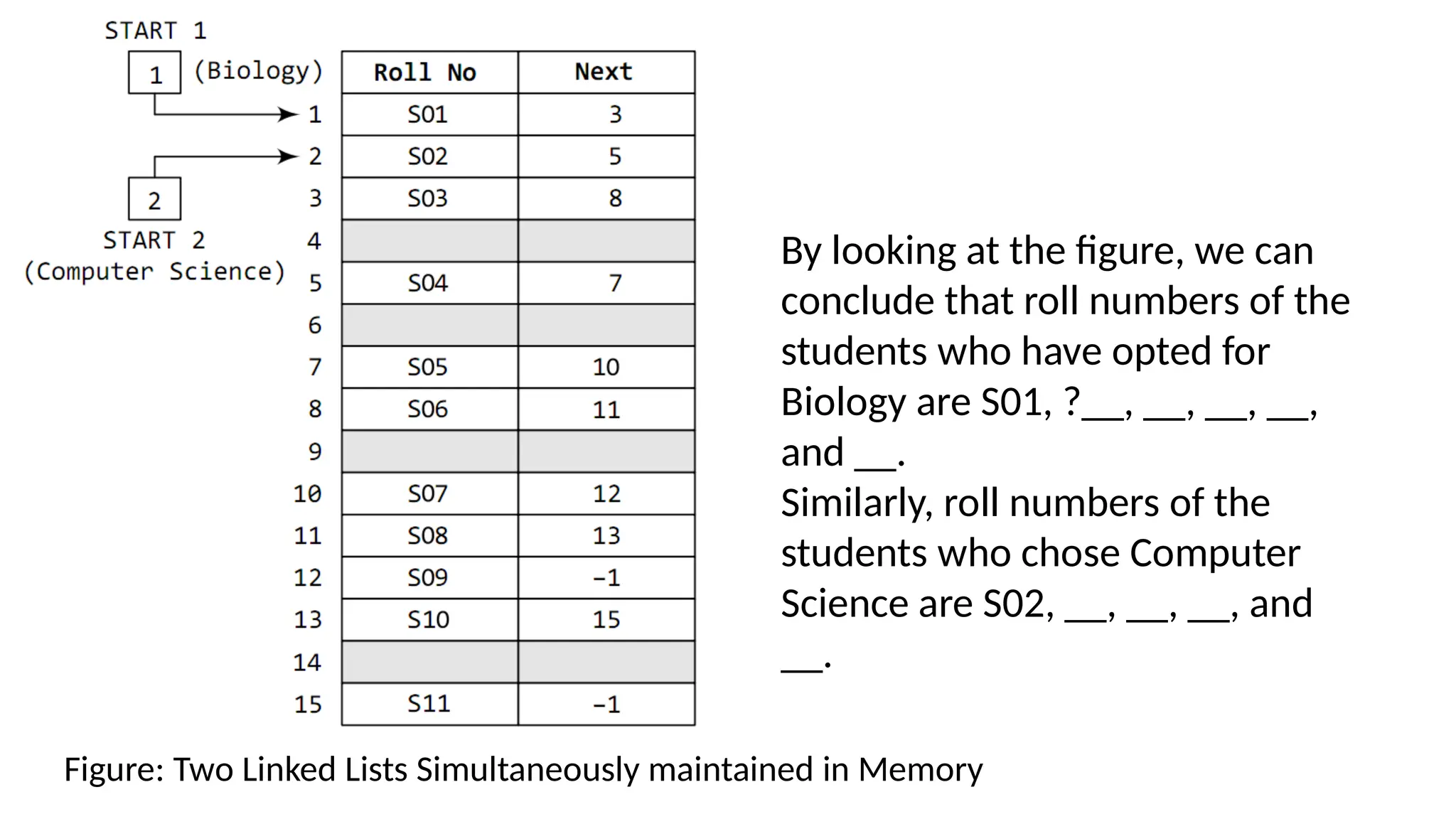
Figure: Two Linked Lists Simultaneously maintained in Memory
By looking at the figure, we can
conclude that roll numbers of the
students who have opted for
Biology are S01, ?__, __, __, __,
and __.
Similarly, roll numbers of the
students who chose Computer
Science are S02, __, __, __, and
__.
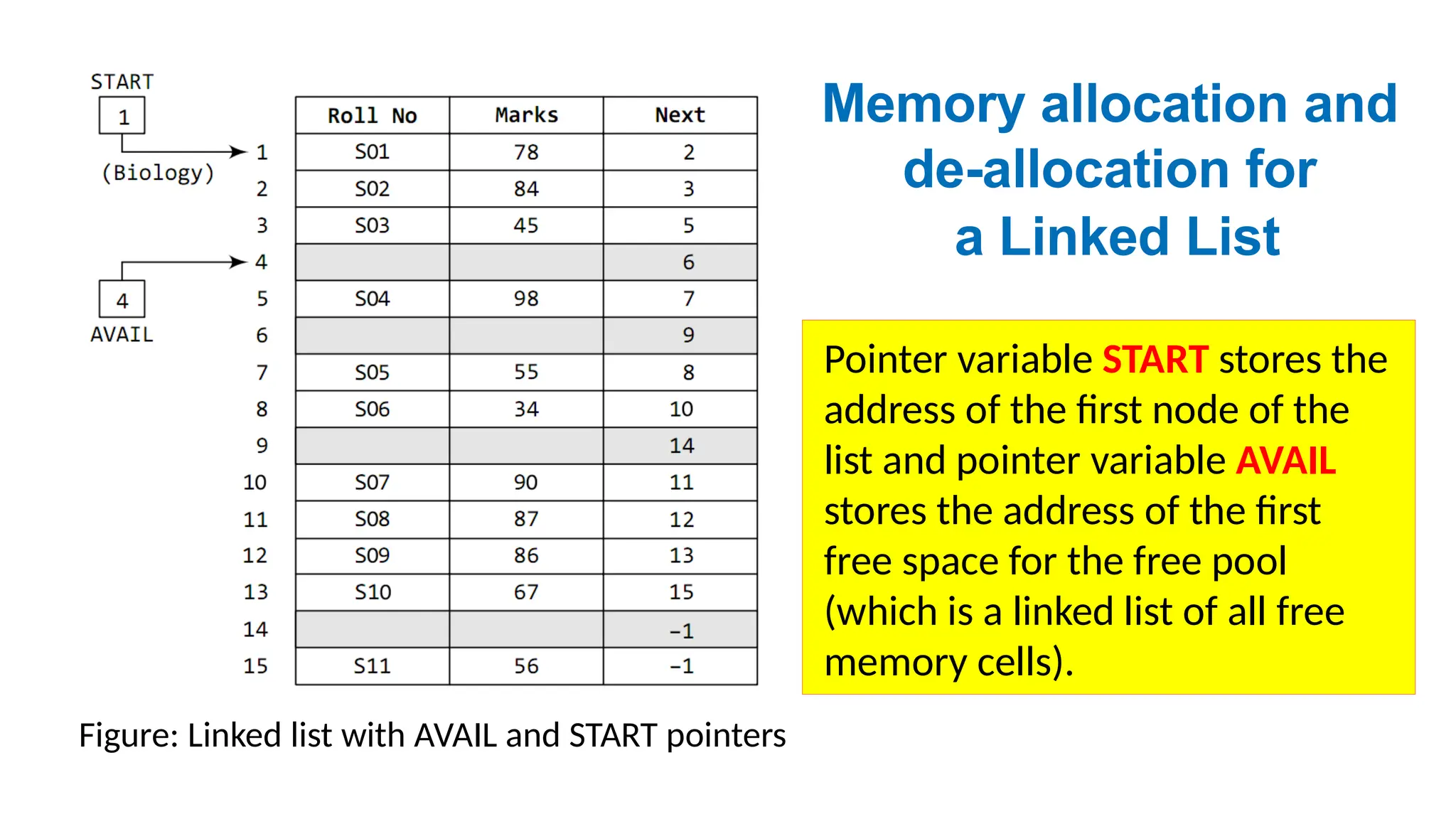
Figure: Linked list with AVAIL and START pointers
Pointer variable START stores the
address of the first node of the
list and pointer variable AVAIL
stores the address of the first
free space for the free pool
(which is a linked list of all free
memory cells).
Memory allocation and
de-allocation for
a Linked List
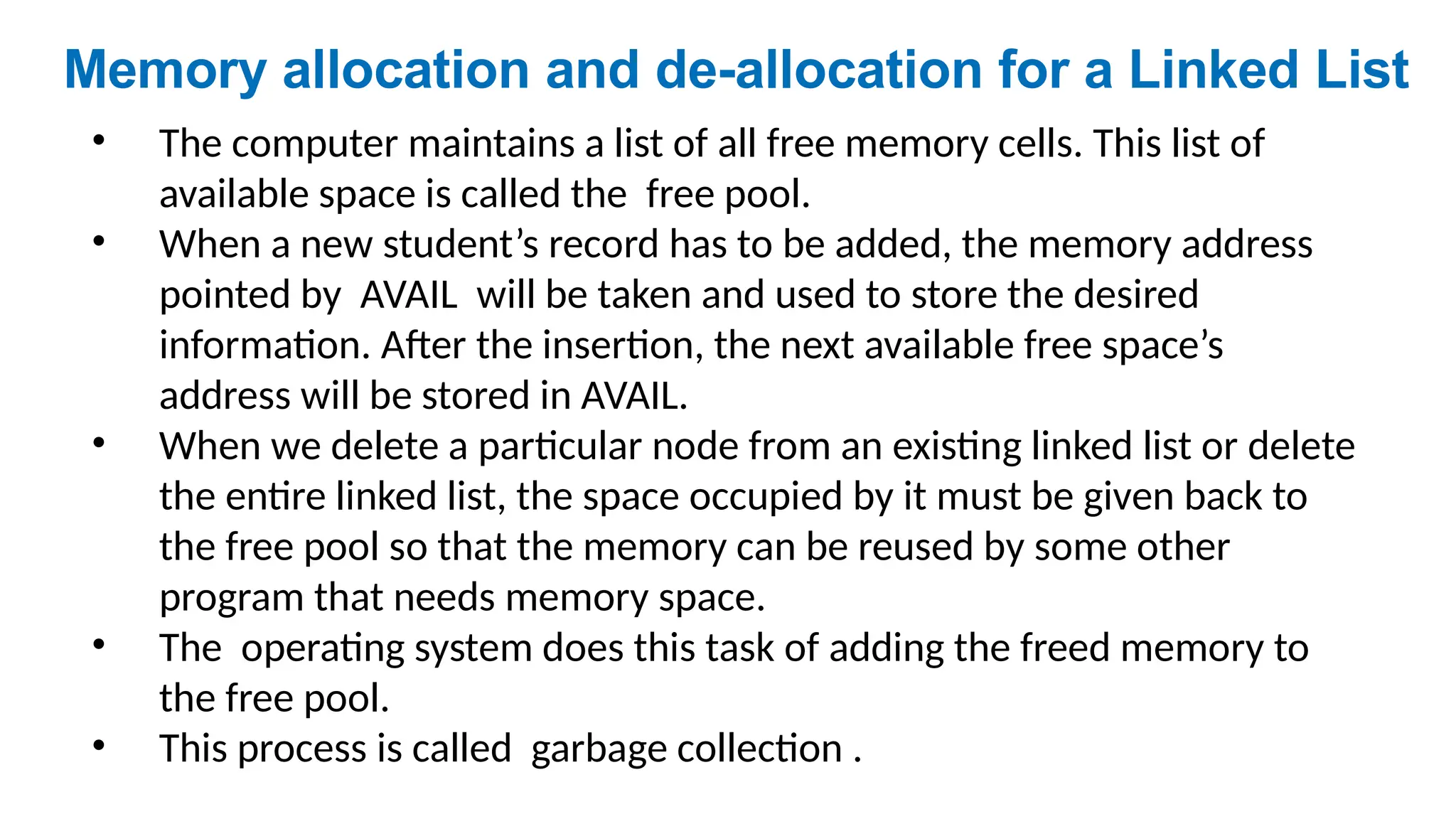
• The computer maintains a list of all free memory cells. This list of
available space is called the free pool.
• When a new student’s record has to be added, the memory address
pointed by AVAIL will be taken and used to store the desired
information. After the insertion, the next available free space’s
address will be stored in AVAIL.
• When we delete a particular node from an existing linked list or delete
the entire linked list, the space occupied by it must be given back to
the free pool so that the memory can be reused by some other
program that needs memory space.
• The operating system does this task of adding the freed memory to
the free pool.
• This process is called garbage collection .
Memory allocation and de-allocation for a Linked List
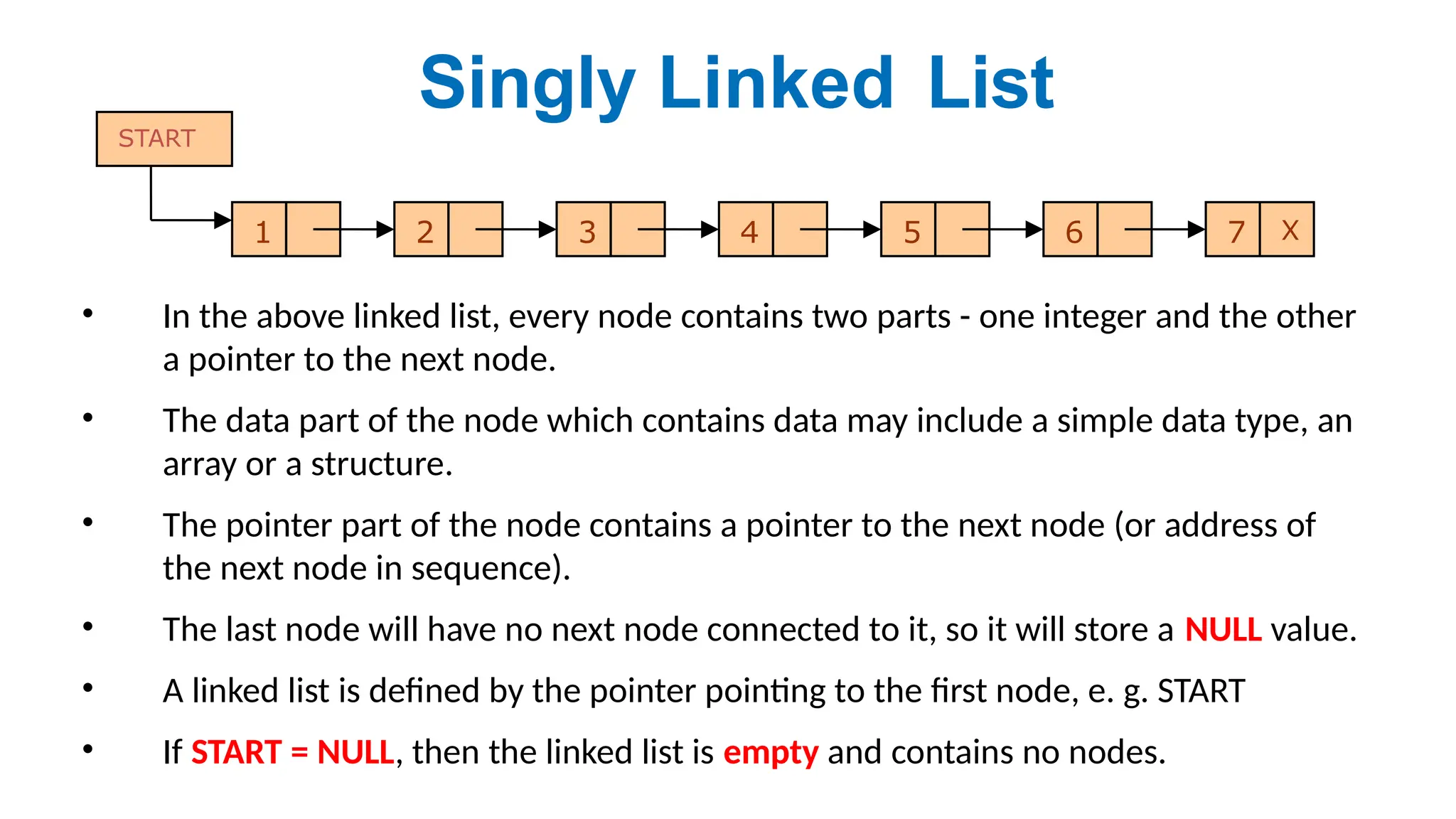
• In the above linked list, every node contains two parts - one integer and the other
a pointer to the next node.
• The data part of the node which contains data may include a simple data type, an
array or a structure.
• The pointer part of the node contains a pointer to the next node (or address of
the next node in sequence).
• The last node will have no next node connected to it, so it will store a NULL value.
• A linked list is defined by the pointer pointing to the first node, e. g. START
• If START = NULL, then the linked list is empty and contains no nodes.
Singly Linked List
1 2 3 4 5 6 7 X
START
Singly-Linked
List
head
7 10
4
13
hea
d
7 10 4 13
Node contains:
Key/Data
next pointer
Linked List Operations
1. Create a node and linked list
2. Traversal, e.g. display all elements
3. Search node
4. Insert node
at beginning, at end, after/before a node
5. Delete node
at beginning, at end, after/before a node
6. Sort
A node is a structure data type, can be created in
two methods, statically and dynamically.
• Static method
– use array of structures
– declared as globally outside functions
– declared locally within a function
• Dynamic method (mostly used for linked list)
– use stdlib function malloc(size) get memory space
struct node *np = (struct node*) malloc(sizeof(struct node));
1. How to create nodes
How to create nodes continued...
struct node *np = (struct node*) malloc(sizeof(struct node));
At run time, OS allocates consecutive sizeof(struct node)
bytes in the heap region,
return the address of the address of the first memory
cell,
store the address to struct node type pointer np.
Need (struct node*) to cast the return address to struct
node pointer value.
Need use free(np) to release when deleting the node!!!
Otherwise cause memory leaking
2. Traversing a Linked List
• We can traverse the entire linked list using a single pointer
variable called START.
• The START node contains the address of the first node; the next
part of the first node in turn stores the address of its
succeeding node.
• Using this technique the individual nodes of the list will form a
chain of nodes.
• If START = NULL, this means that the linked list is empty and
contains no nodes.
• For traversing the linked list, we also make use of another pointer variable PTR which
points to the node that is currently being accessed.
• Here processing an element may even be simply printing it.
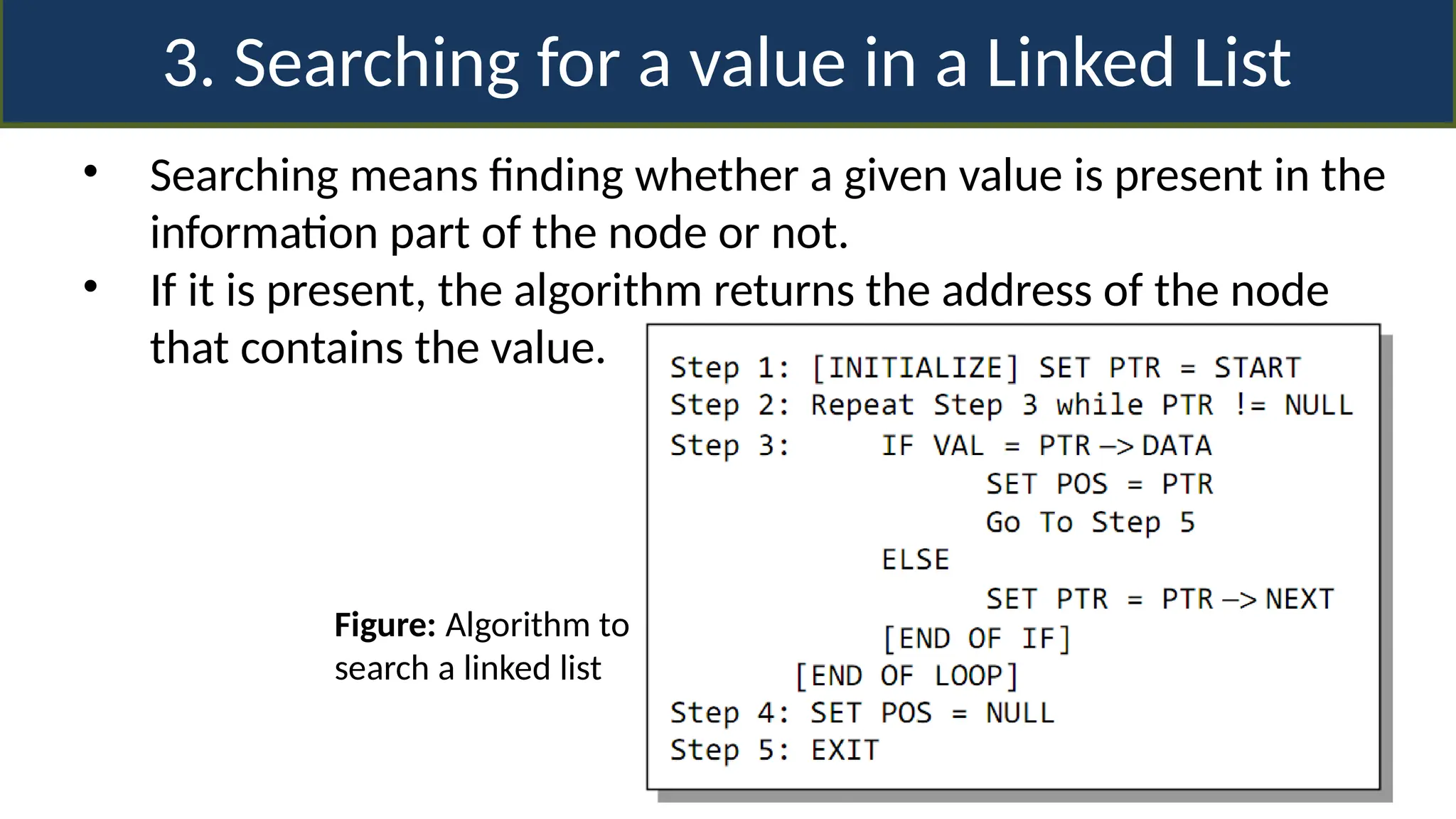
3. Searching for a value in a Linked List
• Searching means finding whether a given value is present in the
information part of the node or not.
• If it is present, the algorithm returns the address of the node
that contains the value.
Figure: Algorithm to
search a linked list
4. Inserting a new node in a Linked List
• How a new node is added into an already existing
linked list?
• Four cases: -
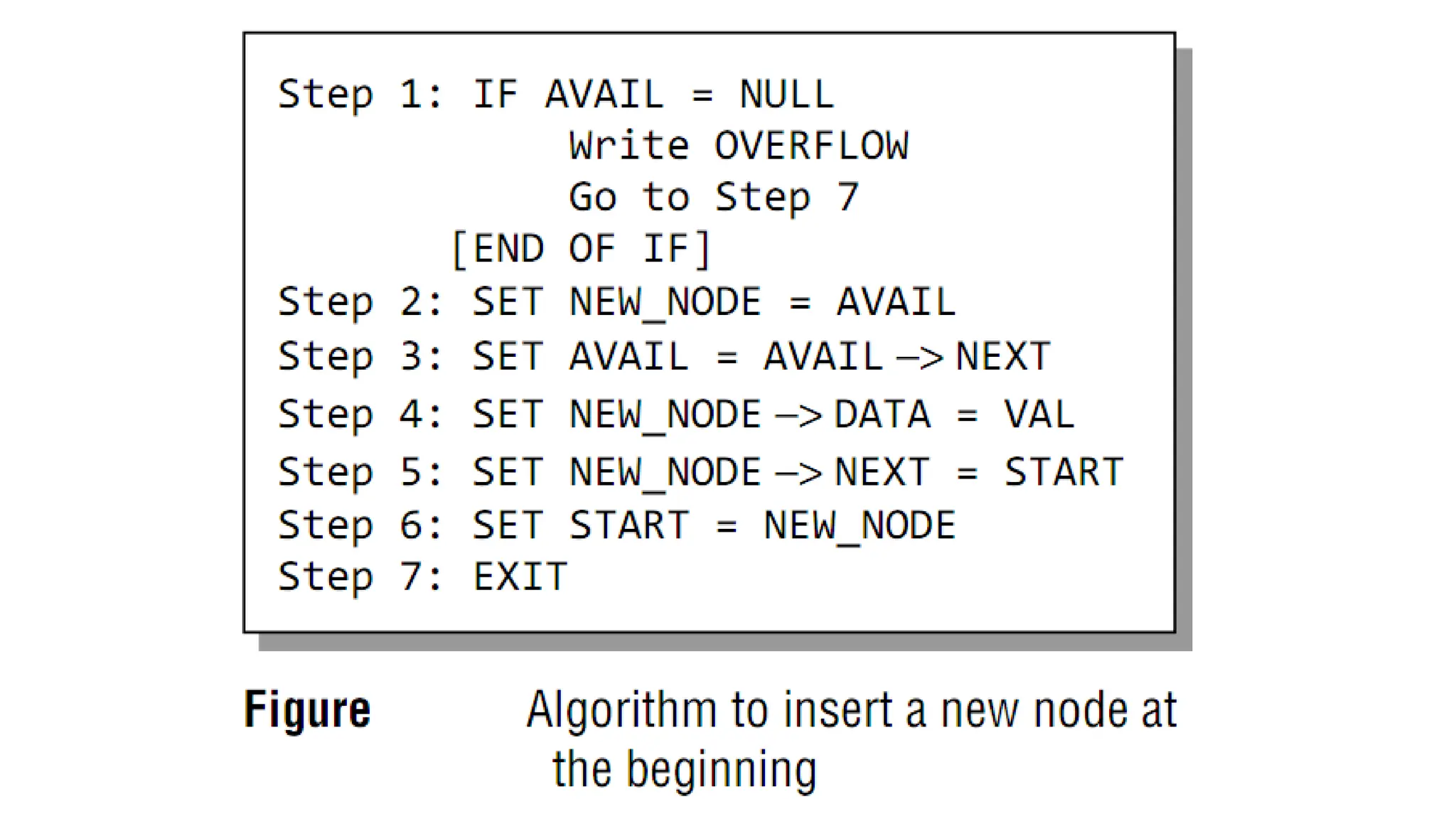
 Case 1: The new node is inserted at the beginning. (PushFront)
 Case 2: The new node is inserted at the end.
 Case 3: The new node is inserted after a given node.
 Case 4: The new node is inserted before a given node.
Case1: The new node is inserted at the beginning.
hea
d
7 10 4 13
PushFro
nt
PushFro
nt
hea
d
7 10 4 13
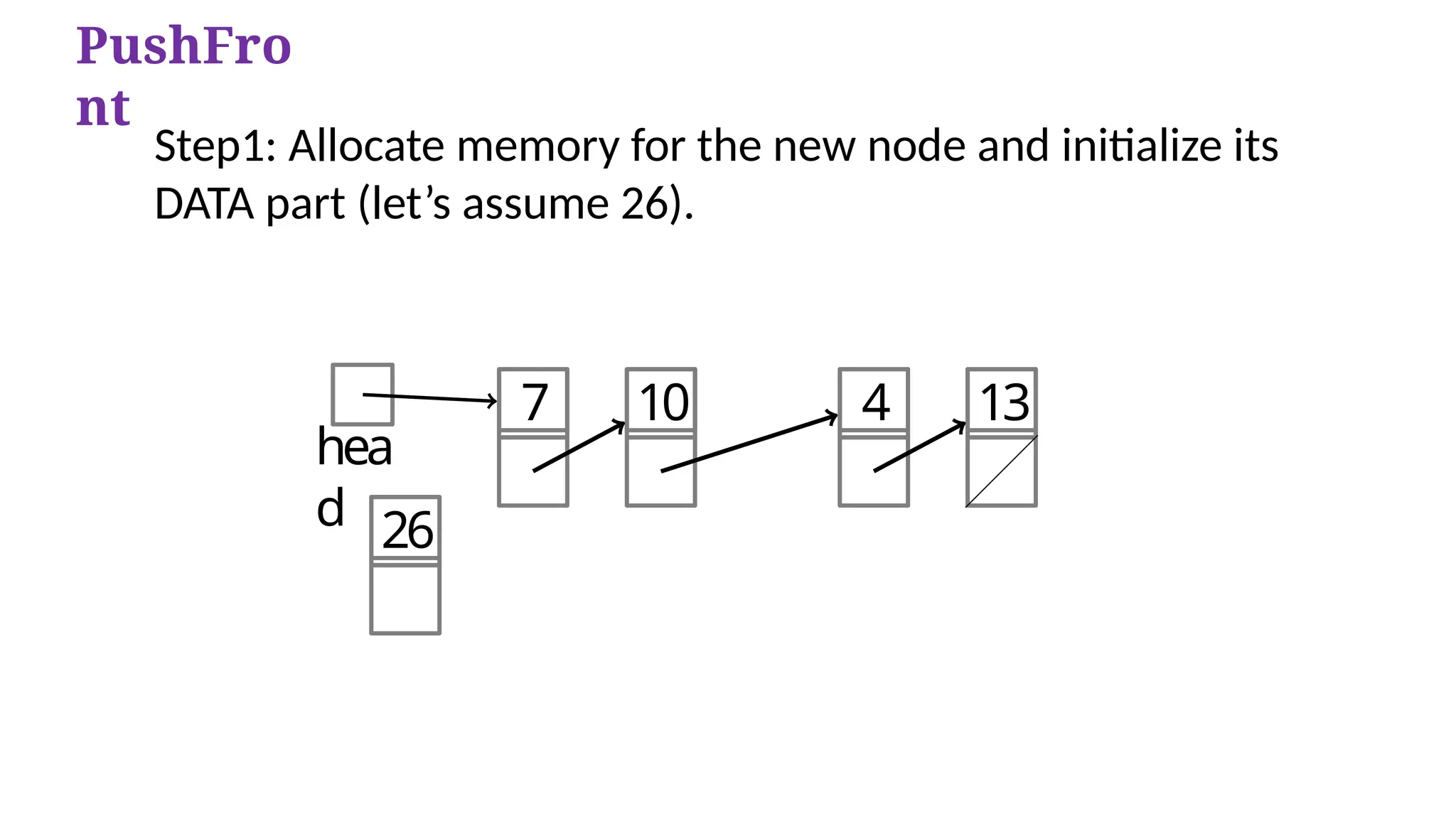
26
Step1: Allocate memory for the new node and initialize its
DATA part (let’s assume 26).
PushFro
nt
hea
d
7 10 4 13
26
Step 2: Add the new node as the first node of the list by making the
NEXT part of the new node contain the address of START.
PushFront time complexity
O(1)
hea
d
7 10 4 13
26
PushFro
nt
Step 3: Now make HEAD/START to point to the first node of the list.
OVERFLOW IN LINKED LISTS
Overflow is a condition that occurs when AVAIL = NULL or
no free memory cell is present in the system.
Complete Example of PushFront
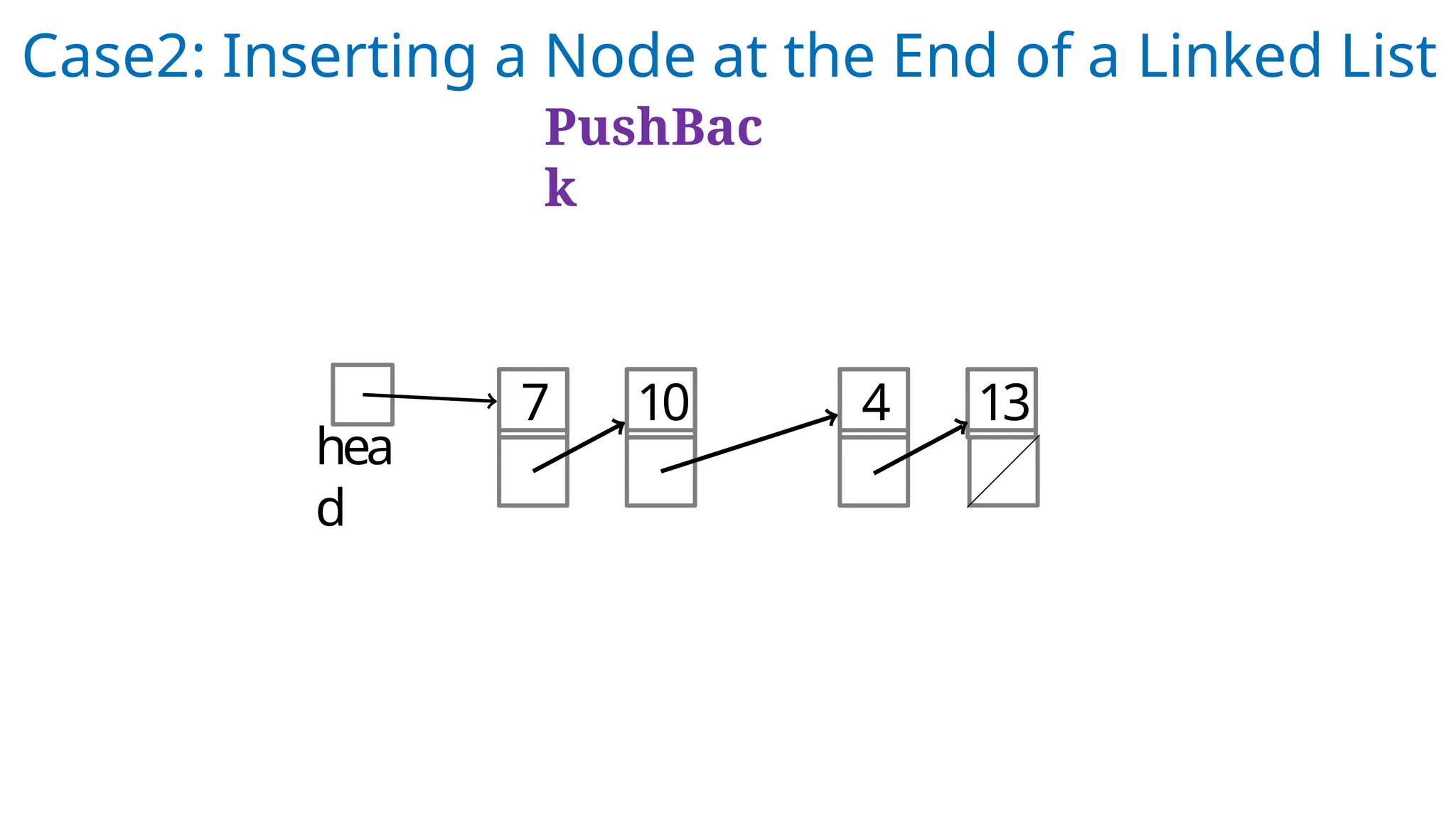
Case2: Inserting a Node at the End of a Linked List
PushBac
k
hea
d
7 10 4 13
hea
d
7 10 4 13
8
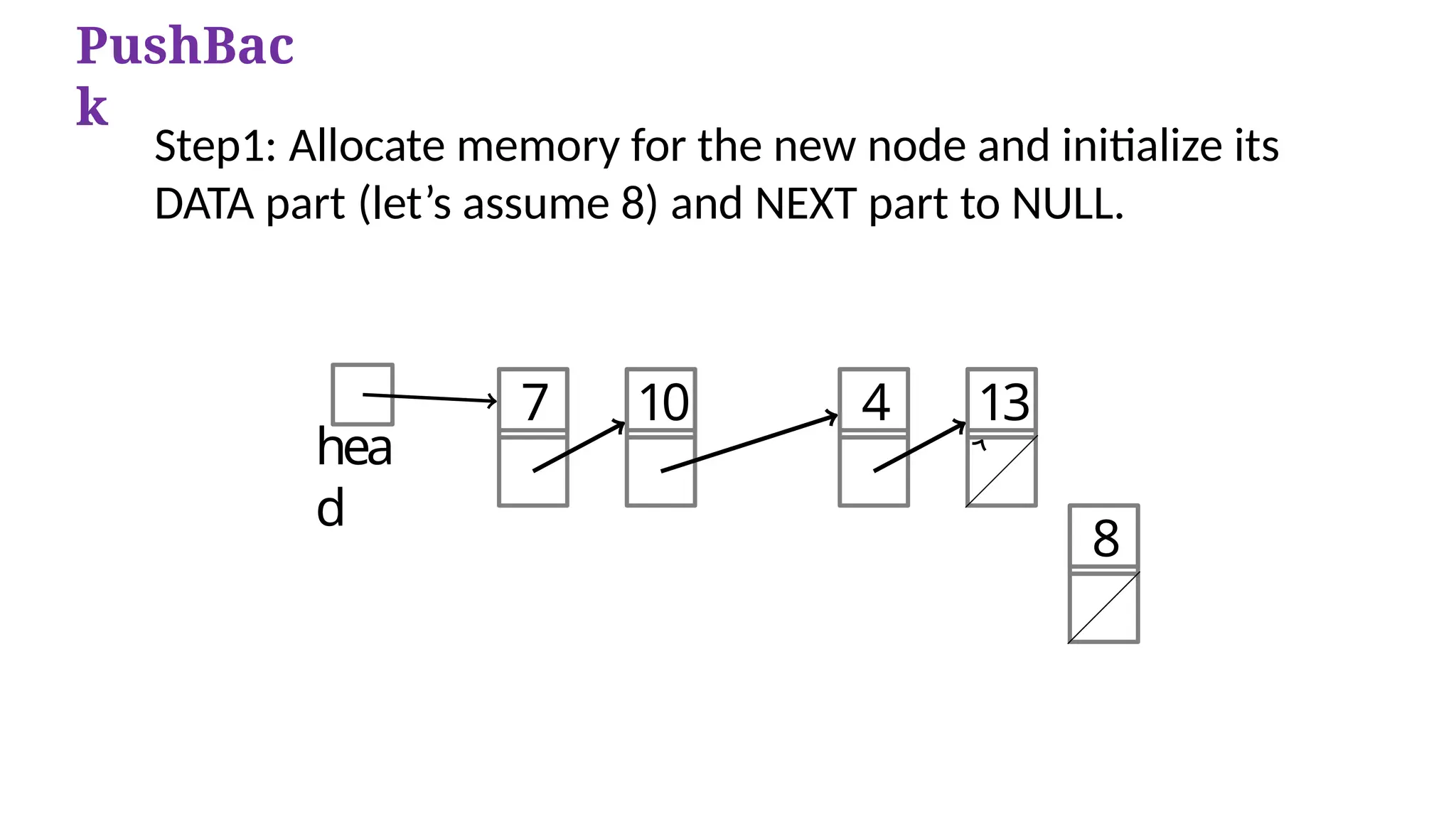
PushBac
k
Step1: Allocate memory for the new node and initialize its
DATA part (let’s assume 8) and NEXT part to NULL.
Head /
Start
7 10 4 13
8
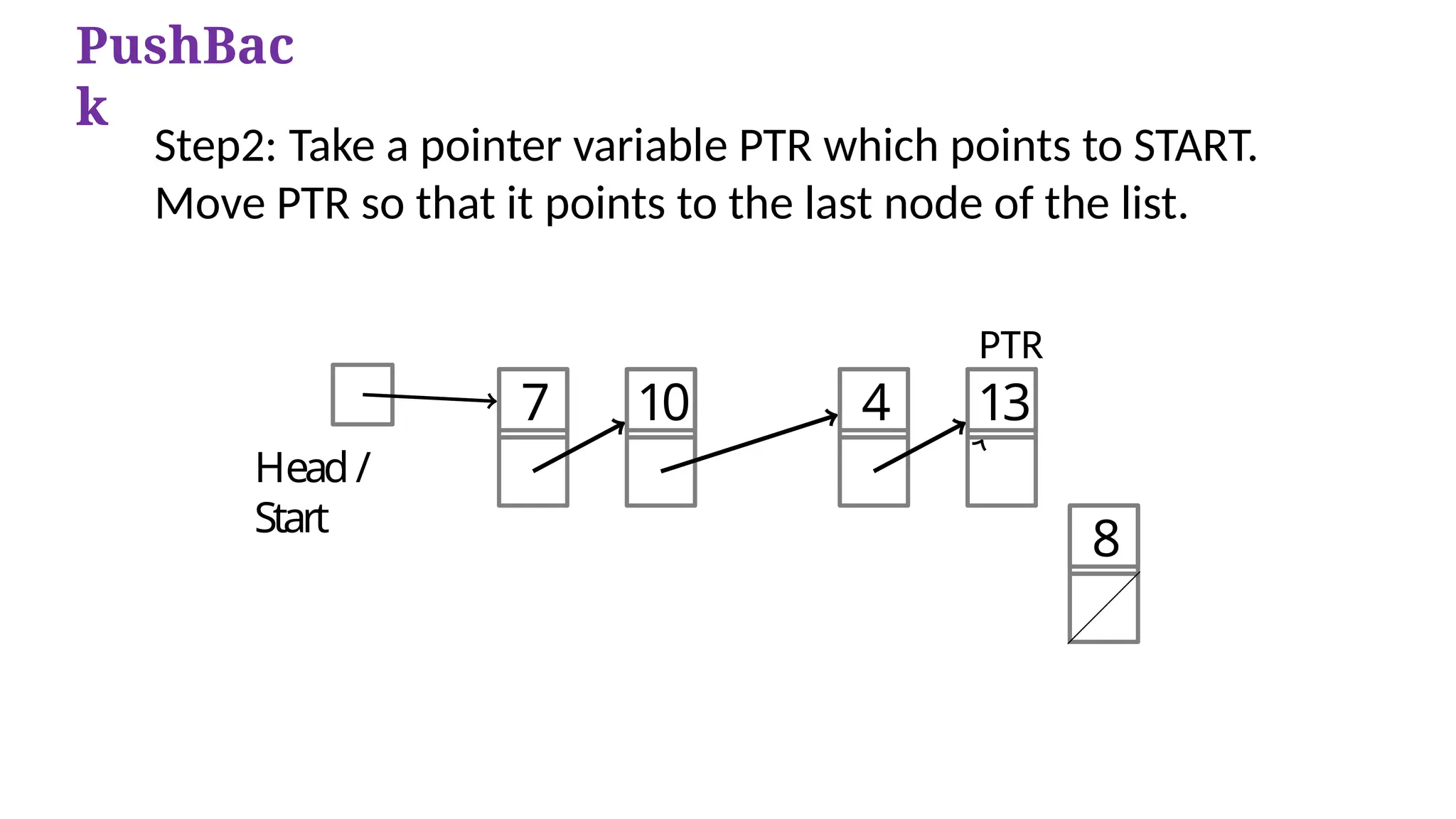
PushBac
k
Step2: Take a pointer variable PTR which points to START.
Move PTR so that it points to the last node of the list.
PTR
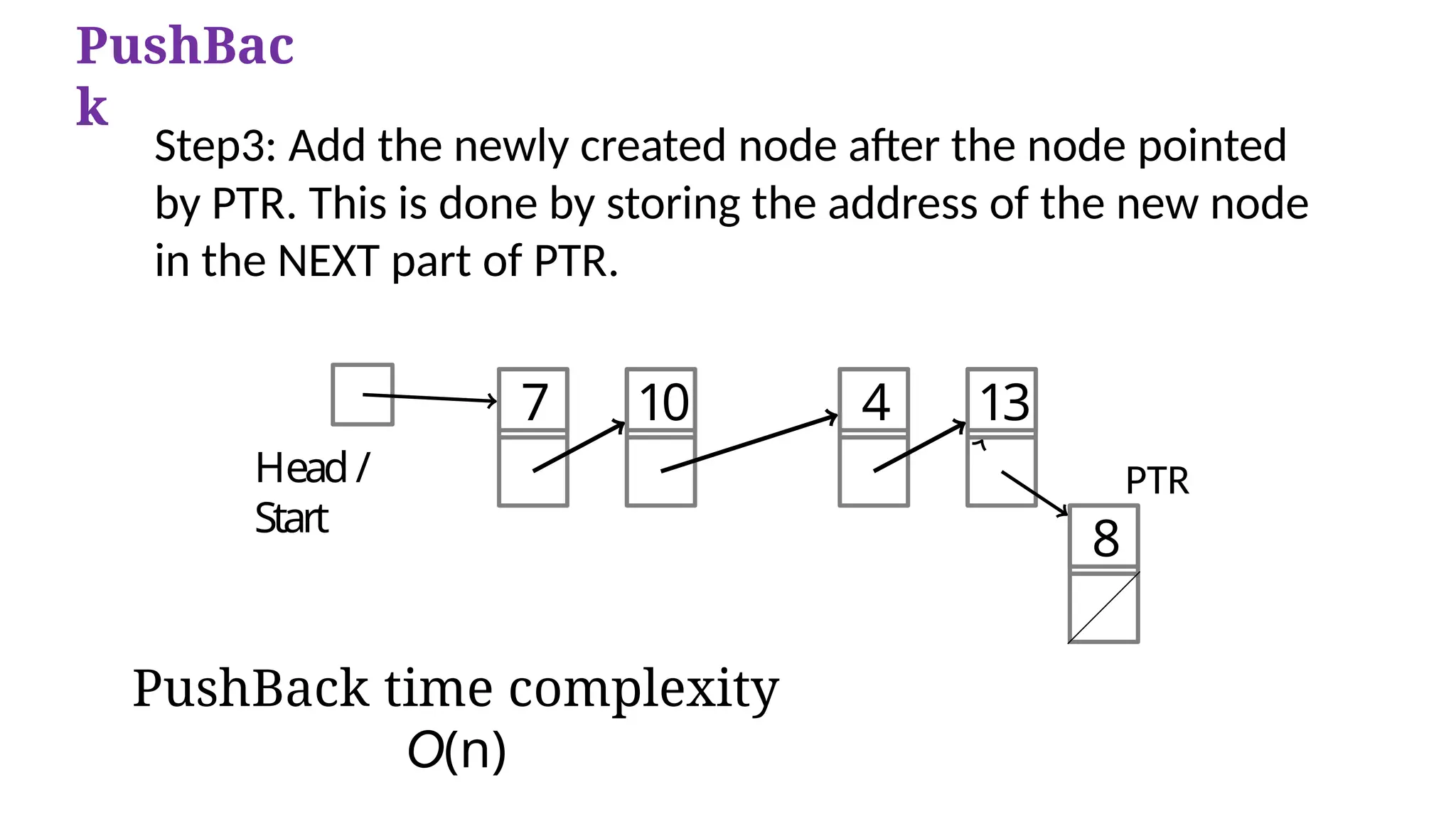
PushBack time complexity
O(n)
Head /
Start
7 10 4 13
8
PTR
PushBac
k
Step3: Add the newly created node after the node pointed
by PTR. This is done by storing the address of the new node
in the NEXT part of PTR.
Case 3: The new node is inserted after a given
node.
PushAfter 3
PushAfter
Step1: Allocate memory for the new node and initialize its
DATA part to 9.
PushAfter
Step2: Take two pointer variables PTR and PREPTR and initialize
them with START so that START, PTR, and PREPTR point to the
first node of the list.
PushAfter
Step3: Move PTR and PREPTR until the
DATA part of PREPTR= value of the node after which insertion
has to be done.
PREPTR will always point to the node just before PTR.
PushAfter
Step4: Add the new node in between the nodes pointed by
PREPTR and PTR.
PushAfter time complexity O(n)
PushAfter
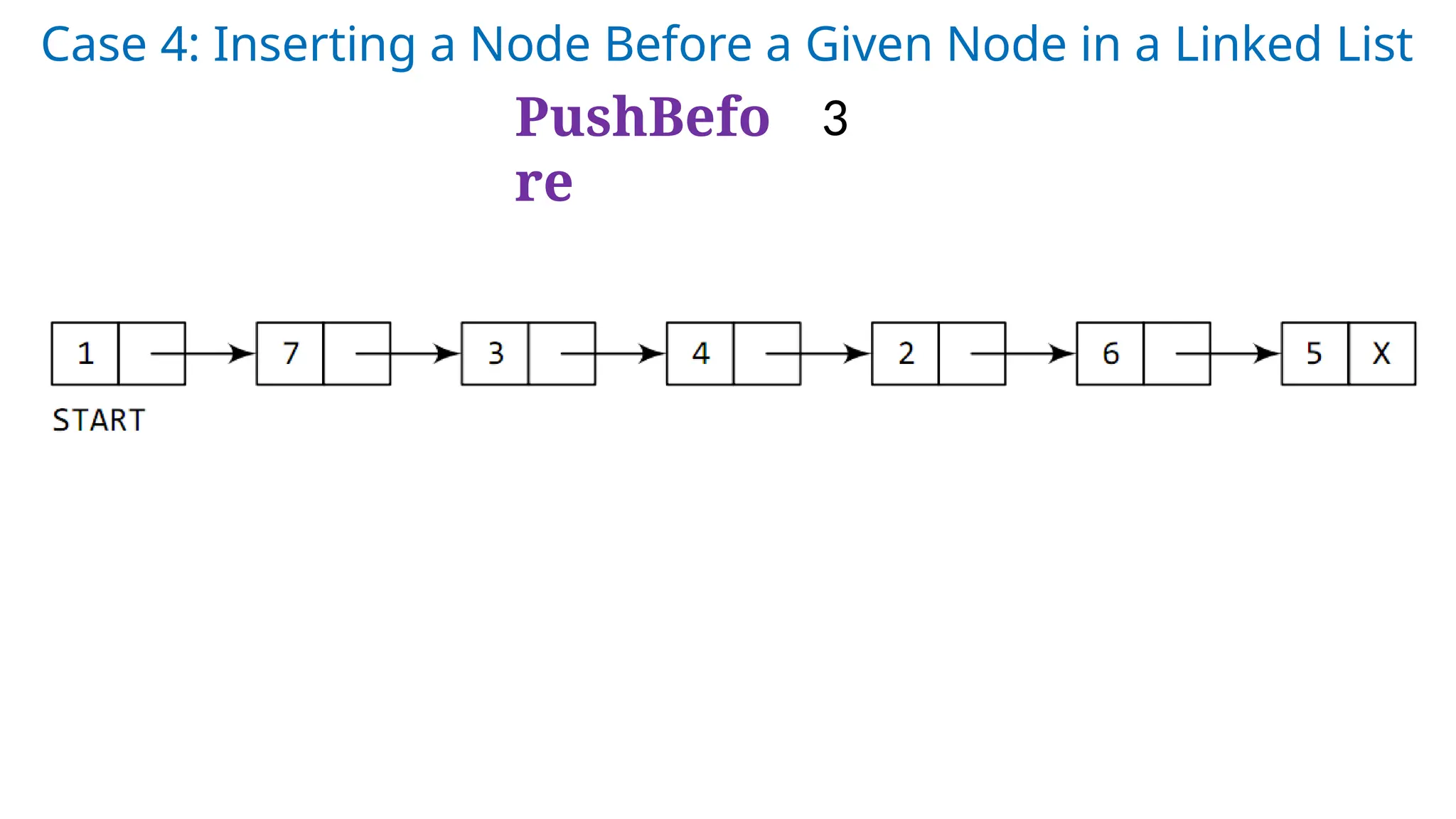
Case 4: Inserting a Node Before a Given Node in a Linked List
PushBefo
re
3
Step 1: Allocate memory for the new node and initialize its DATA
part to 9.
PushBefo
re
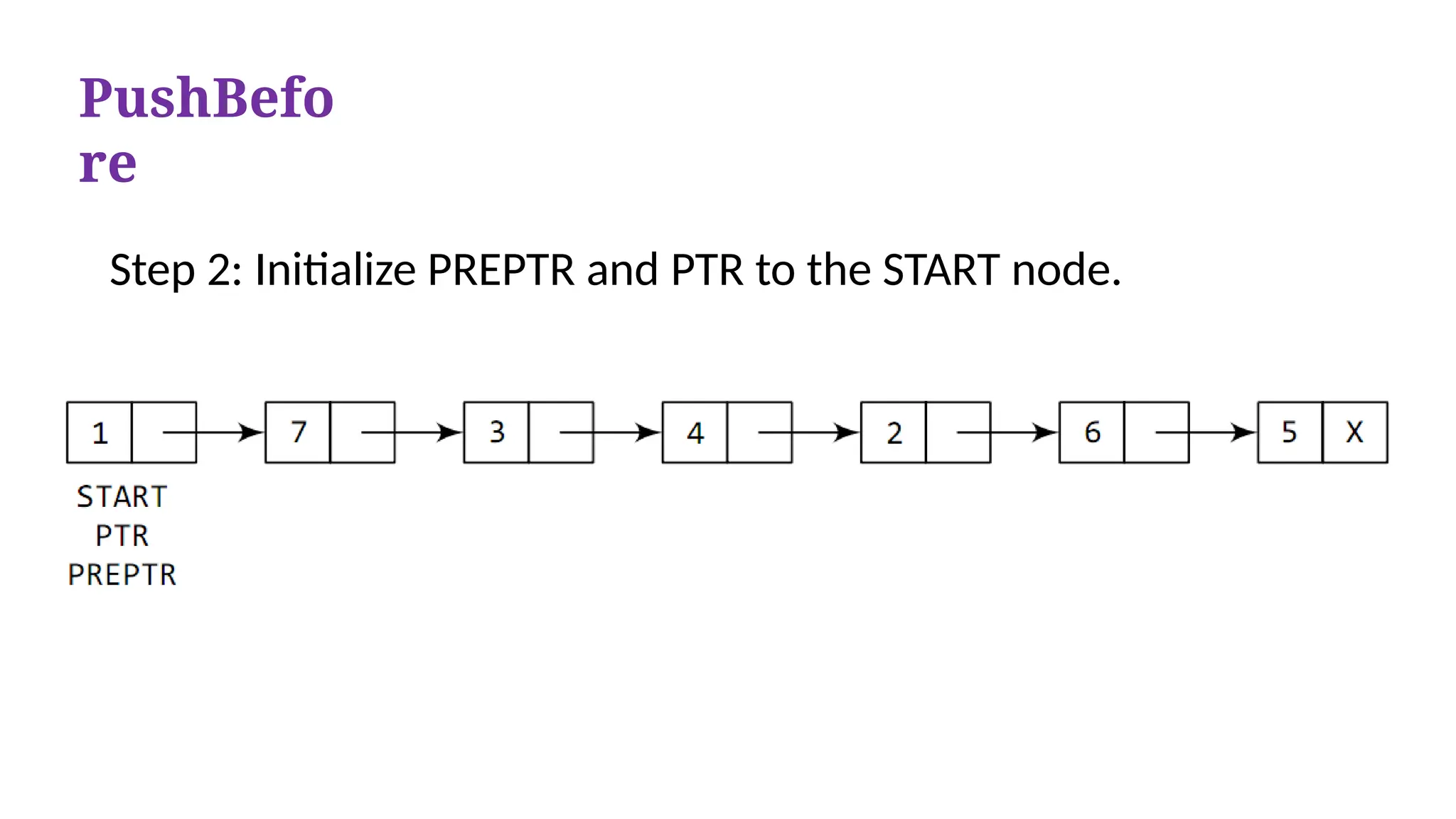
Step 2: Initialize PREPTR and PTR to the START node.
PushBefo
re
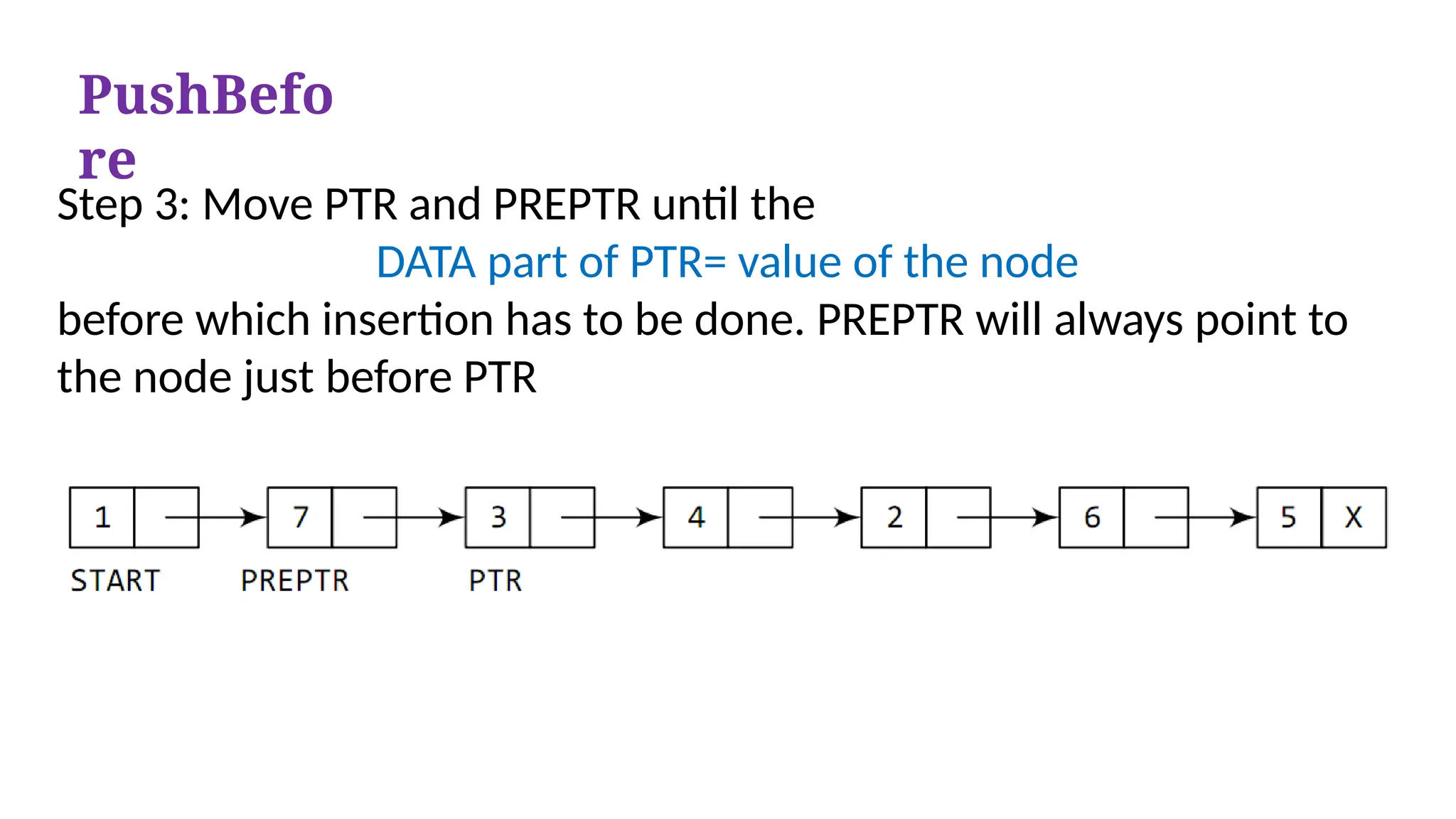
Step 3: Move PTR and PREPTR until the
DATA part of PTR= value of the node
before which insertion has to be done. PREPTR will always point to
the node just before PTR
PushBefo
re
Step 4: Insert the new node in between the nodes pointed by
PREPTR and PTR
PushBefo
re
PushBefore time complexity O(n)
PushBefor
e
PushBefo
re
PushAfter
comparison
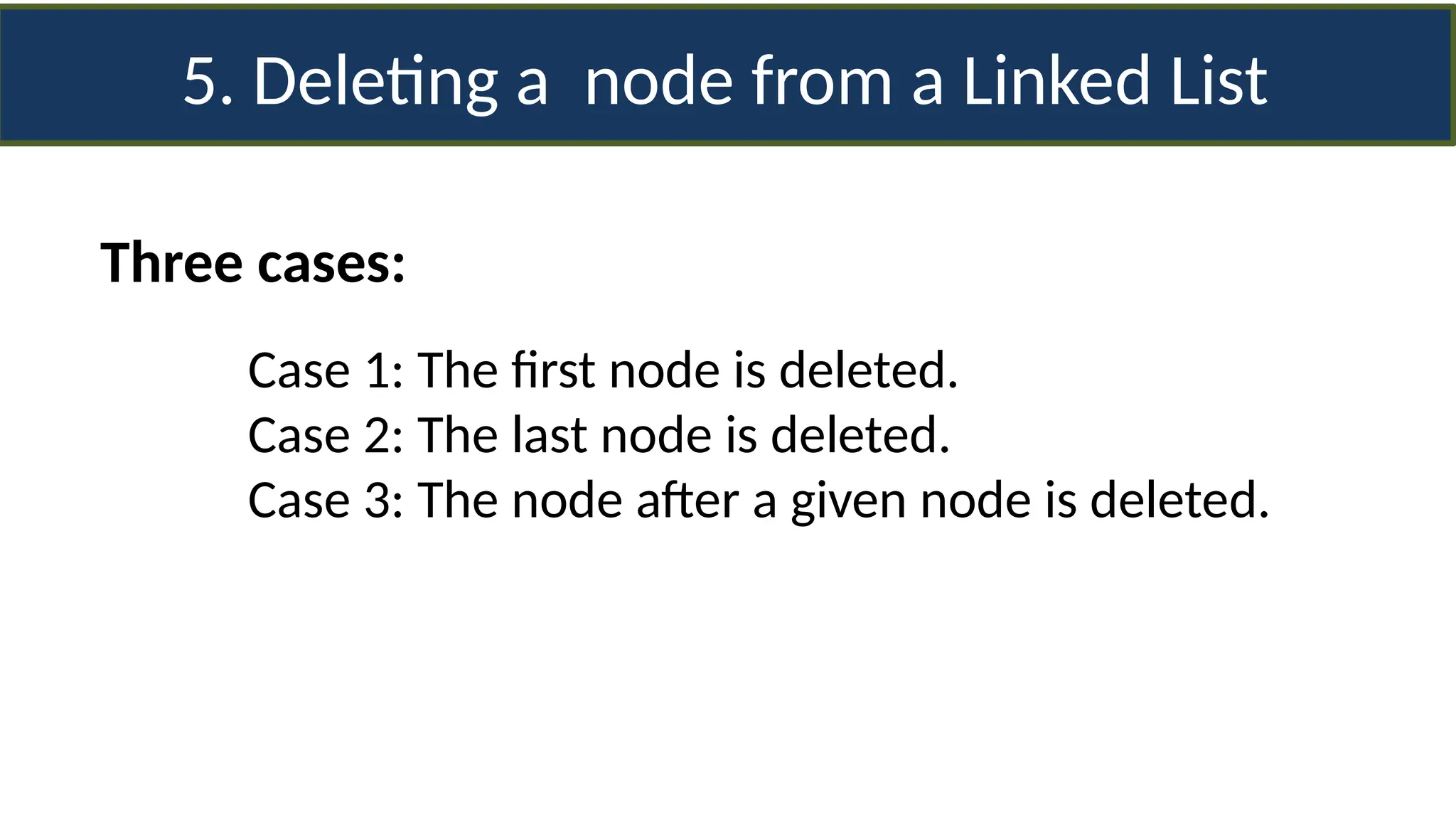
5. Deleting a node from a Linked List
Three cases:
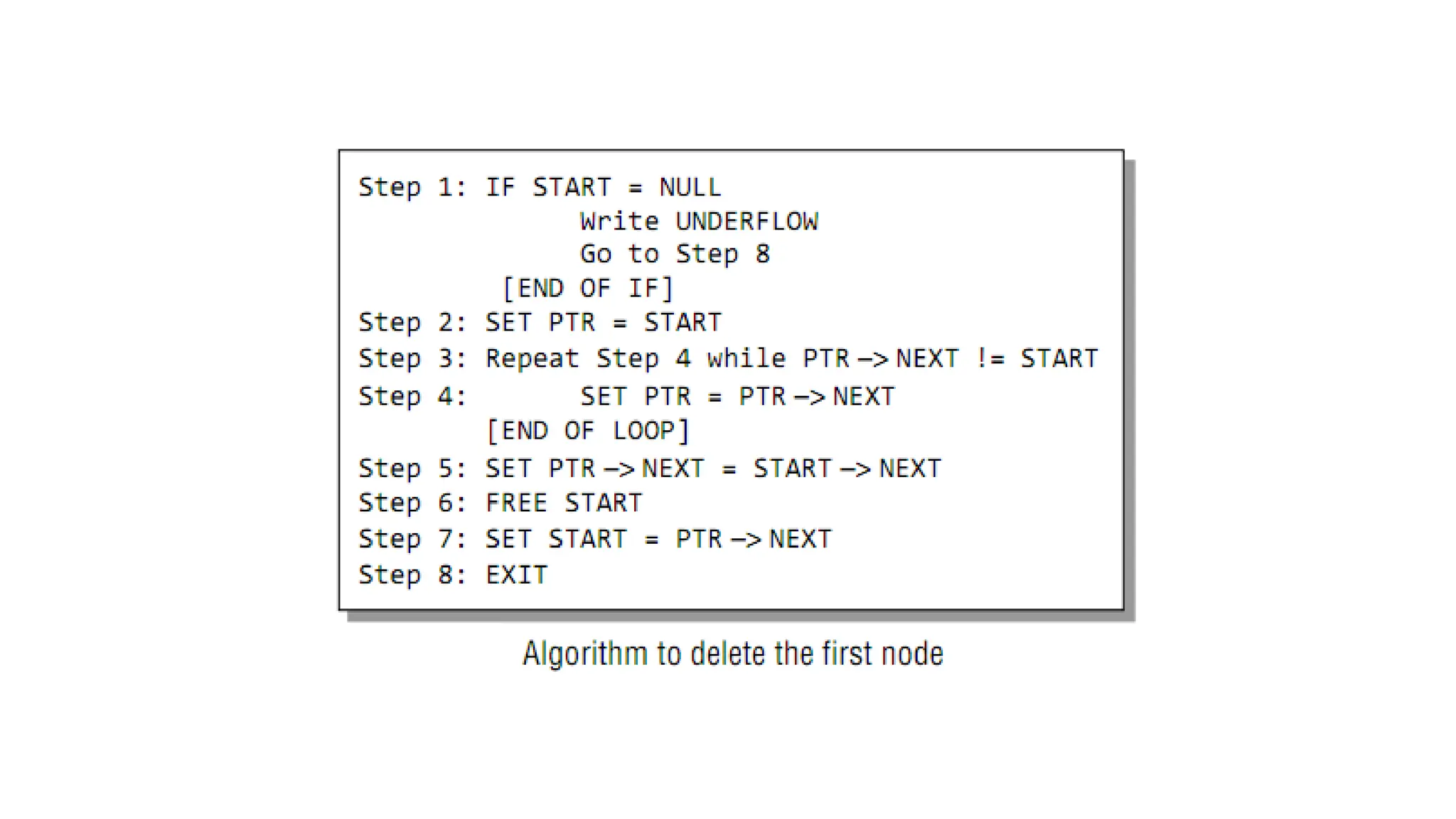
Case 1: The first node is deleted.
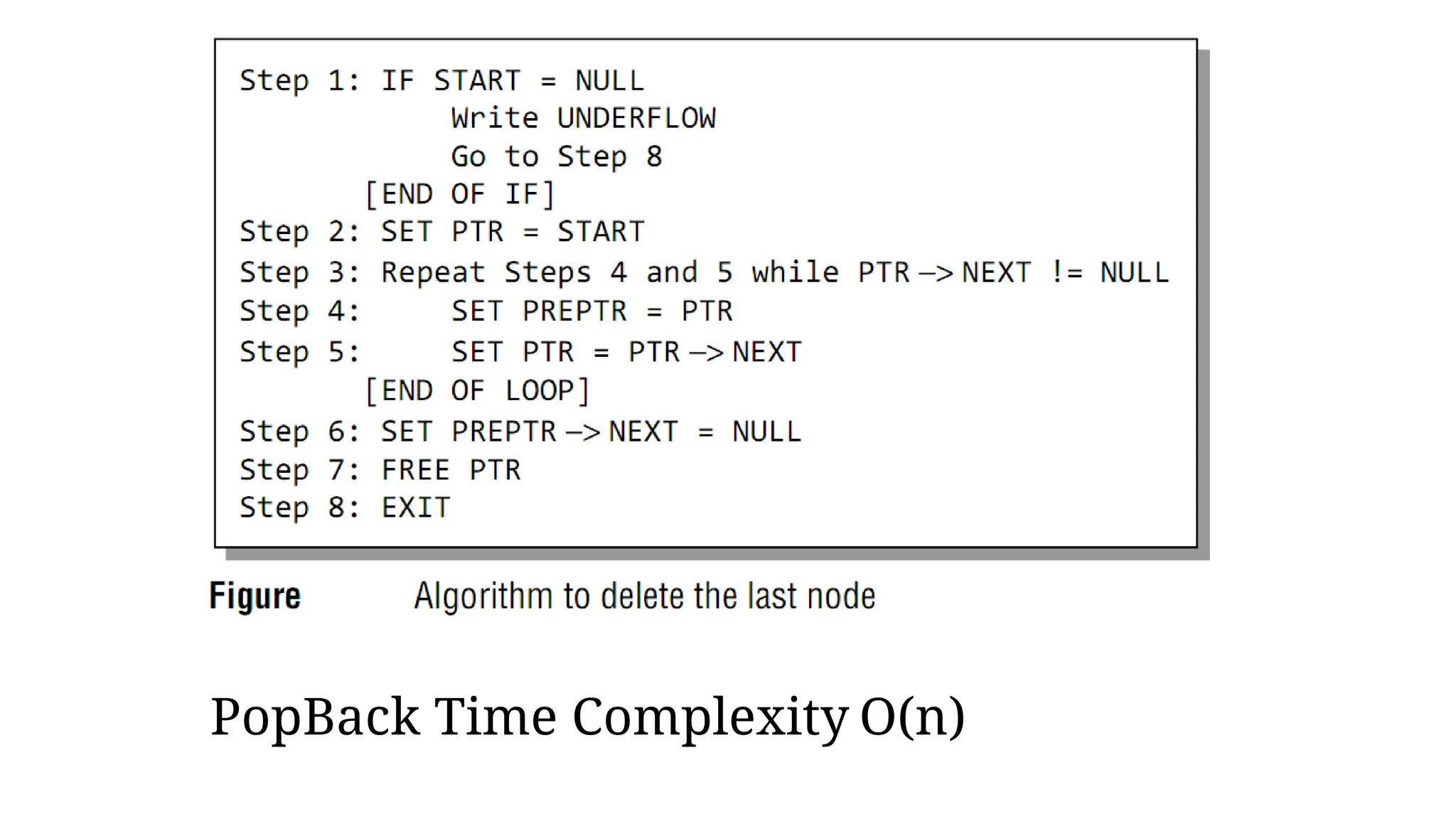
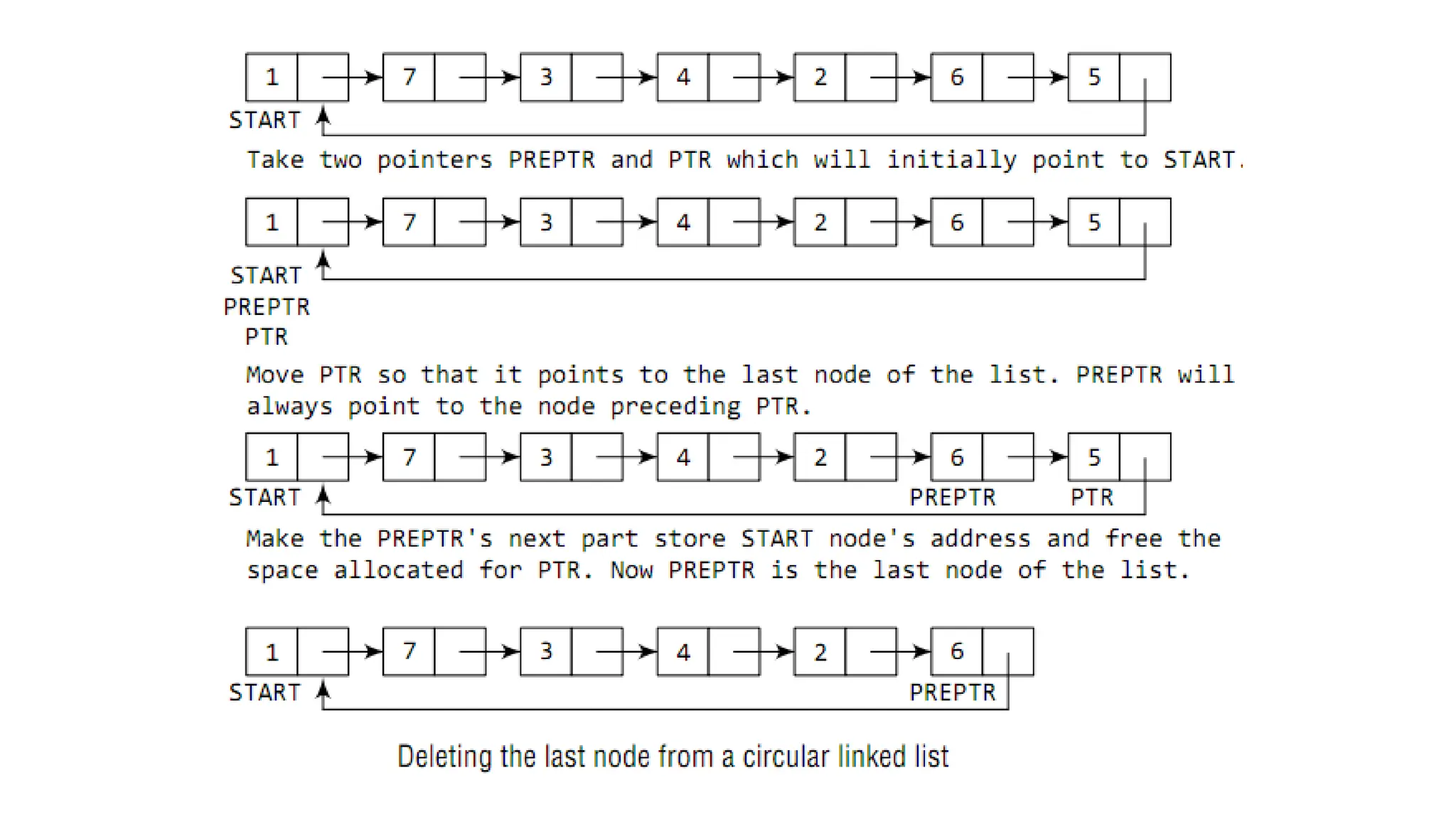
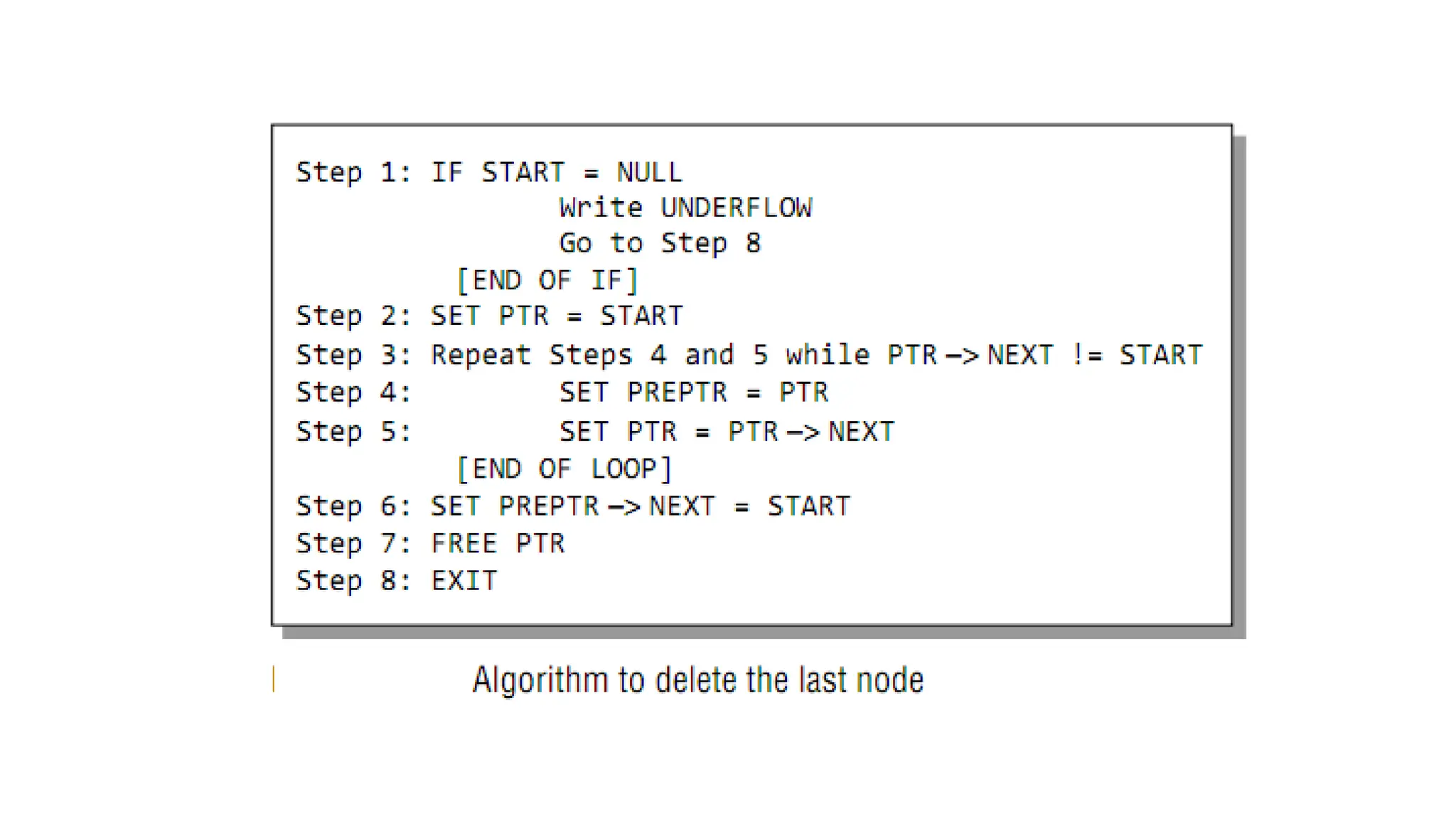
Case 2: The last node is deleted.
Case 3: The node after a given node is deleted.
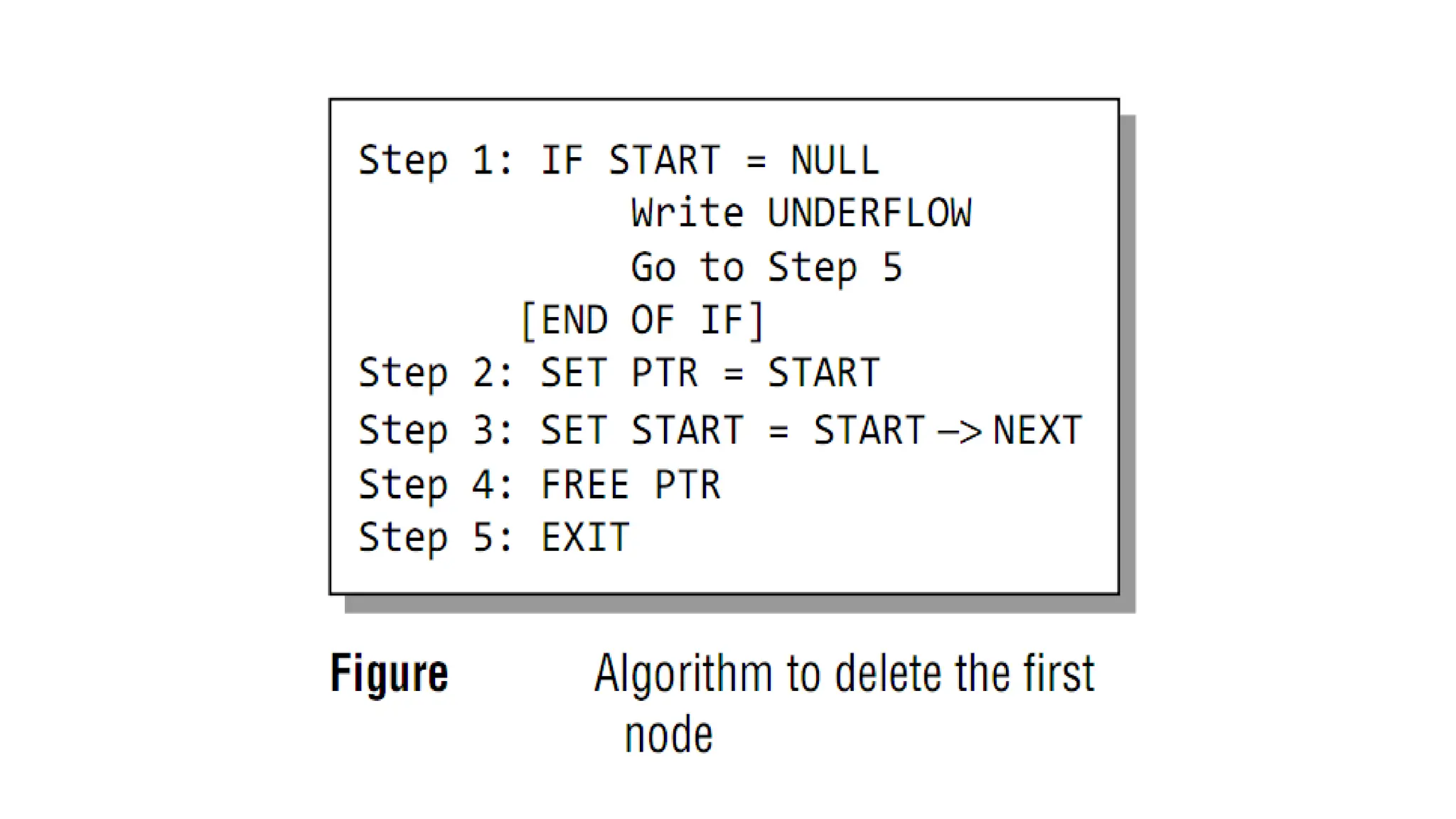
• Underflow is a condition that occurs when we try to delete a
node from a linked list that is empty.
• This happens when START = NULL or when there are no more
nodes to delete.
• When a node is deleted from a linked list, the memory occupied
by that node will be freed up.
• The memory is returned to the free pool so that it can be used to
store other programs and data.
• Whatever be the case of deletion, the AVAIL pointer is always
changed so that it points to the address that has been recently
vacated.
UNDERFLOW IN LINKED LISTS
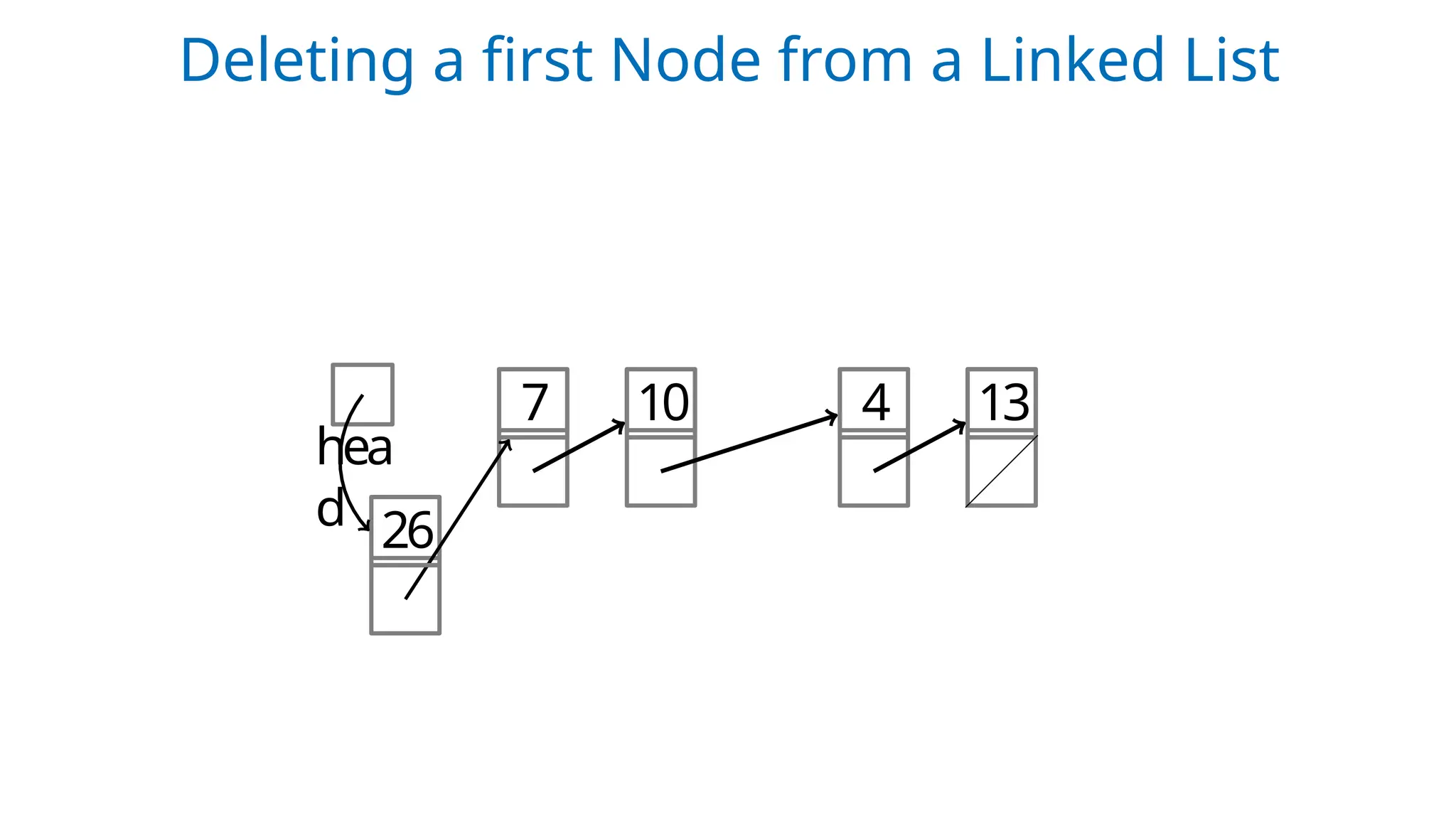
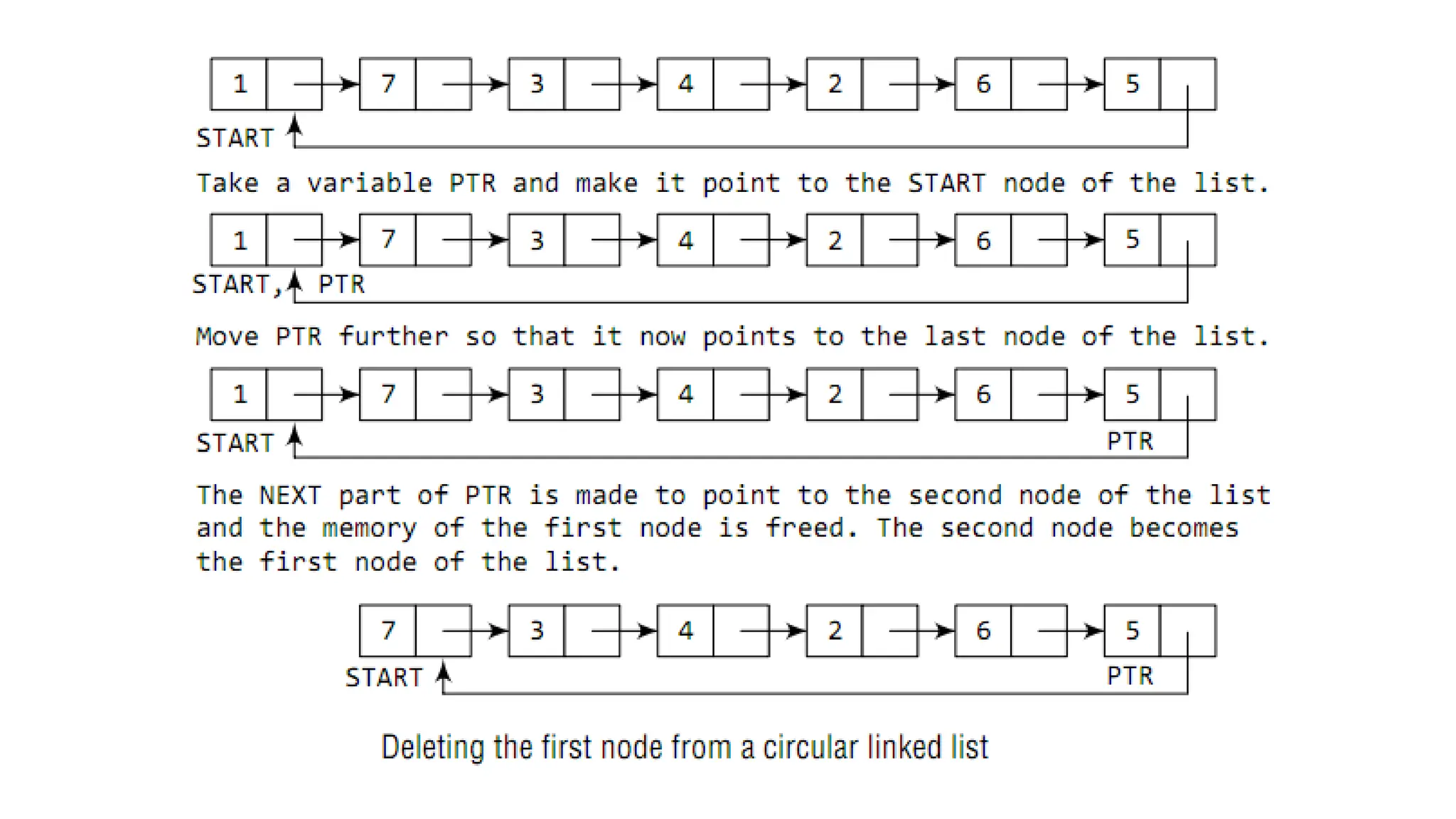
Case 1: Deleting the First Node from a Linked List
hea
d
7 10 4 13
26
Deleting a first Node from a Linked List
hea
d
7 10 4 13
26
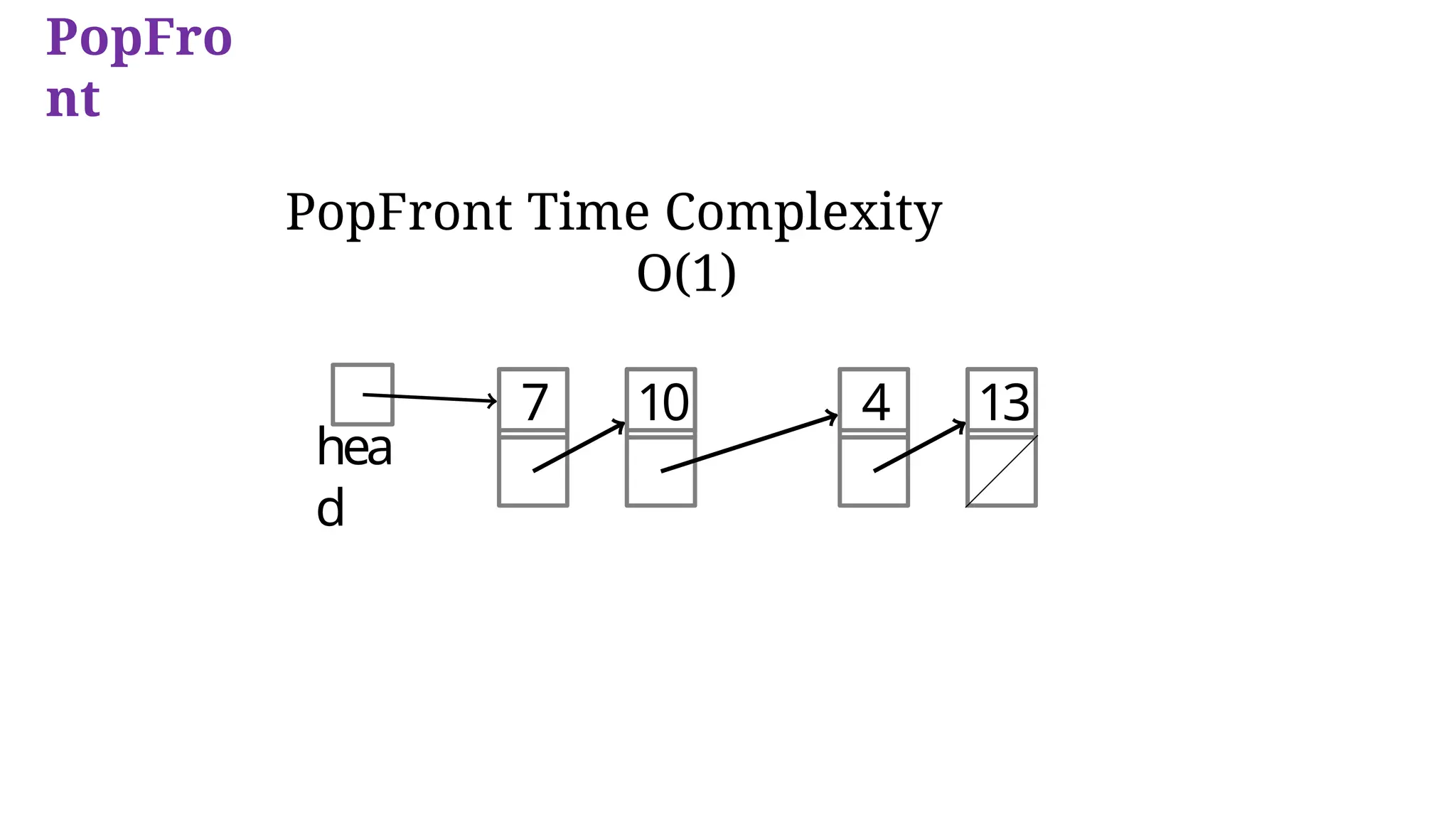
PopFro
nt
PopFront Time Complexity
O(1)
hea
d
7 10 4 13
PopFro
nt
Case 2: Deleting the Last Node from a Linked List
1
2
3
PopBack Time Complexity O(n)
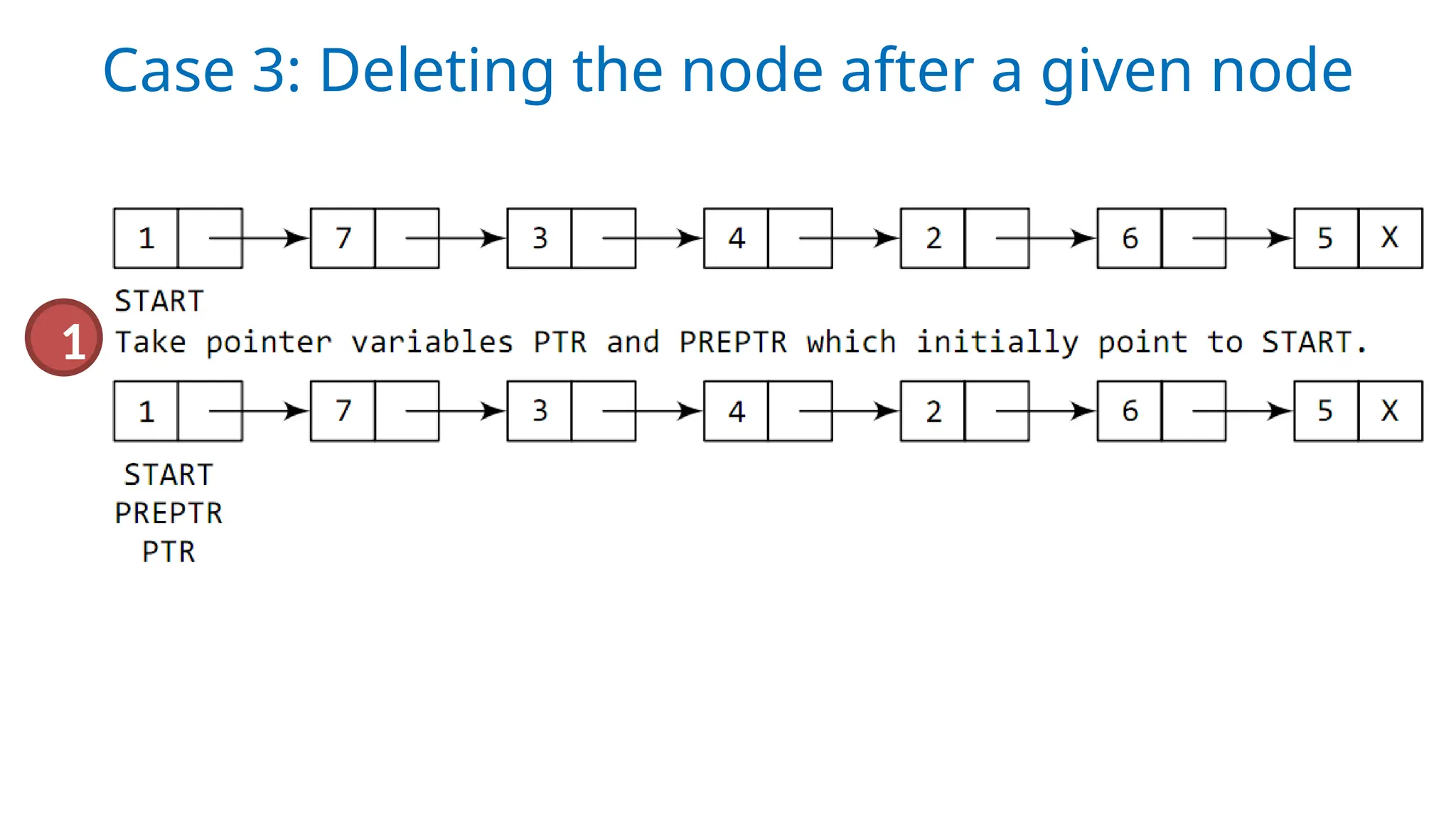
Case 3: Deleting the node after a given node
1
2
Case 3 continued…
3
PopAfter Time ComplexityO(n)
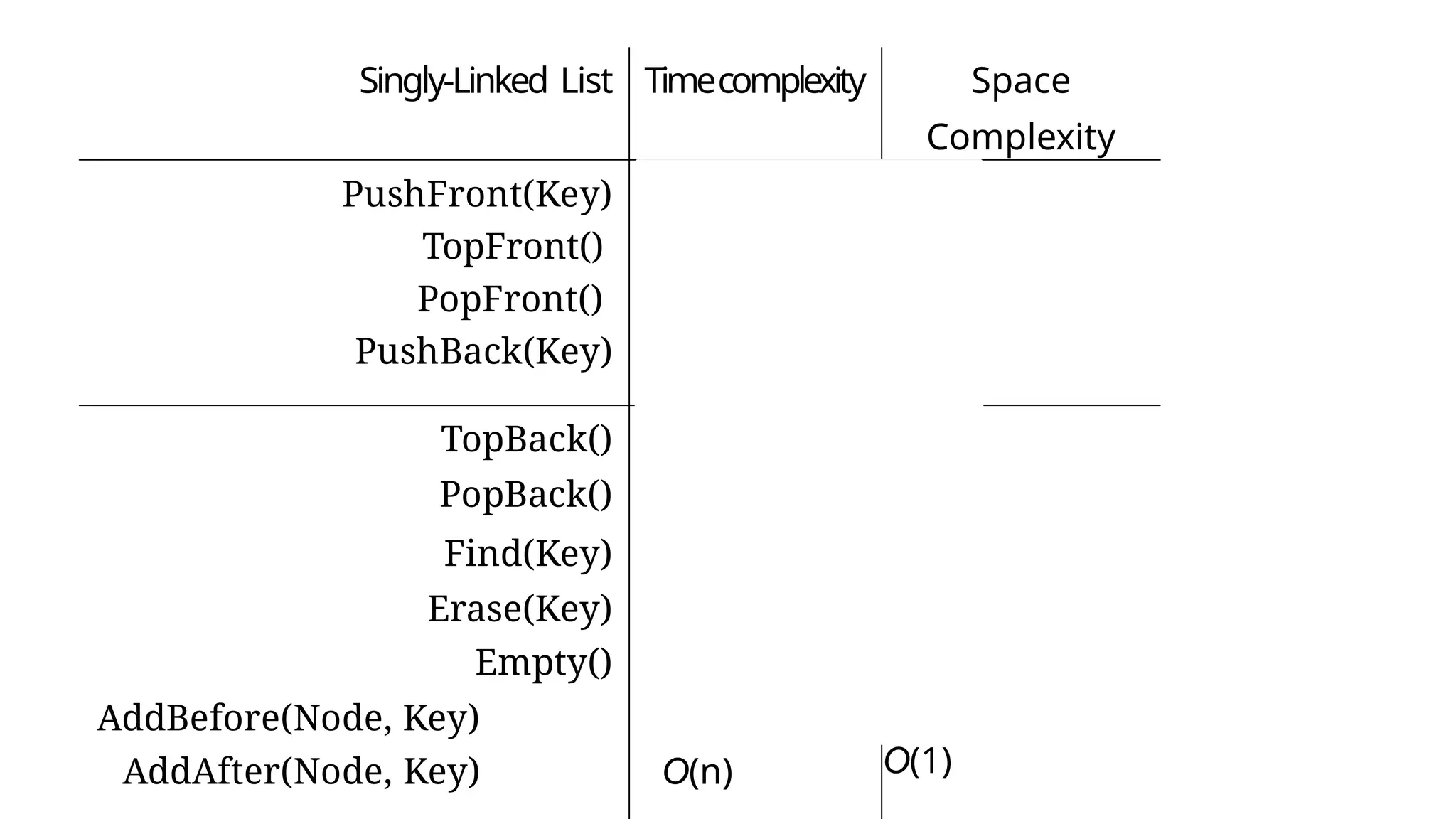
Singly-Linked List Timecomplexity Space
Complexity
PushFront(Key)
TopFront()
PopFront()
PushBack(Key)
O(1)
O(1)
O(1)
O(n)
O(1)
O(1)
O(1)
O(1)
O(1)
TopBack() O(n) O(1)
PopBack() O(n) O(1)
Find(Key) O(n) O(1)
Erase(Key)
Empty()
O(n)
O(1)
O(1)
O(1)
AddBefore(Node, Key)
AddAfter(Node, Key)
O(n)
O(n)
O(1)
O(1)
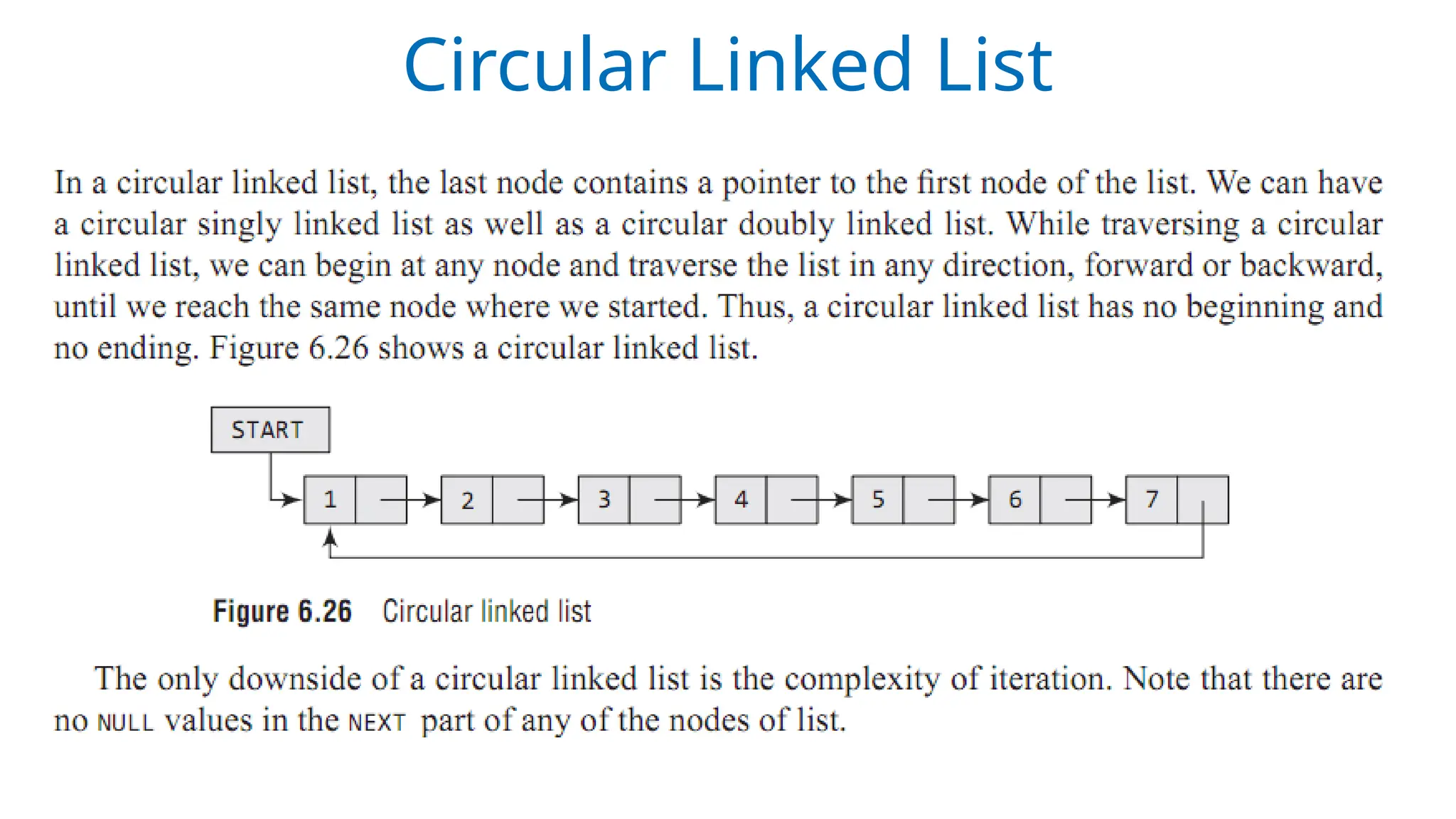
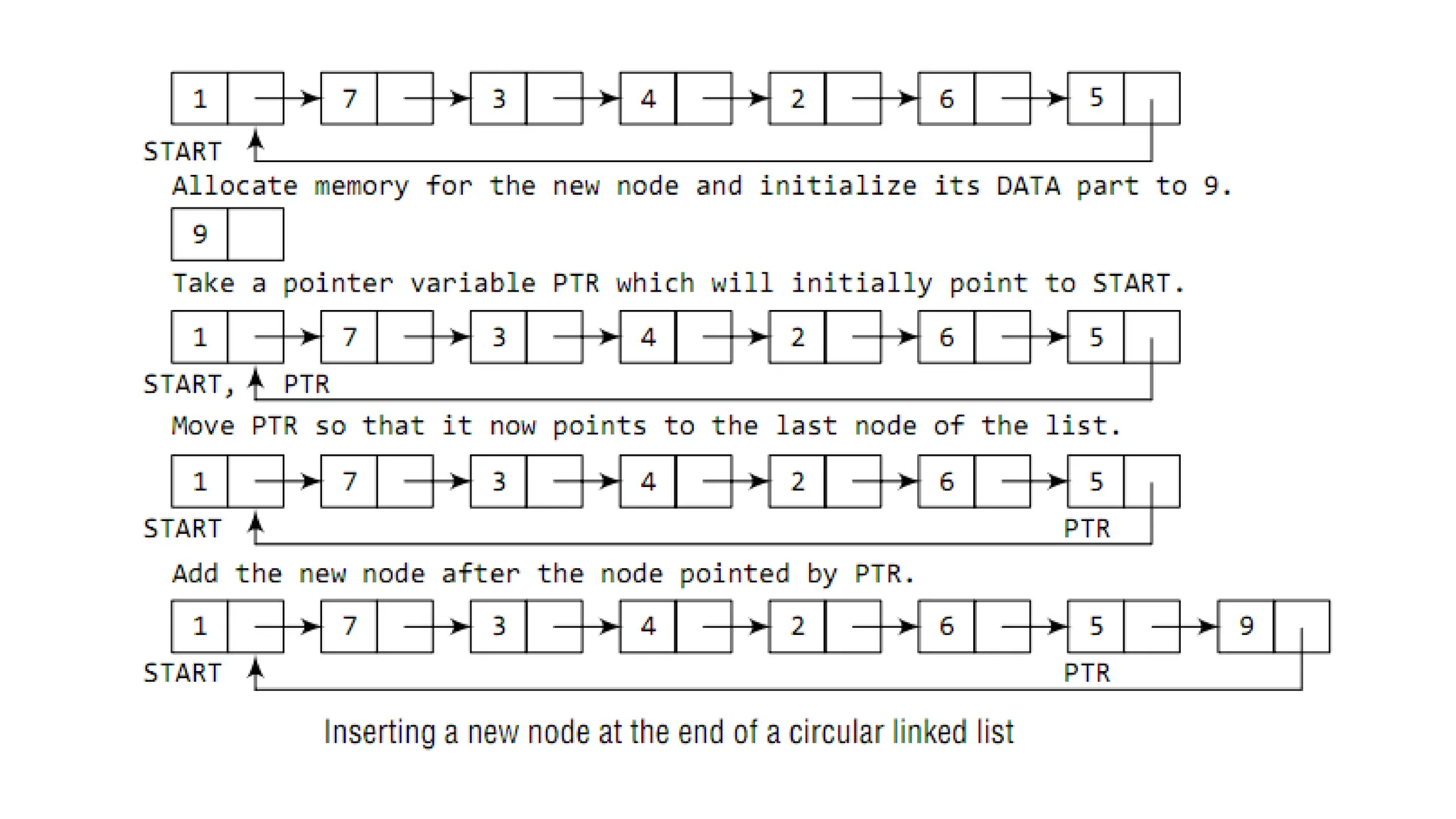
Circular Linked List
• Circular linked lists are widely used in
operating systems for task maintenance.
• When we are surfing the Internet, we
can use the Back button and the
forward button to move to the previous
pages that we have already visited.
• A circular linked list is used to maintain
the sequence of the Web pages visited.
• Traversing this circular linked list either
in forward or backward direction helps
to revisit the pages.
We can traverse the list until we find the NEXT entry that
contains the address of the start node of the list. This
denotes the end of the linked list, that is, the node that
contains the address of the first node is actually the last
node of the circular linked list.
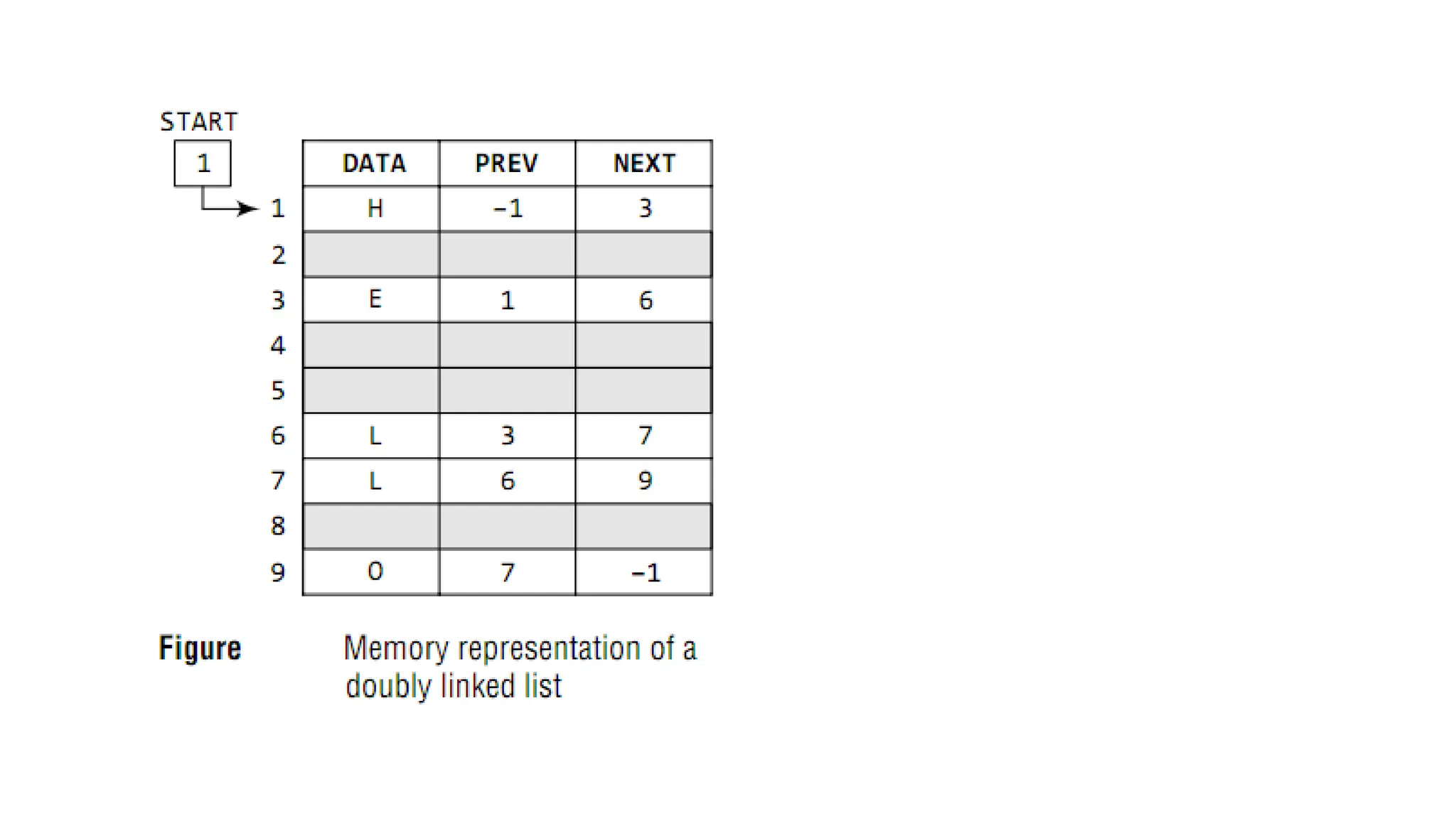
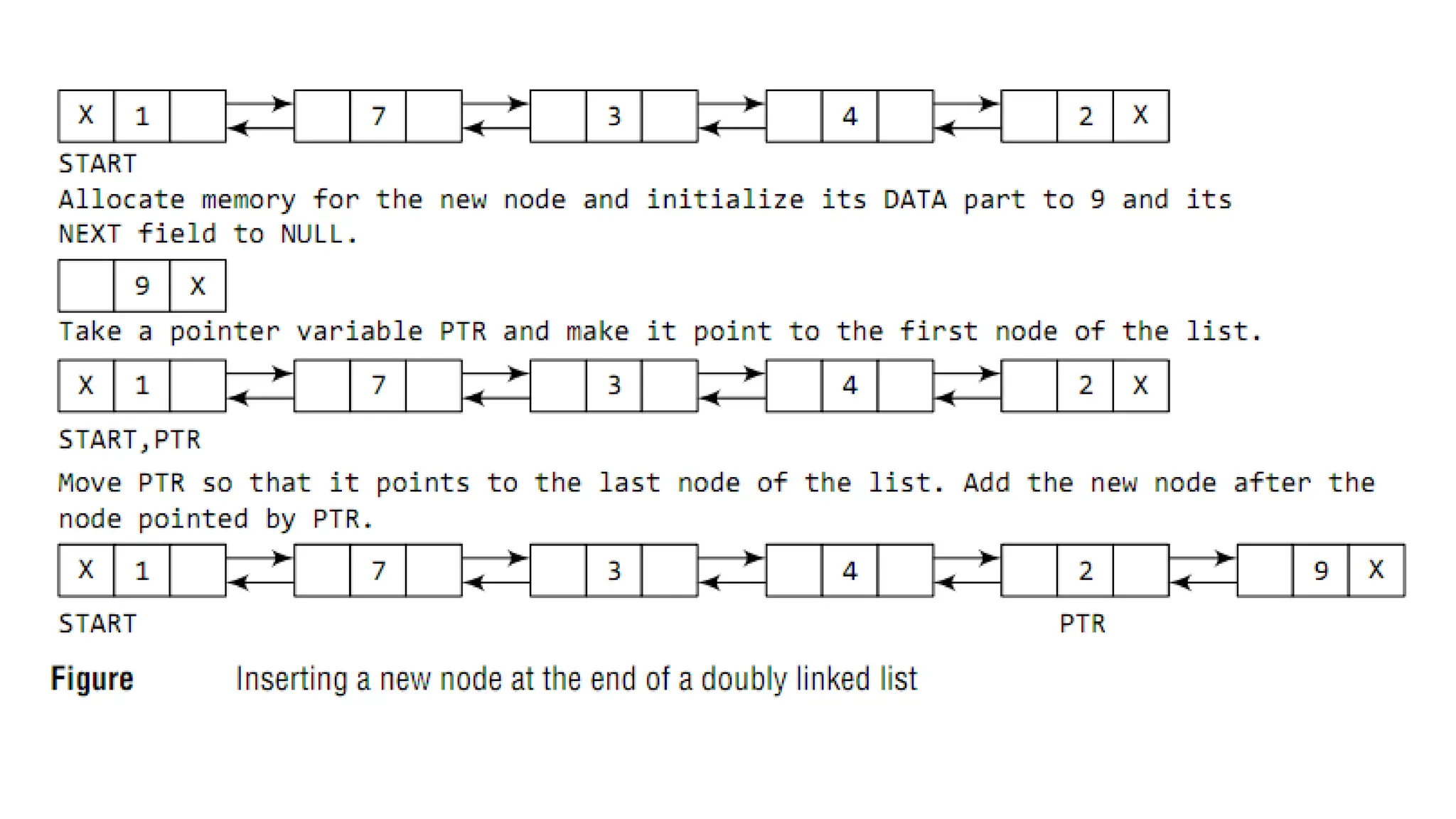
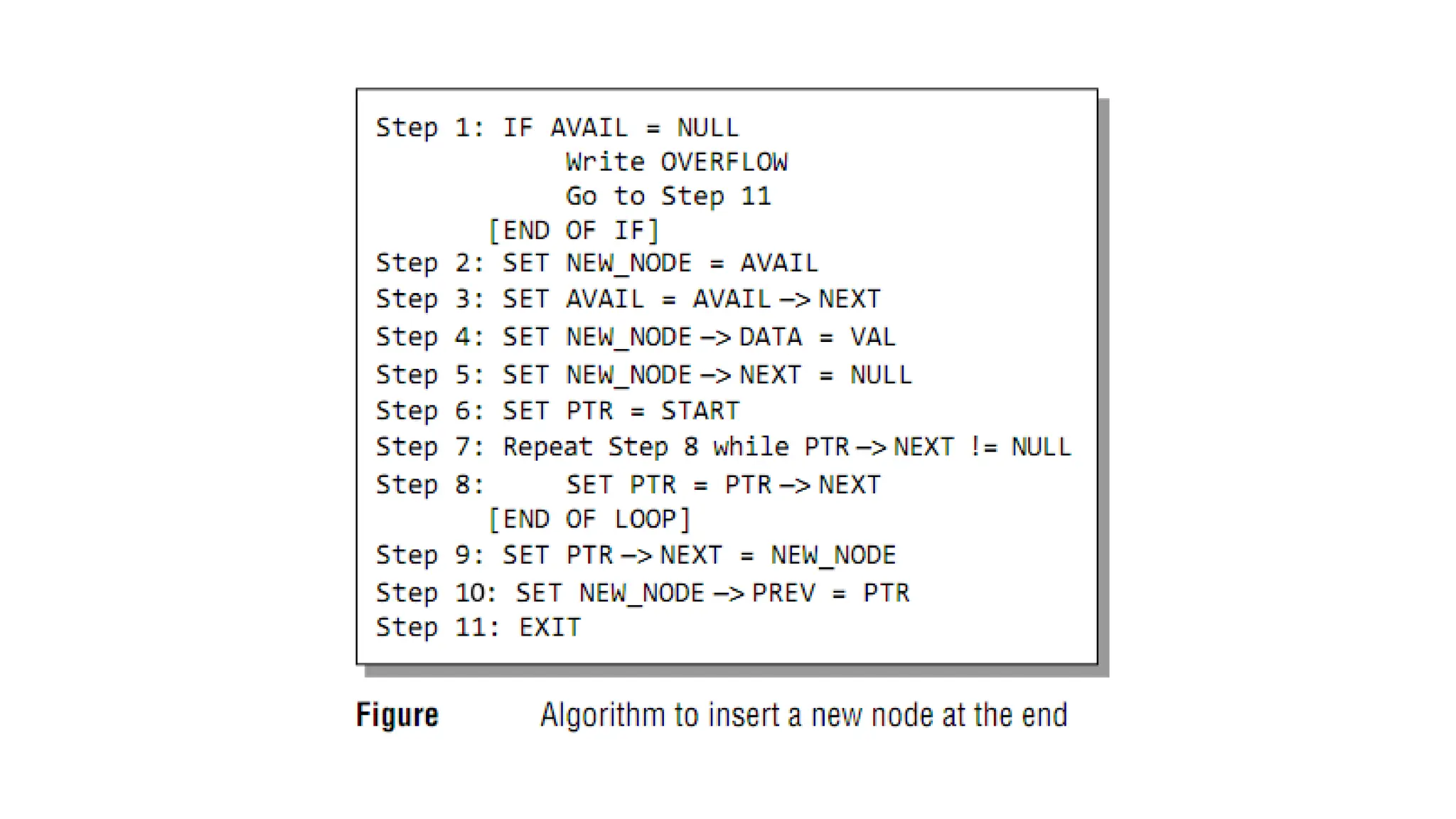
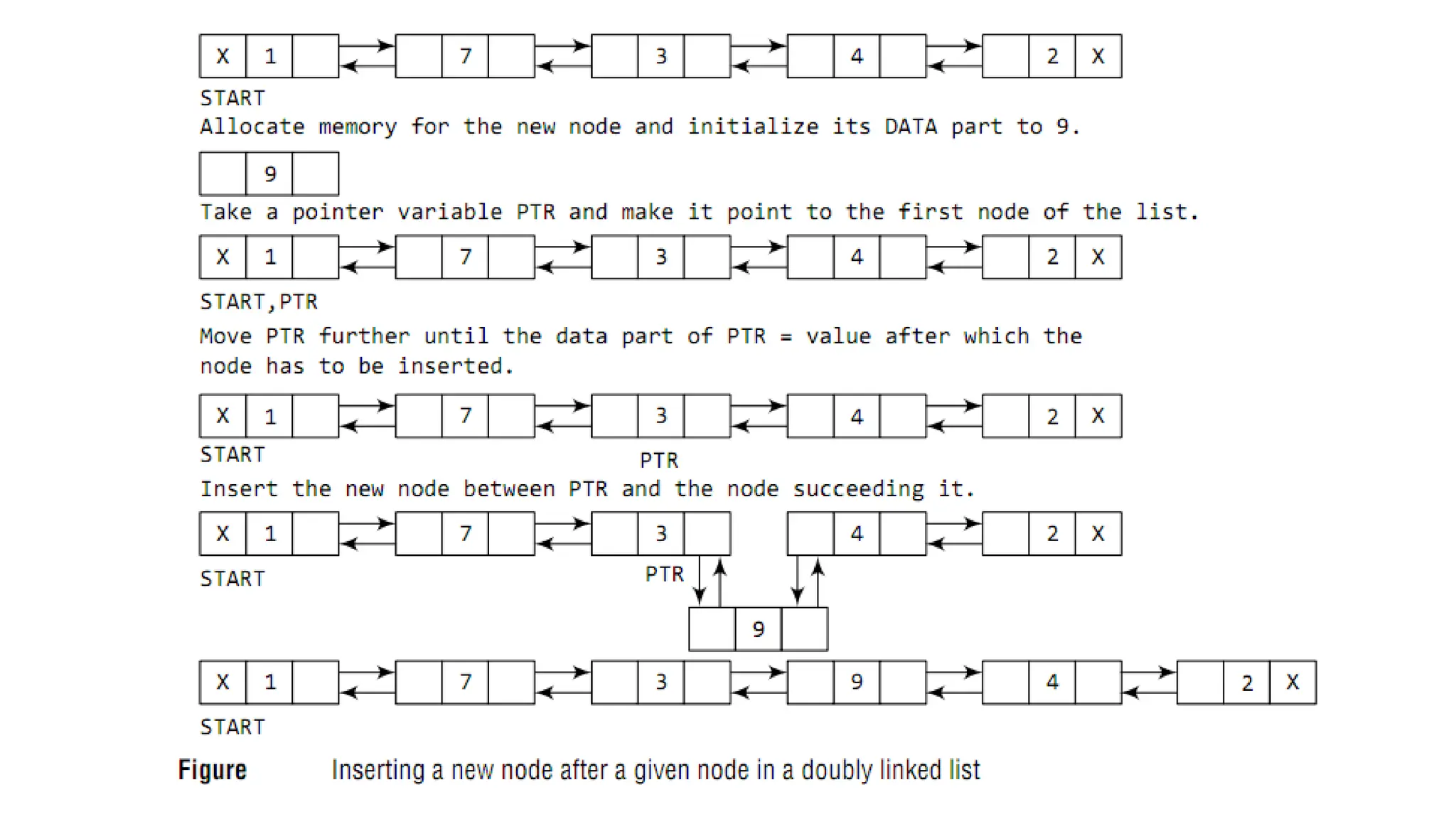
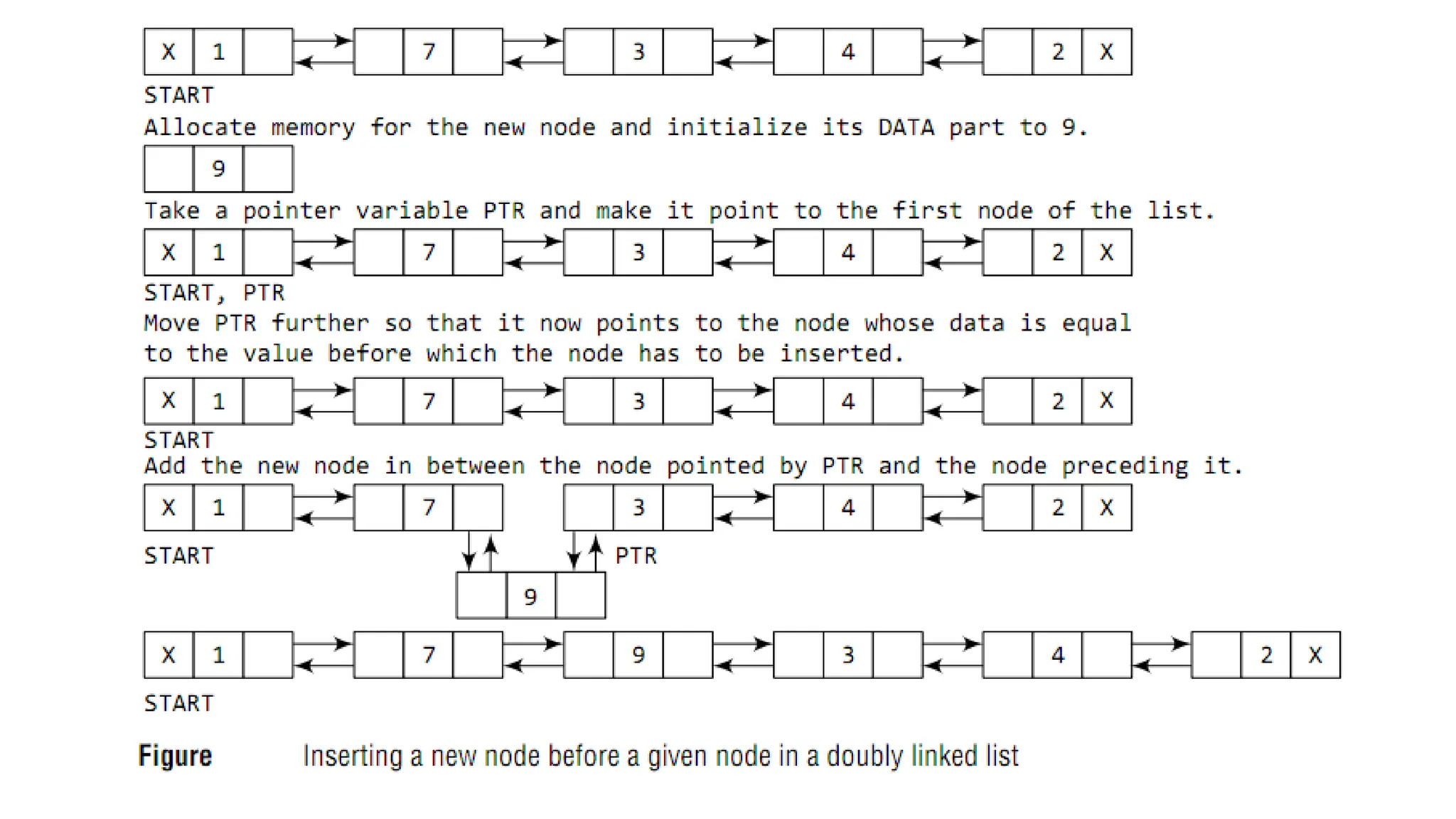
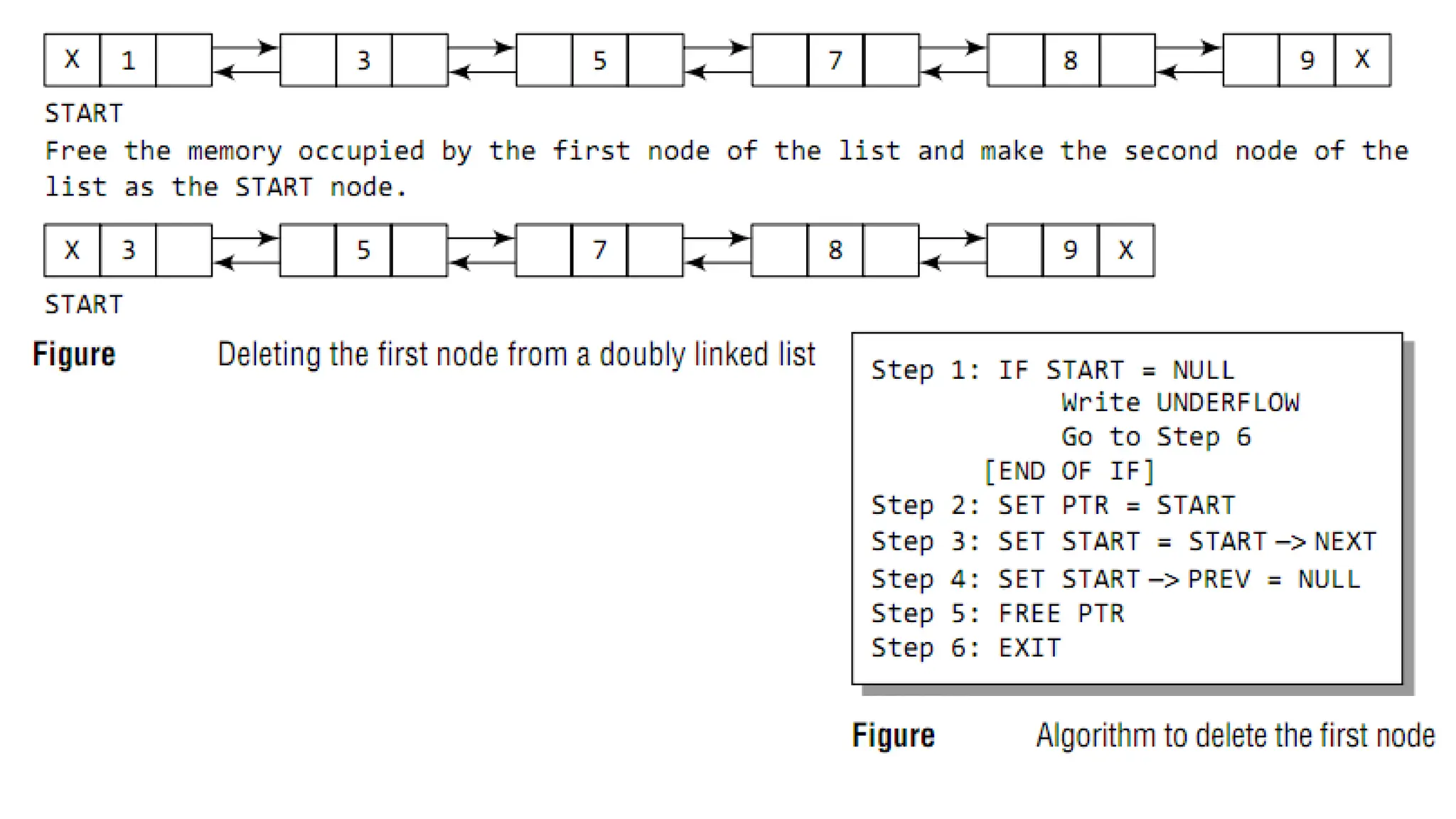
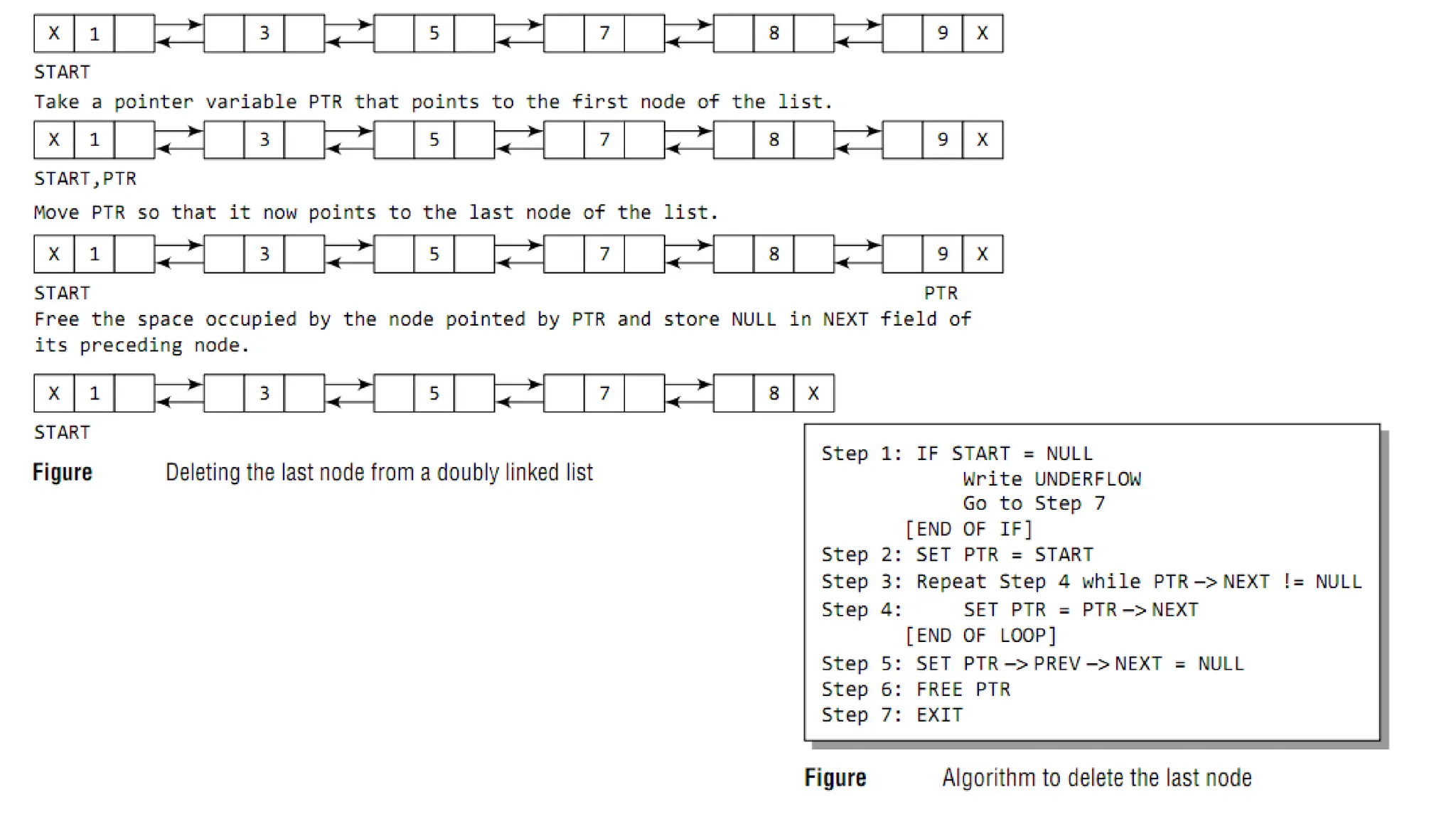
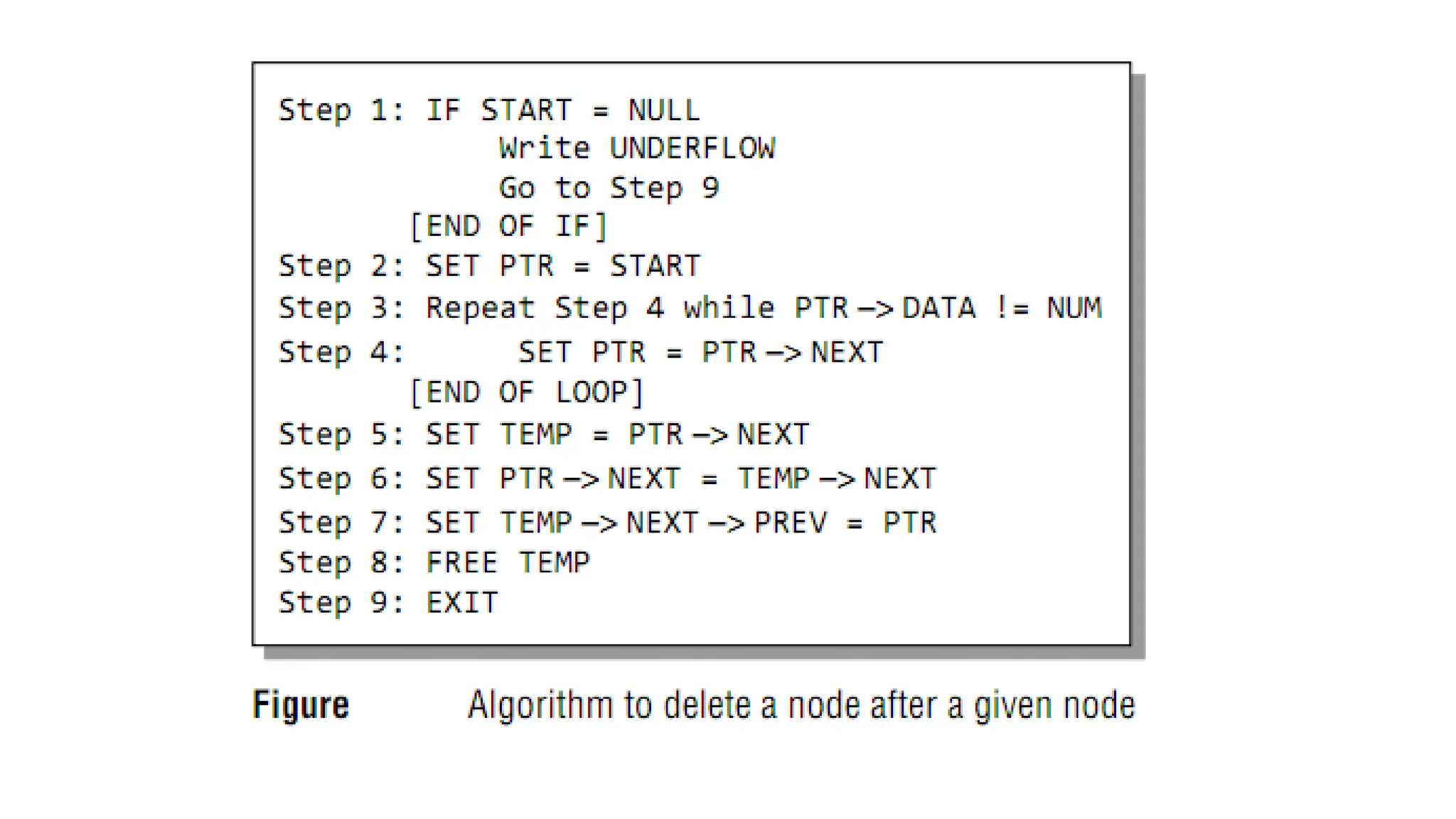
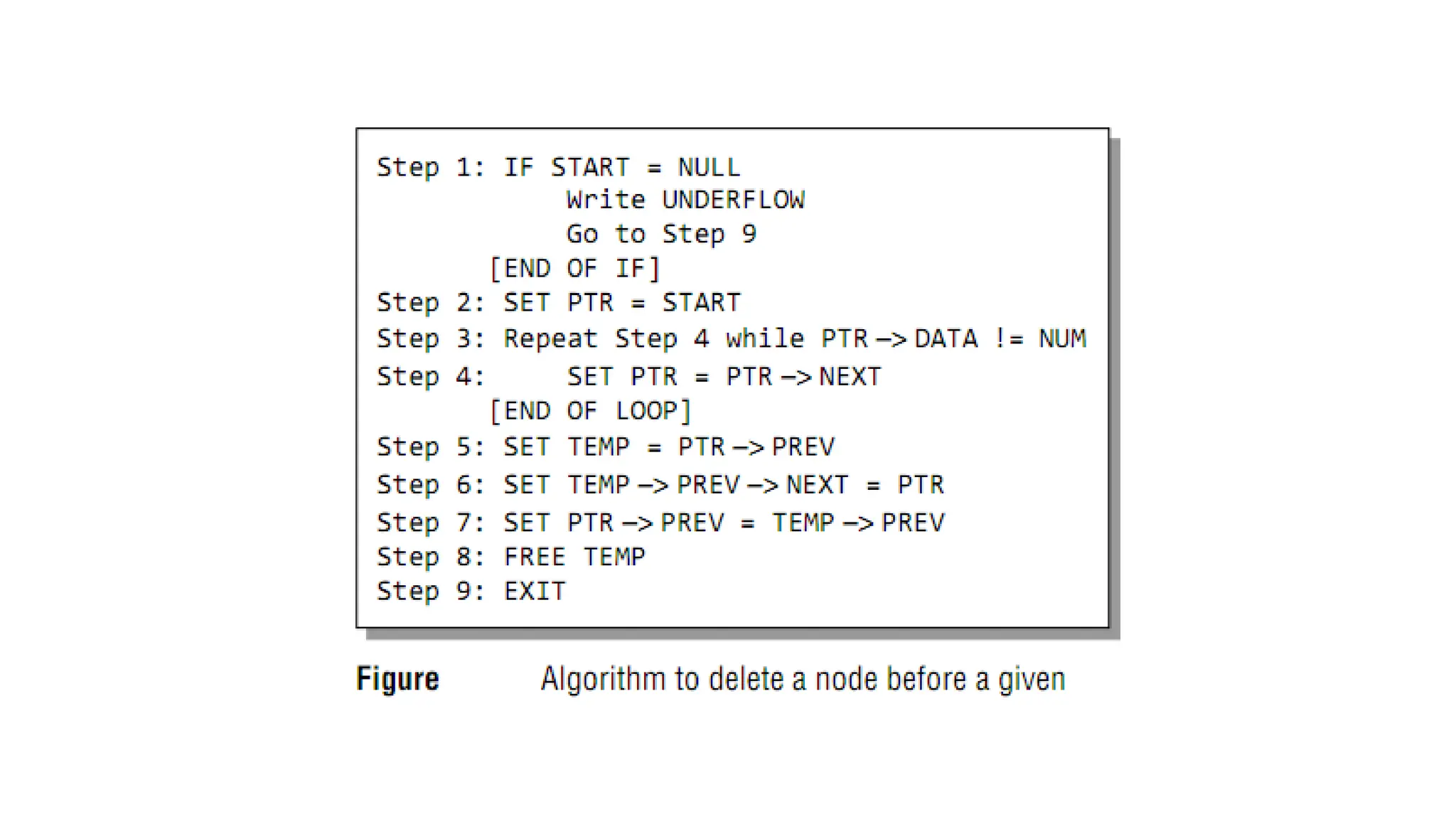
DOUBLY LINKED LISTS
• Doubly linked list calls for more space per node and more
expensive basic operations.
• However, a doubly linked list provides the ease to
manipulate the elements of the list as it maintains
pointers to nodes in both the directions (forward and
backward).
• The main advantage of using a doubly linked list is that it
makes searching twice as efficient.
DOUBLY LINKED LISTS continued…
RPT_03_A_Linked List presentation for FE

RPT_03_A_Linked List presentation for FE

  • 1.
    Data Structure Module04 Linked Lists A.B.Vartak Department of Information Technology Mumbai University
  • 2.
    • Array isa linear collection of data elements in which the elements are stored in consecutive memory locations • While declaring arrays, we have to specify the size of the array, which will restrict the number of elements that the array can store. • What if we are not sure of the number of elements in advance? • Moreover, to make efficient use of memory, the elements must be stored randomly at any location rather than in consecutive locations. • So, there must be a data structure that removes the restrictions on the maximum number of elements and the storage condition to write efficient programs. • But like an array, insertions and deletions should be possible at any point in a constant time. The one such data structure is linked list. • Another advantage of a linked list over an array is that we can add any number of elements in the list. Need of Linked List (Array vs linked list)
  • 3.
    • A linkedlist is a linear collection of data elements called nodes in which linear representation is given by links from one node to the next node. • Similar to array, it is a linear collection of data elements of the same type. • Data elements of linked list are generally not lined in consecutive memory space; instead they are dispersed in various locations. • Elements in a linked list can be accessed only in a sequential manner (does not allow random access ) • Linked list data structure can be used to implement other data structures. Thus, it acts as building block to implement data structures like stacks, queues and their variations. • A linked list can be perceived as a train or a sequence of nodes in which each node contains one or more data fields and a pointer to the next node. Introduction to Linked List
  • 4.
     Linked listelement (node) is user defined structure data type, typically contains two parts  data variables  pointers to next elements, hold the addresses of next elements  Since in a linked list, every node contains a pointer to another node which is of the same type, it is also called a self-referential data type.  Example: struct node { int data; // data struct node *next; // pointer to next element }; Introduction to Linked List
  • 5.
    Figure: Linked ListStored in Memory HELLO
  • 6.
    Figure: Two LinkedLists Simultaneously maintained in Memory By looking at the figure, we can conclude that roll numbers of the students who have opted for Biology are S01, ?__, __, __, __, and __. Similarly, roll numbers of the students who chose Computer Science are S02, __, __, __, and __.
  • 7.
    Figure: Linked listwith AVAIL and START pointers Pointer variable START stores the address of the first node of the list and pointer variable AVAIL stores the address of the first free space for the free pool (which is a linked list of all free memory cells). Memory allocation and de-allocation for a Linked List
  • 8.
    • The computermaintains a list of all free memory cells. This list of available space is called the free pool. • When a new student’s record has to be added, the memory address pointed by AVAIL will be taken and used to store the desired information. After the insertion, the next available free space’s address will be stored in AVAIL. • When we delete a particular node from an existing linked list or delete the entire linked list, the space occupied by it must be given back to the free pool so that the memory can be reused by some other program that needs memory space. • The operating system does this task of adding the freed memory to the free pool. • This process is called garbage collection . Memory allocation and de-allocation for a Linked List
  • 9.
    • In theabove linked list, every node contains two parts - one integer and the other a pointer to the next node. • The data part of the node which contains data may include a simple data type, an array or a structure. • The pointer part of the node contains a pointer to the next node (or address of the next node in sequence). • The last node will have no next node connected to it, so it will store a NULL value. • A linked list is defined by the pointer pointing to the first node, e. g. START • If START = NULL, then the linked list is empty and contains no nodes. Singly Linked List 1 2 3 4 5 6 7 X START
  • 10.
    Singly-Linked List head 7 10 4 13 hea d 7 104 13 Node contains: Key/Data next pointer
  • 11.
    Linked List Operations 1.Create a node and linked list 2. Traversal, e.g. display all elements 3. Search node 4. Insert node at beginning, at end, after/before a node 5. Delete node at beginning, at end, after/before a node 6. Sort
  • 12.
    A node isa structure data type, can be created in two methods, statically and dynamically. • Static method – use array of structures – declared as globally outside functions – declared locally within a function • Dynamic method (mostly used for linked list) – use stdlib function malloc(size) get memory space struct node *np = (struct node*) malloc(sizeof(struct node)); 1. How to create nodes
  • 13.
    How to createnodes continued... struct node *np = (struct node*) malloc(sizeof(struct node)); At run time, OS allocates consecutive sizeof(struct node) bytes in the heap region, return the address of the address of the first memory cell, store the address to struct node type pointer np. Need (struct node*) to cast the return address to struct node pointer value. Need use free(np) to release when deleting the node!!! Otherwise cause memory leaking
  • 14.
    2. Traversing aLinked List • We can traverse the entire linked list using a single pointer variable called START. • The START node contains the address of the first node; the next part of the first node in turn stores the address of its succeeding node. • Using this technique the individual nodes of the list will form a chain of nodes. • If START = NULL, this means that the linked list is empty and contains no nodes.
  • 15.
    • For traversingthe linked list, we also make use of another pointer variable PTR which points to the node that is currently being accessed. • Here processing an element may even be simply printing it.
  • 17.
    3. Searching fora value in a Linked List • Searching means finding whether a given value is present in the information part of the node or not. • If it is present, the algorithm returns the address of the node that contains the value. Figure: Algorithm to search a linked list
  • 19.
    4. Inserting anew node in a Linked List • How a new node is added into an already existing linked list? • Four cases: -  Case 1: The new node is inserted at the beginning. (PushFront)  Case 2: The new node is inserted at the end.  Case 3: The new node is inserted after a given node.  Case 4: The new node is inserted before a given node.
  • 20.
    Case1: The newnode is inserted at the beginning. hea d 7 10 4 13 PushFro nt
  • 21.
    PushFro nt hea d 7 10 413 26 Step1: Allocate memory for the new node and initialize its DATA part (let’s assume 26).
  • 22.
    PushFro nt hea d 7 10 413 26 Step 2: Add the new node as the first node of the list by making the NEXT part of the new node contain the address of START.
  • 23.
    PushFront time complexity O(1) hea d 710 4 13 26 PushFro nt Step 3: Now make HEAD/START to point to the first node of the list.
  • 24.
    OVERFLOW IN LINKEDLISTS Overflow is a condition that occurs when AVAIL = NULL or no free memory cell is present in the system.
  • 25.
  • 27.
    Case2: Inserting aNode at the End of a Linked List PushBac k hea d 7 10 4 13
  • 28.
    hea d 7 10 413 8 PushBac k Step1: Allocate memory for the new node and initialize its DATA part (let’s assume 8) and NEXT part to NULL.
  • 29.
    Head / Start 7 104 13 8 PushBac k Step2: Take a pointer variable PTR which points to START. Move PTR so that it points to the last node of the list. PTR
  • 30.
    PushBack time complexity O(n) Head/ Start 7 10 4 13 8 PTR PushBac k Step3: Add the newly created node after the node pointed by PTR. This is done by storing the address of the new node in the NEXT part of PTR.
  • 32.
    Case 3: Thenew node is inserted after a given node. PushAfter 3
  • 33.
    PushAfter Step1: Allocate memoryfor the new node and initialize its DATA part to 9.
  • 34.
    PushAfter Step2: Take twopointer variables PTR and PREPTR and initialize them with START so that START, PTR, and PREPTR point to the first node of the list.
  • 35.
    PushAfter Step3: Move PTRand PREPTR until the DATA part of PREPTR= value of the node after which insertion has to be done. PREPTR will always point to the node just before PTR.
  • 36.
    PushAfter Step4: Add thenew node in between the nodes pointed by PREPTR and PTR. PushAfter time complexity O(n)
  • 37.
  • 38.
    Case 4: Insertinga Node Before a Given Node in a Linked List PushBefo re 3
  • 39.
    Step 1: Allocatememory for the new node and initialize its DATA part to 9. PushBefo re
  • 40.
    Step 2: InitializePREPTR and PTR to the START node. PushBefo re
  • 41.
    Step 3: MovePTR and PREPTR until the DATA part of PTR= value of the node before which insertion has to be done. PREPTR will always point to the node just before PTR PushBefo re
  • 42.
    Step 4: Insertthe new node in between the nodes pointed by PREPTR and PTR PushBefo re PushBefore time complexity O(n)
  • 43.
  • 44.
  • 45.
    5. Deleting anode from a Linked List Three cases: Case 1: The first node is deleted. Case 2: The last node is deleted. Case 3: The node after a given node is deleted.
  • 46.
    • Underflow isa condition that occurs when we try to delete a node from a linked list that is empty. • This happens when START = NULL or when there are no more nodes to delete. • When a node is deleted from a linked list, the memory occupied by that node will be freed up. • The memory is returned to the free pool so that it can be used to store other programs and data. • Whatever be the case of deletion, the AVAIL pointer is always changed so that it points to the address that has been recently vacated. UNDERFLOW IN LINKED LISTS
  • 47.
    Case 1: Deletingthe First Node from a Linked List
  • 48.
    hea d 7 10 413 26 Deleting a first Node from a Linked List
  • 49.
    hea d 7 10 413 26 PopFro nt
  • 50.
  • 52.
    Case 2: Deletingthe Last Node from a Linked List
  • 53.
  • 54.
  • 55.
    Case 3: Deletingthe node after a given node 1
  • 56.
  • 57.
  • 59.
    Singly-Linked List TimecomplexitySpace Complexity PushFront(Key) TopFront() PopFront() PushBack(Key) O(1) O(1) O(1) O(n) O(1) O(1) O(1) O(1) O(1) TopBack() O(n) O(1) PopBack() O(n) O(1) Find(Key) O(n) O(1) Erase(Key) Empty() O(n) O(1) O(1) O(1) AddBefore(Node, Key) AddAfter(Node, Key) O(n) O(n) O(1) O(1)
  • 60.
  • 61.
    • Circular linkedlists are widely used in operating systems for task maintenance. • When we are surfing the Internet, we can use the Back button and the forward button to move to the previous pages that we have already visited. • A circular linked list is used to maintain the sequence of the Web pages visited. • Traversing this circular linked list either in forward or backward direction helps to revisit the pages.
  • 62.
    We can traversethe list until we find the NEXT entry that contains the address of the start node of the list. This denotes the end of the linked list, that is, the node that contains the address of the first node is actually the last node of the circular linked list.
  • 71.
  • 72.
    • Doubly linkedlist calls for more space per node and more expensive basic operations. • However, a doubly linked list provides the ease to manipulate the elements of the list as it maintains pointers to nodes in both the directions (forward and backward). • The main advantage of using a doubly linked list is that it makes searching twice as efficient. DOUBLY LINKED LISTS continued…