MS Business IntelligencePortfolioRodney Matejekrmatejek@optonline.net(732) 940 7678
Table of ContentsProject Overview……………………………………………………………………  Page  3SSIS Overview ………………………………………………………………………………….   Page  4SSIS Detail  ………………………………………………………………………………………   Page  5SSAS Overview  ……………………………………………………………………………….    Page 13SSAS Detail   …………………………………………………………………………………...    Page 14SSRS Overview  ……………………………………………………………………………….    Page 24SSRS Detail   ……………………………………………………………………………………    Page 25
Project OverviewIntroduction:  This portfolio showcases my skills in the Microsoft Business Intelligence arena.  It is the results of my participation in the SetFocus BI Masters program.  What is seen here is the results of the labs done as part of the training.SetFocus utilizes Microsoft Official Curriculum in conjunction with its own materials.  The core technologies covered are: • Microsoft SQL Server 2008 T-SQL • Data Warehousing Concepts • Microsoft SQL Server 2008 Integration Services (SSIS) • Microsoft SQL Server 2008 Analysis Services (SSAS) • MDX Queries • Microsoft SQL Server 2008 Reporting Services (SSRS) • Business Intelligence with SharePoint and Performance Point Server
SSIS OverviewSSIS detail goals:  Design and build a SQL Server 2008 relational database to track employeeand customer information, timesheet and labor rates data, as well as job order information, job materials, and customer invoices.  Specific milestones for this effort include the following:Create packages to transfer data from different raw data sources (XLS, CSV, and XML) into a SQL Server 2008 database.
Schedule packages nightly to import/update any additional information.
Convert the input data into SQL Server data types.
Create calculated values to be included when needed.
Perform validation to detect errors (e.g. child records with invalid parent records).
Determine if the input values require the insert of a new row or update of existing columns.
Generate emails with results including number of rows inserted and updated.
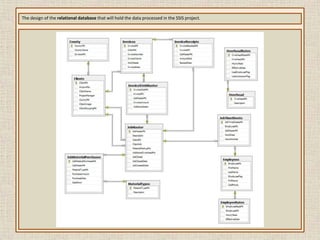
Create a separate package to re-index and shrink the database, as well as perform nightly backups of the database.The design of the relational database that will hold the data processed in the SSIS project.
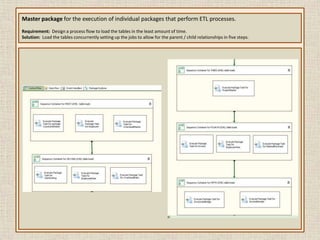
Master package for the execution of individual packages that perform ETL processes.  Requirement:  Design a process flow to load the tables in the least amount of time.Solution:  Load the tables concurrently setting up the jobs to allow for the parent / child relationshipsin five steps.
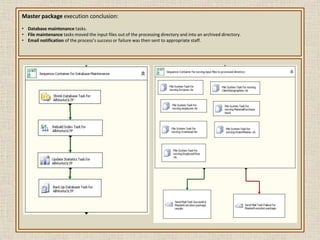
Master package execution conclusion: Database maintenance tasks.
File maintenance tasks moved the input files out of the processing directory and into an archived directory.
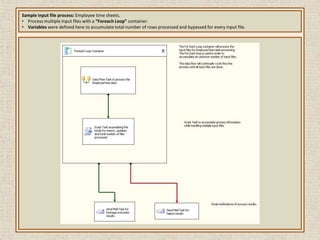
Email notification of the process’s success or failure was then sent to appropriate staff.Sample input file process: Employee time sheets.  Process multiple input files with a “Foreach Loop” container.
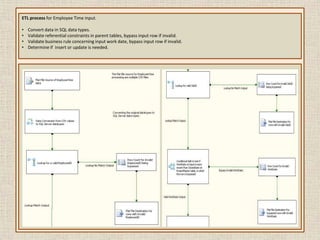
Variables were defined here to accumulate total number of rows processed and bypassed for every input file.  ETL process for Employee Time input.Convert data in SQL data types.
Validate referential constraints in parent tables, bypass input row if invalid.
Validate business rule concerning input work date, bypass input row if invalid.
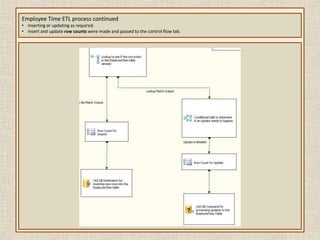
Determine if  insert or update is needed.Employee Time ETL process continuedInserting or updating as required.
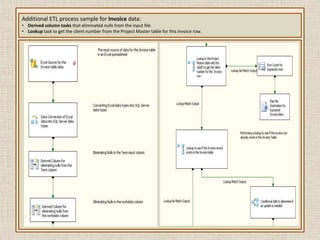
Insert and update row counts were made and passed to the control flow tab.Additional ETL process sample for Invoice data:Derived column tasks that eliminated nulls from the input file.
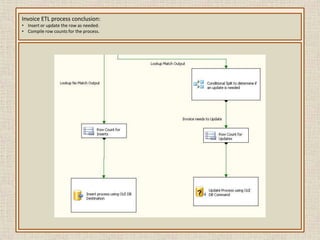
Lookup task to get the client number from the Project Master table for this invoice row.Invoice ETL process conclusion:Insert or update the row as needed.
Compile row counts for the process.SSAS Overview SSAS detail goals:  Create a data warehouse and build analysis package solutions using Analysis Services, setting the data warehouse from the SSIS lab as the data source.  The Analysis Services project will accomplish the following goals:Using BIDS, create an Analysis Services solution using the newly created SQL Server 2008 database.
Create a custom data view, build a cube with fact tables and dimensions, create attributes and hierarchies.
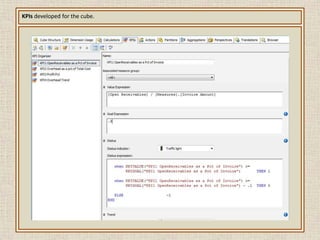
Create calculated measures and set up key point indicators (KPIs) to analyze and measure the profitability and costs.
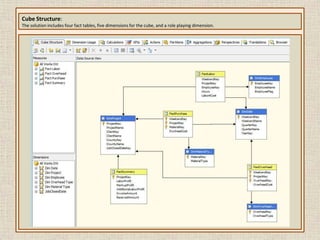
Write a series of MDX queries to provide data for business decisions.Cube Structure:The solution includes four fact tables, five dimensions for the cube, and a role playing dimension.
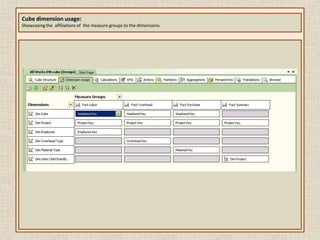
Cube dimension usage:Showcasing the  affiliations of  the measure groups to the dimensions.
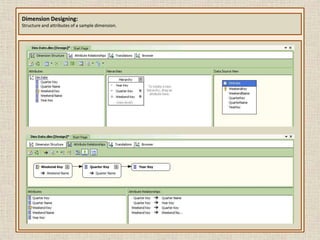
Dimension Designing:Structure and attributes of a sample dimension.
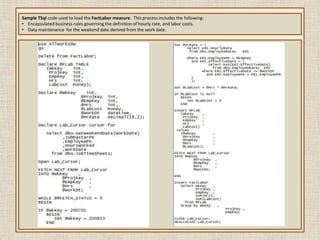
Sample TSql code used to load the FactLabor measure.  This process includes the following:Encapsulated business rules governing the definition of hourly rate, and labor costs.
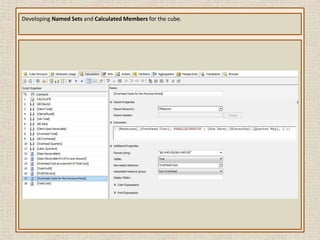
Data maintenance  for the weekend date derived from the work date.Developing Named Sets and Calculated Members for the cube.
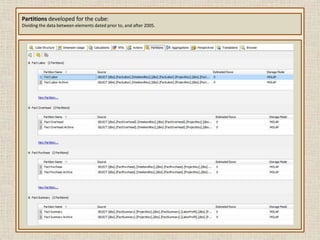
Partitions developed for the cube:Dividing the data between elements dated prior to, and after 2005.
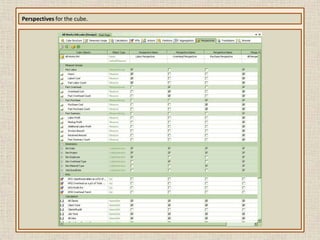
Perspectives for the cube.
KPIs developed for the cube.
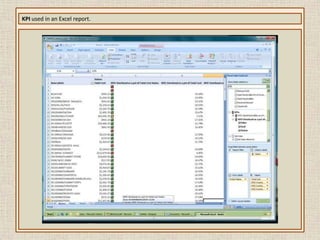
KPI used in an Excel report.
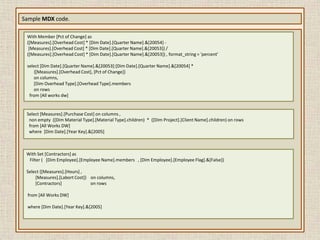
Sample MDX code.With Member [Pct of Change] as([Measures].[Overhead Cost] * [Dim Date].[Quarter Name].&[20054] -  [Measures].[Overhead Cost] * [Dim Date].[Quarter Name].&[20053]) / ([Measures].[Overhead Cost] * [Dim Date].[Quarter Name].&[20053]) , format_string = 'percent'select [Dim Date].[Quarter Name].&[20053]:[Dim Date].[Quarter Name].&[20054] *      {[Measures].[Overhead Cost], [Pct of Change]}        on columns,       [Dim Overhead Type].[Overhead Type].members             on rows  from [All works dw]Select [Measures].[Purchase Cost] on columns ,  non empty  ([Dim Material Type].[Material Type].children)  *  ([Dim Project].[Client Name].children) on rows  from [All Works DW]      where  [Dim Date].[Year Key].&[2005]With Set [Contractors] as   Filter ( [Dim Employee].[Employee Name].members   , [Dim Employee].[Employee Flag].&[False])Select {[Measures].[Hours] ,         [Measures].[Labort Cost]}    on columns,            [Contractors]                          on rows from [All Works DW] where [Dim Date].[Year Key].&[2005]
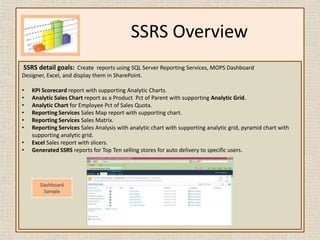
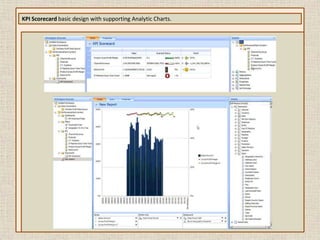
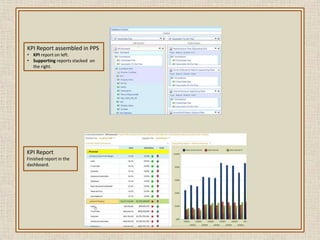
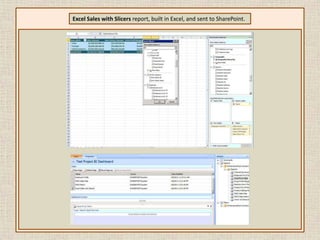
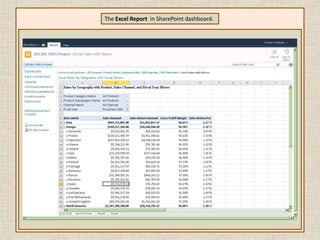
SSRS Overview SSRS detail goals:  Create  reports using SQL Server Reporting Services, MOPS Dashboard Designer, Excel, and display them in SharePoint.KPI Scorecard report with supporting Analytic Charts.
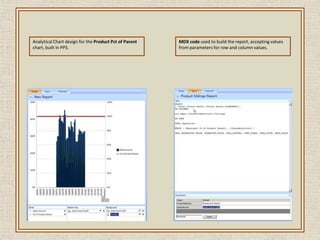
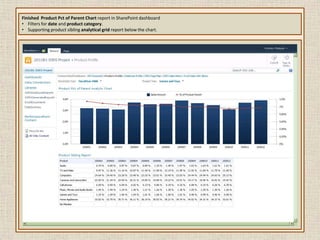
Analytic Sales Chart report as a Product  Pct of Parent with supporting Analytic Grid.
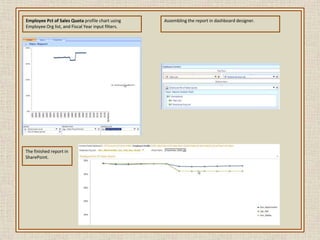
Analytic Chart for Employee Pct of Sales Quota.
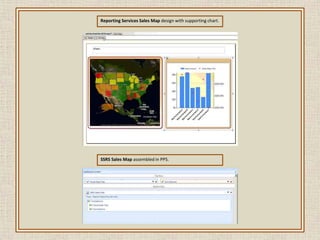
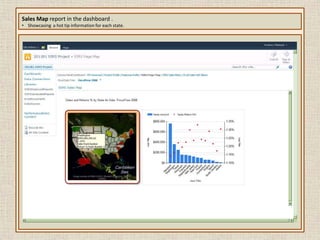
Reporting Services Sales Map report with supporting chart.
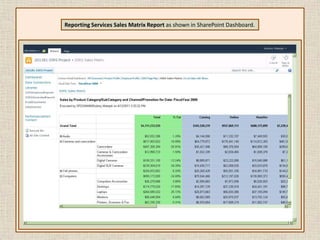
Reporting Services Sales Matrix.

Rodney Matejek Portfolio

  • 1.
    MS Business IntelligencePortfolioRodneyMatejekrmatejek@optonline.net(732) 940 7678
  • 2.
    Table of ContentsProjectOverview…………………………………………………………………… Page 3SSIS Overview …………………………………………………………………………………. Page 4SSIS Detail ……………………………………………………………………………………… Page 5SSAS Overview ………………………………………………………………………………. Page 13SSAS Detail …………………………………………………………………………………... Page 14SSRS Overview ………………………………………………………………………………. Page 24SSRS Detail …………………………………………………………………………………… Page 25
  • 3.
    Project OverviewIntroduction: This portfolio showcases my skills in the Microsoft Business Intelligence arena. It is the results of my participation in the SetFocus BI Masters program. What is seen here is the results of the labs done as part of the training.SetFocus utilizes Microsoft Official Curriculum in conjunction with its own materials. The core technologies covered are: • Microsoft SQL Server 2008 T-SQL • Data Warehousing Concepts • Microsoft SQL Server 2008 Integration Services (SSIS) • Microsoft SQL Server 2008 Analysis Services (SSAS) • MDX Queries • Microsoft SQL Server 2008 Reporting Services (SSRS) • Business Intelligence with SharePoint and Performance Point Server
  • 4.
    SSIS OverviewSSIS detailgoals: Design and build a SQL Server 2008 relational database to track employeeand customer information, timesheet and labor rates data, as well as job order information, job materials, and customer invoices. Specific milestones for this effort include the following:Create packages to transfer data from different raw data sources (XLS, CSV, and XML) into a SQL Server 2008 database.
  • 5.
    Schedule packages nightlyto import/update any additional information.
  • 6.
    Convert the inputdata into SQL Server data types.
  • 7.
    Create calculated valuesto be included when needed.
  • 8.
    Perform validation todetect errors (e.g. child records with invalid parent records).
  • 9.
    Determine if theinput values require the insert of a new row or update of existing columns.
  • 10.
    Generate emails withresults including number of rows inserted and updated.
  • 11.
    Create a separatepackage to re-index and shrink the database, as well as perform nightly backups of the database.The design of the relational database that will hold the data processed in the SSIS project.
  • 12.
    Master package forthe execution of individual packages that perform ETL processes. Requirement: Design a process flow to load the tables in the least amount of time.Solution: Load the tables concurrently setting up the jobs to allow for the parent / child relationshipsin five steps.
  • 13.
    Master package executionconclusion: Database maintenance tasks.
  • 14.
    File maintenance tasksmoved the input files out of the processing directory and into an archived directory.
  • 15.
    Email notification ofthe process’s success or failure was then sent to appropriate staff.Sample input file process: Employee time sheets. Process multiple input files with a “Foreach Loop” container.
  • 16.
    Variables were definedhere to accumulate total number of rows processed and bypassed for every input file. ETL process for Employee Time input.Convert data in SQL data types.
  • 17.
    Validate referential constraintsin parent tables, bypass input row if invalid.
  • 18.
    Validate business ruleconcerning input work date, bypass input row if invalid.
  • 19.
    Determine if insert or update is needed.Employee Time ETL process continuedInserting or updating as required.
  • 20.
    Insert and updaterow counts were made and passed to the control flow tab.Additional ETL process sample for Invoice data:Derived column tasks that eliminated nulls from the input file.
  • 21.
    Lookup task toget the client number from the Project Master table for this invoice row.Invoice ETL process conclusion:Insert or update the row as needed.
  • 22.
    Compile row countsfor the process.SSAS Overview SSAS detail goals: Create a data warehouse and build analysis package solutions using Analysis Services, setting the data warehouse from the SSIS lab as the data source. The Analysis Services project will accomplish the following goals:Using BIDS, create an Analysis Services solution using the newly created SQL Server 2008 database.
  • 23.
    Create a customdata view, build a cube with fact tables and dimensions, create attributes and hierarchies.
  • 24.
    Create calculated measuresand set up key point indicators (KPIs) to analyze and measure the profitability and costs.
  • 25.
    Write a seriesof MDX queries to provide data for business decisions.Cube Structure:The solution includes four fact tables, five dimensions for the cube, and a role playing dimension.
  • 26.
    Cube dimension usage:Showcasingthe affiliations of the measure groups to the dimensions.
  • 27.
    Dimension Designing:Structure andattributes of a sample dimension.
  • 28.
    Sample TSql codeused to load the FactLabor measure. This process includes the following:Encapsulated business rules governing the definition of hourly rate, and labor costs.
  • 29.
    Data maintenance for the weekend date derived from the work date.Developing Named Sets and Calculated Members for the cube.
  • 30.
    Partitions developed forthe cube:Dividing the data between elements dated prior to, and after 2005.
  • 31.
  • 32.
  • 33.
    KPI used inan Excel report.
  • 34.
    Sample MDX code.WithMember [Pct of Change] as([Measures].[Overhead Cost] * [Dim Date].[Quarter Name].&[20054] - [Measures].[Overhead Cost] * [Dim Date].[Quarter Name].&[20053]) / ([Measures].[Overhead Cost] * [Dim Date].[Quarter Name].&[20053]) , format_string = 'percent'select [Dim Date].[Quarter Name].&[20053]:[Dim Date].[Quarter Name].&[20054] * {[Measures].[Overhead Cost], [Pct of Change]} on columns, [Dim Overhead Type].[Overhead Type].members on rows from [All works dw]Select [Measures].[Purchase Cost] on columns , non empty ([Dim Material Type].[Material Type].children) * ([Dim Project].[Client Name].children) on rows from [All Works DW] where [Dim Date].[Year Key].&[2005]With Set [Contractors] as Filter ( [Dim Employee].[Employee Name].members , [Dim Employee].[Employee Flag].&[False])Select {[Measures].[Hours] , [Measures].[Labort Cost]} on columns, [Contractors] on rows from [All Works DW] where [Dim Date].[Year Key].&[2005]
  • 35.
    SSRS Overview SSRSdetail goals: Create reports using SQL Server Reporting Services, MOPS Dashboard Designer, Excel, and display them in SharePoint.KPI Scorecard report with supporting Analytic Charts.
  • 36.
    Analytic Sales Chartreport as a Product Pct of Parent with supporting Analytic Grid.
  • 37.
    Analytic Chart forEmployee Pct of Sales Quota.
  • 38.
    Reporting Services SalesMap report with supporting chart.
  • 39.