Getting Started
      with


 Asmaa El-Bamby
 Mozilla Campus Rep
What is Firefox?
• Firefox is a free, open-source, cross
  platform and graphical web browser for
  Windows, Linux and Mac OS X
  developed by the Mozilla Corporation.
• Firefox has features like Pop-up blocking,
  tabbed browsing, multiple search engine
  support, and built-in RSS support.
• Similar to Internet Explorer, but so
  different!
Who made Firefox?
   The Mozilla Corporation made the
                   Firefox
  Mozilla is a global, open source project
     a mission-oriented organization
     a public benefit company and
                 subsidiaries
               250 employees
 40% of code comes from non-employees
        20,000+ testing volunteers
           over 300 million users
Where can I get Firefox?
•   You can download the latest version of
    Firefox from the Official Mozilla
    website, www.Mozilla.com/Firefox
•   To get previous versions of Mozilla
    Firefox simply go to,
    www.oldversion.com/Mozilla-Firefox.html
Why switch from Internet Explorer?
 (for IE users)
     Well, Top 5 reasons to switch
     Let's have a look at these!
 Speed: going from IE to Firefox is like trading
  in your minivan for a sports car.

 Safety: It's open-source security process means
  it address threats faster to keep you safe online.
 Easy to Use: Firefox's cutting-edge features
   are so intuitive you won't know how you
   lived without them.

 Customization: It offer literally thousands of
   ways for you to adapt Firefox to meet your
   unique browsing needs.

 Free: They say the best things in life are free,
   and Firefox is totally, 100% free of charge.
How can I Import preferences from my
old browser?
To import your bookmarks, settings, and preferences
from your previous browser. First click on the File Menu
and then click on Import. Now you will be prompted to
select which browser you would like to import your
information from. After selecting the browser, click on
the Next button. The default option in importing is to
import all internet options like Cookies, Browsing
History, Saved Form History, Saved Passwords and
Favorites(i.e. bookmarks). After clicking the Next button,
Firefox will soon tell you that it’s finished.
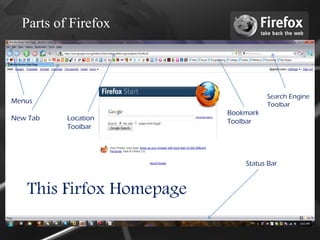
Parts of Firefox


                                     Search Engine
Menus                                Toolbar
                          Bookmark
New Tab   Location        Toolbar
          Toolbar


                              Status Bar


   This Firfox Homepage
How did Firefox become?
• Firefox has developed considerably since its
  first release as Phoenix on September 23,
  2002.
• Pre-1.0 releases suffered many issues with
  extensions, as the code for handling them
  changed from version to version.
• Throughout its development, Firefox versions
  have had internal codenames.
• PC Magazine named it best browser.
Statistics About Firefox?
• With over 25 million downloads in the 99 days
  after the initial 1.0 release, Firefox became one of
  the most downloaded free and open source
  applications, especially among home users.
• On October 19, 2005, Firefox had its 100
  millionth download, just 344 days after the
  release of version 1.0. Firefox 1.5 was released
  with more than 2 million downloads within the
  first 36 hours.
• On June 18, 2008, 8,002,530 people
  downloaded Firefox 3 in only 24 hours!
• Worldwide market share hovering near 30%
Speed
Frefox 1.5       ...12 months
Frefox 2.0       ...11 months
Frefox 3.0       ...21 months
Frefox 3.5       ...12 months
Frefox 3.6       ... 6 months
Frefox 3.7       ... 5 months
Frefox 4.0       ... 6 months

IE7 was 60 months ...
IE8 was 17 months ...
What are add-ons?
 Small programs to create your own
 unique browsing experience. By using
 these add-ons, browsing can be made
 faster, more efficient and more enjoyable.

          Firefox Add-ons
       More Than 2,039,501,348
Add-ons Examples
• Weave: synchronizing user profiles across several
  Firefox instances (including mobile)
• AdBlock+: blocks advertising.
• Flashblock: blocks Flash applets.
• CustomizeGoogle: adds features to Gmail,
  remove redirects from search results.
• MassPasswordReset: makes it easier to change
  your corporate password.
• BetterPrivacy: removes ad-related tracking
  cookies.
• ThiTan: Shortcut to create a wiki link and puts it
  into the clipboard.
Why Firefox succeed?
  • For the users.
  • By the users.
  • Of the users.
How you can contribute?
 • By reporting bugs on bugzilla.mozilla.org.
 • You can join spreadfirefox.com which is
   home of Firefox community Marketing to
   promote more and more Firefox to the
   people.
 • You can be a Mozilla Campus Rep like me
   and help Firefox to grow in your Campus.
GET FIREFOX 
www.getfirefox.com
Thank You!

Asmaa El-Bamby
Mozilla Campus Rep

Getting Started with Firefox

  • 1.
    Getting Started with Asmaa El-Bamby Mozilla Campus Rep
  • 2.
    What is Firefox? •Firefox is a free, open-source, cross platform and graphical web browser for Windows, Linux and Mac OS X developed by the Mozilla Corporation. • Firefox has features like Pop-up blocking, tabbed browsing, multiple search engine support, and built-in RSS support. • Similar to Internet Explorer, but so different!
  • 3.
    Who made Firefox? The Mozilla Corporation made the Firefox Mozilla is a global, open source project a mission-oriented organization a public benefit company and subsidiaries 250 employees 40% of code comes from non-employees 20,000+ testing volunteers over 300 million users
  • 4.
    Where can Iget Firefox? • You can download the latest version of Firefox from the Official Mozilla website, www.Mozilla.com/Firefox • To get previous versions of Mozilla Firefox simply go to, www.oldversion.com/Mozilla-Firefox.html
  • 5.
    Why switch fromInternet Explorer? (for IE users) Well, Top 5 reasons to switch Let's have a look at these!  Speed: going from IE to Firefox is like trading in your minivan for a sports car.  Safety: It's open-source security process means it address threats faster to keep you safe online.
  • 6.
     Easy toUse: Firefox's cutting-edge features are so intuitive you won't know how you lived without them.  Customization: It offer literally thousands of ways for you to adapt Firefox to meet your unique browsing needs.  Free: They say the best things in life are free, and Firefox is totally, 100% free of charge.
  • 7.
    How can IImport preferences from my old browser? To import your bookmarks, settings, and preferences from your previous browser. First click on the File Menu and then click on Import. Now you will be prompted to select which browser you would like to import your information from. After selecting the browser, click on the Next button. The default option in importing is to import all internet options like Cookies, Browsing History, Saved Form History, Saved Passwords and Favorites(i.e. bookmarks). After clicking the Next button, Firefox will soon tell you that it’s finished.
  • 8.
    Parts of Firefox Search Engine Menus Toolbar Bookmark New Tab Location Toolbar Toolbar Status Bar This Firfox Homepage
  • 9.
    How did Firefoxbecome? • Firefox has developed considerably since its first release as Phoenix on September 23, 2002. • Pre-1.0 releases suffered many issues with extensions, as the code for handling them changed from version to version. • Throughout its development, Firefox versions have had internal codenames. • PC Magazine named it best browser.
  • 10.
    Statistics About Firefox? •With over 25 million downloads in the 99 days after the initial 1.0 release, Firefox became one of the most downloaded free and open source applications, especially among home users. • On October 19, 2005, Firefox had its 100 millionth download, just 344 days after the release of version 1.0. Firefox 1.5 was released with more than 2 million downloads within the first 36 hours. • On June 18, 2008, 8,002,530 people downloaded Firefox 3 in only 24 hours! • Worldwide market share hovering near 30%
  • 11.
    Speed Frefox 1.5 ...12 months Frefox 2.0 ...11 months Frefox 3.0 ...21 months Frefox 3.5 ...12 months Frefox 3.6 ... 6 months Frefox 3.7 ... 5 months Frefox 4.0 ... 6 months IE7 was 60 months ... IE8 was 17 months ...
  • 12.
    What are add-ons? Small programs to create your own unique browsing experience. By using these add-ons, browsing can be made faster, more efficient and more enjoyable. Firefox Add-ons More Than 2,039,501,348
  • 13.
    Add-ons Examples • Weave:synchronizing user profiles across several Firefox instances (including mobile) • AdBlock+: blocks advertising. • Flashblock: blocks Flash applets. • CustomizeGoogle: adds features to Gmail, remove redirects from search results. • MassPasswordReset: makes it easier to change your corporate password. • BetterPrivacy: removes ad-related tracking cookies. • ThiTan: Shortcut to create a wiki link and puts it into the clipboard.
  • 14.
    Why Firefox succeed? • For the users. • By the users. • Of the users.
  • 15.
    How you cancontribute? • By reporting bugs on bugzilla.mozilla.org. • You can join spreadfirefox.com which is home of Firefox community Marketing to promote more and more Firefox to the people. • You can be a Mozilla Campus Rep like me and help Firefox to grow in your Campus.
  • 16.
  • 17.