ROCK GWT UI'S WITH
POLYMER ELEMENTS
1. Motivations
2. What are web components
3. What’s polymer
4. JsInterop
5. GWT consuming web components
6. introducing gwt-polymer-elements
7. Demo: full-stack gwt app using polymer and rest
services.
Agenda
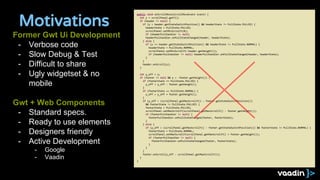
Motivations
public void onScrollMove(ScrollMoveEvent event) {
int y = scrollPanel.getY();
if (header != null) {
if (y > header.getStateSwitchPosition() && headerState != PullState.PULLED) {
headerState = PullState.PULLED;
scrollPanel.setMinScrollY(0);
if (headerPullhandler != null)
headerPullhandler.onPullStateChanged(header, headerState);
} else {
if (y <= header.getStateSwitchPosition() && headerState != PullState.NORMAL) {
headerState = PullState.NORMAL;
scrollPanel.setMinScrollY(-header.getHeight());
if (headerPullhandler != null) headerPullhandler.onPullStateChanged(header, headerState);
}
}
header.onScroll(y);
}
int y_off = y;
if (footer != null && y < -footer.getHeight()) {
if (footerState == PullState.PULLED) {
y_off = y_off - footer.getHeight();
}
if (footerState == PullState.NORMAL) {
y_off = y_off + footer.getHeight();
}
if (y_off < (scrollPanel.getMaxScrollY() - footer.getStateSwitchPosition())
&& footerState != PullState.PULLED) {
footerState = PullState.PULLED;
scrollPanel.setMaxScrollY(scrollPanel.getMaxScrollY() - footer.getHeight());
if (footerPullhandler != null) {
footerPullhandler.onPullStateChanged(footer, footerState);
}
} else {
if (y_off > (scrollPanel.getMaxScrollY() - footer.getStateSwitchPosition()) && footerState != PullState.NORMAL) {
footerState = PullState.NORMAL;
scrollPanel.setMaxScrollY(scrollPanel.getMaxScrollY() + footer.getHeight());
if (footerPullhandler != null) {
footerPullhandler.onPullStateChanged(footer, footerState);
}
}
}
footer.onScroll(y_off - scrollPanel.getMaxScrollY());
}
}
Former Gwt Ui Development
- Verbose code
- Slow Debug & Test
- Difficult to share
- Ugly widgetset & no
mobile
Gwt + Web Components
- Standard specs.
- Ready to use elements
- Designers friendly
- Active Development
- Google
- Vaadin
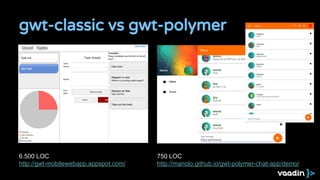
gwt-classic vs gwt-polymer
6.500 LOC
http://gwt-mobilewebapp.appspot.com/
750 LOC
http://manolo.github.io/gwt-polymer-chat-app/demo/
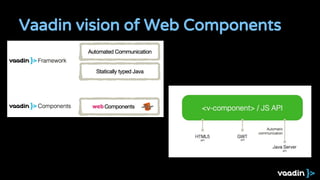
Vaadin vision of Web Components
What are Web Components?
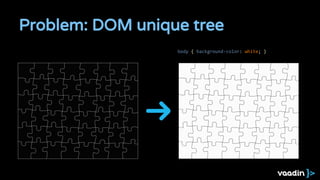
Problem: DOM unique tree
body { background-color: white; }
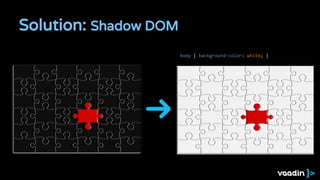
Solution: Shadow DOM
body { background-color: white; }
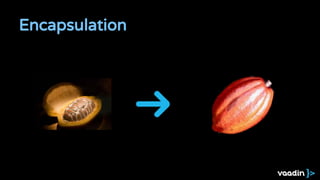
Encapsulation
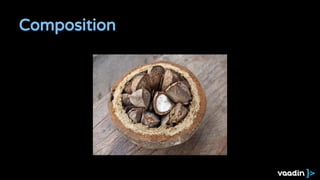
Composition
Community
Web Components
State of the art
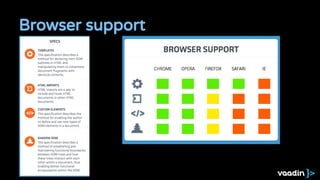
Browser support
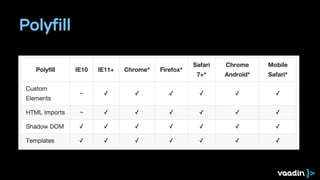
Polyfill
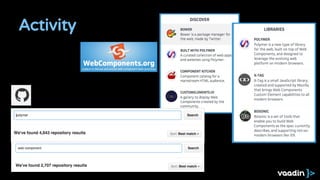
Activity
What’s Polymer
Polymer
- Polymer makes it easier and faster to create anything
from a button to a complete application across
desktop, mobile, and beyond.
- Polymer ecosystem enables sharing UI components
between developers.
- JS estable API & polyfills
- Production ready reusable components
- Documentation system
- Let's GWT take advantage of the JS ecosystem to
create amazing UIs.
Catalog
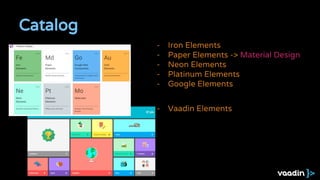
- Iron Elements
- Paper Elements -> Material Design
- Neon Elements
- Platinum Elements
- Google Elements
- Vaadin Elements
JsInterop
1. Why JsInterop
a. Nowadays most GWT big projects interact with JS libs.
b. JSNI is a bad option for complex scenarios
2. JsInterop magic allows interact natively with Js. No JSNI anymore!
a. @JsType
b. @JsProperty @JsConstructor @JsMethod @JsFunction
c. Issues ? : experimental, does not extend JSO
3. Elemental-2.0 Interfaces for all HTML
a. Window, Document, Element, Style, Events, …
b. Issue: not available yet 2.8.x ?
4. Code generation
a. Let’s explore ways to create java boilerplate code
GWT JsInterop
GWT:
Consuming Web Components
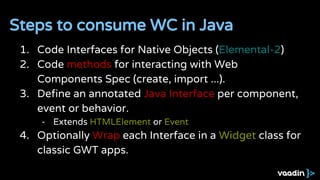
1. Code Interfaces for Native Objects (Elemental-2)
2. Code methods for interacting with Web
Components Spec (create, import ...).
3. Define an annotated Java Interface per component,
event or behavior.
- Extends HTMLElement or Event
4. Optionally Wrap each Interface in a Widget class for
classic GWT apps.
Steps to consume WC in Java
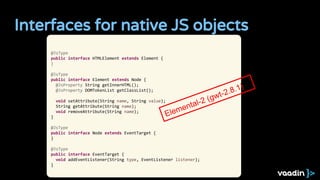
Interfaces for native JS objects
@JsType
public interface HTMLElement extends Element {
}
@JsType
public interface Element extends Node {
@JsProperty String getInnerHTML();
@JsProperty DOMTokenList getClassList();
void setAttribute(String name, String value);
String getAttribute(String name);
void removeAttribute(String name);
}
@JsType
public interface Node extends EventTarget {
}
@JsType
public interface EventTarget {
void addEventListener(String type, EventListener listener);
}
Elemental-2 (gwt-2.8.1)
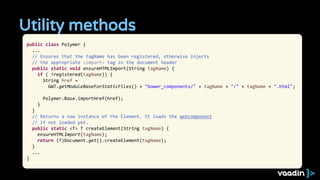
Utility methods
public class Polymer {
...
// Ensures that the tagName has been registered, otherwise injects
// the appropriate <import> tag in the document header
public static void ensureHTMLImport(String tagName) {
if ( !registered(tagName)) {
String href =
GWT.getModuleBaseForStaticFiles() + "bower_components/" + tagName + "/" + tagName + ".html";
Polymer.Base.importHref(href);
}
}
// Returns a new instance of the Element. It loads the webcomponent
// if not loaded yet.
public static <T> T createElement(String tagName) {
ensureHTMLImport(tagName);
return (T)Document.get().createElement(tagName);
}
...
}
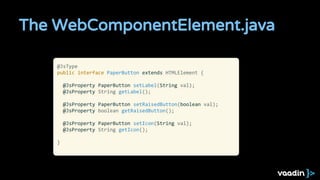
The WebComponentElement.java
@JsType
public interface PaperButton extends HTMLElement {
@JsProperty PaperButton setLabel(String val);
@JsProperty String getLabel();
@JsProperty PaperButton setRaisedButton(boolean val);
@JsProperty boolean getRaisedButton();
@JsProperty PaperButton setIcon(String val);
@JsProperty String getIcon();
}
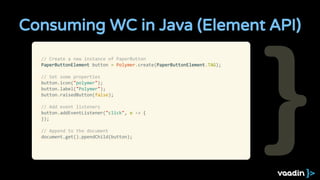
Consuming WC in Java (Element API)
// Create a new instance of PaperButton
PaperButtonElement button = Polymer.create(PaperButtonElement.TAG);
// Set some properties
button.icon("polymer");
button.label("Polymer");
button.raisedButton(false);
// Add event listeners
button.addEventListener("click", e -> {
});
// Append to the document
document.get().ppendChild(button);
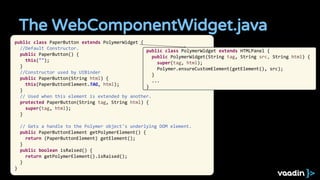
The WebComponentWidget.java
public class PaperButton extends PolymerWidget {
//Default Constructor.
public PaperButton() {
this("");
}
//Constructor used by UIBinder
public PaperButton(String html) {
this(PaperButtonElement.TAG, html);
}
// Used when this element is extended by another.
protected PaperButton(String tag, String html) {
super(tag, html);
}
// Gets a handle to the Polymer object's underlying DOM element.
public PaperButtonElement getPolymerElement() {
return (PaperButtonElement) getElement();
}
public boolean isRaised() {
return getPolymerElement().isRaised();
}
}
public class PolymerWidget extends HTMLPanel {
public PolymerWidget(String tag, String src, String html) {
super(tag, html);
Polymer.ensureCustomElement(getElement(), src);
}
...
}
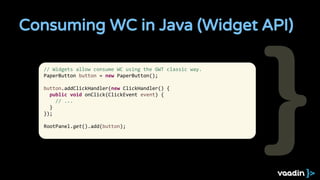
Consuming WC in Java (Widget API)
// Widgets allow consume WC using the GWT classic way.
PaperButton button = new PaperButton();
button.addClickHandler(new ClickHandler() {
public void onClick(ClickEvent event) {
// ...
}
});
RootPanel.get().add(button);
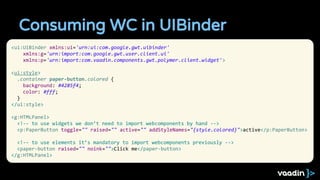
Consuming WC in UIBinder
<ui:UiBinder xmlns:ui='urn:ui:com.google.gwt.uibinder'
xmlns:g='urn:import:com.google.gwt.user.client.ui'
xmlns:p='urn:import:com.vaadin.components.gwt.polymer.client.widget'>
<ui:style>
.container paper-button.colored {
background: #4285f4;
color: #fff;
}
</ui:style>
<g:HTMLPanel>
<!-- to use widgets we don’t need to import webcomponents by hand -->
<p:PaperButton toggle="" raised="" active="" addStyleNames="{style.colored}">active</p:PaperButton>
<!-- to use elements it’s mandatory to import webcomponents previously -->
<paper-button raised="" noink="">Click me</paper-button>
</g:HTMLPanel>
Introducing
Vaadin gwt-polymer
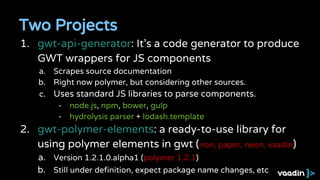
Two Projects
1. gwt-api-generator: It’s a code generator to produce
GWT wrappers for JS components
a. Scrapes source documentation
b. Right now polymer, but considering other sources.
c. Uses standard JS libraries to parse components.
- node.js, npm, bower, gulp
- hydrolysis parser + lodash.template
2. gwt-polymer-elements: a ready-to-use library for
using polymer elements in gwt (iron, paper, neon, vaadin)
a. Version 1.2.1.0.alpha1 (polymer 1.2.1)
b. Still under definition, expect package name changes, etc
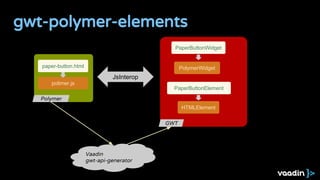
gwt-polymer-elements
GWT
PaperButtonWidget
PolymerWidget
HTMLElement
PaperButtonElement
Polymer
paper-button.html
polimer.js
JsInterop
Vaadin
gwt-api-generator
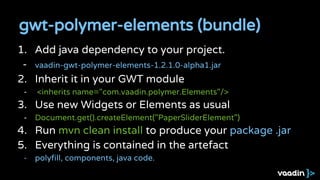
1. Add java dependency to your project.
- vaadin-gwt-polymer-elements-1.2.1.0-alpha1.jar
2. Inherit it in your GWT module
- <inherits name="com.vaadin.polymer.Elements"/>
3. Use new Widgets or Elements as usual
- Document.get().createElement("PaperSliderElement")
4. Run mvn clean install to produce your package .jar
5. Everything is contained in the artefact
- polyfill, components, java code.
gwt-polymer-elements (bundle)
1. Install the generator
- sudo npm install gwt-api-generator -g
2. Install all the components you need for your project.
- bower install my-github-account/my-custom-polymer-element
3. Run the script to generate .java classes
- gwt-api-generator [--pom --groupId=xx --artifactId=xx]
4. Run mvn clean install to produce your gwt-package .jar
gwt-api-generator (custom elements)
gwt-api-generator goals
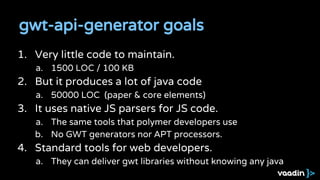
1. Very little code to maintain.
a. 1500 LOC / 100 KB
2. But it produces a lot of java code
a. 50000 LOC (paper & core elements)
3. It uses native JS parsers for JS code.
a. The same tools that polymer developers use
b. No GWT generators nor APT processors.
4. Standard tools for web developers.
a. They can deliver gwt libraries without knowing any java
Demo:
Building a full stack app
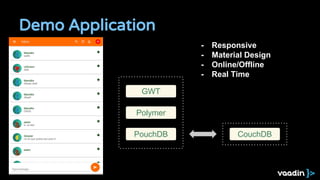
Demo Application
GWT
Polymer
PouchDB CouchDB
- Responsive
- Material Design
- Online/Offline
- Real Time
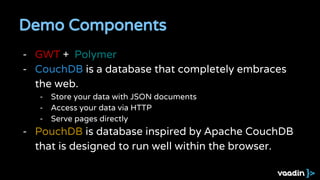
Demo Components
- GWT + Polymer
- CouchDB is a database that completely embraces
the web.
- Store your data with JSON documents
- Access your data via HTTP
- Serve pages directly
- PouchDB is database inspired by Apache CouchDB
that is designed to run well within the browser.
Demo
http://manolo.github.io/gwt-polymer-chat-app/demo/
https://github.com/manolo/gwt-polymer-chat-app
Thanks
+ManuelCarrascoMonino
manolo@vaadin.com
@dodotis

Rock GWT UI's with Polymer Elements

  • 1.
    ROCK GWT UI'SWITH POLYMER ELEMENTS
  • 2.
    1. Motivations 2. Whatare web components 3. What’s polymer 4. JsInterop 5. GWT consuming web components 6. introducing gwt-polymer-elements 7. Demo: full-stack gwt app using polymer and rest services. Agenda
  • 3.
    Motivations public void onScrollMove(ScrollMoveEventevent) { int y = scrollPanel.getY(); if (header != null) { if (y > header.getStateSwitchPosition() && headerState != PullState.PULLED) { headerState = PullState.PULLED; scrollPanel.setMinScrollY(0); if (headerPullhandler != null) headerPullhandler.onPullStateChanged(header, headerState); } else { if (y <= header.getStateSwitchPosition() && headerState != PullState.NORMAL) { headerState = PullState.NORMAL; scrollPanel.setMinScrollY(-header.getHeight()); if (headerPullhandler != null) headerPullhandler.onPullStateChanged(header, headerState); } } header.onScroll(y); } int y_off = y; if (footer != null && y < -footer.getHeight()) { if (footerState == PullState.PULLED) { y_off = y_off - footer.getHeight(); } if (footerState == PullState.NORMAL) { y_off = y_off + footer.getHeight(); } if (y_off < (scrollPanel.getMaxScrollY() - footer.getStateSwitchPosition()) && footerState != PullState.PULLED) { footerState = PullState.PULLED; scrollPanel.setMaxScrollY(scrollPanel.getMaxScrollY() - footer.getHeight()); if (footerPullhandler != null) { footerPullhandler.onPullStateChanged(footer, footerState); } } else { if (y_off > (scrollPanel.getMaxScrollY() - footer.getStateSwitchPosition()) && footerState != PullState.NORMAL) { footerState = PullState.NORMAL; scrollPanel.setMaxScrollY(scrollPanel.getMaxScrollY() + footer.getHeight()); if (footerPullhandler != null) { footerPullhandler.onPullStateChanged(footer, footerState); } } } footer.onScroll(y_off - scrollPanel.getMaxScrollY()); } } Former Gwt Ui Development - Verbose code - Slow Debug & Test - Difficult to share - Ugly widgetset & no mobile Gwt + Web Components - Standard specs. - Ready to use elements - Designers friendly - Active Development - Google - Vaadin
  • 4.
    gwt-classic vs gwt-polymer 6.500LOC http://gwt-mobilewebapp.appspot.com/ 750 LOC http://manolo.github.io/gwt-polymer-chat-app/demo/
  • 5.
    Vaadin vision ofWeb Components
  • 6.
    What are WebComponents?
  • 7.
    Problem: DOM uniquetree body { background-color: white; }
  • 8.
    Solution: Shadow DOM body{ background-color: white; }
  • 9.
  • 10.
  • 11.
  • 12.
  • 13.
  • 14.
  • 15.
  • 16.
  • 17.
    Polymer - Polymer makesit easier and faster to create anything from a button to a complete application across desktop, mobile, and beyond. - Polymer ecosystem enables sharing UI components between developers. - JS estable API & polyfills - Production ready reusable components - Documentation system - Let's GWT take advantage of the JS ecosystem to create amazing UIs.
  • 18.
    Catalog - Iron Elements -Paper Elements -> Material Design - Neon Elements - Platinum Elements - Google Elements - Vaadin Elements
  • 19.
  • 20.
    1. Why JsInterop a.Nowadays most GWT big projects interact with JS libs. b. JSNI is a bad option for complex scenarios 2. JsInterop magic allows interact natively with Js. No JSNI anymore! a. @JsType b. @JsProperty @JsConstructor @JsMethod @JsFunction c. Issues ? : experimental, does not extend JSO 3. Elemental-2.0 Interfaces for all HTML a. Window, Document, Element, Style, Events, … b. Issue: not available yet 2.8.x ? 4. Code generation a. Let’s explore ways to create java boilerplate code GWT JsInterop
  • 21.
  • 22.
    1. Code Interfacesfor Native Objects (Elemental-2) 2. Code methods for interacting with Web Components Spec (create, import ...). 3. Define an annotated Java Interface per component, event or behavior. - Extends HTMLElement or Event 4. Optionally Wrap each Interface in a Widget class for classic GWT apps. Steps to consume WC in Java
  • 23.
    Interfaces for nativeJS objects @JsType public interface HTMLElement extends Element { } @JsType public interface Element extends Node { @JsProperty String getInnerHTML(); @JsProperty DOMTokenList getClassList(); void setAttribute(String name, String value); String getAttribute(String name); void removeAttribute(String name); } @JsType public interface Node extends EventTarget { } @JsType public interface EventTarget { void addEventListener(String type, EventListener listener); } Elemental-2 (gwt-2.8.1)
  • 24.
    Utility methods public classPolymer { ... // Ensures that the tagName has been registered, otherwise injects // the appropriate <import> tag in the document header public static void ensureHTMLImport(String tagName) { if ( !registered(tagName)) { String href = GWT.getModuleBaseForStaticFiles() + "bower_components/" + tagName + "/" + tagName + ".html"; Polymer.Base.importHref(href); } } // Returns a new instance of the Element. It loads the webcomponent // if not loaded yet. public static <T> T createElement(String tagName) { ensureHTMLImport(tagName); return (T)Document.get().createElement(tagName); } ... }
  • 25.
    The WebComponentElement.java @JsType public interfacePaperButton extends HTMLElement { @JsProperty PaperButton setLabel(String val); @JsProperty String getLabel(); @JsProperty PaperButton setRaisedButton(boolean val); @JsProperty boolean getRaisedButton(); @JsProperty PaperButton setIcon(String val); @JsProperty String getIcon(); }
  • 26.
    Consuming WC inJava (Element API) // Create a new instance of PaperButton PaperButtonElement button = Polymer.create(PaperButtonElement.TAG); // Set some properties button.icon("polymer"); button.label("Polymer"); button.raisedButton(false); // Add event listeners button.addEventListener("click", e -> { }); // Append to the document document.get().ppendChild(button);
  • 27.
    The WebComponentWidget.java public classPaperButton extends PolymerWidget { //Default Constructor. public PaperButton() { this(""); } //Constructor used by UIBinder public PaperButton(String html) { this(PaperButtonElement.TAG, html); } // Used when this element is extended by another. protected PaperButton(String tag, String html) { super(tag, html); } // Gets a handle to the Polymer object's underlying DOM element. public PaperButtonElement getPolymerElement() { return (PaperButtonElement) getElement(); } public boolean isRaised() { return getPolymerElement().isRaised(); } } public class PolymerWidget extends HTMLPanel { public PolymerWidget(String tag, String src, String html) { super(tag, html); Polymer.ensureCustomElement(getElement(), src); } ... }
  • 28.
    Consuming WC inJava (Widget API) // Widgets allow consume WC using the GWT classic way. PaperButton button = new PaperButton(); button.addClickHandler(new ClickHandler() { public void onClick(ClickEvent event) { // ... } }); RootPanel.get().add(button);
  • 29.
    Consuming WC inUIBinder <ui:UiBinder xmlns:ui='urn:ui:com.google.gwt.uibinder' xmlns:g='urn:import:com.google.gwt.user.client.ui' xmlns:p='urn:import:com.vaadin.components.gwt.polymer.client.widget'> <ui:style> .container paper-button.colored { background: #4285f4; color: #fff; } </ui:style> <g:HTMLPanel> <!-- to use widgets we don’t need to import webcomponents by hand --> <p:PaperButton toggle="" raised="" active="" addStyleNames="{style.colored}">active</p:PaperButton> <!-- to use elements it’s mandatory to import webcomponents previously --> <paper-button raised="" noink="">Click me</paper-button> </g:HTMLPanel>
  • 30.
  • 31.
    Two Projects 1. gwt-api-generator:It’s a code generator to produce GWT wrappers for JS components a. Scrapes source documentation b. Right now polymer, but considering other sources. c. Uses standard JS libraries to parse components. - node.js, npm, bower, gulp - hydrolysis parser + lodash.template 2. gwt-polymer-elements: a ready-to-use library for using polymer elements in gwt (iron, paper, neon, vaadin) a. Version 1.2.1.0.alpha1 (polymer 1.2.1) b. Still under definition, expect package name changes, etc
  • 32.
  • 33.
    1. Add javadependency to your project. - vaadin-gwt-polymer-elements-1.2.1.0-alpha1.jar 2. Inherit it in your GWT module - <inherits name="com.vaadin.polymer.Elements"/> 3. Use new Widgets or Elements as usual - Document.get().createElement("PaperSliderElement") 4. Run mvn clean install to produce your package .jar 5. Everything is contained in the artefact - polyfill, components, java code. gwt-polymer-elements (bundle)
  • 34.
    1. Install thegenerator - sudo npm install gwt-api-generator -g 2. Install all the components you need for your project. - bower install my-github-account/my-custom-polymer-element 3. Run the script to generate .java classes - gwt-api-generator [--pom --groupId=xx --artifactId=xx] 4. Run mvn clean install to produce your gwt-package .jar gwt-api-generator (custom elements)
  • 35.
    gwt-api-generator goals 1. Verylittle code to maintain. a. 1500 LOC / 100 KB 2. But it produces a lot of java code a. 50000 LOC (paper & core elements) 3. It uses native JS parsers for JS code. a. The same tools that polymer developers use b. No GWT generators nor APT processors. 4. Standard tools for web developers. a. They can deliver gwt libraries without knowing any java
  • 36.
  • 37.
    Demo Application GWT Polymer PouchDB CouchDB -Responsive - Material Design - Online/Offline - Real Time
  • 38.
    Demo Components - GWT+ Polymer - CouchDB is a database that completely embraces the web. - Store your data with JSON documents - Access your data via HTTP - Serve pages directly - PouchDB is database inspired by Apache CouchDB that is designed to run well within the browser.
  • 39.
  • 40.