한장현
han41858@gmail.com
han41858.tistory.com
: 어디까지 왔을까
ngular 2
Angular 2 진행상황
Angular 2의 장애물
Angular 1 대비 장점
Angular 1
업그레이드 방법
다른 라이브러리와 비교
Today
2
Ver. 2.2.0
ngular 2
3
{
"name": "angular-quickstart",
"version": "1.0.0",
"scripts": {
"start": "npm run lite",
"lite": "lite-server"
},
"licenses": [
{
"type": "MIT",
"url":
"https://github.com/angular/angular.io/blob/master/LICENSE"
}
],
"devDependencies": {
"concurrently": "^3.0.0",
"lite-server": "^2.2.2"
}
}
"dependencies": {
"@angular/common": "~2.1.1",
"@angular/compiler": "~2.1.1",
"@angular/core": "~2.1.1",
"@angular/forms": "~2.1.1",
"@angular/http": "~2.1.1",
"@angular/platform-browser": "~2.1.1",
"@angular/platform-browser-dynamic": "~2.1.1",
"@angular/router": "~3.1.1",
"@angular/upgrade": "~2.1.1",
"angular-in-memory-web-api": "~0.1.5",
"core-js": "^2.4.1",
"reflect-metadata": "^0.1.8",
"rxjs": "5.0.0-beta.12",
"zone.js": "^0.6.25"
},
Quickstart package.json 2.0.0 package.json
4
[Major] . [Minor] . [Patch]
버그 수정
호환되지 않는 API 변화
호환되면서 기능 변경, 추가
SemVer
http://han41858.tistory.com/22
5
→ 빠르고 지속적인 큰 변화
①장애물
6
2016. 12. 1 출판 예정
2016. 10. 1 출판 목표
빠른 변화
7
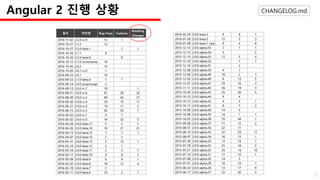
CHANGELOG.mdAngular 2 진행 상황
8
ngModule
CLI
Angular 2 Final
9
→ 새로운 개발 언어
②장애물
10
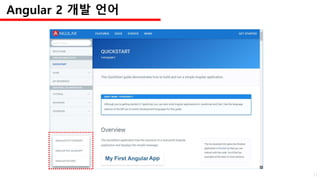
Angular 2 개발 언어
11
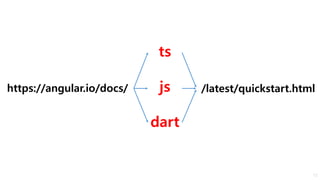
ts
js
dart
https://angular.io/docs/ /latest/quickstart.html
12
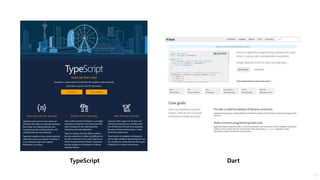
TypeScript Dart
13
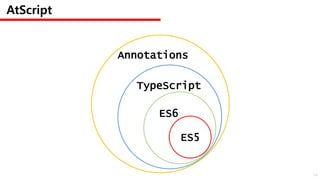
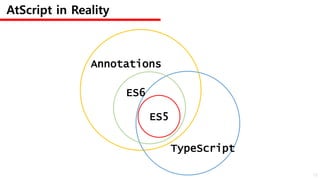
AtScript
ES5
ES6
TypeScript
Annotations
14
AtScript in Reality
ES5
ES6
TypeScript
Annotations
15
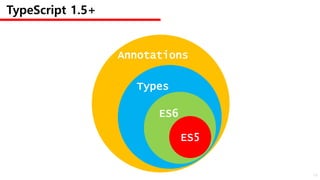
TypeScript 1.5+
ES5
ES6
Types
Annotations
16
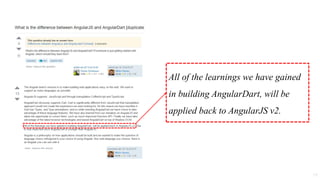
All of the learnings we have gained
in building AngularDart, will be
applied back to AngularJS v2.
17
18
19
(function(app) {
app.AppComponent =
ng.core.Component({
selector: 'my-app',
template: '<h1>My First Angular App</h1>'
})
.Class({
constructor: function() {}
});
})(window.app || (window.app = {}));
JavaScript
import 'package:angular2/core.dart';
@Component(
selector: 'my-app',
template: '<h1>My First Angular App</h1>'
)
export class AppComponent {}
Dart
import { Component } from '@angular/core';
@Component({
selector: 'my-app',
template: '<h1>My First Angular App</h1>'
})
export class AppComponent {}
TypeScript
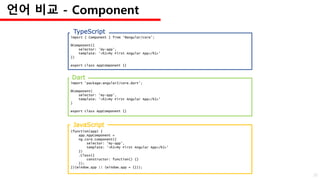
언어 비교 - Component
20
(function(app) {
app.AppModule =
ng.core.NgModule({
imports: [ ng.platformBrowser.BrowserModule ],
declarations: [ app.AppComponent ],
bootstrap: [ app.AppComponent ]
})
.Class({
constructor: function() {}
});
})(window.app || (window.app = {}));
JavaScript
-- This page is not yet available in Dart. We recommend reading it in TypeScript. --
Dart
import { NgModule } from '@angular/core';
import { BrowserModule } from '@angular/platform-browser';
import { AppComponent } from './app.component';
@NgModule({
imports: [ BrowserModule ],
declarations: [ AppComponent ],
bootstrap: [ AppComponent ]
})
export class AppModule { }
TypeScript
언어 비교 - ngModule
21
(function(app) {
document.addEventListener('DOMContentLoaded', function() {
ng.platformBrowserDynamic
.platformBrowserDynamic()
.bootstrapModule(app.AppModule);
});
})(window.app || (window.app = {}));
JavaScript
import 'package:angular2/platform/browser.dart';
import 'package:angular2_quickstart/app_component.dart';
void main() {
bootstrap(AppComponent);
}
Dart
import { platformBrowserDynamic } from '@angular/platform-browser-dynamic';
import { AppModule } from './app.module';
const platform = platformBrowserDynamic();
platform.bootstrapModule(AppModule);
TypeScript
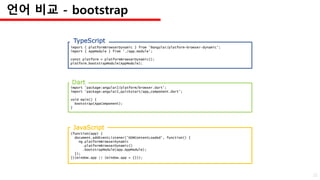
언어 비교 - bootstrap
22
→새로운 Tool, 개발 방식의 변화
③장애물
23
26%
22%
17%
35%
Environment Setup
Too Complicated
Lack of Documentation
Other Interests
Mike Brocchi
Angular CLI contributor
Q. What is/was your largest barrier to getting started with Angular 2?
with Angular CLI
24
25
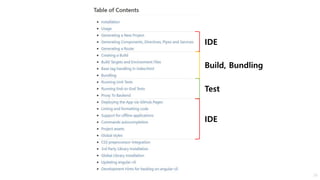
IDE
Build, Bundling
Test
IDE
26
Boilerplate
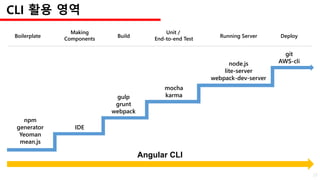
Making
Components
Build Running Server
Unit /
End-to-end Test
Deploy
CLI 활용 영역
npm
generator
Yeoman
mean.js
IDE
gulp
grunt
webpack
node.js
lite-server
webpack-dev-server
mocha
karma
git
AWS-cli
Angular CLI
27
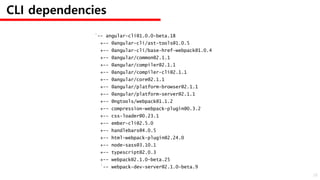
`-- angular-cli@1.0.0-beta.18
+-- @angular-cli/ast-tools@1.0.5
+-- @angular-cli/base-href-webpack@1.0.4
+-- @angular/common@2.1.1
+-- @angular/compiler@2.1.1
+-- @angular/compiler-cli@2.1.1
+-- @angular/core@2.1.1
+-- @angular/platform-browser@2.1.1
+-- @angular/platform-server@2.1.1
+-- @ngtools/webpack@1.1.2
+-- compression-webpack-plugin@0.3.2
+-- css-loader@0.23.1
+-- ember-cli@2.5.0
+-- handlebars@4.0.5
+-- html-webpack-plugin@2.24.0
+-- node-sass@3.10.1
+-- typescript@2.0.3
+-- webpack@2.1.0-beta.25
`-- webpack-dev-server@2.1.0-beta.9
CLI dependencies
28
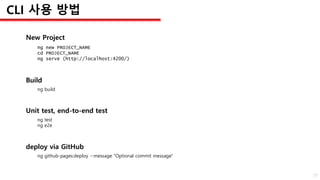
Build
ng build
New Project
ng new PROJECT_NAME
cd PROJECT_NAME
ng serve (http://localhost:4200/)
Unit test, end-to-end test
ng test
ng e2e
deploy via GitHub
ng github-pages:deploy --message "Optional commit message"
CLI 사용 방법
29
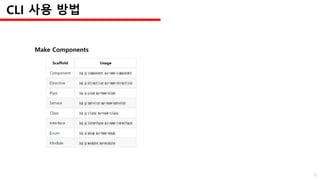
Make Components
CLI 사용 방법
30
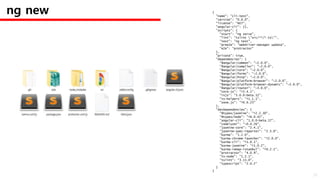
{
"name": "cli-test",
"version": "0.0.0",
"license": "MIT",
"angular-cli": {},
"scripts": {
"start": "ng serve",
"lint": "tslint "src/**/*.ts"",
"test": "ng test",
"pree2e": "webdriver-manager update",
"e2e": "protractor"
},
"private": true,
"dependencies": {
"@angular/common": "~2.0.0",
"@angular/compiler": "~2.0.0",
"@angular/core": "~2.0.0",
"@angular/forms": "~2.0.0",
"@angular/http": "~2.0.0",
"@angular/platform-browser": "~2.0.0",
"@angular/platform-browser-dynamic": "~2.0.0",
"@angular/router": "~3.0.0",
"core-js": "^2.4.1",
"rxjs": "5.0.0-beta.12",
"ts-helpers": "^1.1.1",
"zone.js": "^0.6.23"
},
"devDependencies": {
"@types/jasmine": "^2.2.30",
"@types/node": "^6.0.42",
"angular-cli": "1.0.0-beta.17",
"codelyzer": "~0.0.26",
"jasmine-core": "2.4.1",
"jasmine-spec-reporter": "2.5.0",
"karma": "1.2.0",
"karma-chrome-launcher": "^2.0.0",
"karma-cli": "^1.0.1",
"karma-jasmine": "^1.0.2",
"karma-remap-istanbul": "^0.2.1",
"protractor": "4.0.9",
"ts-node": "1.2.1",
"tslint": "3.13.0",
"typescript": "2.0.2"
}
}
ng new
31
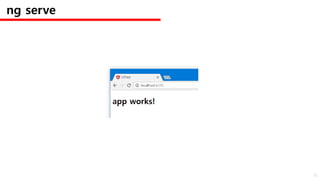
ng serve
32
Angular CLI Demo
33
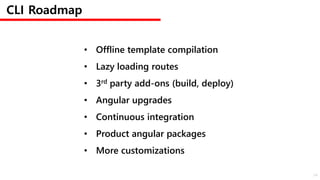
CLI Roadmap
• Offline template compilation
• Lazy loading routes
• 3rd party add-ons (build, deploy)
• Angular upgrades
• Continuous integration
• Product angular packages
• More customizations
34
→ 문법의 변화
작은 장애물
35
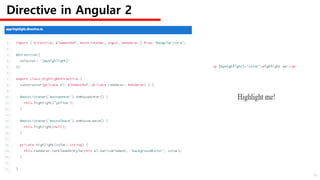
Directive in Angular 2
36
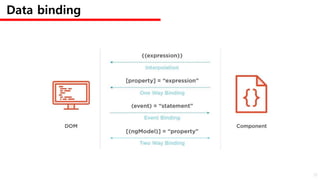
Data binding
37
* and <template>
<hero-detail *ngIf="currentHero" [hero]="currentHero"></hero_detail>
<hero-detail *ngFor="let hero of heroes; trackBy:trackByHeroes" [hero]="hero"></her
<span [ngSwitch]="toeChoice">
<span *ngSwitchCase="'Eenie'">Eenie</span>
<span *ngSwitchCase="'Meanie'">Meanie</span>
<span *ngSwitchCase="'Miney'">Miney</span>
<span *ngSwitchCase="'Moe'">Moe</span>
<span *ngSwitchDefault>other</span>
</span>
38
import {Component} from '@angular/core'
import {MdButtonModule} from '@angular-material2/button'
import {MdSideNavModule} from '@angular-material2/sidenav'
import {MdCardModule} from '@angular-material2/card'
import {RouterModule} from '@angular/router'
@NgModule({
imports: [
MdButtonModule,
MdSideNavModule,
MdCardModule,
RouterModule.forRoot(routeConfig)
]
})
class MyAppModule {}
import {Component} from '@angular/core'
import {MD_BUTTON_DIRECTIVES} from '@angular-material2/button'
import {MD_SIDENAV_DIRECTIVES} from '@angular-material2/sidenav'
import {MD_CARD_DIRECTIVES} from '@angular-material2/card'
import {provideRouter, ROUTER_DIRECTIVES} from '@angular/router'
@Component({
selector: 'my-component',
providers: [ provideRouter(routeConfig) ],
directives: [
MD_BUTTON_DIRECTIVES,
MD_SIDENAV_DIRECTIVES,
MD_CARD_DIRECTIVES,
ROUTER_DIRECTIVES
]
})
class MyComponent {}
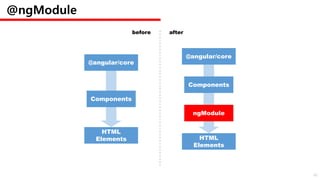
@ngModule
39
@angular/core
Components
HTML
Elements
@angular/core
Components
ngModule
HTML
Elements
@ngModule
before after
40
→ 속도
장점 ①
41
42
https://www.youtube.com/watch?v=XQM0K6YG18s
16:21~17:10
But!!
43
44
45
https://www.youtube.com/watch?v=XQM0K6YG18s
17:39~18:48
new change detection : zone.js
smoother virtual scrolling
smoother view transition
lazy loading
server-side rendering
첫 로딩은 2.5배
리렌더링은 4.2배
성능 개선 후 언제나 5배 이상
?
Angular 1 대비
46
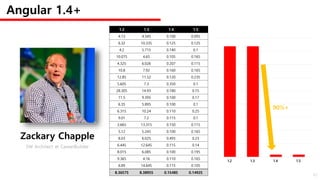
Angular 1.4+
1.2 1.3 1.4 1.5
4.13 4.545 0.100 0.095
6.32 10.335 0.125 0.125
4.2 5.715 0.140 0.1
10.075 4.65 0.105 0.165
4.325 6.026 0.207 0.115
10.8 7.92 0.160 0.165
12.85 11.52 0.120 0.235
5.605 7.3 0.350 0.1
28.305 14.93 0.180 0.15
11.5 9.395 0.100 0.17
6.35 5.895 0.100 0.1
6.315 10.24 0.110 0.25
9.01 7.2 0.115 0.1
3.665 13.315 0.150 0.115
5.12 5.245 0.100 0.165
8.03 6.025 0.495 0.23
6.445 12.645 0.115 0.14
8.015 6.085 0.100 0.195
9.365 4.16 0.110 0.165
6.89 14.645 0.115 0.105
Zackary Chapple
SW Architect at CareerBuilder
1.2 1.3 1.4 1.5
90%+
8.36575 8.38955 0.15485 0.14925
47
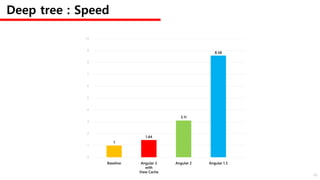
Deep tree : Speed
8.58
3.11
1.44
1
Baseline Angular 2
with
View Cache
Angular 2 Angular 1.3
0
1
2
3
4
5
6
7
8
9
10
48
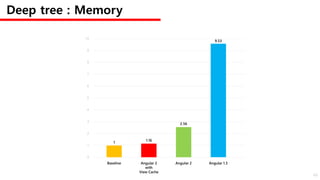
Deep tree : Memory
9.53
2.56
1.16
1
Baseline Angular 2
with
View Cache
Angular 2 Angular 1.3
0
1
2
3
4
5
6
7
8
9
10
49
2000
1500
1000
500
0
2 9 16 23 30
# of tables
Angular 1
Angular 2
Angular 2
(Immutable Data)
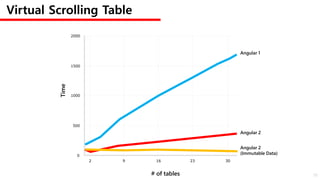
Virtual Scrolling Table
Time
50
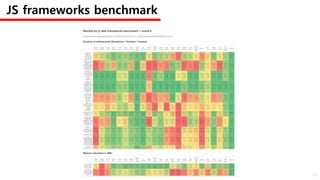
JS frameworks benchmark
51
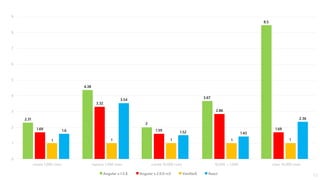
2.31
1.69
1
1.6
1
2
3
0
4
5
6
7
8
9
create 1,000 rows
Angular v.1.5.8 Angular v.2.0.0-rc5 VanillaJS React
replace 1,000 rows create 10,000 rows 10,000 + 1,000 clear 10,000 rows
4.38
3.32
1
3.54
2
1.59
1
1.52
3.67
2.86
1
1.43
8.5
1.69
1
2.36
52
→ 체계적인 개발 방법
장점 ②
53
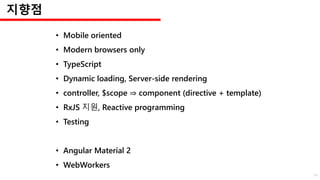
지향점
• Mobile oriented
• Modern browsers only
• TypeScript
• Dynamic loading, Server-side rendering
• controller, $scope ⇒ component (directive + template)
• RxJS 지원, Reactive programming
• Testing
• Angular Material 2
• WebWorkers
54
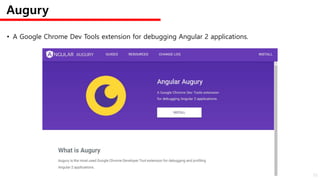
• A Google Chrome Dev Tools extension for debugging Angular 2 applications.
Augury
55
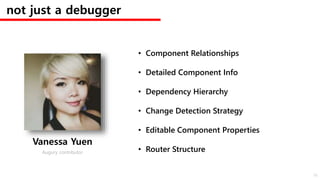
not just a debugger
• Component Relationships
• Detailed Component Info
• Dependency Hierarchy
• Change Detection Strategy
• Editable Component Properties
• Router Structure
Vanessa Yuen
Augury contributor
56
57
58
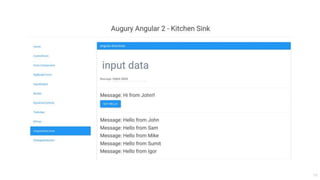
Augury Demo
59
ngular 2
써야 할까?
언제?
60
Productivity
61
체계적인 프로젝트 관리
최신 기술의 자연스러운 도입
62
더 나은 길로 가고 있다.
사용은 아직….
관심을 계속 갖자.
63
Q & A
64
세상에 라이브러리는 많다.
65
66
Angular 2의 선구자가 될 시점은 지금!
감사합니다.
han41858@gmail.com
han41858.tistory.com
67

Angular 2 어디까지 왔을까

  • 1.
  • 2.
    Angular 2 진행상황 Angular2의 장애물 Angular 1 대비 장점 Angular 1 업그레이드 방법 다른 라이브러리와 비교 Today 2
  • 3.
  • 4.
    { "name": "angular-quickstart", "version": "1.0.0", "scripts":{ "start": "npm run lite", "lite": "lite-server" }, "licenses": [ { "type": "MIT", "url": "https://github.com/angular/angular.io/blob/master/LICENSE" } ], "devDependencies": { "concurrently": "^3.0.0", "lite-server": "^2.2.2" } } "dependencies": { "@angular/common": "~2.1.1", "@angular/compiler": "~2.1.1", "@angular/core": "~2.1.1", "@angular/forms": "~2.1.1", "@angular/http": "~2.1.1", "@angular/platform-browser": "~2.1.1", "@angular/platform-browser-dynamic": "~2.1.1", "@angular/router": "~3.1.1", "@angular/upgrade": "~2.1.1", "angular-in-memory-web-api": "~0.1.5", "core-js": "^2.4.1", "reflect-metadata": "^0.1.8", "rxjs": "5.0.0-beta.12", "zone.js": "^0.6.25" }, Quickstart package.json 2.0.0 package.json 4
  • 5.
    [Major] . [Minor]. [Patch] 버그 수정 호환되지 않는 API 변화 호환되면서 기능 변경, 추가 SemVer http://han41858.tistory.com/22 5
  • 6.
    → 빠르고 지속적인큰 변화 ①장애물 6
  • 7.
    2016. 12. 1출판 예정 2016. 10. 1 출판 목표 빠른 변화 7
  • 8.
  • 9.
  • 10.
    → 새로운 개발언어 ②장애물 10
  • 11.
  • 12.
  • 13.
  • 14.
  • 15.
  • 16.
  • 17.
    All of thelearnings we have gained in building AngularDart, will be applied back to AngularJS v2. 17
  • 18.
  • 19.
  • 20.
    (function(app) { app.AppComponent = ng.core.Component({ selector:'my-app', template: '<h1>My First Angular App</h1>' }) .Class({ constructor: function() {} }); })(window.app || (window.app = {})); JavaScript import 'package:angular2/core.dart'; @Component( selector: 'my-app', template: '<h1>My First Angular App</h1>' ) export class AppComponent {} Dart import { Component } from '@angular/core'; @Component({ selector: 'my-app', template: '<h1>My First Angular App</h1>' }) export class AppComponent {} TypeScript 언어 비교 - Component 20
  • 21.
    (function(app) { app.AppModule = ng.core.NgModule({ imports:[ ng.platformBrowser.BrowserModule ], declarations: [ app.AppComponent ], bootstrap: [ app.AppComponent ] }) .Class({ constructor: function() {} }); })(window.app || (window.app = {})); JavaScript -- This page is not yet available in Dart. We recommend reading it in TypeScript. -- Dart import { NgModule } from '@angular/core'; import { BrowserModule } from '@angular/platform-browser'; import { AppComponent } from './app.component'; @NgModule({ imports: [ BrowserModule ], declarations: [ AppComponent ], bootstrap: [ AppComponent ] }) export class AppModule { } TypeScript 언어 비교 - ngModule 21
  • 22.
    (function(app) { document.addEventListener('DOMContentLoaded', function(){ ng.platformBrowserDynamic .platformBrowserDynamic() .bootstrapModule(app.AppModule); }); })(window.app || (window.app = {})); JavaScript import 'package:angular2/platform/browser.dart'; import 'package:angular2_quickstart/app_component.dart'; void main() { bootstrap(AppComponent); } Dart import { platformBrowserDynamic } from '@angular/platform-browser-dynamic'; import { AppModule } from './app.module'; const platform = platformBrowserDynamic(); platform.bootstrapModule(AppModule); TypeScript 언어 비교 - bootstrap 22
  • 23.
    →새로운 Tool, 개발방식의 변화 ③장애물 23
  • 24.
    26% 22% 17% 35% Environment Setup Too Complicated Lackof Documentation Other Interests Mike Brocchi Angular CLI contributor Q. What is/was your largest barrier to getting started with Angular 2? with Angular CLI 24
  • 25.
  • 26.
  • 27.
    Boilerplate Making Components Build Running Server Unit/ End-to-end Test Deploy CLI 활용 영역 npm generator Yeoman mean.js IDE gulp grunt webpack node.js lite-server webpack-dev-server mocha karma git AWS-cli Angular CLI 27
  • 28.
    `-- angular-cli@1.0.0-beta.18 +-- @angular-cli/ast-tools@1.0.5 +--@angular-cli/base-href-webpack@1.0.4 +-- @angular/common@2.1.1 +-- @angular/compiler@2.1.1 +-- @angular/compiler-cli@2.1.1 +-- @angular/core@2.1.1 +-- @angular/platform-browser@2.1.1 +-- @angular/platform-server@2.1.1 +-- @ngtools/webpack@1.1.2 +-- compression-webpack-plugin@0.3.2 +-- css-loader@0.23.1 +-- ember-cli@2.5.0 +-- handlebars@4.0.5 +-- html-webpack-plugin@2.24.0 +-- node-sass@3.10.1 +-- typescript@2.0.3 +-- webpack@2.1.0-beta.25 `-- webpack-dev-server@2.1.0-beta.9 CLI dependencies 28
  • 29.
    Build ng build New Project ngnew PROJECT_NAME cd PROJECT_NAME ng serve (http://localhost:4200/) Unit test, end-to-end test ng test ng e2e deploy via GitHub ng github-pages:deploy --message "Optional commit message" CLI 사용 방법 29
  • 30.
  • 31.
    { "name": "cli-test", "version": "0.0.0", "license":"MIT", "angular-cli": {}, "scripts": { "start": "ng serve", "lint": "tslint "src/**/*.ts"", "test": "ng test", "pree2e": "webdriver-manager update", "e2e": "protractor" }, "private": true, "dependencies": { "@angular/common": "~2.0.0", "@angular/compiler": "~2.0.0", "@angular/core": "~2.0.0", "@angular/forms": "~2.0.0", "@angular/http": "~2.0.0", "@angular/platform-browser": "~2.0.0", "@angular/platform-browser-dynamic": "~2.0.0", "@angular/router": "~3.0.0", "core-js": "^2.4.1", "rxjs": "5.0.0-beta.12", "ts-helpers": "^1.1.1", "zone.js": "^0.6.23" }, "devDependencies": { "@types/jasmine": "^2.2.30", "@types/node": "^6.0.42", "angular-cli": "1.0.0-beta.17", "codelyzer": "~0.0.26", "jasmine-core": "2.4.1", "jasmine-spec-reporter": "2.5.0", "karma": "1.2.0", "karma-chrome-launcher": "^2.0.0", "karma-cli": "^1.0.1", "karma-jasmine": "^1.0.2", "karma-remap-istanbul": "^0.2.1", "protractor": "4.0.9", "ts-node": "1.2.1", "tslint": "3.13.0", "typescript": "2.0.2" } } ng new 31
  • 32.
  • 33.
  • 34.
    CLI Roadmap • Offlinetemplate compilation • Lazy loading routes • 3rd party add-ons (build, deploy) • Angular upgrades • Continuous integration • Product angular packages • More customizations 34
  • 35.
  • 36.
  • 37.
  • 38.
    * and <template> <hero-detail*ngIf="currentHero" [hero]="currentHero"></hero_detail> <hero-detail *ngFor="let hero of heroes; trackBy:trackByHeroes" [hero]="hero"></her <span [ngSwitch]="toeChoice"> <span *ngSwitchCase="'Eenie'">Eenie</span> <span *ngSwitchCase="'Meanie'">Meanie</span> <span *ngSwitchCase="'Miney'">Miney</span> <span *ngSwitchCase="'Moe'">Moe</span> <span *ngSwitchDefault>other</span> </span> 38
  • 39.
    import {Component} from'@angular/core' import {MdButtonModule} from '@angular-material2/button' import {MdSideNavModule} from '@angular-material2/sidenav' import {MdCardModule} from '@angular-material2/card' import {RouterModule} from '@angular/router' @NgModule({ imports: [ MdButtonModule, MdSideNavModule, MdCardModule, RouterModule.forRoot(routeConfig) ] }) class MyAppModule {} import {Component} from '@angular/core' import {MD_BUTTON_DIRECTIVES} from '@angular-material2/button' import {MD_SIDENAV_DIRECTIVES} from '@angular-material2/sidenav' import {MD_CARD_DIRECTIVES} from '@angular-material2/card' import {provideRouter, ROUTER_DIRECTIVES} from '@angular/router' @Component({ selector: 'my-component', providers: [ provideRouter(routeConfig) ], directives: [ MD_BUTTON_DIRECTIVES, MD_SIDENAV_DIRECTIVES, MD_CARD_DIRECTIVES, ROUTER_DIRECTIVES ] }) class MyComponent {} @ngModule 39
  • 40.
  • 41.
  • 42.
  • 43.
  • 44.
  • 45.
  • 46.
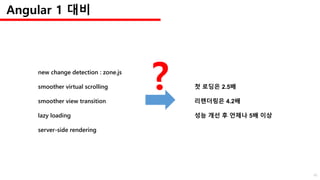
    new change detection: zone.js smoother virtual scrolling smoother view transition lazy loading server-side rendering 첫 로딩은 2.5배 리렌더링은 4.2배 성능 개선 후 언제나 5배 이상 ? Angular 1 대비 46
  • 47.
    Angular 1.4+ 1.2 1.31.4 1.5 4.13 4.545 0.100 0.095 6.32 10.335 0.125 0.125 4.2 5.715 0.140 0.1 10.075 4.65 0.105 0.165 4.325 6.026 0.207 0.115 10.8 7.92 0.160 0.165 12.85 11.52 0.120 0.235 5.605 7.3 0.350 0.1 28.305 14.93 0.180 0.15 11.5 9.395 0.100 0.17 6.35 5.895 0.100 0.1 6.315 10.24 0.110 0.25 9.01 7.2 0.115 0.1 3.665 13.315 0.150 0.115 5.12 5.245 0.100 0.165 8.03 6.025 0.495 0.23 6.445 12.645 0.115 0.14 8.015 6.085 0.100 0.195 9.365 4.16 0.110 0.165 6.89 14.645 0.115 0.105 Zackary Chapple SW Architect at CareerBuilder 1.2 1.3 1.4 1.5 90%+ 8.36575 8.38955 0.15485 0.14925 47
  • 48.
    Deep tree :Speed 8.58 3.11 1.44 1 Baseline Angular 2 with View Cache Angular 2 Angular 1.3 0 1 2 3 4 5 6 7 8 9 10 48
  • 49.
    Deep tree :Memory 9.53 2.56 1.16 1 Baseline Angular 2 with View Cache Angular 2 Angular 1.3 0 1 2 3 4 5 6 7 8 9 10 49
  • 50.
    2000 1500 1000 500 0 2 9 1623 30 # of tables Angular 1 Angular 2 Angular 2 (Immutable Data) Virtual Scrolling Table Time 50
  • 51.
  • 52.
    2.31 1.69 1 1.6 1 2 3 0 4 5 6 7 8 9 create 1,000 rows Angularv.1.5.8 Angular v.2.0.0-rc5 VanillaJS React replace 1,000 rows create 10,000 rows 10,000 + 1,000 clear 10,000 rows 4.38 3.32 1 3.54 2 1.59 1 1.52 3.67 2.86 1 1.43 8.5 1.69 1 2.36 52
  • 53.
    → 체계적인 개발방법 장점 ② 53
  • 54.
    지향점 • Mobile oriented •Modern browsers only • TypeScript • Dynamic loading, Server-side rendering • controller, $scope ⇒ component (directive + template) • RxJS 지원, Reactive programming • Testing • Angular Material 2 • WebWorkers 54
  • 55.
    • A GoogleChrome Dev Tools extension for debugging Angular 2 applications. Augury 55
  • 56.
    not just adebugger • Component Relationships • Detailed Component Info • Dependency Hierarchy • Change Detection Strategy • Editable Component Properties • Router Structure Vanessa Yuen Augury contributor 56
  • 57.
  • 58.
  • 59.
  • 60.
  • 61.
  • 62.
    체계적인 프로젝트 관리 최신기술의 자연스러운 도입 62
  • 63.
    더 나은 길로가고 있다. 사용은 아직…. 관심을 계속 갖자. 63
  • 64.
  • 65.
  • 66.
    66 Angular 2의 선구자가될 시점은 지금!
  • 67.

Editor's Notes

  • #4 https://github.com/angular/angular npm 기준 2.1.2 github 기준 2.2.0
  • #5 2.1.1 기준
  • #6 Angular 2 부터 Semantic Versioning 사용 Angular 2 Versioning : http://angularjs.blogspot.kr/2016/09/angular2-final.html SemVer : http://semver.org/spec/v2.0.0.html
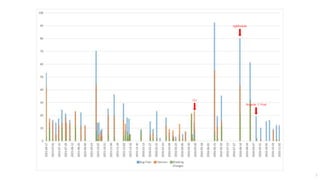
  • #7 2.0 final 발표 이후에도 버전이 계속 바뀌고 있음 문제는 크게 바뀌고 있다는 것
  • #9 https://github.com/angular/angular/blob/master/CHANGELOG.md 2016/11/3 기준 Braeaking Changes에 크게 바뀌는 부분이 많다는 것이 문제
  • #10 https://github.com/angular/angular/blob/master/CHANGELOG.md 2016/5/2 2.0.0-rc.0 : Angular CLI 2016/8/9 2.0.0-rc.5 : ngModule 2016/9/13 2.1.0-beta.0 : Angular 2 Final
  • #12 Angular 2를 개발하는 3가지 언어
  • #13 공식 사이트에서 3가지 가이드를 제공
  • #14 공식적인 Angular 지원 언어는 TypeScript, JavaScript, Dart JavaScript의 SuperSet이라고는 하지만… Dart… 얘는 또 뭔데…. <script type="application/dart" src="app.dart"></script> <script type="text/javascript" src="packages/browser/dart.js"></script> Dart 전담부서 2016. 6. 21 공식 발표 http://angularjs.blogspot.kr/2016/07/a-dedicated-team-for-angulardart.html
  • #15 Angular 2 처음 시작은 AtScript https://youtu.be/QHulaj5ZxbI?list=PLOETEcp3DkCoNnlhE-7fovYvqwVPrRiY7
  • #16 Angular 2 발표 당시 AtScript와 TypeScript의 차이
  • #17 TypeScript 1.5 버전으로 흡수 2016. 8. 30 TypeScript 1.5.0 2016. 9. 22 TypeScript 2.0.3
  • #18 http://stackoverflow.com/questions/21055756/what-is-the-difference-between-angularjs-and-angulardart Angular 1를 만든 Misko Hevery도 Dart 프로젝트의 진행을 언급하고 있음
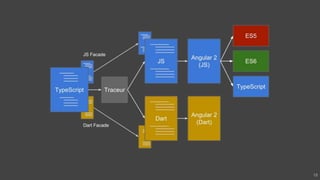
  • #19 Google에서도 Angular 2는 TypeScript와 Dart로 병렬 진행중
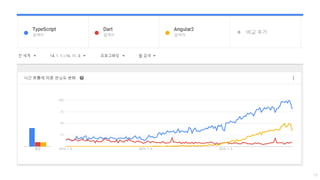
  • #20 Angular 2의 검색과 함께 일단은 TypeScript도 같이 올라가는 중
  • #21 TypeScript가 간단하긴 하다…. Dart 는 TypeScript랑 비슷
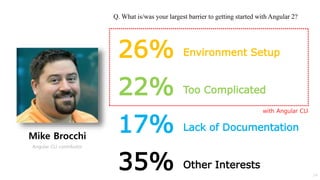
  • #25 Mike Brocchi, Architect at CEI (ceiamerica.com) (https://www.linkedin.com/in/mikebrocchi) from ng-conf 2016 환경설정, 폴더 관리의 문제 => CLI가 개선할 수 있음 Other Interests : 다른 framework 를 사용
  • #26 https://cli.angular.io/ https://github.com/angular/angular-cli Command Line Interface for building Angular 2 applications 2016/5/2 Angular 2.0.0-rc.0 에서 처음 발표 npm 기준 v1.0.0-beta.19-3
  • #27 프로젝트 생성부터 개발, 테스트, 빌드까지 전부 수행할 수 있음
  • #28 CLI가 다루는 영역은 기본 틀부터 빌드, 테스트, 배포까지 전 단계 IDE : Integrated Development Environment
  • #30 CLI 사용 방법
  • #31 사용방법
  • #32 ng new 결과물
  • #33 ng serve 결과물 서버 띄우기까지 명령어 하나로 수행
  • #34 make new project ng serve make components
  • #35 CLI roadmap by Mike Brocchi
  • #37 Directive 는 없어지지 않았다 하지만 문법이 달라졌음
  • #38 Angular 2 data binding https://angular.io/docs/ts/latest/guide/template-syntax.html#!#binding-syntax
  • #39 일부 build-in directive 에서는 * 사용 “template 안에서 *로 시작하는 directive를 사용”
  • #40 http://angularjs.blogspot.kr/2016/08/angular-2-rc5-ngmodules-lazy-loading.html Angular 2 안에서의 큰 변화, ngModule Angular 2 RC5 에 등장 (2016. 8. 9) 기존 @Component 구현 방식을 보완 components, directives, pipes 반복 로딩을 대체 AoT(Ahead of Time, build step) => lazy loading 대체 -> 원문 RC5 deprecations we’ve deprecated and will remove for 2.0.0-final the need to declare directives, pipes and components in individual components, in favor of doing so at the NgModule level. NgModule 페이지 마지막 예제 참고
  • #41 ngModule이 들어오면서 개발 방식이 변화
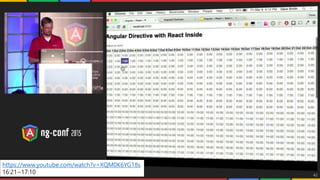
  • #43 애초에 Angular 2가 관심을 끌었던 이유는 완성물의 동작 속도 ng-conf 2015에서 보여준 데모로는 Angular + React 보다 Angular 2가 많이 빨라 보인다 Angular 2 정식 발표 전 데모
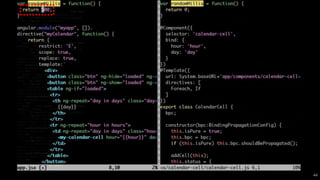
  • #45 응답시간 설정 오류
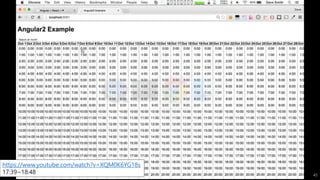
  • #46 응답시간이 동일한 비교 Angular 2가 살짝 빠름
  • #47 1대비 빠르긴 하지만 어느 정도인지는 말하기 애매함 1.x도 개선중, Angular 1.4 (2015. 5. 28) 에서 1.3 대비 최고 25% 빨라짐 https://youtu.be/XQM0K6YG18s Angular 1.4 release note http://angularjs.blogspot.kr/2015/05/angular-140-jaracimrman-existence.html
  • #48 ng-conf 2016, Zackary Chapple github : heimdallr(Performance monitoring for Angular), ng-table Page loading x20 test
  • #49 slide : goo.gl/bae2af Baseline : optimized pure JavaScript code Angular 1보다 빠르긴 함
  • #51 from ng-conf 2015 (2015. 2. 26) Virtual Scrolling Table : 화면에 보이는 위치의 DOM 만 구현하여 속도 향상 https://youtu.be/QHulaj5ZxbI?list=PLOETEcp3DkCoNnlhE-7fovYvqwVPrRiY7
  • #52 JavaScript 프레임워크 비교 http://www.stefankrause.net/wp/?p=316
  • #53 Angular 1, 2, VanillaJS만 요약 (React 추가) Angular 1보다 빠르긴 하다 http://www.stefankrause.net/wp/?p=316 js framework benchmark : https://auth0.com/blog/more-benchmarks-virtual-dom-vs-angular-12-vs-mithril-js-vs-the-rest/ server side rendering : https://youtu.be/0wvZ7gakqV4 Angular2 Universal Starter Kit : https://github.com/alexpods/angular2-universal-starter
  • #55 http://blog.angular-university.io/introduction-to-angular2-the-main-goals/ 이런 방향으로 가고 있음 최신 트렌드를 반영하고 체계적인 프로젝트 관리를 지향
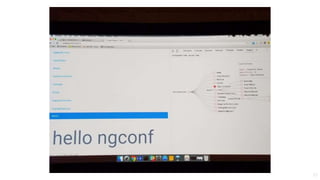
  • #56 https://augury.angular.io/ 개발을 도와주는 Angular 2 디버깅 툴의 등장
  • #57 Augury 설명 Vanessa Yuen (Canada, Full Stack JavaScript Software Developer)
  • #61 현 상황에서 Angular 2를 써야할까 현재로서는 아직. 아직도 계속 바뀌고 있고 사용자들의 사용 경험 부족 많은 삽질이 예상됨
  • #62 하지만 Angular 2를 계속 주목해야 하는 이유는 프로젝트 관리에 체계적인 방식을 계속 도입하고 있음 Angular 1에서 보여준 탄탄한 구조를 Angular 2에 적용할 수 있을지가 문제
  • #63 체계적인 프로젝트 관리 : CLI를 이용한 통일된 폴더 구조, 빌드, 테스트, 배포 최신 기술의 자연스러운 도입 : lazy loading, server rendering, Reactive Programming, Web Component, Service Worker Object Oriented Programming
  • #64 결론
  • #65 Angular usage in Google (etc : https://builtwith.angularjs.org/) Double Click For Advertiser YouTube for PS3 Google Cloud Developers Console Google Cast
  • #67 민중을 이끄는 자유의 여신 지금 시작하면 Angular 2의 선구자가 될 수 있다 다만 삽질은 여러분의 몫