AI Dev Days
Robotics	Powered	by	Machine	Learning
R	K	Sharath Kumar	(sharrkum@in.ibm.com)
Shikha Maheshwari (shikha.mah@in.ibm.com)
#aidevdays
2
3
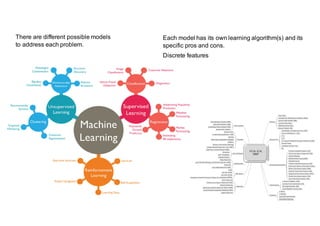
There are different possible models
to address each problem.
Each model has its own learning algorithm(s) and its
specific pros and cons.
Discrete features
Robotics
Raw	curiosity
More	
computatio
nal	power
Advances	in	
AI	
algorithms	
and	
architecture
s
Better/smal
ler	sensors	
and	
actuators
Better	
batteries
3D	printing
Advances	in	neural	
implants
New	
military	
doctrine
Demograph
ic	changes
Economic	
need
Advances	
in	neural	
implants
Technology	push
Demand	pull
Raw
curiosity
Dependent Autonomous
Fixed place Mobile
Thing-facing
Human-
facing
Predictable Responsive Social
Use Cases For AI
9
Concierge
(Robot,	Avatar,	
Space)
Where	is	the	elevator?
Retail
(Robot,	Avatar,	
Space)
Do	you	wanna	build	a	snowman?
ElderCare
(Robot,	Avatar,	
Space)
I’ve	fallen	and	I	can’t	get	up!
Cobot
(Robot)
Get	me	a	screwdriver.
Manufacturi
ng
(Robot)
Watch	me	do	this.
Transportati
on
(Robot,	Avatar,	
Space)
Open	the	pod	bay	doors,	Watson.
Boardroom
(Avatar,	Space)
Help	me	decide. Companion
(Avatar,	Device)
Let’s	play	a	game.
An Agent May Be Embodied In A Robot…
Text +	Audio +	Vision
+	
Emotion
+	Motion
+	Physical	
interaction
Socially-intelligent	
cooperative	robot
Cognitive systems are creating a new partnership between
humans and technology
12
Humans
excel at
DILEMMAS
COMPASSION
DREAMING
ABSTRACTION
IMAGINATION
MORALS
GENERALIZATION
Cognitive Systems
excel atCOMMON SENSE (but with many biases)
ELIMINATING BIASES
LOCATING KNOWLEDGE
PATTERN IDENTIFICATION
MACHINE LEARNING
NATURAL LANGUAGE PROCESSING AT SCALE
PROVIDING ENDLESS CAPACITY
13
A	cognitive	business	has	
systems	that	can	enhance	
digital	intelligence
exponentially.
They can reason, grasp
underlying concepts, form
hypotheses, and infer and
extract ideas.
Understand Reason
Learn Interact
Cognitive systems understand
imagery, language and other
unstructured data like humans
do
With abilities to see, talk
and hear, cognitive systems
interact with humans in a
natural way.
With each data point,
interaction and outcome, they
develop and sharpen
expertise, so they never stop
learning.
Who is Nao (pronounced as ‘Now’)
• Nao	is	a	humanoid	robot
• Developed	by	SoftBank	Robotics
• Originated	at	Aldebaran	in	France
• Nao’s	can	play	the	roles	of
• A	‘Hospitality’	Robot,	to
• Attract	&	Welcome
• Inform	&	Assist	customers
• A	Companion	Robot
• Person	care	use	cases
• children,	elderly,	entertainment,	…
• It	is	not	intended	(nor	capable)	to	replace	a	human	--- Will	complement	humans	for	some	chores
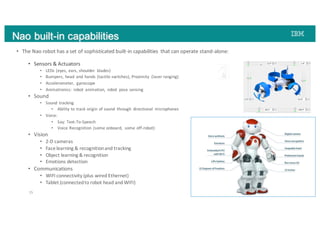
Nao built-in capabilities
• The	Nao	robot	has	a	set	of	sophisticated	built-in	capabilities	 that	can	operate	stand-alone:
• Sensors	&	Actuators
• LEDs	(eyes,	ears,	shoulder	 blades)
• Bumpers,	head	 and	hands	(tactile	switches),	Proximity	 (laser	ranging)
• Accelerometer,	 gyroscope
• Animatronics:	 robot	 animation,	 robot	 pose	sensing
• Sound
• Sound	 tracking
• Ability	to	track	origin	of	sound	 through	 directional	 microphones
• Voice:
• Say:	Text-To-Speech
• Voice	Recognition	 (some	onboard,	 some	off-robot)
• Vision	
• 2-D	cameras
• Face	learning	&	recognition	and	tracking	
• Object	learning	&	recognition
• Emotions	detection
• Communications
• WIFI	connectivity	(plus	wired	Ethernet)
• Tablet	(connected	to	robot	head	and	WIFI)
15
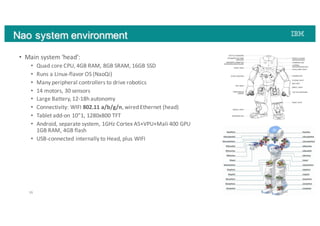
Nao system environment
16
• Main	system	‘head’:
• Quad	core	CPU,	4GB	RAM,	8GB	SRAM,	16GB	SSD
• Runs	a	Linux-flavor	OS	(NaoQi)
• Many	peripheral	controllers	to	drive	robotics
• 14	motors,	30	sensors
• Large	Battery,	12-18h	autonomy
• Connectivity:	WIFI	802.11	a/b/g/n,	wired	Ethernet	(head)
• Tablet	add-on	10”1,	1280x800	TFT
• Android,	separate	system,	1GHz	Cortex	A5+VPU+Mali	400	GPU
1GB	RAM,	4GB	flash
• USB-connected	internally	to	Head,	plus	WIFI
Nao software environment
• NaoQi	operating	system,	Linux-based	OS
• SSH/FTP/…	available	to	administer	the	robot
• Distributed	objects	system	(NaoQi),	extensible
• Software	and	Programming
• Choregraphe
• ‘wiring	boxes’,	code	written	in	Python
• Virtual	robot	Emulation
• Robot	animation	(recording	of	positions,	playback,	sync	with	actions)
• Dialog	(QiChat),	to	drive	request-response	with	voice
• Automation,	no	magic
• Native	C++.	Distributed	Objects	platform	(QiMessage)
• Remotely	accessible	from	outside	the	robot	(e.g.	gateway)
• Android	tablet,	can	interact	with	robot	through	JavaScript	APIs
17
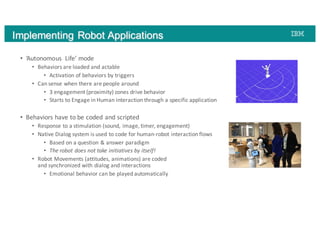
Implementing Robot Applications
• ‘Autonomous	 Life’	mode
• Behaviors	are	loaded	and	actable
• Activation	of	behaviors	by	triggers
• Can	sense	when	there	are	people	around
• 3	engagement	(proximity)	zones	drive	behavior
• Starts	to	Engage	in	Human	interaction	through	a	specific	application
• Behaviors	have	to	be	coded	and	scripted
• Response	to	a	stimulation	(sound,	image,	timer,	engagement)
• Native	Dialog	system	is	used	to	code	for	human-robot	interaction	flows
• Based	on	a	question	&	answer	paradigm
• The	robot	does	not	take	initiatives	by	itself!
• Robot	Movements	(attitudes,	animations)	are	coded	
and	synchronized	with	dialog	and	interactions
• Emotional	behavior	can	be	played	automatically
How	to	make	NAO	Robot	smarter
Robot as an inference agent
• Create	a	cognitive	agent	in	NAO	robot
• Watson	Conversation	service
• Data	Science	Experience	
• Enable	the	exchange	of	information	 between	
different	systems	
• Process	natural	language	to	derive	insights	from	
the	data
Architecture
• Establish	the	communication	between	
the	NAO	robot	and	IBM	Data	Science	
Experience	(DSX)	by	using	Watson	
Conversation	API	&	Node-RED
• Create	the	Watson	Conversation	chat	
bot	application
• Perform	statistical	analysis	on	a	
financial	data	set	by	using	Jupyter	
(Python)	Notebook	on	IBM	DSX
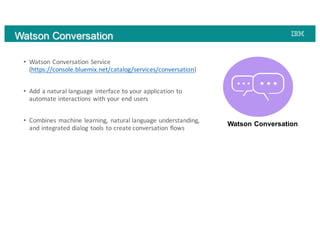
• Watson	Conversation	Service	
(https://console.bluemix.net/catalog/services/conversation)
• Add	a	natural	language	interface	to	your	application	to	
automate	interactions	with	your	end	users
• Combines	machine	learning,	 natural	language	understanding,	
and	integrated	dialog	tools	to	create	conversation	flows
Watson Conversation
Watson Conversation
• IBM	Data	Science	Experience	(https://datascience.ibm.com/)
• An	interactive,	collaborative,	cloud-based	 environment	 where	data	
scientists	can	use	multiple	tools	to	activate	insights
• Various	tools	available	to	analyze	data
• Jupyter notebooks	in	Python,	Scala,	or	R
• The	Flow	Editor	to	create	models	that	use	machine	learning
• Rstudio within	DSX	to	run	R	notebooks
• Data	Refinery to	prepare	data	for	analysis
• Streams	Designer	to	design	stream	flows	to	collect	and	analyze	large	amounts	
of	streaming	data
IBM Data Science Experience
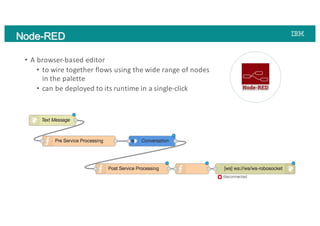
• A browser-based	editor	
• to	wire	together	flows	using	the	wide	range	of	nodes	
in	the	palette	
• can	be	deployed	to	its	runtime	in	a	single-click
Node-RED
Demo
Recap
https://developer.ibm.com/code/patterns/robotic-calculations-and-
inference-agent/
https://developer.ibm.com/code
Q	&	A
Thank	You	!!

Robotics Powered by Machine Learning