Microsoft Briefing for FE Principals and Policymakers 2011


COST SAVING (                  AND QUALITY

IMPROVEMENT!)    WITH      IT IN THE CLOUD.

Robin Gadd
Head of Information and Systems Development
 Midsize Tertiary FE College
 Central southern England in SE Region (just)

 New Forest National Park – semi-rural, wide
  (international) catchment
    We do education and training outstandingly well
 c.11,000 learners per annum, 14-104 years
             We’re not an IT service provider
  old, pre-entry to foundationthis outstandingly well pre-
     (although we try hard to do degree level, and a too!)
  school nursery
 c.200 key employers (mainly SMEs)


 Beacon College since 2004
 Technology Exemplar Provider since 2008
MY CASE STUDY…
 A brief guide to Cloud Computing for Principals and
  Policymakers – demystification!
 Explain what we’ve been doing at Brock, and why

 Outline the perceived costs and the benefits

 Contextualise in the “shared services” agenda

 Highlight some things to think about


So that we…
 Can think some more about how cloud computing
  fits in FE sector IT Strategies going forward
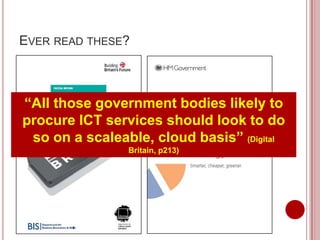
EVER READ THESE?


“All those government bodies likely to
procure ICT services should look to do
 so on a scaleable, cloud basis” (Digital
                Britain, p213)
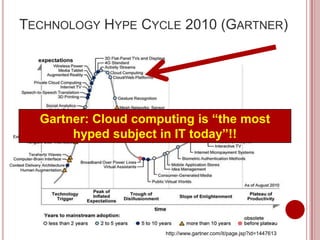
TECHNOLOGY HYPE CYCLE 2010 (GARTNER)


  Gartner: Cloud computing is “the most
       hyped subject in IT today”!!


                      http://www.gartner.com/it/page.jsp?id=1447613
TRADE-OFFS OF “TRAD” IT INVESTMENTS
   Hardware
     Fixed costs; fixed performance!
     Five-year capitalised ownership = out-dated equipment!

But we wantutilization
 Variable asset to spend more money at the
    Most servers run at 5-20% of processing capacity
frontline of teaching nowhere near 100% don’t
    Even virtualised servers get
                                  and learning,
                             we?
 Data redundancy and security
     Computing/networking reliability & redundancy
     Backup and DR (disaster recovery)
   Power and cooling efficiency
       Datacentres: 1 watt to the server, 1.5 watts in overhead!
   Personnel costs
       Recruitment, retention, training
WHAT ARE WE ACTUALLY TALKING ABOUT HERE?


        Cloud computing is “a model for enabling
  convenient, on-demand network access to a shared
       “Technology services resources
        pool of configurable computing delivered
                  over the internet”
   (e.g., networks, servers, storage, applications, and
      services) that can be rapidly provisioned and
  released with minimal management effort or service
                  provider interaction”.


        (US National Institute of Standards and Technology)
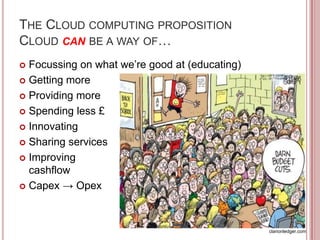
THE CLOUD COMPUTING PROPOSITION
CLOUD CAN BE A WAY OF…
 Focussing on what we’re good at (educating)
 Getting more

 Providing more

 Spending less £

 Innovating

 Sharing services

 Improving
  cashflow
 Capex → Opex


                                                clarionledger.com
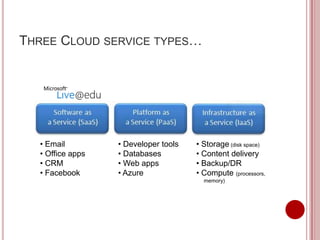
THREE CLOUD SERVICE TYPES…


  • Email         • Developer tools   • Storage (disk space)
  • Office apps   • Databases         • Content delivery
  • CRM           • Web apps          • Backup/DR
  • Facebook      • Azure             • Compute (processors,
                                        memory)
So what is cloud computing?

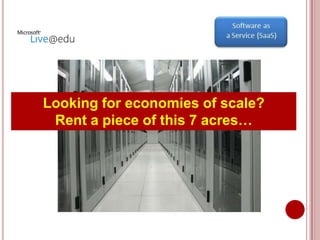
Looking for economies of scale?
 Rent a piece of this 7 acres…
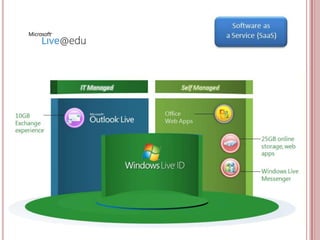
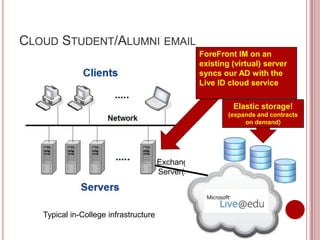
CLOUD STUDENT/ALUMNI EMAIL
                                                   ForeFront IM on an
                                                   existing (virtual) server
                                                   syncs our AD with the
                                                   Live ID cloud service

                                                            Elastic storage!
                                                           (expands and contracts
                                                                on demand)


                                       Exchange
                                       Server(s)


   Typical in-College infrastructure
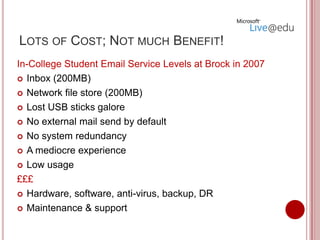
LOTS OF COST; NOT MUCH BENEFIT!
In-College Student Email Service Levels at Brock in 2007
 Inbox (200MB)

 Network file store (200MB)

 Lost USB sticks galore

 No external mail send by default

 No system redundancy

 A mediocre experience

 Low usage

£££
 Hardware, software, anti-virus, backup, DR

 Maintenance & support
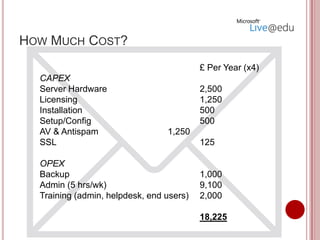
HOW MUCH COST?
                                          £ Per Year (x4)
  CAPEX
  Server Hardware                         2,500
  Licensing                               1,250
  Installation                            500
  Setup/Config                            500
  AV & Antispam                  1,250
  SSL                                     125

  OPEX
  Backup                                  1,000
  Admin (5 hrs/wk)                        9,100
  Training (admin, helpdesk, end users)   2,000

                                          18,225
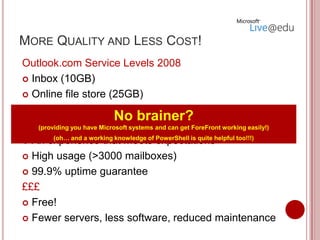
MORE QUALITY AND LESS COST!
Outlook.com Service Levels 2008
 Inbox (10GB)

 Online file store (25GB)

 Anti-virus and anti-spam
                             No brainer?
 Email for life (Alumni? Destinations tracking?) easily!)
    (providing you have Microsoft systems and can get ForeFront working

 An experience that meets expectationshelpful too!!!)
         (oh… and a working knowledge of PowerShell is quite


 High usage (>3000 mailboxes)

 99.9% uptime guarantee

£££
 Free!

 Fewer servers, less software, reduced maintenance
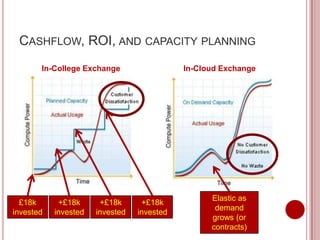
CASHFLOW, ROI, AND CAPACITY PLANNING
       In-College Exchange                  In-Cloud Exchange


                                                  Elastic as
  £18k      +£18k      +£18k      +£18k
                                                   demand
invested   invested   invested   invested
                                                  grows (or
                                                  contracts)
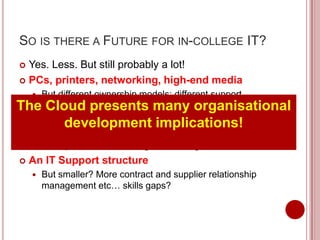
SO IS THERE A FUTURE FOR IN-COLLEGE IT?
 Yes. Less. But still probably a lot!
 PCs, printers, networking, high-end media
   But different ownership models; different support
    
Themodels; utility computing; thin clients organisational
    Cloud presents many
   A data centre
           development             implications!
       But smaller; bridge between the college and the cloud;
        more proactive monitoring/self-healing; shared services
   An IT Support structure
       But smaller? More contract and supplier relationship
        management etc… skills gaps?
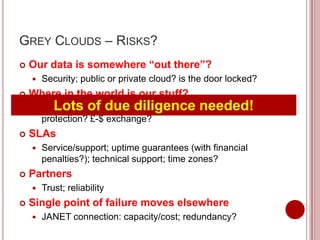
GREY CLOUDS – RISKS?
   Our data is somewhere “out there”?
       Security; public or private cloud? is the door locked?
   Where in the world is our stuff?
          Lots of due diligence needed!
        Legal jurisdictions? regulatory compliance; data
        protection? £-$ exchange?
   SLAs
       Service/support; uptime guarantees (with financial
        penalties?); technical support; time zones?
   Partners
       Trust; reliability
   Single point of failure moves elsewhere
       JANET connection: capacity/cost; redundancy?
FLUFFY WHITE CLOUDS – OPPORTUNITIES!
   Expenditure management
       Spending less; shared/managed services; fewer fixed
        costs; elastic capacity; moving Capex → Opex;
        enhanced cashflow
                  So why
    Quality improvement           wait?
    Getting more service/capacity; providing better services
     to our customers
                            can save you
 Innovation and agility - this year!
                 money
       The world changes; IT changes; opportunities change;
        keeping up with the next big thing!
   Focussing on what we’re good at!
       Keeping what adds value, outsourcing what
        doesn’t, adding more value by buying-in just the
        services we need
CONCLUSION: THE BOTTOM LINE

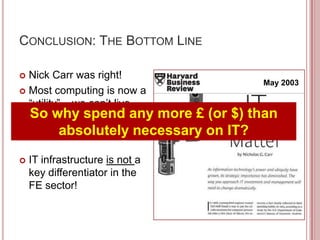
 Nick Carr was right!
                                       May 2003
 Most computing is now a
  “utility” – we can’t live
  So why spend any more £ (or $) than
  without IT, and yet “IT
  doesn’t matter”
           absolutely necessary on IT?
   IT infrastructure is not a
    key differentiator in the
    FE sector!
THANK YOU!
RGADD@BROCK.AC.UK

Robin Gadd at FE Briefing on Live@EDU and Cloud Computing for Microsoft October 2011

  • 1.
    Microsoft Briefing forFE Principals and Policymakers 2011 COST SAVING ( AND QUALITY IMPROVEMENT!) WITH IT IN THE CLOUD. Robin Gadd Head of Information and Systems Development
  • 2.
     Midsize TertiaryFE College  Central southern England in SE Region (just)  New Forest National Park – semi-rural, wide (international) catchment We do education and training outstandingly well  c.11,000 learners per annum, 14-104 years We’re not an IT service provider old, pre-entry to foundationthis outstandingly well pre- (although we try hard to do degree level, and a too!) school nursery  c.200 key employers (mainly SMEs)  Beacon College since 2004  Technology Exemplar Provider since 2008
  • 3.
    MY CASE STUDY… A brief guide to Cloud Computing for Principals and Policymakers – demystification!  Explain what we’ve been doing at Brock, and why  Outline the perceived costs and the benefits  Contextualise in the “shared services” agenda  Highlight some things to think about So that we…  Can think some more about how cloud computing fits in FE sector IT Strategies going forward
  • 4.
    EVER READ THESE? “Allthose government bodies likely to procure ICT services should look to do so on a scaleable, cloud basis” (Digital Britain, p213)
  • 5.
    TECHNOLOGY HYPE CYCLE2010 (GARTNER) Gartner: Cloud computing is “the most hyped subject in IT today”!! http://www.gartner.com/it/page.jsp?id=1447613
  • 6.
    TRADE-OFFS OF “TRAD”IT INVESTMENTS  Hardware  Fixed costs; fixed performance!  Five-year capitalised ownership = out-dated equipment! But we wantutilization  Variable asset to spend more money at the  Most servers run at 5-20% of processing capacity frontline of teaching nowhere near 100% don’t  Even virtualised servers get and learning, we?  Data redundancy and security  Computing/networking reliability & redundancy  Backup and DR (disaster recovery)  Power and cooling efficiency  Datacentres: 1 watt to the server, 1.5 watts in overhead!  Personnel costs  Recruitment, retention, training
  • 7.
    WHAT ARE WEACTUALLY TALKING ABOUT HERE? Cloud computing is “a model for enabling convenient, on-demand network access to a shared “Technology services resources pool of configurable computing delivered over the internet” (e.g., networks, servers, storage, applications, and services) that can be rapidly provisioned and released with minimal management effort or service provider interaction”. (US National Institute of Standards and Technology)
  • 8.
    THE CLOUD COMPUTINGPROPOSITION CLOUD CAN BE A WAY OF…  Focussing on what we’re good at (educating)  Getting more  Providing more  Spending less £  Innovating  Sharing services  Improving cashflow  Capex → Opex clarionledger.com
  • 9.
    THREE CLOUD SERVICETYPES… • Email • Developer tools • Storage (disk space) • Office apps • Databases • Content delivery • CRM • Web apps • Backup/DR • Facebook • Azure • Compute (processors, memory)
  • 10.
    So what iscloud computing? Looking for economies of scale? Rent a piece of this 7 acres…
  • 12.
    CLOUD STUDENT/ALUMNI EMAIL ForeFront IM on an existing (virtual) server syncs our AD with the Live ID cloud service Elastic storage! (expands and contracts on demand) Exchange Server(s) Typical in-College infrastructure
  • 13.
    LOTS OF COST;NOT MUCH BENEFIT! In-College Student Email Service Levels at Brock in 2007  Inbox (200MB)  Network file store (200MB)  Lost USB sticks galore  No external mail send by default  No system redundancy  A mediocre experience  Low usage £££  Hardware, software, anti-virus, backup, DR  Maintenance & support
  • 14.
    HOW MUCH COST? £ Per Year (x4) CAPEX Server Hardware 2,500 Licensing 1,250 Installation 500 Setup/Config 500 AV & Antispam 1,250 SSL 125 OPEX Backup 1,000 Admin (5 hrs/wk) 9,100 Training (admin, helpdesk, end users) 2,000 18,225
  • 15.
    MORE QUALITY ANDLESS COST! Outlook.com Service Levels 2008  Inbox (10GB)  Online file store (25GB)  Anti-virus and anti-spam No brainer?  Email for life (Alumni? Destinations tracking?) easily!) (providing you have Microsoft systems and can get ForeFront working  An experience that meets expectationshelpful too!!!) (oh… and a working knowledge of PowerShell is quite  High usage (>3000 mailboxes)  99.9% uptime guarantee £££  Free!  Fewer servers, less software, reduced maintenance
  • 16.
    CASHFLOW, ROI, ANDCAPACITY PLANNING In-College Exchange In-Cloud Exchange Elastic as £18k +£18k +£18k +£18k demand invested invested invested invested grows (or contracts)
  • 17.
    SO IS THEREA FUTURE FOR IN-COLLEGE IT?  Yes. Less. But still probably a lot!  PCs, printers, networking, high-end media But different ownership models; different support  Themodels; utility computing; thin clients organisational Cloud presents many  A data centre development implications!  But smaller; bridge between the college and the cloud; more proactive monitoring/self-healing; shared services  An IT Support structure  But smaller? More contract and supplier relationship management etc… skills gaps?
  • 18.
    GREY CLOUDS –RISKS?  Our data is somewhere “out there”?  Security; public or private cloud? is the door locked?  Where in the world is our stuff?  Lots of due diligence needed! Legal jurisdictions? regulatory compliance; data protection? £-$ exchange?  SLAs  Service/support; uptime guarantees (with financial penalties?); technical support; time zones?  Partners  Trust; reliability  Single point of failure moves elsewhere  JANET connection: capacity/cost; redundancy?
  • 19.
    FLUFFY WHITE CLOUDS– OPPORTUNITIES!  Expenditure management  Spending less; shared/managed services; fewer fixed costs; elastic capacity; moving Capex → Opex; enhanced cashflow  So why Quality improvement wait?  Getting more service/capacity; providing better services to our customers can save you  Innovation and agility - this year! money  The world changes; IT changes; opportunities change; keeping up with the next big thing!  Focussing on what we’re good at!  Keeping what adds value, outsourcing what doesn’t, adding more value by buying-in just the services we need
  • 20.
    CONCLUSION: THE BOTTOMLINE  Nick Carr was right! May 2003  Most computing is now a “utility” – we can’t live So why spend any more £ (or $) than without IT, and yet “IT doesn’t matter” absolutely necessary on IT?  IT infrastructure is not a key differentiator in the FE sector!
  • 21.