RiskyProject
Project Risk Management Software
Intaver Institute Inc.
303, 6707, Elbow Drive S.W, Calgary, AB, Canada
Tel: +1 (403) 692-2252
Fax: +1 (403) 459-4533
www.intaver.com 1
2012IntaverInstitute05/06/14
What Is RiskyProject?
• Project Scheduling
• Risk Register
• Quantitative risk analysis using Monte Carlo simulations
• Project performance measurement
2
RiskyProject is Windows-based project risk
management software.
Risky Project gives you a simple answer to a
common question: What will happen to your
project if certain risks occur?
2012IntaverInstitute05/06/14
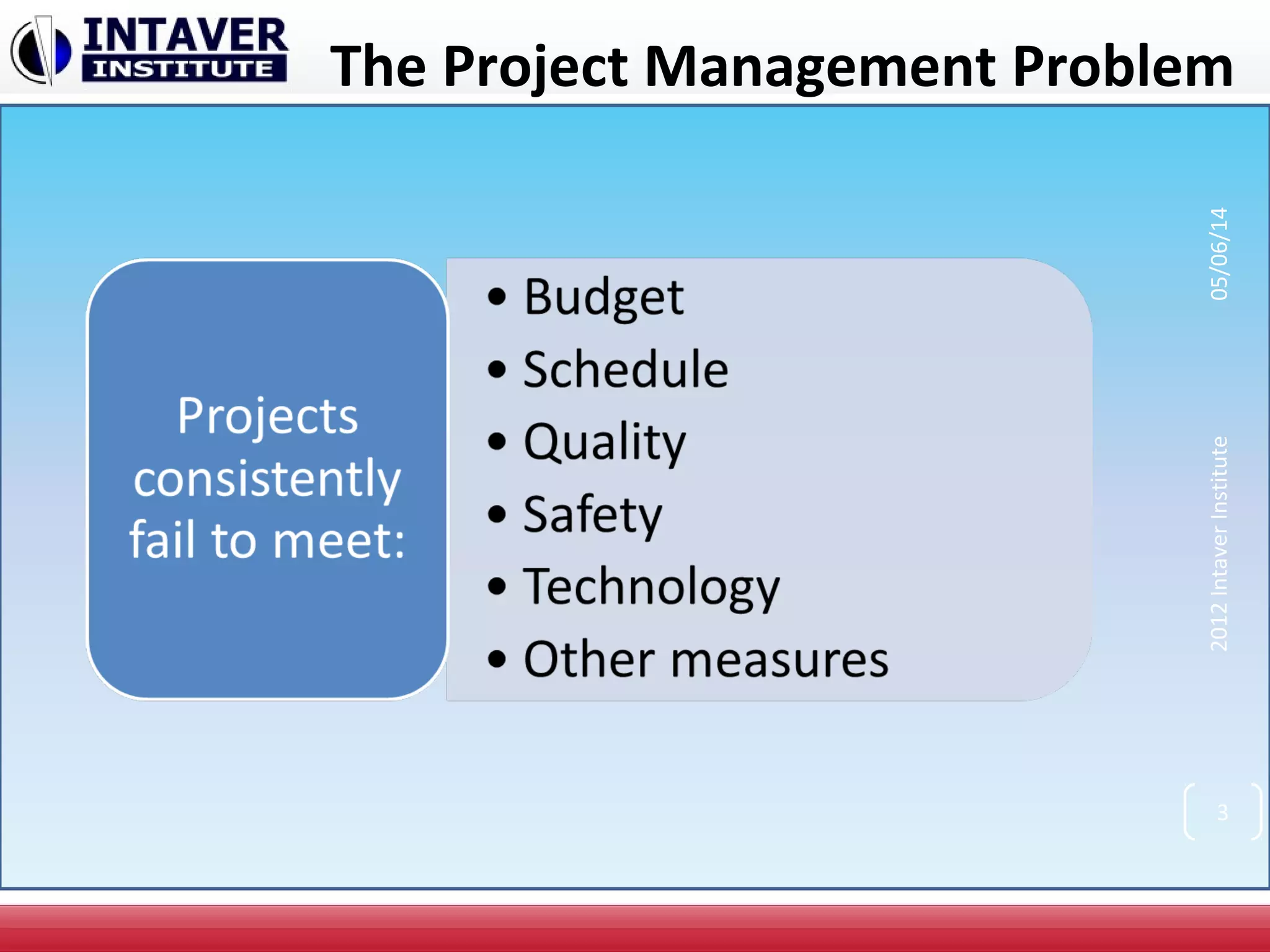
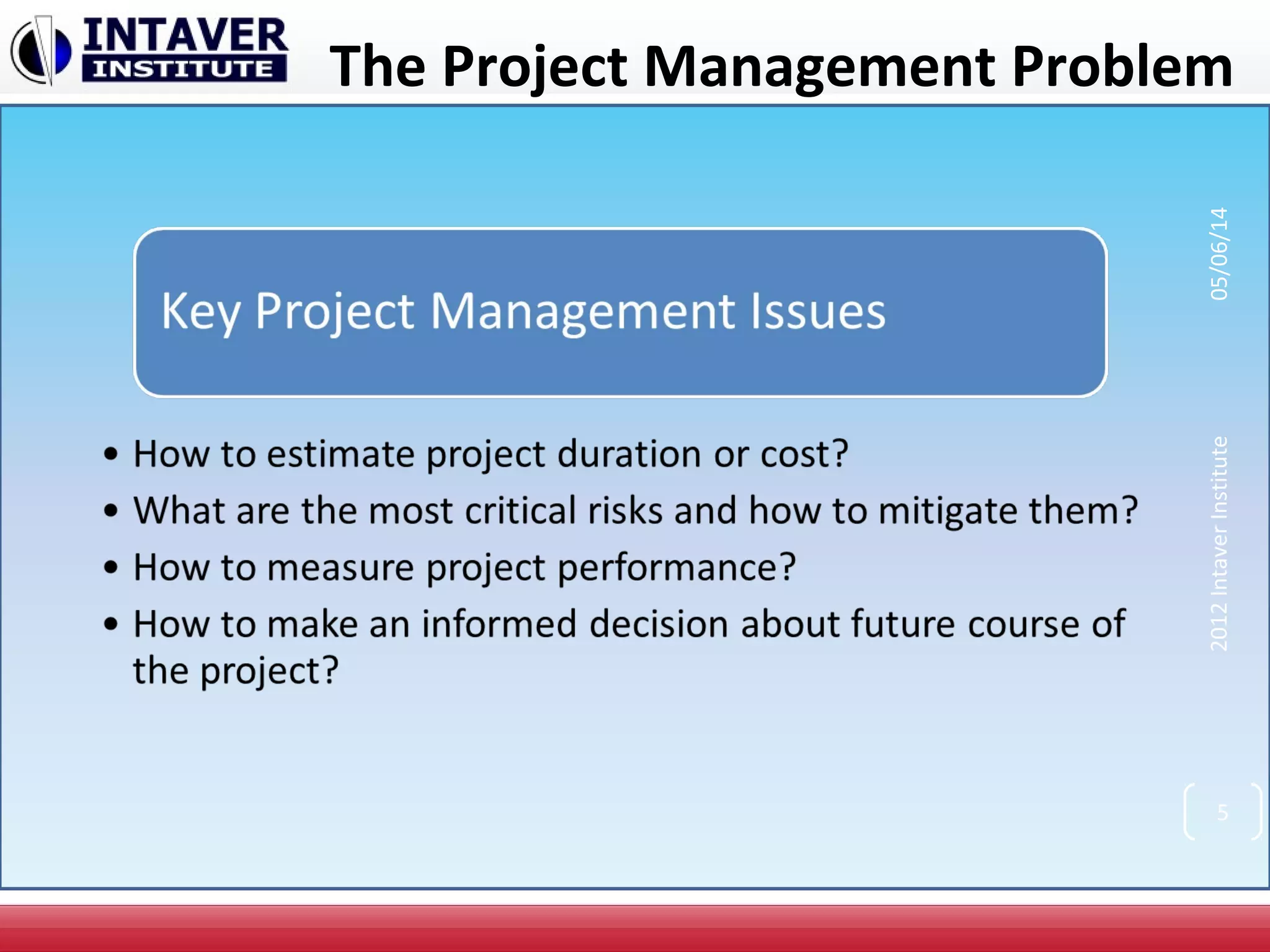
The Project Management Problem
2012IntaverInstitute05/06/14
3
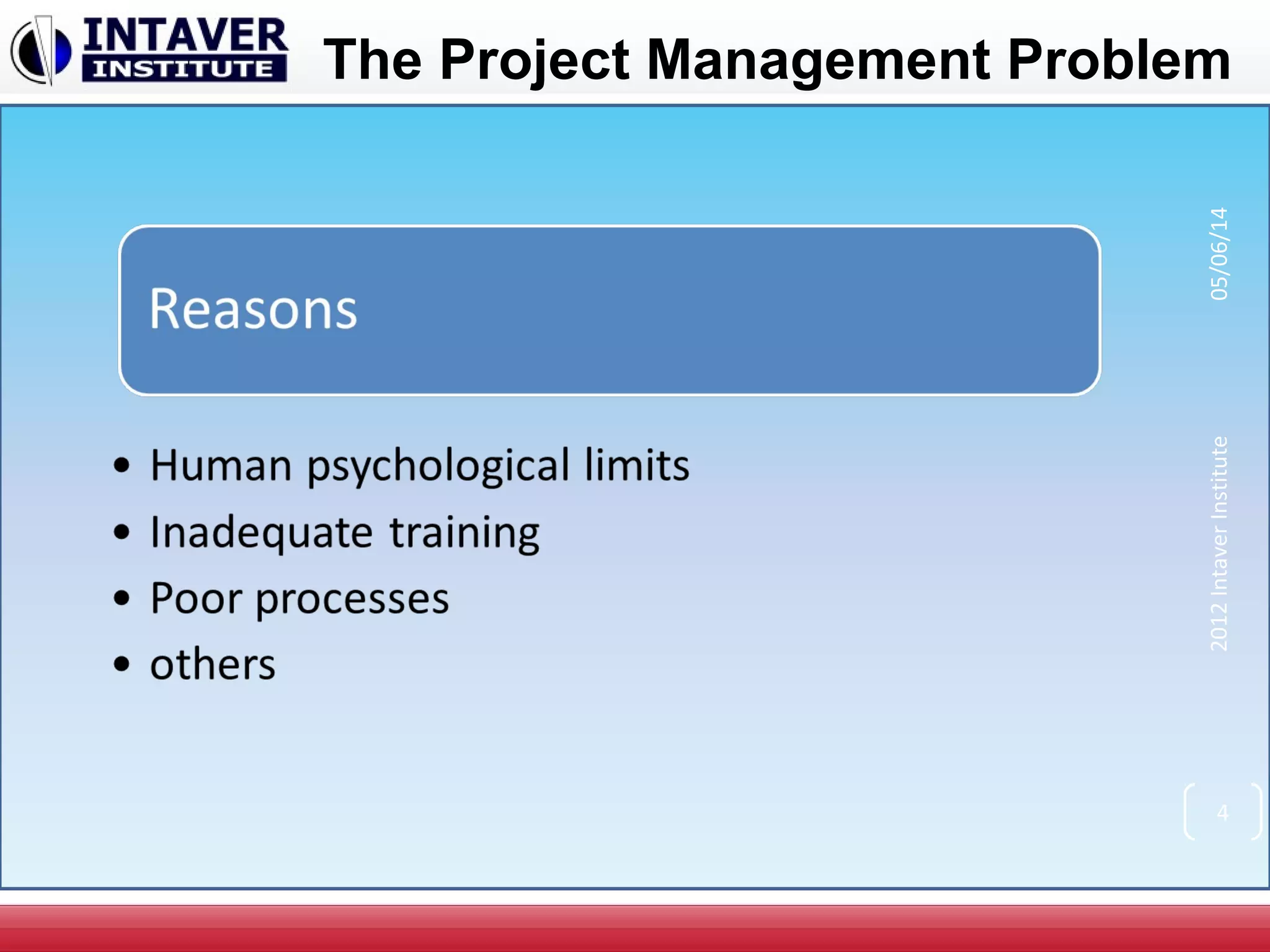
The Project Management Problem
2012IntaverInstitute05/06/14
4
The Project Management Problem
2012IntaverInstitute05/06/14
5
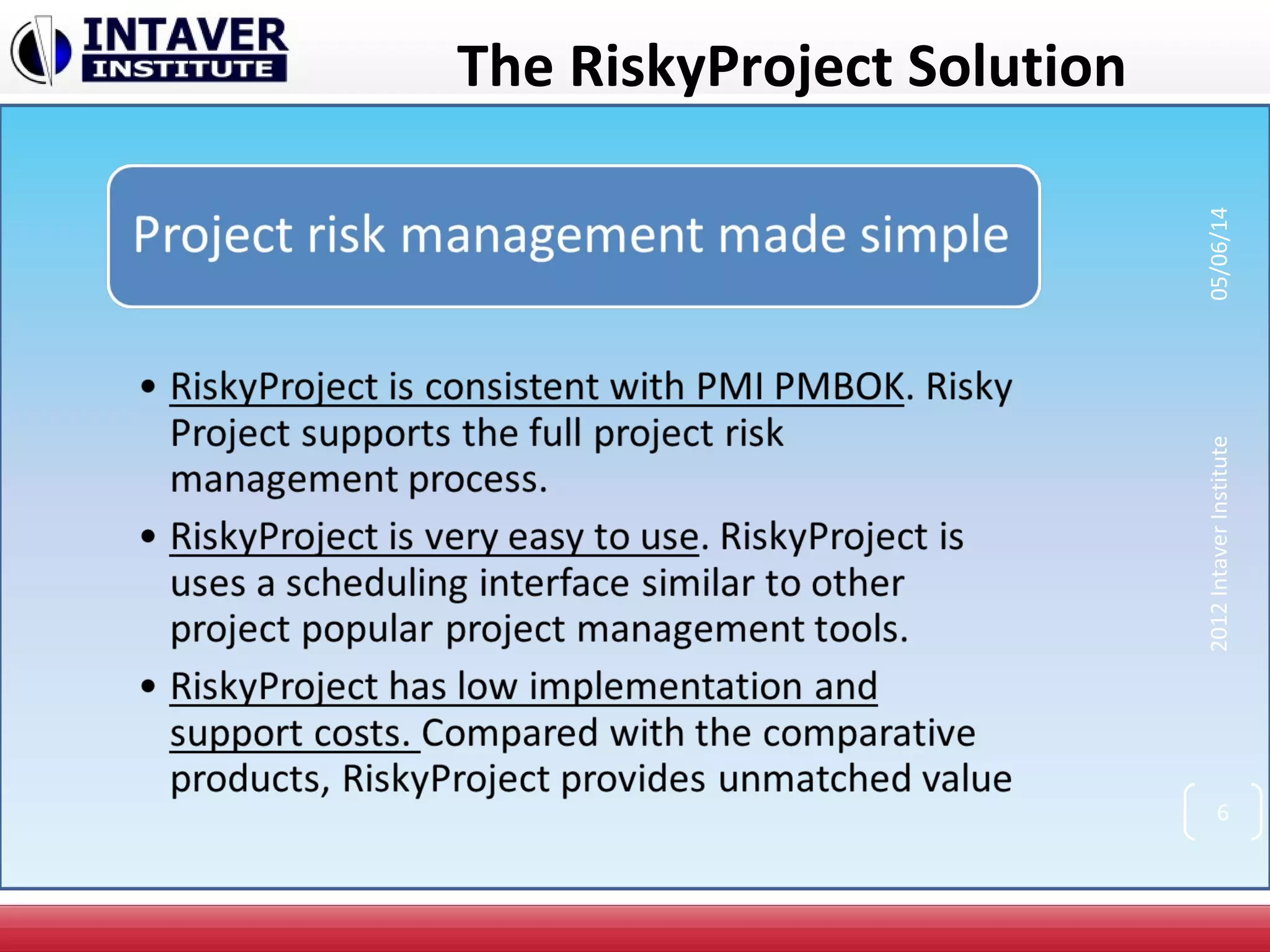
The RiskyProject Solution
2012IntaverInstitute05/06/14
6
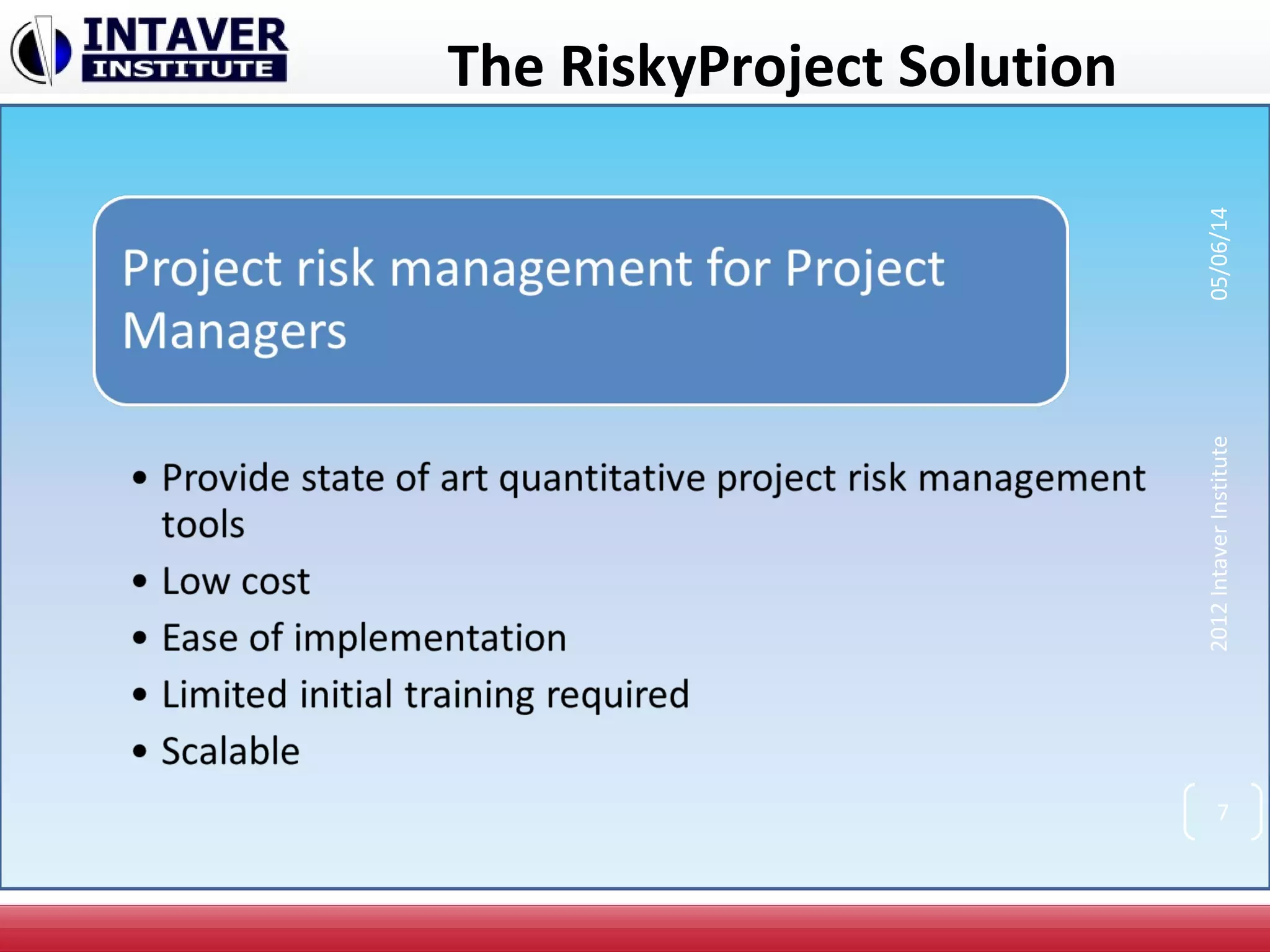
The RiskyProject Solution
2012IntaverInstitute05/06/14
7
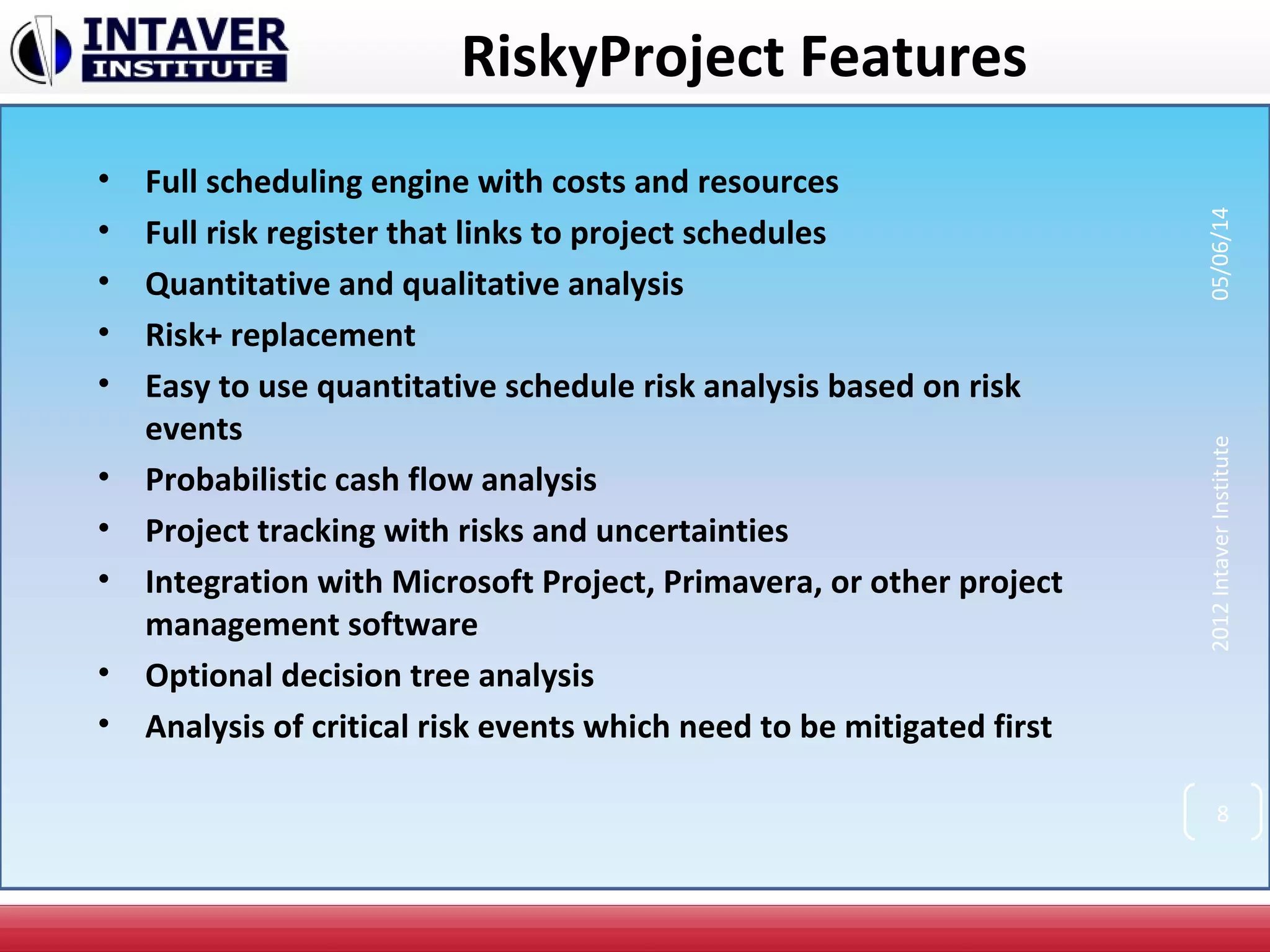
RiskyProject Features
• Full scheduling engine with costs and resources
• Full risk register that links to project schedules
• Quantitative and qualitative analysis
• Risk+ replacement
• Easy to use quantitative schedule risk analysis based on risk
events
• Probabilistic cash flow analysis
• Project tracking with risks and uncertainties
• Integration with Microsoft Project, Primavera, or other project
management software
• Optional decision tree analysis
• Analysis of critical risk events which need to be mitigated first
2012IntaverInstitute05/06/14
8
RiskyProject Features (Continued)
• Product lifecycle management
• Risk templates
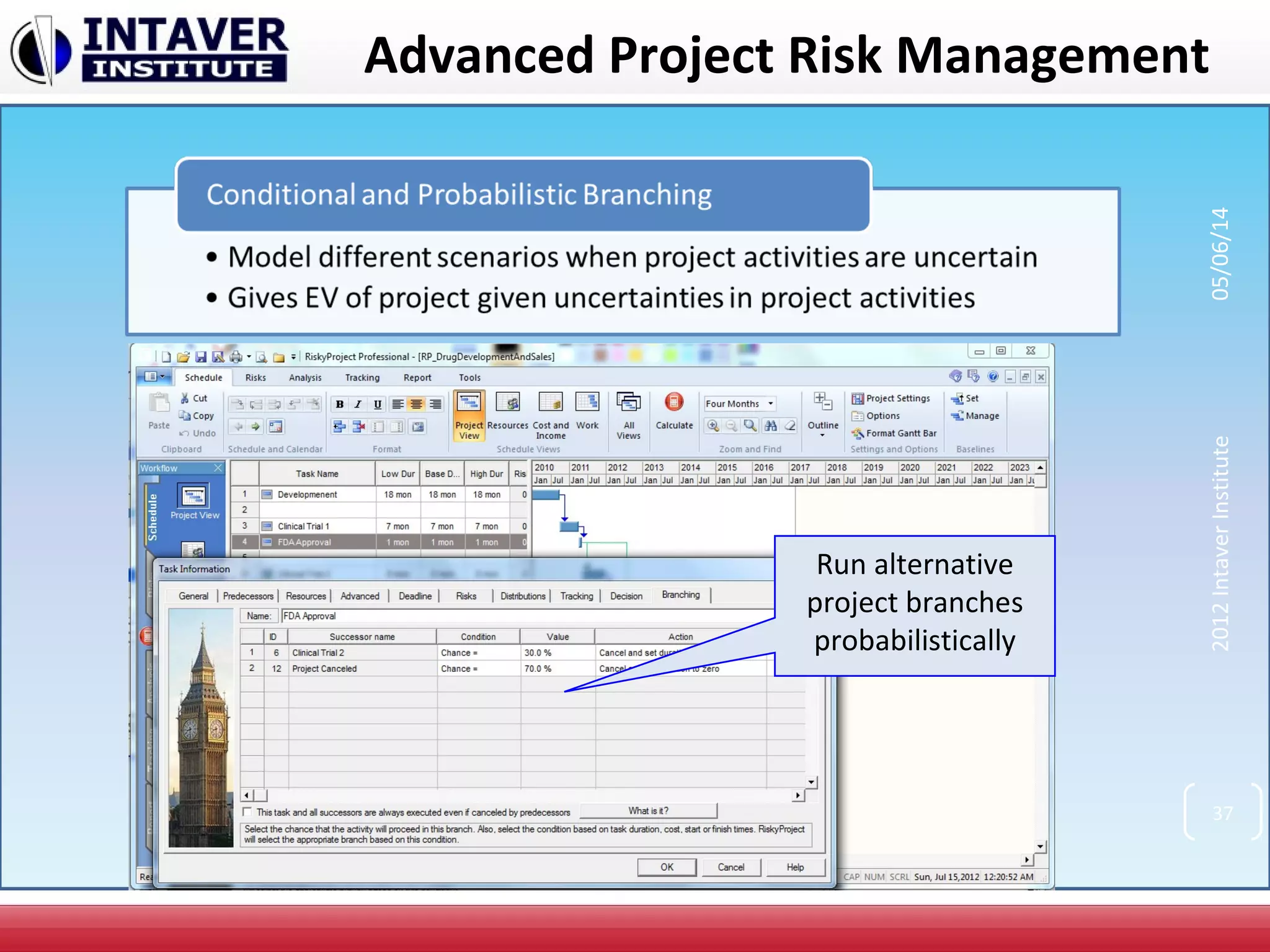
• Probabilistic and conditional branching
• Managing mitigation plans
• “What if “ analysis
• Advanced reporting tools
• Risk event correlations
• Multiple statistical distributions and distribution fitting
2012IntaverInstitute05/06/14
9
2012IntaverInstitute05/06/14
10
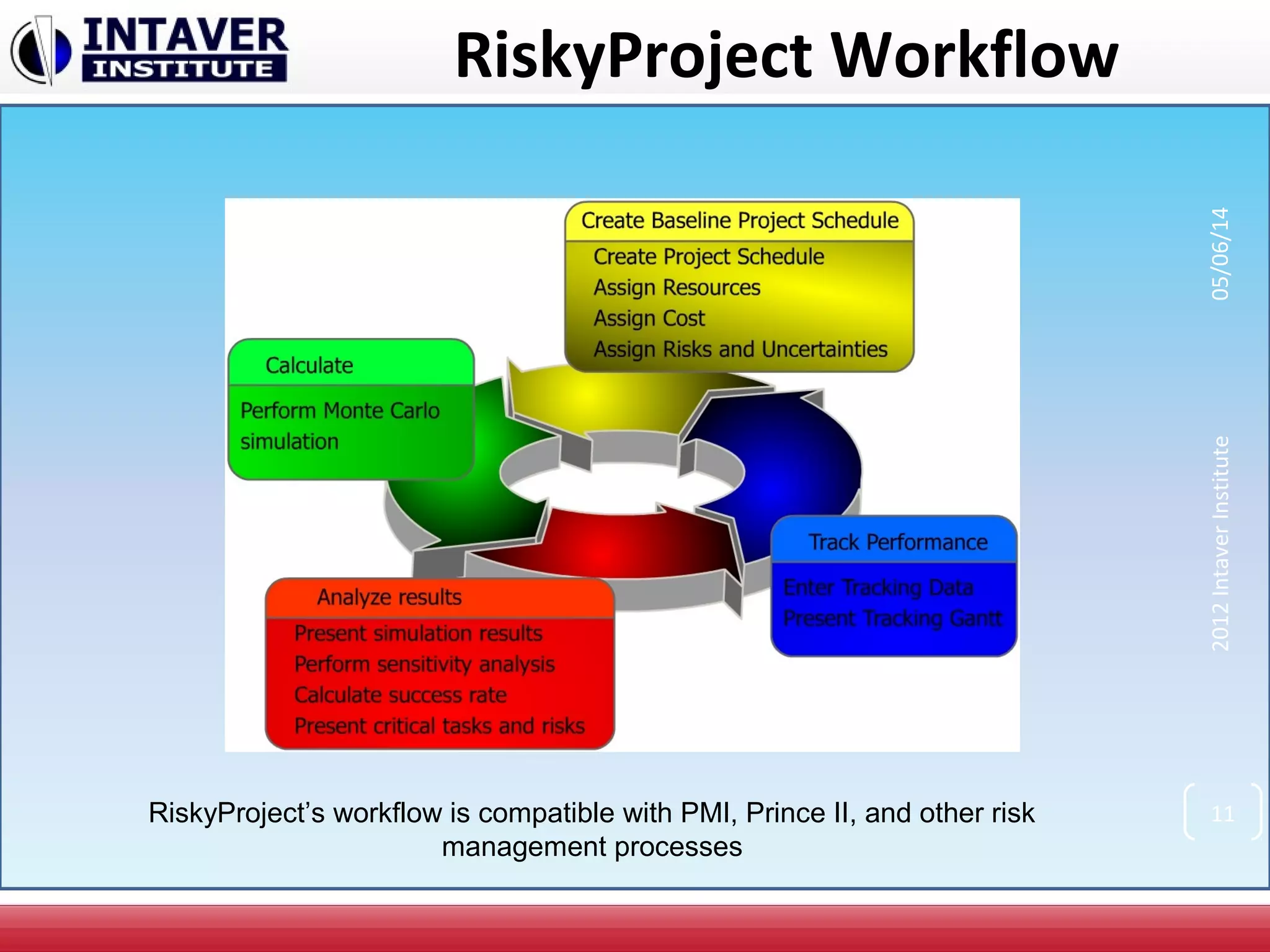
RiskyProject Workflow
2012IntaverInstitute05/06/14
11RiskyProject’s workflow is compatible with PMI, Prince II, and other risk
management processes
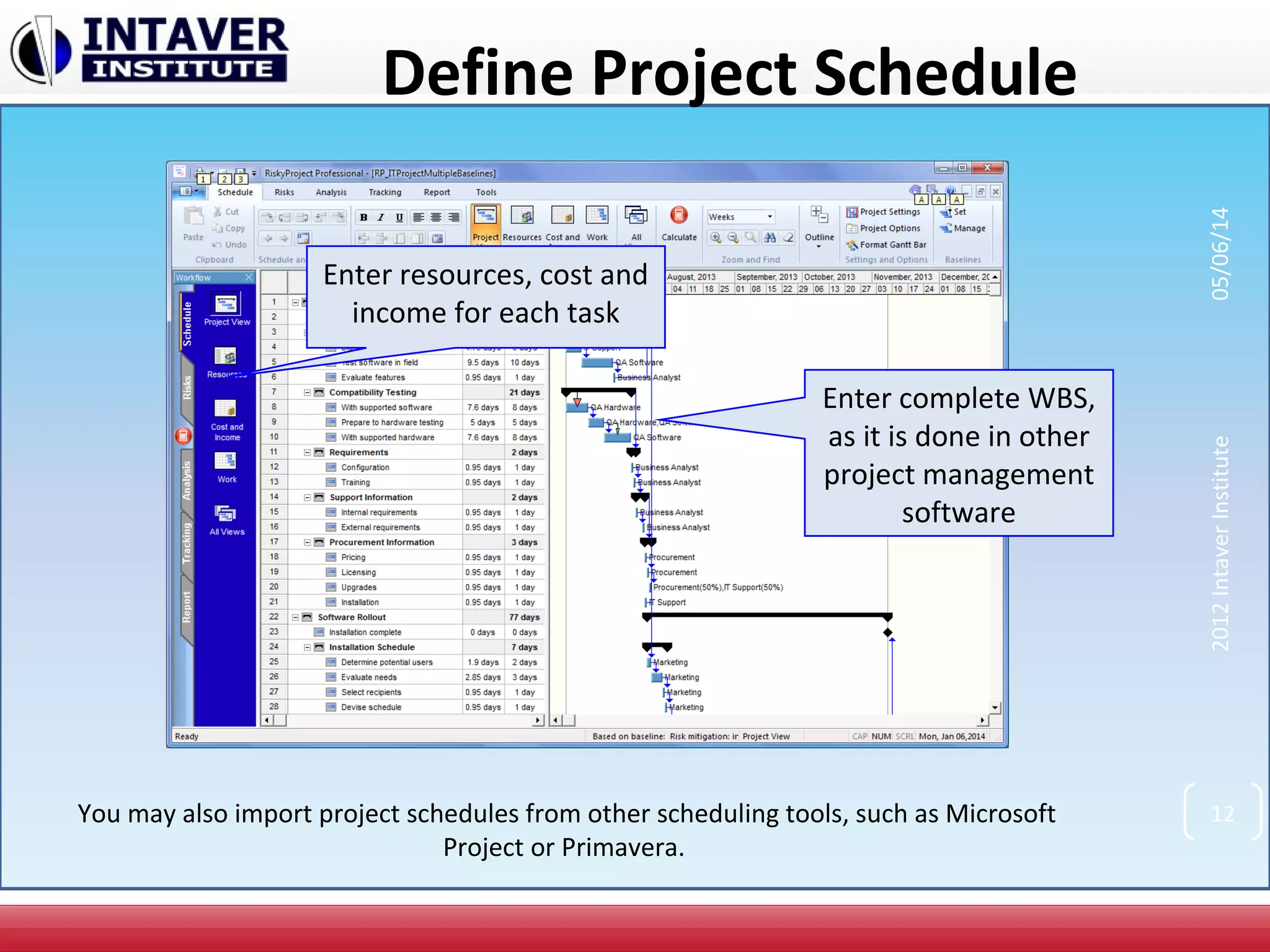
Define Project Schedule
Enter complete WBS,
as it is done in other
project management
software
Enter resources, cost and
income for each task
You may also import project schedules from other scheduling tools, such as Microsoft
Project or Primavera.
2012IntaverInstitute05/06/14
12
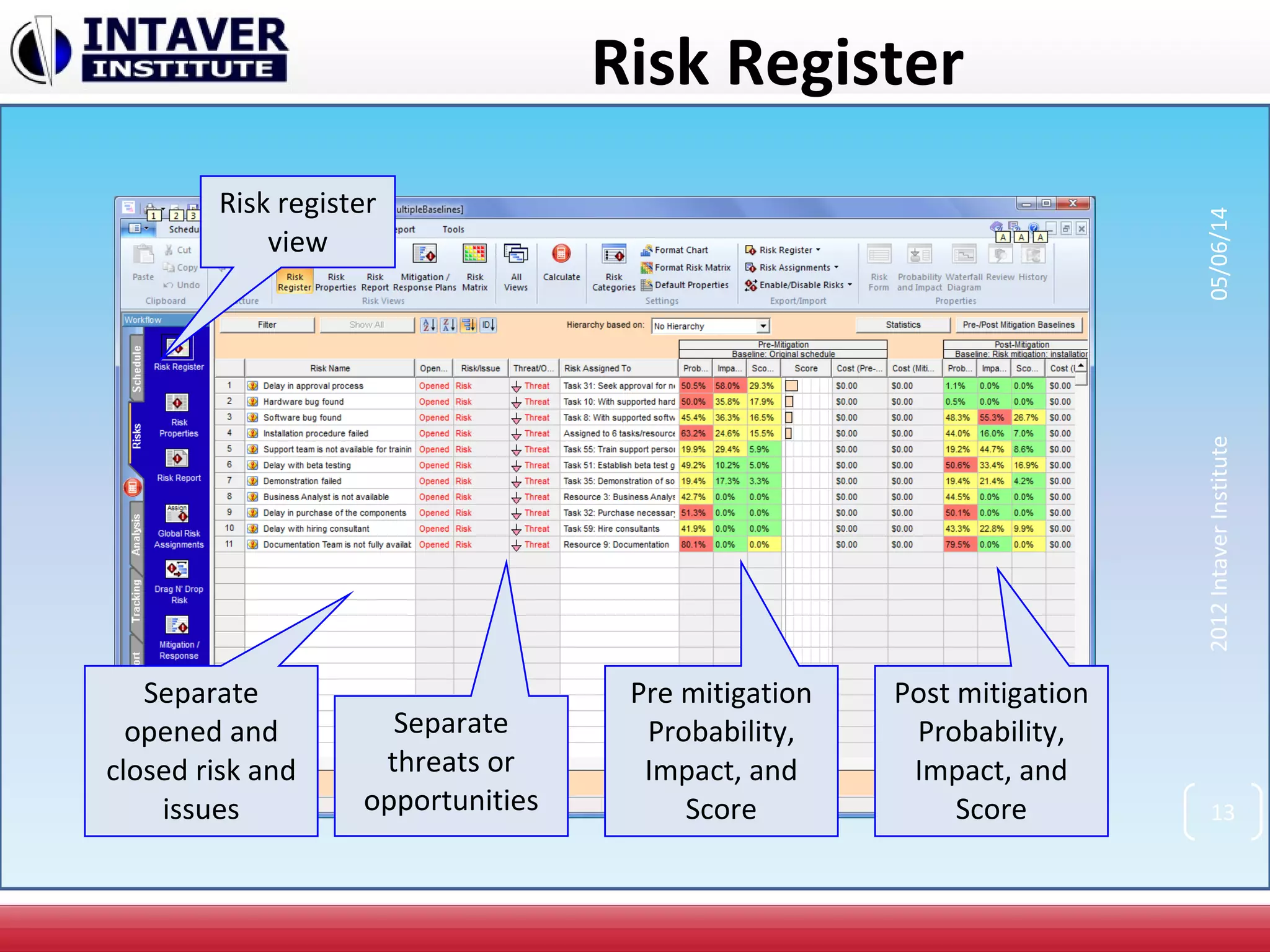
Risk Register
Pre mitigation
Probability,
Impact, and
Score
Post mitigation
Probability,
Impact, and
Score
Risk register
view
Separate
opened and
closed risk and
issues
Separate
threats or
opportunities
2012IntaverInstitute05/06/14
13
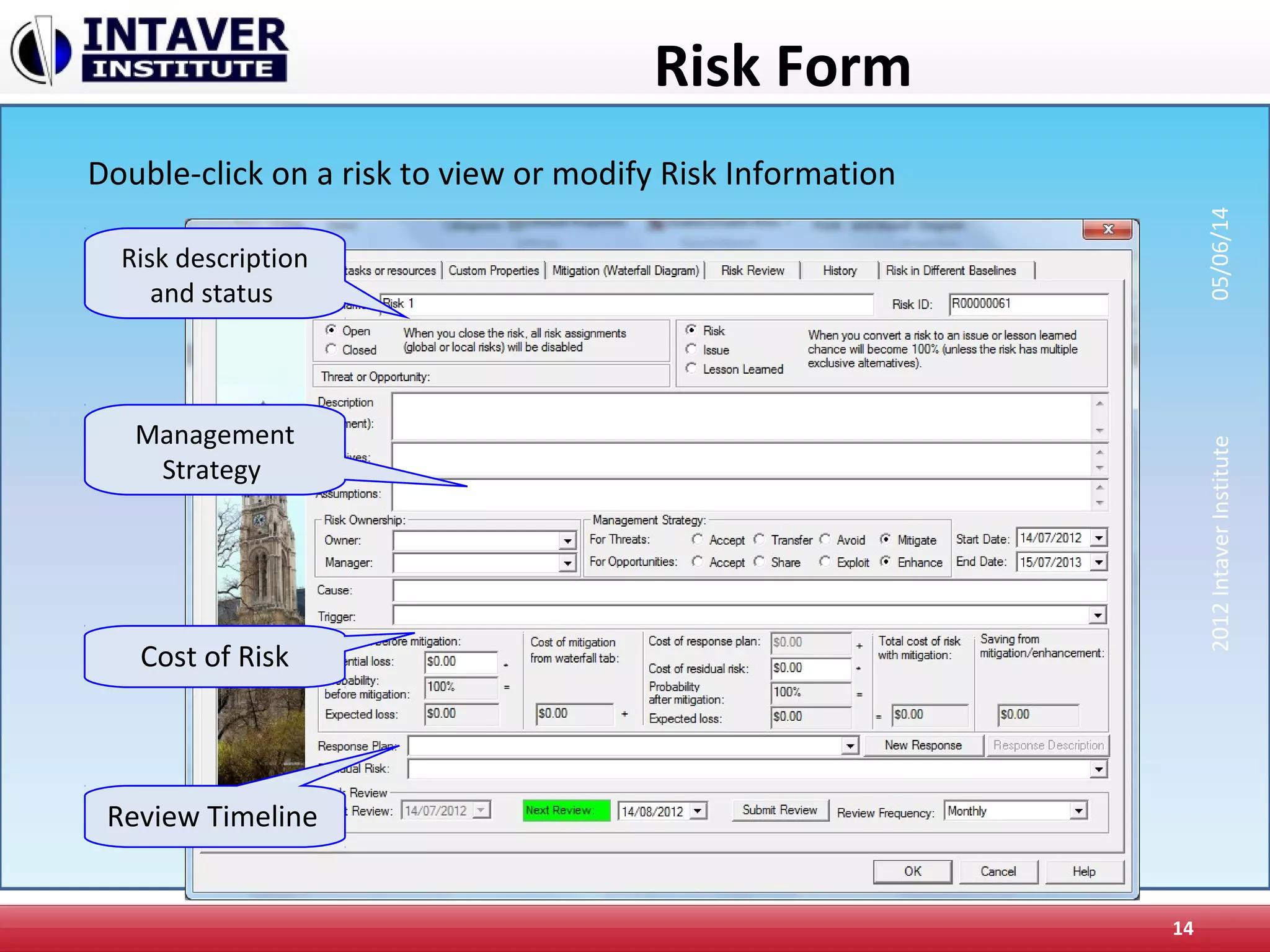
Risk Form
14
Risk description
and status
Cost of Risk
Management
Strategy
Review Timeline
Double-click on a risk to view or modify Risk Information
2012IntaverInstitute05/06/14
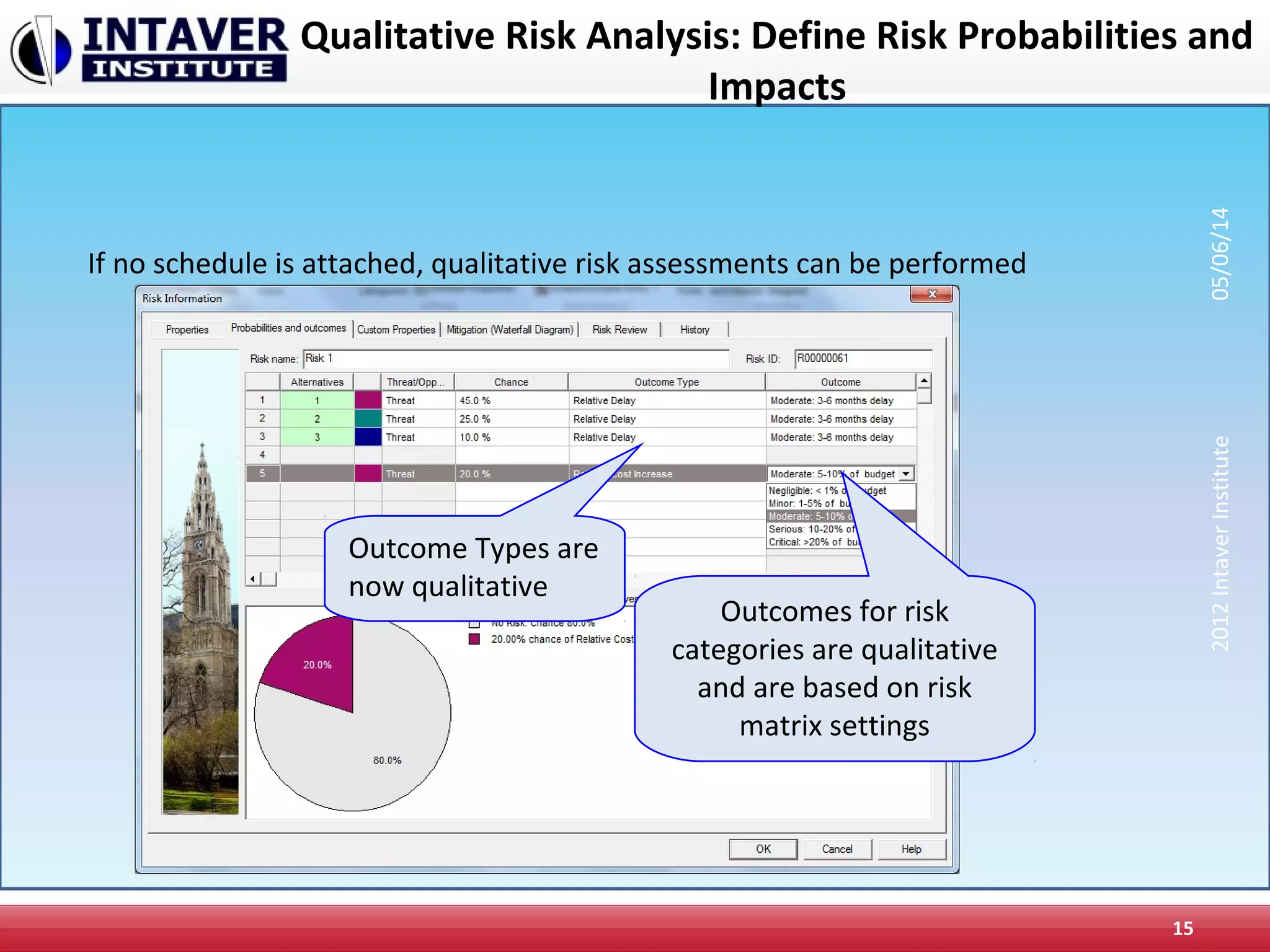
Qualitative Risk Analysis: Define Risk Probabilities and
Impacts
15
If no schedule is attached, qualitative risk assessments can be performed
Outcome Types are
now qualitative
Outcomes for risk
categories are qualitative
and are based on risk
matrix settings
2012IntaverInstitute05/06/14
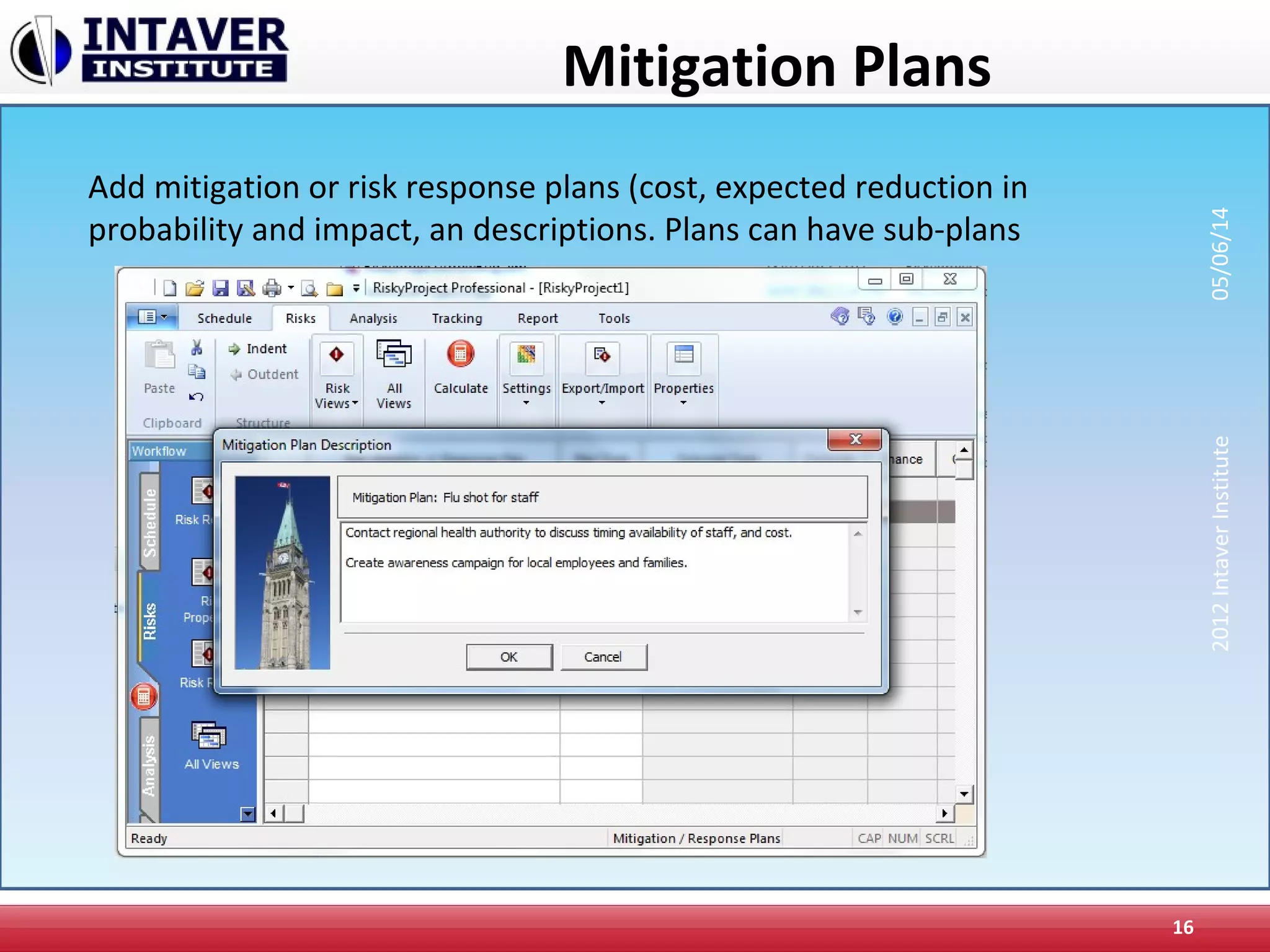
Mitigation Plans
16
Add mitigation or risk response plans (cost, expected reduction in
probability and impact, an descriptions. Plans can have sub-plans
2012IntaverInstitute05/06/14
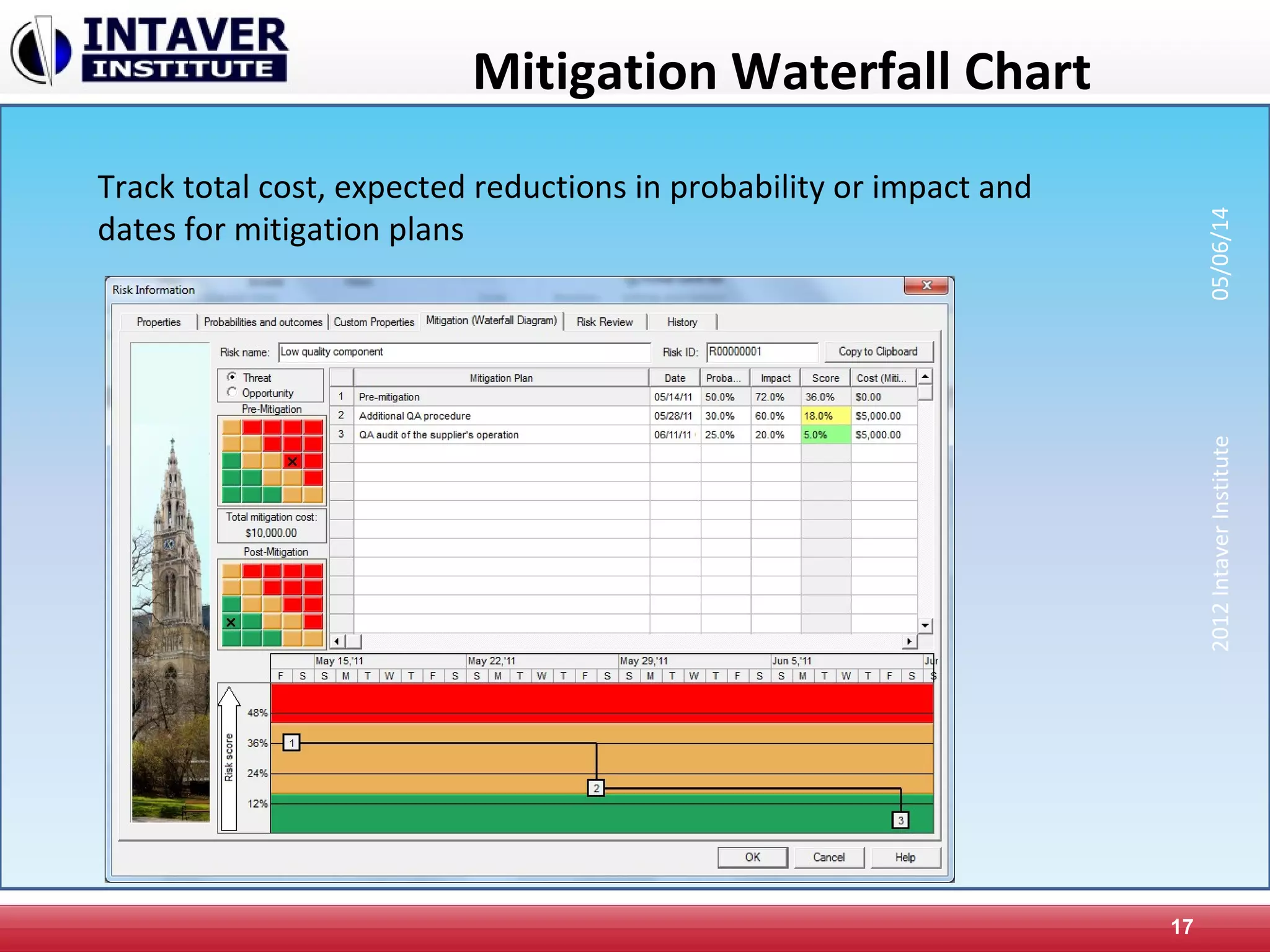
Mitigation Waterfall Chart
17
Track total cost, expected reductions in probability or impact and
dates for mitigation plans
2012IntaverInstitute05/06/14
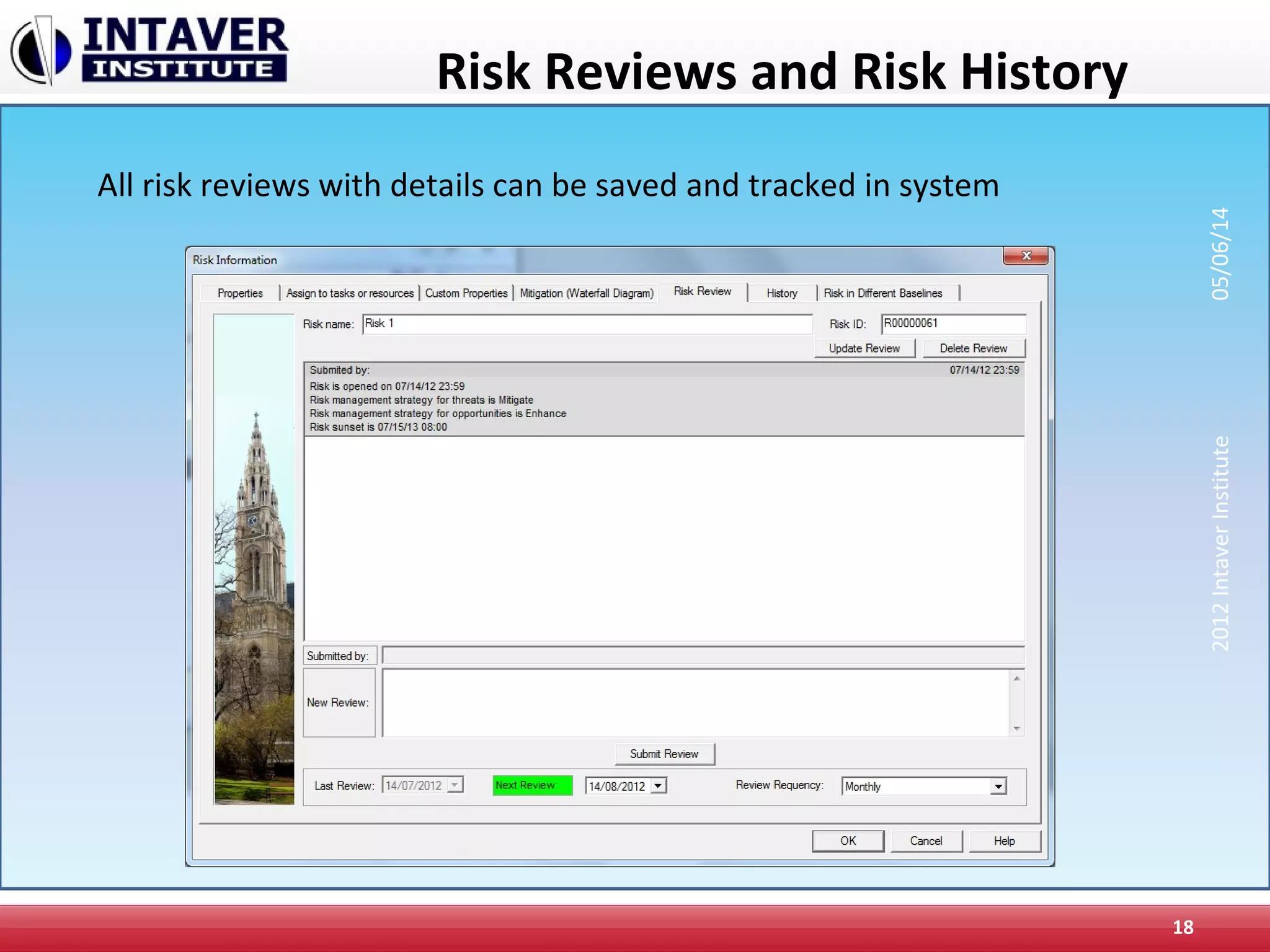
Risk Reviews and Risk History
18
All risk reviews with details can be saved and tracked in system
2012IntaverInstitute05/06/14
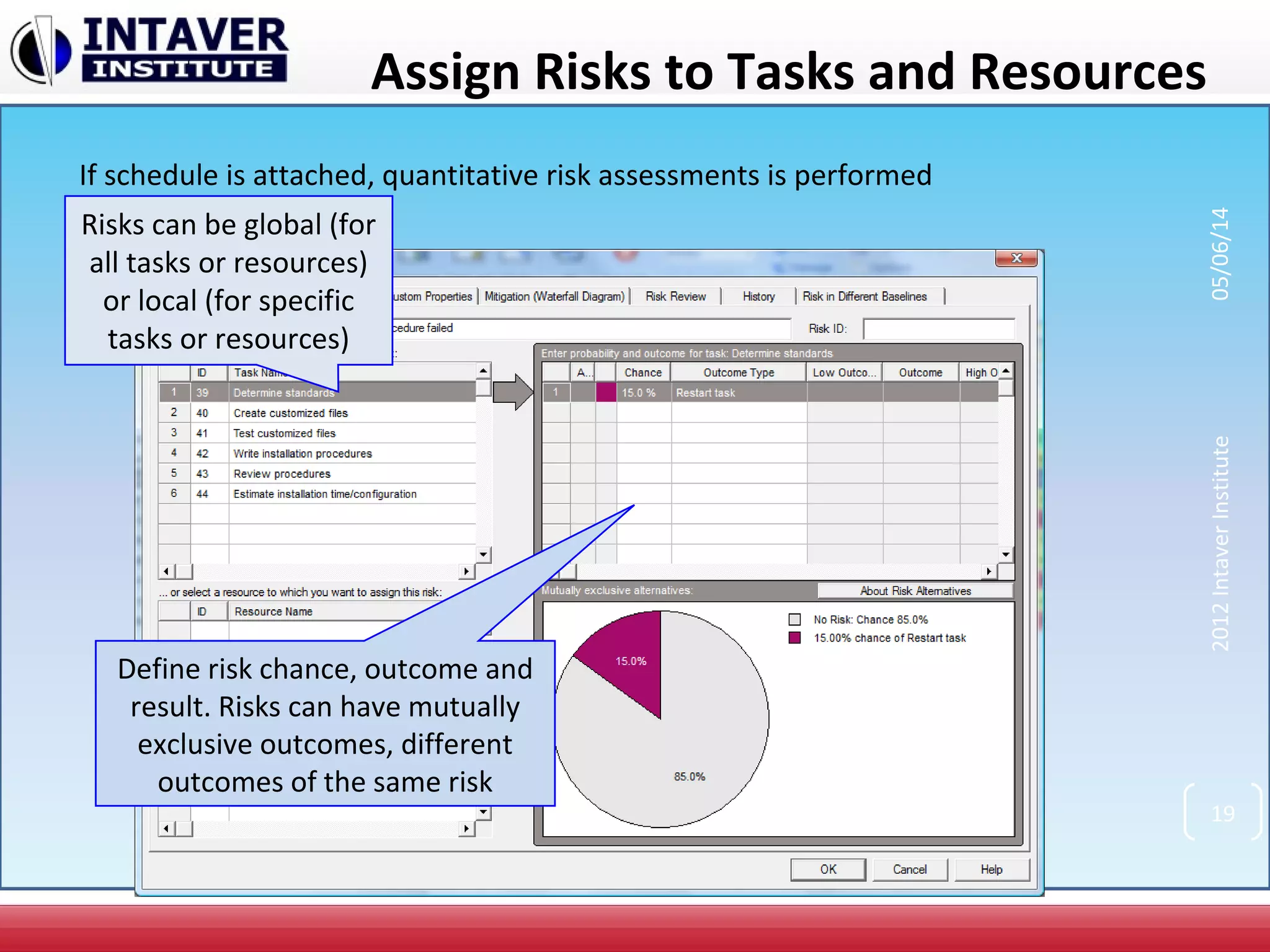
Assign Risks to Tasks and Resources
Define risk chance, outcome and
result. Risks can have mutually
exclusive outcomes, different
outcomes of the same risk
Risks can be global (for
all tasks or resources)
or local (for specific
tasks or resources)
2012IntaverInstitute05/06/14
19
If schedule is attached, quantitative risk assessments is performed
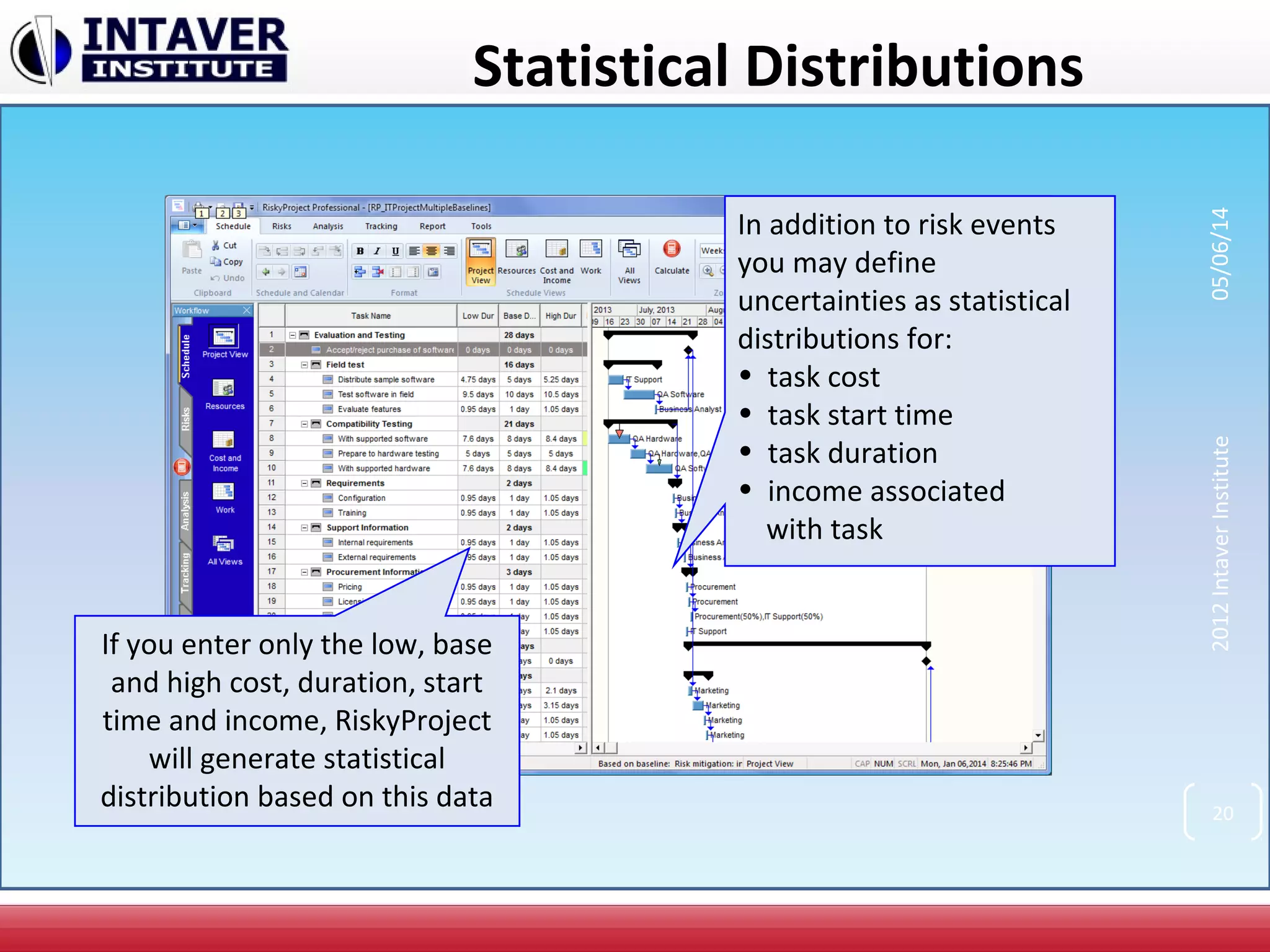
Statistical Distributions
In addition to risk events
you may define
uncertainties as statistical
distributions for:
• task cost
• task start time
• task duration
• income associated
with task
If you enter only the low, base
and high cost, duration, start
time and income, RiskyProject
will generate statistical
distribution based on this data 20
2012IntaverInstitute05/06/14
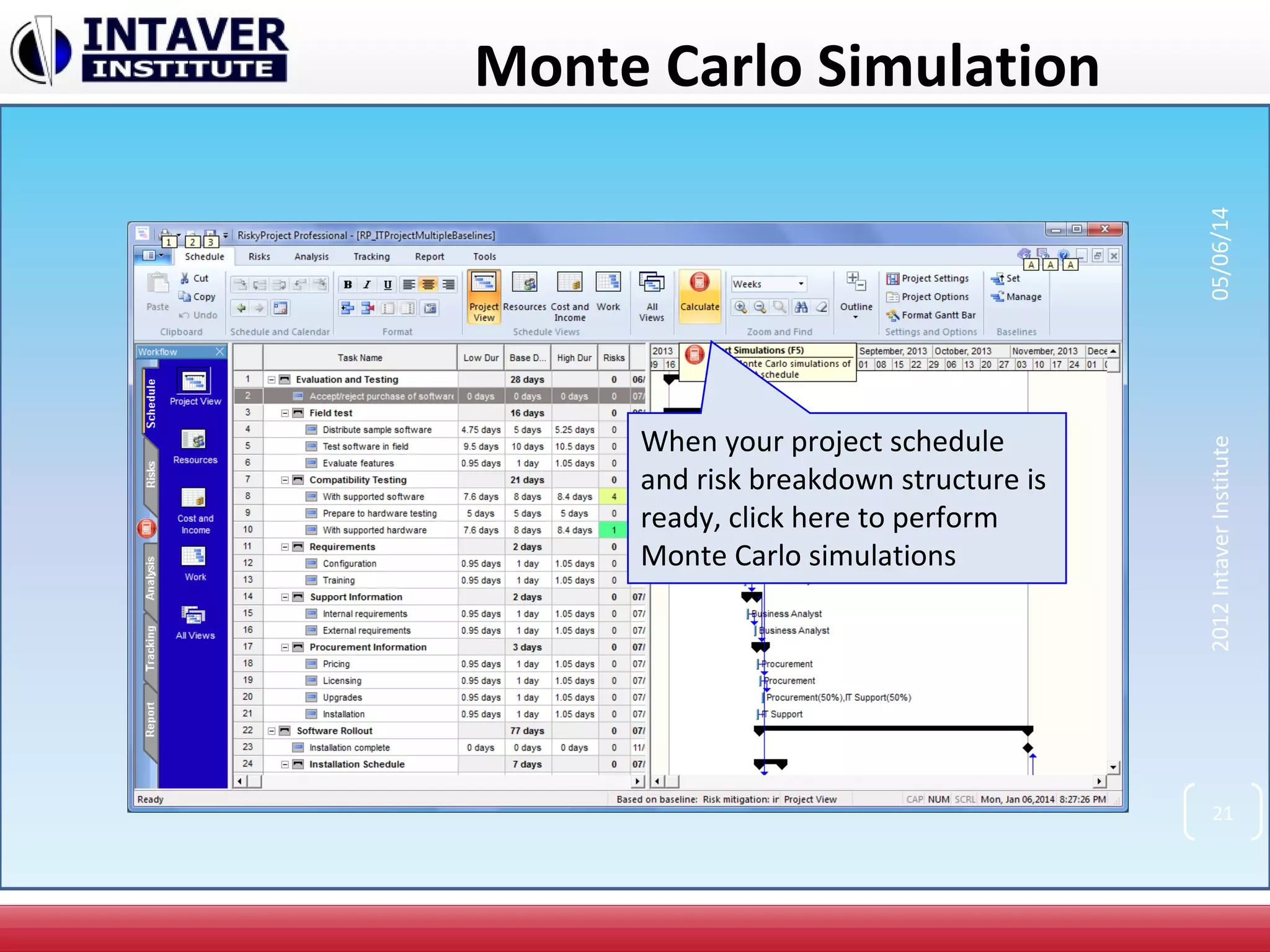
Monte Carlo Simulation
When your project schedule
and risk breakdown structure is
ready, click here to perform
Monte Carlo simulations
21
2012IntaverInstitute05/06/14
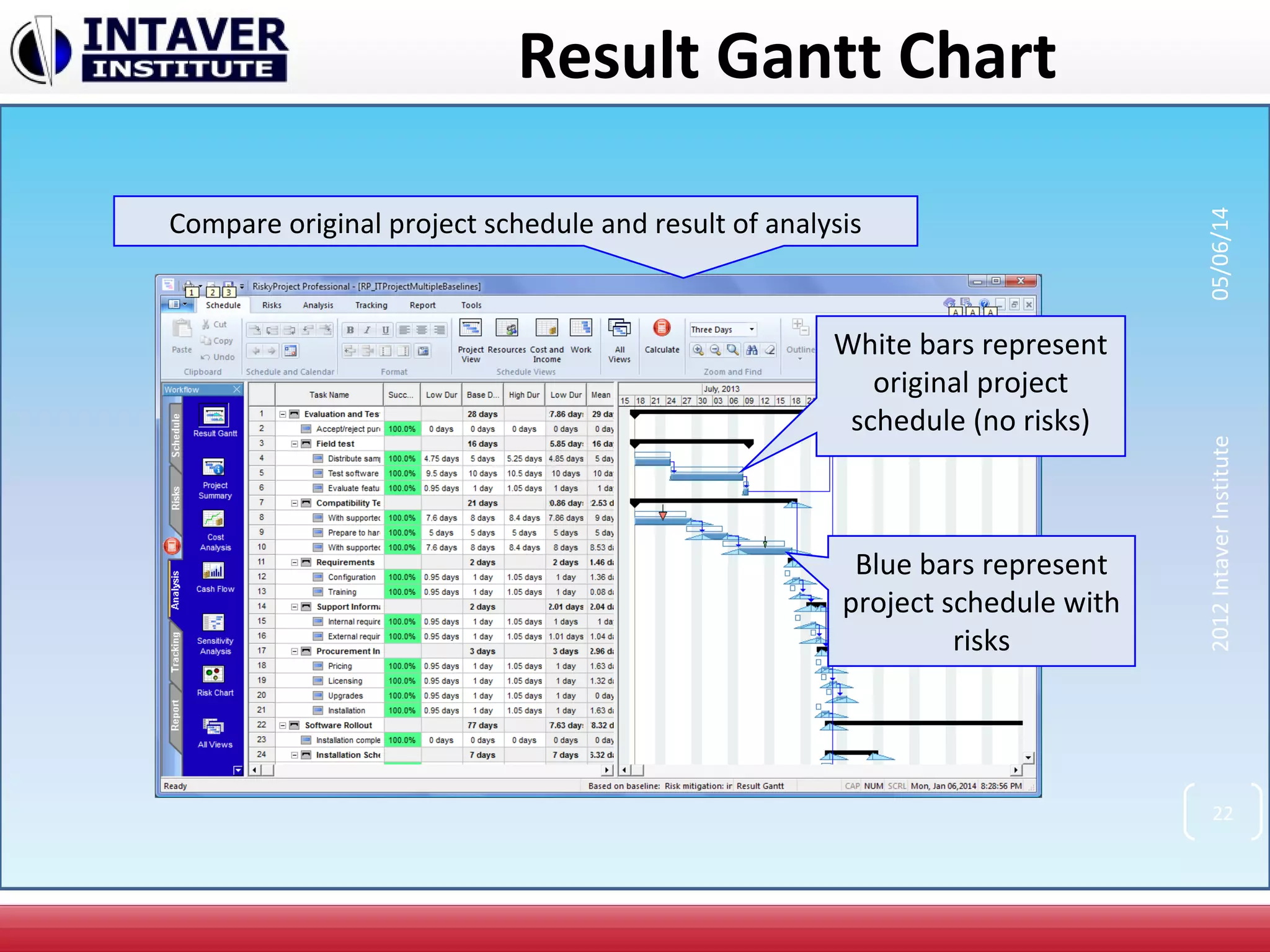
Result Gantt Chart
White bars represent
original project
schedule (no risks)
Blue bars represent
project schedule with
risks
Compare original project schedule and result of analysis
22
2012IntaverInstitute05/06/14
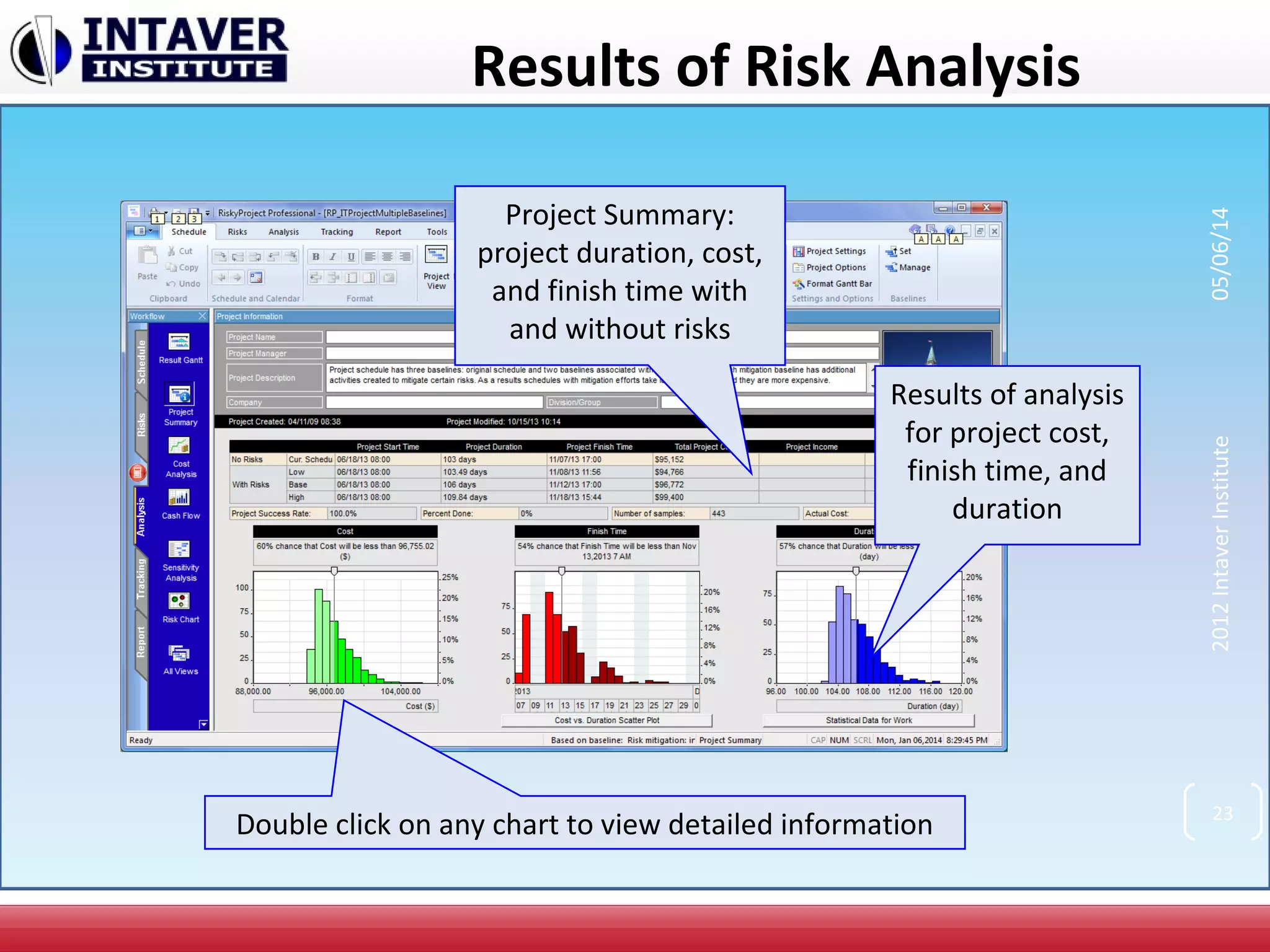
Results of Risk Analysis
Project Summary:
project duration, cost,
and finish time with
and without risks
Results of analysis
for project cost,
finish time, and
duration
Double click on any chart to view detailed information 23
2012IntaverInstitute05/06/14
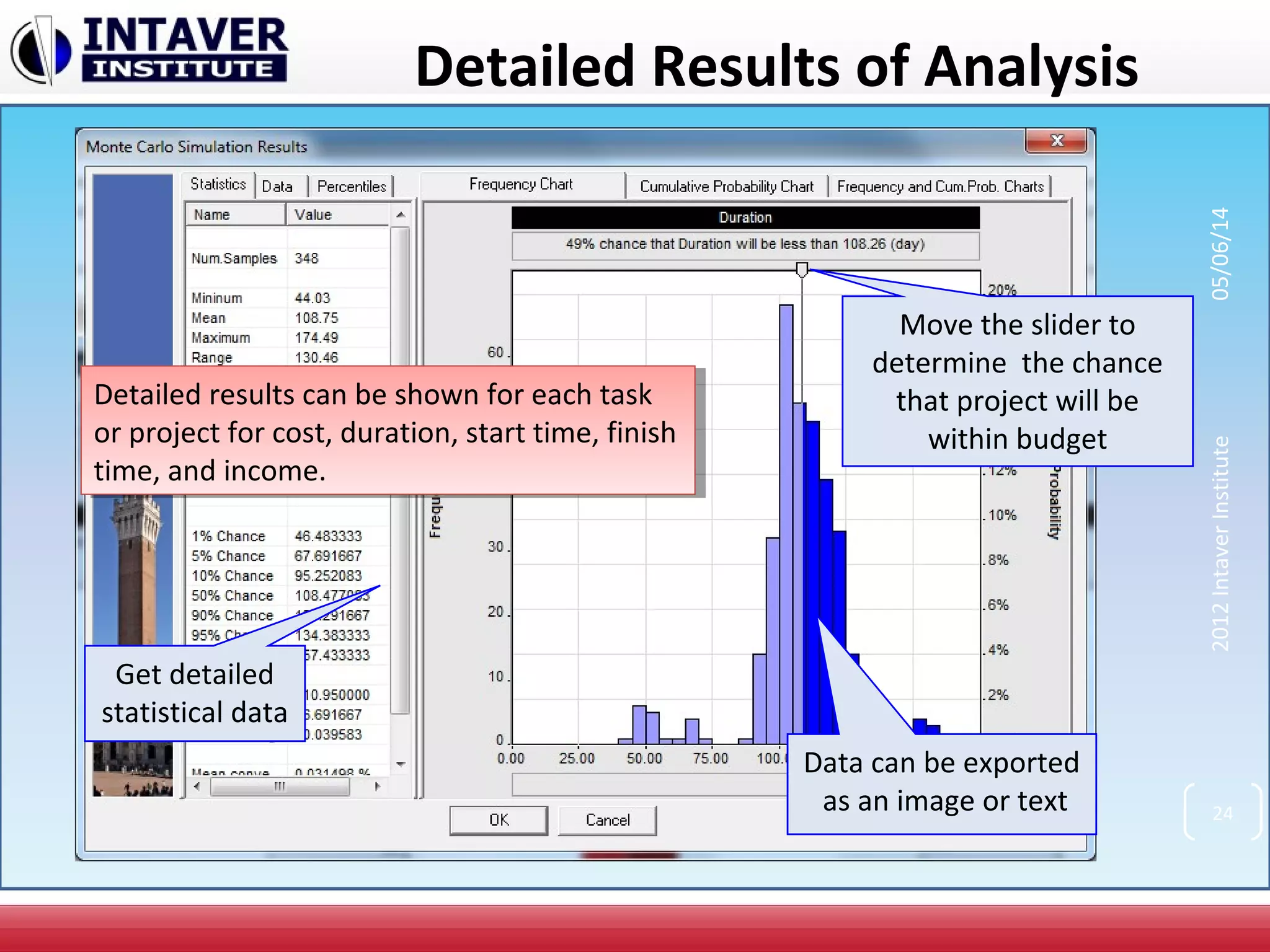
Detailed Results of Analysis
Move the slider to
determine the chance
that project will be
within budget
Get detailed
statistical data
Data can be exported
as an image or text
Detailed results can be shown for each task
or project for cost, duration, start time, finish
time, and income.
Detailed results can be shown for each task
or project for cost, duration, start time, finish
time, and income.
24
2012IntaverInstitute05/06/14
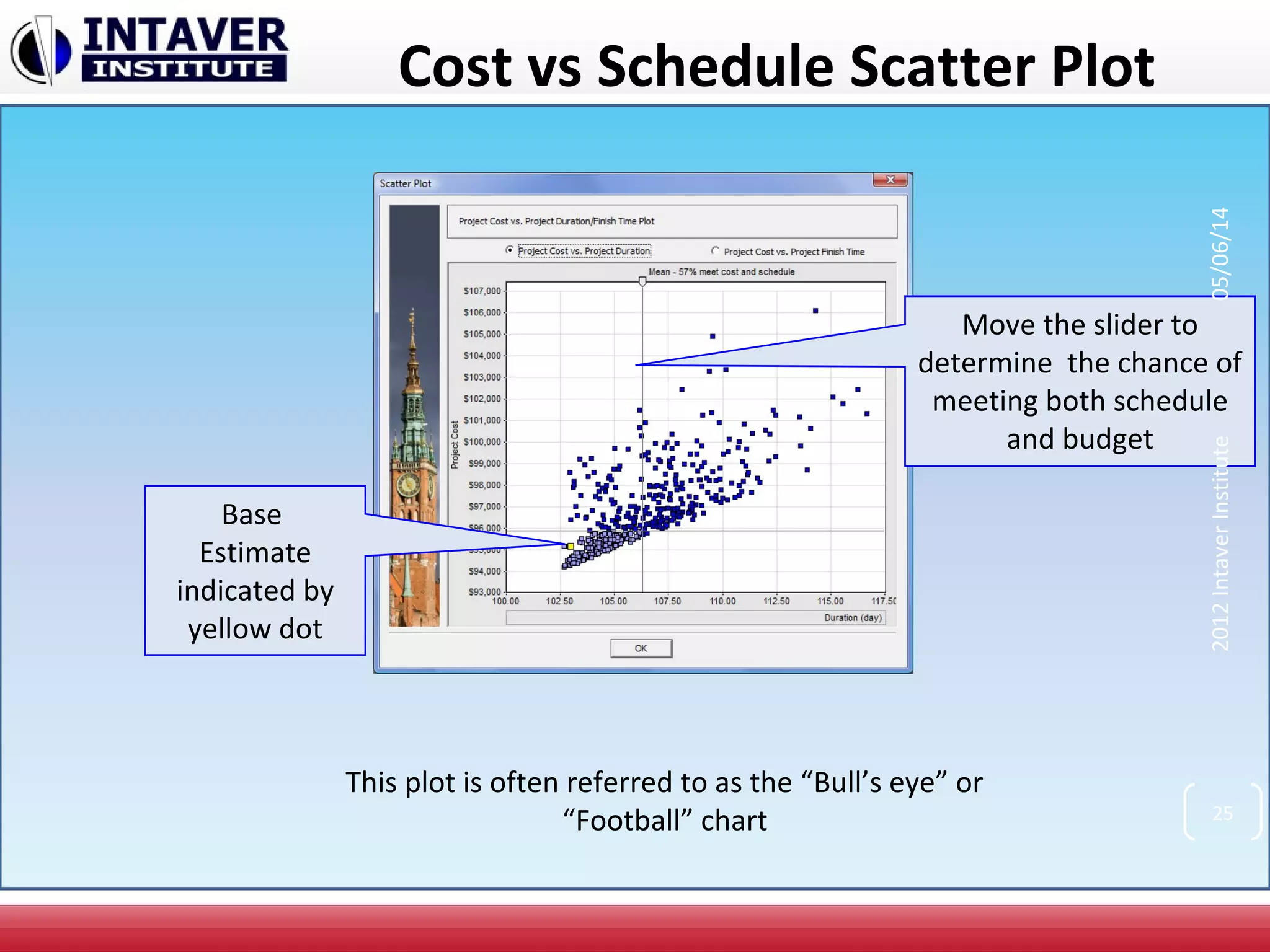
Cost vs Schedule Scatter Plot
Move the slider to
determine the chance of
meeting both schedule
and budget
Base
Estimate
indicated by
yellow dot
25
2012IntaverInstitute05/06/14
This plot is often referred to as the “Bull’s eye” or
“Football” chart
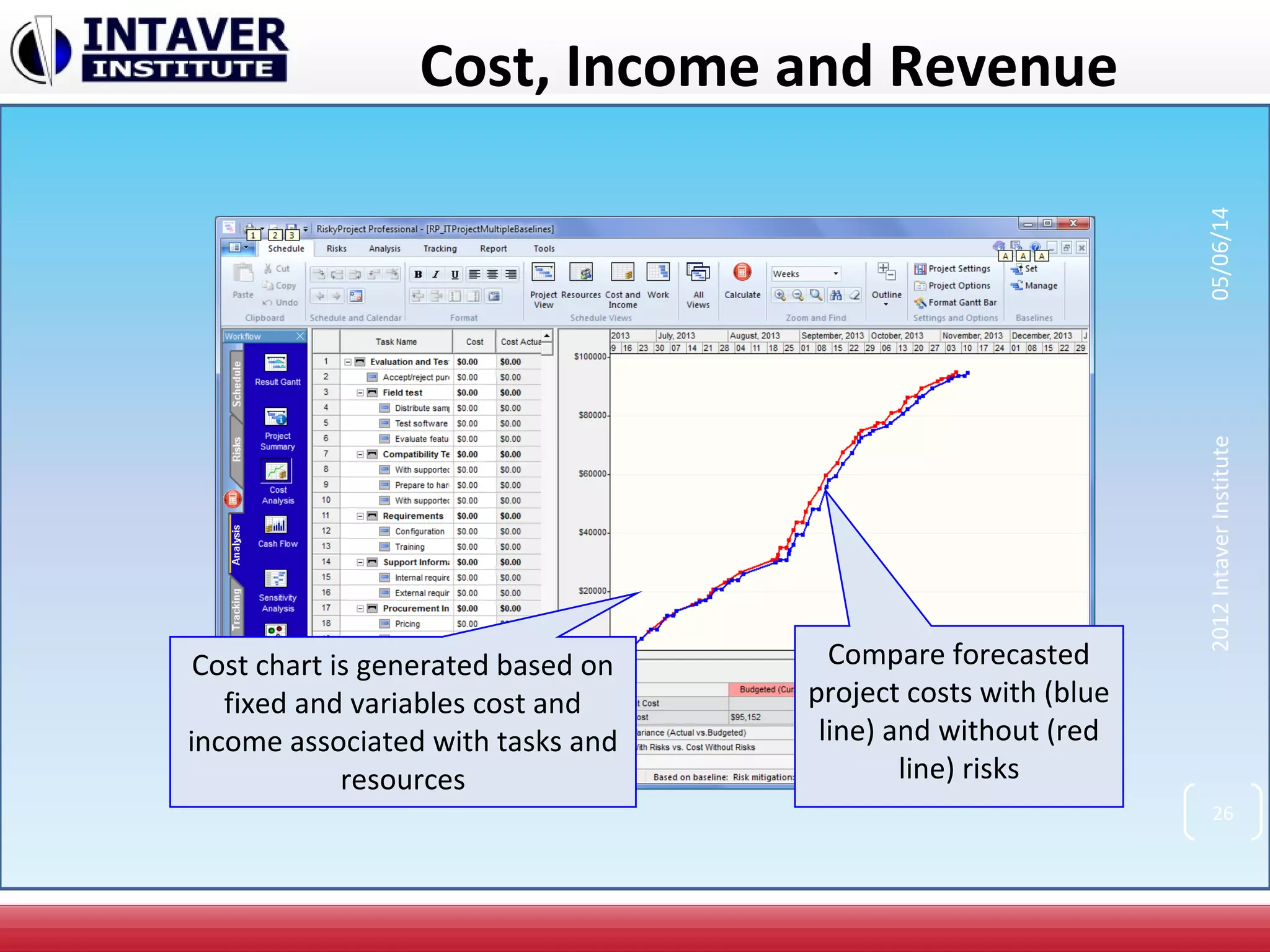
Cost, Income and Revenue
Compare forecasted
project costs with (blue
line) and without (red
line) risks
Cost chart is generated based on
fixed and variables cost and
income associated with tasks and
resources
26
2012IntaverInstitute05/06/14
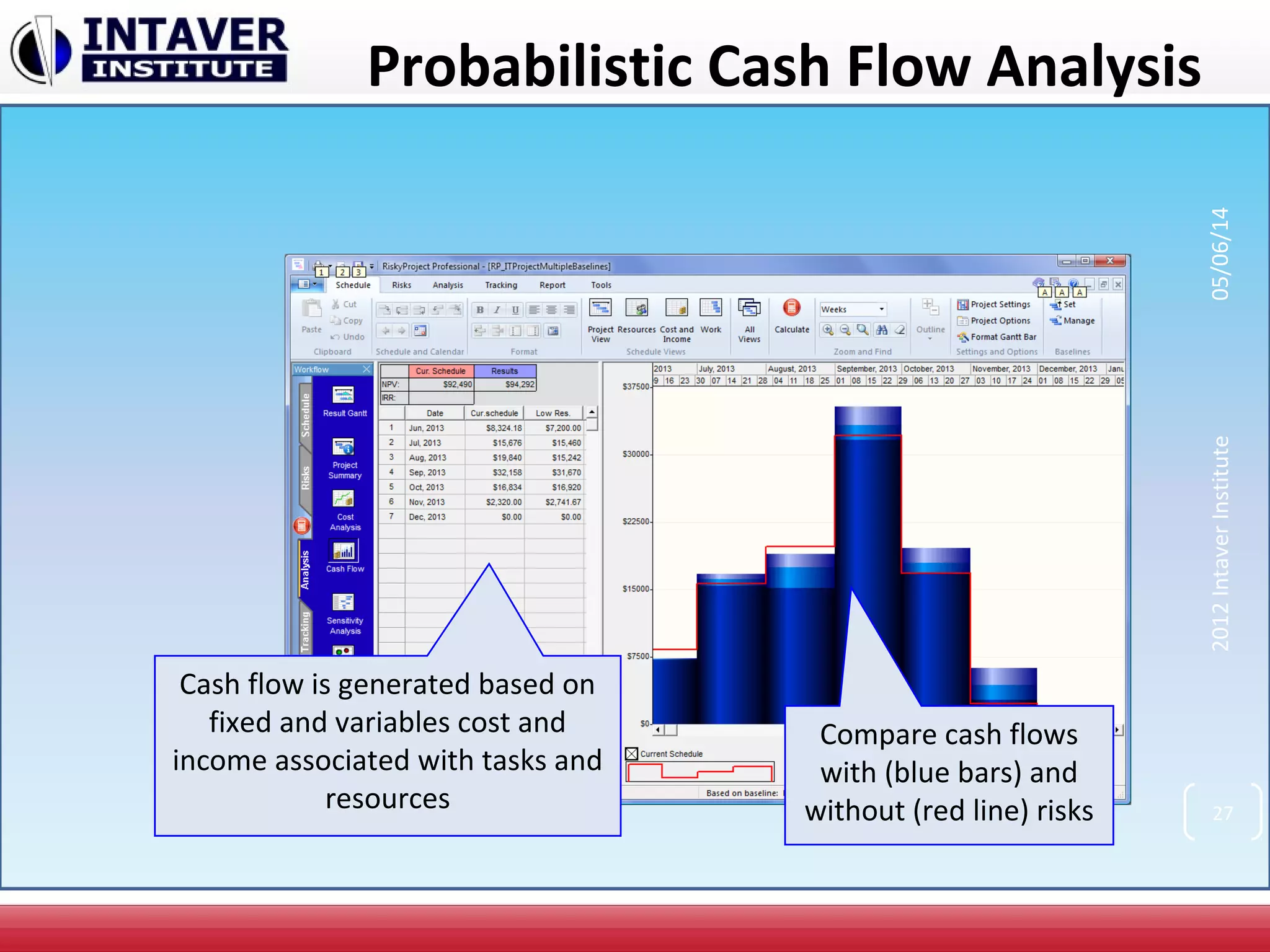
Probabilistic Cash Flow Analysis
Compare cash flows
with (blue bars) and
without (red line) risks
Cash flow is generated based on
fixed and variables cost and
income associated with tasks and
resources 27
2012IntaverInstitute05/06/14
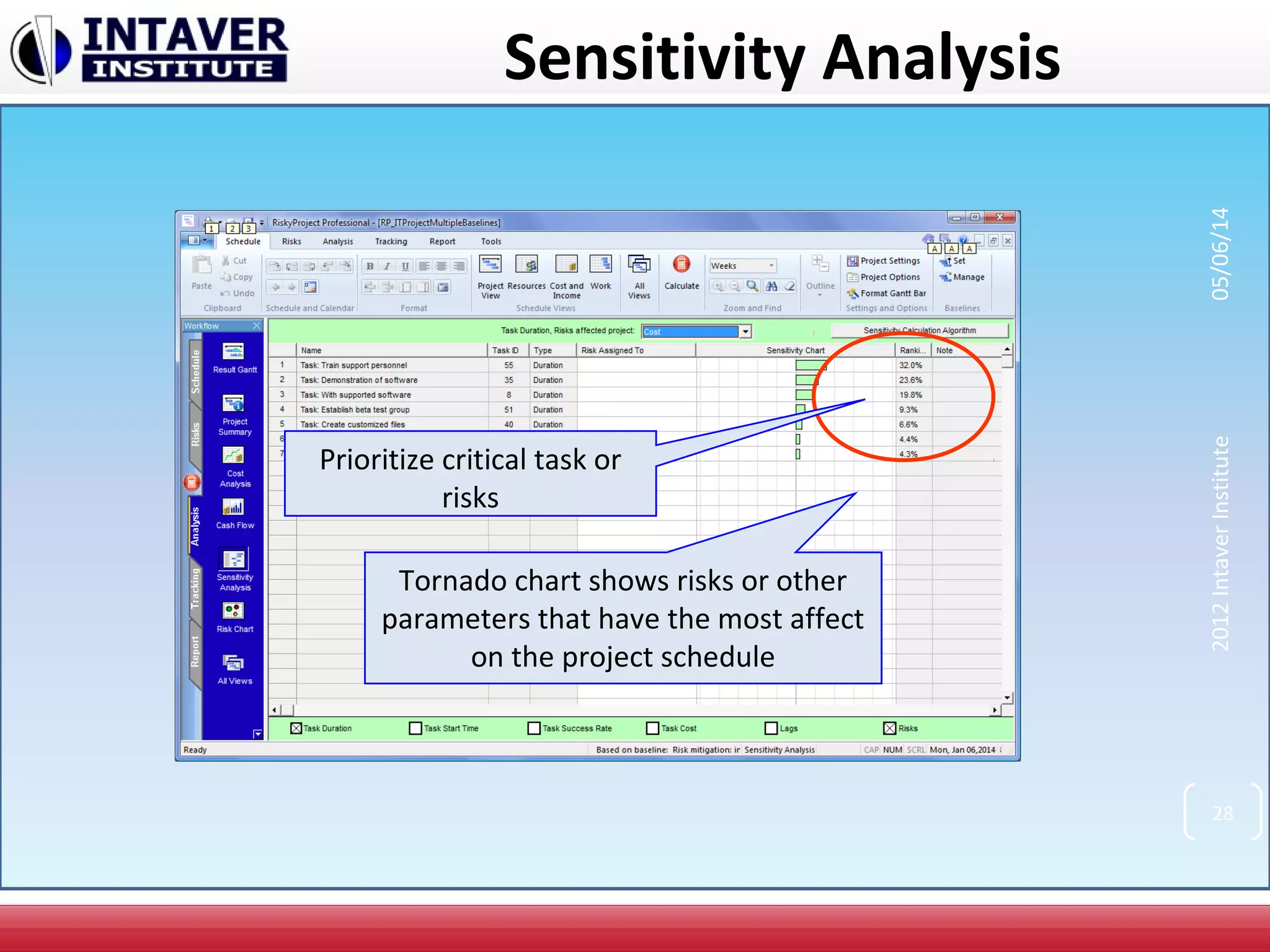
Sensitivity Analysis
Tornado chart shows risks or other
parameters that have the most affect
on the project schedule
Prioritize critical task or
risks
28
2012IntaverInstitute05/06/14
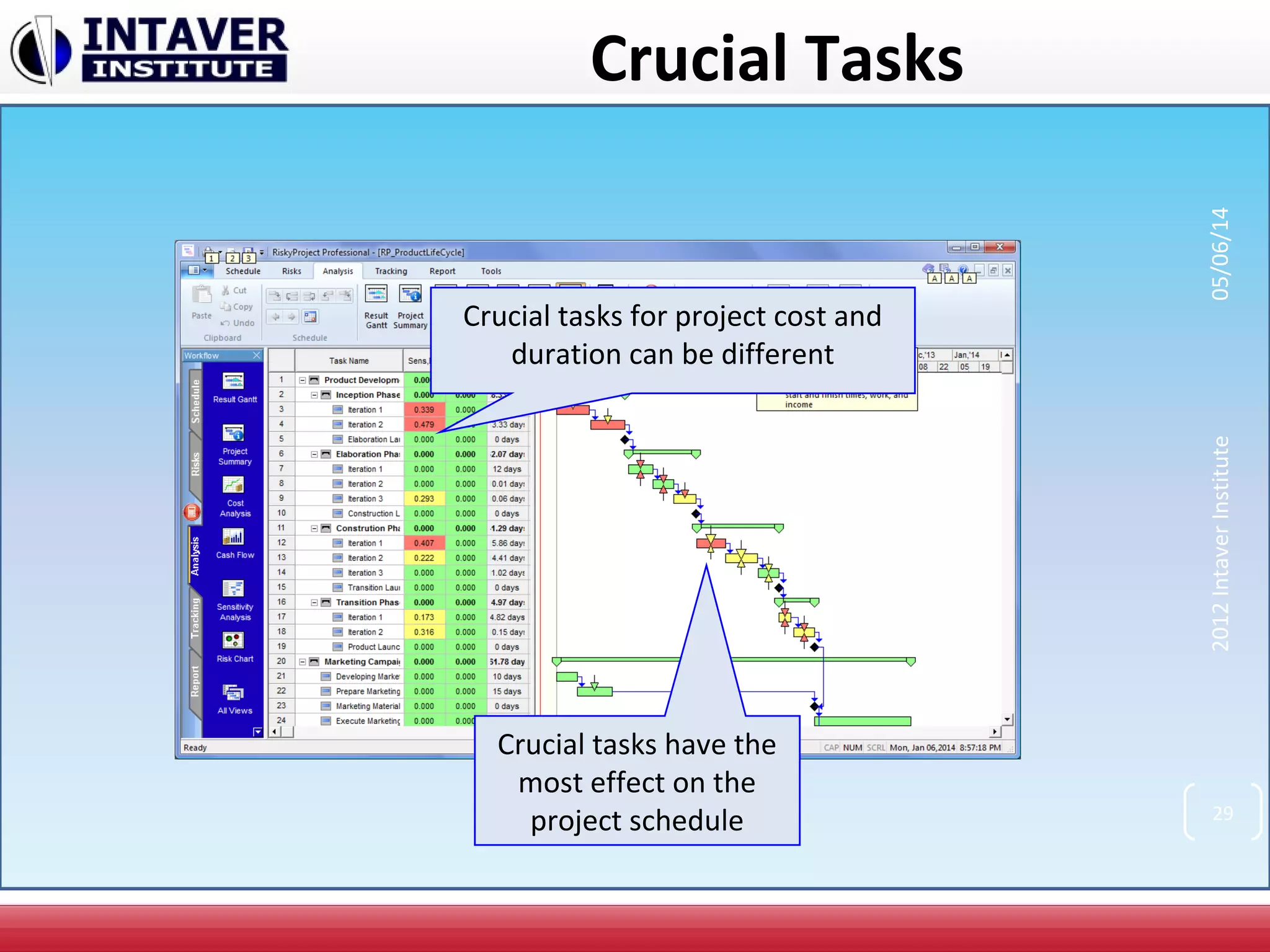
Crucial Tasks
Crucial tasks have the
most effect on the
project schedule
Crucial tasks for project cost and
duration can be different
29
2012IntaverInstitute05/06/14
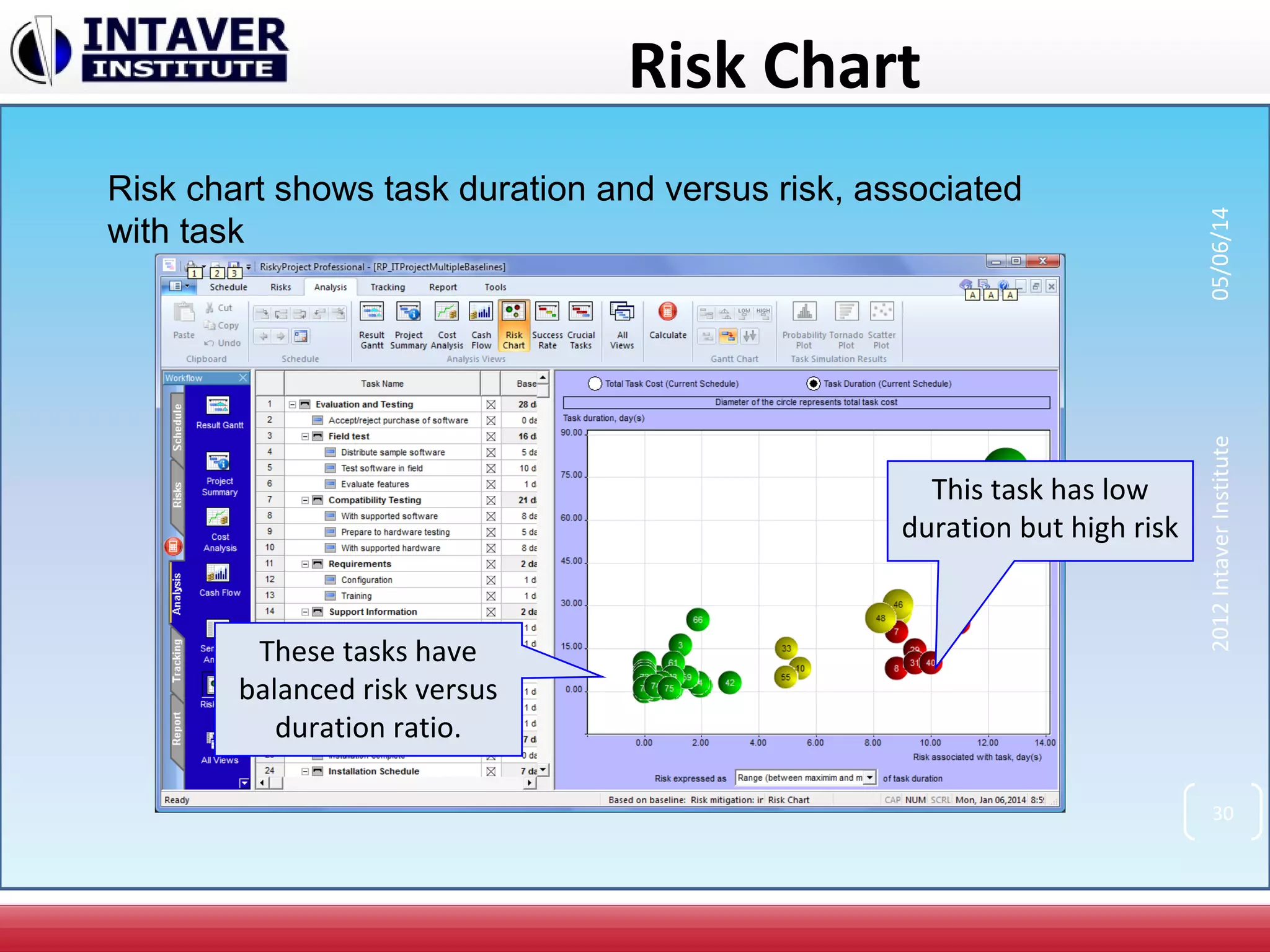
Risk Chart
Risk chart shows task duration and versus risk, associated
with task
This task has low
duration but high risk
These tasks have
balanced risk versus
duration ratio.
30
2012IntaverInstitute05/06/14
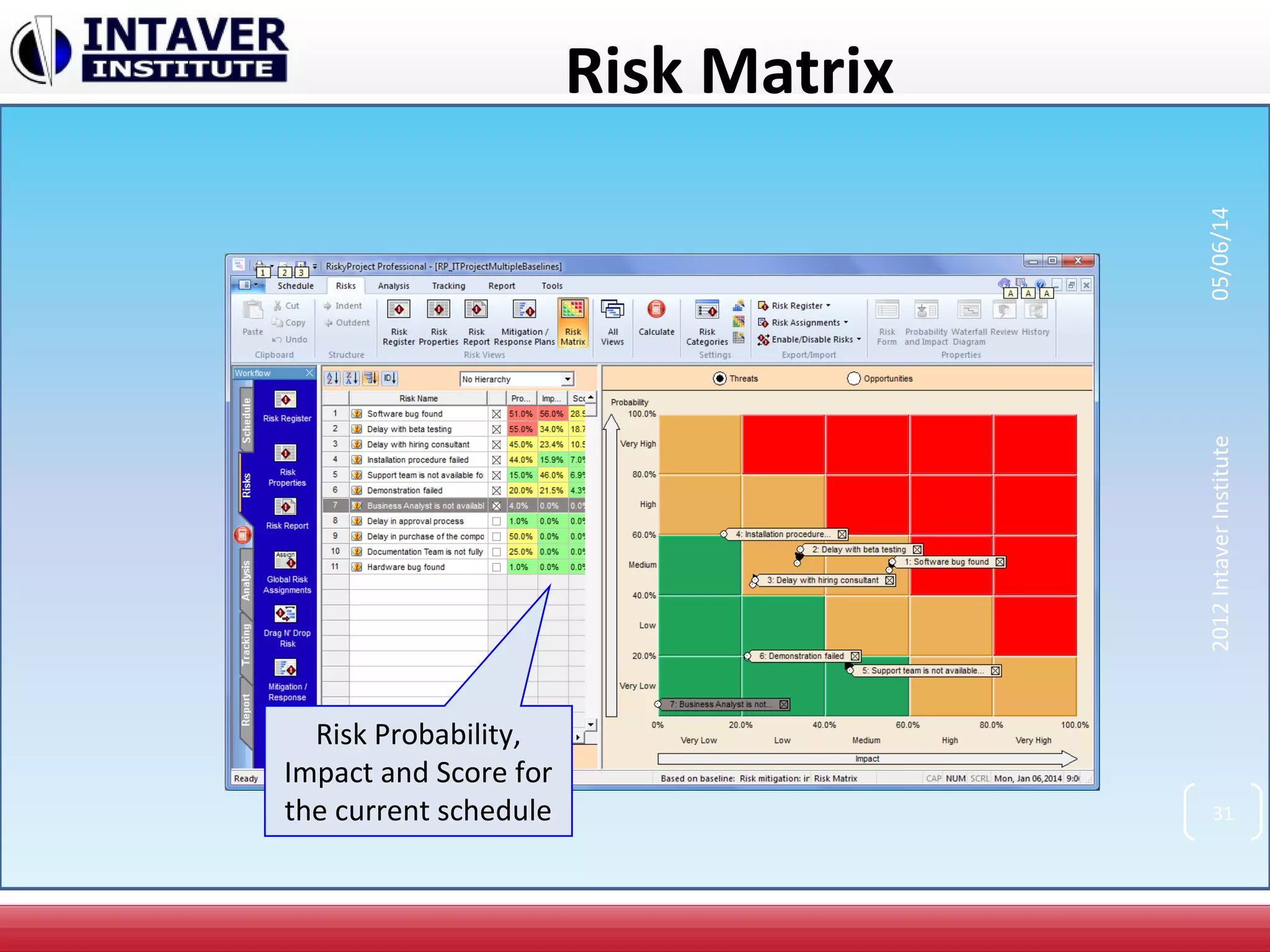
Risk Matrix
Risk Probability,
Impact and Score for
the current schedule 31
2012IntaverInstitute05/06/14
2012IntaverInstitute
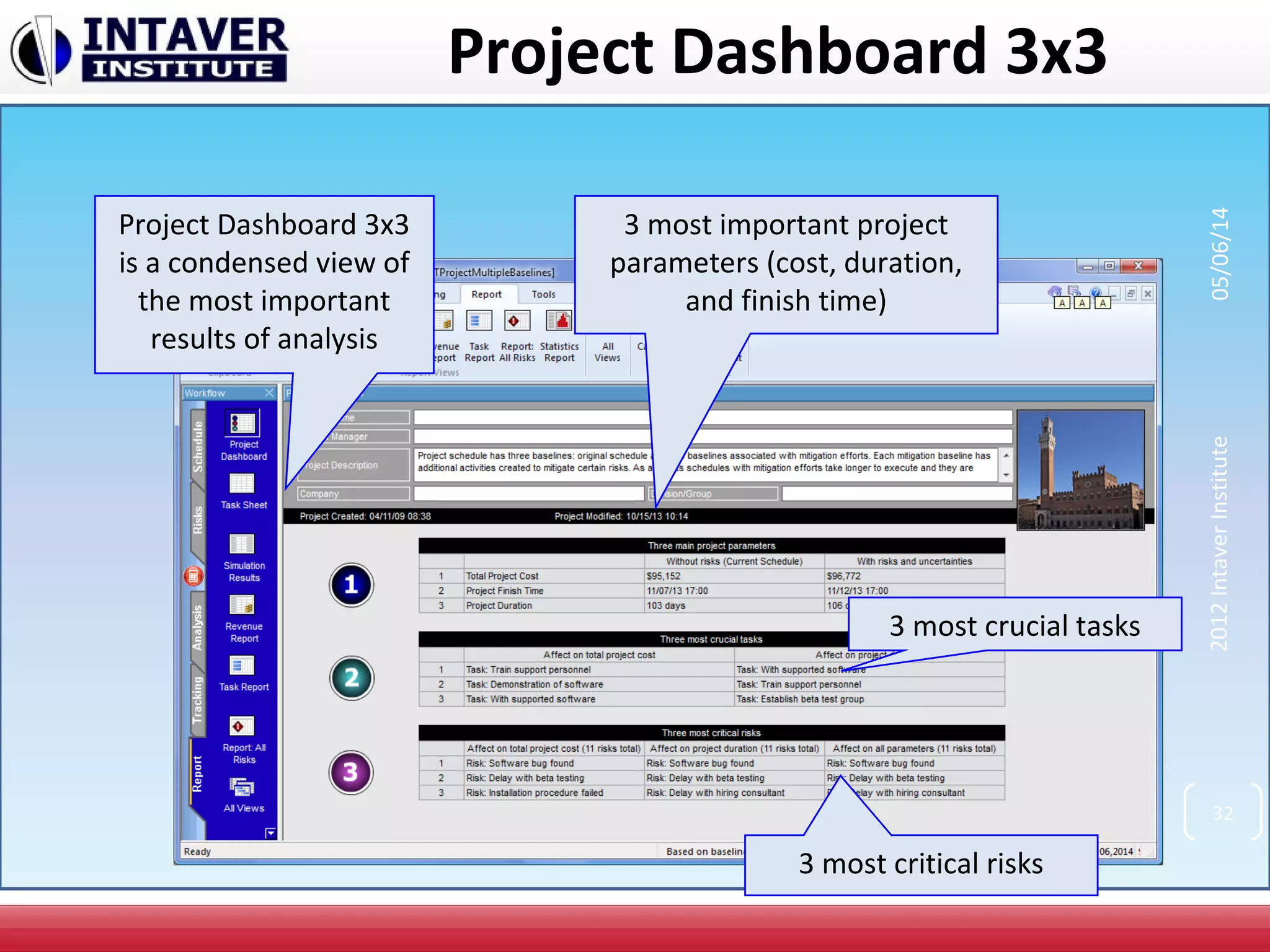
Project Dashboard 3x3
3 most important project
parameters (cost, duration,
and finish time)
3 most crucial tasks
3 most critical risks
Project Dashboard 3x3
is a condensed view of
the most important
results of analysis
32
05/06/14
Project Tracking
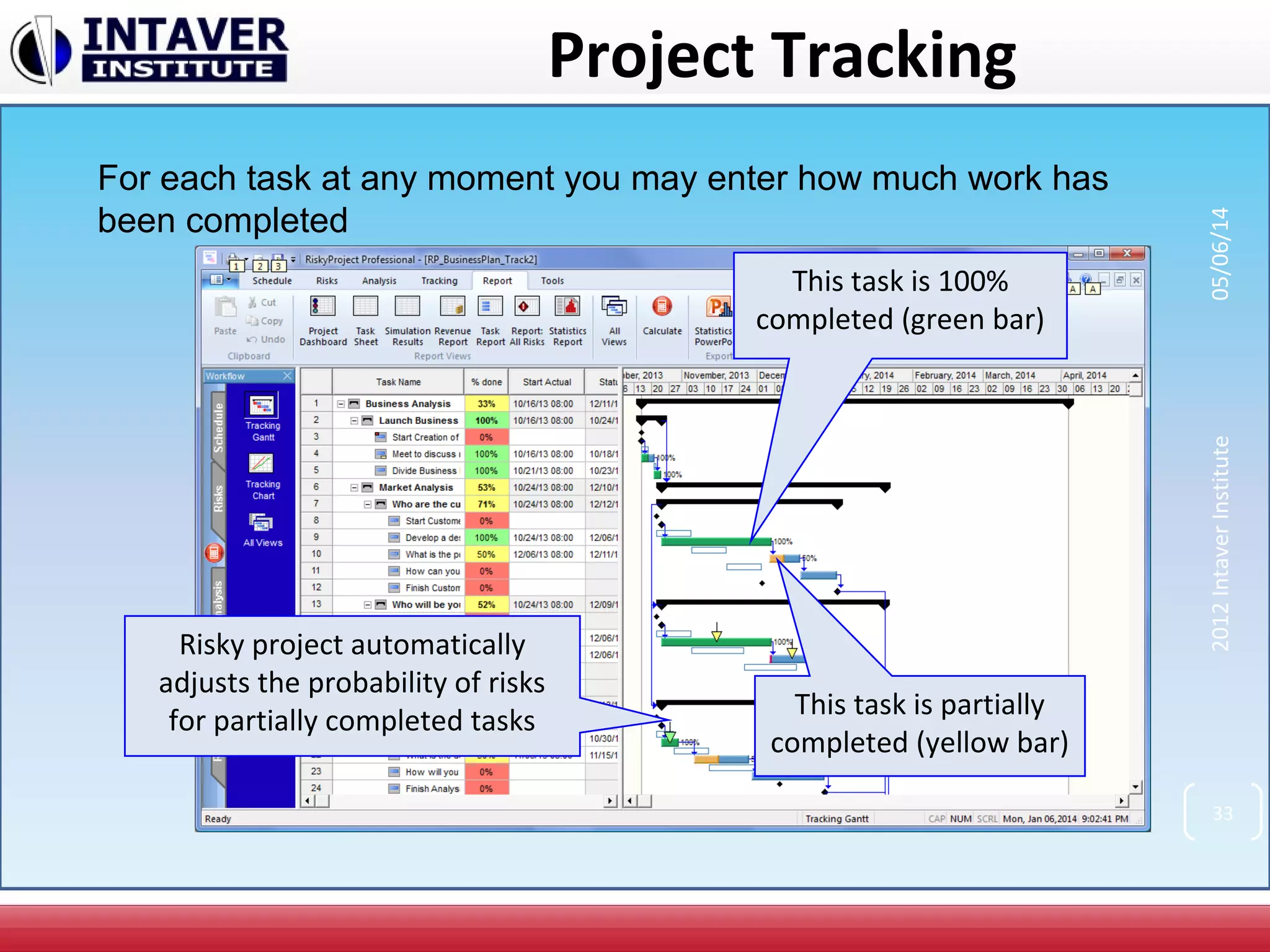
This task is 100%
completed (green bar)
For each task at any moment you may enter how much work has
been completed
This task is partially
completed (yellow bar)
Risky project automatically
adjusts the probability of risks
for partially completed tasks
33
2012IntaverInstitute05/06/14
Tracking Results
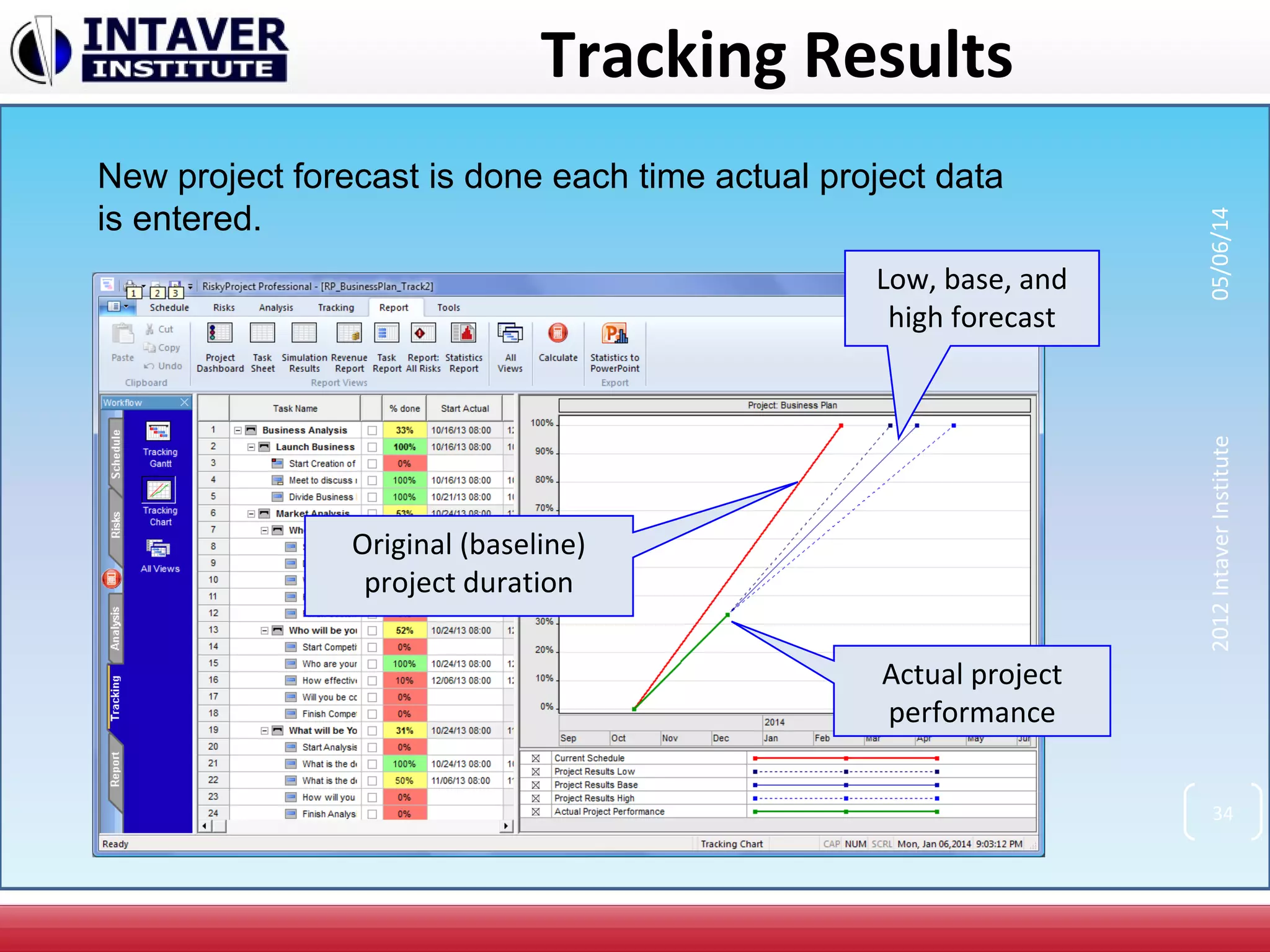
New project forecast is done each time actual project data
is entered.
Original (baseline)
project duration
Actual project
performance
Low, base, and
high forecast
34
2012IntaverInstitute05/06/14
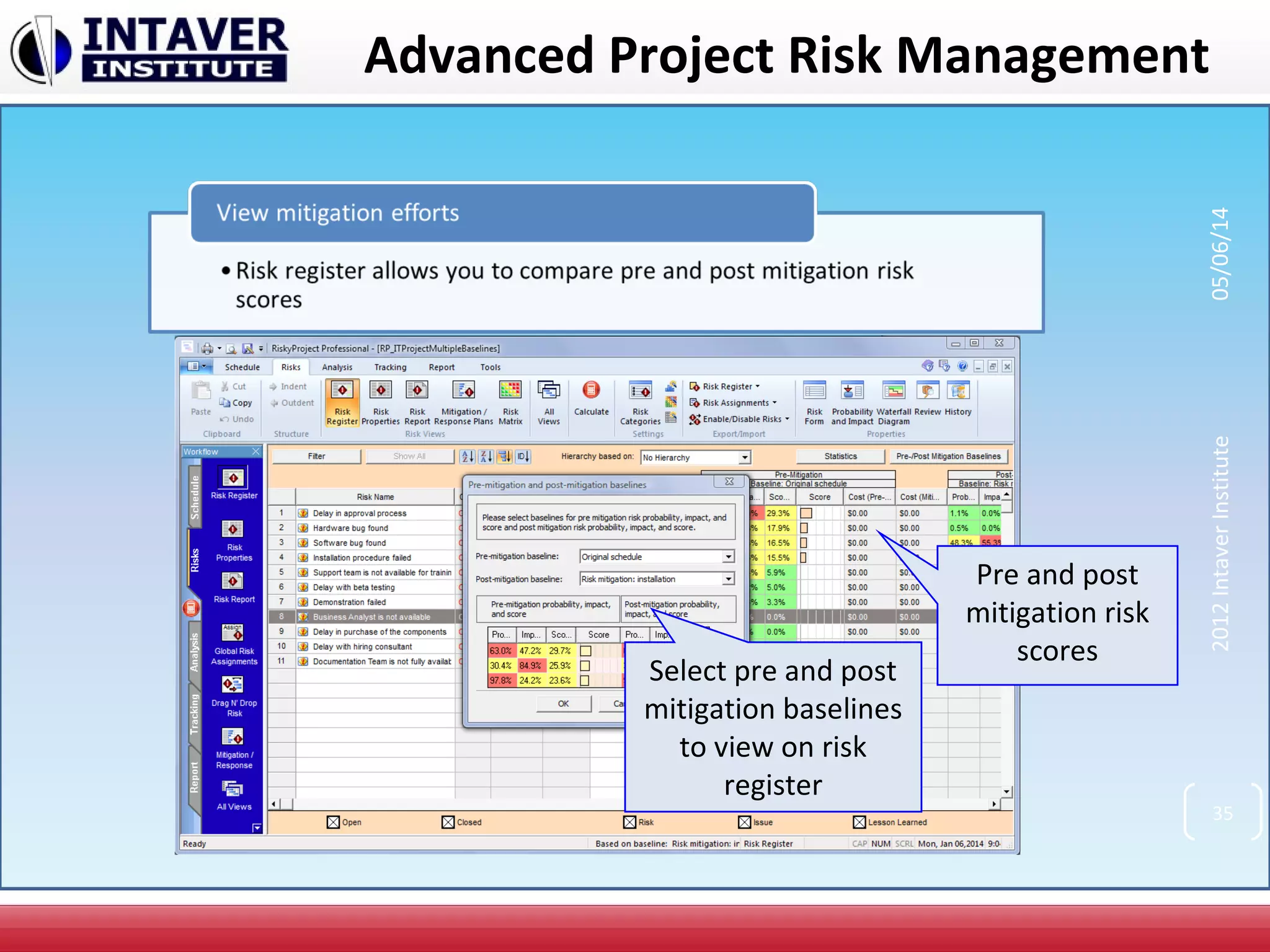
Select pre and post
mitigation baselines
to view on risk
register
Pre and post
mitigation risk
scores
35
2012IntaverInstitute05/06/14
Advanced Project Risk Management
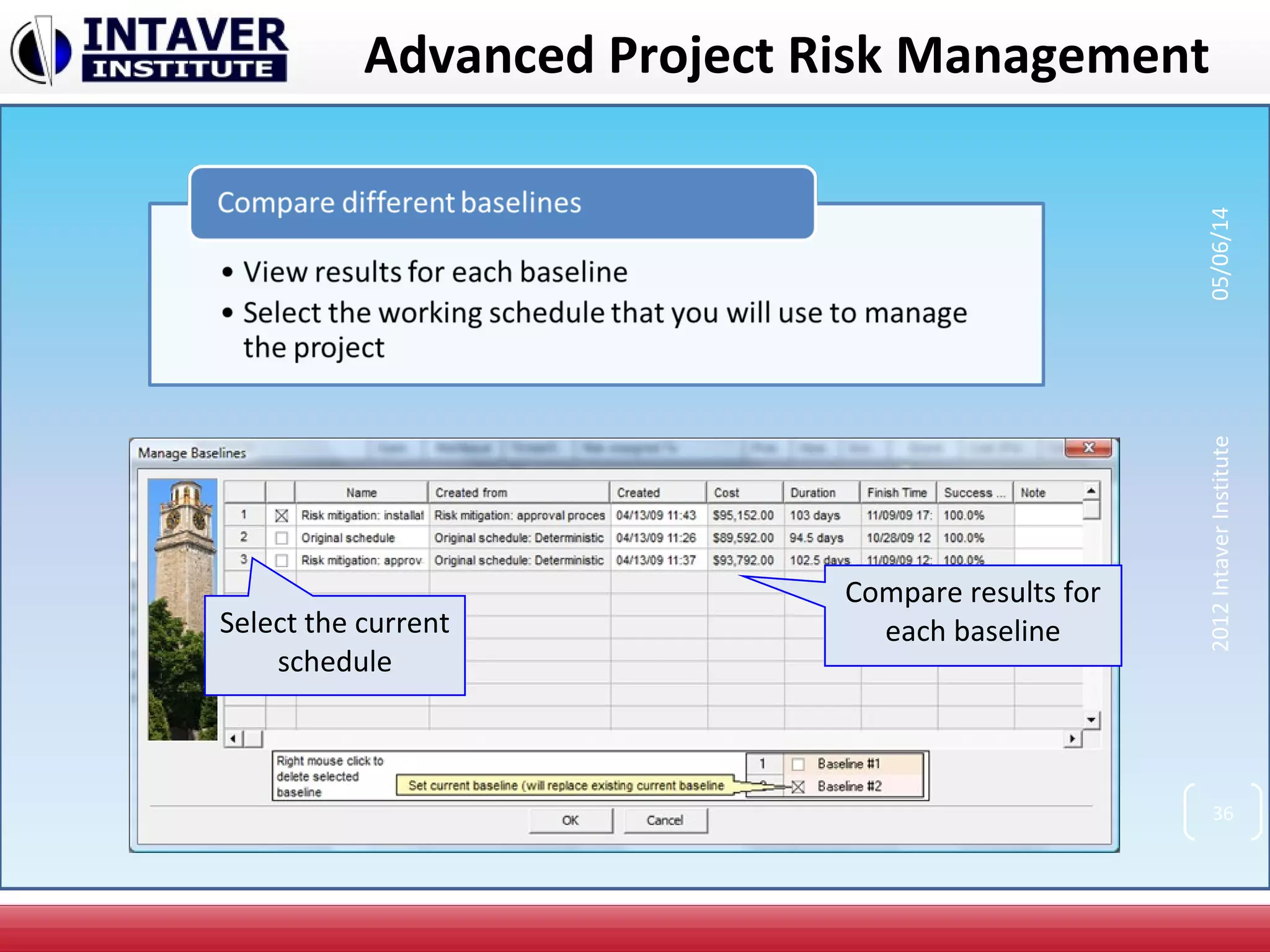
Select the current
schedule
Compare results for
each baseline
36
2012IntaverInstitute05/06/14
Advanced Project Risk Management
Run alternative
project branches
probabilistically
37
2012IntaverInstitute05/06/14
Integration with Project Management
Software
38
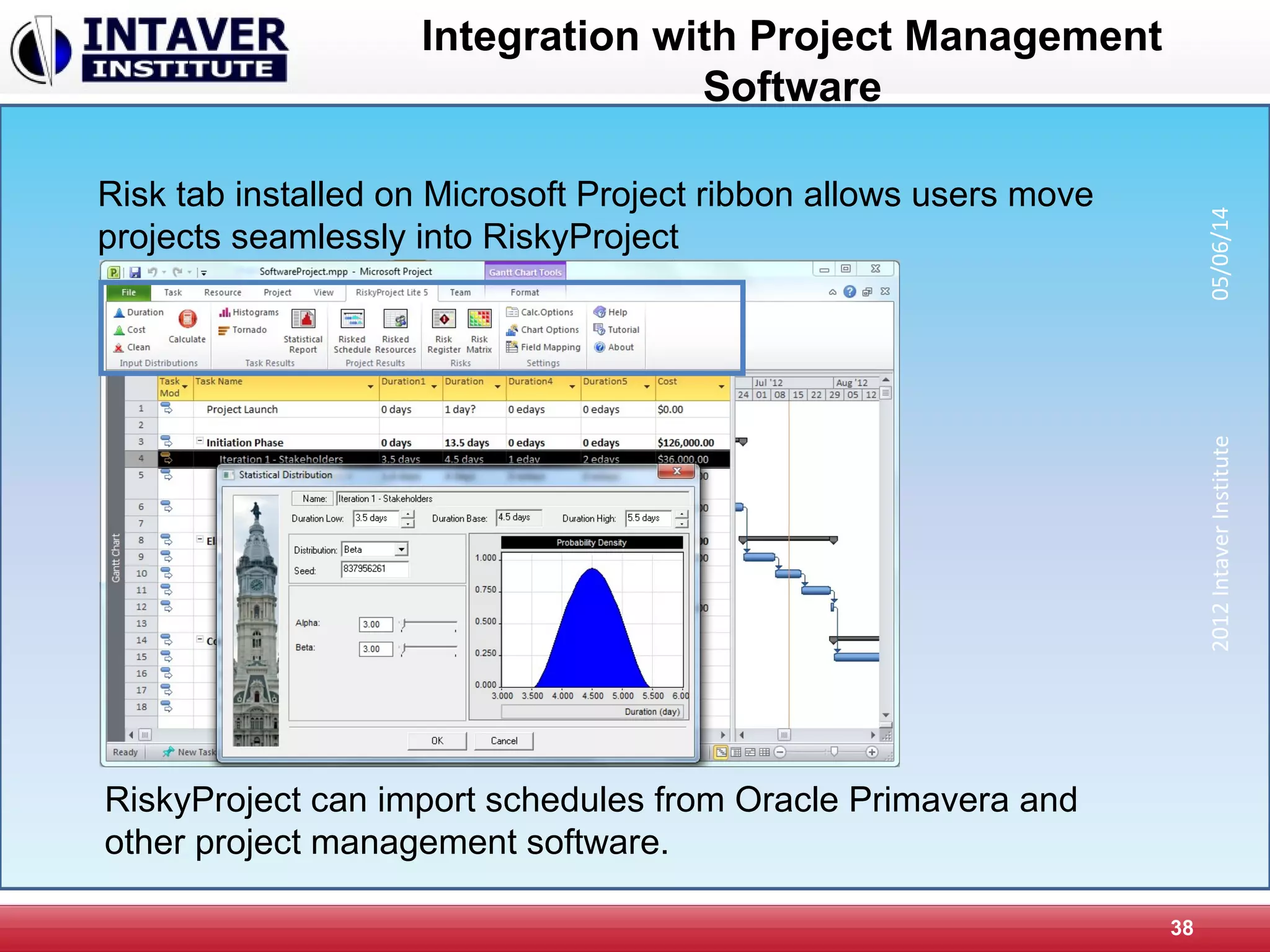
Risk tab installed on Microsoft Project ribbon allows users move
projects seamlessly into RiskyProject
2012IntaverInstitute05/06/14
RiskyProject can import schedules from Oracle Primavera and
other project management software.
Intaver Institute’s Services
Intaver Institute performs project risk management, risk
analysis, and decision analysis training and consulting
Popular Intaver’s training courses include:
• Project management: theory and best practices
• Introduction to project risk management: theory and case
studies
• Project decision analysis
• Quantitative methods in project management
• Introduction to RiskyProject: basic RiskyProject workflow
and features
• Advanced features of RiskyProject Professional
39
2012IntaverInstitute05/06/14

RiskyProject Software

  • 1.
    RiskyProject Project Risk ManagementSoftware Intaver Institute Inc. 303, 6707, Elbow Drive S.W, Calgary, AB, Canada Tel: +1 (403) 692-2252 Fax: +1 (403) 459-4533 www.intaver.com 1 2012IntaverInstitute05/06/14
  • 2.
    What Is RiskyProject? •Project Scheduling • Risk Register • Quantitative risk analysis using Monte Carlo simulations • Project performance measurement 2 RiskyProject is Windows-based project risk management software. Risky Project gives you a simple answer to a common question: What will happen to your project if certain risks occur? 2012IntaverInstitute05/06/14
  • 3.
    The Project ManagementProblem 2012IntaverInstitute05/06/14 3
  • 4.
    The Project ManagementProblem 2012IntaverInstitute05/06/14 4
  • 5.
    The Project ManagementProblem 2012IntaverInstitute05/06/14 5
  • 6.
  • 7.
  • 8.
    RiskyProject Features • Fullscheduling engine with costs and resources • Full risk register that links to project schedules • Quantitative and qualitative analysis • Risk+ replacement • Easy to use quantitative schedule risk analysis based on risk events • Probabilistic cash flow analysis • Project tracking with risks and uncertainties • Integration with Microsoft Project, Primavera, or other project management software • Optional decision tree analysis • Analysis of critical risk events which need to be mitigated first 2012IntaverInstitute05/06/14 8
  • 9.
    RiskyProject Features (Continued) •Product lifecycle management • Risk templates • Probabilistic and conditional branching • Managing mitigation plans • “What if “ analysis • Advanced reporting tools • Risk event correlations • Multiple statistical distributions and distribution fitting 2012IntaverInstitute05/06/14 9
  • 10.
  • 11.
    RiskyProject Workflow 2012IntaverInstitute05/06/14 11RiskyProject’s workflowis compatible with PMI, Prince II, and other risk management processes
  • 12.
    Define Project Schedule Entercomplete WBS, as it is done in other project management software Enter resources, cost and income for each task You may also import project schedules from other scheduling tools, such as Microsoft Project or Primavera. 2012IntaverInstitute05/06/14 12
  • 13.
    Risk Register Pre mitigation Probability, Impact,and Score Post mitigation Probability, Impact, and Score Risk register view Separate opened and closed risk and issues Separate threats or opportunities 2012IntaverInstitute05/06/14 13
  • 14.
    Risk Form 14 Risk description andstatus Cost of Risk Management Strategy Review Timeline Double-click on a risk to view or modify Risk Information 2012IntaverInstitute05/06/14
  • 15.
    Qualitative Risk Analysis:Define Risk Probabilities and Impacts 15 If no schedule is attached, qualitative risk assessments can be performed Outcome Types are now qualitative Outcomes for risk categories are qualitative and are based on risk matrix settings 2012IntaverInstitute05/06/14
  • 16.
    Mitigation Plans 16 Add mitigationor risk response plans (cost, expected reduction in probability and impact, an descriptions. Plans can have sub-plans 2012IntaverInstitute05/06/14
  • 17.
    Mitigation Waterfall Chart 17 Tracktotal cost, expected reductions in probability or impact and dates for mitigation plans 2012IntaverInstitute05/06/14
  • 18.
    Risk Reviews andRisk History 18 All risk reviews with details can be saved and tracked in system 2012IntaverInstitute05/06/14
  • 19.
    Assign Risks toTasks and Resources Define risk chance, outcome and result. Risks can have mutually exclusive outcomes, different outcomes of the same risk Risks can be global (for all tasks or resources) or local (for specific tasks or resources) 2012IntaverInstitute05/06/14 19 If schedule is attached, quantitative risk assessments is performed
  • 20.
    Statistical Distributions In additionto risk events you may define uncertainties as statistical distributions for: • task cost • task start time • task duration • income associated with task If you enter only the low, base and high cost, duration, start time and income, RiskyProject will generate statistical distribution based on this data 20 2012IntaverInstitute05/06/14
  • 21.
    Monte Carlo Simulation Whenyour project schedule and risk breakdown structure is ready, click here to perform Monte Carlo simulations 21 2012IntaverInstitute05/06/14
  • 22.
    Result Gantt Chart Whitebars represent original project schedule (no risks) Blue bars represent project schedule with risks Compare original project schedule and result of analysis 22 2012IntaverInstitute05/06/14
  • 23.
    Results of RiskAnalysis Project Summary: project duration, cost, and finish time with and without risks Results of analysis for project cost, finish time, and duration Double click on any chart to view detailed information 23 2012IntaverInstitute05/06/14
  • 24.
    Detailed Results ofAnalysis Move the slider to determine the chance that project will be within budget Get detailed statistical data Data can be exported as an image or text Detailed results can be shown for each task or project for cost, duration, start time, finish time, and income. Detailed results can be shown for each task or project for cost, duration, start time, finish time, and income. 24 2012IntaverInstitute05/06/14
  • 25.
    Cost vs ScheduleScatter Plot Move the slider to determine the chance of meeting both schedule and budget Base Estimate indicated by yellow dot 25 2012IntaverInstitute05/06/14 This plot is often referred to as the “Bull’s eye” or “Football” chart
  • 26.
    Cost, Income andRevenue Compare forecasted project costs with (blue line) and without (red line) risks Cost chart is generated based on fixed and variables cost and income associated with tasks and resources 26 2012IntaverInstitute05/06/14
  • 27.
    Probabilistic Cash FlowAnalysis Compare cash flows with (blue bars) and without (red line) risks Cash flow is generated based on fixed and variables cost and income associated with tasks and resources 27 2012IntaverInstitute05/06/14
  • 28.
    Sensitivity Analysis Tornado chartshows risks or other parameters that have the most affect on the project schedule Prioritize critical task or risks 28 2012IntaverInstitute05/06/14
  • 29.
    Crucial Tasks Crucial taskshave the most effect on the project schedule Crucial tasks for project cost and duration can be different 29 2012IntaverInstitute05/06/14
  • 30.
    Risk Chart Risk chartshows task duration and versus risk, associated with task This task has low duration but high risk These tasks have balanced risk versus duration ratio. 30 2012IntaverInstitute05/06/14
  • 31.
    Risk Matrix Risk Probability, Impactand Score for the current schedule 31 2012IntaverInstitute05/06/14
  • 32.
    2012IntaverInstitute Project Dashboard 3x3 3most important project parameters (cost, duration, and finish time) 3 most crucial tasks 3 most critical risks Project Dashboard 3x3 is a condensed view of the most important results of analysis 32 05/06/14
  • 33.
    Project Tracking This taskis 100% completed (green bar) For each task at any moment you may enter how much work has been completed This task is partially completed (yellow bar) Risky project automatically adjusts the probability of risks for partially completed tasks 33 2012IntaverInstitute05/06/14
  • 34.
    Tracking Results New projectforecast is done each time actual project data is entered. Original (baseline) project duration Actual project performance Low, base, and high forecast 34 2012IntaverInstitute05/06/14
  • 35.
    Select pre andpost mitigation baselines to view on risk register Pre and post mitigation risk scores 35 2012IntaverInstitute05/06/14 Advanced Project Risk Management
  • 36.
    Select the current schedule Compareresults for each baseline 36 2012IntaverInstitute05/06/14 Advanced Project Risk Management
  • 37.
    Advanced Project RiskManagement Run alternative project branches probabilistically 37 2012IntaverInstitute05/06/14
  • 38.
    Integration with ProjectManagement Software 38 Risk tab installed on Microsoft Project ribbon allows users move projects seamlessly into RiskyProject 2012IntaverInstitute05/06/14 RiskyProject can import schedules from Oracle Primavera and other project management software.
  • 39.
    Intaver Institute’s Services IntaverInstitute performs project risk management, risk analysis, and decision analysis training and consulting Popular Intaver’s training courses include: • Project management: theory and best practices • Introduction to project risk management: theory and case studies • Project decision analysis • Quantitative methods in project management • Introduction to RiskyProject: basic RiskyProject workflow and features • Advanced features of RiskyProject Professional 39 2012IntaverInstitute05/06/14