RIAs
Building for the Desktop with the Web
What am I talking about?!
 What is Adobe AIR and Titanium?
 Look what I can do!
   CSS and JavaScript without libraries
 Look what I can do even faster!
   jQuery and jQuery UI
Adobe AIR & Titanium
Desktop Platforms using Web Technologies
What is Adobe AIR/Titanium?
 Platforms for desktop applications built using web
 technologies such as Flash and JavaScript that can
 be run on various operating systems
 Powered by Webkit
   But different from each other and Safari
HTML/JavaScript
 Code base can easily be shared between web and
 desktop applications
 Ajax libraries such as jQuery, Mootools, ExtJS, and
 YUI can be used
 Adobe AIR: Ability to sandbox code for additional
 application security
 Adobe AIR: Full access to AS3 API and Flash runtime
 from JavaScript.
 Single threaded environment
Webkit
 Single rendering environment (no cross-browser
 issues)
 CSS3 Features
 New DOM methods
Webkit
 Adobe AIR
   HTML Control in Flash environment, text
   rendering isn’t consistent with browser
   Consistent HTML controls across platforms but
   not with OS
 Titanium is just Webkit
   consistent with OS
   better chrome handling in OSX
Look what I can do
Imagine a world with only one browser
CSS3 Features
 opacity and rgba support
 multiple background images
 border-radius
 border-image
 columns
 CSS Transformations
 CSS3 Media Queries
 http://www.w3.org/TR/css3-mediaqueries/


 Canvas! SVG!
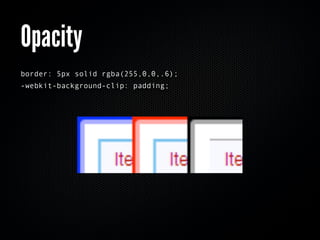
Opacity
border: 5px solid rgba(255,0,0,.6);
-webkit-background-clip: padding;
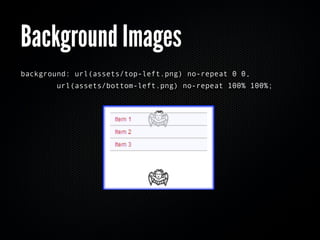
Background Images
background: url(assets/top-left.png) no-repeat 0 0,
        url(assets/bottom-left.png) no-repeat 100% 100%;
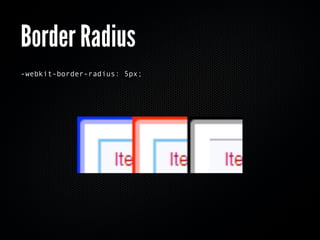
Border Radius
-webkit-border-radius: 5px;
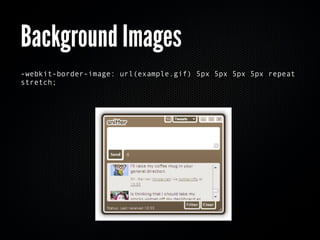
Background Images
-webkit-border-image: url(example.gif) 5px 5px 5px 5px repeat
stretch;
Background Images
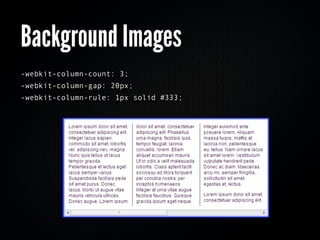
-webkit-column-count: 3;
-webkit-column-gap: 20px;
-webkit-column-rule: 1px solid #333;
Custom Scrollbars
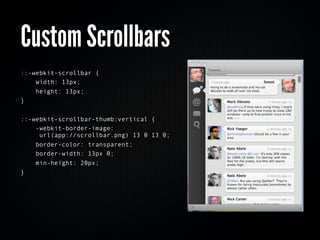
::-webkit-scrollbar {
    width: 13px;
    height: 13px;
}


::-webkit-scrollbar-thumb:vertical {
    -webkit-border-image:
     url(app://scrollbar.png) 13 0 13 0;
    border-color: transparent;
    border-width: 13px 0;
    min-height: 20px;
}
AIR 2 beta
 2D transformations, transitions, animations,
 gradients, zoom
Titanium
 2D transformations and...
 3D transformations
 http://www.arcaner.com/2009/07/25/css-3d-transformations-in-titanium-desktop/
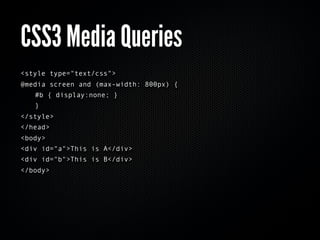
CSS3 Media Queries
<style type="text/css">
@media screen and (max-width: 800px) {
   #b { display:none; }
   }
</style>
</head>
<body>
<div id="a">This is A</div>
<div id="b">This is B</div>
</body>
DOM Features
 XPath and CSS Selector engines
 XML serialization and de-serialization
Selector Engines
//XPATH
ToDo.items
  .evaluate("//item[@id='"+ id +"']", ToDo.items)
  .iterateNext();


// W3C Selectors
ToDo.items = document.querySelectorAll(".items");
XML Serialization
var s = byteData.readUTFBytes(byteData.length);
var parser=new DOMParser();
var doc=parser.parseFromString(s,"text/xml");


var serializer = new XMLSerializer();
var packet = serializer.serializeToString(ToDo.items);
Powerful Layout
 Application shells can be built quickly with a little
 CSS and position:absolute
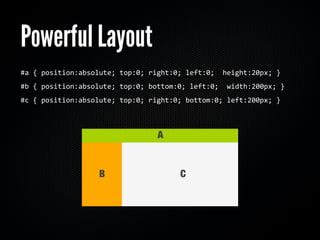
Powerful Layout
#a	
  {	
  position:absolute;	
  top:0;	
  right:0;	
  left:0;	
  	
  height:20px;	
  }
#b	
  {	
  position:absolute;	
  top:0;	
  bottom:0;	
  left:0;	
  	
  width:200px;	
  }
#c	
  {	
  position:absolute;	
  top:0;	
  right:0;	
  bottom:0;	
  left:200px;	
  }	
  	
  
Look what I can do
EVEN FASTER!
Libraries are still useful
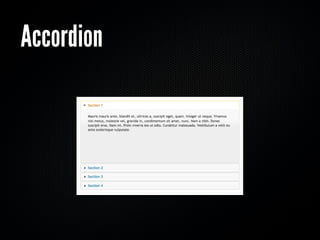
Accordion
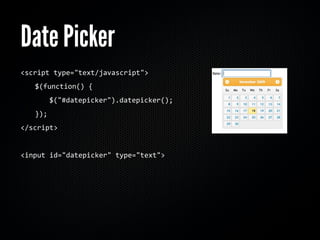
Date Picker
<script	
  type="text/javascript">
	
     $(function()	
  {
	
     	
     $("#datepicker").datepicker();
	
     });
</script>


<input	
  id="datepicker"	
  type="text">
Questions?
I promise not to bite.

RIAs

  • 1.
    RIAs Building for theDesktop with the Web
  • 2.
    What am Italking about?! What is Adobe AIR and Titanium? Look what I can do! CSS and JavaScript without libraries Look what I can do even faster! jQuery and jQuery UI
  • 3.
    Adobe AIR &Titanium Desktop Platforms using Web Technologies
  • 4.
    What is AdobeAIR/Titanium? Platforms for desktop applications built using web technologies such as Flash and JavaScript that can be run on various operating systems Powered by Webkit But different from each other and Safari
  • 5.
    HTML/JavaScript Code basecan easily be shared between web and desktop applications Ajax libraries such as jQuery, Mootools, ExtJS, and YUI can be used Adobe AIR: Ability to sandbox code for additional application security Adobe AIR: Full access to AS3 API and Flash runtime from JavaScript. Single threaded environment
  • 6.
    Webkit Single renderingenvironment (no cross-browser issues) CSS3 Features New DOM methods
  • 7.
    Webkit Adobe AIR HTML Control in Flash environment, text rendering isn’t consistent with browser Consistent HTML controls across platforms but not with OS Titanium is just Webkit consistent with OS better chrome handling in OSX
  • 8.
    Look what Ican do Imagine a world with only one browser
  • 9.
    CSS3 Features opacityand rgba support multiple background images border-radius border-image columns CSS Transformations CSS3 Media Queries http://www.w3.org/TR/css3-mediaqueries/ Canvas! SVG!
  • 10.
    Opacity border: 5px solidrgba(255,0,0,.6); -webkit-background-clip: padding;
  • 11.
    Background Images background: url(assets/top-left.png)no-repeat 0 0,         url(assets/bottom-left.png) no-repeat 100% 100%;
  • 12.
  • 13.
  • 14.
    Background Images -webkit-column-count: 3; -webkit-column-gap:20px; -webkit-column-rule: 1px solid #333;
  • 15.
    Custom Scrollbars ::-webkit-scrollbar { width: 13px; height: 13px; } ::-webkit-scrollbar-thumb:vertical { -webkit-border-image: url(app://scrollbar.png) 13 0 13 0; border-color: transparent; border-width: 13px 0; min-height: 20px; }
  • 16.
    AIR 2 beta 2D transformations, transitions, animations, gradients, zoom
  • 17.
    Titanium 2D transformationsand... 3D transformations http://www.arcaner.com/2009/07/25/css-3d-transformations-in-titanium-desktop/
  • 18.
    CSS3 Media Queries <styletype="text/css"> @media screen and (max-width: 800px) { #b { display:none; } } </style> </head> <body> <div id="a">This is A</div> <div id="b">This is B</div> </body>
  • 19.
    DOM Features XPathand CSS Selector engines XML serialization and de-serialization
  • 20.
    Selector Engines //XPATH ToDo.items .evaluate("//item[@id='"+ id +"']", ToDo.items) .iterateNext(); // W3C Selectors ToDo.items = document.querySelectorAll(".items");
  • 21.
    XML Serialization var s= byteData.readUTFBytes(byteData.length); var parser=new DOMParser(); var doc=parser.parseFromString(s,"text/xml"); var serializer = new XMLSerializer(); var packet = serializer.serializeToString(ToDo.items);
  • 22.
    Powerful Layout Applicationshells can be built quickly with a little CSS and position:absolute
  • 23.
    Powerful Layout #a  {  position:absolute;  top:0;  right:0;  left:0;    height:20px;  } #b  {  position:absolute;  top:0;  bottom:0;  left:0;    width:200px;  } #c  {  position:absolute;  top:0;  right:0;  bottom:0;  left:200px;  }    
  • 24.
    Look what Ican do EVEN FASTER! Libraries are still useful
  • 26.
  • 27.
    Date Picker <script  type="text/javascript">   $(function()  {     $("#datepicker").datepicker();   }); </script> <input  id="datepicker"  type="text">
  • 29.