Reuse in ADF applications
June 2nd 2016. Matthieu de Graaf & Frank Houweling
Write once, Use everywhere
2
Content
• Short introduction into Oracle ADF
• Reuse in Taskflows
• Reuse in the UI layer
– Crud actions
– Dynamic Save/Rollback buttons
• Reuse in the model layer
– Selection of sequences
– Executing database procedures
– Make a screen readonly in seconds
• Final example
– Global search out of the box
Frank Houweling
• Principal Java / ADF / SOA
consultant - AMIS (Netherlands)
• Focus on performance diagnosis & performance management
• Frequent speaker at Kscope, UKOUG and OOW
• Tech Lead of ADF Performance Monitor
Frank.houweling@amis.nl
Matthieu de Graaf
• Principal Java / ADF
consultant - AMIS (Netherlands)
• Focus on ADF/Database and .Net (WPF) Development
• Not so frequent speaker
Matthieu.de.graaf@amis.nl
5
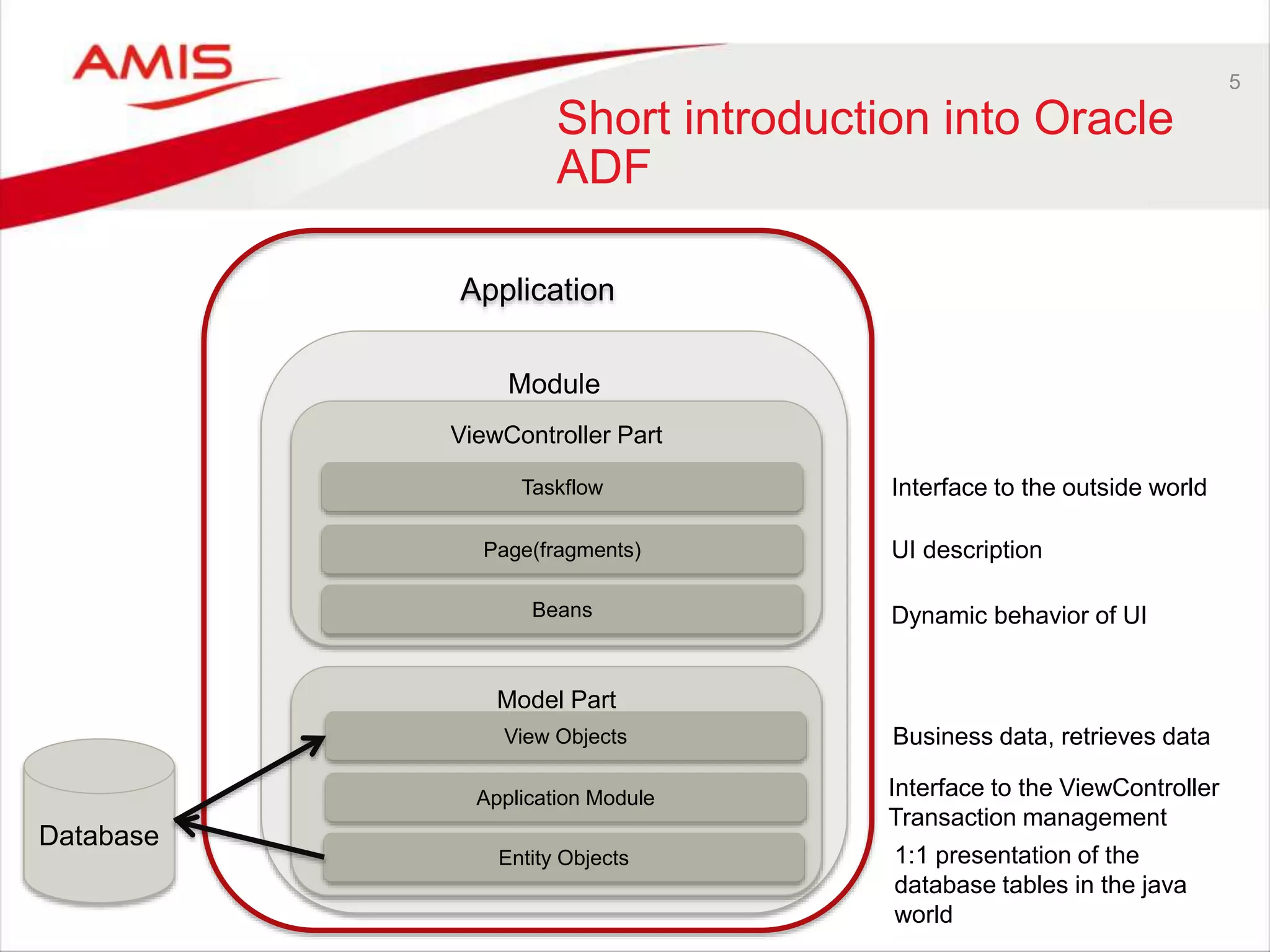
Short introduction into Oracle
ADF
Application
Module
ViewController Part
Model Part
Taskflow
View Objects
Entity Objects
Application Module
Page(fragments)
Beans
Database
UI description
Dynamic behavior of UI
Business data, retrieves data
Interface to the outside world
Interface to the ViewController
Transaction management
1:1 presentation of the
database tables in the java
world
6
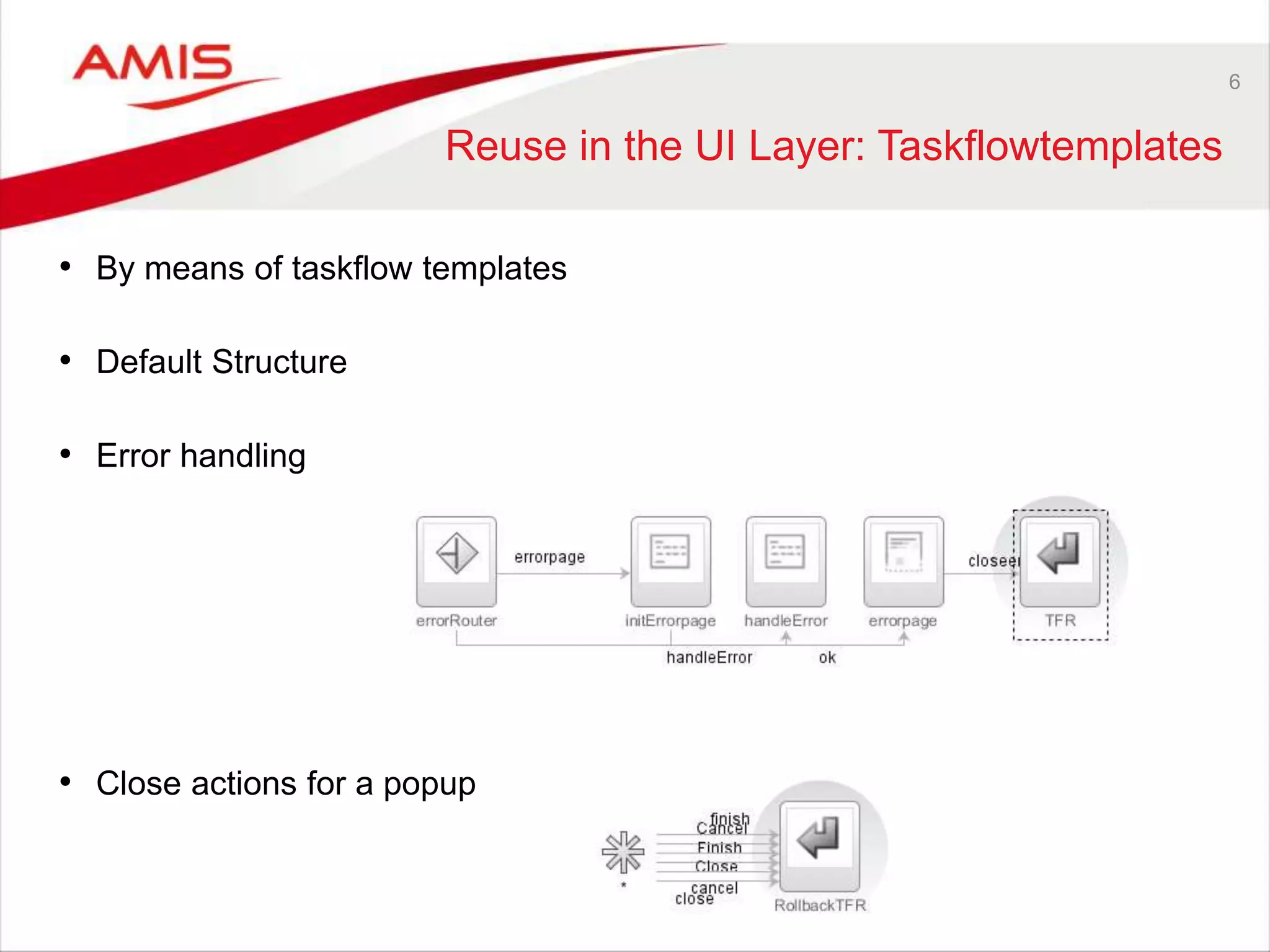
Reuse in the UI Layer: Taskflowtemplates
• By means of taskflow templates
• Default Structure
• Error handling
• Close actions for a popup
7
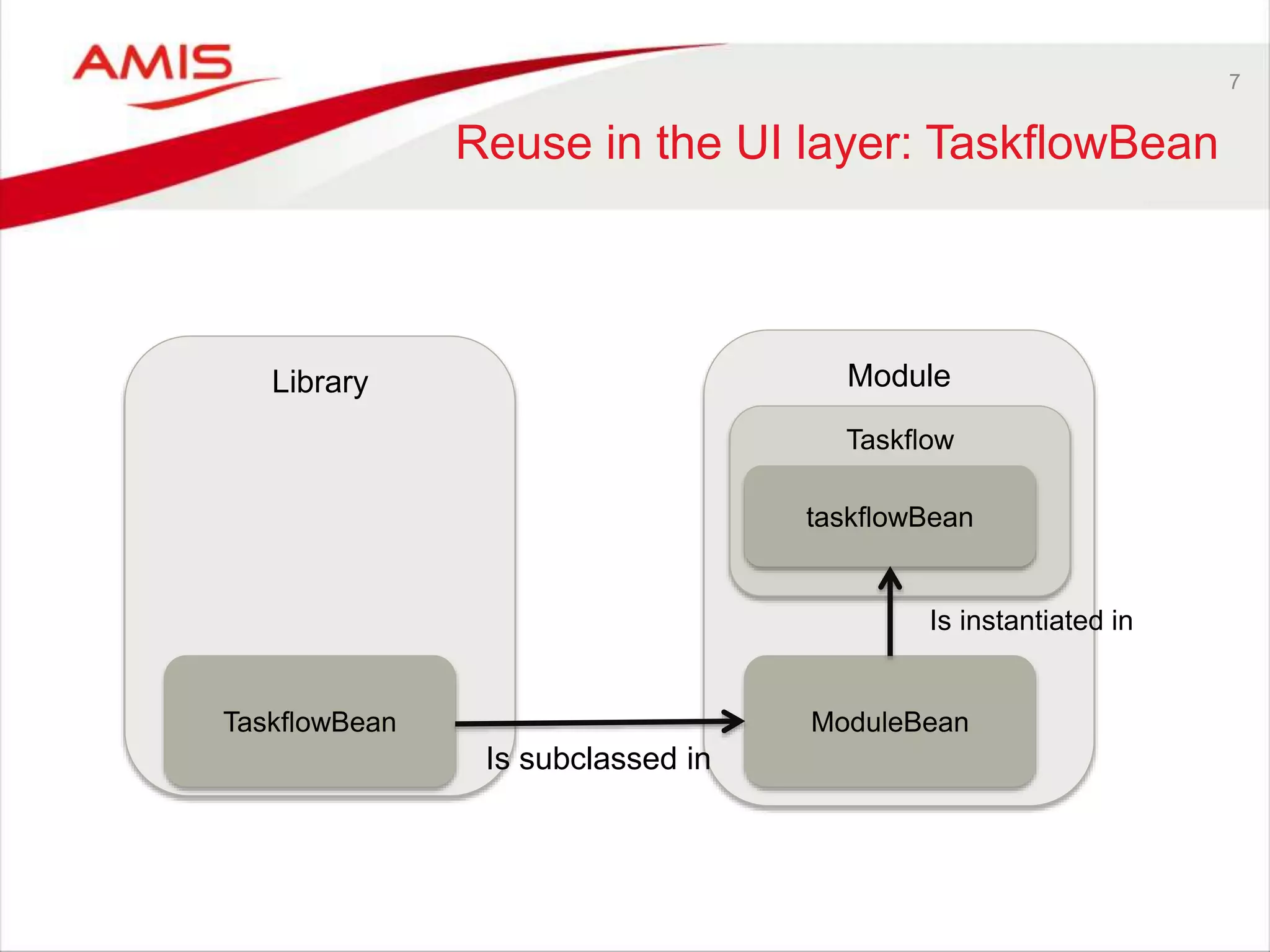
Reuse in the UI layer: TaskflowBean
Library Module
TaskflowBean
Taskflow
ModuleBean
taskflowBean
Is instantiated in
Is subclassed in
8
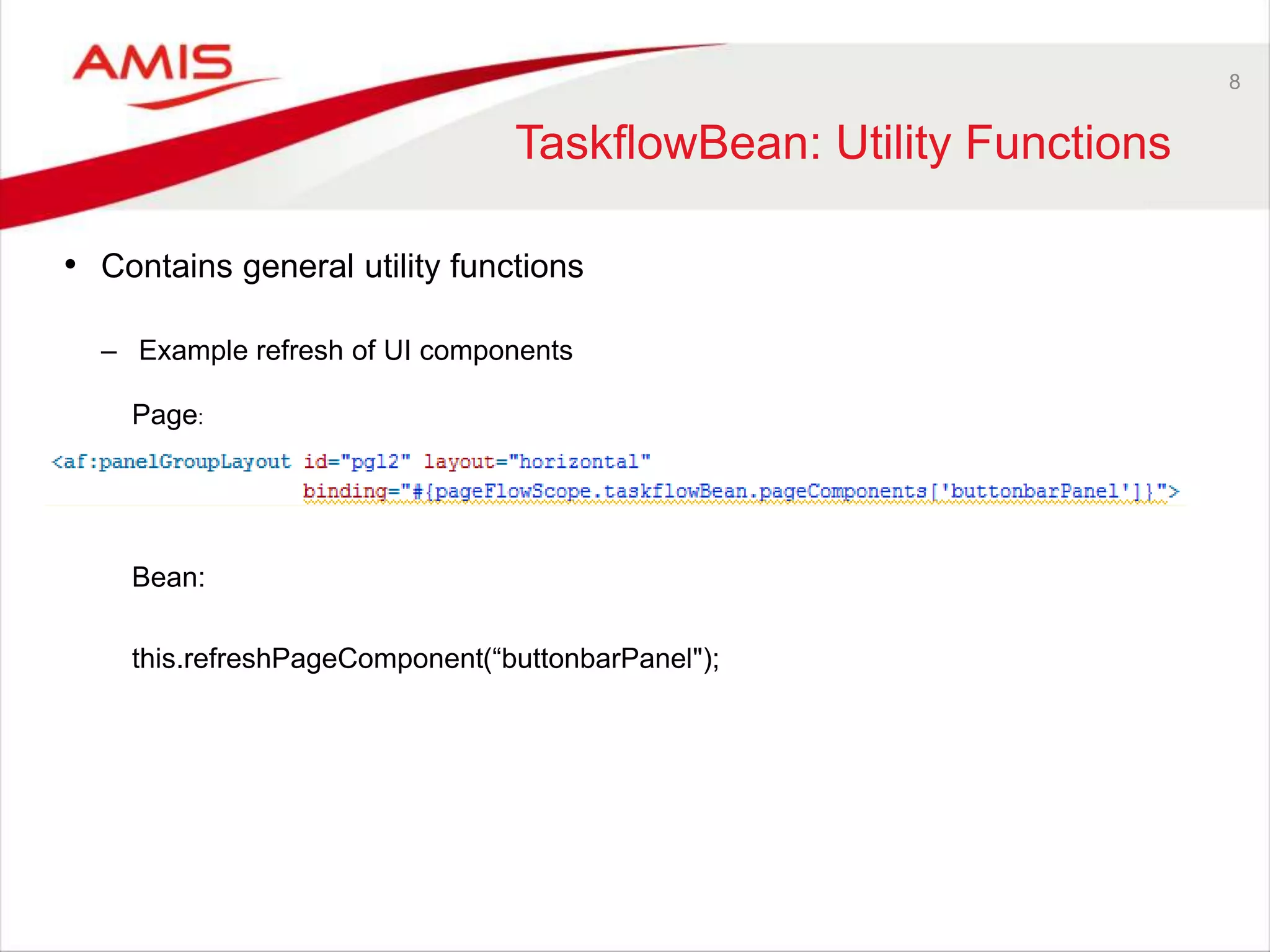
TaskflowBean: Utility Functions
• Contains general utility functions
– Example refresh of UI components
Page:
Bean:
this.refreshPageComponent(“buttonbarPanel");
9
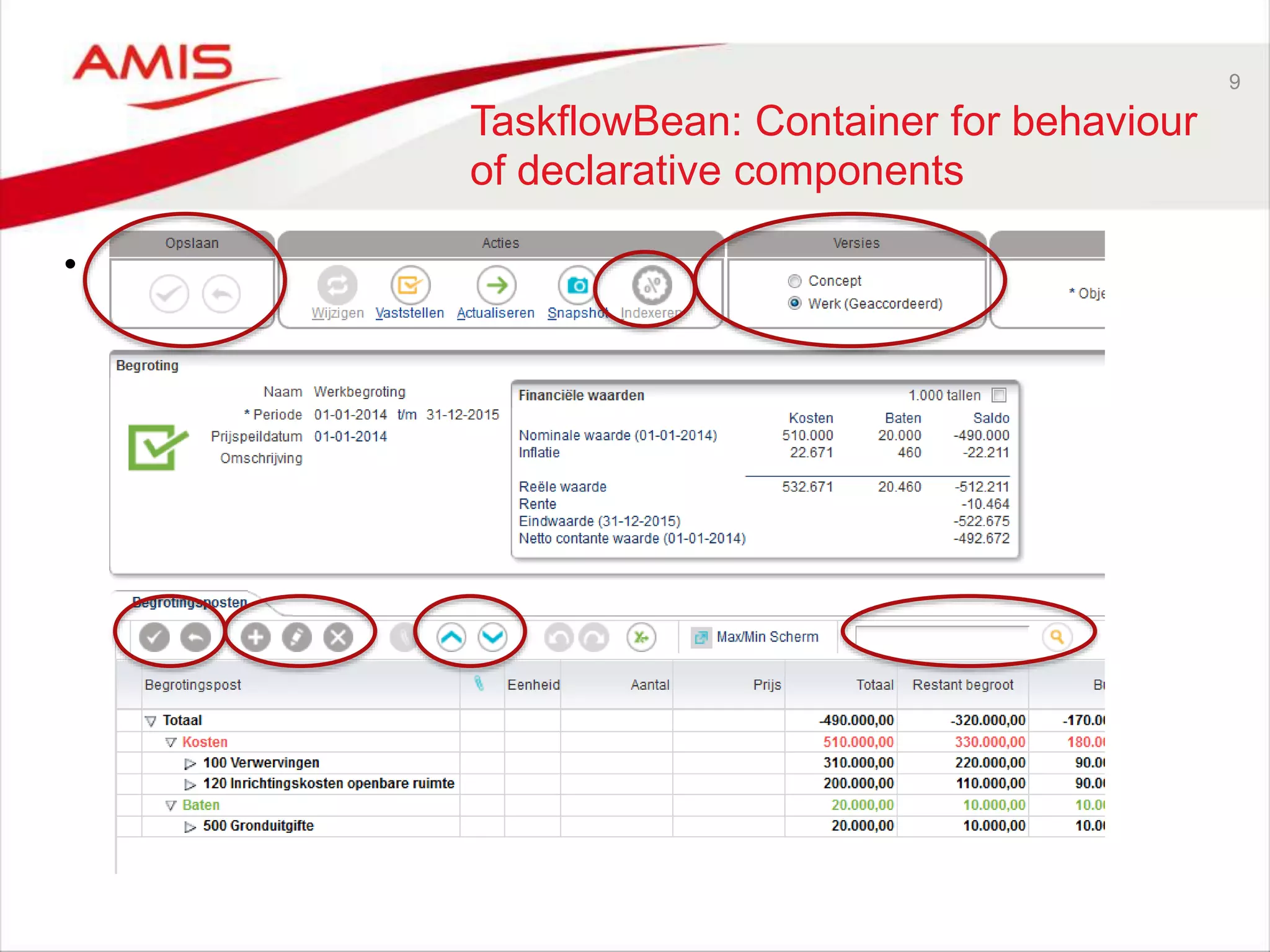
TaskflowBean: Container for behaviour
of declarative components
• Container for (declarative) components
10
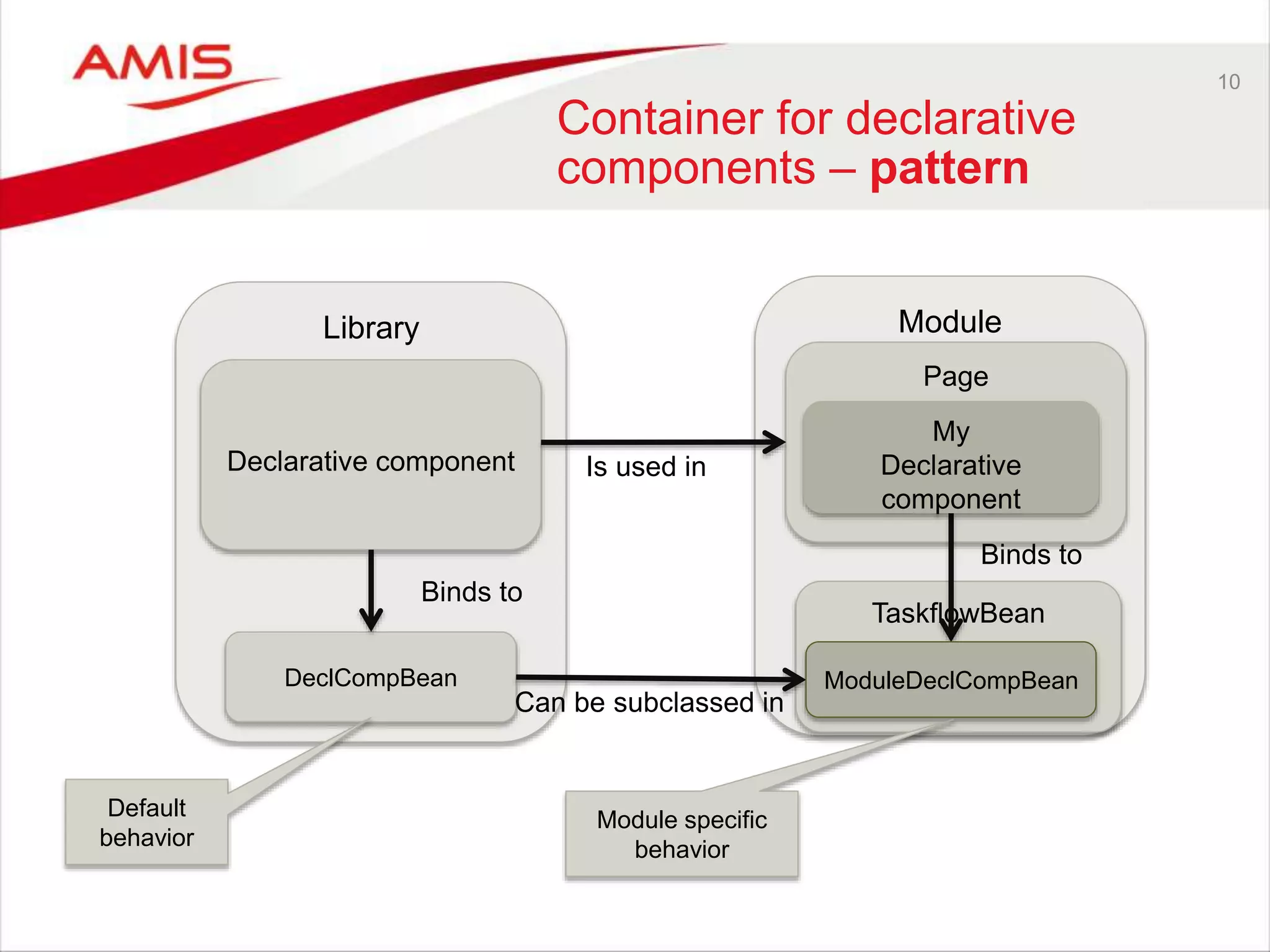
Container for declarative
components – pattern
Library Module
DeclCompBean
Page
TaskflowBean
Binds to
Declarative component
Can be subclassed in
ModuleDeclCompBean
Binds to
Is used in
My
Declarative
component
Default
behavior
Module specific
behavior
12
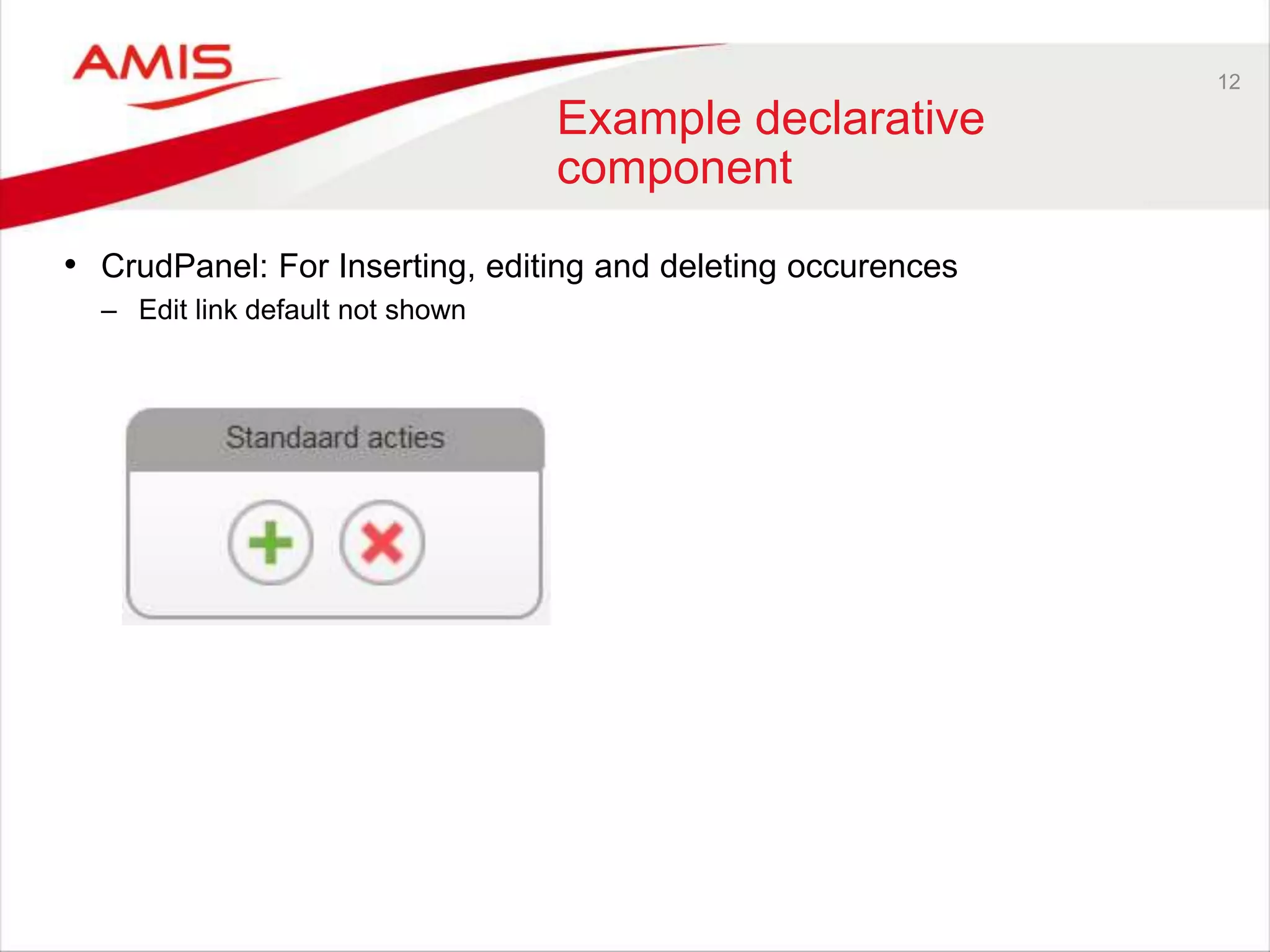
Example declarative
component
• CrudPanel: For Inserting, editing and deleting occurences
– Edit link default not shown
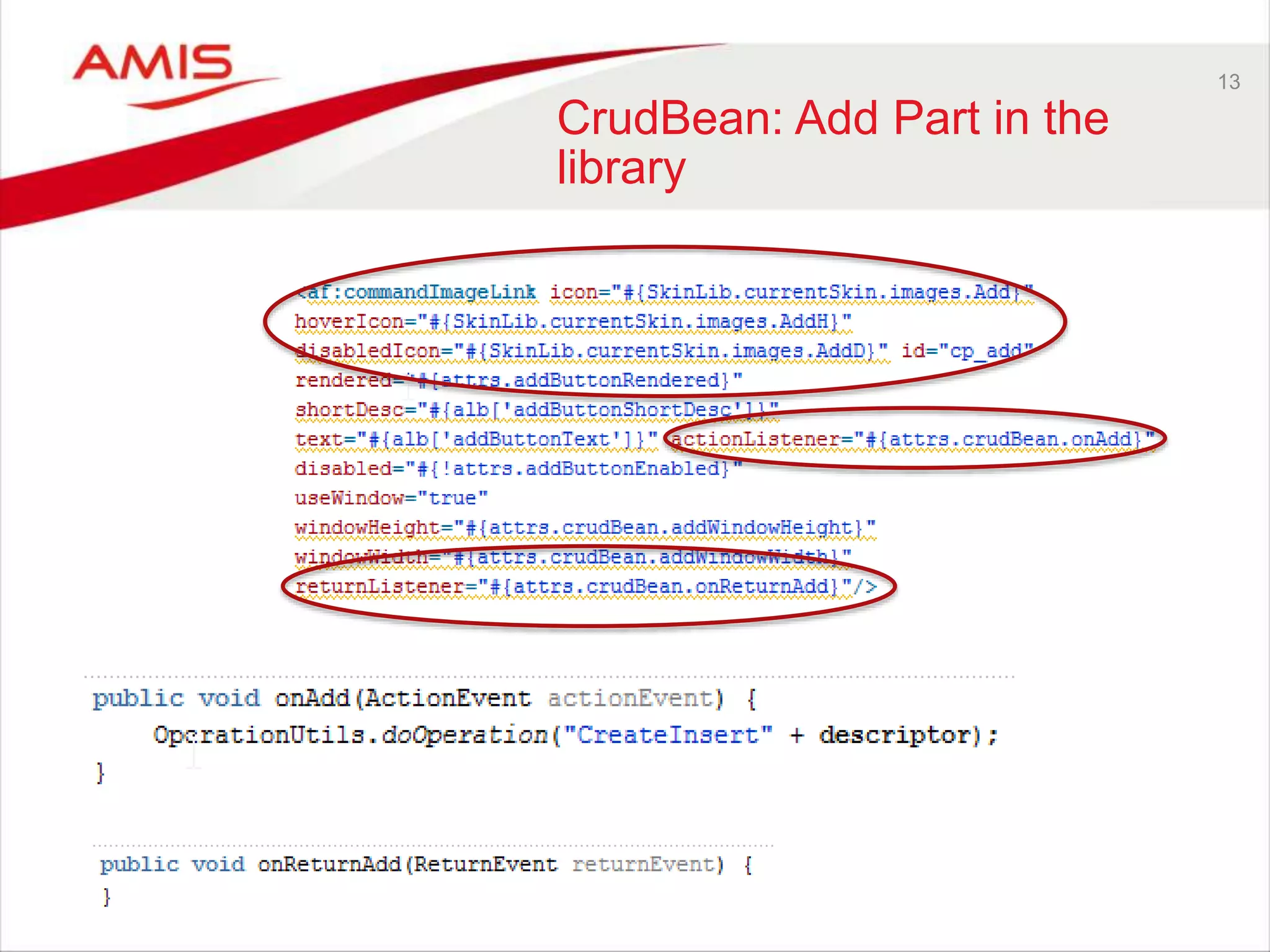
13
CrudBean: Add Part in the
library
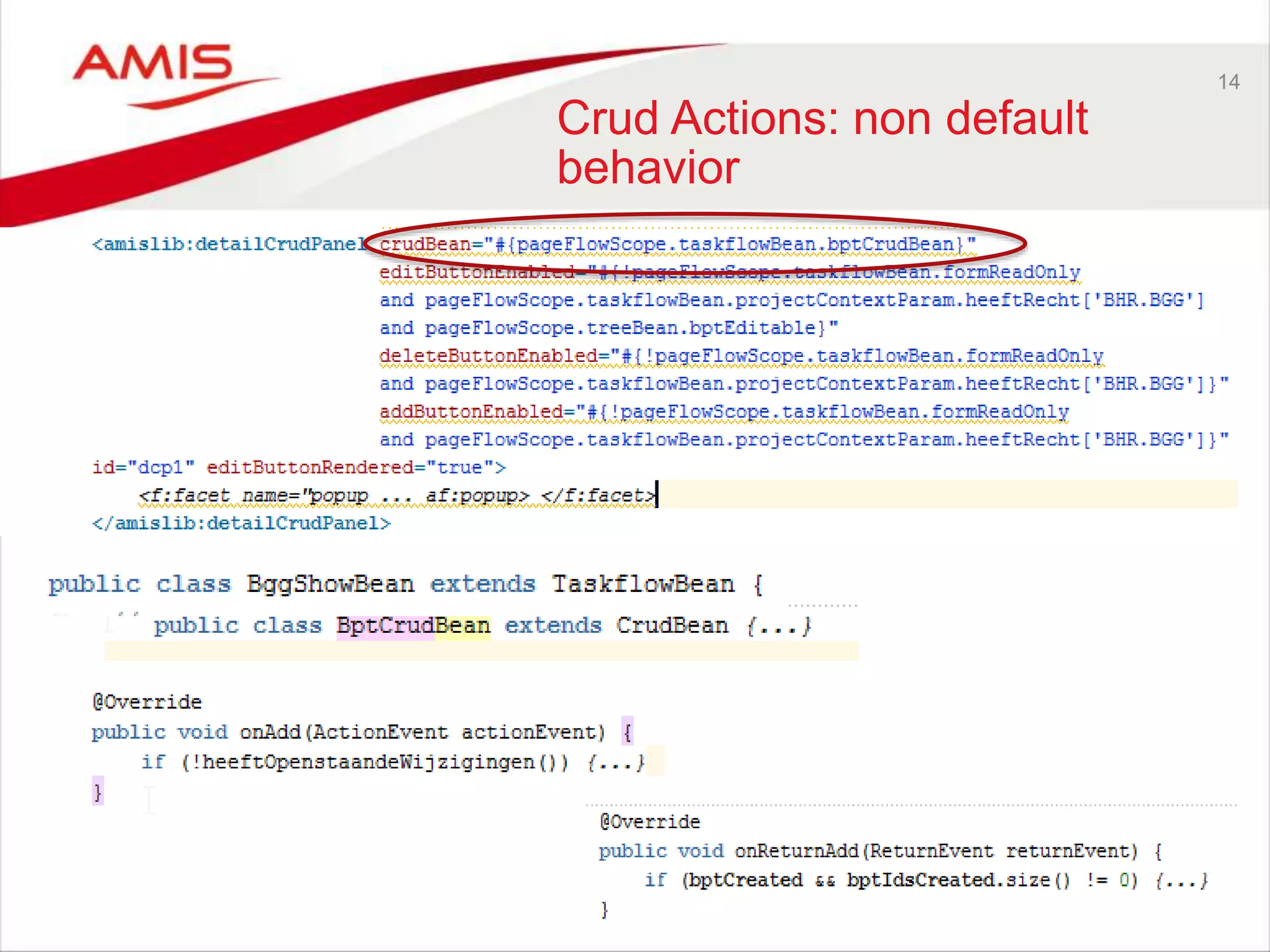
14
Crud Actions: non default
behavior
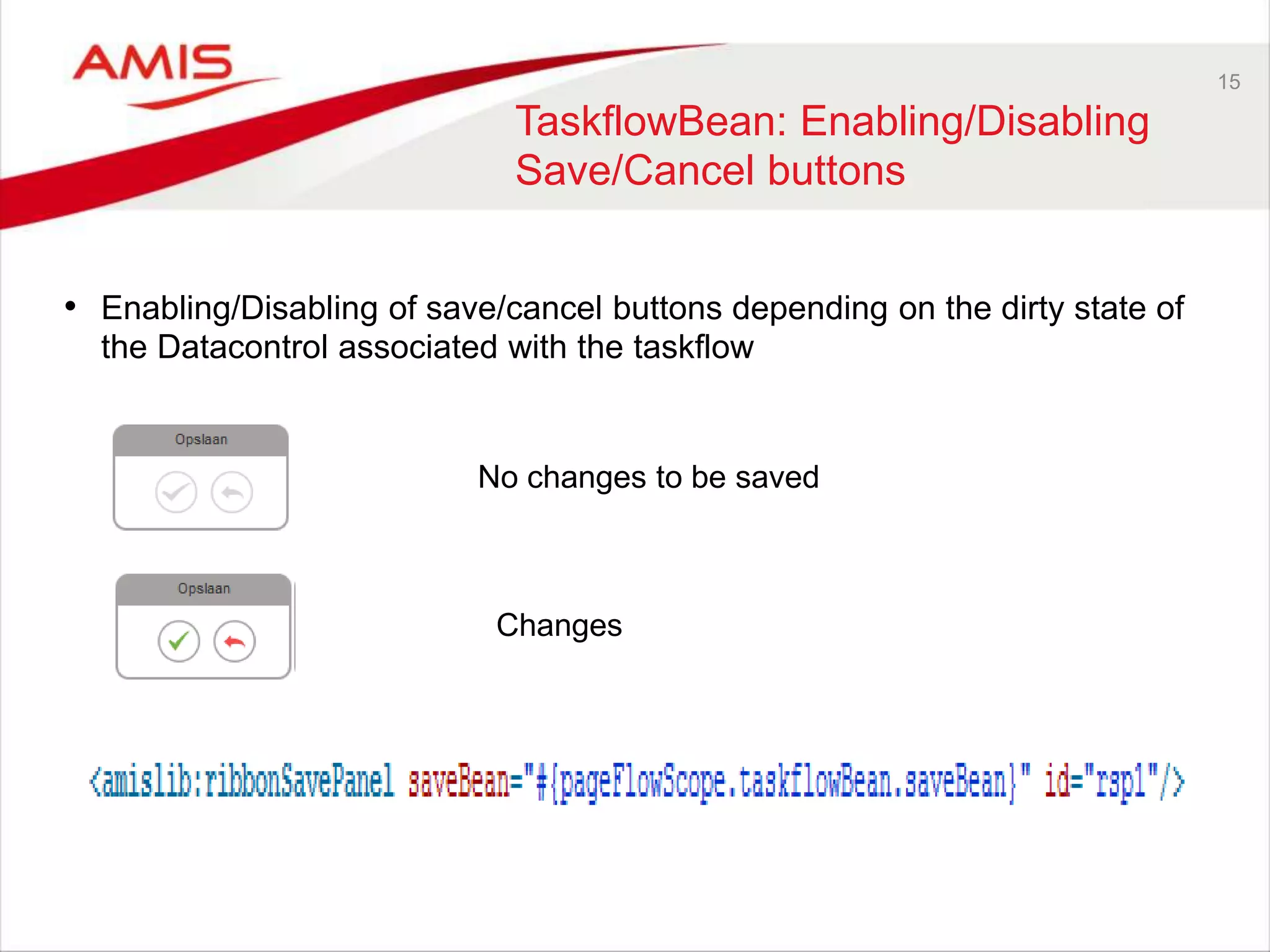
15
TaskflowBean: Enabling/Disabling
Save/Cancel buttons
• Enabling/Disabling of save/cancel buttons depending on the dirty state of
the Datacontrol associated with the taskflow
No changes to be saved
Changes
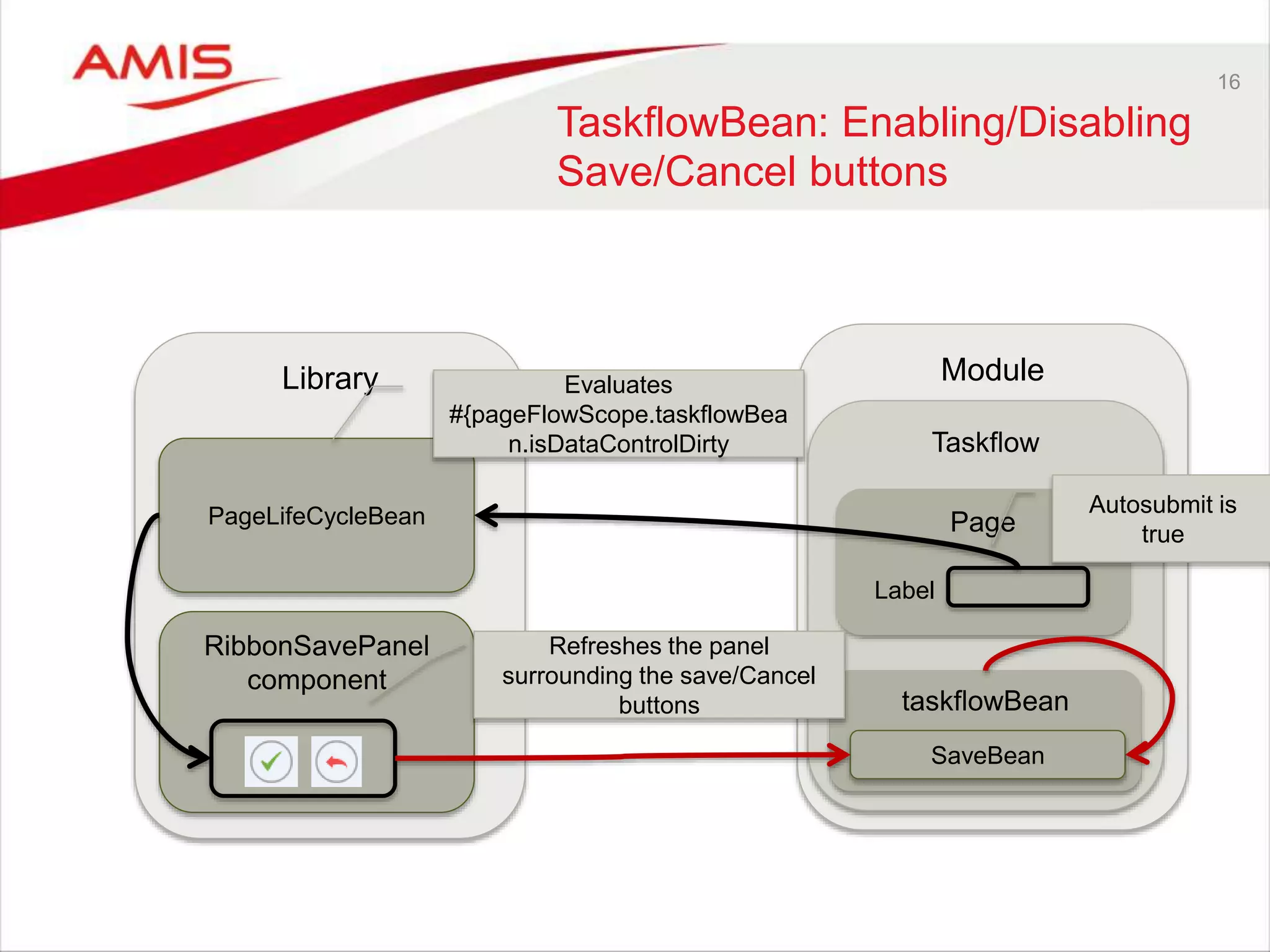
16
TaskflowBean: Enabling/Disabling
Save/Cancel buttons
Library Module
Taskflow
PageLifeCycleBean Page
RibbonSavePanel
component
Label
Autosubmit is
true
Evaluates
#{pageFlowScope.taskflowBea
n.isDataControlDirty
taskflowBean
Refreshes the panel
surrounding the save/Cancel
buttons
SaveBean
17
Reuse in the model layer
• Generate sequence values
• Call stored procedures/functions
• Set page in readonly mode
18
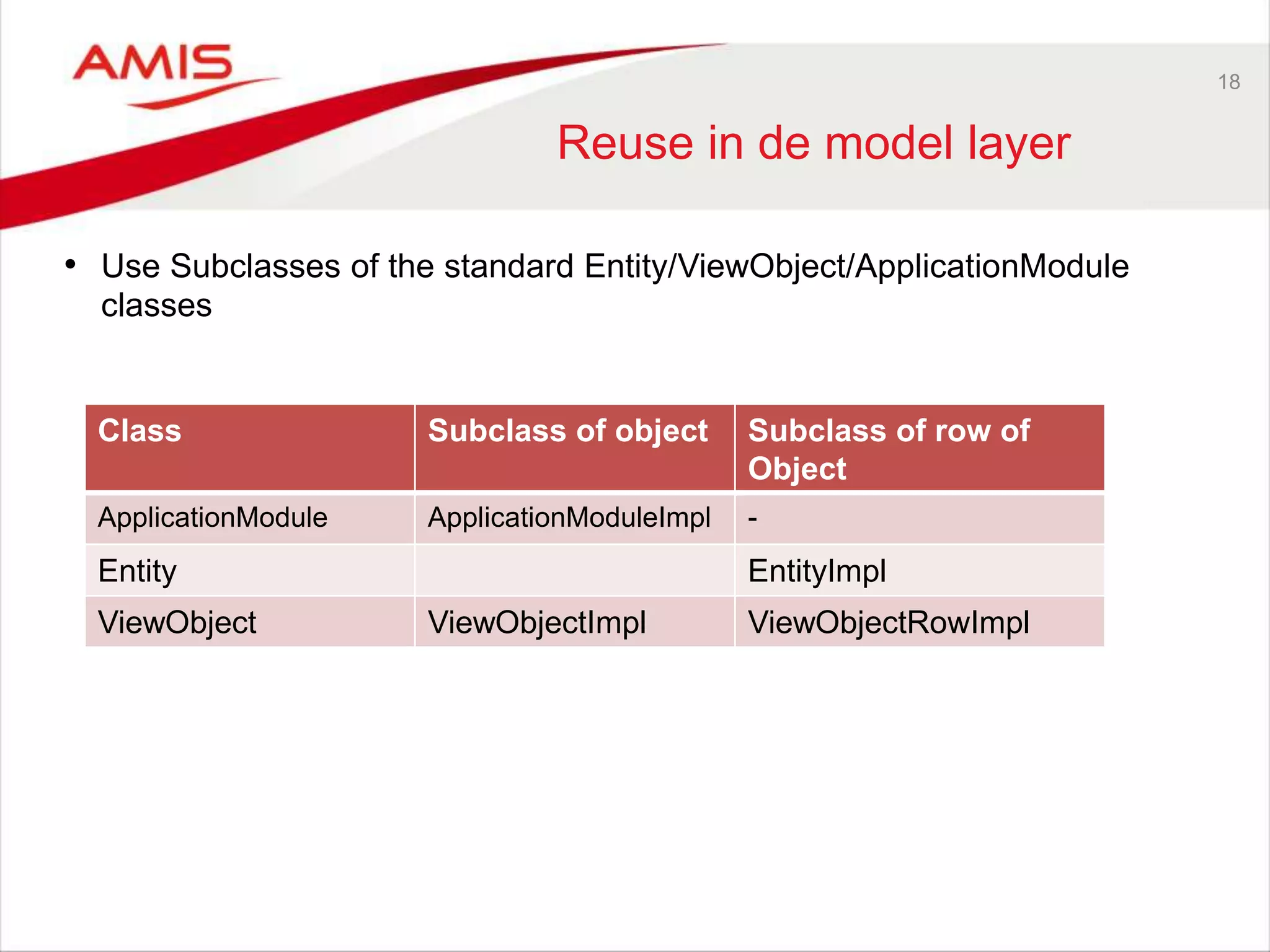
Reuse in de model layer
• Use Subclasses of the standard Entity/ViewObject/ApplicationModule
classes
Class Subclass of object Subclass of row of
Object
ApplicationModule ApplicationModuleImpl -
Entity EntityImpl
ViewObject ViewObjectImpl ViewObjectRowImpl
19
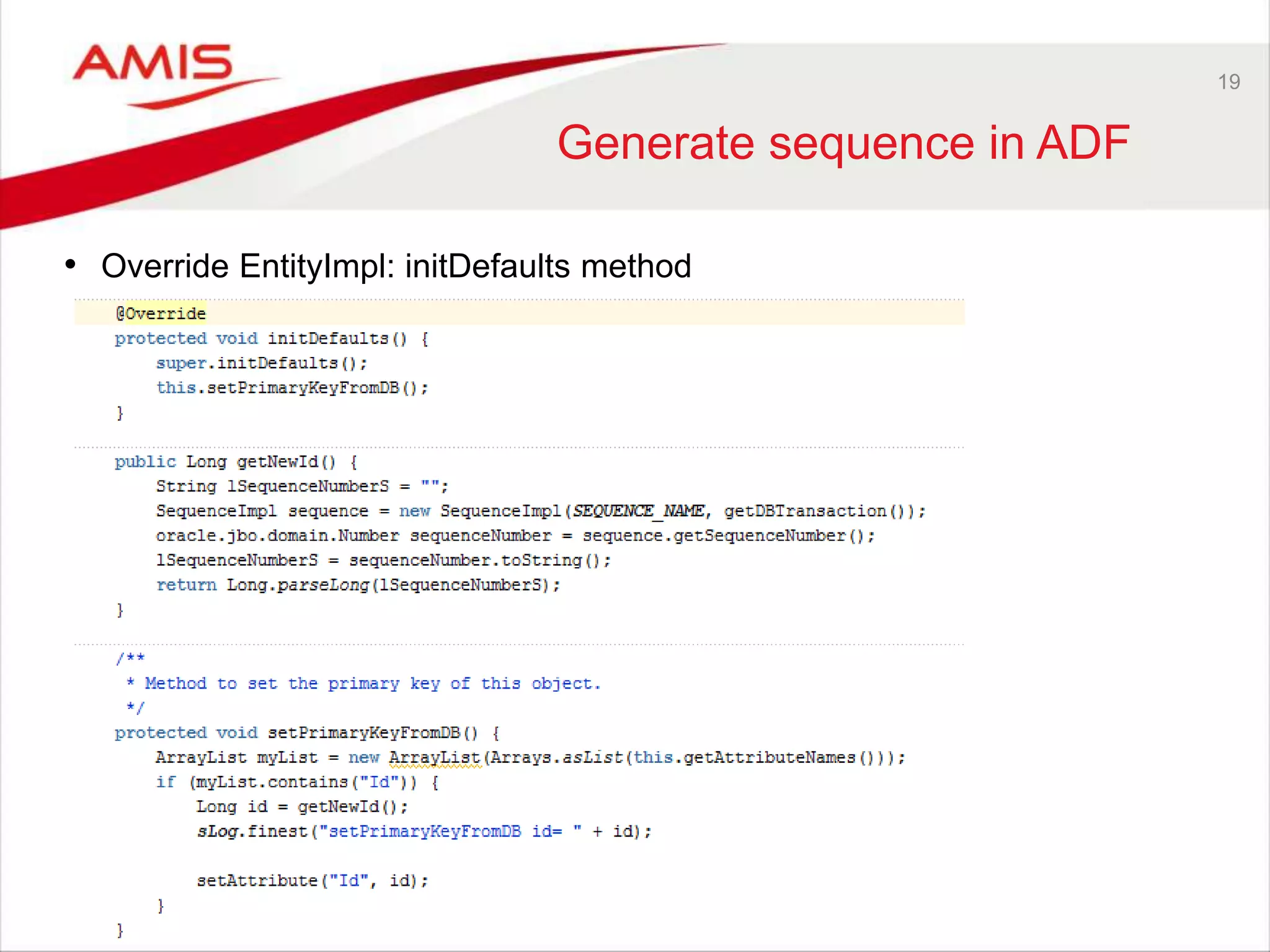
Generate sequence in ADF
• Override EntityImpl: initDefaults method
20
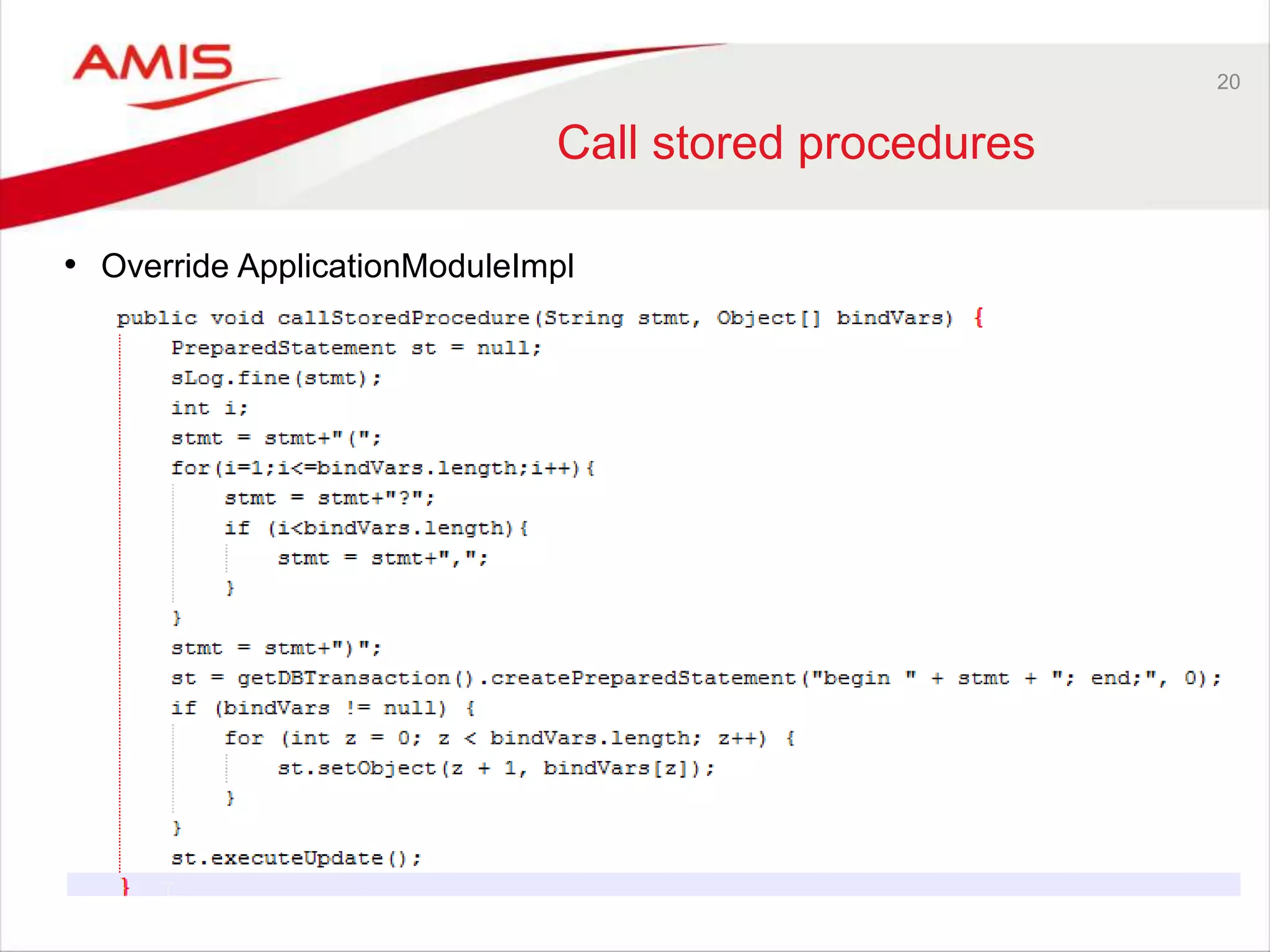
Call stored procedures
• Override ApplicationModuleImpl
21
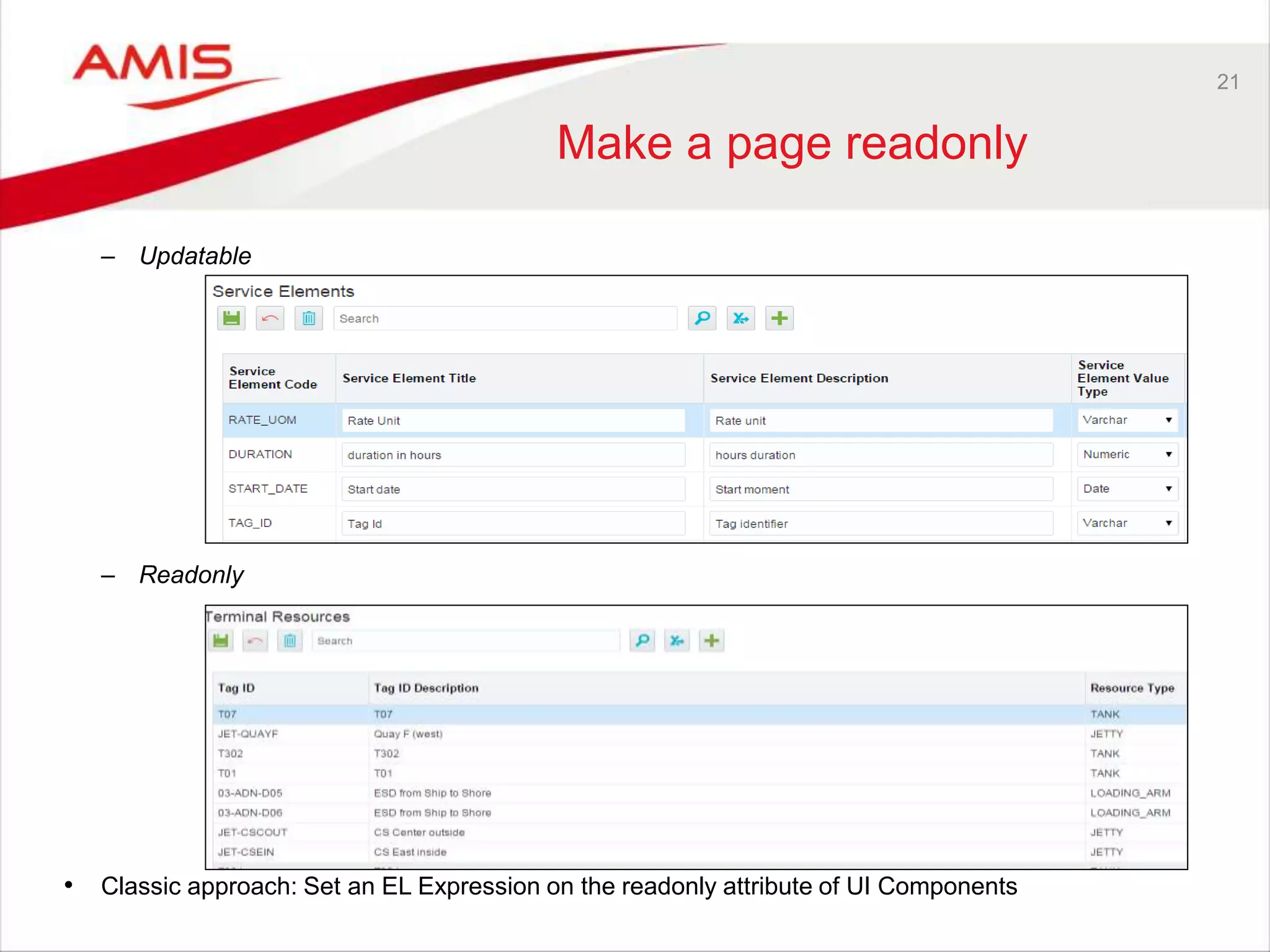
Make a page readonly
– Updatable
– Readonly
• Classic approach: Set an EL Expression on the readonly attribute of UI Components
22
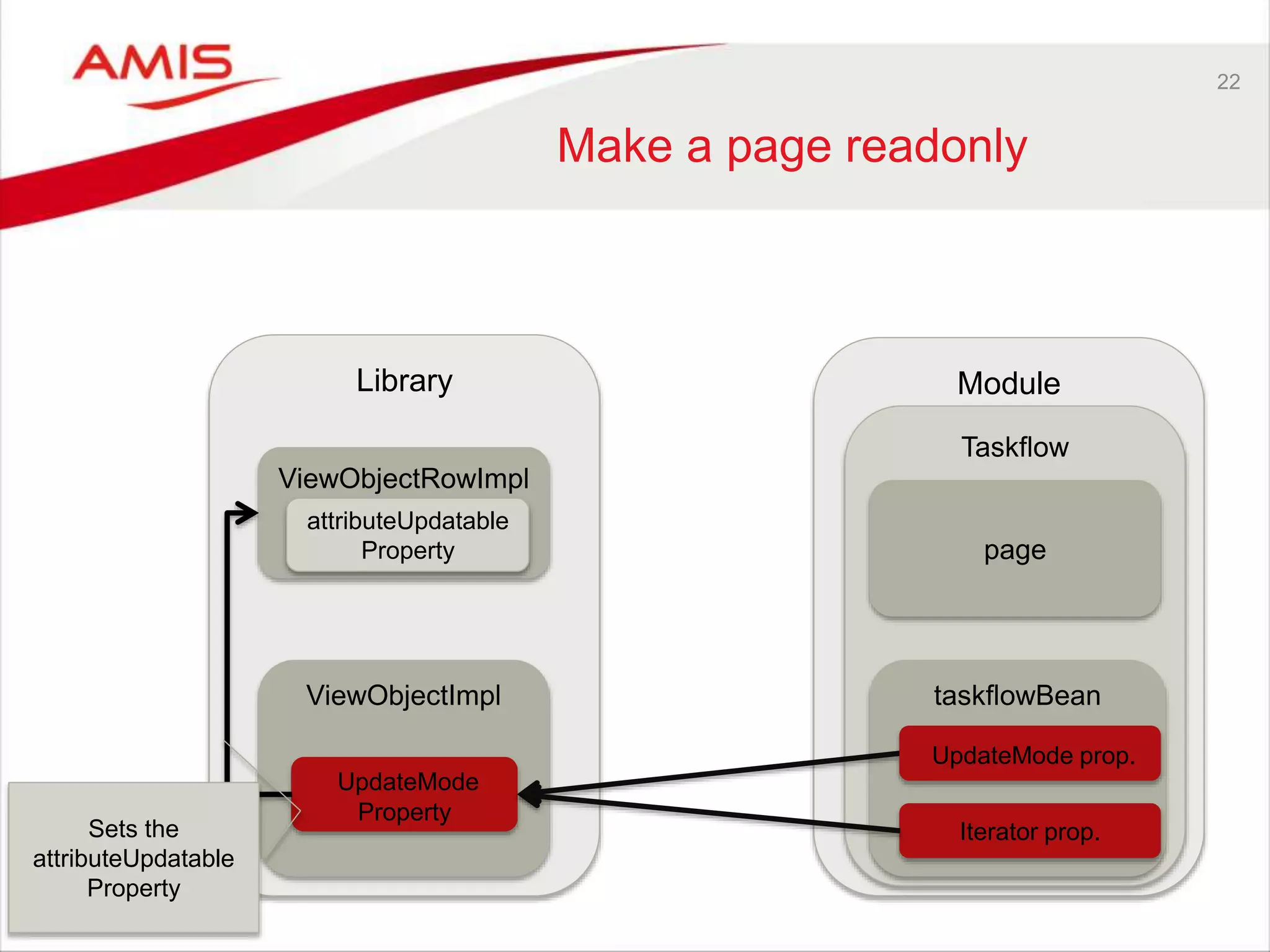
Make a page readonly
Library Module
ViewObjectRowImpl
Taskflow
taskflowBean
page
ViewObjectImpl
UpdateMode
Property
attributeUpdatable
Property
Sets the
attributeUpdatable
Property
UpdateMode prop.
Iterator prop.
23
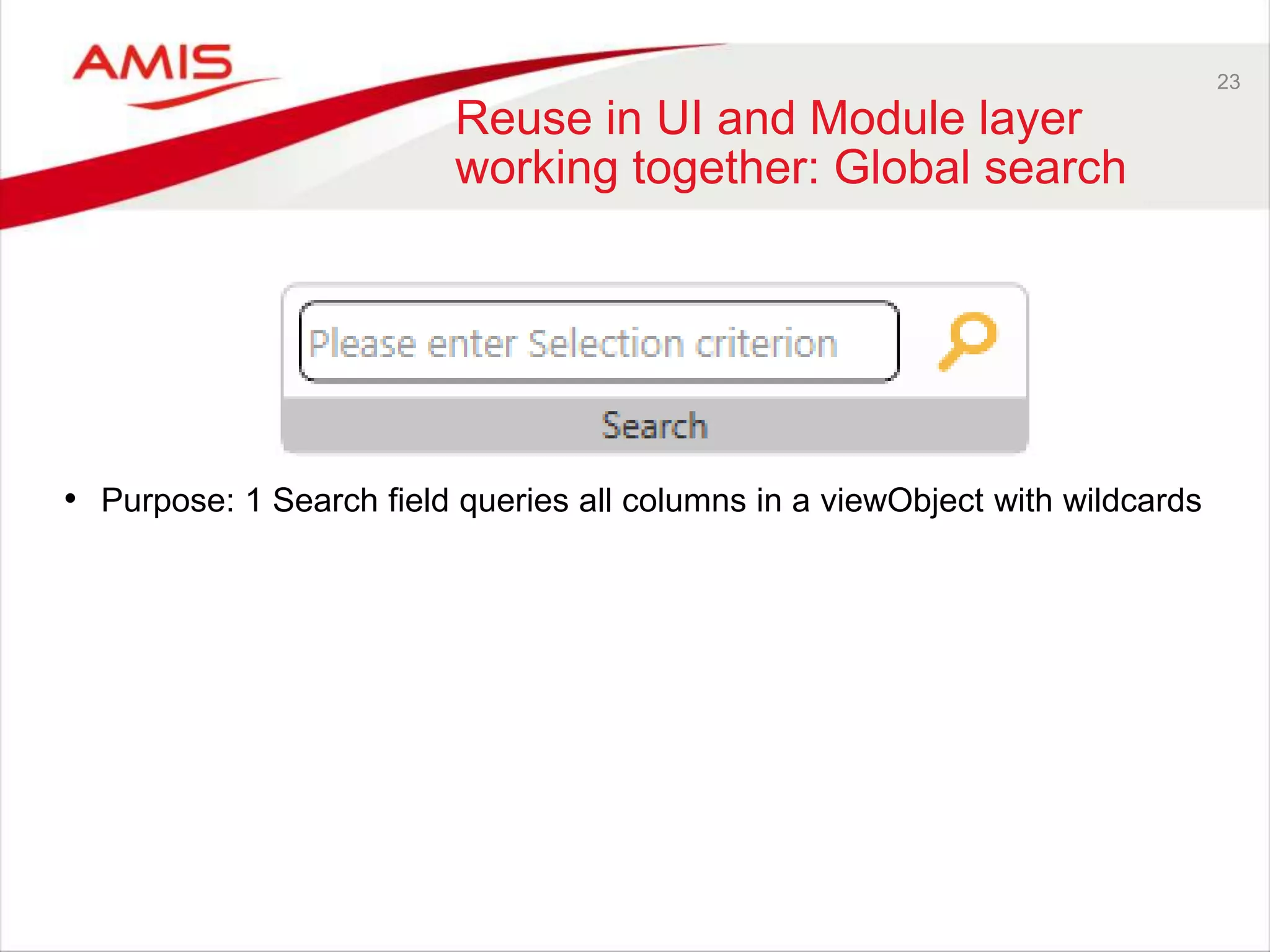
Reuse in UI and Module layer
working together: Global search
• Purpose: 1 Search field queries all columns in a viewObject with wildcards
24
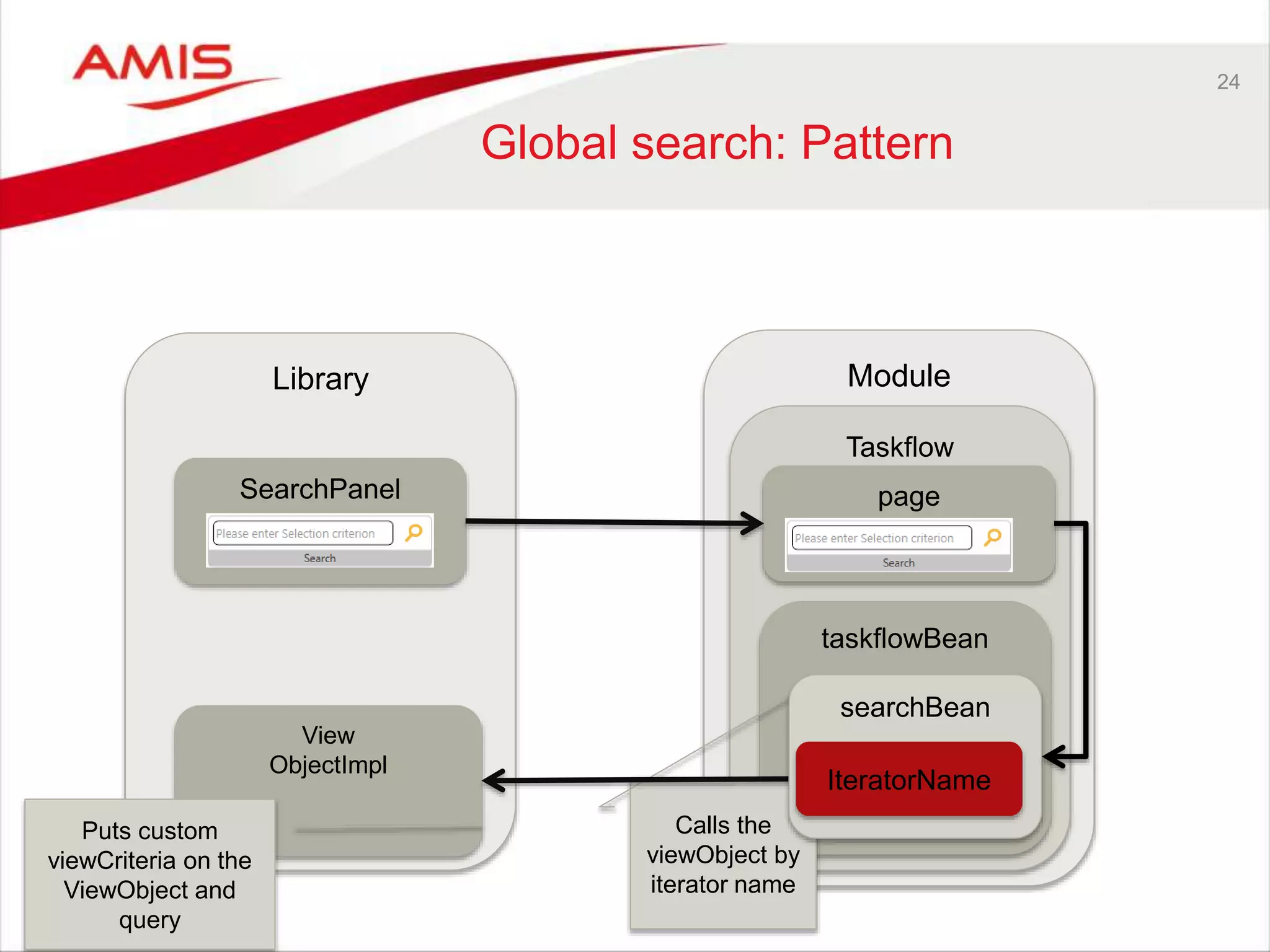
Global search: Pattern
Library Module
Taskflow
taskflowBean
Calls the
viewObject by
iterator name
View
ObjectImpl
Puts custom
viewCriteria on the
ViewObject and
query
searchBean
IteratorName
pageSearchPanel
25
Conclusion
• In Oracle ADF you can accomplish reuse in a lot of ways
• Switch from declarative approach to a code approach
• Your application
– Will have consistent look and feel
– Will take less time to develop
– Can be maintained easier
Reuse in adf applications

Reuse in adf applications

  • 1.
    Reuse in ADFapplications June 2nd 2016. Matthieu de Graaf & Frank Houweling Write once, Use everywhere
  • 2.
    2 Content • Short introductioninto Oracle ADF • Reuse in Taskflows • Reuse in the UI layer – Crud actions – Dynamic Save/Rollback buttons • Reuse in the model layer – Selection of sequences – Executing database procedures – Make a screen readonly in seconds • Final example – Global search out of the box
  • 3.
    Frank Houweling • PrincipalJava / ADF / SOA consultant - AMIS (Netherlands) • Focus on performance diagnosis & performance management • Frequent speaker at Kscope, UKOUG and OOW • Tech Lead of ADF Performance Monitor Frank.houweling@amis.nl
  • 4.
    Matthieu de Graaf •Principal Java / ADF consultant - AMIS (Netherlands) • Focus on ADF/Database and .Net (WPF) Development • Not so frequent speaker Matthieu.de.graaf@amis.nl
  • 5.
    5 Short introduction intoOracle ADF Application Module ViewController Part Model Part Taskflow View Objects Entity Objects Application Module Page(fragments) Beans Database UI description Dynamic behavior of UI Business data, retrieves data Interface to the outside world Interface to the ViewController Transaction management 1:1 presentation of the database tables in the java world
  • 6.
    6 Reuse in theUI Layer: Taskflowtemplates • By means of taskflow templates • Default Structure • Error handling • Close actions for a popup
  • 7.
    7 Reuse in theUI layer: TaskflowBean Library Module TaskflowBean Taskflow ModuleBean taskflowBean Is instantiated in Is subclassed in
  • 8.
    8 TaskflowBean: Utility Functions •Contains general utility functions – Example refresh of UI components Page: Bean: this.refreshPageComponent(“buttonbarPanel");
  • 9.
    9 TaskflowBean: Container forbehaviour of declarative components • Container for (declarative) components
  • 10.
    10 Container for declarative components– pattern Library Module DeclCompBean Page TaskflowBean Binds to Declarative component Can be subclassed in ModuleDeclCompBean Binds to Is used in My Declarative component Default behavior Module specific behavior
  • 11.
    12 Example declarative component • CrudPanel:For Inserting, editing and deleting occurences – Edit link default not shown
  • 12.
    13 CrudBean: Add Partin the library
  • 13.
    14 Crud Actions: nondefault behavior
  • 14.
    15 TaskflowBean: Enabling/Disabling Save/Cancel buttons •Enabling/Disabling of save/cancel buttons depending on the dirty state of the Datacontrol associated with the taskflow No changes to be saved Changes
  • 15.
    16 TaskflowBean: Enabling/Disabling Save/Cancel buttons LibraryModule Taskflow PageLifeCycleBean Page RibbonSavePanel component Label Autosubmit is true Evaluates #{pageFlowScope.taskflowBea n.isDataControlDirty taskflowBean Refreshes the panel surrounding the save/Cancel buttons SaveBean
  • 16.
    17 Reuse in themodel layer • Generate sequence values • Call stored procedures/functions • Set page in readonly mode
  • 17.
    18 Reuse in demodel layer • Use Subclasses of the standard Entity/ViewObject/ApplicationModule classes Class Subclass of object Subclass of row of Object ApplicationModule ApplicationModuleImpl - Entity EntityImpl ViewObject ViewObjectImpl ViewObjectRowImpl
  • 18.
    19 Generate sequence inADF • Override EntityImpl: initDefaults method
  • 19.
    20 Call stored procedures •Override ApplicationModuleImpl
  • 20.
    21 Make a pagereadonly – Updatable – Readonly • Classic approach: Set an EL Expression on the readonly attribute of UI Components
  • 21.
    22 Make a pagereadonly Library Module ViewObjectRowImpl Taskflow taskflowBean page ViewObjectImpl UpdateMode Property attributeUpdatable Property Sets the attributeUpdatable Property UpdateMode prop. Iterator prop.
  • 22.
    23 Reuse in UIand Module layer working together: Global search • Purpose: 1 Search field queries all columns in a viewObject with wildcards
  • 23.
    24 Global search: Pattern LibraryModule Taskflow taskflowBean Calls the viewObject by iterator name View ObjectImpl Puts custom viewCriteria on the ViewObject and query searchBean IteratorName pageSearchPanel
  • 24.
    25 Conclusion • In OracleADF you can accomplish reuse in a lot of ways • Switch from declarative approach to a code approach • Your application – Will have consistent look and feel – Will take less time to develop – Can be maintained easier