Dashbuilder
Introduction
Key features & target users
Key concepts
Architecture
Functional overview & screenshots
Process and task monitoring with jBPM
How to learn more about Dashbuilder

1

www.dashbuilder.org
Dashbuilder Introduction

2

www.dashbuilder.org
Key features
Enable the configuration of business
dashboards with no coding.
Key features:
■ Visual configuration of dashboards
(Drag'n'drop).
■ Graphical representation of KPIs (Key
Performance Indicators).
■ Configuration of interactive report tables.
■ Data export to Excel and CSV format.
■ Filtering and search, both in-memory or SQL
based.
■ Process and tasks dashboards with jBPM.
■ Data extraction from external systems, through
different protocols.
■ Granular access control for different user
profiles.
■ Look'n'feel customization tools.
■ Open source.
3

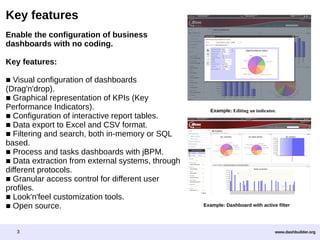
Example: Editing an indicator.

Example: Dashboard with active filter

www.dashbuilder.org
Target users
Managers / Business owners. Consumer of dashboards and reports.
IT / System Architects. Connectivity and data extraction.
Process Analyst. Dashboard composition & configuration.

4

www.dashbuilder.org
Dashbuilder key concepts
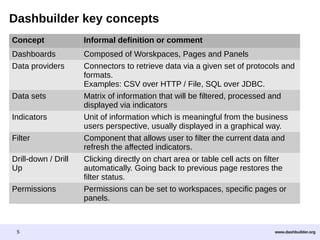
Concept

Informal definition or comment

Dashboards
Data providers

Composed of Worskpaces, Pages and Panels
Connectors to retrieve data via a given set of protocols and
formats.
Examples: CSV over HTTP / File, SQL over JDBC.
Matrix of information that will be filtered, processed and
displayed via indicators
Unit of information which is meaningful from the business
users perspective, usually displayed in a graphical way.
Component that allows user to filter the current data and
refresh the affected indicators.
Clicking directly on chart area or table cell acts on filter
automatically. Going back to previous page restores the
filter status.
Permissions can be set to workspaces, specific pages or
panels.

Data sets
Indicators
Filter
Drill-down / Drill
Up
Permissions

5

www.dashbuilder.org
Generic technical overview
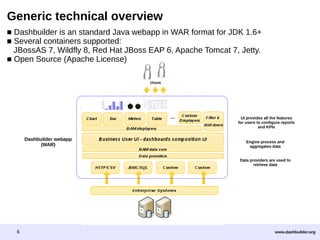
■ Dashbuilder is an standard Java webapp in WAR format for JDK 1.6+
■ Several containers supported:
JBossAS 7, Wildfly 8, Red Hat JBoss EAP 6, Apache Tomcat 7, Jetty.
■ Open Source (Apache License)

UI provides all the features
for users to configure reports
and KPIs

Dashbuilder webapp
(WAR)

Engine process and
aggregates data
Data providers are used to
retrieve data

6

www.dashbuilder.org
Dashbuilder functional overview

7

www.dashbuilder.org
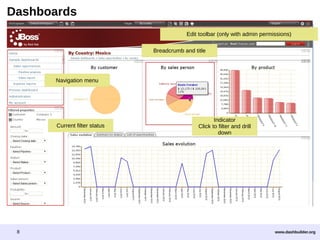
Dashboards
Edit toolbar (only with admin permissions)
Breadcrumb and title

Navigation menu

Current filter status

8

Indicator
Click to filter and drill
down

www.dashbuilder.org
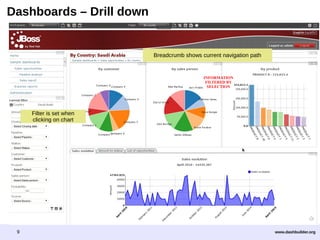
Dashboards – Drill down

Breadcrumb shows current navigation path

INFORMATION
FILTERED BY
SELECTION

Filter is set when
clicking on chart

9

www.dashbuilder.org
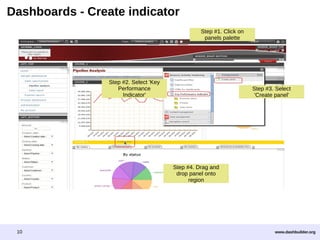
Dashboards - Create indicator
Step #1. Click on
panels palette

Step #2. Select 'Key
Performance
Indicator'

Step #3. Select
'Create panel'

Step #4. Drag and
drop panel onto
region

10

www.dashbuilder.org
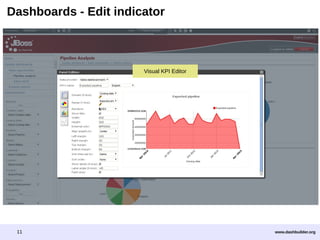
Dashboards - Edit indicator

Visual KPI Editor

11

www.dashbuilder.org
Dashboards - Report tables
Export filtered data
to Excel & CSV

Click to sort and filter

Summary tables

12

www.dashbuilder.org
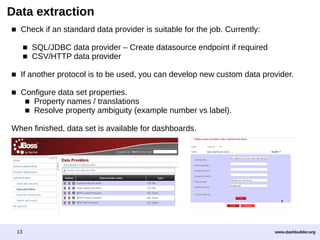
Data extraction
■ Check if an standard data provider is suitable for the job. Currently:
■ SQL/JDBC data provider – Create datasource endpoint if required
■ CSV/HTTP data provider
■ If another protocol is to be used, you can develop new custom data provider.
■ Configure data set properties.
■ Property names / translations
■ Resolve property ambiguity (example number vs label).
When finished, data set is available for dashboards.

13

www.dashbuilder.org
jBPM and Dashbuilder integration

14

www.dashbuilder.org
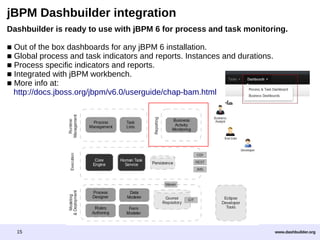
jBPM Dashbuilder integration
Dashbuilder is ready to use with jBPM 6 for process and task monitoring.
■ Out of the box dashboards for any jBPM 6 installation.
■ Global process and task indicators and reports. Instances and durations.
■ Process specific indicators and reports.
■ Integrated with jBPM workbench.
■ More info at:
http://docs.jboss.org/jbpm/v6.0/userguide/chap-bam.html

15

www.dashbuilder.org
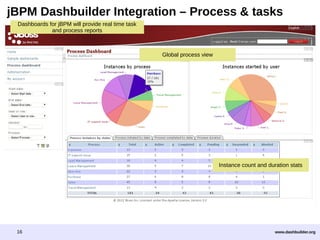
jBPM Dashbuilder Integration – Process & tasks
Dashboards for jBPM will provide real time task
and process reports

Global process view

Instance count and duration stats

16

www.dashbuilder.org
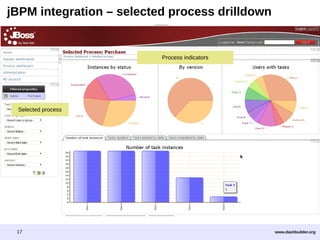
jBPM integration – selected process drilldown

Process indicators

Selected process

17

www.dashbuilder.org
To learn more about Dashbuilder, please visit:
http://www.dashbuilder.org/
Commercial support is offered by Red Hat with the BPMS 6 platform subscription

http://www.redhat.com/solutions/it/business-process-management/

18

www.dashbuilder.org

Dashbuilder community overview

  • 1.
    Dashbuilder Introduction Key features &target users Key concepts Architecture Functional overview & screenshots Process and task monitoring with jBPM How to learn more about Dashbuilder 1 www.dashbuilder.org
  • 2.
  • 3.
    Key features Enable theconfiguration of business dashboards with no coding. Key features: ■ Visual configuration of dashboards (Drag'n'drop). ■ Graphical representation of KPIs (Key Performance Indicators). ■ Configuration of interactive report tables. ■ Data export to Excel and CSV format. ■ Filtering and search, both in-memory or SQL based. ■ Process and tasks dashboards with jBPM. ■ Data extraction from external systems, through different protocols. ■ Granular access control for different user profiles. ■ Look'n'feel customization tools. ■ Open source. 3 Example: Editing an indicator. Example: Dashboard with active filter www.dashbuilder.org
  • 4.
    Target users Managers /Business owners. Consumer of dashboards and reports. IT / System Architects. Connectivity and data extraction. Process Analyst. Dashboard composition & configuration. 4 www.dashbuilder.org
  • 5.
    Dashbuilder key concepts Concept Informaldefinition or comment Dashboards Data providers Composed of Worskpaces, Pages and Panels Connectors to retrieve data via a given set of protocols and formats. Examples: CSV over HTTP / File, SQL over JDBC. Matrix of information that will be filtered, processed and displayed via indicators Unit of information which is meaningful from the business users perspective, usually displayed in a graphical way. Component that allows user to filter the current data and refresh the affected indicators. Clicking directly on chart area or table cell acts on filter automatically. Going back to previous page restores the filter status. Permissions can be set to workspaces, specific pages or panels. Data sets Indicators Filter Drill-down / Drill Up Permissions 5 www.dashbuilder.org
  • 6.
    Generic technical overview ■Dashbuilder is an standard Java webapp in WAR format for JDK 1.6+ ■ Several containers supported: JBossAS 7, Wildfly 8, Red Hat JBoss EAP 6, Apache Tomcat 7, Jetty. ■ Open Source (Apache License) UI provides all the features for users to configure reports and KPIs Dashbuilder webapp (WAR) Engine process and aggregates data Data providers are used to retrieve data 6 www.dashbuilder.org
  • 7.
  • 8.
    Dashboards Edit toolbar (onlywith admin permissions) Breadcrumb and title Navigation menu Current filter status 8 Indicator Click to filter and drill down www.dashbuilder.org
  • 9.
    Dashboards – Drilldown Breadcrumb shows current navigation path INFORMATION FILTERED BY SELECTION Filter is set when clicking on chart 9 www.dashbuilder.org
  • 10.
    Dashboards - Createindicator Step #1. Click on panels palette Step #2. Select 'Key Performance Indicator' Step #3. Select 'Create panel' Step #4. Drag and drop panel onto region 10 www.dashbuilder.org
  • 11.
    Dashboards - Editindicator Visual KPI Editor 11 www.dashbuilder.org
  • 12.
    Dashboards - Reporttables Export filtered data to Excel & CSV Click to sort and filter Summary tables 12 www.dashbuilder.org
  • 13.
    Data extraction ■ Checkif an standard data provider is suitable for the job. Currently: ■ SQL/JDBC data provider – Create datasource endpoint if required ■ CSV/HTTP data provider ■ If another protocol is to be used, you can develop new custom data provider. ■ Configure data set properties. ■ Property names / translations ■ Resolve property ambiguity (example number vs label). When finished, data set is available for dashboards. 13 www.dashbuilder.org
  • 14.
    jBPM and Dashbuilderintegration 14 www.dashbuilder.org
  • 15.
    jBPM Dashbuilder integration Dashbuilderis ready to use with jBPM 6 for process and task monitoring. ■ Out of the box dashboards for any jBPM 6 installation. ■ Global process and task indicators and reports. Instances and durations. ■ Process specific indicators and reports. ■ Integrated with jBPM workbench. ■ More info at: http://docs.jboss.org/jbpm/v6.0/userguide/chap-bam.html 15 www.dashbuilder.org
  • 16.
    jBPM Dashbuilder Integration– Process & tasks Dashboards for jBPM will provide real time task and process reports Global process view Instance count and duration stats 16 www.dashbuilder.org
  • 17.
    jBPM integration –selected process drilldown Process indicators Selected process 17 www.dashbuilder.org
  • 18.
    To learn moreabout Dashbuilder, please visit: http://www.dashbuilder.org/ Commercial support is offered by Red Hat with the BPMS 6 platform subscription http://www.redhat.com/solutions/it/business-process-management/ 18 www.dashbuilder.org