Reusable Test MatricesAuthor: Eswaranand AttuluriVersion 1.0
Test MatricesTest Matrices table that generates different set of input that can result in different output values. Testing multiple outputs for a single input Synonyms:Reusable Test MatricesFeature MatrixDecision TableChecklist
3Using Test Matrices for Routine IssuesAfter testing a simple numeric input field a few times, you’ve learned the drill. The boundary chart is reasonably easy to fill out for this.Use a test matrix to show/track a series of test cases that are essentially the same.For example, for most input fields, you’ll do a series of the same tests, checking how the field handles boundaries, unexpected characters, function keys, etc.
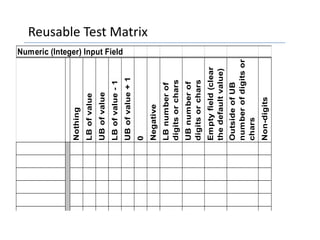
Creation of Test MatrixThe matrix is a concise way of showing the repeating tests. Put the objects that you’re testing on the rows. Show the tests on the columns. Check off the tests that you actually completed in the cells.
Typical Uses of Test MatricesYou can often re-use a matrix like this across the functionalities in products and projects.You can create matrices like this for a wide range of problems. Whenever you can specify multiple tests to be done on one function, and you expect to test several such functions, you can put the multiple tests on the matrix.
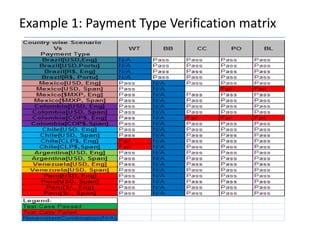
Typical Uses of Test MatricesMark a cell green if you ran the test and the functionality passed it. Mark the cell red if the functionality failed and write the bug number of the bug report for this bug.Write (in the cell)  the automation number or identifier or file name if the test case has been automated.
                           MatricesProblems?What if your thinking gets out of date? (What if this program poses new issues, not covered by the standard tests?)Do you need to execute every test every time? (or ever?)What if the automation ID number changes?
Reusable Test Matrix
I think you got it right  ?This includes only the first few columns of a matrix that I’ve mentioned, but it gets across the idea.
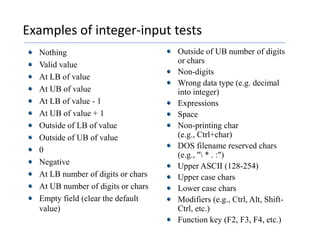
Examples of integer-input testsNothingValid valueAt LB of value	At UB of valueAt LB of value - 1	At UB of value + 1	Outside of LB of value	Outside of UB of value	0	Negative	At LB number of digits or charsAt UB number of digits or charsEmpty field (clear the default value)Outside of UB number of digits or chars	Non-digits 	Wrong data type (e.g. decimal into integer)ExpressionsSpaceNon-printing char (e.g., Ctrl+char)DOS filename reserved chars (e.g., "\ * . :")Upper ASCII (128-254)Upper case charsLower case charsModifiers (e.g., Ctrl, Alt, Shift-Ctrl, etc.)Function key (F2, F3, F4, etc.)
Example 1: Payment Type Verification matrix
Example 2: Hierarchy Feature Matrix
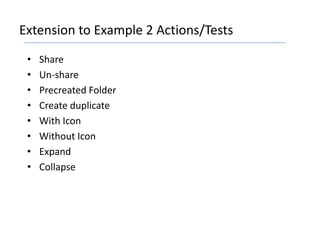
Extension to Example 2 Actions/TestsShareUn-sharePrecreated FolderCreate duplicateWith IconWithout IconExpandCollapse
Example 3: Multiplication Matrix
Example 4: Decision Table according to Emp. Grades
Example 5: Application Compatibility
ConclusionThinking may be a great way of getting things started.But doing is the only way to get things done.

Reusable Test Matrices Presentaion

  • 1.
    Reusable Test MatricesAuthor:Eswaranand AttuluriVersion 1.0
  • 2.
    Test MatricesTest Matricestable that generates different set of input that can result in different output values. Testing multiple outputs for a single input Synonyms:Reusable Test MatricesFeature MatrixDecision TableChecklist
  • 3.
    3Using Test Matricesfor Routine IssuesAfter testing a simple numeric input field a few times, you’ve learned the drill. The boundary chart is reasonably easy to fill out for this.Use a test matrix to show/track a series of test cases that are essentially the same.For example, for most input fields, you’ll do a series of the same tests, checking how the field handles boundaries, unexpected characters, function keys, etc.
  • 4.
    Creation of TestMatrixThe matrix is a concise way of showing the repeating tests. Put the objects that you’re testing on the rows. Show the tests on the columns. Check off the tests that you actually completed in the cells.
  • 5.
    Typical Uses ofTest MatricesYou can often re-use a matrix like this across the functionalities in products and projects.You can create matrices like this for a wide range of problems. Whenever you can specify multiple tests to be done on one function, and you expect to test several such functions, you can put the multiple tests on the matrix.
  • 6.
    Typical Uses ofTest MatricesMark a cell green if you ran the test and the functionality passed it. Mark the cell red if the functionality failed and write the bug number of the bug report for this bug.Write (in the cell) the automation number or identifier or file name if the test case has been automated.
  • 7.
    MatricesProblems?What if your thinking gets out of date? (What if this program poses new issues, not covered by the standard tests?)Do you need to execute every test every time? (or ever?)What if the automation ID number changes?
  • 8.
  • 9.
    I think yougot it right ?This includes only the first few columns of a matrix that I’ve mentioned, but it gets across the idea.
  • 10.
    Examples of integer-inputtestsNothingValid valueAt LB of value At UB of valueAt LB of value - 1 At UB of value + 1 Outside of LB of value Outside of UB of value 0 Negative At LB number of digits or charsAt UB number of digits or charsEmpty field (clear the default value)Outside of UB number of digits or chars Non-digits Wrong data type (e.g. decimal into integer)ExpressionsSpaceNon-printing char (e.g., Ctrl+char)DOS filename reserved chars (e.g., "\ * . :")Upper ASCII (128-254)Upper case charsLower case charsModifiers (e.g., Ctrl, Alt, Shift-Ctrl, etc.)Function key (F2, F3, F4, etc.)
  • 11.
    Example 1: PaymentType Verification matrix
  • 12.
    Example 2: HierarchyFeature Matrix
  • 13.
    Extension to Example2 Actions/TestsShareUn-sharePrecreated FolderCreate duplicateWith IconWithout IconExpandCollapse
  • 14.
  • 15.
    Example 4: DecisionTable according to Emp. Grades
  • 16.
  • 17.
    ConclusionThinking may bea great way of getting things started.But doing is the only way to get things done.