ReSwift
Unidirectional Flow
About
Rodrigo Freitas
co-founder at Kobe
rodrigo.freitas@kobe.io
Architecture
MVC
MVVM
VIPER
RIBLE
}
ReSwift
Multidirectional
Unidirectional
Flux
Pattern for building UI in web application
Born at Facebook
Flux core
Make state and state transitions explicit
Enforce unidirectional flow
Separate responsibilities
Flux/Redux
Original pattern created by Facebook
Flux pattern + constraints
Flux
Redux
Single Store
Reducers for state updates
ReSwift Reactor
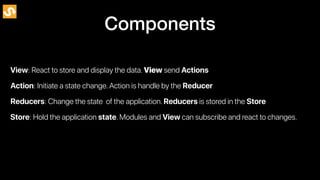
Action: Initiate a state change.Action is handle by the Reducer
Reducers: Change the state of the application.Reducers is stored in the Store
Store: Hold the application state.Modules and View can subscribe and react to changes.
Components
View: React to store and display the data.View send Actions
Unidirectional Flow
View
Action
View
Action
Store
View
State
Action
Store
View
Reducer
State
State
Action
Action
Store
View
Reducer
Reducer
State
State
Action
Action
Store
View
Reducer
Reducer
State
State
Action
State
Action
Store
View
Reducer
Reducer
State
State
Action
State
State
Action
Store
View
Reducer
Reducer
State
State
Action
State
State
Action
Store
View
Reducer
Reducer
State
State
Action
State
State
Stylished
State
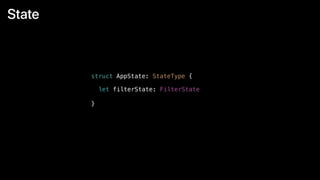
struct AppState: StateType {
}
let filterState: FilterState
State
struct FilterState: StateType {
var styles: [String]
var isProcessing: Bool
var selectedIndex: Int
var currentImage: CIImage?
var filteredImage: CIImage?
}
Actions
enum FilterAction: Action {
case processing
case done
case applyFilter(image: CIImage)
case newImage(image: CGImage)
case newFilter(index: Int)
}
Reducer
func appReducer(action: Action, state: AppState?) -> AppState {
return AppState(
filterState: filterReducer(action: action, state: state?.filterState)
)
}
Reducer
func filterReducer(action: Action, state: FilterState?) -> FilterState {
guard let action = action as? FilterAction else { return state ?? FilterState() }
switch action {
case .done:
var newState = state
newState?.isProcessing = false
return newState ?? FilterState()
case .processing:
var newState = state
newState?.isProcessing = true
return newState ?? FilterState()
case .applyFilter(let image):
guard var newState = state else { return FilterState() }
newState.filteredImage = image
return newState


// ………..

}
}
Store
let store = Store(reducer: appReducer, state: nil)
Send Action
public func imagePickerController(_ picker: UIImagePickerController, didFinishPickingMediaWithInfo
info: [String : Any]) {
if let image = info[UIImagePickerControllerOriginalImage] as? UIImage {
store.dispatch(FilterAction.newImage(image: image))
}
picker.dismiss(animated: true, completion: nil)
}
Subscribe
override func viewWillAppear(_ animated: Bool) {
super.viewWillAppear(animated)
// Listen for modification on the state
store.subscribe(self)
}
override func viewWillDisappear(_ animated: Bool) {
super.viewWillDisappear(animated)
store.unsubscribe(self)
}
Listen and react to changes
extension ViewController: StoreSubscriber {
func newState(state: AppState) {
collectionDataSource?.models = state.filterState.styles
collectionView.reloadData()
if let image = state.filterState.filteredImage {
imageView.image = UIImage(ciImage: image)
}
if state.filterState.isProcessing {
startAnimating()
} else {
stopAnimating()
}
}
}
Turicreate
Turi Create simplifies the development of custom machine learning models.You
don't have to be a machine learning expert to add recommendations,object
detection,image classification,image similarity or activity classification to your
app.
Turicreate
Turi Create simplifies the development of custom machine learning models.You
don't have to be a machine learning expert to add recommendations,object
detection,image classification,image similarity or activity classification to your
app.
Recommender
Image Classification
Object Detection
Style Transfer
Activity Classification
Image Similarity
Classifiers
Text Classifier
Style Transfer
import turicreate as tc
# Load the style and content images
styles = tc.load_images('style/')
content = tc.load_images('content/')
# Create a StyleTransfer model
model = tc.style_transfer.create(styles, content)
# Load some test images
test_images = tc.load_images('test/')
# Stylize the test images
stylized_images = model.stylize(test_images)
# Save the model for later use in Turi Create
model.save('mymodel.model')
# Export for use in Core ML
model.export_coreml('MyStyleTransfer.mlmodel')
Interactions
model = tc.style_transfer.create(styles, content, max_iterations = 4000)
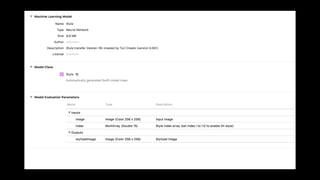
model.export_coreml('./StyleV6.mlmodel', image_shape=(1000,769))
static func styling(index: Int,
totalStyles: Int,
cgImage: CGImage,
width: Int,
height: Int, completionHandler: @escaping (CIImage?) -> Void) {
let styleArray = try? MLMultiArray(shape: [totalStyles] as [NSNumber],
dataType: MLMultiArrayDataType.double)
// Clear the array
for i in 0...((styleArray?.count)!-1) {
styleArray?[i] = 0.0
}
// Set the style to use
styleArray?[index] = 1.0
// Apply Style
DispatchQueue.global(qos: .background).async {
let mlModel = StyleV6()
let buffer = StyleCreate.pixelBuffer(cgImage: cgImage, width: width, height: height)
let output = try? mlModel.prediction(image: buffer, index: styleArray!)
let ciImage = CIImage(cvPixelBuffer: (output?.stylizedImage)!)
completionHandler(ciImage)
}
}
Deploy CoreML into iOS app
Thanks
• https://github.com/ReSwift/ReSwift
• https://github.com/apple/turicreate/issues/855
• http://blog.benjamin-encz.de/
rodrigo.freitas@kobe.io
• https://apple.github.io/turicreate/docs/userguide/style_transfer/
• https://arxiv.org/pdf/1610.07629.pdf

ReSwift & Machine Learning