Re-structuring of a Swing-based Application into an Eclipse RCP  Christian Kurzke Gustavo de Paula Hugo Raniere
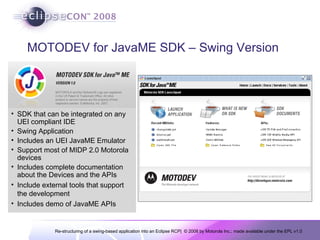
MOTODEV for JavaME SDK – Swing Version SDK that can be integrated on any UEI compliant IDE Swing Application Includes an UEI JavaME Emulator Support most of MIDP 2.0 Motorola devices Includes complete documentation about the Devices and the APIs Include external tools that support the development Includes demo of JavaME APIs
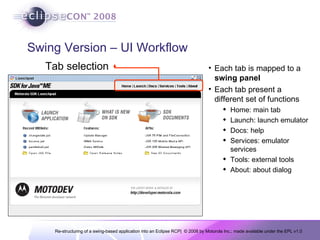
Swing Version – UI Workflow Each tab is mapped to a  swing panel Each tab present a different set of functions Home: main tab Launch: launch emulator Docs: help Services: emulator services Tools: external tools About: about dialog Tab selection
Issues to consider in porting to RCP 3 main issues Map of UI Concepts Map of Functionalities Map of Classes into Plug-ins
Map UI Concepts Tried to  keep  as most as possible the original  user experience Reduce the impact to the end-ser All UI concepts available on Swing are also available on SWT/JFaces Some concepts were adapted in order to keep the same user experience “ Swing Tabs” External Dialogs
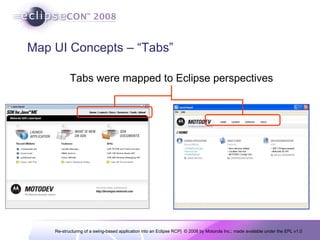
Map UI Concepts – “Tabs” Tabs were mapped to Eclipse perspectives
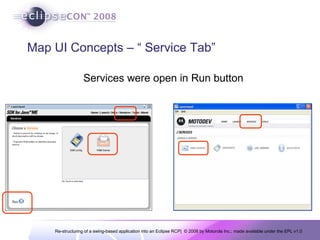
Map UI Concepts – “ Service Tab” Services were open in Run button
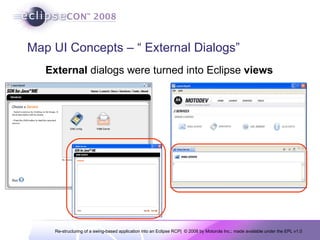
Map UI Concepts – “ External Dialogs” External  dialogs were turned into Eclipse  views
Map of Functionalities Most of the functionalities are the same Eclipse RCP  brings some services that can be reused “About tab”     Eclipse About “Docs tab”     Eclipse Help “Update solution”     Eclipse update manager
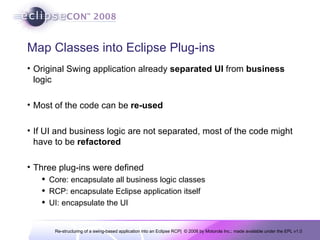
Map Classes into Eclipse Plug-ins Original Swing application already  separated   UI  from  business  logic Most of the code can be  re-used If UI and business logic are not separated, most of the code might have to be  refactored Three plug-ins were defined Core: encapsulate all business logic classes RCP: encapsulate Eclipse application itself UI: encapsulate the UI
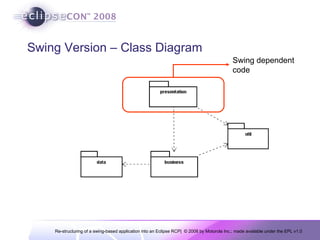
Swing Version – Class Diagram Swing dependent  code
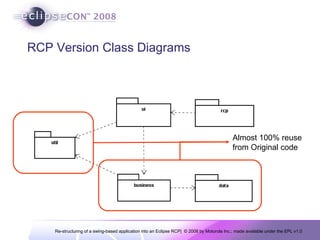
RCP Version Class Diagrams Almost 100% reuse  from Original code
Some Metrics… Number of  Classes  is  similar  in both versions Approximately 10% increase in RCP version Code  size is  similar  in both versions Approximately 10% increase in RCP version Final  deployment  size  increased  in RCP Eclipse RCP has to included But services like update manager and Eclipse Help System are now available on the tool Effort to re-structure application into a RCP was  4 staff/month
Conclusions Effort  to “convert” a swing app into RCP can be  low  if the UI is well  separated All  UI concepts  available  on Swing can be implemented on SWT/JFaces Some  functionality  can be  replaced  by already existing  Eclipse   Services

Re-structuring of a swing-based application into an Eclipse RCP

  • 1.
    Re-structuring of aSwing-based Application into an Eclipse RCP Christian Kurzke Gustavo de Paula Hugo Raniere
  • 2.
    MOTODEV for JavaMESDK – Swing Version SDK that can be integrated on any UEI compliant IDE Swing Application Includes an UEI JavaME Emulator Support most of MIDP 2.0 Motorola devices Includes complete documentation about the Devices and the APIs Include external tools that support the development Includes demo of JavaME APIs
  • 3.
    Swing Version –UI Workflow Each tab is mapped to a swing panel Each tab present a different set of functions Home: main tab Launch: launch emulator Docs: help Services: emulator services Tools: external tools About: about dialog Tab selection
  • 4.
    Issues to considerin porting to RCP 3 main issues Map of UI Concepts Map of Functionalities Map of Classes into Plug-ins
  • 5.
    Map UI ConceptsTried to keep as most as possible the original user experience Reduce the impact to the end-ser All UI concepts available on Swing are also available on SWT/JFaces Some concepts were adapted in order to keep the same user experience “ Swing Tabs” External Dialogs
  • 6.
    Map UI Concepts– “Tabs” Tabs were mapped to Eclipse perspectives
  • 7.
    Map UI Concepts– “ Service Tab” Services were open in Run button
  • 8.
    Map UI Concepts– “ External Dialogs” External dialogs were turned into Eclipse views
  • 9.
    Map of FunctionalitiesMost of the functionalities are the same Eclipse RCP brings some services that can be reused “About tab”  Eclipse About “Docs tab”  Eclipse Help “Update solution”  Eclipse update manager
  • 10.
    Map Classes intoEclipse Plug-ins Original Swing application already separated UI from business logic Most of the code can be re-used If UI and business logic are not separated, most of the code might have to be refactored Three plug-ins were defined Core: encapsulate all business logic classes RCP: encapsulate Eclipse application itself UI: encapsulate the UI
  • 11.
    Swing Version –Class Diagram Swing dependent code
  • 12.
    RCP Version ClassDiagrams Almost 100% reuse from Original code
  • 13.
    Some Metrics… Numberof Classes is similar in both versions Approximately 10% increase in RCP version Code size is similar in both versions Approximately 10% increase in RCP version Final deployment size increased in RCP Eclipse RCP has to included But services like update manager and Eclipse Help System are now available on the tool Effort to re-structure application into a RCP was 4 staff/month
  • 14.
    Conclusions Effort to “convert” a swing app into RCP can be low if the UI is well separated All UI concepts available on Swing can be implemented on SWT/JFaces Some functionality can be replaced by already existing Eclipse Services