Development with the Embedded Rich Client Platform (eRCP) Chris Aniszczyk, IBM Lotus, Austin Gorkem Ercan, Nokia, Finland Mark Rogalski, IBM Lotus, Austin
Agenda Exercise Tracker Exercise   Overview eSWT Introduction Mobile Extensions Developing Mobile applications Working with Devices Troubleshooting and Debugging Conclusion Q&A
Exercise Tracker Requirements Eclipse 3.2.2 www.eclipse.org/downloads eRCP www.eclipse.org/ercp Sample Plug-ins http://eclipsezilla.eclipsecon.org/attachment.cgi?id=428
Exercise Tracker
Agenda Exercise Tracker Exercise   Overview eSWT Introduction Mobile Extensions Developing Mobile applications Working with Devices Troubleshooting and Debugging Conclusion Q&A
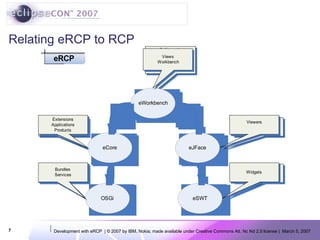
Relating eRCP to RCP
Architecture OSGi underpinnings eRCP applications run in a workbench similar to Eclipse IDE plugins Also supports stand-alone eSWT applications Applications provide a View  extension  which the eWorkbench instantiates on demand Applications and services run in the same JVM Consumes fewer resources than separate JVMs Allows sharing of services Enables variety of life cycle choices
Application Model eRCP
eWorkbench Applications provide a View extension which the eWorkbench instantiates on demand Applications and services run in the same JVM Consumes fewer resources than separate JVMs Allows sharing of services Enables variety of life cycle  Owns eSWT UI thread Applications are registered using  org.eclipse.ercp.eworkbench.applications  extension point
Agenda Exercise Tracker Exercise   Overview eSWT Introduction Mobile Extensions Developing Mobile applications Working with Devices Troubleshooting and Debugging Conclusion Q&A
Introduction to eSWT Subset of SWT and additional mobile specific widgets Provides efficient, portable access to the user interface facilities of the operating system Consists of 3 packages SWT subset divided into two  core  package expanded  package mobile  package - new eSWT components defined for mobile world
Class Diagram
Mobile package - MobileShell A device tailored Shell that can change the trimmings dynamically Top-level shell Full screen mode Allows key press polling Introduces status pane styles NO_STATUS_PANE SMALL_STATUS_PANE LARGE_STATUS_PANE
Mobile package -Basic controls ConstrainedText DateEditor HyperLink TextExtension CaptionedControl SortedList TaskTip Suitable for providing info on long running tasks Text and optional ProgressBar
Mobile package - Advanced Controls ListBox : A list control with enhanced capabilities to display icons  ListView : Selectable control that can display items in a multi-column way  MultipageDialog : A tabbed dialog
Mobile package – Dialogs QueryDialog: Several query types STANDARD: alphanumeric input NUMERIC TIME DATE PASSWORD TimedMessageBox: 4 Different system Icons (working, information, warning, error ) Icons can be replaced
Mobile package – Commands Maps to a specific mechanism depending upon device capabilities Has logical types that are typically mapped to Soft keys (GENERAL, SELECT, OK, CANCEL, DELETE, BACK, EXIT, STOP, HELP) COMMANDGROUP can contain other sub-commands S60 implementation maps DELETE commands to ‘C’ clear key. Bound to focus context
Mobile package – MobileDevice, Screen & Input MobileDevice Discover device capabilities and characteristics Register listeners for changes in input, screen capabilities Screen Query the capabilities of the screen(s)  Input Determine input device capabilities
Tips: Building mobile applications using eSWT Do not rely on Shell trimmings some platforms do not support trimmings like SWT.CLOSE  Do not use too deep menu hierarchies.  Use Commands in relation with the focus context to avoid the soft keys getting crowded Use MobileDevice, Screen, and Input to adjust the behavior at runtime Active screens, active input methods may change Always use layout managers Check the computed layout size and add use scrollbars if greater than screen size Tailor your application according to aspect ratios
Tips: Choosing the right input widget
Agenda Exercise Tracker Exercise   Overview eSWT Introduction Mobile Extensions Developing Mobile applications Working with Devices Troubleshooting and Debugging Conclusion Q&A
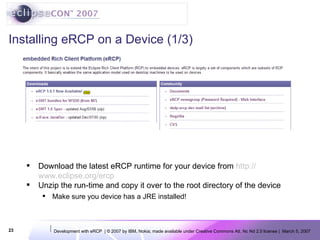
Installing eRCP on a Device (1/3) Download the latest eRCP runtime for your device from  http:// www.eclipse.org/ercp Unzip the run-time and copy it over to the root directory of the device Make sure you device has a JRE installed!
Installing eRCP on a Device (2/3)  The eRCP directory should be copied to the root of the device Browse to the eRCP directory on the actual device Notice the familiar eclipse directory structure
Installing eRCP on a Device (3/3) Run the j9foun-hello shortcut You should see something similar to what’s picture on the left You have successfully installed eRCP on your device!
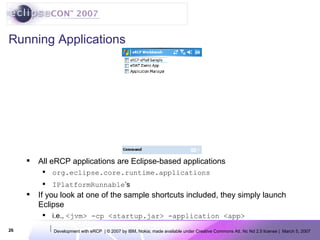
Running Applications All eRCP applications are Eclipse-based applications org.eclipse.core.runtime.applications IPlatformRunnable ’s If you look at one of the sample shortcuts included, they simply launch Eclipse i.e.,  <jvm> -cp <startup.jar> -application <app>
Agenda Exercise Tracker Exercise   Overview eSWT Introduction Mobile Extensions Developing Mobile applications Working with Devices Troubleshooting and Debugging Conclusion Q&A
Troubleshooting Make sure the target platform is set to the eRCP target platform The application ID extension point isn’t unique, check the ID in the  org.eclipse.ercp.eworkbench.application  extension point
Debugging Tips Develop as much as possible on the device runtime Take advantage of a resizable workbench window to test different screen sizes and proportions Copying plug-ins directly to the device will work if you have the osgi.checkConfiguration property set to “true”
Agenda Exercise Tracker Exercise   Overview eSWT Introduction Mobile Extensions Developing Mobile applications Working with Devices Troubleshooting and Debugging Conclusion Q&A
Conclusion eRCP brings the RCP paradigm to mobile devices Website http://www.eclipse.org/ercp Newsgroups news://news.eclipse.org/eclipse.dsdp.ercp Always looking for contributors!
Questions & Answers

Development With eRCP

  • 1.
    Development with theEmbedded Rich Client Platform (eRCP) Chris Aniszczyk, IBM Lotus, Austin Gorkem Ercan, Nokia, Finland Mark Rogalski, IBM Lotus, Austin
  • 2.
    Agenda Exercise TrackerExercise  Overview eSWT Introduction Mobile Extensions Developing Mobile applications Working with Devices Troubleshooting and Debugging Conclusion Q&A
  • 3.
    Agenda Exercise TrackerExercise  Overview eSWT Introduction Mobile Extensions Developing Mobile applications Working with Devices Troubleshooting and Debugging Conclusion Q&A
  • 4.
    Exercise Tracker RequirementsEclipse 3.2.2 www.eclipse.org/downloads eRCP www.eclipse.org/ercp Sample Plug-ins http://eclipsezilla.eclipsecon.org/attachment.cgi?id=428
  • 5.
  • 6.
    Agenda Exercise TrackerExercise  Overview eSWT Introduction Mobile Extensions Developing Mobile applications Working with Devices Troubleshooting and Debugging Conclusion Q&A
  • 7.
  • 8.
    Architecture OSGi underpinningseRCP applications run in a workbench similar to Eclipse IDE plugins Also supports stand-alone eSWT applications Applications provide a View extension which the eWorkbench instantiates on demand Applications and services run in the same JVM Consumes fewer resources than separate JVMs Allows sharing of services Enables variety of life cycle choices
  • 9.
  • 10.
    eWorkbench Applications providea View extension which the eWorkbench instantiates on demand Applications and services run in the same JVM Consumes fewer resources than separate JVMs Allows sharing of services Enables variety of life cycle Owns eSWT UI thread Applications are registered using org.eclipse.ercp.eworkbench.applications extension point
  • 11.
    Agenda Exercise TrackerExercise  Overview eSWT Introduction Mobile Extensions Developing Mobile applications Working with Devices Troubleshooting and Debugging Conclusion Q&A
  • 12.
    Introduction to eSWTSubset of SWT and additional mobile specific widgets Provides efficient, portable access to the user interface facilities of the operating system Consists of 3 packages SWT subset divided into two core package expanded package mobile package - new eSWT components defined for mobile world
  • 13.
  • 14.
    Mobile package -MobileShell A device tailored Shell that can change the trimmings dynamically Top-level shell Full screen mode Allows key press polling Introduces status pane styles NO_STATUS_PANE SMALL_STATUS_PANE LARGE_STATUS_PANE
  • 15.
    Mobile package -Basiccontrols ConstrainedText DateEditor HyperLink TextExtension CaptionedControl SortedList TaskTip Suitable for providing info on long running tasks Text and optional ProgressBar
  • 16.
    Mobile package -Advanced Controls ListBox : A list control with enhanced capabilities to display icons ListView : Selectable control that can display items in a multi-column way MultipageDialog : A tabbed dialog
  • 17.
    Mobile package –Dialogs QueryDialog: Several query types STANDARD: alphanumeric input NUMERIC TIME DATE PASSWORD TimedMessageBox: 4 Different system Icons (working, information, warning, error ) Icons can be replaced
  • 18.
    Mobile package –Commands Maps to a specific mechanism depending upon device capabilities Has logical types that are typically mapped to Soft keys (GENERAL, SELECT, OK, CANCEL, DELETE, BACK, EXIT, STOP, HELP) COMMANDGROUP can contain other sub-commands S60 implementation maps DELETE commands to ‘C’ clear key. Bound to focus context
  • 19.
    Mobile package –MobileDevice, Screen & Input MobileDevice Discover device capabilities and characteristics Register listeners for changes in input, screen capabilities Screen Query the capabilities of the screen(s) Input Determine input device capabilities
  • 20.
    Tips: Building mobileapplications using eSWT Do not rely on Shell trimmings some platforms do not support trimmings like SWT.CLOSE Do not use too deep menu hierarchies. Use Commands in relation with the focus context to avoid the soft keys getting crowded Use MobileDevice, Screen, and Input to adjust the behavior at runtime Active screens, active input methods may change Always use layout managers Check the computed layout size and add use scrollbars if greater than screen size Tailor your application according to aspect ratios
  • 21.
    Tips: Choosing theright input widget
  • 22.
    Agenda Exercise TrackerExercise  Overview eSWT Introduction Mobile Extensions Developing Mobile applications Working with Devices Troubleshooting and Debugging Conclusion Q&A
  • 23.
    Installing eRCP ona Device (1/3) Download the latest eRCP runtime for your device from http:// www.eclipse.org/ercp Unzip the run-time and copy it over to the root directory of the device Make sure you device has a JRE installed!
  • 24.
    Installing eRCP ona Device (2/3)  The eRCP directory should be copied to the root of the device Browse to the eRCP directory on the actual device Notice the familiar eclipse directory structure
  • 25.
    Installing eRCP ona Device (3/3) Run the j9foun-hello shortcut You should see something similar to what’s picture on the left You have successfully installed eRCP on your device!
  • 26.
    Running Applications AlleRCP applications are Eclipse-based applications org.eclipse.core.runtime.applications IPlatformRunnable ’s If you look at one of the sample shortcuts included, they simply launch Eclipse i.e., <jvm> -cp <startup.jar> -application <app>
  • 27.
    Agenda Exercise TrackerExercise  Overview eSWT Introduction Mobile Extensions Developing Mobile applications Working with Devices Troubleshooting and Debugging Conclusion Q&A
  • 28.
    Troubleshooting Make surethe target platform is set to the eRCP target platform The application ID extension point isn’t unique, check the ID in the org.eclipse.ercp.eworkbench.application extension point
  • 29.
    Debugging Tips Developas much as possible on the device runtime Take advantage of a resizable workbench window to test different screen sizes and proportions Copying plug-ins directly to the device will work if you have the osgi.checkConfiguration property set to “true”
  • 30.
    Agenda Exercise TrackerExercise  Overview eSWT Introduction Mobile Extensions Developing Mobile applications Working with Devices Troubleshooting and Debugging Conclusion Q&A
  • 31.
    Conclusion eRCP bringsthe RCP paradigm to mobile devices Website http://www.eclipse.org/ercp Newsgroups news://news.eclipse.org/eclipse.dsdp.ercp Always looking for contributors!
  • 32.