Notes
* Simple


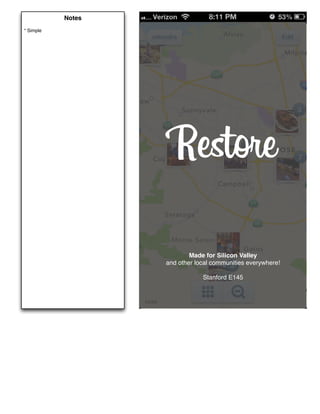
                    Restore

                           Made for Silicon Valley
                   and other local communities everywhere!

                               Stanford E145
Notes
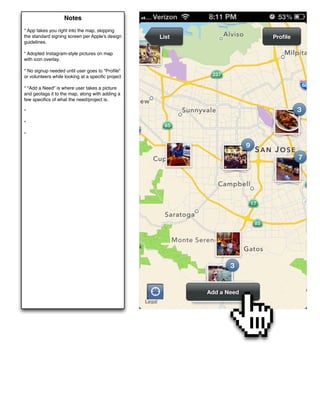
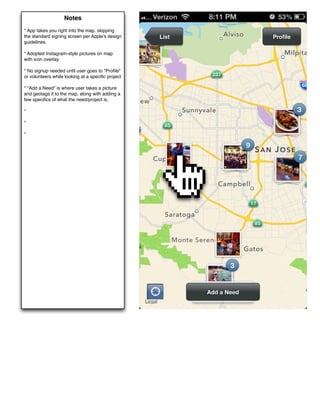
* App takes you right into the map, skipping
the standard signing screen per Apple's design     List                        Profile
guidelines.

* Adopted Instagram-style pictures on map
with icon overlay.

* No signup needed until user goes to "Profile"
or volunteers while looking at a specific project

* "Add a Need" is where user takes a picture
and geotags it to the map, along with adding a
few specifics of what the need/project is.

*

*

*


                                                          Welcome to Restore


                                                             Add a Need
Notes
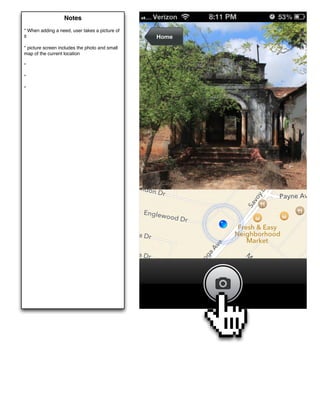
* When adding a need, user takes a picture of
it                                              Home
* picture screen includes the photo and small
map of the current location

*

*

*


                                                       Welcome to Restore
Notes
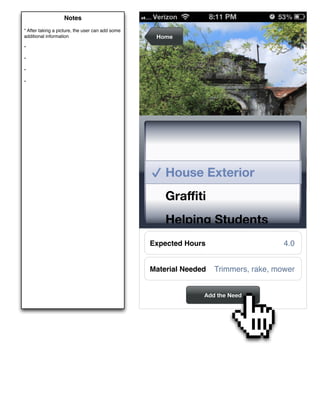
* After taking a picture, the user can add some
additional information                             Home
*

*

*

*


                                                             Welcome to Restore


                                                      House Exterior
                                                      Graffiti
                                                      Helping Students
                                                  Expected Hours                      4.0


                                                  Material Needed   Trimmers, rake, mower


                                                                Add the Need
Notes
* App takes you right into the map, skipping
the standard signing screen per Apple's design     List                        Profile
guidelines.

* Adopted Instagram-style pictures on map
with icon overlay.

* No signup needed until user goes to "Profile"
or volunteers while looking at a specific project

* "Add a Need" is where user takes a picture
and geotags it to the map, along with adding a
few specifics of what the need/project is.

*

*

*


                                                          Welcome to Restore


                                                             Add a Need
Notes
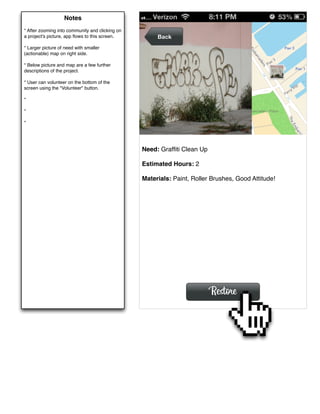
* After zooming into community and clicking on
a project's picture, app flows to this screen.         Back
* Larger picture of need with smaller
(actionable) map on right side.

* Below picture and map are a few further
descriptions of the project.

* User can volunteer on the bottom of the
screen using the "Volunteer" button.

*

*

*


                                                 Need: Graffiti Clean Up

                                                 Estimated Hours: 2

                                                 Materials: Paint, Roller Brushes, Good Attitude!


                                                                          Restore
Notes
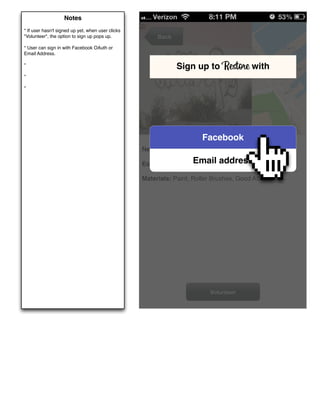
* If user hasn't signed up yet, when user clicks
"Volunteer", the option to sign up pops up.             Back
* User can sign in with Facebook OAuth or
Email Address.

*
                                                               Sign up to Restore with
*

*


                                                                        Facebook
                                                   Need: Graffiti Clean Up

                                                   Estimated Hours:Email
                                                                   2           address
                                                   Materials: Paint, Roller Brushes, Good Attitude!


                                                                            Volunteer
Notes
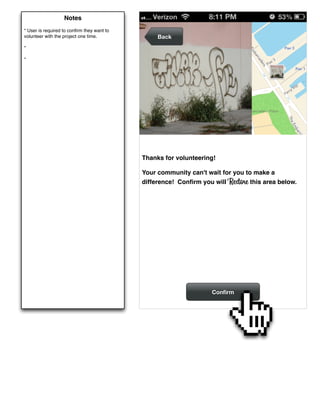
* User is required to confirm they want to
volunteer with the project one time.             Back
*

*


                                            Thanks for volunteering!

                                            Your community can't wait for you to make a
                                            difference! Confirm you will Restore this area below.


                                                                   Confirm
Notes
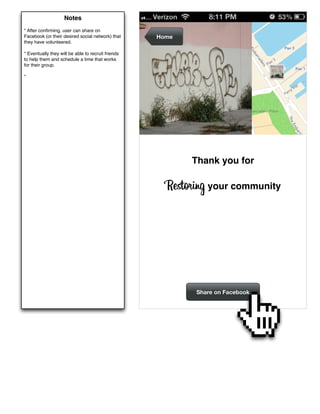
* After confirming, user can share on
Facebook (or their desired social network) that     Home
they have volunteered.

* Eventually they will be able to recruit friends
to help them and schedule a time that works
for their group.

*


                                                           Thank you for

                                                      Restoring your community


                                                            Share on Facebook
Notes
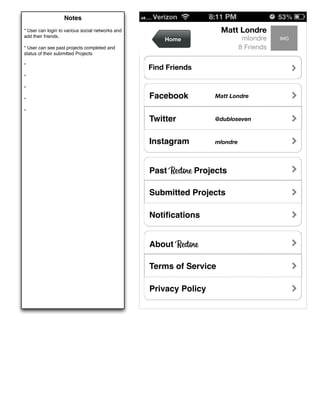
* User can login to various social networks and                      Matt Londre
add their friends.
                                                      Home                    mlondre    IMG
* User can see past projects completed and                                   8 Friends
status of their submitted Projects

*
                                                  Find Friends
*

*

*
                                                  Facebook         Matt Londre

*
                                                  Twitter          @dubloseven


                                                  Instagram        mlondre


                                                  Past Restore Projects

                                                  Submitted Projects

                                                  Notifications


                                                  About Restore

                                                  Terms of Service

                                                  Privacy Policy

Restore Prototype

  • 1.
    Notes * Simple Restore Made for Silicon Valley and other local communities everywhere! Stanford E145
  • 2.
    Notes * App takesyou right into the map, skipping the standard signing screen per Apple's design List Profile guidelines. * Adopted Instagram-style pictures on map with icon overlay. * No signup needed until user goes to "Profile" or volunteers while looking at a specific project * "Add a Need" is where user takes a picture and geotags it to the map, along with adding a few specifics of what the need/project is. * * * Welcome to Restore Add a Need
  • 3.
    Notes * When addinga need, user takes a picture of it Home * picture screen includes the photo and small map of the current location * * * Welcome to Restore
  • 4.
    Notes * After takinga picture, the user can add some additional information Home * * * * Welcome to Restore House Exterior Graffiti Helping Students Expected Hours 4.0 Material Needed Trimmers, rake, mower Add the Need
  • 5.
    Notes * App takesyou right into the map, skipping the standard signing screen per Apple's design List Profile guidelines. * Adopted Instagram-style pictures on map with icon overlay. * No signup needed until user goes to "Profile" or volunteers while looking at a specific project * "Add a Need" is where user takes a picture and geotags it to the map, along with adding a few specifics of what the need/project is. * * * Welcome to Restore Add a Need
  • 6.
    Notes * After zoominginto community and clicking on a project's picture, app flows to this screen. Back * Larger picture of need with smaller (actionable) map on right side. * Below picture and map are a few further descriptions of the project. * User can volunteer on the bottom of the screen using the "Volunteer" button. * * * Need: Graffiti Clean Up Estimated Hours: 2 Materials: Paint, Roller Brushes, Good Attitude! Restore
  • 7.
    Notes * If userhasn't signed up yet, when user clicks "Volunteer", the option to sign up pops up. Back * User can sign in with Facebook OAuth or Email Address. * Sign up to Restore with * * Facebook Need: Graffiti Clean Up Estimated Hours:Email 2 address Materials: Paint, Roller Brushes, Good Attitude! Volunteer
  • 8.
    Notes * User isrequired to confirm they want to volunteer with the project one time. Back * * Thanks for volunteering! Your community can't wait for you to make a difference! Confirm you will Restore this area below. Confirm
  • 9.
    Notes * After confirming,user can share on Facebook (or their desired social network) that Home they have volunteered. * Eventually they will be able to recruit friends to help them and schedule a time that works for their group. * Thank you for Restoring your community Share on Facebook
  • 10.
    Notes * User canlogin to various social networks and Matt Londre add their friends. Home mlondre IMG * User can see past projects completed and 8 Friends status of their submitted Projects * Find Friends * * * Facebook Matt Londre * Twitter @dubloseven Instagram mlondre Past Restore Projects Submitted Projects Notifications About Restore Terms of Service Privacy Policy