2013 Winter Conference | Dallas, TX


Seminar 59 - New Mobile Applications for
HVAC Field Work and Building Retrofits

       Discussion of Mobile Apps for
         Building Energy Retrofits

                                 January 30, 2013


                               Richard Szydlowski
                  Director of Engineering and Business Development
                        Center for Energy and Environment
                           212 3rd Avenue North, Suite 560
                           Minneapolis, Minnesota 55401
        Work: 612.335.5862   Mobile: 612.747.6726   email: rszydlowski@mncee.org
Learning Objectives
•   Define what types of mobile apps exist for HVAC field work.
•   Explain the advantages of using these types of applications out in the field
    versus at the office.
•   Explain the key features of mobile applications that collect field data on building
    structures.
•   Explain how one company is using a governmental-developed application
    programming interface (API) to easily develop mobile tools for energy
    audits.
•   Explain why is there a need for standardized data from field surveys of building
    assets.
•   Explain some of the caveats of using mobile applications.

    ASHRAE is a Registered Provider with The American Institute of Architects Continuing Education Systems.
    Credit earned on completion of this program will be reported to ASHRAE Records for AIA members. Certificates
    of Completion for non-AIA members are available on request.

    This program is registered with the AIA/ASHRAE for continuing professional education. As such, it does not
    include content that may be deemed or construed to be an approval or endorsement by the AIA of any
    material of construction or any method or manner of handling, using, distributing, or dealing in any material or
    product. Questions related to specific materials, methods, and services will be addressed at the conclusion of
    this presentation.
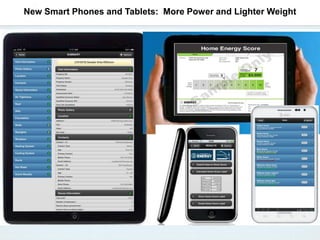
New Smart Phones and Tablets: More Power and Lighter Weight
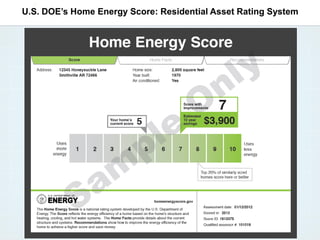
U.S. DOE’s Home Energy Score: Residential Asset Rating System
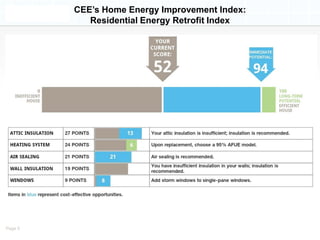
CEE’s Home Energy Improvement Index:
            Residential Energy Retrofit Index


Page 5
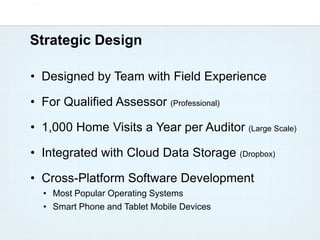
Strategic Design

• Designed by Team with Field Experience

• For Qualified Assessor (Professional)

• 1,000 Home Visits a Year per Auditor (Large Scale)

• Integrated with Cloud Data Storage (Dropbox)

• Cross-Platform Software Development
  • Most Popular Operating Systems
  • Smart Phone and Tablet Mobile Devices
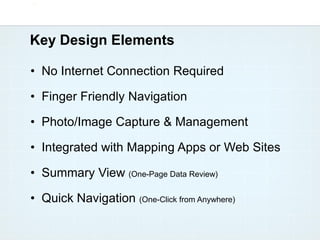
Key Design Elements

• No Internet Connection Required

• Finger Friendly Navigation

• Photo/Image Capture & Management

• Integrated with Mapping Apps or Web Sites

• Summary View (One-Page Data Review)

• Quick Navigation (One-Click from Anywhere)
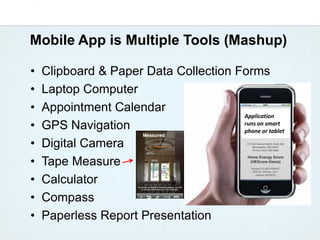
Mobile App is Multiple Tools (Mashup)

•   Clipboard & Paper Data Collection Forms
•   Laptop Computer
•   Appointment Calendar
                                       Application
•   GPS Navigation                     runs on smart
                                       phone or tablet

•   Digital Camera
•   Tape Measure
•   Calculator
•   Compass
•   Paperless Report Presentation
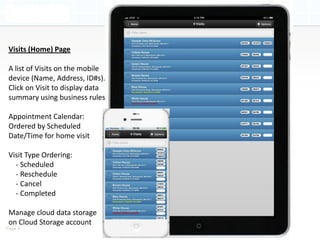
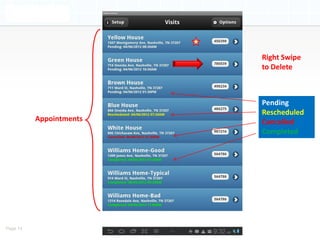
Visits (Home) Page

 A list of Visits on the mobile
 device (Name, Address, ID#s).
 Click on Visit to display data
 summary using business rules

 Appointment Calendar:
 Ordered by Scheduled
 Date/Time for home visit

 Visit Type Ordering:
   - Scheduled
   - Reschedule
   - Cancel
   - Completed

 Manage cloud data storage
 on Cloud Storage account
Page 9
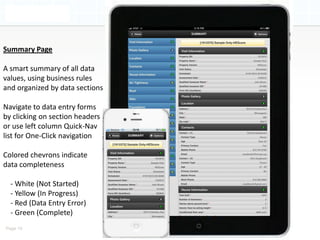
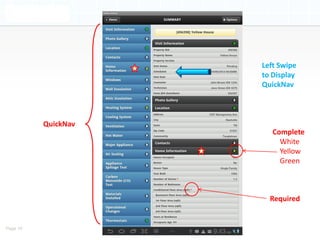
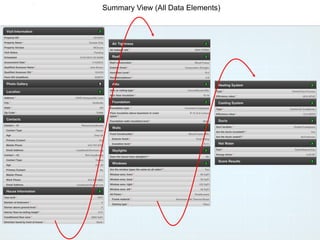
Summary Page

A smart summary of all data
values, using business rules
and organized by data sections

Navigate to data entry forms
by clicking on section headers
or use left column Quick-Nav
list for One-Click navigation

Colored chevrons indicate
data completeness

  - White (Not Started)
  - Yellow (In Progress)
  - Red (Data Entry Error)
  - Green (Complete)
Page 10
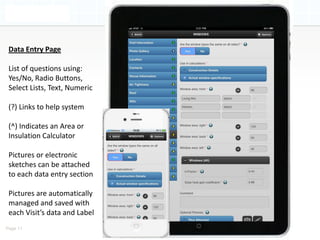
Data Entry Page

 List of questions using:
 Yes/No, Radio Buttons,
 Select Lists, Text, Numeric

 (?) Links to help system

 (^) Indicates an Area or
 Insulation Calculator

 Pictures or electronic
 sketches can be attached
 to each data entry section

 Pictures are automatically
 managed and saved with
 each Visit’s data and Label
Page 11
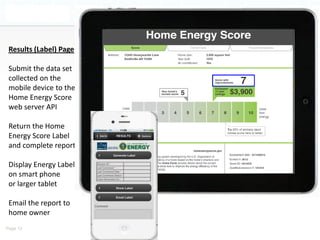
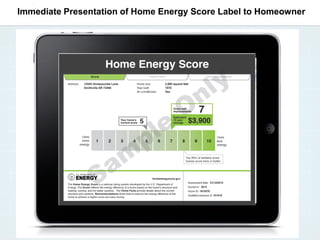
Results (Label) Page

 Submit the data set
 collected on the
 mobile device to the
 Home Energy Score
 web server API

 Return the Home
 Energy Score Label
 and complete report

 Display Energy Label
 on smart phone
 or larger tablet

 Email the report to
 home owner
Page 12
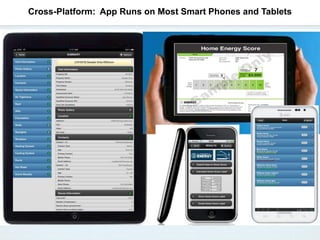
Cross-Platform: App Runs on Most Smart Phones and Tablets
Right Swipe
                         to Delete


                         Pending
                         Rescheduled
          Appointments   Cancelled
                         Completed


Page 14
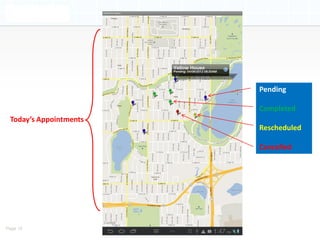
Pending

                        Completed
 Today’s Appointments
                        Rescheduled

                        Cancelled


Page 15
Left Swipe
                     to Display
                     QuickNav


          QuickNav
                        Complete
                          White
                          Yellow
                          Green


                       Required


Page 16
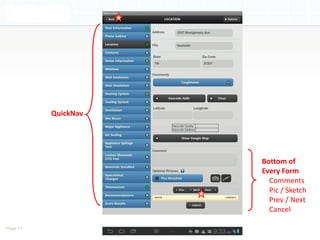
QuickNav


                     Bottom of
                     Every Form
                       Comments
                       Pic / Sketch
                       Prev / Next
                       Cancel

Page 17
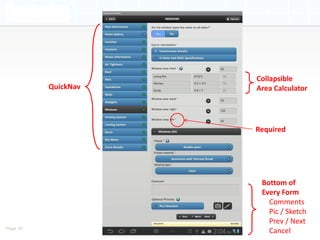
Collapsible
          QuickNav   Area Calculator


                     Required


                      Bottom of
                      Every Form
                        Comments
                        Pic / Sketch
                        Prev / Next
Page 18
                        Cancel
Summary View (All Data Elements)
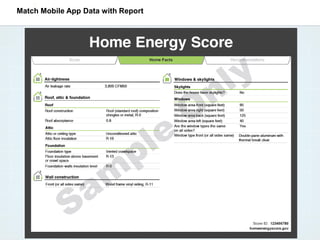
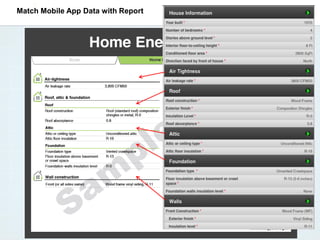
Match Mobile App Data with Report
Immediate Presentation of Home Energy Score Label to Homeowner
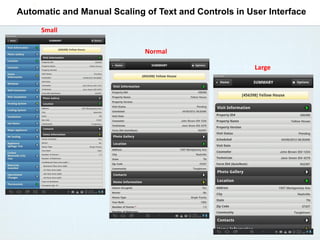
Automatic and Manual Scaling of Text and Controls in User Interface
     Small


                             Normal

                                                       Large
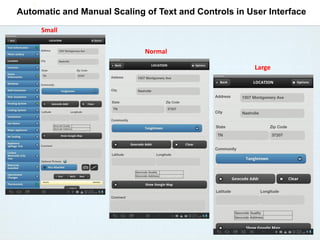
Automatic and Manual Scaling of Text and Controls in User Interface
     Small


                             Normal

                                                       Large
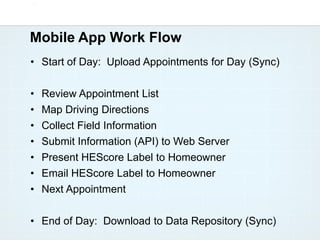
Mobile App Work Flow
• Start of Day: Upload Appointments for Day (Sync)

•   Review Appointment List
•   Map Driving Directions
•   Collect Field Information
•   Submit Information (API) to Web Server
•   Present HEScore Label to Homeowner
•   Email HEScore Label to Homeowner
•   Next Appointment

• End of Day: Download to Data Repository (Sync)
Questions?

 Richard Szydlowski
  rszydlowski@mncee.org

Discussion of Mobile Apps for Building Energy Retrofits

  • 1.
    2013 Winter Conference| Dallas, TX Seminar 59 - New Mobile Applications for HVAC Field Work and Building Retrofits Discussion of Mobile Apps for Building Energy Retrofits January 30, 2013 Richard Szydlowski Director of Engineering and Business Development Center for Energy and Environment 212 3rd Avenue North, Suite 560 Minneapolis, Minnesota 55401 Work: 612.335.5862 Mobile: 612.747.6726 email: rszydlowski@mncee.org
  • 2.
    Learning Objectives • Define what types of mobile apps exist for HVAC field work. • Explain the advantages of using these types of applications out in the field versus at the office. • Explain the key features of mobile applications that collect field data on building structures. • Explain how one company is using a governmental-developed application programming interface (API) to easily develop mobile tools for energy audits. • Explain why is there a need for standardized data from field surveys of building assets. • Explain some of the caveats of using mobile applications. ASHRAE is a Registered Provider with The American Institute of Architects Continuing Education Systems. Credit earned on completion of this program will be reported to ASHRAE Records for AIA members. Certificates of Completion for non-AIA members are available on request. This program is registered with the AIA/ASHRAE for continuing professional education. As such, it does not include content that may be deemed or construed to be an approval or endorsement by the AIA of any material of construction or any method or manner of handling, using, distributing, or dealing in any material or product. Questions related to specific materials, methods, and services will be addressed at the conclusion of this presentation.
  • 3.
    New Smart Phonesand Tablets: More Power and Lighter Weight
  • 4.
    U.S. DOE’s HomeEnergy Score: Residential Asset Rating System
  • 5.
    CEE’s Home EnergyImprovement Index: Residential Energy Retrofit Index Page 5
  • 6.
    Strategic Design • Designedby Team with Field Experience • For Qualified Assessor (Professional) • 1,000 Home Visits a Year per Auditor (Large Scale) • Integrated with Cloud Data Storage (Dropbox) • Cross-Platform Software Development • Most Popular Operating Systems • Smart Phone and Tablet Mobile Devices
  • 7.
    Key Design Elements •No Internet Connection Required • Finger Friendly Navigation • Photo/Image Capture & Management • Integrated with Mapping Apps or Web Sites • Summary View (One-Page Data Review) • Quick Navigation (One-Click from Anywhere)
  • 8.
    Mobile App isMultiple Tools (Mashup) • Clipboard & Paper Data Collection Forms • Laptop Computer • Appointment Calendar Application • GPS Navigation runs on smart phone or tablet • Digital Camera • Tape Measure • Calculator • Compass • Paperless Report Presentation
  • 9.
    Visits (Home) Page A list of Visits on the mobile device (Name, Address, ID#s). Click on Visit to display data summary using business rules Appointment Calendar: Ordered by Scheduled Date/Time for home visit Visit Type Ordering: - Scheduled - Reschedule - Cancel - Completed Manage cloud data storage on Cloud Storage account Page 9
  • 10.
    Summary Page A smartsummary of all data values, using business rules and organized by data sections Navigate to data entry forms by clicking on section headers or use left column Quick-Nav list for One-Click navigation Colored chevrons indicate data completeness - White (Not Started) - Yellow (In Progress) - Red (Data Entry Error) - Green (Complete) Page 10
  • 11.
    Data Entry Page List of questions using: Yes/No, Radio Buttons, Select Lists, Text, Numeric (?) Links to help system (^) Indicates an Area or Insulation Calculator Pictures or electronic sketches can be attached to each data entry section Pictures are automatically managed and saved with each Visit’s data and Label Page 11
  • 12.
    Results (Label) Page Submit the data set collected on the mobile device to the Home Energy Score web server API Return the Home Energy Score Label and complete report Display Energy Label on smart phone or larger tablet Email the report to home owner Page 12
  • 13.
    Cross-Platform: App Runson Most Smart Phones and Tablets
  • 14.
    Right Swipe to Delete Pending Rescheduled Appointments Cancelled Completed Page 14
  • 15.
    Pending Completed Today’s Appointments Rescheduled Cancelled Page 15
  • 16.
    Left Swipe to Display QuickNav QuickNav Complete White Yellow Green Required Page 16
  • 17.
    QuickNav Bottom of Every Form Comments Pic / Sketch Prev / Next Cancel Page 17
  • 18.
    Collapsible QuickNav Area Calculator Required Bottom of Every Form Comments Pic / Sketch Prev / Next Page 18 Cancel
  • 19.
    Summary View (AllData Elements)
  • 20.
    Match Mobile AppData with Report
  • 21.
    Match Mobile AppData with Report
  • 22.
    Immediate Presentation ofHome Energy Score Label to Homeowner
  • 23.
    Automatic and ManualScaling of Text and Controls in User Interface Small Normal Large
  • 24.
    Automatic and ManualScaling of Text and Controls in User Interface Small Normal Large
  • 25.
    Mobile App WorkFlow • Start of Day: Upload Appointments for Day (Sync) • Review Appointment List • Map Driving Directions • Collect Field Information • Submit Information (API) to Web Server • Present HEScore Label to Homeowner • Email HEScore Label to Homeowner • Next Appointment • End of Day: Download to Data Repository (Sync)
  • 26.
    Questions? Richard Szydlowski rszydlowski@mncee.org