RESTGIST
User Guide
1
RestGist
(Restaurant Management System)
RESTGIST
User Guide
2
Welcome
Welcome to RestGist!
RestGist is a Restaurant Back Office ERP suite an ideal software solution for
Hospitality Industry that can be used at restaurants. RestGist is Asp.Net based ERP
for managing complete operations of Restaurants thru online/ offline.
The most time consuming and tedious job is to take orders with paper pan, it takes
so much of your captions time, with RestGist, you do not have to worry about
taking orders. Your Captions will be loaded with the Tabs, and the moment they
place order, at the same time the KOT will automatically be printed in your kitchen
with details of order, time, No of Pax, Priority, and also with the notification of
packing, take away or home delivery. Once the order is ready in Kitchen, it will also
notify the caption, as a notification message on tab that the order of table no. N is
ready.
RestGist saves your tons of time, resources and it makes the system more reliable,
Fast and error free. RestGist has following core features:
INVENTORY MANAGEMENT
RestGist has an awesome feature of auto inventory. It Manages inventory levels on
a daily or weekly basis can reduce food costs up to 15% or more by curbing waste
and eliminating theft. So RestGist is there to removing the Loopholes in your
Restaurant / Cafe
POINT OF SALE REPORTING
Reports like VAT wise report, Item wise report, Pax wise, Discount Report,
Department wise report, table turns, and cost of sales by menu item, variance and
more can increase profitability by thousands of rupees per month.
MULTIPLE TERMINALS AT A TIME
The RestGist can be run by multiple terminals at a time so at the time of heavy load,
Weekends, Festive Seasons, you can manage the billing by multiple counters. It not
only decreases the response time but also it allows you to manage the other
important tasks.
TABLE MANAGEMENT
Now, you can Manage your all the tables by assigning them on the daily/ weekly or
monthly basis to your captions. It has tons of reports for the tables, waiters and
captions for the billing.
RESTGIST
User Guide
3
PARTY BOOKINGS
To book a party / Banquet hall was never so easy. With RestGist, you can book
Party, Plan the Menu, calculate the per plate amount, do add-ons, and billing as per
the menu. A complete reporting will also be there with the party booking.
FEEDBACK SYSTEM
Customer Feedback is very important tool for growing business as well as to
improve the product, service and all other areas of your business With RestGist, you
can take customer feedback by Tabs, or by feedback form and later you can feed
them in the system.
CUSTOMER RELATIONSHIP
With RestGist, you can manage all the Important Dates of your guests like Date of
Birth, Date of Anniversary so that you can wish them. You can manage the no of
visits of guest so that you can give them loyalty discounts and tons of other
features.
KITCHEN DISPLAY SYSTEM
Send orders automatically to the kitchen with KDS Module which gives the Kitchen
staff real time information of all the orders taking-place. This is not only improves
the communication between the front staff and the kitchen staff but also reduce
errors and speed up serving time.
EMAIL AND SMS NOTIFICATION
You can also send Bill on mail or SMS, also promotional SMS, Discounts and other
informational SMS on various dates so that your guests will be connected with you.
RESTGIST
User Guide
4
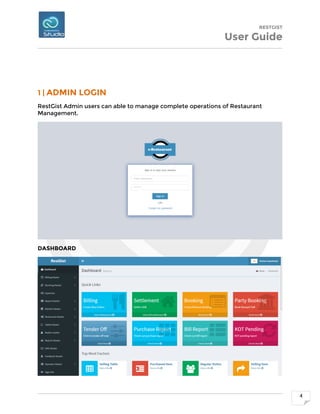
1 | ADMIN LOGIN
RestGist Admin users can able to manage complete operations of Restaurant
Management.
DASHBOARD
RESTGIST
User Guide
5
RESTGIST
User Guide
6
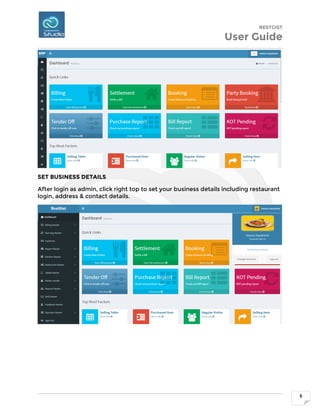
SET BUSINESS DETAILS
After login as admin, click right top to set your business details including restaurant
login, address & contact details.
RESTGIST
User Guide
7
BILLING MASTER
Billing master is a one of the core module to manage customers billing, settlement,
advance booking and party booking etc.
RESTGIST
User Guide
8
This is billing window to select table and add items and making order. The numbers
1, 2, 3 represented restaurants’ table no. As red color marked tables are in process
and waiting for billing.
So, we have to select table first to make order. In the left pane you will click to see
items of the category, also you can type item no in order to search the items.
RESTGIST
User Guide
9
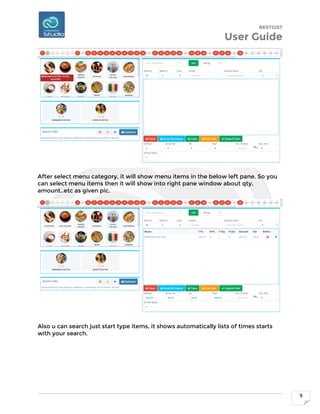
After select menu category, it will show menu items in the below left pane. So you
can select menu items then it will show into right pane window about qty,
amount..etc as given pic.
Also u can search just start type items, it shows automatically lists of times starts
with your search.
RESTGIST
User Guide
10
You can also use items no, like 78 as below screenshot. Just type item no then add
it will listed in the order.
RESTGIST
User Guide
11
After selected items, please generate token before print order.
RESTGIST
User Guide
12
After token has been created for the bill, click ‘Print Order’ button to generate bill
and take printing.
DISPATCH ORDER
After print bill, please click ‘Dispatch Order’ button to pay.
RESTGIST
User Guide
13
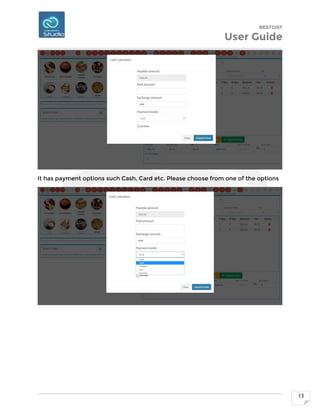
It has payment options such Cash, Card etc. Please choose from one of the options
RESTGIST
User Guide
14
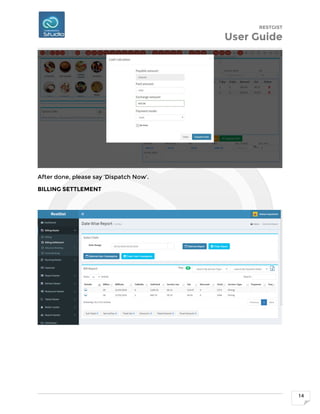
After done, please say ‘Dispatch Now’.
BILLING SETTLEMENT
RESTGIST
User Guide
15
ADVANCE BOOKING
PART BOOKING
RESTGIST
User Guide
16
RUNNING MASTER
Running master manages pending orders and auto print of Kitchen Order Items
(KOT).
RESTGIST
User Guide
17
EXPENSES
Manage company expenses & reports.
RESTGIST
User Guide
18
REPORT MASTER
Report Master has billing reports, expenses, tender off report, Kitchen reports, KOT
report, stock purchase report, Ingredient report, feedback report and etc.
RESTGIST
User Guide
19
RESTGIST
User Guide
20
KITCHEN MASTER
Kitchen master manages vendor details, kitchen items, purchase master, create
ingredients, direct consumption, inventory etc.
RESTGIST
User Guide
21
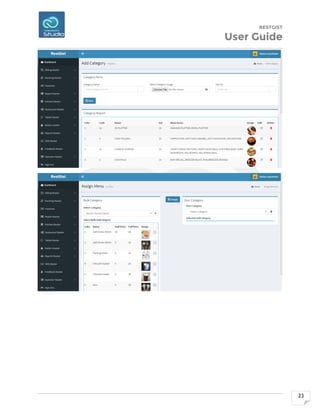
RESTAURANT MASTER
RESTGIST
User Guide
22
RESTGIST
User Guide
23
RESTGIST
User Guide
24
TABLE MASTER
RESTGIST
User Guide
25
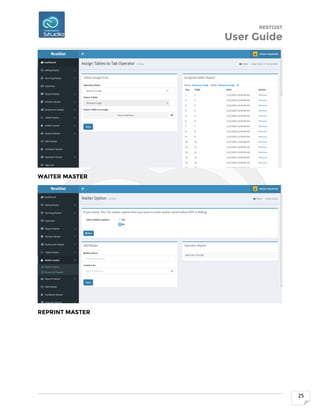
WAITER MASTER
REPRINT MASTER
RESTGIST
User Guide
26
SMS MASTER
RESTGIST
User Guide
27
FEEDBACK MASTER
RESTGIST
User Guide
28
OPERATOR MASTER
RESTGIST
User Guide
29
Contact
More details about RestGist or live demo, please contact us.
Coderobotics Studio.,
I Main Road, Officers Colony,
Adambakkam,
Chennai 600088,
Tamil Nadu, INDIA.
E-mail: sasi@coderobotics.com
Mobile: (91)-99403-67824, (91)-85250 85119
WhatsApp: (91)-99403-67824
Website: www.coderobotics.com

RestGist

  • 1.
  • 2.
    RESTGIST User Guide 2 Welcome Welcome toRestGist! RestGist is a Restaurant Back Office ERP suite an ideal software solution for Hospitality Industry that can be used at restaurants. RestGist is Asp.Net based ERP for managing complete operations of Restaurants thru online/ offline. The most time consuming and tedious job is to take orders with paper pan, it takes so much of your captions time, with RestGist, you do not have to worry about taking orders. Your Captions will be loaded with the Tabs, and the moment they place order, at the same time the KOT will automatically be printed in your kitchen with details of order, time, No of Pax, Priority, and also with the notification of packing, take away or home delivery. Once the order is ready in Kitchen, it will also notify the caption, as a notification message on tab that the order of table no. N is ready. RestGist saves your tons of time, resources and it makes the system more reliable, Fast and error free. RestGist has following core features: INVENTORY MANAGEMENT RestGist has an awesome feature of auto inventory. It Manages inventory levels on a daily or weekly basis can reduce food costs up to 15% or more by curbing waste and eliminating theft. So RestGist is there to removing the Loopholes in your Restaurant / Cafe POINT OF SALE REPORTING Reports like VAT wise report, Item wise report, Pax wise, Discount Report, Department wise report, table turns, and cost of sales by menu item, variance and more can increase profitability by thousands of rupees per month. MULTIPLE TERMINALS AT A TIME The RestGist can be run by multiple terminals at a time so at the time of heavy load, Weekends, Festive Seasons, you can manage the billing by multiple counters. It not only decreases the response time but also it allows you to manage the other important tasks. TABLE MANAGEMENT Now, you can Manage your all the tables by assigning them on the daily/ weekly or monthly basis to your captions. It has tons of reports for the tables, waiters and captions for the billing.
  • 3.
    RESTGIST User Guide 3 PARTY BOOKINGS Tobook a party / Banquet hall was never so easy. With RestGist, you can book Party, Plan the Menu, calculate the per plate amount, do add-ons, and billing as per the menu. A complete reporting will also be there with the party booking. FEEDBACK SYSTEM Customer Feedback is very important tool for growing business as well as to improve the product, service and all other areas of your business With RestGist, you can take customer feedback by Tabs, or by feedback form and later you can feed them in the system. CUSTOMER RELATIONSHIP With RestGist, you can manage all the Important Dates of your guests like Date of Birth, Date of Anniversary so that you can wish them. You can manage the no of visits of guest so that you can give them loyalty discounts and tons of other features. KITCHEN DISPLAY SYSTEM Send orders automatically to the kitchen with KDS Module which gives the Kitchen staff real time information of all the orders taking-place. This is not only improves the communication between the front staff and the kitchen staff but also reduce errors and speed up serving time. EMAIL AND SMS NOTIFICATION You can also send Bill on mail or SMS, also promotional SMS, Discounts and other informational SMS on various dates so that your guests will be connected with you.
  • 4.
    RESTGIST User Guide 4 1 |ADMIN LOGIN RestGist Admin users can able to manage complete operations of Restaurant Management. DASHBOARD
  • 5.
  • 6.
    RESTGIST User Guide 6 SET BUSINESSDETAILS After login as admin, click right top to set your business details including restaurant login, address & contact details.
  • 7.
    RESTGIST User Guide 7 BILLING MASTER Billingmaster is a one of the core module to manage customers billing, settlement, advance booking and party booking etc.
  • 8.
    RESTGIST User Guide 8 This isbilling window to select table and add items and making order. The numbers 1, 2, 3 represented restaurants’ table no. As red color marked tables are in process and waiting for billing. So, we have to select table first to make order. In the left pane you will click to see items of the category, also you can type item no in order to search the items.
  • 9.
    RESTGIST User Guide 9 After selectmenu category, it will show menu items in the below left pane. So you can select menu items then it will show into right pane window about qty, amount..etc as given pic. Also u can search just start type items, it shows automatically lists of times starts with your search.
  • 10.
    RESTGIST User Guide 10 You canalso use items no, like 78 as below screenshot. Just type item no then add it will listed in the order.
  • 11.
    RESTGIST User Guide 11 After selecteditems, please generate token before print order.
  • 12.
    RESTGIST User Guide 12 After tokenhas been created for the bill, click ‘Print Order’ button to generate bill and take printing. DISPATCH ORDER After print bill, please click ‘Dispatch Order’ button to pay.
  • 13.
    RESTGIST User Guide 13 It haspayment options such Cash, Card etc. Please choose from one of the options
  • 14.
    RESTGIST User Guide 14 After done,please say ‘Dispatch Now’. BILLING SETTLEMENT
  • 15.
  • 16.
    RESTGIST User Guide 16 RUNNING MASTER Runningmaster manages pending orders and auto print of Kitchen Order Items (KOT).
  • 17.
  • 18.
    RESTGIST User Guide 18 REPORT MASTER ReportMaster has billing reports, expenses, tender off report, Kitchen reports, KOT report, stock purchase report, Ingredient report, feedback report and etc.
  • 19.
  • 20.
    RESTGIST User Guide 20 KITCHEN MASTER Kitchenmaster manages vendor details, kitchen items, purchase master, create ingredients, direct consumption, inventory etc.
  • 21.
  • 22.
  • 23.
  • 24.
  • 25.
  • 26.
  • 27.
  • 28.
  • 29.
    RESTGIST User Guide 29 Contact More detailsabout RestGist or live demo, please contact us. Coderobotics Studio., I Main Road, Officers Colony, Adambakkam, Chennai 600088, Tamil Nadu, INDIA. E-mail: sasi@coderobotics.com Mobile: (91)-99403-67824, (91)-85250 85119 WhatsApp: (91)-99403-67824 Website: www.coderobotics.com