@sayanee_
RESPONSIVE WEB DESIGN
      codes + slides
RESPONSIVE WEB DESIGN
adaptive   fluid   flexible   flowing
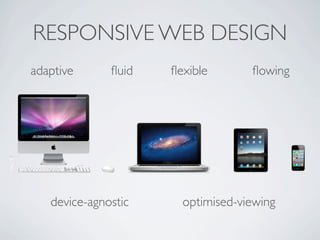
RESPONSIVE WEB DESIGN
adaptive      fluid   flexible       flowing


   device-agnostic     optimised-viewing
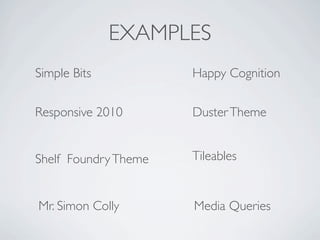
EXAMPLES
Simple Bits           Happy Cognition

Responsive 2010       Duster Theme


Shelf Foundry Theme   Tileables


Mr. Simon Colly       Media Queries
TOOLS
TOOLS
Browser
TOOLS
Browser

Text Editor
TOOLS
Browser

Text Editor

Simulator
TOOLS
Browser

Text Editor

Simulator
TOOLS
Browser

Text Editor

Simulator

Coding
#1    fluid layout

#2    media queries

#3    flexible media
#1   fluid layout
1280px
         #1   fluid layout
1280px
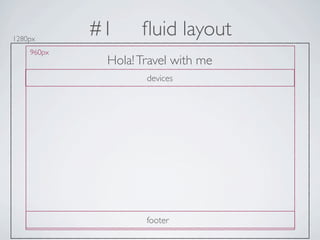
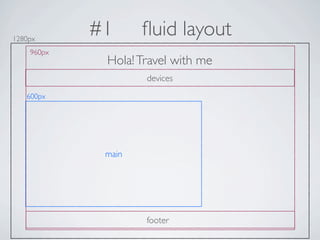
            #1     fluid layout
    960px
             Hola! Travel with me
                    devices


                    footer
1280px
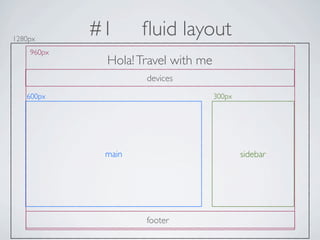
            #1      fluid layout
    960px
             Hola! Travel with me
                    devices
   600px


             main


                    footer
1280px
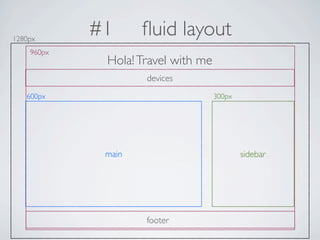
            #1      fluid layout
    960px
             Hola! Travel with me
                    devices
   600px                            300px


             main                           sidebar


                    footer
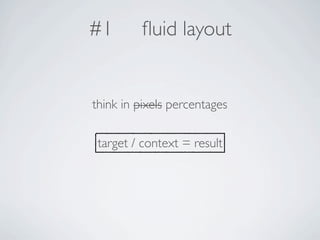
#1       fluid layout


think in pixels percentages

 target / context = result
1280px
            #1      fluid layout
    960px
             Hola! Travel with me
                    devices
   600px                            300px


             main                           sidebar


                    footer
1280px
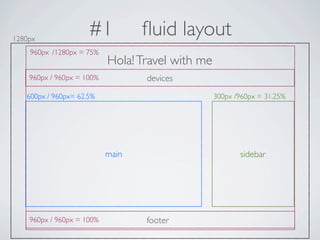
                     #1           fluid layout
    960px /1280px = 75%
                           Hola! Travel with me
    960px / 960px = 100%          devices
   600px / 960px= 62.5%                           300px /960px = 31.25%


                           main                          sidebar


    960px / 960px = 100%          footer
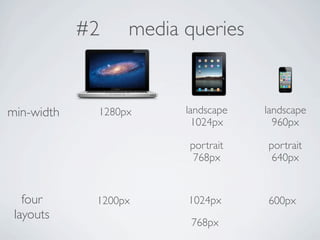
#2    media queries


min-width    1280px     landscape   landscape
                          1024px      960px

                        portrait    portrait
                         768px       640px


   four      1200px     1024px      600px
 layouts
                         768px
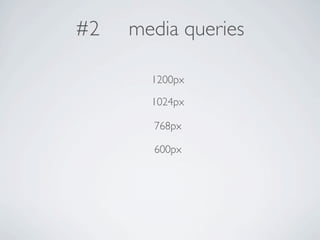
#2   media queries

       1200px

       1024px

       768px

       600px
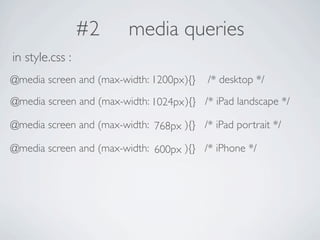
#2      media queries
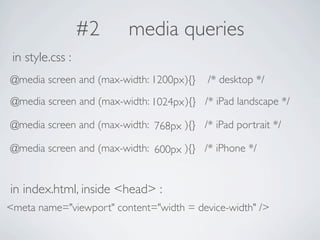
in style.css :
@media screen and (max-width: 1200px ){}   /* desktop */
@media screen and (max-width: 1024px ){} /* iPad landscape */

@media screen and (max-width: 768px ){} /* iPad portrait */

@media screen and (max-width: 600px ){} /* iPhone */
#2     media queries
 in style.css :
@media screen and (max-width: 1200px ){}   /* desktop */
@media screen and (max-width: 1024px ){} /* iPad landscape */

@media screen and (max-width: 768px ){} /* iPad portrait */

@media screen and (max-width: 600px ){} /* iPhone */


in index.html, inside <head> :
<meta name="viewport" content="width = device-width" />
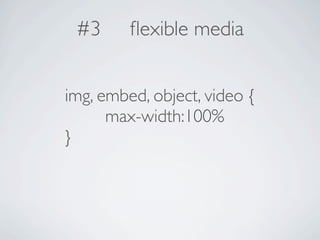
#3      flexible media


img, embed, object, video {
      max-width:100%
}
#3      flexible media


flexible heading using fittext.js
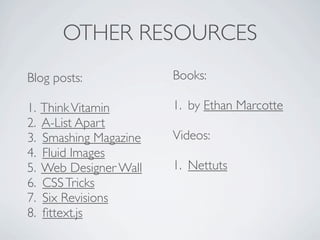
OTHER RESOURCES
Blog posts:              Books:

1.   Think Vitamin       1. by Ethan Marcotte
2.   A-List Apart
3.   Smashing Magazine   Videos:
4.   Fluid Images
5.   Web Designer Wall   1. Nettuts
6.   CSS Tricks
7.   Six Revisions
8.   fittext.js
codes + slides
@sayanee_

Responsive Web Design

  • 1.
  • 2.
    RESPONSIVE WEB DESIGN codes + slides
  • 3.
  • 4.
    RESPONSIVE WEB DESIGN adaptive fluid flexible flowing
  • 5.
    RESPONSIVE WEB DESIGN adaptive fluid flexible flowing device-agnostic optimised-viewing
  • 6.
    EXAMPLES Simple Bits Happy Cognition Responsive 2010 Duster Theme Shelf Foundry Theme Tileables Mr. Simon Colly Media Queries
  • 7.
  • 8.
  • 9.
  • 10.
  • 11.
  • 12.
  • 13.
    #1 fluid layout #2 media queries #3 flexible media
  • 14.
    #1 fluid layout
  • 15.
    1280px #1 fluid layout
  • 16.
    1280px #1 fluid layout 960px Hola! Travel with me devices footer
  • 17.
    1280px #1 fluid layout 960px Hola! Travel with me devices 600px main footer
  • 18.
    1280px #1 fluid layout 960px Hola! Travel with me devices 600px 300px main sidebar footer
  • 19.
    #1 fluid layout think in pixels percentages target / context = result
  • 20.
    1280px #1 fluid layout 960px Hola! Travel with me devices 600px 300px main sidebar footer
  • 21.
    1280px #1 fluid layout 960px /1280px = 75% Hola! Travel with me 960px / 960px = 100% devices 600px / 960px= 62.5% 300px /960px = 31.25% main sidebar 960px / 960px = 100% footer
  • 22.
    #2 media queries min-width 1280px landscape landscape 1024px 960px portrait portrait 768px 640px four 1200px 1024px 600px layouts 768px
  • 23.
    #2 media queries 1200px 1024px 768px 600px
  • 24.
    #2 media queries in style.css : @media screen and (max-width: 1200px ){} /* desktop */ @media screen and (max-width: 1024px ){} /* iPad landscape */ @media screen and (max-width: 768px ){} /* iPad portrait */ @media screen and (max-width: 600px ){} /* iPhone */
  • 25.
    #2 media queries in style.css : @media screen and (max-width: 1200px ){} /* desktop */ @media screen and (max-width: 1024px ){} /* iPad landscape */ @media screen and (max-width: 768px ){} /* iPad portrait */ @media screen and (max-width: 600px ){} /* iPhone */ in index.html, inside <head> : <meta name="viewport" content="width = device-width" />
  • 26.
    #3 flexible media img, embed, object, video { max-width:100% }
  • 27.
    #3 flexible media flexible heading using fittext.js
  • 28.
    OTHER RESOURCES Blog posts: Books: 1. Think Vitamin 1. by Ethan Marcotte 2. A-List Apart 3. Smashing Magazine Videos: 4. Fluid Images 5. Web Designer Wall 1. Nettuts 6. CSS Tricks 7. Six Revisions 8. fittext.js
  • 29.
  • 30.

Editor's Notes

  • #2 open examples sites &amp; flickr.com in safari, \nopen codes in github (chrome), working site &amp; fittextjs.com\nopen totalterminal for cal, \nopen codes in textmate, \n
  • #3 \n
  • #4 ask who is using which device\n
  • #5 ask who is using which device\n
  • #6 ask who is using which device\n
  • #7 ask who is using which device\n
  • #8 ask who is using which device\n
  • #9 ask who is using which device\n
  • #10 ask who is using which device\n
  • #11 ask who is using which device\n
  • #12 ask who is using which device\n
  • #13 ask who is using which device\n
  • #14 open them in safari\n
  • #15 ask which text editor they use\nask who knows html/css/javascript - ask them to stop me!\n
  • #16 ask which text editor they use\nask who knows html/css/javascript - ask them to stop me!\n
  • #17 ask which text editor they use\nask who knows html/css/javascript - ask them to stop me!\n
  • #18 ask which text editor they use\nask who knows html/css/javascript - ask them to stop me!\n
  • #19 ask which text editor they use\nask who knows html/css/javascript - ask them to stop me!\n
  • #20 ask which text editor they use\nask who knows html/css/javascript - ask them to stop me!\n
  • #21 ask which text editor they use\nask who knows html/css/javascript - ask them to stop me!\n
  • #22 ask which text editor they use\nask who knows html/css/javascript - ask them to stop me!\n
  • #23 ask which text editor they use\nask who knows html/css/javascript - ask them to stop me!\n
  • #24 ask which text editor they use\nask who knows html/css/javascript - ask them to stop me!\n
  • #25 ask which text editor they use\nask who knows html/css/javascript - ask them to stop me!\n
  • #26 ask which text editor they use\nask who knows html/css/javascript - ask them to stop me!\n
  • #27 ask which text editor they use\nask who knows html/css/javascript - ask them to stop me!\n
  • #28 ask which text editor they use\nask who knows html/css/javascript - ask them to stop me!\n
  • #29 ask which text editor they use\nask who knows html/css/javascript - ask them to stop me!\n
  • #30 ask which text editor they use\nask who knows html/css/javascript - ask them to stop me!\n
  • #31 ask which text editor they use\nask who knows html/css/javascript - ask them to stop me!\n
  • #32 \n
  • #33 \n
  • #34 \n
  • #35 \n
  • #36 \n
  • #37 \n
  • #38 \n
  • #39 \n
  • #40 \n
  • #41 \n
  • #42 \n
  • #43 \n
  • #44 \n
  • #45 \n
  • #46 \n
  • #47 \n
  • #48 go on to edit the css\n
  • #49 revise the percentage number\n
  • #50 revise the percentage number\n
  • #51 revise the percentage number\n
  • #52 revise the percentage number\n
  • #53 revise the percentage number\n
  • #54 \n
  • #55 go on to edit the css FIRST\n\ngo on to edit the html FIRST\n
  • #56 go on to edit the css FIRST\n\ngo on to edit the html FIRST\n
  • #57 go on to edit the css FIRST\n\ngo on to edit the html FIRST\n
  • #58 go on to edit the css FIRST\n\ngo on to edit the html FIRST\n
  • #59 go on to edit the css FIRST\n\ngo on to edit the html FIRST\n
  • #60 go on to edit the css FIRST\n\ngo on to edit the html FIRST\n
  • #61 go on to edit the css FIRST\n\ngo on to edit the html FIRST\n
  • #62 \n
  • #63 \n
  • #64 open Ethan Marcotte&amp;#x2019;s book\n
  • #65 \n
  • #66 \n