Reproducibility with Checkpoint & RRO
New York R Conference
Joseph Rickert
April 25, 2015
2
OUR COMPANY
The leading provider
of advanced analytics
software and services
based on open source R,
since 2007
OUR PRODUCT
REVOLUTION R: The
enterprise-grade predictive
analytics application platform
based on the R language
SOME KUDOS
“This acquisition will help
customers use advanced
analytics within Microsoft data
platforms“
-- Joseph Sirosh, CVP C+E
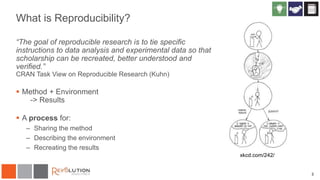
What is Reproducibility?
“The goal of reproducible research is to tie specific
instructions to data analysis and experimental data so that
scholarship can be recreated, better understood and
verified.”
CRAN Task View on Reproducible Research (Kuhn)
 Method + Environment
-> Results
 A process for:
– Sharing the method
– Describing the environment
– Recreating the results
3
xkcd.com/242/
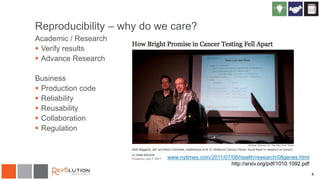
Reproducibility – why do we care?
Academic / Research
 Verify results
 Advance Research
Business
 Production code
 Reliability
 Reusability
 Collaboration
 Regulation
4
www.nytimes.com/2011/07/08/health/research/08genes.html
http://arxiv.org/pdf/1010.1092.pdf
Observations
 R versions are pretty manageable
– Major versions just once a year
– Patches rarely introduce incompatible changes
 Good solutions for literate programming
– Rstudio / knitr / Rmarkdown
 OS/Hardware not the major cause of problems
 The big problem is with packages
– CRAN is in a state of continual flux
5
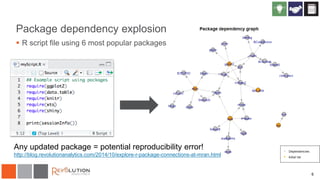
Package dependency explosion
 R script file using 6 most popular packages
6
Any updated package = potential reproducibility error!
http://blog.revolutionanalytics.com/2014/10/explore-r-package-connections-at-mran.html
7
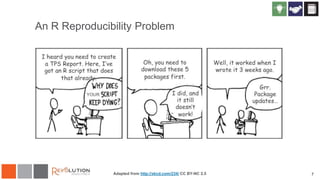
An R Reproducibility Problem
Adapted from http://xkcd.com/234/ CC BY-NC 2.5
8
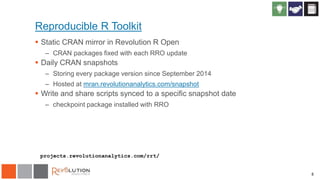
Reproducible R Toolkit
 Static CRAN mirror in Revolution R Open
– CRAN packages fixed with each RRO update
 Daily CRAN snapshots
– Storing every package version since September 2014
– Hosted at mran.revolutionanalytics.com/snapshot
 Write and share scripts synced to a specific snapshot date
– checkpoint package installed with RRO
projects.revolutionanalytics.com/rrt/
9
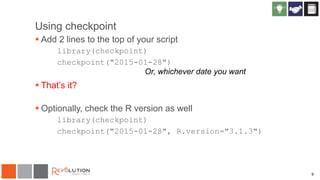
Using checkpoint
 Add 2 lines to the top of your script
library(checkpoint)
checkpoint("2015-01-28")
 That’s it?
 Optionally, check the R version as well
library(checkpoint)
checkpoint("2015-01-28", R.version="3.1.3")
Or, whichever date you want
10
Using checkpoint
 Easy to use: add 2 lines to the top of each script
library(checkpoint)
checkpoint("2014-09-17")
 For the package author:
– Use package versions available on the chosen date
– Installs packages local to this project
• Allows different package versions to be used simultaneously
 For a script collaborator:
– Automatically installs required packages
• Detects required packages (no need to manually install!)
– Uses same package versions as script author to ensure reproducibility
11
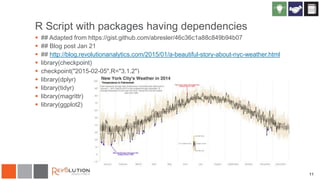
R Script with packages having dependencies
 ## Adapted from https://gist.github.com/abresler/46c36c1a88c849b94b07
 ## Blog post Jan 21
 ## http://blog.revolutionanalytics.com/2015/01/a-beautiful-story-about-nyc-weather.html
 library(checkpoint)
 checkpoint("2015-02-05",R="3.1.2")
 library(dplyr)
 library(tidyr)
 library(magrittr)
 library(ggplot2)
12
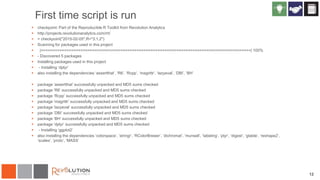
First time script is run
 checkpoint: Part of the Reproducible R Toolkit from Revolution Analytics
 http://projects.revolutionanalytics.com/rrt/
 > checkpoint("2015-02-05",R="3.1.2")
 Scanning for packages used in this project
 |==========================================================================================| 100%
 - Discovered 5 packages
 Installing packages used in this project
 - Installing ‘dplyr’
 also installing the dependencies ‘assertthat’, ‘R6’, ‘Rcpp’, ‘magrittr’, ‘lazyeval’, ‘DBI’, ‘BH’
 package ‘assertthat’ successfully unpacked and MD5 sums checked
 package ‘R6’ successfully unpacked and MD5 sums checked
 package ‘Rcpp’ successfully unpacked and MD5 sums checked
 package ‘magrittr’ successfully unpacked and MD5 sums checked
 package ‘lazyeval’ successfully unpacked and MD5 sums checked
 package ‘DBI’ successfully unpacked and MD5 sums checked
 package ‘BH’ successfully unpacked and MD5 sums checked
 package ‘dplyr’ successfully unpacked and MD5 sums checked
 - Installing ‘ggplot2’
 also installing the dependencies ‘colorspace’, ‘stringr’, ‘RColorBrewer’, ‘dichromat’, ‘munsell’, ‘labeling’, ‘plyr’, ‘digest’, ‘gtable’, ‘reshape2’,
‘scales’, ‘proto’, ‘MASS’
13
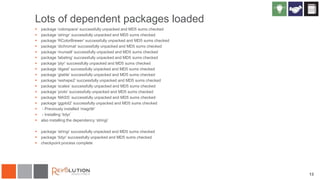
Lots of dependent packages loaded
 package ‘colorspace’ successfully unpacked and MD5 sums checked
 package ‘stringr’ successfully unpacked and MD5 sums checked
 package ‘RColorBrewer’ successfully unpacked and MD5 sums checked
 package ‘dichromat’ successfully unpacked and MD5 sums checked
 package ‘munsell’ successfully unpacked and MD5 sums checked
 package ‘labeling’ successfully unpacked and MD5 sums checked
 package ‘plyr’ successfully unpacked and MD5 sums checked
 package ‘digest’ successfully unpacked and MD5 sums checked
 package ‘gtable’ successfully unpacked and MD5 sums checked
 package ‘reshape2’ successfully unpacked and MD5 sums checked
 package ‘scales’ successfully unpacked and MD5 sums checked
 package ‘proto’ successfully unpacked and MD5 sums checked
 package ‘MASS’ successfully unpacked and MD5 sums checked
 package ‘ggplot2’ successfully unpacked and MD5 sums checked
 - Previously installed ‘magrittr’
 - Installing ‘tidyr’
 also installing the dependency ‘stringi’
 package ‘stringi’ successfully unpacked and MD5 sums checked
 package ‘tidyr’ successfully unpacked and MD5 sums checked
 checkpoint process complete
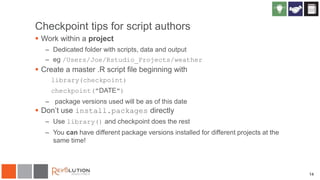
Checkpoint tips for script authors
 Work within a project
– Dedicated folder with scripts, data and output
– eg /Users/Joe/Rstudio_Projects/weather
 Create a master .R script file beginning with
library(checkpoint)
checkpoint("DATE")
– package versions used will be as of this date
 Don’t use install.packages directly
– Use library() and checkpoint does the rest
– You can have different package versions installed for different projects at the
same time!
14
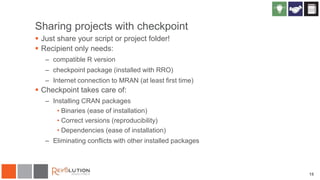
Sharing projects with checkpoint
 Just share your script or project folder!
 Recipient only needs:
– compatible R version
– checkpoint package (installed with RRO)
– Internet connection to MRAN (at least first time)
 Checkpoint takes care of:
– Installing CRAN packages
• Binaries (ease of installation)
• Correct versions (reproducibility)
• Dependencies (ease of installation)
– Eliminating conflicts with other installed packages
15
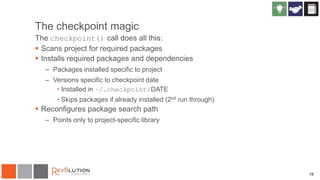
The checkpoint magic
The checkpoint() call does all this:
 Scans project for required packages
 Installs required packages and dependencies
– Packages installed specific to project
– Versions specific to checkpoint date
• Installed in ~/.checkpoint/DATE
• Skips packages if already installed (2nd run through)
 Reconfigures package search path
– Points only to project-specific library
16
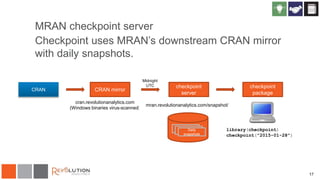
MRAN checkpoint server
Checkpoint uses MRAN’s downstream CRAN mirror
with daily snapshots.
17
CRAN
RRDaily
snapshots
checkpoint
package
library(checkpoint)
checkpoint("2015-01-28")
CRAN mirror
cran.revolutionanalytics.com
(Windows binaries virus-scanned)
checkpoint
server
Midnight
UTC
mran.revolutionanalytics.com/snapshot/
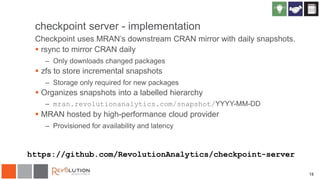
checkpoint server - implementation
Checkpoint uses MRAN’s downstream CRAN mirror with daily snapshots.
 rsync to mirror CRAN daily
– Only downloads changed packages
 zfs to store incremental snapshots
– Storage only required for new packages
 Organizes snapshots into a labelled hierarchy
– mran.revolutionanalytics.com/snapshot/YYYY-MM-DD
 MRAN hosted by high-performance cloud provider
– Provisioned for availability and latency
18
https://github.com/RevolutionAnalytics/checkpoint-server
19
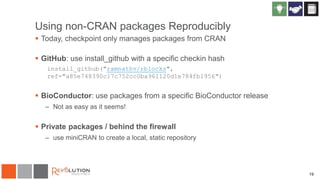
Using non-CRAN packages Reproducibly
 Today, checkpoint only manages packages from CRAN
 GitHub: use install_github with a specific checkin hash
install_github("ramnathv/rblocks",
ref="a85e748390c17c752cc0ba961120d1e784fb1956")
 BioConductor: use packages from a specific BioConductor release
– Not as easy as it seems!
 Private packages / behind the firewall
– use miniCRAN to create a local, static repository
20
Why use checkpoint?
 Write and share code R whose results can be reproduced, even if new (and
possibly incompatible) package versions are released later.
 Share R scripts with others that will automatically install the appropriate package
versions (no need to manually install CRAN packages).
 Write R scripts that use older versions of packages, or packages that are no
longer available on CRAN.
 Install packages (or package versions) visible only to a specific project, without
affecting other R projects or R users on the same system.
 Manage multiple projects that use different package versions.
What about packrat?
 Packrat is flexible and powerful
– Supports non-CRAN packages (e.g. github)
– Allows mix-and-matching package versions
– Requires shipping all package source
– Requires recipients to build packages from source
 Checkpoint is simple
– Reproducibility from one script
– Simple for recipients to reproduce results
– Only allows use of CRAN packages versions that have been tested
together
– Requires Web access (and availability of MRAN)
21
rstudio.github.io/packrat/
22
Revolution R Open is:
 An enhanced open source distribution of R
 Compatible with all R-related software
 Multi-threaded for performance
 Focused on reproducibility
 Open source (GPLv2 license)
 Available for Windows, Mac OS X, Ubuntu, Red Hat and OpenSUSE
 Includes checkpoint
 Designed to work with RStudio
 Side-by-side installations
 Download from mran.revolutionanalytics.com
CRAN mirrors and RRO
 Revolution R Open ships with a fixed default CRAN mirror
– Currently, 1 March 2015 snapshot (v 8.0.2)
– Soon: (v 8.0.3)
 All users of same version get same CRAN package versions by default
– regardless when “install.packages” is run
 Use checkpoint to access newer package versions
23
24
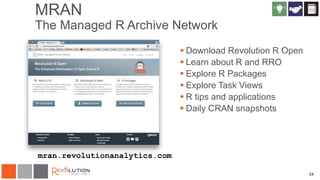
MRAN
The Managed R Archive Network
 Download Revolution R Open
 Learn about R and RRO
 Explore R Packages
 Explore Task Views
 R tips and applications
 Daily CRAN snapshots
mran.revolutionanalytics.com
Thank you.
Learn more at:
projects.revolutionanalytics.com/rrt/
Find archived webinars at:
revolutionanalytics.com/webinars
www.revolutionanalytics.com
1.855.GET.REVO
Twitter: @RevolutionR
Joseph Rickert
Data Scientist, Community Manager
Revolution Analytics
@RevoJoe
Joseph.rickert@revolutionanalytics.com
26
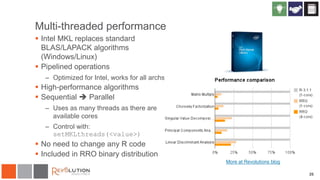
Multi-threaded performance
 Intel MKL replaces standard
BLAS/LAPACK algorithms
(Windows/Linux)
 Pipelined operations
– Optimized for Intel, works for all archs
 High-performance algorithms
 Sequential  Parallel
– Uses as many threads as there are
available cores
– Control with:
setMKLthreads(<value>)
 No need to change any R code
 Included in RRO binary distribution
More at Revolutions blog
27
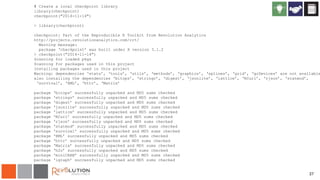
# Create a local checkpoint library
library(checkpoint)
checkpoint("2014-11-14")
> library(checkpoint)
checkpoint: Part of the Reproducible R Toolkit from Revolution Analytics
http://projects.revolutionanalytics.com/rrt/
Warning message:
package ‘checkpoint’ was built under R version 3.1.2
> checkpoint("2014-11-14")
Scanning for loaded pkgs
Scanning for packages used in this project
Installing packages used in this project
Warning: dependencies ‘stats’, ‘tools’, ‘utils’, ‘methods’, ‘graphics’, ‘splines’, ‘grid’, ‘grDevices’ are not available
also installing the dependencies ‘bitops’, ‘stringr’, ‘digest’, ‘jsonlite’, ‘lattice’, ‘RCurl’, ‘rjson’, ‘statmod’,
‘survival’, ‘XML’, ‘httr’, ‘Matrix’
package ‘bitops’ successfully unpacked and MD5 sums checked
package ‘stringr’ successfully unpacked and MD5 sums checked
package ‘digest’ successfully unpacked and MD5 sums checked
package ‘jsonlite’ successfully unpacked and MD5 sums checked
package ‘lattice’ successfully unpacked and MD5 sums checked
package ‘RCurl’ successfully unpacked and MD5 sums checked
package ‘rjson’ successfully unpacked and MD5 sums checked
package ‘statmod’ successfully unpacked and MD5 sums checked
package ‘survival’ successfully unpacked and MD5 sums checked
package ‘XML’ successfully unpacked and MD5 sums checked
package ‘httr’ successfully unpacked and MD5 sums checked
package ‘Matrix’ successfully unpacked and MD5 sums checked
package ‘h2o’ successfully unpacked and MD5 sums checked
package ‘miniCRAN’ successfully unpacked and MD5 sums checked
package ‘igraph’ successfully unpacked and MD5 sums checked
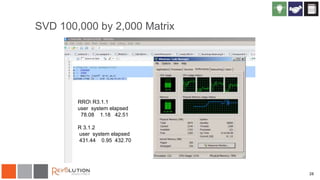
SVD 100,000 by 2,000 Matrix
28
RRO R3.1.1
user system elapsed
78.08 1.18 42.51
R 3.1.2
user system elapsed
431.44 0.95 432.70
29
Revolution R Plus Technical Support
Technical support for R, from the R experts.
 Developers: Email and phone support, 8AM-6PM Mon-Fri
 Production Servers and Hadoop: 24x7 Severity-1 coverage
 On-line case management and knowledgebase
 Access to technical resources, documentation and user forums
 Exclusive on-line webinars from community experts
 Guaranteed response times
Also available: expert hands-on and on-line training for R, from
Revolution Analytics AcademyR.
www.revolutionanalytics.com/plus

Reproducibility with Checkpoint & RRO

  • 1.
    Reproducibility with Checkpoint& RRO New York R Conference Joseph Rickert April 25, 2015
  • 2.
    2 OUR COMPANY The leadingprovider of advanced analytics software and services based on open source R, since 2007 OUR PRODUCT REVOLUTION R: The enterprise-grade predictive analytics application platform based on the R language SOME KUDOS “This acquisition will help customers use advanced analytics within Microsoft data platforms“ -- Joseph Sirosh, CVP C+E
  • 3.
    What is Reproducibility? “Thegoal of reproducible research is to tie specific instructions to data analysis and experimental data so that scholarship can be recreated, better understood and verified.” CRAN Task View on Reproducible Research (Kuhn)  Method + Environment -> Results  A process for: – Sharing the method – Describing the environment – Recreating the results 3 xkcd.com/242/
  • 4.
    Reproducibility – whydo we care? Academic / Research  Verify results  Advance Research Business  Production code  Reliability  Reusability  Collaboration  Regulation 4 www.nytimes.com/2011/07/08/health/research/08genes.html http://arxiv.org/pdf/1010.1092.pdf
  • 5.
    Observations  R versionsare pretty manageable – Major versions just once a year – Patches rarely introduce incompatible changes  Good solutions for literate programming – Rstudio / knitr / Rmarkdown  OS/Hardware not the major cause of problems  The big problem is with packages – CRAN is in a state of continual flux 5
  • 6.
    Package dependency explosion R script file using 6 most popular packages 6 Any updated package = potential reproducibility error! http://blog.revolutionanalytics.com/2014/10/explore-r-package-connections-at-mran.html
  • 7.
    7 An R ReproducibilityProblem Adapted from http://xkcd.com/234/ CC BY-NC 2.5
  • 8.
    8 Reproducible R Toolkit Static CRAN mirror in Revolution R Open – CRAN packages fixed with each RRO update  Daily CRAN snapshots – Storing every package version since September 2014 – Hosted at mran.revolutionanalytics.com/snapshot  Write and share scripts synced to a specific snapshot date – checkpoint package installed with RRO projects.revolutionanalytics.com/rrt/
  • 9.
    9 Using checkpoint  Add2 lines to the top of your script library(checkpoint) checkpoint("2015-01-28")  That’s it?  Optionally, check the R version as well library(checkpoint) checkpoint("2015-01-28", R.version="3.1.3") Or, whichever date you want
  • 10.
    10 Using checkpoint  Easyto use: add 2 lines to the top of each script library(checkpoint) checkpoint("2014-09-17")  For the package author: – Use package versions available on the chosen date – Installs packages local to this project • Allows different package versions to be used simultaneously  For a script collaborator: – Automatically installs required packages • Detects required packages (no need to manually install!) – Uses same package versions as script author to ensure reproducibility
  • 11.
    11 R Script withpackages having dependencies  ## Adapted from https://gist.github.com/abresler/46c36c1a88c849b94b07  ## Blog post Jan 21  ## http://blog.revolutionanalytics.com/2015/01/a-beautiful-story-about-nyc-weather.html  library(checkpoint)  checkpoint("2015-02-05",R="3.1.2")  library(dplyr)  library(tidyr)  library(magrittr)  library(ggplot2)
  • 12.
    12 First time scriptis run  checkpoint: Part of the Reproducible R Toolkit from Revolution Analytics  http://projects.revolutionanalytics.com/rrt/  > checkpoint("2015-02-05",R="3.1.2")  Scanning for packages used in this project  |==========================================================================================| 100%  - Discovered 5 packages  Installing packages used in this project  - Installing ‘dplyr’  also installing the dependencies ‘assertthat’, ‘R6’, ‘Rcpp’, ‘magrittr’, ‘lazyeval’, ‘DBI’, ‘BH’  package ‘assertthat’ successfully unpacked and MD5 sums checked  package ‘R6’ successfully unpacked and MD5 sums checked  package ‘Rcpp’ successfully unpacked and MD5 sums checked  package ‘magrittr’ successfully unpacked and MD5 sums checked  package ‘lazyeval’ successfully unpacked and MD5 sums checked  package ‘DBI’ successfully unpacked and MD5 sums checked  package ‘BH’ successfully unpacked and MD5 sums checked  package ‘dplyr’ successfully unpacked and MD5 sums checked  - Installing ‘ggplot2’  also installing the dependencies ‘colorspace’, ‘stringr’, ‘RColorBrewer’, ‘dichromat’, ‘munsell’, ‘labeling’, ‘plyr’, ‘digest’, ‘gtable’, ‘reshape2’, ‘scales’, ‘proto’, ‘MASS’
  • 13.
    13 Lots of dependentpackages loaded  package ‘colorspace’ successfully unpacked and MD5 sums checked  package ‘stringr’ successfully unpacked and MD5 sums checked  package ‘RColorBrewer’ successfully unpacked and MD5 sums checked  package ‘dichromat’ successfully unpacked and MD5 sums checked  package ‘munsell’ successfully unpacked and MD5 sums checked  package ‘labeling’ successfully unpacked and MD5 sums checked  package ‘plyr’ successfully unpacked and MD5 sums checked  package ‘digest’ successfully unpacked and MD5 sums checked  package ‘gtable’ successfully unpacked and MD5 sums checked  package ‘reshape2’ successfully unpacked and MD5 sums checked  package ‘scales’ successfully unpacked and MD5 sums checked  package ‘proto’ successfully unpacked and MD5 sums checked  package ‘MASS’ successfully unpacked and MD5 sums checked  package ‘ggplot2’ successfully unpacked and MD5 sums checked  - Previously installed ‘magrittr’  - Installing ‘tidyr’  also installing the dependency ‘stringi’  package ‘stringi’ successfully unpacked and MD5 sums checked  package ‘tidyr’ successfully unpacked and MD5 sums checked  checkpoint process complete
  • 14.
    Checkpoint tips forscript authors  Work within a project – Dedicated folder with scripts, data and output – eg /Users/Joe/Rstudio_Projects/weather  Create a master .R script file beginning with library(checkpoint) checkpoint("DATE") – package versions used will be as of this date  Don’t use install.packages directly – Use library() and checkpoint does the rest – You can have different package versions installed for different projects at the same time! 14
  • 15.
    Sharing projects withcheckpoint  Just share your script or project folder!  Recipient only needs: – compatible R version – checkpoint package (installed with RRO) – Internet connection to MRAN (at least first time)  Checkpoint takes care of: – Installing CRAN packages • Binaries (ease of installation) • Correct versions (reproducibility) • Dependencies (ease of installation) – Eliminating conflicts with other installed packages 15
  • 16.
    The checkpoint magic Thecheckpoint() call does all this:  Scans project for required packages  Installs required packages and dependencies – Packages installed specific to project – Versions specific to checkpoint date • Installed in ~/.checkpoint/DATE • Skips packages if already installed (2nd run through)  Reconfigures package search path – Points only to project-specific library 16
  • 17.
    MRAN checkpoint server Checkpointuses MRAN’s downstream CRAN mirror with daily snapshots. 17 CRAN RRDaily snapshots checkpoint package library(checkpoint) checkpoint("2015-01-28") CRAN mirror cran.revolutionanalytics.com (Windows binaries virus-scanned) checkpoint server Midnight UTC mran.revolutionanalytics.com/snapshot/
  • 18.
    checkpoint server -implementation Checkpoint uses MRAN’s downstream CRAN mirror with daily snapshots.  rsync to mirror CRAN daily – Only downloads changed packages  zfs to store incremental snapshots – Storage only required for new packages  Organizes snapshots into a labelled hierarchy – mran.revolutionanalytics.com/snapshot/YYYY-MM-DD  MRAN hosted by high-performance cloud provider – Provisioned for availability and latency 18 https://github.com/RevolutionAnalytics/checkpoint-server
  • 19.
    19 Using non-CRAN packagesReproducibly  Today, checkpoint only manages packages from CRAN  GitHub: use install_github with a specific checkin hash install_github("ramnathv/rblocks", ref="a85e748390c17c752cc0ba961120d1e784fb1956")  BioConductor: use packages from a specific BioConductor release – Not as easy as it seems!  Private packages / behind the firewall – use miniCRAN to create a local, static repository
  • 20.
    20 Why use checkpoint? Write and share code R whose results can be reproduced, even if new (and possibly incompatible) package versions are released later.  Share R scripts with others that will automatically install the appropriate package versions (no need to manually install CRAN packages).  Write R scripts that use older versions of packages, or packages that are no longer available on CRAN.  Install packages (or package versions) visible only to a specific project, without affecting other R projects or R users on the same system.  Manage multiple projects that use different package versions.
  • 21.
    What about packrat? Packrat is flexible and powerful – Supports non-CRAN packages (e.g. github) – Allows mix-and-matching package versions – Requires shipping all package source – Requires recipients to build packages from source  Checkpoint is simple – Reproducibility from one script – Simple for recipients to reproduce results – Only allows use of CRAN packages versions that have been tested together – Requires Web access (and availability of MRAN) 21 rstudio.github.io/packrat/
  • 22.
    22 Revolution R Openis:  An enhanced open source distribution of R  Compatible with all R-related software  Multi-threaded for performance  Focused on reproducibility  Open source (GPLv2 license)  Available for Windows, Mac OS X, Ubuntu, Red Hat and OpenSUSE  Includes checkpoint  Designed to work with RStudio  Side-by-side installations  Download from mran.revolutionanalytics.com
  • 23.
    CRAN mirrors andRRO  Revolution R Open ships with a fixed default CRAN mirror – Currently, 1 March 2015 snapshot (v 8.0.2) – Soon: (v 8.0.3)  All users of same version get same CRAN package versions by default – regardless when “install.packages” is run  Use checkpoint to access newer package versions 23
  • 24.
    24 MRAN The Managed RArchive Network  Download Revolution R Open  Learn about R and RRO  Explore R Packages  Explore Task Views  R tips and applications  Daily CRAN snapshots mran.revolutionanalytics.com
  • 25.
    Thank you. Learn moreat: projects.revolutionanalytics.com/rrt/ Find archived webinars at: revolutionanalytics.com/webinars www.revolutionanalytics.com 1.855.GET.REVO Twitter: @RevolutionR Joseph Rickert Data Scientist, Community Manager Revolution Analytics @RevoJoe Joseph.rickert@revolutionanalytics.com
  • 26.
    26 Multi-threaded performance  IntelMKL replaces standard BLAS/LAPACK algorithms (Windows/Linux)  Pipelined operations – Optimized for Intel, works for all archs  High-performance algorithms  Sequential  Parallel – Uses as many threads as there are available cores – Control with: setMKLthreads(<value>)  No need to change any R code  Included in RRO binary distribution More at Revolutions blog
  • 27.
    27 # Create alocal checkpoint library library(checkpoint) checkpoint("2014-11-14") > library(checkpoint) checkpoint: Part of the Reproducible R Toolkit from Revolution Analytics http://projects.revolutionanalytics.com/rrt/ Warning message: package ‘checkpoint’ was built under R version 3.1.2 > checkpoint("2014-11-14") Scanning for loaded pkgs Scanning for packages used in this project Installing packages used in this project Warning: dependencies ‘stats’, ‘tools’, ‘utils’, ‘methods’, ‘graphics’, ‘splines’, ‘grid’, ‘grDevices’ are not available also installing the dependencies ‘bitops’, ‘stringr’, ‘digest’, ‘jsonlite’, ‘lattice’, ‘RCurl’, ‘rjson’, ‘statmod’, ‘survival’, ‘XML’, ‘httr’, ‘Matrix’ package ‘bitops’ successfully unpacked and MD5 sums checked package ‘stringr’ successfully unpacked and MD5 sums checked package ‘digest’ successfully unpacked and MD5 sums checked package ‘jsonlite’ successfully unpacked and MD5 sums checked package ‘lattice’ successfully unpacked and MD5 sums checked package ‘RCurl’ successfully unpacked and MD5 sums checked package ‘rjson’ successfully unpacked and MD5 sums checked package ‘statmod’ successfully unpacked and MD5 sums checked package ‘survival’ successfully unpacked and MD5 sums checked package ‘XML’ successfully unpacked and MD5 sums checked package ‘httr’ successfully unpacked and MD5 sums checked package ‘Matrix’ successfully unpacked and MD5 sums checked package ‘h2o’ successfully unpacked and MD5 sums checked package ‘miniCRAN’ successfully unpacked and MD5 sums checked package ‘igraph’ successfully unpacked and MD5 sums checked
  • 28.
    SVD 100,000 by2,000 Matrix 28 RRO R3.1.1 user system elapsed 78.08 1.18 42.51 R 3.1.2 user system elapsed 431.44 0.95 432.70
  • 29.
    29 Revolution R PlusTechnical Support Technical support for R, from the R experts.  Developers: Email and phone support, 8AM-6PM Mon-Fri  Production Servers and Hadoop: 24x7 Severity-1 coverage  On-line case management and knowledgebase  Access to technical resources, documentation and user forums  Exclusive on-line webinars from community experts  Guaranteed response times Also available: expert hands-on and on-line training for R, from Revolution Analytics AcademyR. www.revolutionanalytics.com/plus

Editor's Notes

  • #4 http://xkcd.com/242/