Proposal	
  for	
  Repository	
  System	
  
Utilization	
  for	
  Iterative	
  Projects	
  
Aerospace	
  &	
  Aeronau-cs	
  Department	
  
Faculty	
  of	
  Engineering,	
  Cairo	
  University	
  
13/7/2014	
  
Problem	
  De:inition	
  
•  The	
  department	
  is	
  known	
  for	
  itera-ve	
  approach	
  to	
  projects:	
  
CubeSat,	
  N-­‐Copter,	
  Auto-­‐Pilot…etc.	
  
•  Technical	
  aspects	
  (Codes	
  and	
  CAD	
  models)	
  are	
  not	
  usually	
  
documented	
  or	
  shared.	
  
•  No	
  one	
  way	
  solu-on	
  to	
  obtain	
  aforemen-oned	
  informa-on,	
  
unless	
  contac-ng	
  supervisor	
  and	
  previous	
  project	
  members.	
  
•  When	
  a	
  code	
  malfunc-ons,	
  not	
  easy	
  to	
  retrieve	
  old	
  versions	
  
13/7/2014	
  
Actual	
  Case	
  
•  3rd	
  Itera-on	
  CubeSat	
  project	
  faced	
  a	
  technical	
  difficulty	
  in	
  the	
  
communica-ons	
  subsystem,	
  leading	
  to	
  resort	
  to	
  old	
  methods.	
  
•  How-­‐to’s	
  and	
  codes	
  were	
  available	
  only	
  with	
  last	
  year’s	
  members.	


•  Previous	
  year	
  members	
  were	
  called	
  to	
  advise,	
  assist	
  in	
  
implementa-on	
  and	
  troubleshoot.	


Observa-ons:	
  
•  Crucial	
  informa-on	
  was	
  not	
  fully	
  documented/previously	
  shared	
  in	
  
an	
  itera-ve	
  project,	
  thus	
  causing	
  delays.	
  
•  Members	
  with	
  the	
  right	
  informa-on	
  might	
  not	
  have	
  been	
  free	
  to	
  
provide	
  more	
  than	
  consulta-on.	
  
13/7/2014	
  
Proposed	
  Solution:	
  Repository	
  Systems	
  
An	
  IT	
  solu-on	
  to	
  store,	
  collaborate,	
  track	
  progress,	
  and	
  share	
  all	
  
project	
  informa-on:	
  Codes,	
  models,	
  documenta-on…etc.	
  Not	
  to	
  
be	
  confused	
  with	
  online	
  storage.	
  (i.e.	
  Dropbox,	
  Google	
  Drive)	
  
Repository	


Documenta-on	
  
Codes	
  
Structure	
  Models	
  
References	
  
Professors	
  
Thesis	
  &	
  Papers	
  
Gradua-ng	
  
Students	
  
Undergraduate	
  
Students	
  
Other	
  
Departments	
  
Visitors	
  
13/7/2014	
  
Features:	
  Collaboration	
  
•  Collaborators	
  (Users)	
  upload	
  and	
  download	
  files	
  from	
  the	
  
same	
  shared	
  space.	
  (Known	
  as	
  commit	
  and	
  check-­‐out).	
  
•  All	
  files	
  have	
  revisions	
  to	
  track	
  changes,	
  merge	
  progress,	
  and	
  
avoid	
  overwri-ng	
  issues.	
  
Repository	


Documenta-on	
  
Codes	
  
Structure	
  Models	
  
References	
  
Collaborator	
  
Workspace	
  1	
  
Thesis	
  &	
  Papers	
  .	
  
.	
  
.	
  
Check	
  in	
  
Check	
  out	
  
Check	
  in	
  
Check	
  out	
  
Check	
  in	
  
Check	
  out	
  
AutoPilot.c	
  :	
  #19	
  
AutoPilot.c	
  :	
  #20	
  
AutoPilot.c	
  :	
  #21	
  
Collaborator	
  
Workspace	
  2	
  
Collaborator	
  
Workspace	
  3	
  
.	
  
.	
  
.	
  
13/7/2014	
  
Example	
  
13/7/2014	
  
Features:	
  Organization	
  
•  Access	
  control	
  on	
  allowed	
  collaborators.	
  
•  Access	
  control	
  on	
  file	
  edits	
  (Freeze	
  locks).	
  
•  Tes-ng	
  new	
  code	
  on	
  a	
  separate	
  loca-on	
  (Branch)	
  
•  Versioning	
  of	
  the	
  repository	
  itself	
  (Tags).	
  
Current	
  Itera-on	
  Repo	


Documenta-on	
  
Codes	
  
Structure	
  Models	
  
References	
  
Thesis	
  &	
  Papers	
  
Repository	
  of	
  1st	
  Itera-on	
  
Repository	
  of	
  2nd	
  Itera-on	
  
Repository	
  of	
  3rd	
  Itera-on	
  
Trunk	
   Tags	
  
Tag	
  out	
  
Prototype	
  Repository	
  
Branch	
  out	
  
Merge	
  
13/7/2014	
  
Features:	
  Sharing	
  
Repositories	
  can	
  be	
  kept	
  private,	
  or	
  shared	
  globally	
  to	
  other	
  
developers	
  to	
  view	
  and/or	
  collaborate	
  (Open-­‐source).	
  
Repository	
  #1	
  
Authorized	
  
Collaborator	
  
.	
  
.	
  
.	
  
Authorized	
  
Collaborator	
  
Authorized	
  
Collaborator	
  
Repository	
  #2	
  
Repository	
  #3	
  
.	
  
.	
  
.	
  
Private	
   Or	
  Public	
  
External	
  
Viewer	
  
External	
  
Collaborator	
  
View/Edit	
  
View	
  only	
  
.	
  
.	
  
.	
  
13/7/2014	
  
Use	
  Cases	
  
•  Shared	
  workspace	
  for	
  collabora-ve	
  work	
  by	
  students.	
  
•  Historical	
  review	
  of	
  past	
  itera-ons.	
  
•  Progress	
  tracking	
  for	
  professors	
  and	
  supervisors.	
  
•  Publishing	
  data	
  for	
  public	
  visitors	
  and/or	
  collaborators.	
  
•  Collabora-on	
  area	
  for	
  different	
  departments/universi-es.	
  
13/7/2014	
  
Server	
  Usage	
  #1:	
  Bitbucket	
  
An	
  online	
  repository	
  service	
  for	
  private	
  and	
  public	
  hos-ng.	
  
Provides	
  free	
  and	
  paid	
  services.	
  
Advantages	
  
•  Has	
  a	
  free	
  online	
  service	
  plan	
  for	
  private	
  hos-ng	
  
•  2	
  GB	
  Storage	
  /	
  Repository	
  (Unlimited	
  repositories)	
  
Disadvantages	
  
•  Free	
  service	
  offers	
  only	
  up	
  to	
  5	
  collaborators	
  maximum.	
  
Upgrades	
  require	
  paid	
  service	
  
Scenario	
  
A	
  project	
  desired	
  to	
  be	
  private	
  and	
  has	
  5	
  or	
  less	
  collaborators.	
  
Refer	
  to	
  hgps://bitbucket.org/plans	
  for	
  pricing	
  
13/7/2014	
  
Server	
  Usage	
  #2:	
  Github	
  
Also	
  an	
  online	
  repository	
  service,	
  with	
  private	
  and	
  public	
  
offerings.	
  
Advantages	
  
•  Has	
  a	
  free	
  online	
  service	
  plan	
  
•  Unlimited	
  collaborators	
  
•  1	
  Gb	
  /	
  Repository	
  (Unlimited	
  repositories)	
  
Disadvantages	
  
•  Free	
  service	
  offers	
  only	
  public	
  hos-ng.	
  Upgrades	
  require	
  
paid	
  service	
  
Scenario	
  
Best	
  for	
  projects	
  that	
  are	
  planned	
  to	
  be	
  open-­‐source	
  and	
  
require	
  a	
  lot	
  of	
  collaborators.	
  
Refer	
  to	
  hgps://github.com/pricing	
  for	
  pricing	
  
13/7/2014	
  
Server	
  Usage	
  #3:	
  Local	
  Server	
  
Deploy	
  a	
  repository	
  service	
  (i.e.	
  svn	
  or	
  git)	
  on	
  a	
  local	
  networked	
  
machine	
  on	
  campus.	
  
Advantages	
  
•  Free	
  usage	
  
•  Virtually	
  unlimited	
  collaborators	
  
•  No	
  storage	
  quota	
  (Unless	
  governed	
  by	
  admin)	
  
Disadvantages	
  
•  Installa-on	
  and	
  maintenance	
  
•  Troubleshoo-ng	
  client-­‐side	
  issues	
  
•  Demands	
  server	
  up-me	
  
Scenario	
  
If	
  a	
  server	
  machine	
  and	
  maintenance	
  are	
  provided,	
  this	
  is	
  very	
  
well	
  suited	
  for	
  an	
  unrestricted	
  use	
  with	
  open	
  sharing	
  op-ons.	
  
Refer	
  to	
  the	
  following	
  for	
  installa-ons	
  and	
  guides:	
  
hgp://rogerdudler.github.io/git-­‐guide/	
  
hgp://subversion.apache.org/	
  	
  
13/7/2014	
  
Client-­‐side	
  Usage	
  
•  Use	
  Eclipse	
  IDE	
  with	
  plugins	
  
•  Repository	
  clients	
  
•  Scripts	
  that	
  communicate	
  with	
  
servers	
  (Using	
  svn,	
  git…	
  etc)	
  
Script	
  command	
  to	
  checkout	
  
a	
  directory	
  
13/7/2014	
  
Implementation	
  Plan	
  
Phase	
   Involved	
  Peers	
  (Not	
  limited	
  to)	
  
Agreement	
  on	
  repository	
  hos-ng	
  (Online	
  
services	
  or	
  local	
  hos-ng)	
  and	
  usage	
  plans	
  
•  Department	
  Members	
  
•  Faculty	
  Administra-on	
  
•  IT	
  Administrators	
  
Training	
  and	
  ini-a-on	
  of	
  a	
  local	
  team	
  
dedicated	
  for	
  teaching	
  usage,	
  tracking,	
  and	
  
maintenance.	
  
•  Department	
  Members	
  
•  Students	
  
•  IT	
  Administrators	
  
Crea-ng	
  repository	
  infrastructures	
  for	
  usage	
   •  Specialized	
  Team	
  
•  Collaborators	
  
Ini-a-ve	
  for	
  past	
  itera-ons	
  to	
  upload	
  work	
   •  Department	
  Members	
  
•  Past	
  Itera-ons	
  
13/7/2014	
  
Key	
  Performance	
  Parameters	
  
•  Dedica-on	
  from	
  professors	
  and	
  students	
  alike	
  towards	
  the	
  
ac-ve	
  and	
  good	
  use	
  of	
  a	
  repository.	
  
•  To	
  save	
  -me,	
  collaborators	
  must	
  be	
  fully	
  aware	
  of	
  how	
  the	
  
system	
  works	
  and	
  how	
  to	
  use	
  it.	
  
•  Forma-on	
  of	
  an	
  ac-ve	
  community	
  that	
  handles	
  users	
  training,	
  
troubleshoo-ng	
  issues,	
  and	
  researching	
  newer	
  and	
  beger	
  
methods.	
  
•  The	
  department	
  should	
  keep	
  track	
  on	
  ac-ve	
  repositories,	
  
especially	
  for	
  publica-ons.	
  
13/7/2014	
  
Proposed	
  Good	
  Practices	
  
•  Always	
  check	
  out	
  (download)	
  the	
  files	
  at	
  least	
  once	
  every	
  
week	
  to	
  stay	
  up-­‐to-­‐date.	
  
•  Checking	
  in	
  files	
  (upload)	
  allows	
  you	
  to	
  add	
  a	
  comment	
  for	
  
what	
  changes	
  were	
  made.	
  Make	
  construc-ve	
  comments.	
  
•  For	
  CAD	
  models	
  of	
  big	
  size,	
  resort	
  to	
  use	
  pictures	
  instead.	
  
Keep	
  also	
  a	
  note	
  on	
  where	
  the	
  actual	
  file	
  can	
  be	
  found.	
  
13/7/2014	
  
Conclusion	
  
The	
  proposed	
  system	
  shows	
  its	
  compa-bility	
  to	
  provide:	


•  Easy	
  method	
  to	
  obtain	
  previous	
  itera-ons	
  work	
  
•  Collabora-ve	
  working	
  environment	
  
•  Progress	
  tracking	
  and	
  revisions	
  
•  Capacity	
  building	
  in	
  usage	
  of	
  popular	
  development	
  systems	
  
13/7/2014	
  
Thank	
  you.	
  
Presenta4on	
  by	
  Ahmed	
  Farid	
  
CDH	
  Engineer	
  in	
  2nd	
  Itera-on	
  Cube-­‐Satellite	
  Project	
  
ahmed@farid-­‐dev.net	


13/7/2014	
  

Proposal for Repository System Utilization for Iterative Projects

  • 1.
    Proposal  for  Repository  System   Utilization  for  Iterative  Projects   Aerospace  &  Aeronau-cs  Department   Faculty  of  Engineering,  Cairo  University   13/7/2014  
  • 2.
    Problem  De:inition   • The  department  is  known  for  itera-ve  approach  to  projects:   CubeSat,  N-­‐Copter,  Auto-­‐Pilot…etc.   •  Technical  aspects  (Codes  and  CAD  models)  are  not  usually   documented  or  shared.   •  No  one  way  solu-on  to  obtain  aforemen-oned  informa-on,   unless  contac-ng  supervisor  and  previous  project  members.   •  When  a  code  malfunc-ons,  not  easy  to  retrieve  old  versions   13/7/2014  
  • 3.
    Actual  Case   • 3rd  Itera-on  CubeSat  project  faced  a  technical  difficulty  in  the   communica-ons  subsystem,  leading  to  resort  to  old  methods.   •  How-­‐to’s  and  codes  were  available  only  with  last  year’s  members.     •  Previous  year  members  were  called  to  advise,  assist  in   implementa-on  and  troubleshoot.     Observa-ons:   •  Crucial  informa-on  was  not  fully  documented/previously  shared  in   an  itera-ve  project,  thus  causing  delays.   •  Members  with  the  right  informa-on  might  not  have  been  free  to   provide  more  than  consulta-on.   13/7/2014  
  • 4.
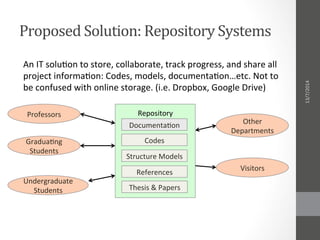
    Proposed  Solution:  Repository  Systems   An  IT  solu-on  to  store,  collaborate,  track  progress,  and  share  all   project  informa-on:  Codes,  models,  documenta-on…etc.  Not  to   be  confused  with  online  storage.  (i.e.  Dropbox,  Google  Drive)   Repository                   Documenta-on   Codes   Structure  Models   References   Professors   Thesis  &  Papers   Gradua-ng   Students   Undergraduate   Students   Other   Departments   Visitors   13/7/2014  
  • 5.
    Features:  Collaboration   • Collaborators  (Users)  upload  and  download  files  from  the   same  shared  space.  (Known  as  commit  and  check-­‐out).   •  All  files  have  revisions  to  track  changes,  merge  progress,  and   avoid  overwri-ng  issues.   Repository                   Documenta-on   Codes   Structure  Models   References   Collaborator   Workspace  1   Thesis  &  Papers  .   .   .   Check  in   Check  out   Check  in   Check  out   Check  in   Check  out   AutoPilot.c  :  #19   AutoPilot.c  :  #20   AutoPilot.c  :  #21   Collaborator   Workspace  2   Collaborator   Workspace  3   .   .   .   13/7/2014  
  • 6.
  • 7.
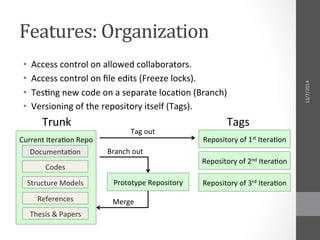
    Features:  Organization   • Access  control  on  allowed  collaborators.   •  Access  control  on  file  edits  (Freeze  locks).   •  Tes-ng  new  code  on  a  separate  loca-on  (Branch)   •  Versioning  of  the  repository  itself  (Tags).   Current  Itera-on  Repo                   Documenta-on   Codes   Structure  Models   References   Thesis  &  Papers   Repository  of  1st  Itera-on   Repository  of  2nd  Itera-on   Repository  of  3rd  Itera-on   Trunk   Tags   Tag  out   Prototype  Repository   Branch  out   Merge   13/7/2014  
  • 8.
    Features:  Sharing   Repositories  can  be  kept  private,  or  shared  globally  to  other   developers  to  view  and/or  collaborate  (Open-­‐source).   Repository  #1   Authorized   Collaborator   .   .   .   Authorized   Collaborator   Authorized   Collaborator   Repository  #2   Repository  #3   .   .   .   Private   Or  Public   External   Viewer   External   Collaborator   View/Edit   View  only   .   .   .   13/7/2014  
  • 9.
    Use  Cases   • Shared  workspace  for  collabora-ve  work  by  students.   •  Historical  review  of  past  itera-ons.   •  Progress  tracking  for  professors  and  supervisors.   •  Publishing  data  for  public  visitors  and/or  collaborators.   •  Collabora-on  area  for  different  departments/universi-es.   13/7/2014  
  • 10.
    Server  Usage  #1:  Bitbucket   An  online  repository  service  for  private  and  public  hos-ng.   Provides  free  and  paid  services.   Advantages   •  Has  a  free  online  service  plan  for  private  hos-ng   •  2  GB  Storage  /  Repository  (Unlimited  repositories)   Disadvantages   •  Free  service  offers  only  up  to  5  collaborators  maximum.   Upgrades  require  paid  service   Scenario   A  project  desired  to  be  private  and  has  5  or  less  collaborators.   Refer  to  hgps://bitbucket.org/plans  for  pricing   13/7/2014  
  • 11.
    Server  Usage  #2:  Github   Also  an  online  repository  service,  with  private  and  public   offerings.   Advantages   •  Has  a  free  online  service  plan   •  Unlimited  collaborators   •  1  Gb  /  Repository  (Unlimited  repositories)   Disadvantages   •  Free  service  offers  only  public  hos-ng.  Upgrades  require   paid  service   Scenario   Best  for  projects  that  are  planned  to  be  open-­‐source  and   require  a  lot  of  collaborators.   Refer  to  hgps://github.com/pricing  for  pricing   13/7/2014  
  • 12.
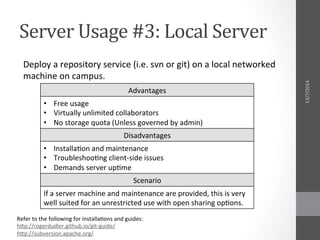
    Server  Usage  #3:  Local  Server   Deploy  a  repository  service  (i.e.  svn  or  git)  on  a  local  networked   machine  on  campus.   Advantages   •  Free  usage   •  Virtually  unlimited  collaborators   •  No  storage  quota  (Unless  governed  by  admin)   Disadvantages   •  Installa-on  and  maintenance   •  Troubleshoo-ng  client-­‐side  issues   •  Demands  server  up-me   Scenario   If  a  server  machine  and  maintenance  are  provided,  this  is  very   well  suited  for  an  unrestricted  use  with  open  sharing  op-ons.   Refer  to  the  following  for  installa-ons  and  guides:   hgp://rogerdudler.github.io/git-­‐guide/   hgp://subversion.apache.org/     13/7/2014  
  • 13.
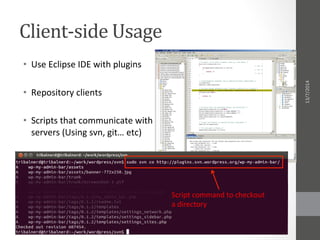
    Client-­‐side  Usage   • Use  Eclipse  IDE  with  plugins   •  Repository  clients   •  Scripts  that  communicate  with   servers  (Using  svn,  git…  etc)   Script  command  to  checkout   a  directory   13/7/2014  
  • 14.
    Implementation  Plan   Phase   Involved  Peers  (Not  limited  to)   Agreement  on  repository  hos-ng  (Online   services  or  local  hos-ng)  and  usage  plans   •  Department  Members   •  Faculty  Administra-on   •  IT  Administrators   Training  and  ini-a-on  of  a  local  team   dedicated  for  teaching  usage,  tracking,  and   maintenance.   •  Department  Members   •  Students   •  IT  Administrators   Crea-ng  repository  infrastructures  for  usage   •  Specialized  Team   •  Collaborators   Ini-a-ve  for  past  itera-ons  to  upload  work   •  Department  Members   •  Past  Itera-ons   13/7/2014  
  • 15.
    Key  Performance  Parameters   •  Dedica-on  from  professors  and  students  alike  towards  the   ac-ve  and  good  use  of  a  repository.   •  To  save  -me,  collaborators  must  be  fully  aware  of  how  the   system  works  and  how  to  use  it.   •  Forma-on  of  an  ac-ve  community  that  handles  users  training,   troubleshoo-ng  issues,  and  researching  newer  and  beger   methods.   •  The  department  should  keep  track  on  ac-ve  repositories,   especially  for  publica-ons.   13/7/2014  
  • 16.
    Proposed  Good  Practices   •  Always  check  out  (download)  the  files  at  least  once  every   week  to  stay  up-­‐to-­‐date.   •  Checking  in  files  (upload)  allows  you  to  add  a  comment  for   what  changes  were  made.  Make  construc-ve  comments.   •  For  CAD  models  of  big  size,  resort  to  use  pictures  instead.   Keep  also  a  note  on  where  the  actual  file  can  be  found.   13/7/2014  
  • 17.
    Conclusion   The  proposed  system  shows  its  compa-bility  to  provide:     •  Easy  method  to  obtain  previous  itera-ons  work   •  Collabora-ve  working  environment   •  Progress  tracking  and  revisions   •  Capacity  building  in  usage  of  popular  development  systems   13/7/2014  
  • 18.
    Thank  you.   Presenta4on  by  Ahmed  Farid   CDH  Engineer  in  2nd  Itera-on  Cube-­‐Satellite  Project   ahmed@farid-­‐dev.net     13/7/2014