Using technology as a remedial resource to improve student learning Eloise C. Leon Guerrero ED 480 Educational Technology Fall 2008
Advantages Unlimited Access of useful amount  through the net -variety of tools available to assist in remedial problems in reading and writing. -Expansion of learning  opportunities -Greater learning experience at low cost and downloadable…
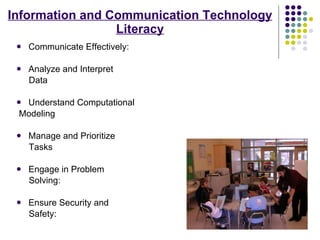
Information and Communication Technology Literacy Communicate Effectively:  Analyze and Interpret  Data Understand Computational Modeling Manage and Prioritize  Tasks Engage in Problem  Solving: Ensure Security and Safety:
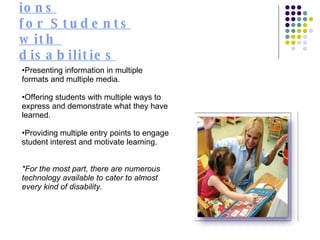
Accommodations for Students with  disabilities Presenting information in multiple formats and multiple media.  Offering students with multiple ways to express and demonstrate what they have learned.  Providing multiple entry points to engage student interest and motivate learning.  *For the most part, there are numerous technology available to cater to almost every kind of disability.
What Types of Learning Problems Does Assistive Technology Address? AT can address many types of learning difficulties. A student who has difficulty writing can compose a school report by dictating it and having it converted to text by special computer software. A child who struggles with math can use a hand-held calculator to keep score while playing a game with a friend. And a teenager with dyslexia may benefit from AT that will read aloud his employer's online training manual. There are AT tools to help students who struggle with: Listening   Math   Organization and Memory   Reading   Writing
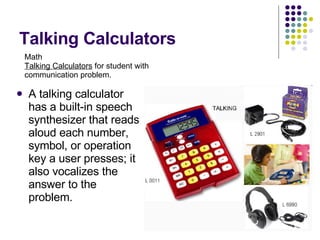
Talking Calculators A talking calculator has a built-in speech synthesizer that reads aloud each number, symbol, or operation key a user presses; it also vocalizes the answer to the problem.  Math Talking Calculators  for student with communication problem.
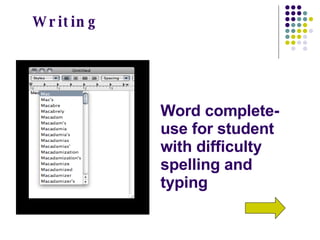
Word complete- use for student with difficulty spelling and typing  Writing
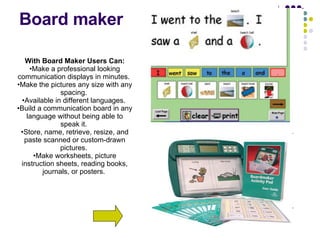
Board maker With Board Maker Users Can: Make a professional looking communication displays in minutes.  Make the pictures any size with any spacing.  Available in different languages.  Build a communication board in any language without being able to speak it.  Store, name, retrieve, resize, and paste scanned or custom-drawn pictures.  Make worksheets, picture instruction sheets, reading books, journals, or posters.
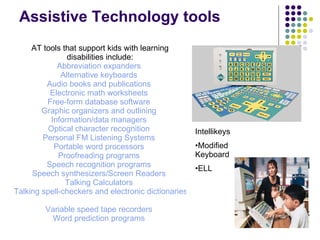
Assistive Technology tools AT tools that support kids with learning disabilities include: Abbreviation expanders   Alternative keyboards   Audio books and publications   Electronic math worksheets   Free-form database software   Graphic organizers and outlining   Information/data managers   Optical character recognition   Personal FM Listening Systems   Portable word processors   Proofreading programs   Speech recognition programs   Speech synthesizers/Screen Readers   Talking Calculators   Talking spell-checkers and electronic dictionaries   Variable speed tape recorders   Word prediction programs   Intellikeys Modified Keyboard  ELL
ESL students and Technology Build conceptual frameworks.  Teach learning strategies.  Focus on reading in all classes.  Give students opportunities to engage in free reading.  Help students move beyond the text.
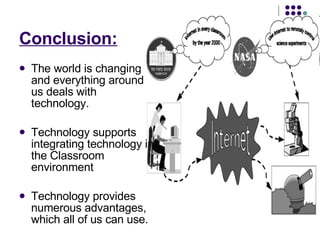
Conclusion: The world is changing and everything around us deals with technology. Technology supports integrating technology in the Classroom environment Technology provides numerous advantages, which all of us can use.
Resources: http://www.ncrel.org/sdrs/areas/issues/methods/technlgy/te800.htm www.uq.edu.au/teaching-learning/download/workshops/innovation-technology-tl.ppt  http://www.ncrel.org/sdrs/areas/issues/methods/technlgy/te900.htm http://www.ericdigests.org/1999-1/remedial.html http://www.rjcooper.com/index.html http://sped.peabody.k12.ma.us/assistive_technology_resources.htm

Remedial Resource

  • 1.
    Using technology asa remedial resource to improve student learning Eloise C. Leon Guerrero ED 480 Educational Technology Fall 2008
  • 2.
    Advantages Unlimited Accessof useful amount through the net -variety of tools available to assist in remedial problems in reading and writing. -Expansion of learning opportunities -Greater learning experience at low cost and downloadable…
  • 3.
    Information and CommunicationTechnology Literacy Communicate Effectively: Analyze and Interpret Data Understand Computational Modeling Manage and Prioritize Tasks Engage in Problem Solving: Ensure Security and Safety:
  • 4.
    Accommodations for Studentswith disabilities Presenting information in multiple formats and multiple media. Offering students with multiple ways to express and demonstrate what they have learned. Providing multiple entry points to engage student interest and motivate learning. *For the most part, there are numerous technology available to cater to almost every kind of disability.
  • 5.
    What Types ofLearning Problems Does Assistive Technology Address? AT can address many types of learning difficulties. A student who has difficulty writing can compose a school report by dictating it and having it converted to text by special computer software. A child who struggles with math can use a hand-held calculator to keep score while playing a game with a friend. And a teenager with dyslexia may benefit from AT that will read aloud his employer's online training manual. There are AT tools to help students who struggle with: Listening Math Organization and Memory Reading Writing
  • 6.
    Talking Calculators Atalking calculator has a built-in speech synthesizer that reads aloud each number, symbol, or operation key a user presses; it also vocalizes the answer to the problem. Math Talking Calculators for student with communication problem.
  • 7.
    Word complete- usefor student with difficulty spelling and typing Writing
  • 8.
    Board maker WithBoard Maker Users Can: Make a professional looking communication displays in minutes. Make the pictures any size with any spacing. Available in different languages. Build a communication board in any language without being able to speak it. Store, name, retrieve, resize, and paste scanned or custom-drawn pictures. Make worksheets, picture instruction sheets, reading books, journals, or posters.
  • 9.
    Assistive Technology toolsAT tools that support kids with learning disabilities include: Abbreviation expanders Alternative keyboards Audio books and publications Electronic math worksheets Free-form database software Graphic organizers and outlining Information/data managers Optical character recognition Personal FM Listening Systems Portable word processors Proofreading programs Speech recognition programs Speech synthesizers/Screen Readers Talking Calculators Talking spell-checkers and electronic dictionaries Variable speed tape recorders Word prediction programs Intellikeys Modified Keyboard ELL
  • 10.
    ESL students andTechnology Build conceptual frameworks. Teach learning strategies. Focus on reading in all classes. Give students opportunities to engage in free reading. Help students move beyond the text.
  • 11.
    Conclusion: The worldis changing and everything around us deals with technology. Technology supports integrating technology in the Classroom environment Technology provides numerous advantages, which all of us can use.
  • 12.
    Resources: http://www.ncrel.org/sdrs/areas/issues/methods/technlgy/te800.htm www.uq.edu.au/teaching-learning/download/workshops/innovation-technology-tl.ppt http://www.ncrel.org/sdrs/areas/issues/methods/technlgy/te900.htm http://www.ericdigests.org/1999-1/remedial.html http://www.rjcooper.com/index.html http://sped.peabody.k12.ma.us/assistive_technology_resources.htm