
1
Here’s your life preserver
2
Is there an easier way to locate
a predicate device?
3
Vol. 1. - Two options on how to search for a predicate device for a 510(k).
We will cover each option step-by-step on how to search for a predicate device and
provide research time required for both.
• Graematter’s SOFIE Regulatory Intelligence Database
• Public FDA Website
The Regulatory Intelligence Series
4
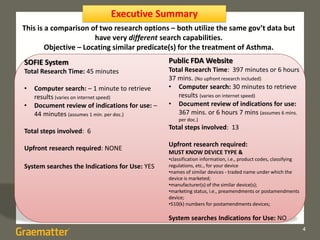
Executive Summary
SOFIE System
Total Research Time: 45 minutes
• Computer search: – 1 minute to retrieve
results (varies on internet speed)
• Document review of indications for use: –
44 minutes (assumes 1 min. per doc.)
Total steps involved: 6
Upfront research required: NONE
System searches the Indications for Use: YES
Public FDA Website
Total Research Time: 397 minutes or 6 hours
37 mins. (No upfront research included)
• Computer search: 30 minutes to retrieve
results (varies on internet speed)
• Document review of indications for use:
367 mins. or 6 hours 7 mins (assumes 6 mins.
per doc.)
Total steps involved: 13
Upfront research required:
MUST KNOW DEVICE TYPE &
•classification information, i.e., product codes, classifying
regulations, etc., for your device
•names of similar devices - traded name under which the
device is marketed;
•manufacturer(s) of the similar device(s);
•marketing status, i.e., preamendments or postamendments
device;
•510(k) numbers for postamendments devices;
System searches Indications for Use: NO
This is a comparison of two research options – both utilize the same gov’t data but
have very different search capabilities.
Objective – Locating similar predicate(s) for the treatment of Asthma.
5
SOFIE System
How to search for a predicate device on the SOFIE™
System
Let’s find a predicate for a new device for the treatment of Asthma.
Important Note: The SOFIE System by Graematter ALLOWS you to search the “Indications
for Use Statements”, saving you upfront research time.
We’ll assume that we don’t know which product code is most applicable to our device.
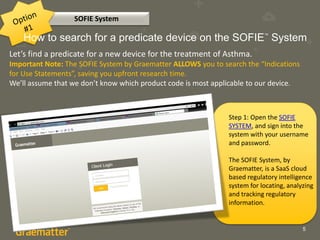
Step 1: Open the SOFIE
SYSTEM, and sign into the
system with your username
and password.
The SOFIE System, by
Graematter, is a SaaS cloud
based regulatory intelligence
system for locating, analyzing
and tracking regulatory
information.
6
SOFIE System
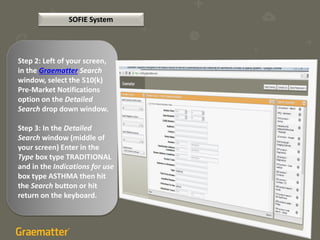
Step 2: Left of your screen,
in the Graematter Search
window, select the 510(k)
Pre-Market Notifications
option on the Detailed
Search drop down window.
Step 3: In the Detailed
Search window (middle of
your screen) Enter in the
Type box type TRADITIONAL
and in the Indications for use
box type ASTHMA then hit
the Search button or hit
return on the keyboard.
7
Step 4: This returns 44 - 510 (k)’s – You
can sort by each column at the top of
the Detailed Search window. Let’s sort
by product code. You are not
restricted to only 1 product code. You
need to review the 44 510(k)’s.
Step 5: Click the first document to
open the Entity Details window. In one
click, this displays the “Indications
for Use Statements”. No searching
required. Review all 44 documents.
Step 6: Determine the best fit.
SOFIE System
8
Upfront research required: NONE
Total Steps involved: 6
Total Research Time: 45 minutes
• Computer search: – 1 minute to retrieve results (varies on internet speed)
• Document review: – 44 minutes (assumes 1 min per doc.)
SOFIE System
Predicate device search on the SOFIE System
9
Public FDA Website
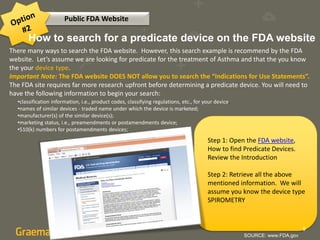
How to search for a predicate device on the FDA website
There many ways to search the FDA website. However, this search example is recommend by the FDA
website. Let’s assume we are looking for predicate for the treatment of Asthma and that the you know
the your device type.
Important Note: The FDA website DOES NOT allow you to search the “Indications for Use Statements”.
The FDA site requires far more research upfront before determining a predicate device. You will need to
have the following information to begin your search:
•classification information, i.e., product codes, classifying regulations, etc., for your device.
•names of similar devices - traded name under which the device is marketed;
•manufacturer(s) of the similar device(s);
•marketing status, i.e., preamendments or postamendments device;
•510(k) numbers for postamendments devices;
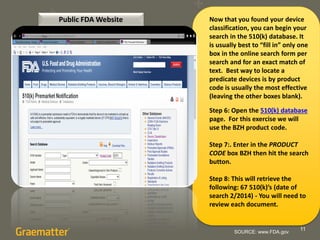
Step 1: Open the FDA website,
How to find Predicate Devices.
Review the Introduction
Step 2: Retrieve all the above
mentioned information. We will
assume you know the device type
SPIROMETRY
SOURCE: www.FDA.gov
10
Public FDA Website
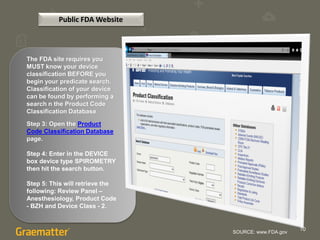
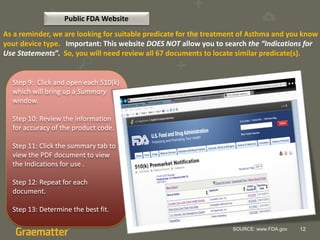
The FDA site requires you
MUST know your device
classification BEFORE you
begin your predicate search.
Classification of your device
can be found by performing a
search n the Product Code
Classification Database
Step 3: Open the Product
Code Classification Database
page.
Step 4: Enter in the DEVICE
box device type SPIROMETRY
then hit the search button.
Step 5: This will retrieve the
following: Review Panel –
Anesthesiology, Product Code
- BZH and Device Class - 2.
SOURCE: www.FDA.gov
11
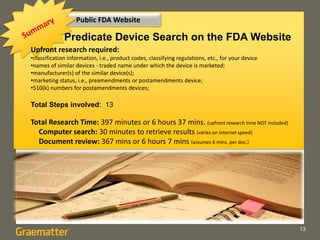
Now that you found your device
classification, you can begin your
search in the 510(k) database. It
is usually best to “fill in” only one
box in the online search form per
search and for an exact match of
text. Best way to locate a
predicate devices is by product
code is usually the most effective
(leaving the other boxes blank).
Step 6: Open the 510(k) database
page. For this exercise we will
use the BZH product code.
Step 7:. Enter in the PRODUCT
CODE box BZH then hit the search
button.
Step 8: This will retrieve the
following: 67 510(k)’s (date of
search 2/2014) - You will need to
review each document.
SOURCE: www.FDA.gov
Public FDA Website
12
Public FDA Website
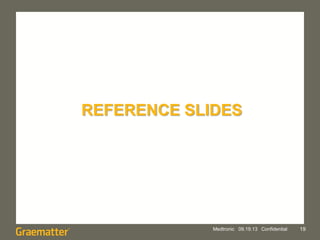
As a reminder, we are looking for suitable predicate for the treatment of Asthma and you know
your device type. Important: This website DOES NOT allow you to search the “Indications for
Use Statements”. So, you will need review all 67 documents to locate similar predicate(s).
Step 9: Click and open each 510(k)
which will bring up a Summary
window.
Step 10: Review the information
for accuracy of the product code.
Step 11: Click the summary tab to
view the PDF document to view
the Indications for use .
Step 12: Repeat for each
document.
Step 13: Determine the best fit.
SOURCE: www.FDA.gov
13
Public FDA Website
Predicate Device Search on the FDA Website
Upfront research required:
•classification information, i.e., product codes, classifying regulations, etc., for your device
•names of similar devices - traded name under which the device is marketed;
•manufacturer(s) of the similar device(s);
•marketing status, i.e., preamendments or postamendments device;
•510(k) numbers for postamendments devices;
Total Steps involved: 13
Total Research Time: 397 minutes or 6 hours 37 mins. (upfront research time NOT included)
Computer search: 30 minutes to retrieve results (varies on internet speed)
Document review: 367 mins or 6 hours 7 mins (assumes 6 mins. per doc.)
14
y step to locate a predicate and show
the time comparisons for both.Comparison of the Two Options
15
This is a comparison of two very
different search options – both
utilized the same gov’t data but
have very different search
capabilities.
Type of System:
SOFIE – SaaS Regulatory Intelligence
System (more info www.Graematter.com)
FDA – Public website
Data Source:
SOFIE – Publicly available
information, from different
government sources, is collected,
scraped for text recognition, and
cross-referenced, connecting all
related documents.
FDA – Publicly available information.
16
Information Cross-referenced:
SOFIE – Yes, it pulls together related and
relevant documents from different gov’t sources
into a single search, seeing the whole history by
product, company or person.
FDA – No
User Interface:
SOFIE – Easy to use. The search can be
completed with in one quick search. No upfront
research required – Info is cross-referenced.
FDA- Some difficulty - research required
upfront. It utilizes 2 separate databases to
compete – Info is not cross-referenced.
How much Experience/training is required:
SOFIE – Novice/minimal training is required.
FDA – Mid-level expert/some training required –
tribal knowledge of where documents are
located.
17
What is Searchable:
SOFIE – The entire document is searchable, any field is searchable. Also, the system allows for
full-text as well as keyword searches.
FDA - The each database limits you to predetermined search fields. The search engine searches
for an exact match of text. However, please refer to the FDA website for best search tips.
Are the Data Always Accessible?
SOFIE – Yes, data is always available, never removed.
FDA – No, documents are sometimes removed after being posted.
Research Required:
SOFIE – 45 minutes – no upfront research required
FDA – 397 minutes or 6 hours 37 mins. (No upfront research included)
18
Stay Tuned – Guidance on Guidance
REFERENCE SLIDES
Medtronic 09.19.13 Confidential 19
SOURCE: www.FDA.gov 20
What’s a 510(k)?
The FDA’s A Premarket Notification [510(k)] is a premarketing submission made
to FDA to demonstrate that the device to be marketed is safe and effective by
proving substantial equivalence1 (SE) to a legally marketed device (predicate
device) that is not subject to Premarket Approval (PMA). Submitters must
compare their 510(k) device to a similar legally marketed U.S. device(s). A
device recently cleared under 510(k) is usually used as a predicate device.
However, any legally U.S. marketed device may be used as a predicate. This
includes: a device that has been cleared through the 510(k) process; a device
that was legally marketed prior to May 28, 1976 (preamendments device); a
device that was originally on the U.S. market as a Class III device (Premarket
Approval) and later downclassified to Class II or I; or a 510(k) exempt device.
21
What’s a Predicate
Device?
The legally marketed device(s) to which
equivalence is drawn is known as the
predicate device(s). A claim of substantial
equivalence does not mean the device(s)
must be identical. Substantial equivalence
is established with respect to: intended
use, design, energy used or delivered,
materials, performance, safety,
effectiveness, labeling, biocompatibility,
standards, and other applicable
characteristics. You can claim SE to either a
preamendments or postamendments
device that is or was legally marketed.
Legally marketed means that the predicate
cannot be one that is or was in violation of
the Federal Food Drug & Cosmetic (FD&C)
Act. An applicant may claim SE to a device
that is no longer being marketed in the U.S.
SOURCE: www.FDA.gov

Regulatory Intelligence Series - How to find Predicate Devices SOFIE compared to FDA Site.

  • 1.
  • 2.
    2 Is there aneasier way to locate a predicate device?
  • 3.
    3 Vol. 1. -Two options on how to search for a predicate device for a 510(k). We will cover each option step-by-step on how to search for a predicate device and provide research time required for both. • Graematter’s SOFIE Regulatory Intelligence Database • Public FDA Website The Regulatory Intelligence Series
  • 4.
    4 Executive Summary SOFIE System TotalResearch Time: 45 minutes • Computer search: – 1 minute to retrieve results (varies on internet speed) • Document review of indications for use: – 44 minutes (assumes 1 min. per doc.) Total steps involved: 6 Upfront research required: NONE System searches the Indications for Use: YES Public FDA Website Total Research Time: 397 minutes or 6 hours 37 mins. (No upfront research included) • Computer search: 30 minutes to retrieve results (varies on internet speed) • Document review of indications for use: 367 mins. or 6 hours 7 mins (assumes 6 mins. per doc.) Total steps involved: 13 Upfront research required: MUST KNOW DEVICE TYPE & •classification information, i.e., product codes, classifying regulations, etc., for your device •names of similar devices - traded name under which the device is marketed; •manufacturer(s) of the similar device(s); •marketing status, i.e., preamendments or postamendments device; •510(k) numbers for postamendments devices; System searches Indications for Use: NO This is a comparison of two research options – both utilize the same gov’t data but have very different search capabilities. Objective – Locating similar predicate(s) for the treatment of Asthma.
  • 5.
    5 SOFIE System How tosearch for a predicate device on the SOFIE™ System Let’s find a predicate for a new device for the treatment of Asthma. Important Note: The SOFIE System by Graematter ALLOWS you to search the “Indications for Use Statements”, saving you upfront research time. We’ll assume that we don’t know which product code is most applicable to our device. Step 1: Open the SOFIE SYSTEM, and sign into the system with your username and password. The SOFIE System, by Graematter, is a SaaS cloud based regulatory intelligence system for locating, analyzing and tracking regulatory information.
  • 6.
    6 SOFIE System Step 2:Left of your screen, in the Graematter Search window, select the 510(k) Pre-Market Notifications option on the Detailed Search drop down window. Step 3: In the Detailed Search window (middle of your screen) Enter in the Type box type TRADITIONAL and in the Indications for use box type ASTHMA then hit the Search button or hit return on the keyboard.
  • 7.
    7 Step 4: Thisreturns 44 - 510 (k)’s – You can sort by each column at the top of the Detailed Search window. Let’s sort by product code. You are not restricted to only 1 product code. You need to review the 44 510(k)’s. Step 5: Click the first document to open the Entity Details window. In one click, this displays the “Indications for Use Statements”. No searching required. Review all 44 documents. Step 6: Determine the best fit. SOFIE System
  • 8.
    8 Upfront research required:NONE Total Steps involved: 6 Total Research Time: 45 minutes • Computer search: – 1 minute to retrieve results (varies on internet speed) • Document review: – 44 minutes (assumes 1 min per doc.) SOFIE System Predicate device search on the SOFIE System
  • 9.
    9 Public FDA Website Howto search for a predicate device on the FDA website There many ways to search the FDA website. However, this search example is recommend by the FDA website. Let’s assume we are looking for predicate for the treatment of Asthma and that the you know the your device type. Important Note: The FDA website DOES NOT allow you to search the “Indications for Use Statements”. The FDA site requires far more research upfront before determining a predicate device. You will need to have the following information to begin your search: •classification information, i.e., product codes, classifying regulations, etc., for your device. •names of similar devices - traded name under which the device is marketed; •manufacturer(s) of the similar device(s); •marketing status, i.e., preamendments or postamendments device; •510(k) numbers for postamendments devices; Step 1: Open the FDA website, How to find Predicate Devices. Review the Introduction Step 2: Retrieve all the above mentioned information. We will assume you know the device type SPIROMETRY SOURCE: www.FDA.gov
  • 10.
    10 Public FDA Website TheFDA site requires you MUST know your device classification BEFORE you begin your predicate search. Classification of your device can be found by performing a search n the Product Code Classification Database Step 3: Open the Product Code Classification Database page. Step 4: Enter in the DEVICE box device type SPIROMETRY then hit the search button. Step 5: This will retrieve the following: Review Panel – Anesthesiology, Product Code - BZH and Device Class - 2. SOURCE: www.FDA.gov
  • 11.
    11 Now that youfound your device classification, you can begin your search in the 510(k) database. It is usually best to “fill in” only one box in the online search form per search and for an exact match of text. Best way to locate a predicate devices is by product code is usually the most effective (leaving the other boxes blank). Step 6: Open the 510(k) database page. For this exercise we will use the BZH product code. Step 7:. Enter in the PRODUCT CODE box BZH then hit the search button. Step 8: This will retrieve the following: 67 510(k)’s (date of search 2/2014) - You will need to review each document. SOURCE: www.FDA.gov Public FDA Website
  • 12.
    12 Public FDA Website Asa reminder, we are looking for suitable predicate for the treatment of Asthma and you know your device type. Important: This website DOES NOT allow you to search the “Indications for Use Statements”. So, you will need review all 67 documents to locate similar predicate(s). Step 9: Click and open each 510(k) which will bring up a Summary window. Step 10: Review the information for accuracy of the product code. Step 11: Click the summary tab to view the PDF document to view the Indications for use . Step 12: Repeat for each document. Step 13: Determine the best fit. SOURCE: www.FDA.gov
  • 13.
    13 Public FDA Website PredicateDevice Search on the FDA Website Upfront research required: •classification information, i.e., product codes, classifying regulations, etc., for your device •names of similar devices - traded name under which the device is marketed; •manufacturer(s) of the similar device(s); •marketing status, i.e., preamendments or postamendments device; •510(k) numbers for postamendments devices; Total Steps involved: 13 Total Research Time: 397 minutes or 6 hours 37 mins. (upfront research time NOT included) Computer search: 30 minutes to retrieve results (varies on internet speed) Document review: 367 mins or 6 hours 7 mins (assumes 6 mins. per doc.)
  • 14.
    14 y step tolocate a predicate and show the time comparisons for both.Comparison of the Two Options
  • 15.
    15 This is acomparison of two very different search options – both utilized the same gov’t data but have very different search capabilities. Type of System: SOFIE – SaaS Regulatory Intelligence System (more info www.Graematter.com) FDA – Public website Data Source: SOFIE – Publicly available information, from different government sources, is collected, scraped for text recognition, and cross-referenced, connecting all related documents. FDA – Publicly available information.
  • 16.
    16 Information Cross-referenced: SOFIE –Yes, it pulls together related and relevant documents from different gov’t sources into a single search, seeing the whole history by product, company or person. FDA – No User Interface: SOFIE – Easy to use. The search can be completed with in one quick search. No upfront research required – Info is cross-referenced. FDA- Some difficulty - research required upfront. It utilizes 2 separate databases to compete – Info is not cross-referenced. How much Experience/training is required: SOFIE – Novice/minimal training is required. FDA – Mid-level expert/some training required – tribal knowledge of where documents are located.
  • 17.
    17 What is Searchable: SOFIE– The entire document is searchable, any field is searchable. Also, the system allows for full-text as well as keyword searches. FDA - The each database limits you to predetermined search fields. The search engine searches for an exact match of text. However, please refer to the FDA website for best search tips. Are the Data Always Accessible? SOFIE – Yes, data is always available, never removed. FDA – No, documents are sometimes removed after being posted. Research Required: SOFIE – 45 minutes – no upfront research required FDA – 397 minutes or 6 hours 37 mins. (No upfront research included)
  • 18.
    18 Stay Tuned –Guidance on Guidance
  • 19.
  • 20.
    SOURCE: www.FDA.gov 20 What’sa 510(k)? The FDA’s A Premarket Notification [510(k)] is a premarketing submission made to FDA to demonstrate that the device to be marketed is safe and effective by proving substantial equivalence1 (SE) to a legally marketed device (predicate device) that is not subject to Premarket Approval (PMA). Submitters must compare their 510(k) device to a similar legally marketed U.S. device(s). A device recently cleared under 510(k) is usually used as a predicate device. However, any legally U.S. marketed device may be used as a predicate. This includes: a device that has been cleared through the 510(k) process; a device that was legally marketed prior to May 28, 1976 (preamendments device); a device that was originally on the U.S. market as a Class III device (Premarket Approval) and later downclassified to Class II or I; or a 510(k) exempt device.
  • 21.
    21 What’s a Predicate Device? Thelegally marketed device(s) to which equivalence is drawn is known as the predicate device(s). A claim of substantial equivalence does not mean the device(s) must be identical. Substantial equivalence is established with respect to: intended use, design, energy used or delivered, materials, performance, safety, effectiveness, labeling, biocompatibility, standards, and other applicable characteristics. You can claim SE to either a preamendments or postamendments device that is or was legally marketed. Legally marketed means that the predicate cannot be one that is or was in violation of the Federal Food Drug & Cosmetic (FD&C) Act. An applicant may claim SE to a device that is no longer being marketed in the U.S. SOURCE: www.FDA.gov