Redesigning a Communication Support System for Teachers 
05/12/2000 
Yasuhisa Kato yasukato@stanford.edu 
Learning, Design, and Technology 
Master Project
2 
Table of Contents 
Background 
CASTL 
KML 
Workspace 
Learning 
Problems and Needs 
Design Principles 
Sneak Preview 
Future Work
3 
CASTL Program 
The Carnegie Academy for the Scholarship of Teaching and Learning 
Objectives 
Foster learning for students 
Enhance teaching 
Share project work 
One year program for higher education, and two-year for K-12
4 
Scholarship of Teaching (SoT) 
Three features 
Being public (community property) 
Open to critique and evaluation 
Available for reuse 
Investigation of student learning
5 
CASTL (Community I) 
Closed community 
Across the country 
Two face-to-face meetings a year 
Including kick off face-to-face meeting 
20 to 30 people 
Selected by their project proposal, not by their technological skill
6 
CASTL (Community II) 
Wide variety of subject area 
Chemistry, Mathematics, English, History 
Business, Psychology, and Performing arts
7 
KML 
The Knowledge Media Laboratory of the Carnegie Foundation for the Advancement of Teaching 
Functions 
Developing online web-based communication tools, called the Workspace 
Facilitating teachers to use a variety of media to present their investigation 
Developing resources which promote the understanding and pursuit of the SoT. 
Helping to build a larger network of teachers
8 
Workspace 
For program participants and Carnegie staff 
Usage 
Post and share project documents 
Comments 
Resources 
Component 
A set of web-based communication tools 
Online multimedia database 
Running from Jan. 1999
9 
Workspace (Current system) 
Demonstration 
Scholar Workspace 
Listserv archive 
Program Documents, etc
10 
What do they learn? 
Each participant has his/her own project. 
Different people have different goals. 
Each individual seeks to develop his/her her own scholarship of teaching and learning.
11 
How do they learn? 
Self learning on campus 
Peer review 
Face-to-face meeting 
Direct E-mail or Telephone 
Via the Workspace
12 
Sample Project 
Prof. Stephen Chew Psychology, Samford University 
Using Examples in Teaching: Progress and General Reflection 
Focus on the use of examples in teaching. 
What are the properties of a good example? 
What is the best way to use examples in teaching? 
What do students learn from examples?
13 
Problems 
Participants do not actively post their project work and responses 
Less posting, less feedback 
Why 
Limitation of text only 
No appropriate communication tool 
Usability issues 
Distrust of the new system/technology
14 
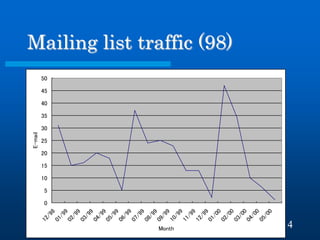
Mailing list traffic (98) 
05101520253035404550 12/9801/9902/9903/9904/9905/9906/9907/9908/9909/9910/9911/9912/9901/0002/0003/0004/0005/00 Month E-mail
15 
Needs 
Establish a discourse 
Profound discussion 
More feedback 
Critical peer reviews 
Technical knowledge/skills 
Advantages of tools 
Tools 
Chat 
Auto notification
16 
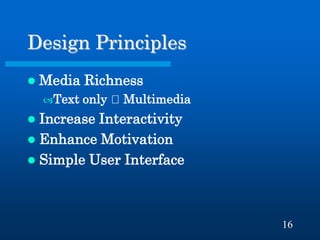
Design Principles 
Media Richness 
Text only Multimedia 
Increase Interactivity 
Enhance Motivation 
Simple User Interface
17 
Sneak Preview 
Development is in progress
18 
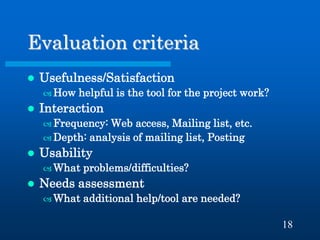
Evaluation criteria 
Usefulness/Satisfaction 
How helpful is the tool for the project work? 
Interaction 
Frequency: Web access, Mailing list, etc. 
Depth: analysis of mailing list, Posting 
Usability 
What problems/difficulties? 
Needs assessment 
What additional help/tool are needed?
19 
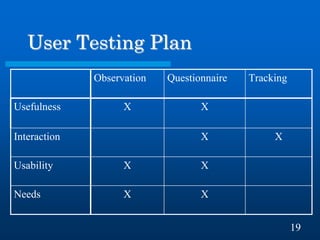
User Testing Plan 
X 
X 
Needs 
X 
X 
Usability 
X 
X 
Interaction 
X 
X 
Usefulness 
Tracking 
Questionnaire 
Observation
20 
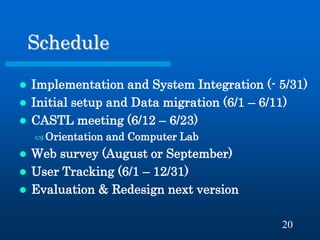
Schedule 
Implementation and System Integration (- 5/31) 
Initial setup and Data migration (6/1 – 6/11) 
CASTL meeting (6/12 – 6/23) 
Orientation and Computer Lab 
Web survey (August or September) 
User Tracking (6/1 – 12/31) 
Evaluation & Redesign next version
21 
Acknowledgement 
Professor Decker Walker 
Program coordinator Deborah Kim 
Carnegie Foundation Dr. Toru Iiyoshi 
Carnegie Foundation Dr. Tom Hatch 
LDTers
Thank you for your attention! 
Yasuhisa Kato 
Yasukato@stanford.edu
23 
URLs 
The Carnegie Foundation for the Advancement of Teaching: http://www.carnegiefoundation.org/ 
CASTL Program: http://www.carnegiefoundation.org/OurWork/CASTL/castl.htm 
Master project: http://ldt.stanford.edu/~yasukato/mp/

Redesigning a Communication Support System for Teachers

  • 1.
    Redesigning a CommunicationSupport System for Teachers 05/12/2000 Yasuhisa Kato yasukato@stanford.edu Learning, Design, and Technology Master Project
  • 2.
    2 Table ofContents Background CASTL KML Workspace Learning Problems and Needs Design Principles Sneak Preview Future Work
  • 3.
    3 CASTL Program The Carnegie Academy for the Scholarship of Teaching and Learning Objectives Foster learning for students Enhance teaching Share project work One year program for higher education, and two-year for K-12
  • 4.
    4 Scholarship ofTeaching (SoT) Three features Being public (community property) Open to critique and evaluation Available for reuse Investigation of student learning
  • 5.
    5 CASTL (CommunityI) Closed community Across the country Two face-to-face meetings a year Including kick off face-to-face meeting 20 to 30 people Selected by their project proposal, not by their technological skill
  • 6.
    6 CASTL (CommunityII) Wide variety of subject area Chemistry, Mathematics, English, History Business, Psychology, and Performing arts
  • 7.
    7 KML TheKnowledge Media Laboratory of the Carnegie Foundation for the Advancement of Teaching Functions Developing online web-based communication tools, called the Workspace Facilitating teachers to use a variety of media to present their investigation Developing resources which promote the understanding and pursuit of the SoT. Helping to build a larger network of teachers
  • 8.
    8 Workspace Forprogram participants and Carnegie staff Usage Post and share project documents Comments Resources Component A set of web-based communication tools Online multimedia database Running from Jan. 1999
  • 9.
    9 Workspace (Currentsystem) Demonstration Scholar Workspace Listserv archive Program Documents, etc
  • 10.
    10 What dothey learn? Each participant has his/her own project. Different people have different goals. Each individual seeks to develop his/her her own scholarship of teaching and learning.
  • 11.
    11 How dothey learn? Self learning on campus Peer review Face-to-face meeting Direct E-mail or Telephone Via the Workspace
  • 12.
    12 Sample Project Prof. Stephen Chew Psychology, Samford University Using Examples in Teaching: Progress and General Reflection Focus on the use of examples in teaching. What are the properties of a good example? What is the best way to use examples in teaching? What do students learn from examples?
  • 13.
    13 Problems Participantsdo not actively post their project work and responses Less posting, less feedback Why Limitation of text only No appropriate communication tool Usability issues Distrust of the new system/technology
  • 14.
    14 Mailing listtraffic (98) 05101520253035404550 12/9801/9902/9903/9904/9905/9906/9907/9908/9909/9910/9911/9912/9901/0002/0003/0004/0005/00 Month E-mail
  • 15.
    15 Needs Establisha discourse Profound discussion More feedback Critical peer reviews Technical knowledge/skills Advantages of tools Tools Chat Auto notification
  • 16.
    16 Design Principles Media Richness Text only Multimedia Increase Interactivity Enhance Motivation Simple User Interface
  • 17.
    17 Sneak Preview Development is in progress
  • 18.
    18 Evaluation criteria Usefulness/Satisfaction How helpful is the tool for the project work? Interaction Frequency: Web access, Mailing list, etc. Depth: analysis of mailing list, Posting Usability What problems/difficulties? Needs assessment What additional help/tool are needed?
  • 19.
    19 User TestingPlan X X Needs X X Usability X X Interaction X X Usefulness Tracking Questionnaire Observation
  • 20.
    20 Schedule Implementationand System Integration (- 5/31) Initial setup and Data migration (6/1 – 6/11) CASTL meeting (6/12 – 6/23) Orientation and Computer Lab Web survey (August or September) User Tracking (6/1 – 12/31) Evaluation & Redesign next version
  • 21.
    21 Acknowledgement ProfessorDecker Walker Program coordinator Deborah Kim Carnegie Foundation Dr. Toru Iiyoshi Carnegie Foundation Dr. Tom Hatch LDTers
  • 22.
    Thank you foryour attention! Yasuhisa Kato Yasukato@stanford.edu
  • 23.
    23 URLs TheCarnegie Foundation for the Advancement of Teaching: http://www.carnegiefoundation.org/ CASTL Program: http://www.carnegiefoundation.org/OurWork/CASTL/castl.htm Master project: http://ldt.stanford.edu/~yasukato/mp/