Red Hat Enterprise Linux
OpenStack Platform on
Inktank Ceph Enterprise
Cinder Volume Performance
Performance Engineering
Version 1.0
December 2014
100 East Davie Street
Raleigh NC 27601 USA
Phone: +1 919 754 4950
Fax: +1 919 800 3804
Linux is a registered trademark of Linus Torvalds. Red Hat, Red Hat Enterprise Linux and the Red Hat
"Shadowman" logo are registered trademarks of Red Hat, Inc. in the United States and other
countries.
Dell, the Dell logo and PowerEdge are trademarks of Dell, Inc.
Intel, the Intel logo and Xeon are registered trademarks of Intel Corporation or its subsidiaries in the
United States and other countries.
All other trademarks referenced herein are the property of their respective owners.
© 2014 by Red Hat, Inc. This material may be distributed only subject to the terms and conditions set
forth in the Open Publication License, V1.0 or later (the latest version is presently available at
http://www.opencontent.org/openpub/).
The information contained herein is subject to change without notice. Red Hat, Inc. shall not be liable
for technical or editorial errors or omissions contained herein.
Distribution of modified versions of this document is prohibited without the explicit permission of Red
Hat Inc.
Distribution of this work or derivative of this work in any standard (paper) book form for commercial
purposes is prohibited unless prior permission is obtained from Red Hat Inc.
The GPG fingerprint of the security@redhat.com key is:
CA 20 86 86 2B D6 9D FC 65 F6 EC C4 21 91 80 CD DB 42 A6 0E
www.redhat.com 2 Performance Engineering
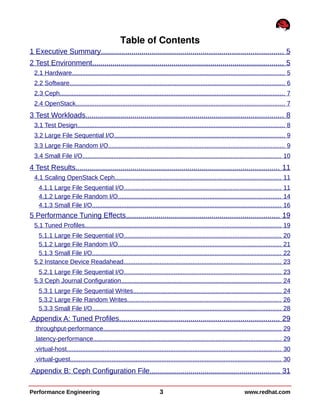
Table of Contents
1 Executive Summary......................................................................................... 5
2 Test Environment.............................................................................................. 5
2.1 Hardware........................................................................................................................... 5
2.2 Software............................................................................................................................. 6
2.3 Ceph.................................................................................................................................. 7
2.4 OpenStack......................................................................................................................... 7
3 Test Workloads................................................................................................. 8
3.1 Test Design........................................................................................................................ 8
3.2 Large File Sequential I/O................................................................................................... 9
3.3 Large File Random I/O...................................................................................................... 9
3.4 Small File I/O................................................................................................................... 10
4 Test Results.................................................................................................... 11
4.1 Scaling OpenStack Ceph................................................................................................ 11
4.1.1 Large File Sequential I/O........................................................................................... 11
4.1.2 Large File Random I/O.............................................................................................. 14
4.1.3 Small File I/O............................................................................................................. 16
5 Performance Tuning Effects........................................................................... 19
5.1 Tuned Profiles.................................................................................................................. 19
5.1.1 Large File Sequential I/O........................................................................................... 20
5.1.2 Large File Random I/O.............................................................................................. 21
5.1.3 Small File I/O............................................................................................................. 22
5.2 Instance Device Readahead........................................................................................... 23
5.2.1 Large File Sequential I/O........................................................................................... 23
5.3 Ceph Journal Configuration............................................................................................. 24
5.3.1 Large File Sequential Writes...................................................................................... 24
5.3.2 Large File Random Writes......................................................................................... 26
5.3.3 Small File I/O............................................................................................................. 28
Appendix A: Tuned Profiles.............................................................................. 29
throughput-performance....................................................................................................... 29
latency-performance............................................................................................................. 29
virtual-host............................................................................................................................ 30
virtual-guest.......................................................................................................................... 30
Appendix B: Ceph Configuration File................................................................ 31
Performance Engineering 3 www.redhat.com
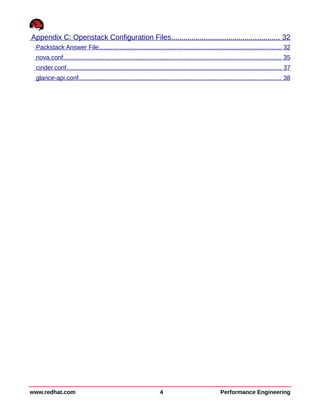
Appendix C: Openstack Configuration Files..................................................... 32
Packstack Answer File.......................................................................................................... 32
nova.conf.............................................................................................................................. 35
cinder.conf............................................................................................................................ 37
glance-api.conf..................................................................................................................... 38
www.redhat.com 4 Performance Engineering
1 Executive Summary
This paper describes I/O characterization testing performed by the Red Hat Performance
Engineering group on a Red Hat Enterprise Linux (RHEL) OpenStack Platform (OSP) v5
configuration using Cinder volumes on Inktank Ceph Enterprise (ICE) v1.2.2 storage. It
focuses on steady-state performance of OpenStack instance created file systems on Cinder
volumes as a function of the number of instances per server. It examines Ceph's ability to
scale as the test environment grows as well as the effects of performance tuning involving
tuned profiles, device readahead and Ceph journal disk configurations.
2 Test Environment
The hardware and software configurations used for the systems under test (SUT).
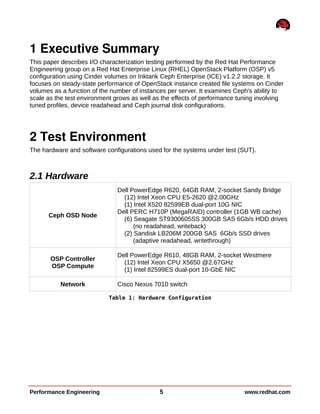
2.1 Hardware
Ceph OSD Node
Dell PowerEdge R620, 64GB RAM, 2-socket Sandy Bridge
(12) Intel Xeon CPU E5-2620 @2.00GHz
(1) Intel X520 82599EB dual-port 10G NIC
Dell PERC H710P (MegaRAID) controller (1GB WB cache)
(6) Seagate ST9300605SS 300GB SAS 6Gb/s HDD drives
(no readahead, writeback)
(2) Sandisk LB206M 200GB SAS 6Gb/s SSD drives
(adaptive readahead, writethrough)
OSP Controller
OSP Compute
Dell PowerEdge R610, 48GB RAM, 2-socket Westmere
(12) Intel Xeon CPU X5650 @2.67GHz
(1) Intel 82599ES dual-port 10-GbE NIC
Network Cisco Nexus 7010 switch
Table 1: Hardware Configuration
Performance Engineering 5 www.redhat.com
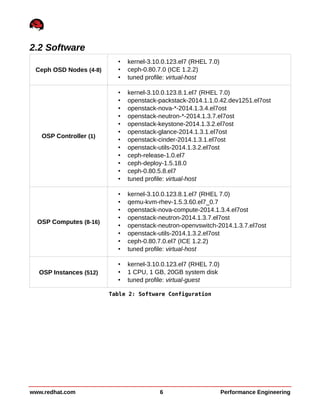
2.2 Software
Ceph OSD Nodes (4-8)
• kernel-3.10.0.123.el7 (RHEL 7.0)
• ceph-0.80.7.0 (ICE 1.2.2)
• tuned profile: virtual-host
OSP Controller (1)
• kernel-3.10.0.123.8.1.el7 (RHEL 7.0)
• openstack-packstack-2014.1.1.0.42.dev1251.el7ost
• openstack-nova-*-2014.1.3.4.el7ost
• openstack-neutron-*-2014.1.3.7.el7ost
• openstack-keystone-2014.1.3.2.el7ost
• openstack-glance-2014.1.3.1.el7ost
• openstack-cinder-2014.1.3.1.el7ost
• openstack-utils-2014.1.3.2.el7ost
• ceph-release-1.0.el7
• ceph-deploy-1.5.18.0
• ceph-0.80.5.8.el7
• tuned profile: virtual-host
OSP Computes (8-16)
• kernel-3.10.0.123.8.1.el7 (RHEL 7.0)
• qemu-kvm-rhev-1.5.3.60.el7_0.7
• openstack-nova-compute-2014.1.3.4.el7ost
• openstack-neutron-2014.1.3.7.el7ost
• openstack-neutron-openvswitch-2014.1.3.7.el7ost
• openstack-utils-2014.1.3.2.el7ost
• ceph-0.80.7.0.el7 (ICE 1.2.2)
• tuned profile: virtual-host
OSP Instances (512)
• kernel-3.10.0.123.el7 (RHEL 7.0)
• 1 CPU, 1 GB, 20GB system disk
• tuned profile: virtual-guest
Table 2: Software Configuration
www.redhat.com 6 Performance Engineering
2.3 Ceph
Ceph stores client data as objects within storage pools. It maps objects to placement groups
(PGs) which organize objects as a group into object storage devices (OSDs). See Ceph
introductory documentation for greater detail (http://ceph.com/docs/master/start/intro/).
Testing was performed in a 4x8 (Ceph nodes and OSP compute nodes) test environment as
well as an 8x16 configuration. Each Ceph OSD node allocated five 300GB local disks for use
as OSDs and an SSD for Ceph journals. The configuration file used during testing is available
in Appendix B: Ceph Configuration File. Each OSP instance had a cinder volume created,
attached, pre-allocated, XFS formatted, and mounted as /dev/vdb for all I/O tests. The
number of placement groups (PGs) for the pool as well as the number of placement groups to
use when calculating data placement were adjusted to pass a ceph health check using
the recommended rule where one OSD is expected to manage approximately 100 PGs or
more. The general rule used is
PGs per pool = ((OSDs * 100 / max_rep_count) / NB_POOLS)
where max_rep_count is the replica count (default=3) and NB_POOLS is the total number of
pool storing objects. For this testing, both pg_num and pgp_num were set to 700 for the 20-
OSD configuration and 1400 when testing with 40 OSDs.
2.4 OpenStack
RHEL OSP 5.0 was installed and configured using packstack with an answer file, the specific
contents of which are available in Appendix C: Openstack Configuration Files. It configures one
OpenStack controller node (Nova, Neutron, Glance, Cinder, Keystone, etc.) and 16 compute
nodes. Cinder was configured to use the Ceph storage described in Section 2.3 using the
instructions to utilize Ceph block device images via libvirt within OpenStack
(http://ceph.com/docs/master/rbd/rbd-openstack/).
After each instance attaches a 6 GB Cinder volume, 4.3 GB of the block is pre-allocated (for 4
GB I/O tests) using dd before mounting the device in the instance. This is done to achieve
repeatable throughput results as RBD volumes are thin provisioned and without doing so can
produce different results from first write to second.
Performance Engineering 7 www.redhat.com
3 Test Workloads
This project used a set of tests that covers a wide spectrum of the possible workloads
applicable to a Cinder volume.
3.1 Test Design
All tests are designed:
• to represent steady state behavior
◦ by using random I/O test durations of 10 min + 10 sec/guest to ensure run times
are sufficient to fully utilize guest memory and force cache flushes to storage
• to ensure data travels the full I/O path between persistent storage and application
◦ by using vm.dirty_expire_centisecs in conjunction with vm.dirty_ratio
◦ by dropping all (server, compute, guest) caches prior to start of every test
◦ by ensuring workload generators do not read or write the same file or offset in a file
more than once, reducing opportunities for caching in memory
◦ so random I/O uses O_DIRECT to bypass guest caching
• to use a data set an order of magnitude larger than aggregate writeback cache size to
ensure data is written to disk by end of test
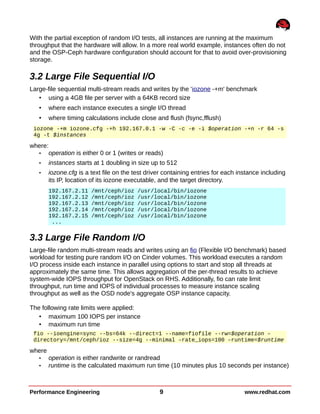
Although testing is designed to cause data to travel the full path between the application and
persistent storage, Ceph (like NFS) uses buffering for OSD I/O even when the application has
requested direct I/O (O_DIRECT), as illustrated by the Ceph server memory consumption in
KB during a random write test in Figure 3.1. Keys indicated with a solid circle are graphed.
www.redhat.com 8 Performance Engineering
Figure 3.1: Server Memory (KB) Usage – 32 Instance Random Writes
With the partial exception of random I/O tests, all instances are running at the maximum
throughput that the hardware will allow. In a more real world example, instances often do not
and the OSP-Ceph hardware configuration should account for that to avoid over-provisioning
storage.
3.2 Large File Sequential I/O
Large-file sequential multi-stream reads and writes by the 'iozone -+m' benchmark
• using a 4GB file per server with a 64KB record size
• where each instance executes a single I/O thread
• where timing calculations include close and flush (fsync,fflush)
iozone -+m iozone.cfg -+h 192.167.0.1 -w -C -c -e -i $operation -+n -r 64 -s
4g -t $instances
where:
• operation is either 0 or 1 (writes or reads)
• instances starts at 1 doubling in size up to 512
• iozone.cfg is a text file on the test driver containing entries for each instance including
its IP, location of its iozone executable, and the target directory.
192.167.2.11 /mnt/ceph/ioz /usr/local/bin/iozone
192.167.2.12 /mnt/ceph/ioz /usr/local/bin/iozone
192.167.2.13 /mnt/ceph/ioz /usr/local/bin/iozone
192.167.2.14 /mnt/ceph/ioz /usr/local/bin/iozone
192.167.2.15 /mnt/ceph/ioz /usr/local/bin/iozone
...
3.3 Large File Random I/O
Large-file random multi-stream reads and writes using an fio (Flexible I/O benchmark) based
workload for testing pure random I/O on Cinder volumes. This workload executes a random
I/O process inside each instance in parallel using options to start and stop all threads at
approximately the same time. This allows aggregation of the per-thread results to achieve
system-wide IOPS throughput for OpenStack on RHS. Additionally, fio can rate limit
throughput, run time and IOPS of individual processes to measure instance scaling
throughput as well as the OSD node's aggregate OSP instance capacity.
The following rate limits were applied:
• maximum 100 IOPS per instance
• maximum run time
fio --ioengine=sync --bs=64k --direct=1 --name=fiofile --rw=$operation –
directory=/mnt/ceph/ioz --size=4g --minimal –rate_iops=100 –runtime=$runtime
where
• operation is either randwrite or randread
• runtime is the calculated maximum run time (10 minutes plus 10 seconds per instance)
Performance Engineering 9 www.redhat.com
3.4 Small File I/O
Small-file multi-stream using the smallfile benchmark. Sequential operations include:.
• create -- create a file and write data to it
• append -- open an existing file and append data to it
• read -- drop cache and read an existing file
• rename -- rename a file
• delete_renamed -- delete a previously renamed file
The test was configured to sequentially execute the following workload:
• one thread per OSP instance
• 30000 64KB files
• 100 files per directory
• stonewalling disabled
./smallfile_cli.py --host-set "`cat vms.list.$instances | tr ' ' ','`"
--response-times Y --stonewall N --top /mnt/ceph/smf --network-sync-dir
/smfnfs/sync --threads $instances --files 30000 --files-per-dir 100 --file-
size 64 --file-size-distribution exponential –operation $operation
where
• instances starts at 1 doubling in size up to 512
• operation loops through the above listed actions
www.redhat.com 10 Performance Engineering
4 Test Results
I/O scaling tests were performed using increasing instance counts in both test environments.
All multi-instance tests ensured even distribution across compute nodes. The results of all
testing are in the following sections.
4.1 Scaling OpenStack Ceph
To remain consistent with regard to instances per server, two test environments were
configured for scaling data collection,
• a 4-server Ceph cluster (20 OSDs, 700 placement groups) and 8 OSP compute nodes
• an 8-server Ceph cluster (40 OSDs, 1400 placement groups) and 16 OSP compute
nodes
Each compute node could host up to 32 (1GB, 1 CPU, 20G disk) OSP instances.
4.1.1 Large File Sequential I/O
Clustered iozone was executed on all participating instances in both test environments.
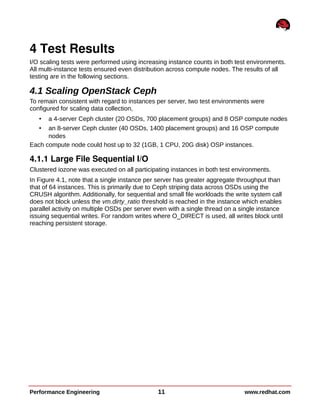
In Figure 4.1, note that a single instance per server has greater aggregate throughput than
that of 64 instances. This is primarily due to Ceph striping data across OSDs using the
CRUSH algorithm. Additionally, for sequential and small file workloads the write system call
does not block unless the vm.dirty_ratio threshold is reached in the instance which enables
parallel activity on multiple OSDs per server even with a single thread on a single instance
issuing sequential writes. For random writes where O_DIRECT is used, all writes block until
reaching persistent storage.
Performance Engineering 11 www.redhat.com
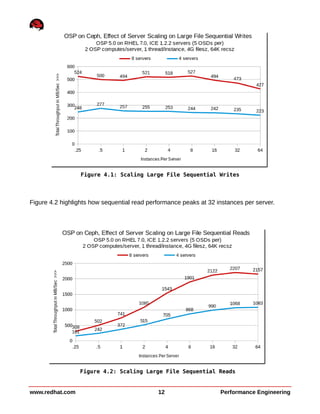
Figure 4.2 highlights how sequential read performance peaks at 32 instances per server.
www.redhat.com 12 Performance Engineering
Figure 4.1: Scaling Large File Sequential Writes
Figure 4.2: Scaling Large File Sequential Reads
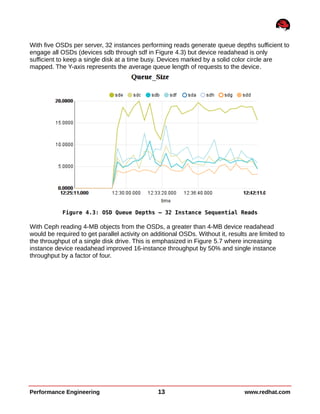
With five OSDs per server, 32 instances performing reads generate queue depths sufficient to
engage all OSDs (devices sdb through sdf in Figure 4.3) but device readahead is only
sufficient to keep a single disk at a time busy. Devices marked by a solid color circle are
mapped. The Y-axis represents the average queue length of requests to the device.
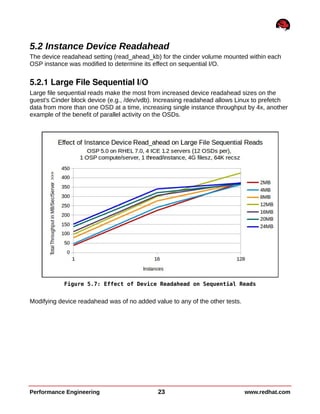
With Ceph reading 4-MB objects from the OSDs, a greater than 4-MB device readahead
would be required to get parallel activity on additional OSDs. Without it, results are limited to
the throughput of a single disk drive. This is emphasized in Figure 5.7 where increasing
instance device readahead improved 16-instance throughput by 50% and single instance
throughput by a factor of four.
Performance Engineering 13 www.redhat.com
Figure 4.3: OSD Queue Depths – 32 Instance Sequential Reads
4.1.2 Large File Random I/O
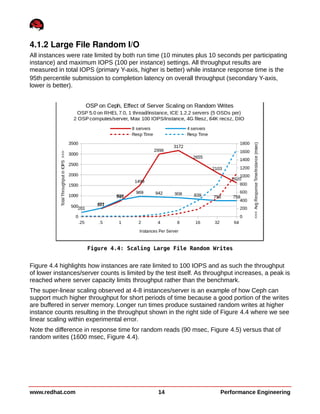
All instances were rate limited by both run time (10 minutes plus 10 seconds per participating
instance) and maximum IOPS (100 per instance) settings. All throughput results are
measured in total IOPS (primary Y-axis, higher is better) while instance response time is the
95th percentile submission to completion latency on overall throughput (secondary Y-axis,
lower is better).
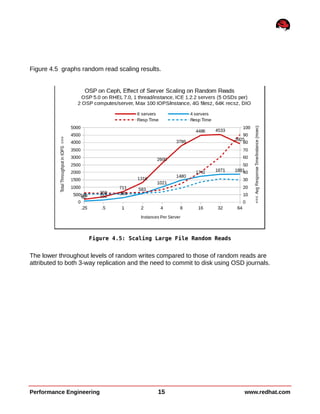
Figure 4.4 highlights how instances are rate limited to 100 IOPS and as such the throughput
of lower instances/server counts is limited by the test itself. As throughput increases, a peak is
reached where server capacity limits throughput rather than the benchmark.
The super-linear scaling observed at 4-8 instances/server is an example of how Ceph can
support much higher throughput for short periods of time because a good portion of the writes
are buffered in server memory. Longer run times produce sustained random writes at higher
instance counts resulting in the throughput shown in the right side of Figure 4.4 where we see
linear scaling within experimental error.
Note the difference in response time for random reads (90 msec, Figure 4.5) versus that of
random writes (1600 msec, Figure 4.4).
www.redhat.com 14 Performance Engineering
Figure 4.4: Scaling Large File Random Writes
Figure 4.5 graphs random read scaling results.
The lower throughout levels of random writes compared to those of random reads are
attributed to both 3-way replication and the need to commit to disk using OSD journals.
Performance Engineering 15 www.redhat.com
Figure 4.5: Scaling Large File Random Reads
4.1.3 Small File I/O
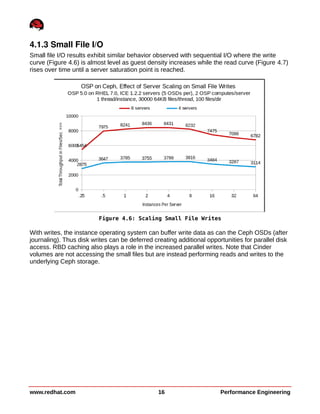
Small file I/O results exhibit similar behavior observed with sequential I/O where the write
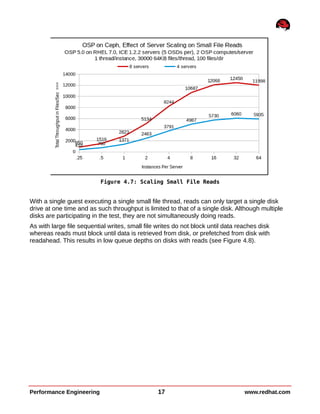
curve (Figure 4.6) is almost level as guest density increases while the read curve (Figure 4.7)
rises over time until a server saturation point is reached.
With writes, the instance operating system can buffer write data as can the Ceph OSDs (after
journaling). Thus disk writes can be deferred creating additional opportunities for parallel disk
access. RBD caching also plays a role in the increased parallel writes. Note that Cinder
volumes are not accessing the small files but are instead performing reads and writes to the
underlying Ceph storage.
www.redhat.com 16 Performance Engineering
Figure 4.6: Scaling Small File Writes
With a single guest executing a single small file thread, reads can only target a single disk
drive at one time and as such throughput is limited to that of a single disk. Although multiple
disks are participating in the test, they are not simultaneously doing reads.
As with large file sequential writes, small file writes do not block until data reaches disk
whereas reads must block until data is retrieved from disk, or prefetched from disk with
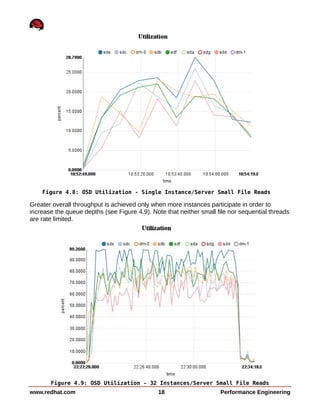
readahead. This results in low queue depths on disks with reads (see Figure 4.8).
Performance Engineering 17 www.redhat.com
Figure 4.7: Scaling Small File Reads
Greater overall throughput is achieved only when more instances participate in order to
increase the queue depths (see Figure 4.9). Note that neither small file nor sequential threads
are rate limited.
www.redhat.com 18 Performance Engineering
Figure 4.8: OSD Utilization - Single Instance/Server Small File Reads
Figure 4.9: OSD Utilization - 32 Instances/Server Small File Reads
5 Performance Tuning Effects
Additional testing was performed to examine the effect of various performance tuning efforts
on a subset of instance counts. Results of interest are presented in this section including:
• tuneD daemon profiles
• instance device readahead
• Ceph journal disk configurations
5.1 Tuned Profiles
Tuned is a daemon that uses udev to monitor connected devices. Using statistics it
dynamically tunes system settings according to a chosen profile. RHEL 7 server tuned applies
the throughput-performance profile by default. Additional tests were executed to compare the
performance of Ceph using the latency-performance and virtual-host profiles (see Appendix A:
Tuned Profiles for details). The virtual-host profile ultimately proved optimal throughout testing
and is identical to the throughput-performance profile with the exceptions being:
• vm.dirty_background_ratio decreases (10 -> 5)
• kernel.sched_migration_cost_ns increases (500K -> 5 million)
The virtual-host profile is now the default used in RHEL 7 OSP deployments.
Performance Engineering 19 www.redhat.com
5.1.1 Large File Sequential I/O
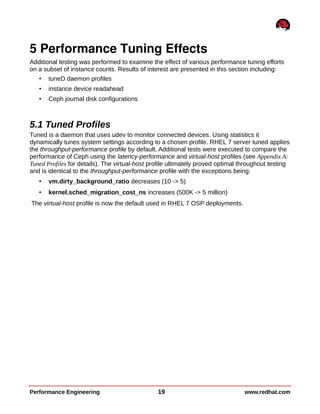
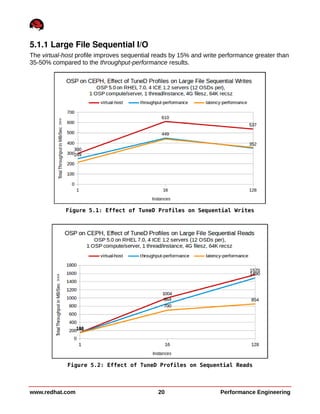
The virtual-host profile improves sequential reads by 15% and write performance greater than
35-50% compared to the throughput-performance results.
www.redhat.com 20 Performance Engineering
Figure 5.1: Effect of TuneD Profiles on Sequential Writes
Figure 5.2: Effect of TuneD Profiles on Sequential Reads
5.1.2 Large File Random I/O
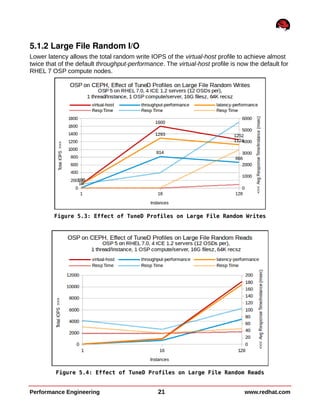
Lower latency allows the total random write IOPS of the virtual-host profile to achieve almost
twice that of the default throughput-performance. The virtual-host profile is now the default for
RHEL 7 OSP compute nodes.
Performance Engineering 21 www.redhat.com
Figure 5.3: Effect of TuneD Profiles on Large File Random Writes
Figure 5.4: Effect of TuneD Profiles on Large File Random Reads
5.1.3 Small File I/O
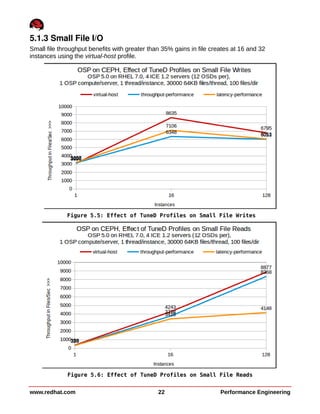
Small file throughput benefits with greater than 35% gains in file creates at 16 and 32
instances using the virtual-host profile.
www.redhat.com 22 Performance Engineering
Figure 5.5: Effect of TuneD Profiles on Small File Writes
Figure 5.6: Effect of TuneD Profiles on Small File Reads
5.2 Instance Device Readahead
The device readahead setting (read_ahead_kb) for the cinder volume mounted within each
OSP instance was modified to determine its effect on sequential I/O.
5.2.1 Large File Sequential I/O
Large file sequential reads make the most from increased device readahead sizes on the
guest's Cinder block device (e.g., /dev/vdb). Increasing readahead allows Linux to prefetch
data from more than one OSD at a time, increasing single instance throughput by 4x, another
example of the benefit of parallel activity on the OSDs.
Modifying device readahead was of no added value to any of the other tests.
Performance Engineering 23 www.redhat.com
Figure 5.7: Effect of Device Readahead on Sequential Reads
5.3 Ceph Journal Configuration
All workloads were tested using various Ceph journal configurations including:
• each OSD journal on a partition of the OSD itself (default)
• all journals on a single SSD JDOB device
• all journals divided among two SSD JBOD devices
• all journals on a 2-SSD striped (RAID 0) device
The default size of a journal on its own OSD is 5GB so for the sake of comparison, all journals
on SSDs were the same size.
5.3.1 Large File Sequential Writes
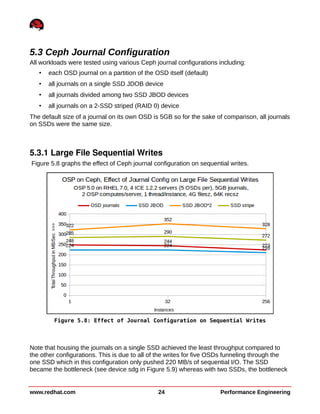
Figure 5.8 graphs the effect of Ceph journal configuration on sequential writes.
Note that housing the journals on a single SSD achieved the least throughput compared to
the other configurations. This is due to all of the writes for five OSDs funneling through the
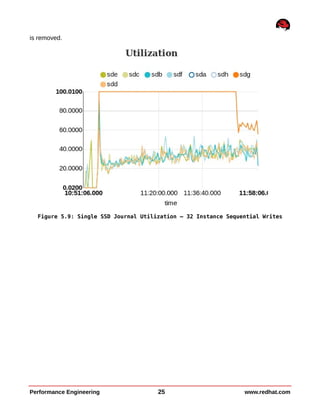
one SSD which in this configuration only pushed 220 MB/s of sequential I/O. The SSD
became the bottleneck (see device sdg in Figure 5.9) whereas with two SSDs, the bottleneck
www.redhat.com 24 Performance Engineering
Figure 5.8: Effect of Journal Configuration on Sequential Writes
is removed.
Performance Engineering 25 www.redhat.com
Figure 5.9: Single SSD Journal Utilization – 32 Instance Sequential Writes
5.3.2 Large File Random Writes
Figure 5.10 graphs the effect of Ceph journal configuration on random writes where SSDs in
any configuration outperforms OSD housed journals by 65% at 32 instances.
The throughput falling off at higher instance counts emphasizes the effect of response time.
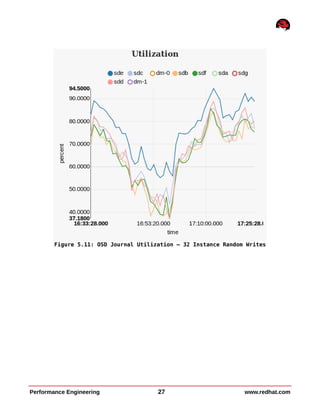
Here the bottleneck in the OSD journals case is disk spindle seek time and therefore any SSD
configuration has a dramatic improvement in IOPS compared to five disks at approximately
100 IOPS/disk.
www.redhat.com 26 Performance Engineering
Figure 5.10: Effect of Journal Configuration on Large File Random Writes
Performance Engineering 27 www.redhat.com
Figure 5.11: OSD Journal Utilization – 32 Instance Random Writes
5.3.3 Small File I/O
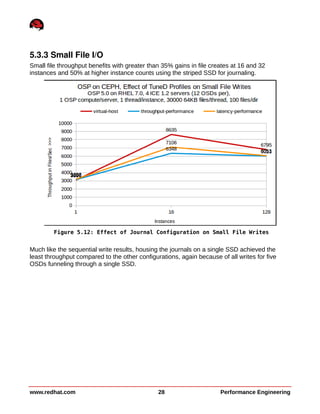
Small file throughput benefits with greater than 35% gains in file creates at 16 and 32
instances and 50% at higher instance counts using the striped SSD for journaling.
Much like the sequential write results, housing the journals on a single SSD achieved the
least throughput compared to the other configurations, again because of all writes for five
OSDs funneling through a single SSD.
www.redhat.com 28 Performance Engineering
Figure 5.12: Effect of Journal Configuration on Small File Writes
Appendix A: Tuned Profiles
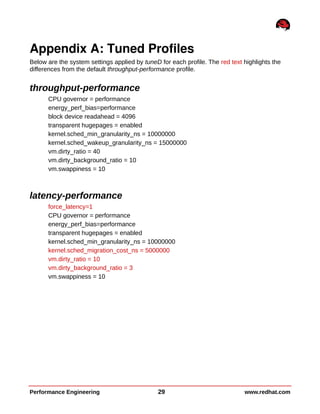
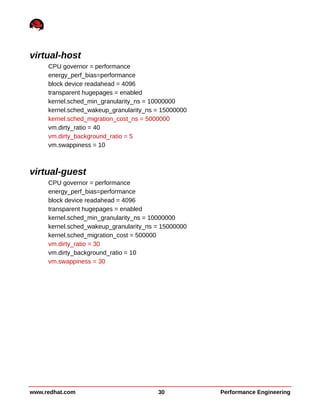
Below are the system settings applied by tuneD for each profile. The red text highlights the
differences from the default throughput-performance profile.
throughput-performance
CPU governor = performance
energy_perf_bias=performance
block device readahead = 4096
transparent hugepages = enabled
kernel.sched_min_granularity_ns = 10000000
kernel.sched_wakeup_granularity_ns = 15000000
vm.dirty_ratio = 40
vm.dirty_background_ratio = 10
vm.swappiness = 10
latency-performance
force_latency=1
CPU governor = performance
energy_perf_bias=performance
transparent hugepages = enabled
kernel.sched_min_granularity_ns = 10000000
kernel.sched_migration_cost_ns = 5000000
vm.dirty_ratio = 10
vm.dirty_background_ratio = 3
vm.swappiness = 10
Performance Engineering 29 www.redhat.com
virtual-host
CPU governor = performance
energy_perf_bias=performance
block device readahead = 4096
transparent hugepages = enabled
kernel.sched_min_granularity_ns = 10000000
kernel.sched_wakeup_granularity_ns = 15000000
kernel.sched_migration_cost_ns = 5000000
vm.dirty_ratio = 40
vm.dirty_background_ratio = 5
vm.swappiness = 10
virtual-guest
CPU governor = performance
energy_perf_bias=performance
block device readahead = 4096
transparent hugepages = enabled
kernel.sched_min_granularity_ns = 10000000
kernel.sched_wakeup_granularity_ns = 15000000
kernel.sched_migration_cost = 500000
vm.dirty_ratio = 30
vm.dirty_background_ratio = 10
vm.swappiness = 30
www.redhat.com 30 Performance Engineering
Appendix B: Ceph Configuration File
[global]
fsid = 002196a8-0eaf-45fc-a355-45309962d06c
mon_initial_members = gprfc089
mon_host = 17.11.154.239
auth cluster required = none
auth service required = none
auth client required = none
filestore_xattr_use_omap = true
public network = 172.17.10.0/24
cluster network = 172.17.10.0/24
[client]
admin socket = /var/run/ceph/rbd-client-$pid.asok
log_file = /var/log/ceph/ceph-rbd.log
rbd cache = true
rbd cache writethrough until flush = true
[osd]
osd backfill full ratio = 0.90
#osd op threads = 8
#filestore merge threshold = 40
#filestore split multiple = 8
Performance Engineering 31 www.redhat.com
Appendix C: Openstack Configuration Files
Packstack Answer File
[general]
CONFIG_DEBUG_MODE=n
CONFIG_SSH_KEY=/root/.ssh/id_rsa.pub
CONFIG_MYSQL_INSTALL=y
CONFIG_GLANCE_INSTALL=y
CONFIG_CINDER_INSTALL=y
CONFIG_NOVA_INSTALL=n
CONFIG_NEUTRON_INSTALL=y
CONFIG_HORIZON_INSTALL=y
CONFIG_SWIFT_INSTALL=n
CONFIG_CEILOMETER_INSTALL=y
CONFIG_HEAT_INSTALL=n
CONFIG_CLIENT_INSTALL=y
CONFIG_NTP_SERVERS=17.11.159.254,17.11.255.2,17.11.255.3
CONFIG_NAGIOS_INSTALL=n
EXCLUDE_SERVERS=
CONFIG_MYSQL_HOST=17.11.154.120
CONFIG_MYSQL_USER=root
CONFIG_MYSQL_PW=password
CONFIG_QPID_HOST=17.11.154.120
CONFIG_QPID_ENABLE_SSL=n
CONFIG_QPID_ENABLE_AUTH=n
CONFIG_QPID_NSS_CERTDB_PW=password
CONFIG_QPID_SSL_PORT=5671
CONFIG_QPID_SSL_CERT_FILE=/etc/pki/tls/certs/qpid_selfcert.pem
CONFIG_QPID_SSL_KEY_FILE=/etc/pki/tls/private/qpid_selfkey.pem
CONFIG_QPID_SSL_SELF_SIGNED=y
CONFIG_QPID_AUTH_USER=qpid_user
CONFIG_QPID_AUTH_PASSWORD=password
CONFIG_KEYSTONE_HOST=17.11.154.120
CONFIG_KEYSTONE_DB_PW=password
CONFIG_KEYSTONE_ADMIN_TOKEN=9a4d45dc558742099f8011b5ba8d7869
CONFIG_KEYSTONE_ADMIN_PW=password
CONFIG_KEYSTONE_DEMO_PW=password
CONFIG_KEYSTONE_TOKEN_FORMAT=PKI
CONFIG_GLANCE_HOST=17.11.154.120
CONFIG_GLANCE_DB_PW=password
CONFIG_GLANCE_KS_PW=password
CONFIG_CINDER_HOST=17.11.154.120
CONFIG_CINDER_DB_PW=password
CONFIG_CINDER_KS_PW=password
CONFIG_CINDER_VOLUMES_CREATE=n
CONFIG_CINDER_VOLUMES_SIZE=20G
CONFIG_CINDER_NFS_MOUNTS=
CONFIG_NOVA_API_HOST=17.11.154.120
CONFIG_NOVA_CERT_HOST=17.11.154.120
CONFIG_NOVA_VNCPROXY_HOST=17.11.154.120
www.redhat.com 32 Performance Engineering
CONFIG_NOVA_COMPUTE_HOSTS=17.11.154.123,17.11.154.129,17.11.154.126,17.11.15
4.132,17.11.154.135,17.11.154.138,17.11.154.141,17.11.154.144,17.11.154.147,
17.11.154.150,17.11.154.143,17.11.154.156,17.11.154.159,17.11.154.162,17.11.
154.165,17.11.154.168
CONFIG_NOVA_CONDUCTOR_HOST=17.11.154.120
CONFIG_NOVA_DB_PW=password
CONFIG_NOVA_KS_PW=password
CONFIG_NOVA_SCHED_HOST=17.11.154.120
CONFIG_NOVA_SCHED_CPU_ALLOC_RATIO=16.0
CONFIG_NOVA_SCHED_RAM_ALLOC_RATIO=1.5
CONFIG_NOVA_COMPUTE_PRIVIF=p2p2
CONFIG_NOVA_NETWORK_HOSTS=17.11.154.120
CONFIG_NOVA_NETWORK_MANAGER=nova.network.manager.FlatDHCPManager
CONFIG_NOVA_NETWORK_PUBIF=em1
CONFIG_NOVA_NETWORK_PRIVIF=p2p2
CONFIG_NOVA_NETWORK_FIXEDRANGE=191.168.32.0/24
CONFIG_NOVA_NETWORK_FLOATRANGE=10.3.4.0/22
CONFIG_NOVA_NETWORK_DEFAULTFLOATINGPOOL=nova
CONFIG_NOVA_NETWORK_AUTOASSIGNFLOATINGIP=n
CONFIG_NOVA_NETWORK_VLAN_START=100
CONFIG_NOVA_NETWORK_NUMBER=1
CONFIG_NOVA_NETWORK_SIZE=255
CONFIG_NEUTRON_SERVER_HOST=17.11.154.120
CONFIG_NEUTRON_KS_PW=password
CONFIG_NEUTRON_DB_PW=password
CONFIG_NEUTRON_L3_HOSTS=17.11.154.120
CONFIG_NEUTRON_L3_EXT_BRIDGE=br-ex
CONFIG_NEUTRON_DHCP_HOSTS=17.11.154.120
CONFIG_NEUTRON_LBAAS_HOSTS=
CONFIG_NEUTRON_L2_PLUGIN=openvswitch
CONFIG_NEUTRON_METADATA_HOSTS=17.11.154.120
CONFIG_NEUTRON_METADATA_PW=password
CONFIG_NEUTRON_LB_TENANT_NETWORK_TYPE=local
CONFIG_NEUTRON_LB_VLAN_RANGES=
CONFIG_NEUTRON_LB_INTERFACE_MAPPINGS=
CONFIG_NEUTRON_OVS_TENANT_NETWORK_TYPE=gre
CONFIG_NEUTRON_OVS_VLAN_RANGES=
CONFIG_NEUTRON_OVS_BRIDGE_MAPPINGS=
CONFIG_NEUTRON_OVS_BRIDGE_IFACES=
CONFIG_NEUTRON_OVS_TUNNEL_RANGES=1:1000
CONFIG_NEUTRON_OVS_TUNNEL_IF=p2p2
CONFIG_OSCLIENT_HOST=17.11.154.120
CONFIG_HORIZON_HOST=17.11.154.120
CONFIG_HORIZON_SSL=n
CONFIG_SSL_CERT=
CONFIG_SSL_KEY=
CONFIG_SWIFT_PROXY_HOSTS=17.11.154.120
CONFIG_SWIFT_KS_PW=password
CONFIG_SWIFT_STORAGE_HOSTS=17.11.154.120
CONFIG_SWIFT_STORAGE_ZONES=1
CONFIG_SWIFT_STORAGE_REPLICAS=1
CONFIG_SWIFT_STORAGE_FSTYPE=ext4
CONFIG_SWIFT_HASH=bc05f46001e442b6
CONFIG_SWIFT_STORAGE_SIZE=2G
CONFIG_PROVISION_DEMO=n
Performance Engineering 33 www.redhat.com
CONFIG_PROVISION_DEMO_FLOATRANGE=172.24.4.224/28
CONFIG_PROVISION_TEMPEST=n
CONFIG_PROVISION_TEMPEST_REPO_URI=https://github.com/openstack/tempest.git
CONFIG_PROVISION_TEMPEST_REPO_REVISION=master
CONFIG_PROVISION_ALL_IN_ONE_OVS_BRIDGE=n
CONFIG_HEAT_HOST=17.11.154.120
CONFIG_HEAT_DB_PW=password
CONFIG_HEAT_KS_PW=password
CONFIG_HEAT_CLOUDWATCH_INSTALL=n
CONFIG_HEAT_CFN_INSTALL=n
CONFIG_HEAT_CLOUDWATCH_HOST=17.11.154.120
CONFIG_HEAT_CFN_HOST=17.11.154.120
CONFIG_CEILOMETER_HOST=17.11.154.120
CONFIG_CEILOMETER_SECRET=8a8af0a389b04b02
CONFIG_CEILOMETER_KS_PW=password
CONFIG_NAGIOS_HOST=17.11.154.120
CONFIG_NAGIOS_PW=password
CONFIG_USE_EPEL=n
CONFIG_REPO=
CONFIG_RH_USER=
CONFIG_RH_PW=
CONFIG_RH_BETA_REPO=n
CONFIG_SATELLITE_URL=
CONFIG_SATELLITE_USER=
CONFIG_SATELLITE_PW=
CONFIG_SATELLITE_AKEY=
CONFIG_SATELLITE_CACERT=
CONFIG_SATELLITE_PROFILE=
CONFIG_SATELLITE_FLAGS=
CONFIG_SATELLITE_PROXY=
CONFIG_SATELLITE_PROXY_USER=
CONFIG_SATELLITE_PROXY_PW=
www.redhat.com 34 Performance Engineering
nova.conf
[DEFAULT]
rabbit_host=17.11.154.120
rabbit_port=5672
rabbit_hosts=17.11.154.120:5672
rabbit_userid=guest
rabbit_password=password
rabbit_virtual_host=/
rabbit_ha_queues=False
rpc_backend=nova.openstack.common.rpc.impl_kombu
state_path=/var/lib/nova
quota_instances=160
quota_cores=160
quota_ram=1200000
enabled_apis=ec2,osapi_compute,metadata
ec2_listen=0.0.0.0
osapi_compute_listen=0.0.0.0
osapi_compute_workers=24
metadata_listen=0.0.0.0
service_down_time=60
rootwrap_config=/etc/nova/rootwrap.conf
auth_strategy=keystone
use_forwarded_for=False
service_neutron_metadata_proxy=True
neutron_metadata_proxy_shared_secret=password
neutron_default_tenant_id=default
novncproxy_host=0.0.0.0
novncproxy_port=6080
glance_api_servers=17.11.154.120:9292
network_api_class=nova.network.neutronv2.api.API
metadata_host=17.11.154.120
neutron_url=http://17.11.154.120:9696
neutron_url_timeout=30
neutron_admin_username=neutron
neutron_admin_password=password
neutron_admin_tenant_name=services
neutron_region_name=RegionOne
neutron_admin_auth_url=http://17.11.154.120:35357/v2.0
neutron_auth_strategy=keystone
neutron_ovs_bridge=br-int
neutron_extension_sync_interval=600
security_group_api=neutron
lock_path=/var/lib/nova/tmp
debug=true
verbose=True
log_dir=/var/log/nova
use_syslog=False
cpu_allocation_ratio=16.0
ram_allocation_ratio=1.5
scheduler_default_filters=RetryFilter,AvailabilityZoneFilter,RamFilter,Compu
teFilter,ComputeCapabilitiesFilter,ImagePropertiesFilter,CoreFilter
firewall_driver=nova.virt.firewall.NoopFirewallDriver
volume_api_class=nova.volume.cinder.API
Performance Engineering 35 www.redhat.com
sql_connection=mysql://nova:password@17.11.154.120/nova
image_service=nova.image.glance.GlanceImageService
libvirt_vif_driver=nova.virt.libvirt.vif.LibvirtGenericVIFDriver
osapi_volume_listen=0.0.0.0
libvirt_use_virtio_for_bridges=True
[baremetal]
use_file_injection=true
[keystone_authtoken]
auth_host=17.11.154.120
auth_port=35357
auth_protocol=http
auth_uri=http://17.11.154.120:5000/
admin_user=nova
admin_password=password
admin_tenant_name=services
[libvirt]
libvirt_images_type=rbd
libvirt_images_rbd_pool=volumes
libvirt_images_rbd_ceph_conf=/etc/ceph/ceph.conf
rbd_user=cinder
rbd_secret_uuid=575b15f2-b2b1-48d0-9df9-29dea74333e8
inject_password=false
inject_key=false
inject_partition=-2
www.redhat.com 36 Performance Engineering
cinder.conf
[DEFAULT]
rabbit_host=17.11.154.120
rabbit_port=5672
rabbit_hosts=17.11.154.120:5672
rabbit_userid=guest
rabbit_password=password
rabbit_virtual_host=/
rabbit_ha_queues=False
notification_driver=cinder.openstack.common.notifier.rpc_notifier
rpc_backend=cinder.openstack.common.rpc.impl_kombu
control_exchange=openstack
quota_volumes=160
quota_gigabytes=6400
osapi_volume_listen=0.0.0.0
backup_ceph_conf=/etc/ceph/ceph.conf
backup_ceph_user=cinder-backup
backup_ceph_chunk_size=134217728
backup_ceph_pool=backups
backup_ceph_stripe_unit=0
backup_ceph_stripe_count=0
restore_discard_excess_bytes=true
backup_driver=cinder.backup.drivers.ceph
api_paste_config=/etc/cinder/api-paste.ini
glance_host=17.11.154.120
glance_api_version=2
auth_strategy=keystone
debug=False
verbose=True
log_dir=/var/log/cinder
use_syslog=False
iscsi_ip_address=17.11.154.120
iscsi_helper=lioadm
volume_group=cinder-volumes
rbd_pool=volumes
rbd_user=cinder
rbd_ceph_conf=/etc/ceph/ceph.conf
rbd_flatten_volume_from_snapshot=false
rbd_secret_uuid=575b15f2-b2b1-48d0-9df9-29dea74333e8
rbd_max_clone_depth=5
rbd_store_chunk_size = 4
rados_connect_timeout = -1
glance_api_version = 2
volume_driver=cinder.volume.drivers.rbd.RBDDriver
sql_connection=mysql://cinder:password@17.11.154.120/cinder
sql_idle_timeout=3600
Performance Engineering 37 www.redhat.com
glance-api.conf
[DEFAULT]
verbose=True
debug=True
default_store=rbd
bind_host=0.0.0.0
bind_port=9292
log_file=/var/log/glance/api.log
backlog=4096
workers=24
show_image_direct_url=True
use_syslog=False
registry_host=0.0.0.0
registry_port=9191
notifier_strategy = rabbit
rabbit_host=17.11.154.120
rabbit_port=5672
rabbit_use_ssl=False
rabbit_userid=guest
rabbit_password=password
rabbit_virtual_host=/
rabbit_notification_exchange=glance
rabbit_notification_topic=notifications
rabbit_durable_queues=False
filesystem_store_datadir=/var/lib/glance/images/
rbd_store_ceph_conf = /etc/ceph/ceph.conf
rbd_store_user=glance
rbd_store_pool=images
rbd_store_chunk_size = 8
sql_connection=mysql://glance:<password>@17.11.154.120/glance
sql_idle_timeout=3600
[keystone_authtoken]
auth_host=17.11.154.120
auth_port=35357
auth_protocol=http
admin_tenant_name=services
admin_user=glance
admin_password=password
auth_uri=http://17.11.154.120:5000/
[paste_deploy]
flavor=keystone
www.redhat.com 38 Performance Engineering

Red Hat Enterprise Linux OpenStack Platform on Inktank Ceph Enterprise