Recover “Recover “SShift+Delete" word filehift+Delete" word file
on Windows computeron Windows computer
Permanently deleted word filePermanently deleted word file
If you have emptied the Recycle Bin after deleting the word files
or permanently delete document file, you still have a chance to
undelete word documents. When the word documents are deleted from
the computer, these word files disappear from your computer. However
their contents aren't immediately destroyed. Windows simply marks the
hard drive space as being available for use by changing one character
in the file table so that the file entry won't be displayed in My Computer
or a command line DIR command, etc. If you manage to start an
undelete process before Windows uses that part of the hard drive to
write a new excel file, all you have to do is set that flag back to "on" and
you get the excel file.
Procedure of deleted Word file recoveryProcedure of deleted Word file recovery
Step – 1
Download & launch word file recovery
Along with that users need to follow these mentioned steps,
integrated with the application to recover all deleted Word
files on Windows computer.
Word file recovery softwareWord file recovery software
H-Data Recovery Master is a powerful word file recovery software
that can help you to undelete files, even if emptied the Recycle Bin,
and recover files lost due to software crash, formatted or damaged
hard drive, virus attack, lost partition and other unknown reasons under
Windows 8.1/8/7/Vista / XP. You can easily recover deleted word
documents- Microsoft Word 97 (doc) or later, including Microsoft Word
2000 (doc), Microsoft Word 2003(doc), Microsoft Word 2007 (docx).
The file recovery software does find ways to locate the deleted word
documents so that they can be recovered easily.
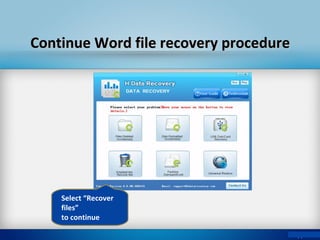
Select “Recover
files”
to continue
Continue Word file recovery procedureContinue Word file recovery procedure
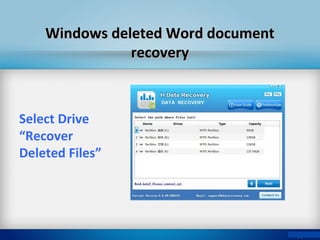
Windows deleted Word documentWindows deleted Word document
recoveryrecovery
Select Drive
“Recover
Deleted Files”
To recover deleted Word files, software will start
scanning procedure on your Mac computer. After
completion of scanning procedure it shows the list of
all restored files.
Before going to save restored Word files, you can
verify them by previewing any selected Word
documents.
Preview Word documentsPreview Word documents
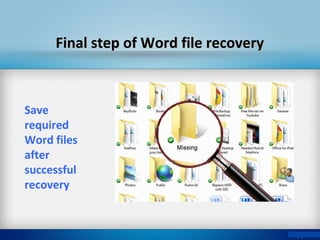
Final step of Word file recoveryFinal step of Word file recovery
Save
required
Word files
after
successful
recovery
Useful features of the softwareUseful features of the software
• Along with deleted Word files, the software restores all
other files including audio, video, archives, image files etc.
• Read only application so that safe to use
• Restore all deleted, lost or formatted data on Mac with very
few mouse clicks
• Recover Word documents from Windows file systems
• Recover data from emptied Recycle Bin
Thanks for visiting!!Thanks for visiting!!

Recover shift+delete word file on Windows Computer

  • 1.
    Recover “Recover “SShift+Delete"word filehift+Delete" word file on Windows computeron Windows computer
  • 2.
    Permanently deleted wordfilePermanently deleted word file If you have emptied the Recycle Bin after deleting the word files or permanently delete document file, you still have a chance to undelete word documents. When the word documents are deleted from the computer, these word files disappear from your computer. However their contents aren't immediately destroyed. Windows simply marks the hard drive space as being available for use by changing one character in the file table so that the file entry won't be displayed in My Computer or a command line DIR command, etc. If you manage to start an undelete process before Windows uses that part of the hard drive to write a new excel file, all you have to do is set that flag back to "on" and you get the excel file.
  • 3.
    Procedure of deletedWord file recoveryProcedure of deleted Word file recovery Step – 1 Download & launch word file recovery Along with that users need to follow these mentioned steps, integrated with the application to recover all deleted Word files on Windows computer.
  • 4.
    Word file recoverysoftwareWord file recovery software H-Data Recovery Master is a powerful word file recovery software that can help you to undelete files, even if emptied the Recycle Bin, and recover files lost due to software crash, formatted or damaged hard drive, virus attack, lost partition and other unknown reasons under Windows 8.1/8/7/Vista / XP. You can easily recover deleted word documents- Microsoft Word 97 (doc) or later, including Microsoft Word 2000 (doc), Microsoft Word 2003(doc), Microsoft Word 2007 (docx). The file recovery software does find ways to locate the deleted word documents so that they can be recovered easily.
  • 5.
    Select “Recover files” to continue ContinueWord file recovery procedureContinue Word file recovery procedure
  • 6.
    Windows deleted WorddocumentWindows deleted Word document recoveryrecovery Select Drive “Recover Deleted Files”
  • 7.
    To recover deletedWord files, software will start scanning procedure on your Mac computer. After completion of scanning procedure it shows the list of all restored files. Before going to save restored Word files, you can verify them by previewing any selected Word documents. Preview Word documentsPreview Word documents
  • 8.
    Final step ofWord file recoveryFinal step of Word file recovery Save required Word files after successful recovery
  • 9.
    Useful features ofthe softwareUseful features of the software • Along with deleted Word files, the software restores all other files including audio, video, archives, image files etc. • Read only application so that safe to use • Restore all deleted, lost or formatted data on Mac with very few mouse clicks • Recover Word documents from Windows file systems • Recover data from emptied Recycle Bin
  • 10.