Rational Team Concert
Build
2Copyright ©2015 Datamato. All rights reserved.
TITLE
Agenda
• Why we Build?
• Basic Concept Of Build.
• Types Of Build
3Copyright ©2015 Datamato. All rights reserved.
TITLE
Prerequisites for Build
• The Rational Team Concert 6.0 server is already set up, and you
have access to theserver through Rational Team Concert Eclipse
client.
•The required source code for build is present in the Rational Team
Concert project areasource control
•The Build System Toolkit has been installed by using the IBM
Installation Manager.
4Copyright ©2015 Datamato. All rights reserved.
TITLE
5Copyright ©2015 Datamato. All rights reserved.
TITLE
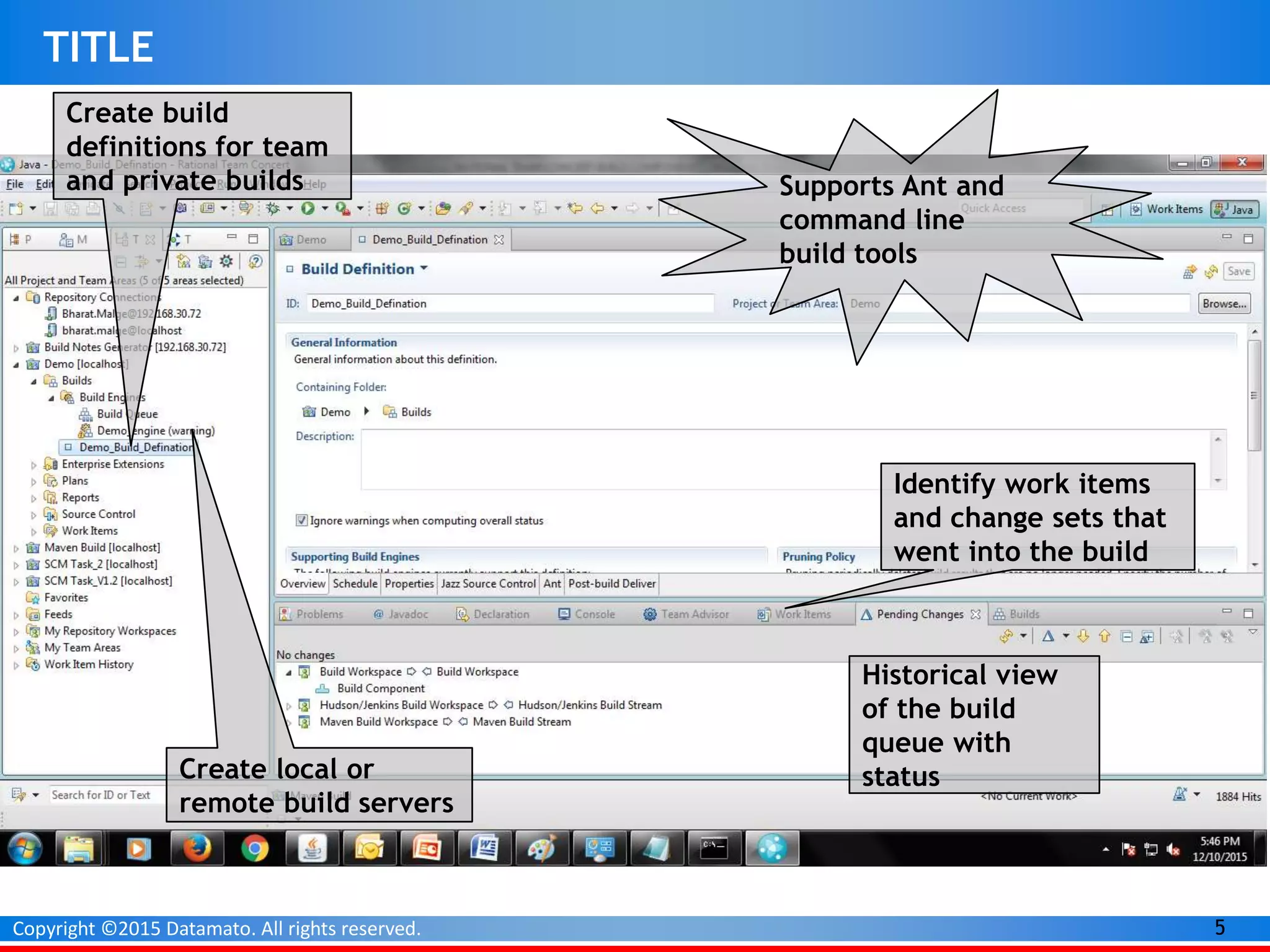
Create local or
remote build servers
Identify work items
and change sets that
went into the build
Historical view
of the build
queue with
status
Create build
definitions for team
and private builds
Create local or
remote build servers
Identify work items
and change sets that
went into the build
Historical view
of the build
queue with
status
Supports Ant and
command line
build tools
6Copyright ©2015 Datamato. All rights reserved.
TITLE
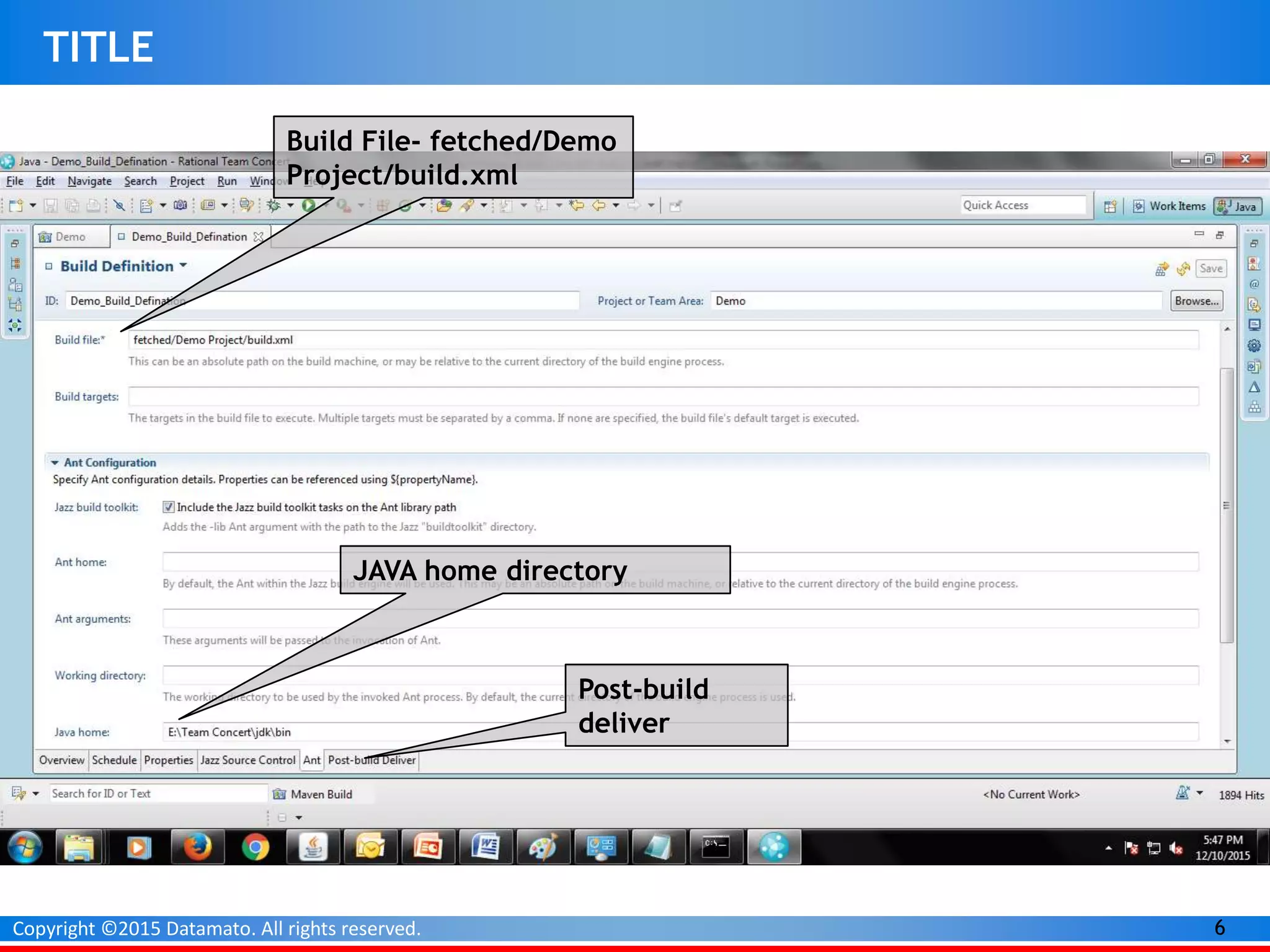
Build File- fetched/Demo
Project/build.xml
JAVA home directory
Post-build
deliver
7Copyright ©2015 Datamato. All rights reserved.
TITLE
8Copyright ©2015 Datamato. All rights reserved.
TITLE
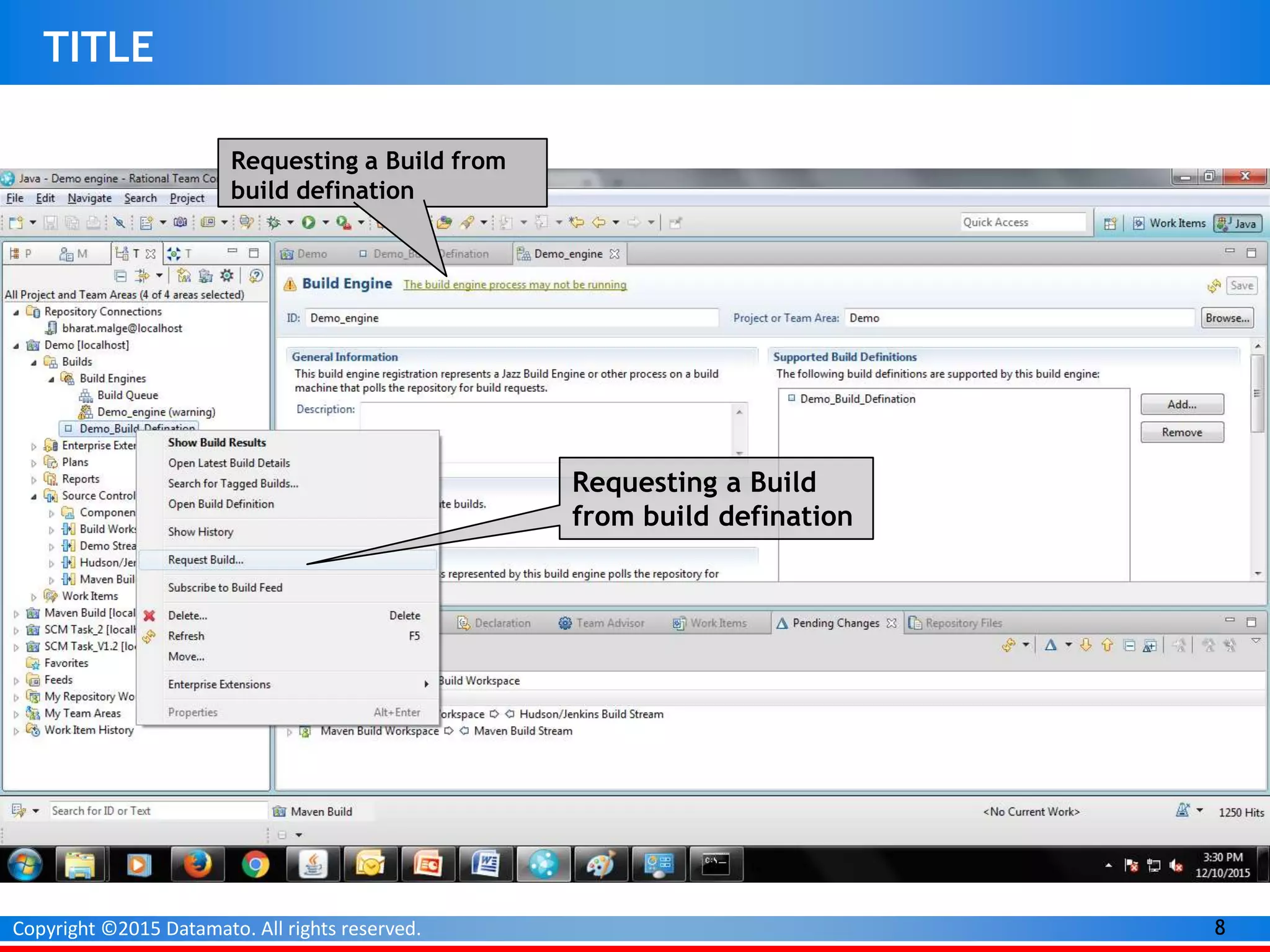
Requesting a Build from
build defination
Requesting a Build
from build defination
9Copyright ©2015 Datamato. All rights reserved.
TITLE
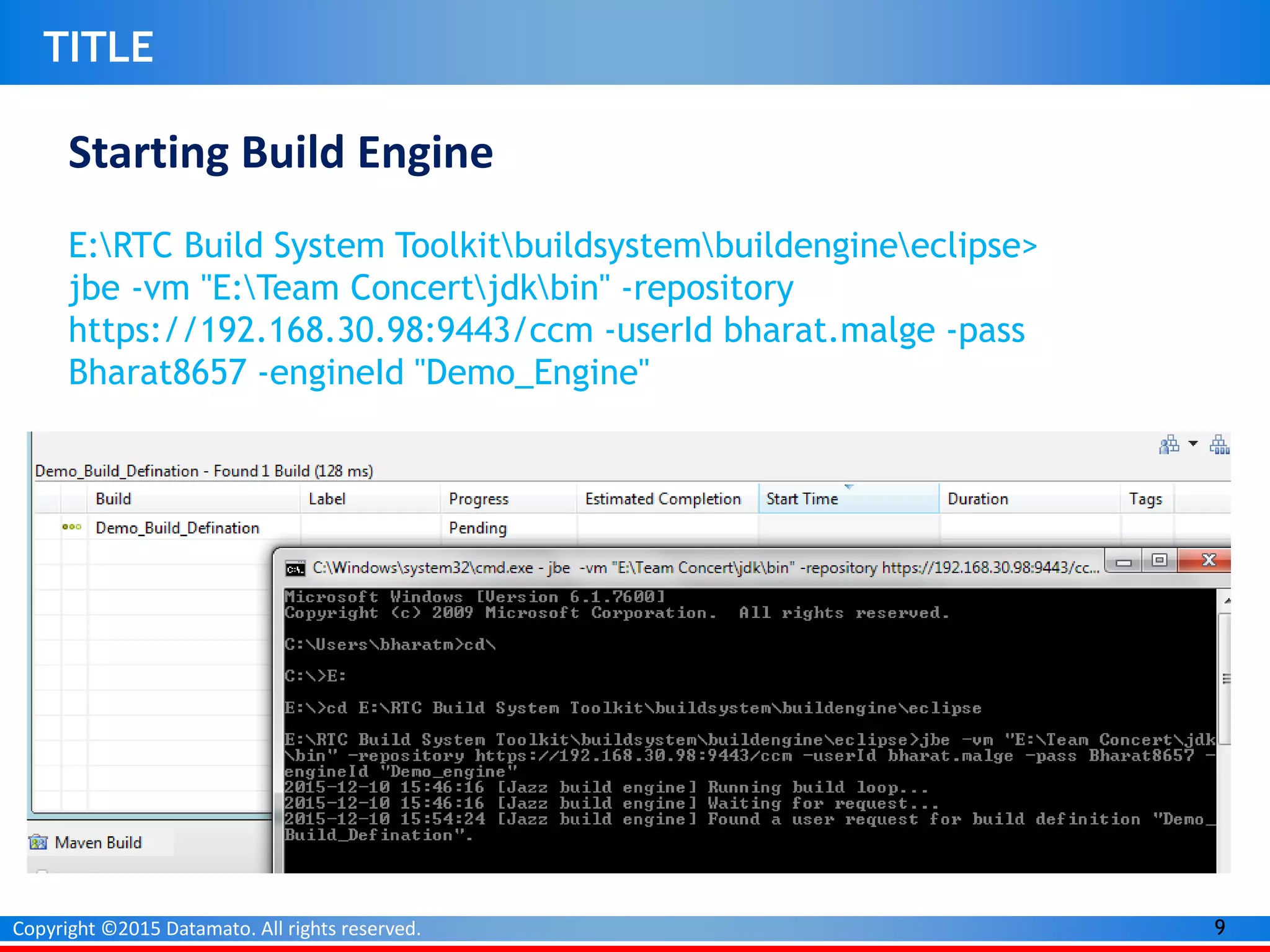
Starting Build Engine
E:RTC Build System Toolkitbuildsystembuildengineeclipse>
jbe -vm "E:Team Concertjdkbin" -repository
https://192.168.30.98:9443/ccm -userId bharat.malge -pass
Bharat8657 -engineId "Demo_Engine"
10Copyright ©2015 Datamato. All rights reserved.
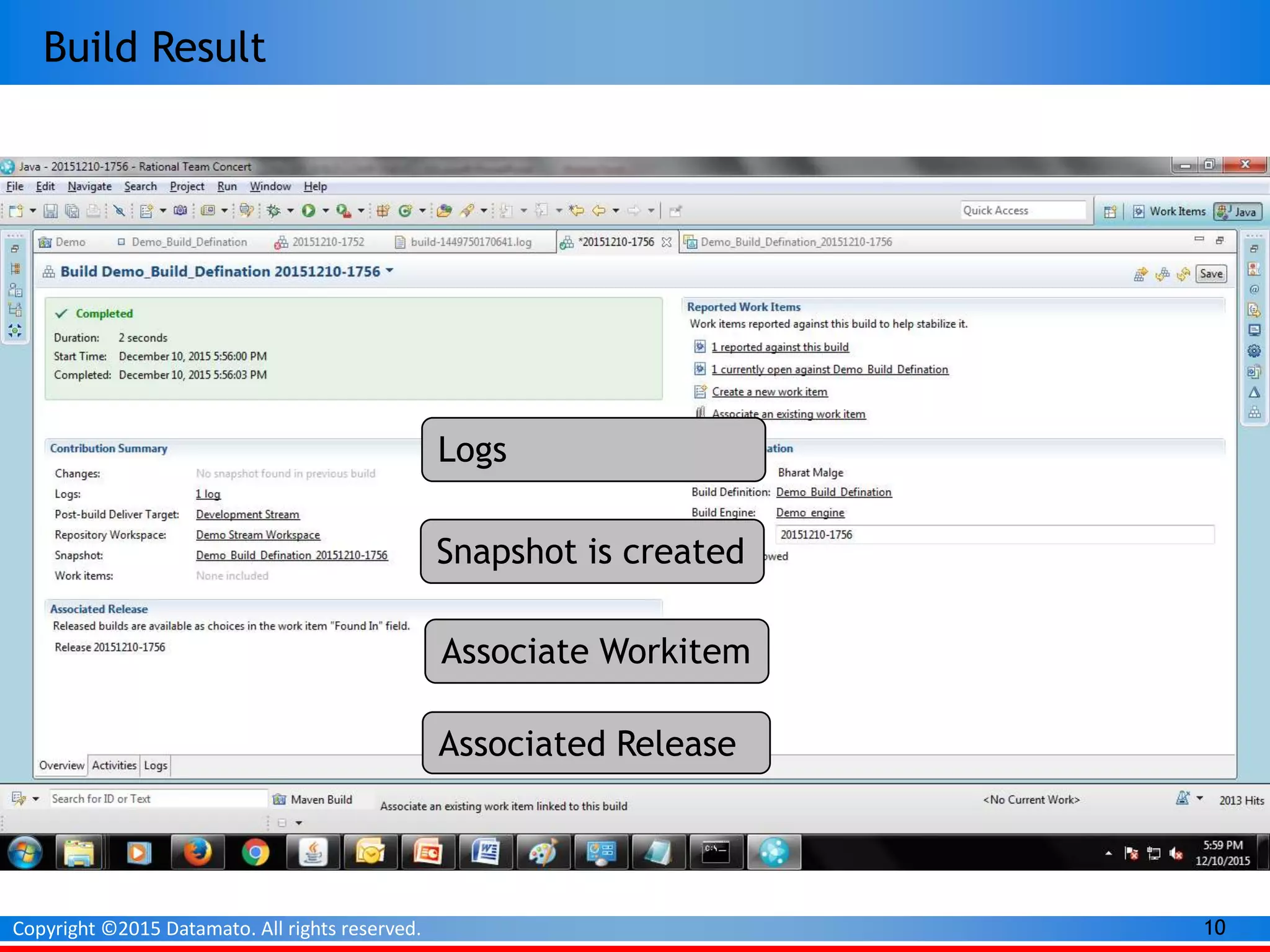
Build Result
Snapshot is created
Associated Release
Logs
Associate Workitem
11Copyright ©2015 Datamato. All rights reserved.
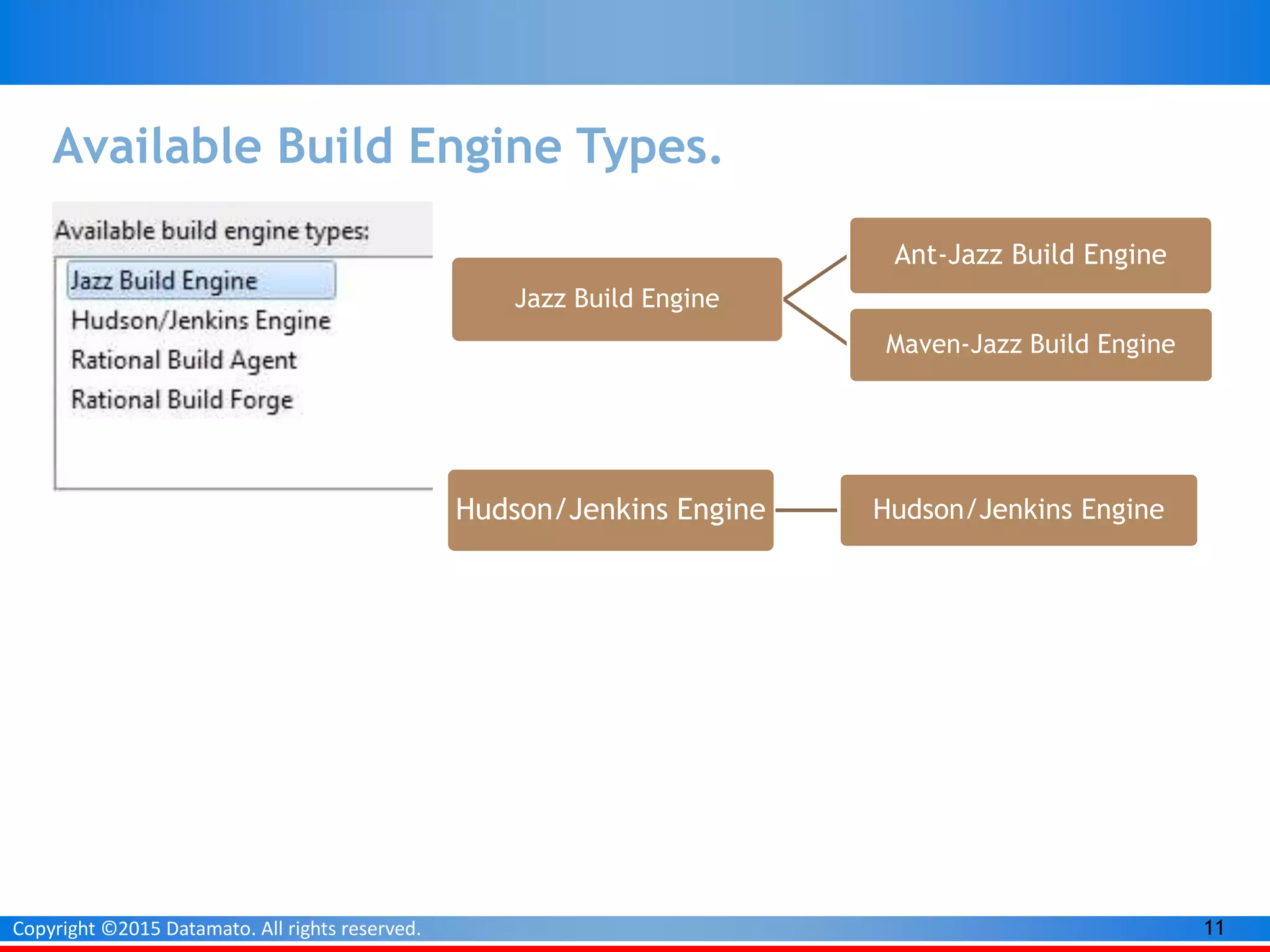
Available Build Engine Types.
Jazz Build Engine
Ant-Jazz Build Engine
Maven-Jazz Build Engine
Hudson/Jenkins Engine Hudson/Jenkins Engine
12Copyright ©2015 Datamato. All rights reserved.
A Jazz-based Maven Build with IBM Rational Team
Concert v6.0
Some crucial prerequisites
•You’ve installed the IBM Rational Team Concert (RTC) client
•You’ve installed the Build System Toolkit (on your machine or
another build machine)
•You have an existing Maven project that successfully builds
13Copyright ©2015 Datamato. All rights reserved.
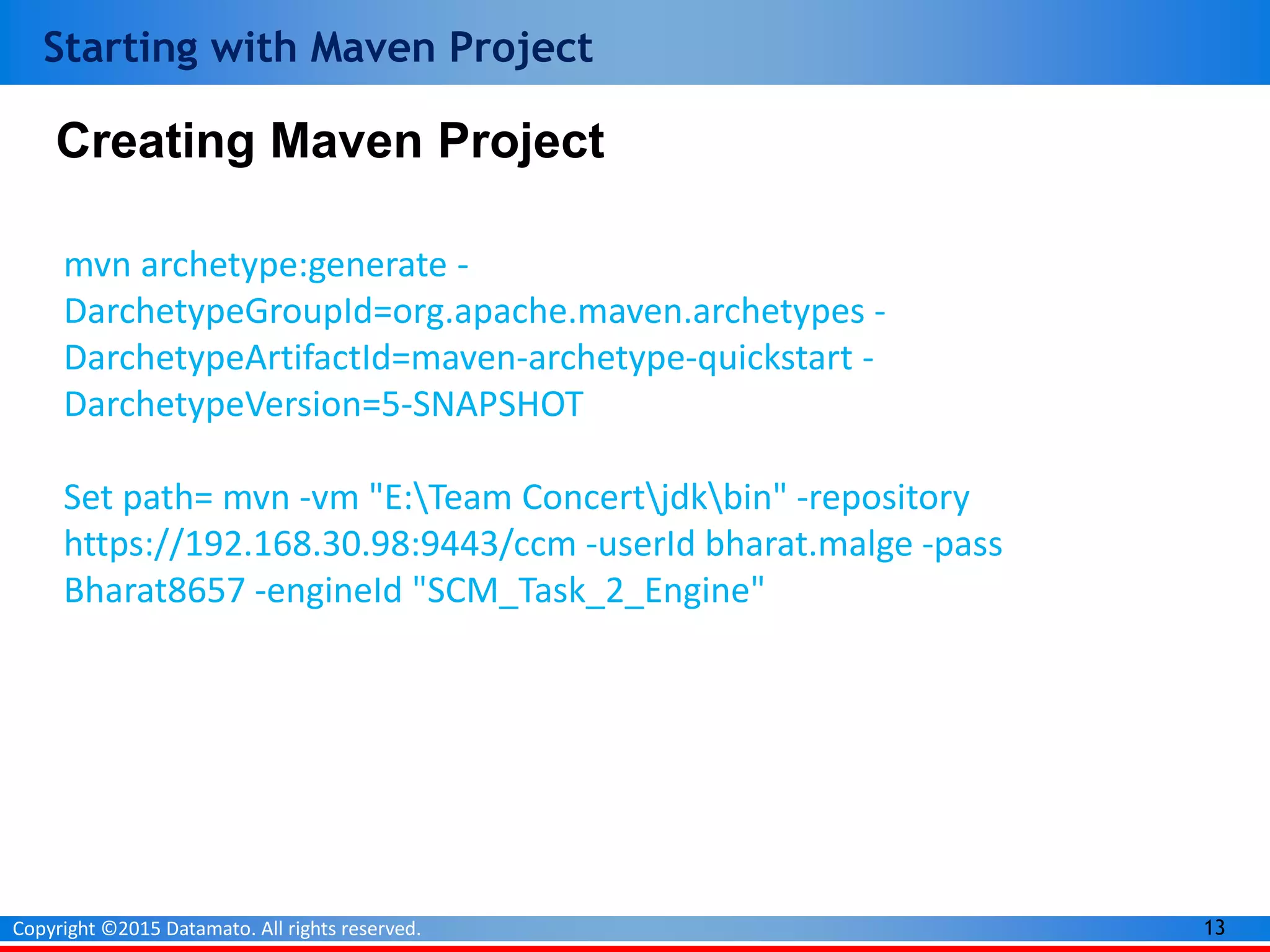
Starting with Maven Project
mvn archetype:generate -
DarchetypeGroupId=org.apache.maven.archetypes -
DarchetypeArtifactId=maven-archetype-quickstart -
DarchetypeVersion=5-SNAPSHOT
Set path= mvn -vm "E:Team Concertjdkbin" -repository
https://192.168.30.98:9443/ccm -userId bharat.malge -pass
Bharat8657 -engineId "SCM_Task_2_Engine"
Creating Maven Project
14Copyright ©2015 Datamato. All rights reserved.
Starting with Maven Project
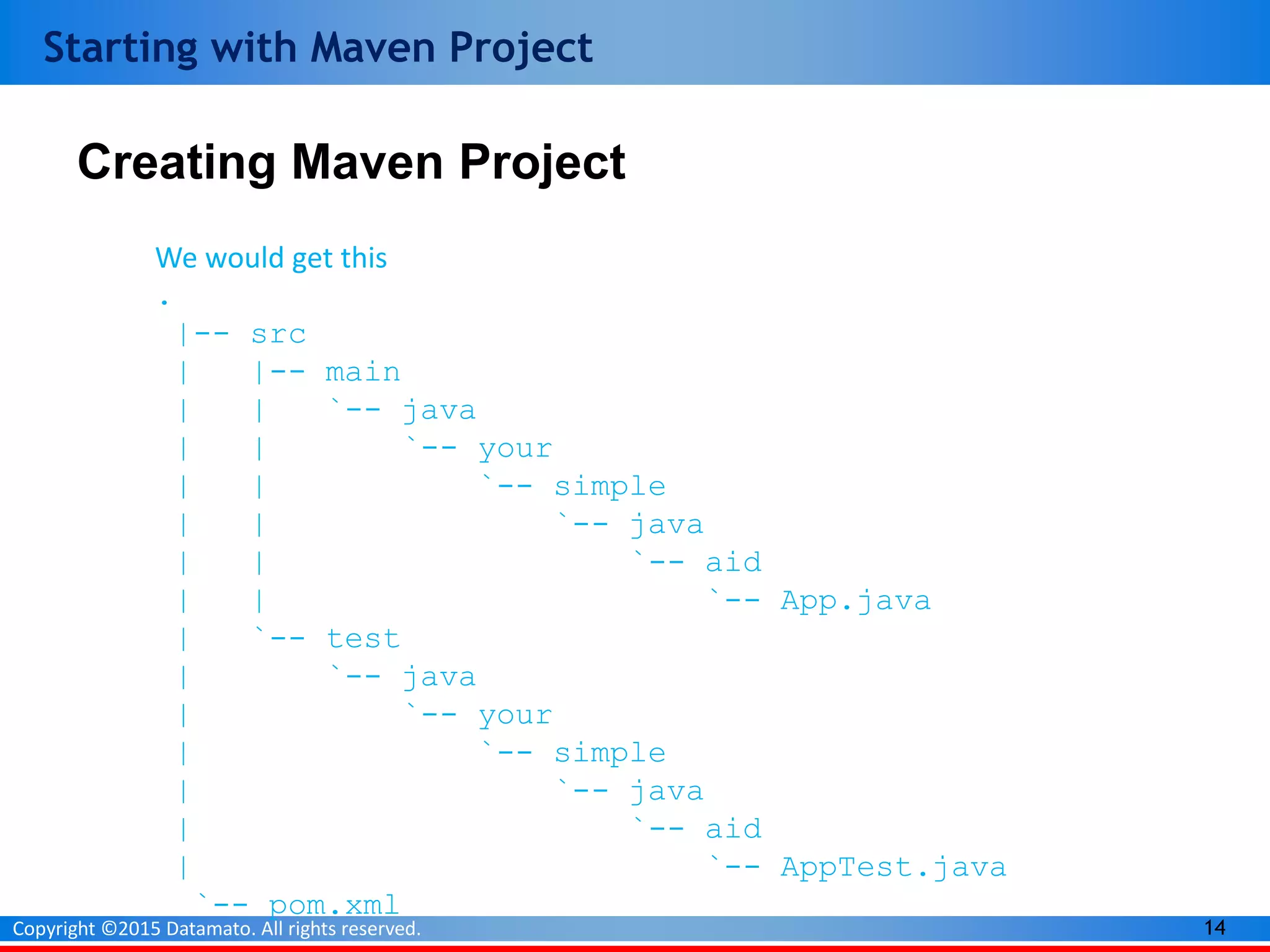
Creating Maven Project
We would get this
.
|-- src
| |-- main
| | `-- java
| | `-- your
| | `-- simple
| | `-- java
| | `-- aid
| | `-- App.java
| `-- test
| `-- java
| `-- your
| `-- simple
| `-- java
| `-- aid
| `-- AppTest.java
`-- pom.xml
15Copyright ©2015 Datamato. All rights reserved.
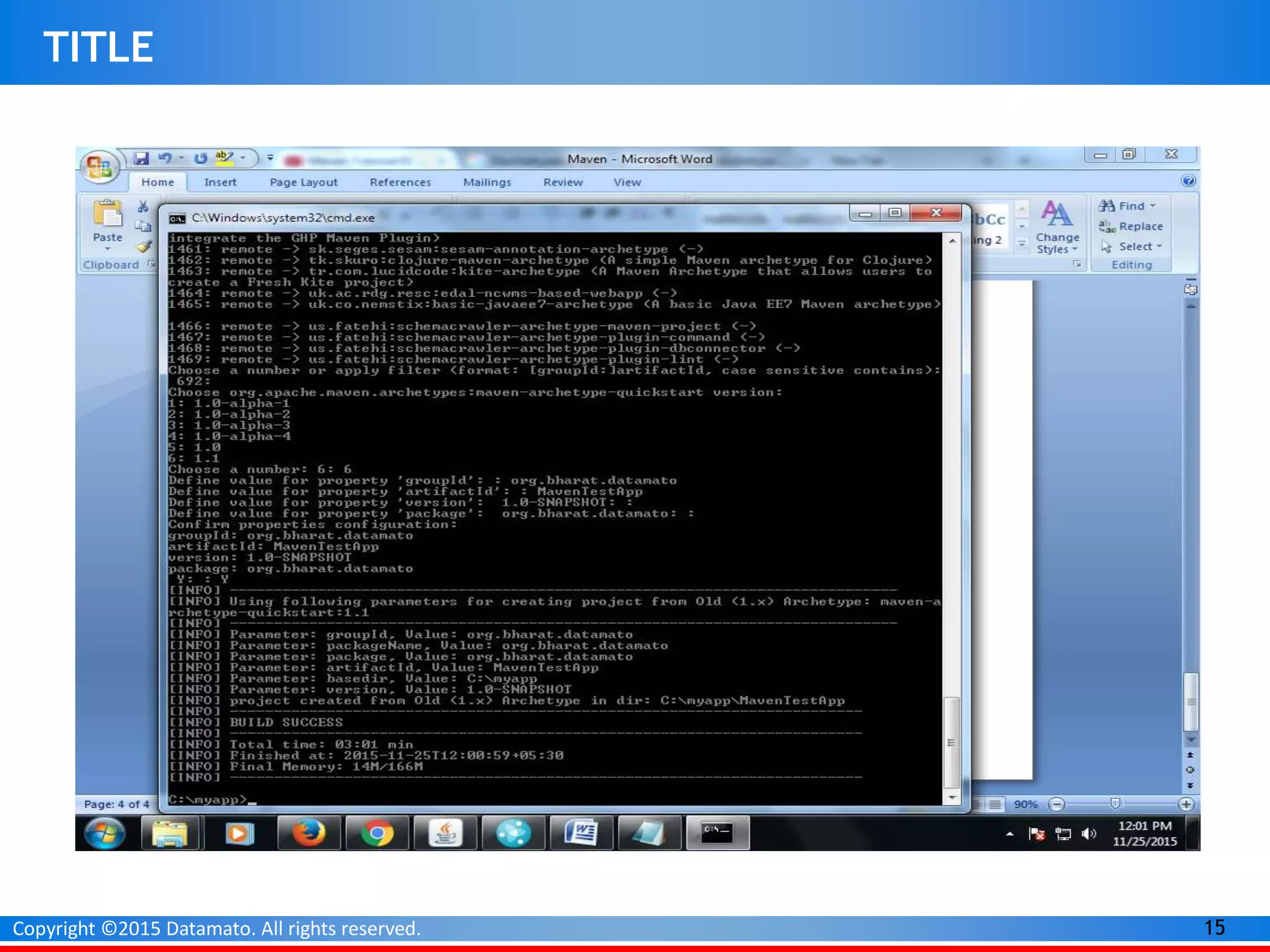
TITLE
16Copyright ©2015 Datamato. All rights reserved.
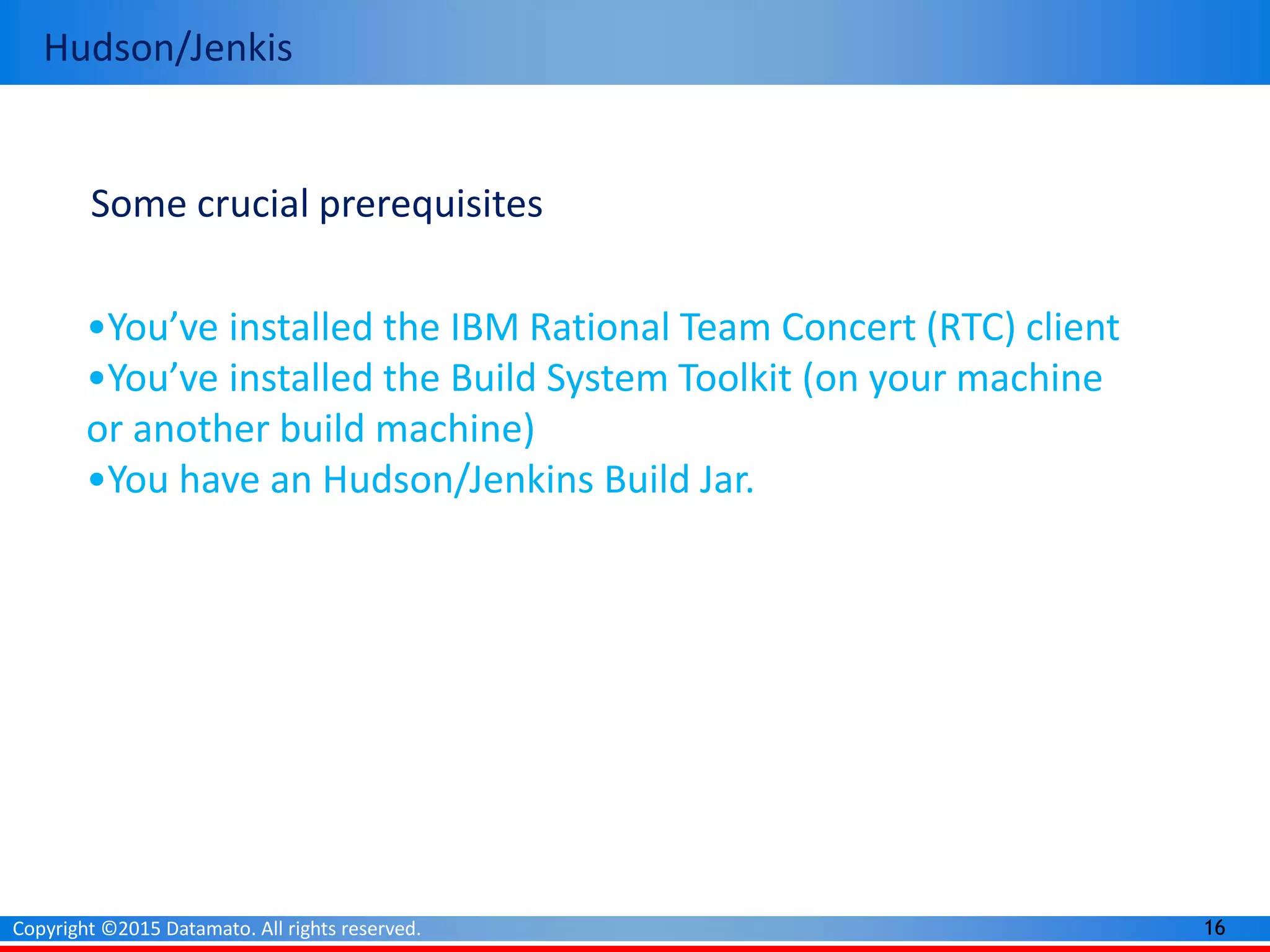
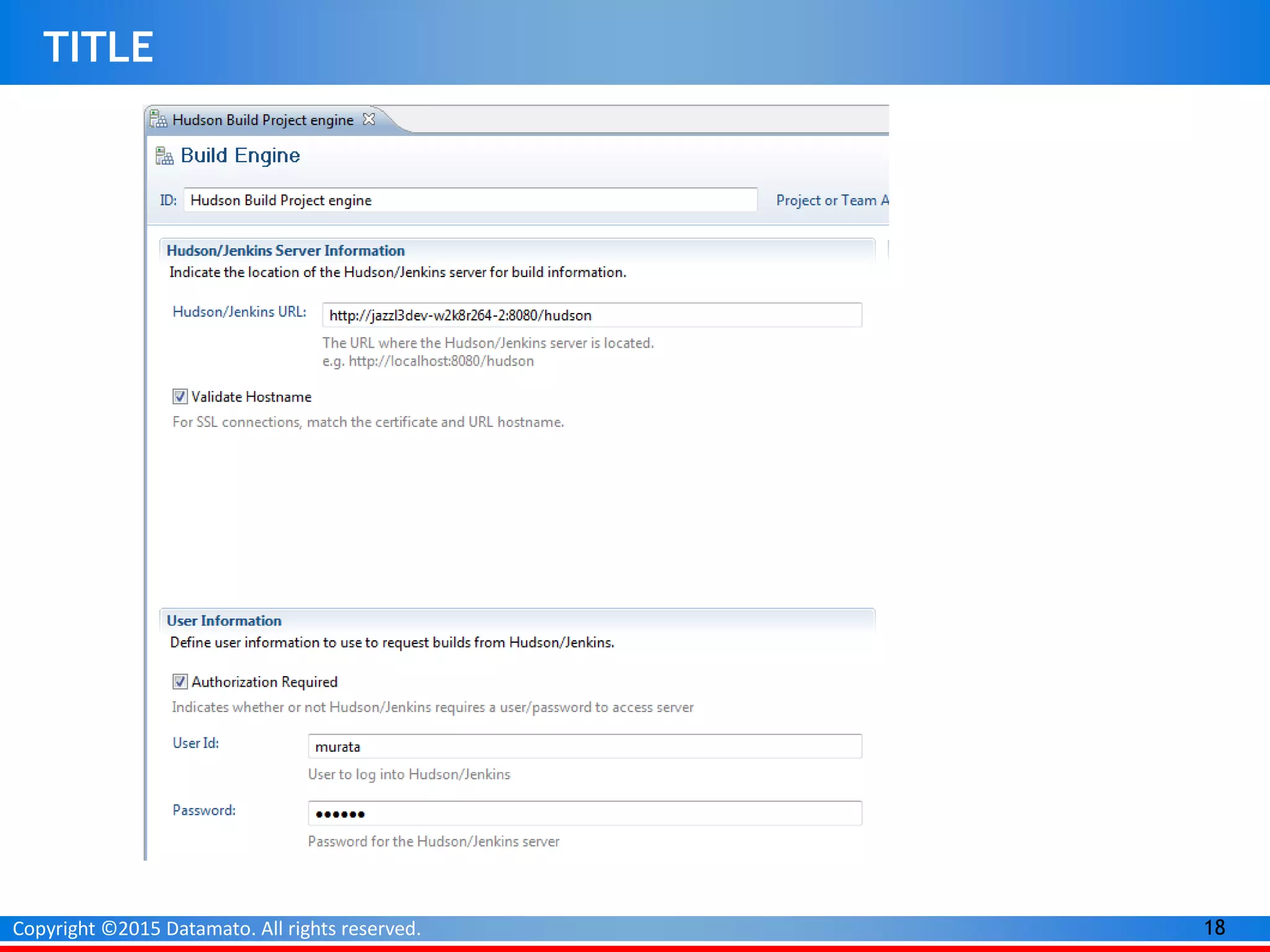
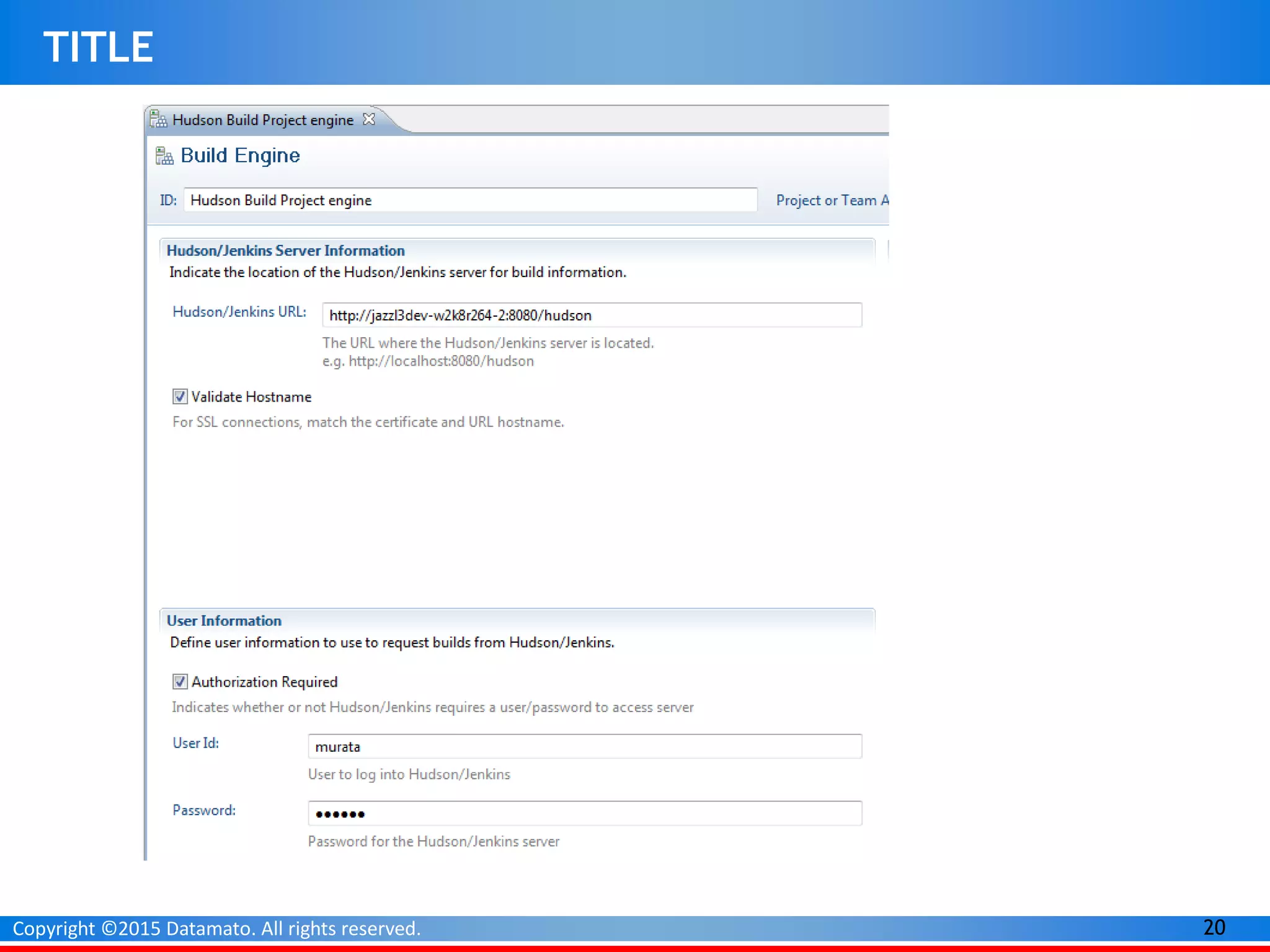
Hudson/Jenkis
Some crucial prerequisites
•You’ve installed the IBM Rational Team Concert (RTC) client
•You’ve installed the Build System Toolkit (on your machine
or another build machine)
•You have an Hudson/Jenkins Build Jar.
17Copyright ©2015 Datamato. All rights reserved.
Starting Jenkins
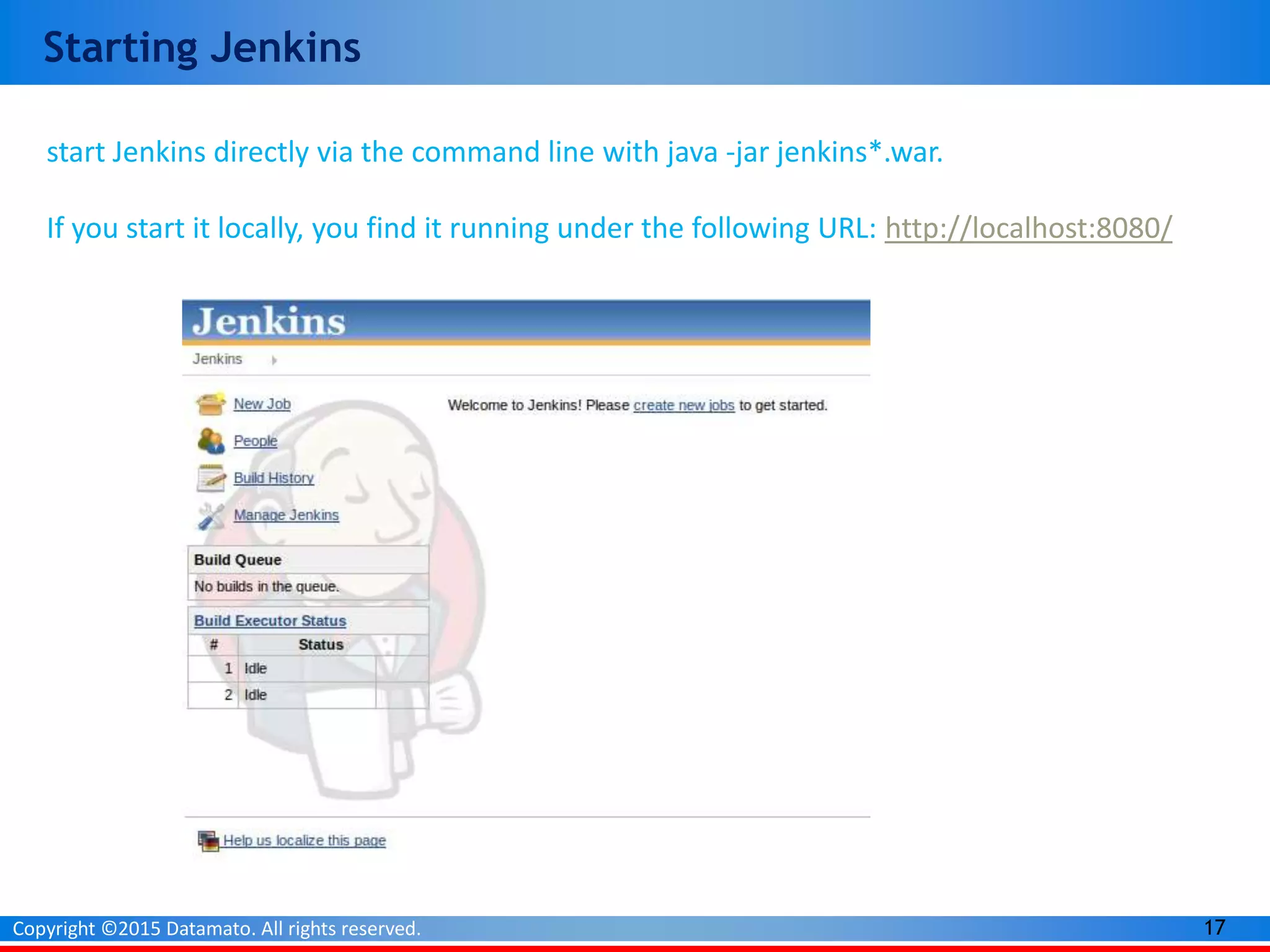
start Jenkins directly via the command line with java -jar jenkins*.war.
If you start it locally, you find it running under the following URL: http://localhost:8080/
18Copyright ©2015 Datamato. All rights reserved.
TITLE
19Copyright ©2015 Datamato. All rights reserved.
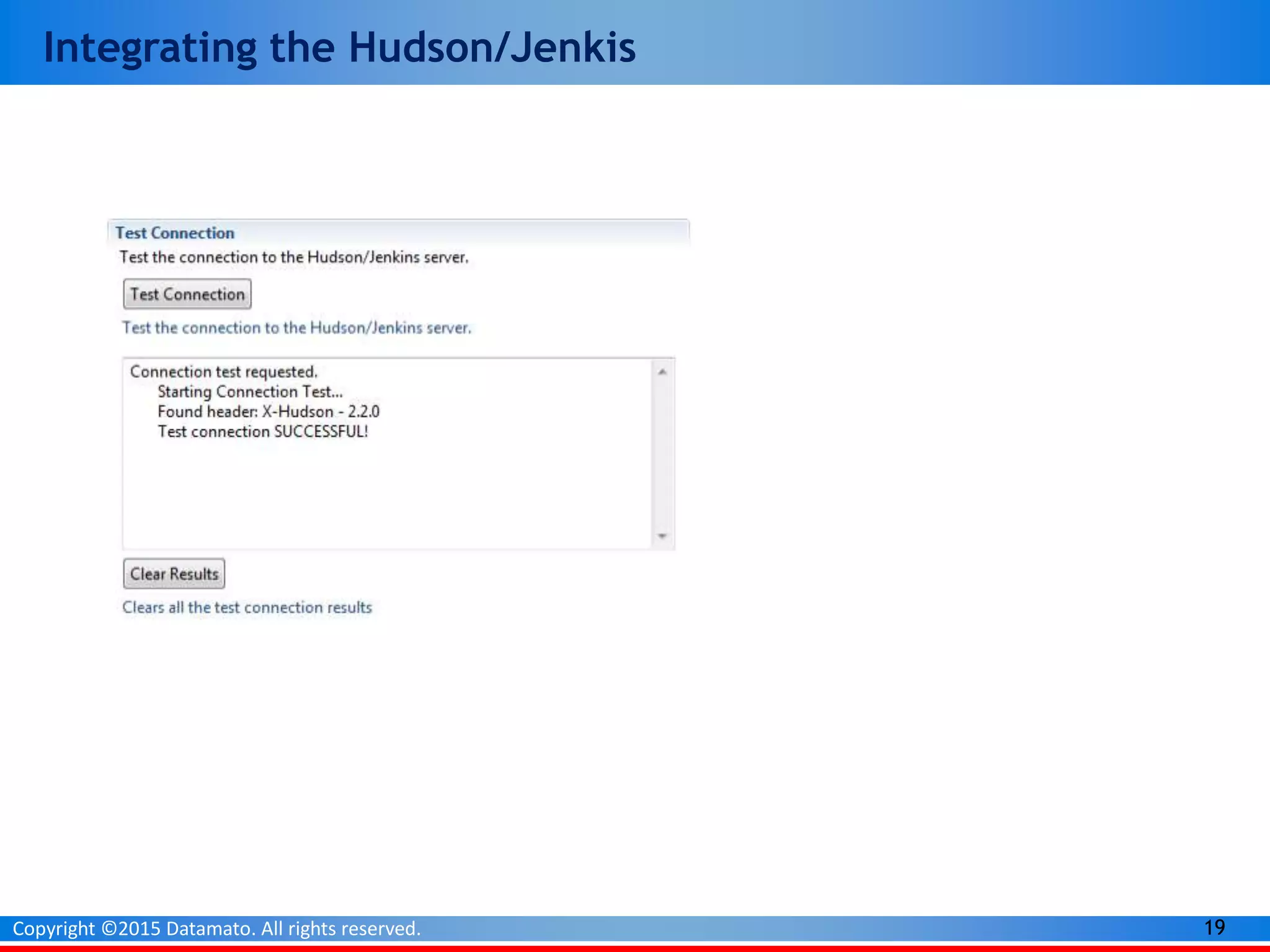
Integrating the Hudson/Jenkis
20Copyright ©2015 Datamato. All rights reserved.
TITLE
Z- TAF
Product Launch
Thank You
21Copyright ©2013 Datamato. All rights reserved.

Rational Team Concert Build Component-Jazz Build Engine, Maven, Hudson/Jenkis

  • 1.
  • 2.
    2Copyright ©2015 Datamato.All rights reserved. TITLE Agenda • Why we Build? • Basic Concept Of Build. • Types Of Build
  • 3.
    3Copyright ©2015 Datamato.All rights reserved. TITLE Prerequisites for Build • The Rational Team Concert 6.0 server is already set up, and you have access to theserver through Rational Team Concert Eclipse client. •The required source code for build is present in the Rational Team Concert project areasource control •The Build System Toolkit has been installed by using the IBM Installation Manager.
  • 4.
    4Copyright ©2015 Datamato.All rights reserved. TITLE
  • 5.
    5Copyright ©2015 Datamato.All rights reserved. TITLE Create local or remote build servers Identify work items and change sets that went into the build Historical view of the build queue with status Create build definitions for team and private builds Create local or remote build servers Identify work items and change sets that went into the build Historical view of the build queue with status Supports Ant and command line build tools
  • 6.
    6Copyright ©2015 Datamato.All rights reserved. TITLE Build File- fetched/Demo Project/build.xml JAVA home directory Post-build deliver
  • 7.
    7Copyright ©2015 Datamato.All rights reserved. TITLE
  • 8.
    8Copyright ©2015 Datamato.All rights reserved. TITLE Requesting a Build from build defination Requesting a Build from build defination
  • 9.
    9Copyright ©2015 Datamato.All rights reserved. TITLE Starting Build Engine E:RTC Build System Toolkitbuildsystembuildengineeclipse> jbe -vm "E:Team Concertjdkbin" -repository https://192.168.30.98:9443/ccm -userId bharat.malge -pass Bharat8657 -engineId "Demo_Engine"
  • 10.
    10Copyright ©2015 Datamato.All rights reserved. Build Result Snapshot is created Associated Release Logs Associate Workitem
  • 11.
    11Copyright ©2015 Datamato.All rights reserved. Available Build Engine Types. Jazz Build Engine Ant-Jazz Build Engine Maven-Jazz Build Engine Hudson/Jenkins Engine Hudson/Jenkins Engine
  • 12.
    12Copyright ©2015 Datamato.All rights reserved. A Jazz-based Maven Build with IBM Rational Team Concert v6.0 Some crucial prerequisites •You’ve installed the IBM Rational Team Concert (RTC) client •You’ve installed the Build System Toolkit (on your machine or another build machine) •You have an existing Maven project that successfully builds
  • 13.
    13Copyright ©2015 Datamato.All rights reserved. Starting with Maven Project mvn archetype:generate - DarchetypeGroupId=org.apache.maven.archetypes - DarchetypeArtifactId=maven-archetype-quickstart - DarchetypeVersion=5-SNAPSHOT Set path= mvn -vm "E:Team Concertjdkbin" -repository https://192.168.30.98:9443/ccm -userId bharat.malge -pass Bharat8657 -engineId "SCM_Task_2_Engine" Creating Maven Project
  • 14.
    14Copyright ©2015 Datamato.All rights reserved. Starting with Maven Project Creating Maven Project We would get this . |-- src | |-- main | | `-- java | | `-- your | | `-- simple | | `-- java | | `-- aid | | `-- App.java | `-- test | `-- java | `-- your | `-- simple | `-- java | `-- aid | `-- AppTest.java `-- pom.xml
  • 15.
    15Copyright ©2015 Datamato.All rights reserved. TITLE
  • 16.
    16Copyright ©2015 Datamato.All rights reserved. Hudson/Jenkis Some crucial prerequisites •You’ve installed the IBM Rational Team Concert (RTC) client •You’ve installed the Build System Toolkit (on your machine or another build machine) •You have an Hudson/Jenkins Build Jar.
  • 17.
    17Copyright ©2015 Datamato.All rights reserved. Starting Jenkins start Jenkins directly via the command line with java -jar jenkins*.war. If you start it locally, you find it running under the following URL: http://localhost:8080/
  • 18.
    18Copyright ©2015 Datamato.All rights reserved. TITLE
  • 19.
    19Copyright ©2015 Datamato.All rights reserved. Integrating the Hudson/Jenkis
  • 20.
    20Copyright ©2015 Datamato.All rights reserved. TITLE
  • 21.
    Z- TAF Product Launch ThankYou 21Copyright ©2013 Datamato. All rights reserved.