
















Routing and Rendering
An under the hood look at how Rails
receives requests and writes responses
The Router
How Rails decides where to send each request
The Router’s Job
The Router’s Job
Each time a request comes in, Rails needs to send it to
some action in some controller
The Router’s Job
Each time a request comes in, Rails needs to send it to
some action in some controller
  That’s what the router does
The Router’s Job
Each time a request comes in, Rails needs to send it to
some action in some controller
  That’s what the router does
The router primarily maps URL’s to actions
The Router’s Job
Each time a request comes in, Rails needs to send it to
some action in some controller
  That’s what the router does
The router primarily maps URL’s to actions
  It may also route based on HTTP verbs
The Router’s Job
Each time a request comes in, Rails needs to send it to
some action in some controller
  That’s what the router does
The router primarily maps URL’s to actions
  It may also route based on HTTP verbs
  It can be made to route on additional criteria, like
  host name
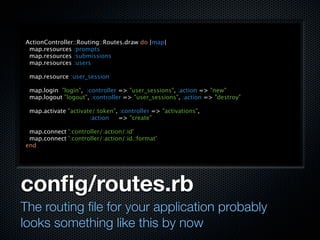
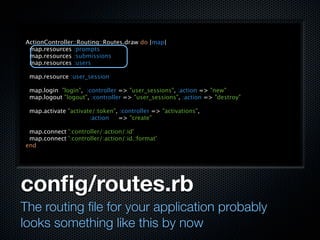
config/routes.rb
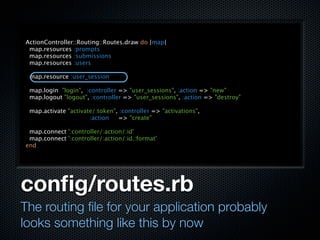
The routing file for your application probably
looks something like this by now
ActionController::Routing::Routes.draw do |map|
 map.resources :prompts
 map.resources :submissions
 map.resources :users

 map.resource :user_session

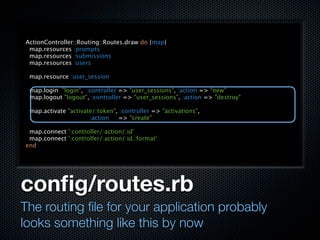
 map.login "login", :controller => "user_sessions", :action => "new"
 map.logout "logout", :controller => "user_sessions", :action => "destroy"

 map.activate "activate/:token", :controller => "activations",
                      :action   => "create"

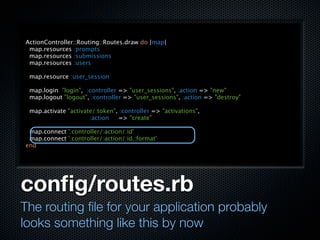
 map.connect ':controller/:action/:id'
 map.connect ':controller/:action/:id.:format'
end


config/routes.rb
The routing file for your application probably
looks something like this by now
ActionController::Routing::Routes.draw do |map|
 map.resources :prompts
 map.resources :submissions
 map.resources :users

 map.resource :user_session

 map.login "login", :controller => "user_sessions", :action => "new"
 map.logout "logout", :controller => "user_sessions", :action => "destroy"

 map.activate "activate/:token", :controller => "activations",
                      :action   => "create"

 map.connect ':controller/:action/:id'
 map.connect ':controller/:action/:id.:format'
end


config/routes.rb
The routing file for your application probably
looks something like this by now
ActionController::Routing::Routes.draw do |map|
 map.resources :prompts
 map.resources :submissions
 map.resources :users

 map.resource :user_session

 map.login "login", :controller => "user_sessions", :action => "new"
 map.logout "logout", :controller => "user_sessions", :action => "destroy"

 map.activate "activate/:token", :controller => "activations",
                      :action   => "create"

 map.connect ':controller/:action/:id'
 map.connect ':controller/:action/:id.:format'
end


config/routes.rb
The routing file for your application probably
looks something like this by now
ActionController::Routing::Routes.draw do |map|
 map.resources :prompts
 map.resources :submissions
 map.resources :users

 map.resource :user_session

 map.login "login", :controller => "user_sessions", :action => "new"
 map.logout "logout", :controller => "user_sessions", :action => "destroy"

 map.activate "activate/:token", :controller => "activations",
                      :action   => "create"

 map.connect ':controller/:action/:id'
 map.connect ':controller/:action/:id.:format'
end


config/routes.rb
The routing file for your application probably
looks something like this by now
ActionController::Routing::Routes.draw do |map|
 map.resources :prompts
 map.resources :submissions
 map.resources :users

 map.resource :user_session

 map.login "login", :controller => "user_sessions", :action => "new"
 map.logout "logout", :controller => "user_sessions", :action => "destroy"

 map.activate "activate/:token", :controller => "activations",
                      :action   => "create"

 map.connect ':controller/:action/:id'
 map.connect ':controller/:action/:id.:format'
end


config/routes.rb
The routing file for your application probably
looks something like this by now
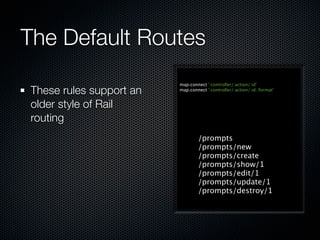
The Default Routes
The Default Routes
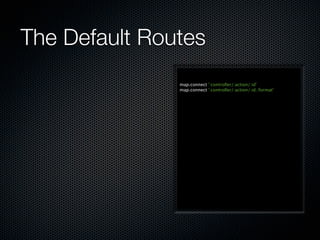
               map.connect ':controller/:action/:id'
               map.connect ':controller/:action/:id.:format'
The Default Routes
                         map.connect ':controller/:action/:id'
These rules support an   map.connect ':controller/:action/:id.:format'


older style of Rail
routing
                                 /prompts
                                 /prompts/new
                                 /prompts/create
                                 /prompts/show/1
                                 /prompts/edit/1
                                 /prompts/update/1
                                 /prompts/destroy/1
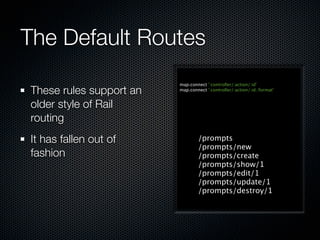
The Default Routes
                         map.connect ':controller/:action/:id'
These rules support an   map.connect ':controller/:action/:id.:format'


older style of Rail
routing
It has fallen out of             /prompts
                                 /prompts/new
fashion                          /prompts/create
                                 /prompts/show/1
                                 /prompts/edit/1
                                 /prompts/update/1
                                 /prompts/destroy/1
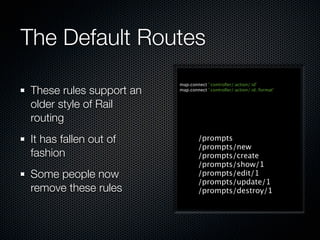
The Default Routes
                         map.connect ':controller/:action/:id'
These rules support an   map.connect ':controller/:action/:id.:format'


older style of Rail
routing
It has fallen out of             /prompts
                                 /prompts/new
fashion                          /prompts/create
                                 /prompts/show/1
Some people now                  /prompts/edit/1
                                 /prompts/update/1
remove these rules               /prompts/destroy/1
Route Priority
Route Priority

 Routes are matches matched in top to bottom order as
 they appear in the routes file
Route Priority

 Routes are matches matched in top to bottom order as
 they appear in the routes file
 The first route to match an incoming request wins
Route Priority

 Routes are matches matched in top to bottom order as
 they appear in the routes file
 The first route to match an incoming request wins
   Lower routes may never fire, if a higher route hides
   them by matching requests
Route Priority

 Routes are matches matched in top to bottom order as
 they appear in the routes file
 The first route to match an incoming request wins
   Lower routes may never fire, if a higher route hides
   them by matching requests
 This is why the default routes are at the bottom of the
 file: they are the last resort
Resource Routing
Resource Routing
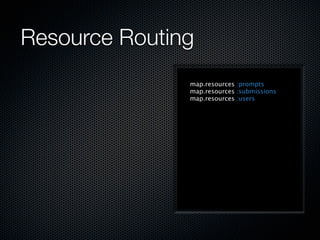
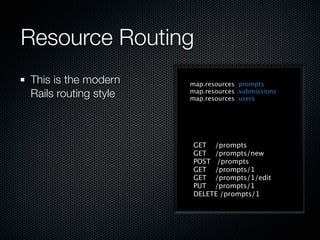
               map.resources :prompts
               map.resources :submissions
               map.resources :users
Resource Routing
This is the modern    map.resources :prompts
Rails routing style   map.resources :submissions
                      map.resources :users


                       GET /prompts
                       GET /prompts/new
                       POST /prompts
                       GET /prompts/1
                       GET /prompts/1/edit
                       PUT /prompts/1
                       DELETE /prompts/1
Resource Routing
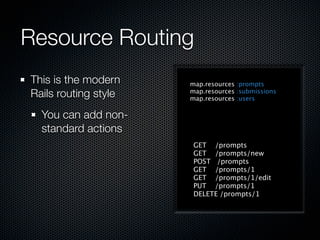
This is the modern    map.resources :prompts
Rails routing style   map.resources :submissions
                      map.resources :users

  You can add non-
  standard actions
                       GET /prompts
                       GET /prompts/new
                       POST /prompts
                       GET /prompts/1
                       GET /prompts/1/edit
                       PUT /prompts/1
                       DELETE /prompts/1
Resource Routing
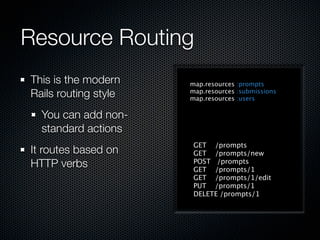
This is the modern    map.resources :prompts
Rails routing style   map.resources :submissions
                      map.resources :users

  You can add non-
  standard actions
                       GET /prompts
It routes based on     GET /prompts/new
HTTP verbs             POST /prompts
                       GET /prompts/1
                       GET /prompts/1/edit
                       PUT /prompts/1
                       DELETE /prompts/1
Resource Routing
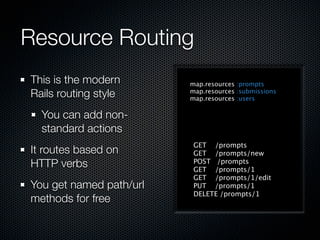
This is the modern       map.resources :prompts
Rails routing style      map.resources :submissions
                         map.resources :users

  You can add non-
  standard actions
                          GET /prompts
It routes based on        GET /prompts/new
HTTP verbs                POST /prompts
                          GET /prompts/1
                          GET /prompts/1/edit
You get named path/url    PUT /prompts/1
                          DELETE /prompts/1
methods for free
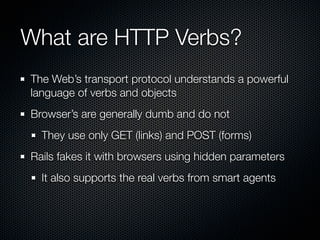
What are HTTP Verbs?
The Web’s transport protocol understands a powerful
language of verbs and objects
What are HTTP Verbs?
The Web’s transport protocol understands a powerful
language of verbs and objects
Browser’s are generally dumb and do not
What are HTTP Verbs?
The Web’s transport protocol understands a powerful
language of verbs and objects
Browser’s are generally dumb and do not
  They use only GET (links) and POST (forms)
What are HTTP Verbs?
The Web’s transport protocol understands a powerful
language of verbs and objects
Browser’s are generally dumb and do not
  They use only GET (links) and POST (forms)
Rails fakes it with browsers using hidden parameters
What are HTTP Verbs?
The Web’s transport protocol understands a powerful
language of verbs and objects
Browser’s are generally dumb and do not
  They use only GET (links) and POST (forms)
Rails fakes it with browsers using hidden parameters
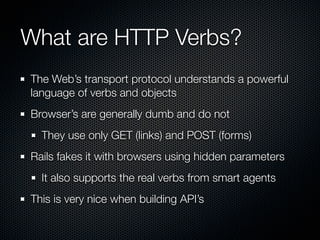
  It also supports the real verbs from smart agents
What are HTTP Verbs?
The Web’s transport protocol understands a powerful
language of verbs and objects
Browser’s are generally dumb and do not
  They use only GET (links) and POST (forms)
Rails fakes it with browsers using hidden parameters
  It also supports the real verbs from smart agents
This is very nice when building API’s
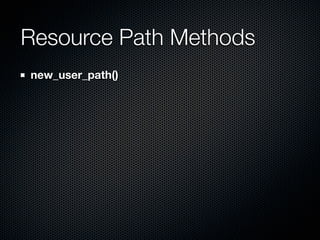
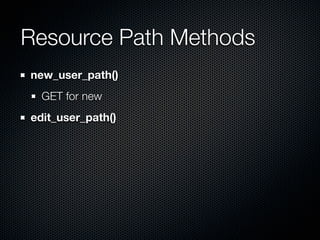
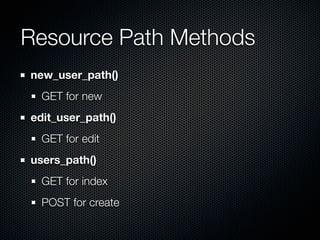
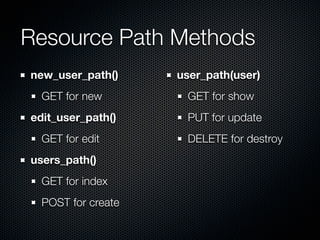
Resource Path Methods
new_user_path()
Resource Path Methods
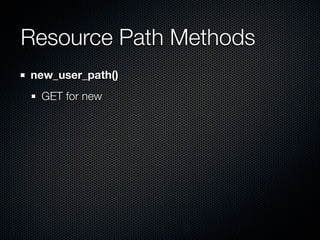
new_user_path()
 GET for new
Resource Path Methods
new_user_path()
  GET for new
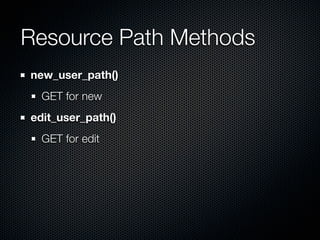
edit_user_path()
Resource Path Methods
new_user_path()
  GET for new
edit_user_path()
  GET for edit
Resource Path Methods
new_user_path()
  GET for new
edit_user_path()
  GET for edit
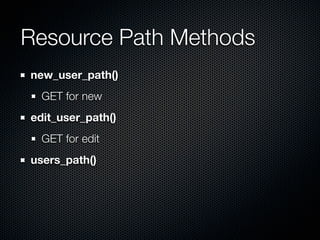
users_path()
Resource Path Methods
new_user_path()
  GET for new
edit_user_path()
  GET for edit
users_path()
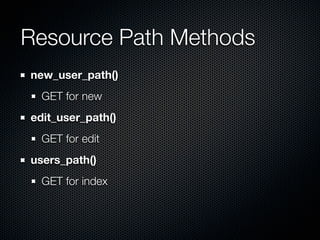
  GET for index
Resource Path Methods
new_user_path()
  GET for new
edit_user_path()
  GET for edit
users_path()
  GET for index
  POST for create
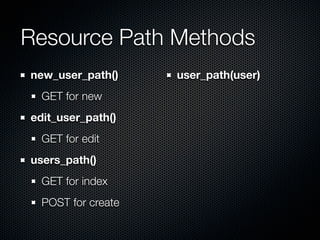
Resource Path Methods
new_user_path()     user_path(user)
  GET for new
edit_user_path()
  GET for edit
users_path()
  GET for index
  POST for create
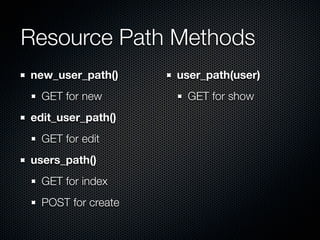
Resource Path Methods
new_user_path()     user_path(user)
  GET for new        GET for show
edit_user_path()
  GET for edit
users_path()
  GET for index
  POST for create
Resource Path Methods
new_user_path()     user_path(user)
  GET for new        GET for show
edit_user_path()     PUT for update
  GET for edit
users_path()
  GET for index
  POST for create
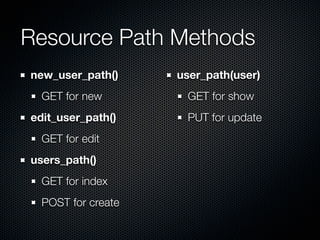
Resource Path Methods
new_user_path()     user_path(user)
  GET for new        GET for show
edit_user_path()     PUT for update
  GET for edit       DELETE for destroy
users_path()
  GET for index
  POST for create
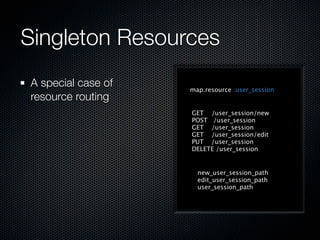
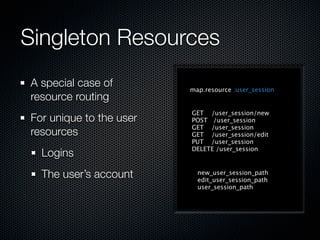
Singleton Resources
Singleton Resources

                map.resource :user_session
Singleton Resources
A special case of   map.resource :user_session
resource routing
                    GET /user_session/new
                    POST /user_session
                    GET /user_session
                    GET /user_session/edit
                    PUT /user_session
                    DELETE /user_session


                      new_user_session_path
                      edit_user_session_path
                      user_session_path
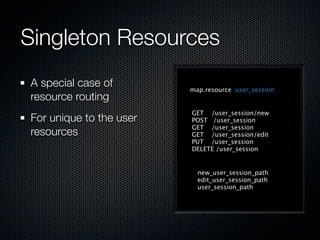
Singleton Resources
A special case of        map.resource :user_session
resource routing
                         GET /user_session/new
For unique to the user   POST /user_session
                         GET /user_session
resources                GET /user_session/edit
                         PUT /user_session
                         DELETE /user_session


                           new_user_session_path
                           edit_user_session_path
                           user_session_path
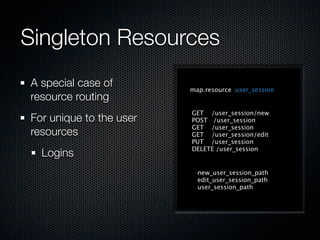
Singleton Resources
A special case of        map.resource :user_session
resource routing
                         GET /user_session/new
For unique to the user   POST /user_session
                         GET /user_session
resources                GET /user_session/edit
                         PUT /user_session
                         DELETE /user_session
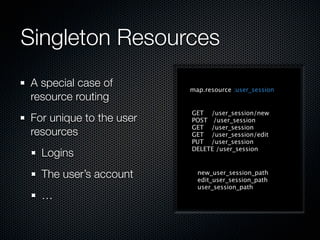
  Logins
                           new_user_session_path
                           edit_user_session_path
                           user_session_path
Singleton Resources
A special case of        map.resource :user_session
resource routing
                         GET /user_session/new
For unique to the user   POST /user_session
                         GET /user_session
resources                GET /user_session/edit
                         PUT /user_session
                         DELETE /user_session
  Logins
  The user’s account       new_user_session_path
                           edit_user_session_path
                           user_session_path
Singleton Resources
A special case of        map.resource :user_session
resource routing
                         GET /user_session/new
For unique to the user   POST /user_session
                         GET /user_session
resources                GET /user_session/edit
                         PUT /user_session
                         DELETE /user_session
  Logins
  The user’s account       new_user_session_path
                           edit_user_session_path
                           user_session_path
  …
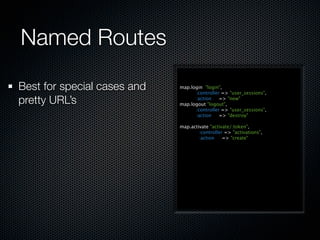
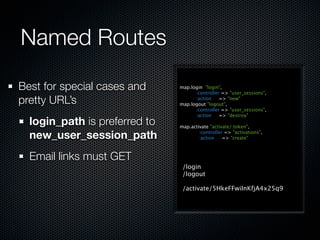
Named Routes
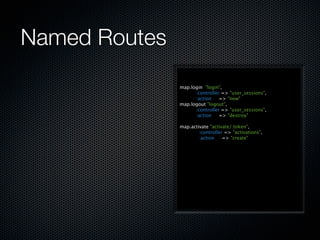
Named Routes
               map.login "login",
                     :controller => "user_sessions",
                     :action    => "new"
               map.logout "logout",
                     :controller => "user_sessions",
                     :action    => "destroy"

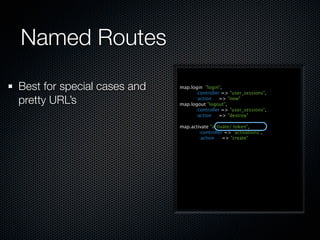
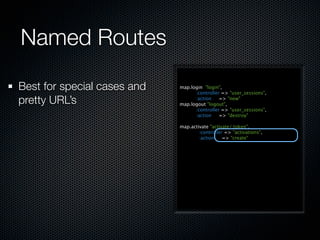
               map.activate "activate/:token",
                       :controller => "activations",
                       :action    => "create"
Named Routes

Best for special cases and   map.login "login",
                                   :controller => "user_sessions",
pretty URL’s                       :action    => "new"
                             map.logout "logout",
                                   :controller => "user_sessions",
                                   :action    => "destroy"

                             map.activate "activate/:token",
                                     :controller => "activations",
                                     :action    => "create"
Named Routes

Best for special cases and   map.login "login",
                                   :controller => "user_sessions",
pretty URL’s                       :action    => "new"
                             map.logout "logout",
                                   :controller => "user_sessions",
                                   :action    => "destroy"

                             map.activate "activate/:token",
                                     :controller => "activations",
                                     :action    => "create"
Named Routes

Best for special cases and   map.login "login",
                                   :controller => "user_sessions",
pretty URL’s                       :action    => "new"
                             map.logout "logout",
                                   :controller => "user_sessions",
                                   :action    => "destroy"

                             map.activate "activate/:token",
                                     :controller => "activations",
                                     :action    => "create"
Named Routes

Best for special cases and     map.login "login",
                                     :controller => "user_sessions",
pretty URL’s                         :action    => "new"
                               map.logout "logout",
                                     :controller => "user_sessions",
                                     :action    => "destroy"
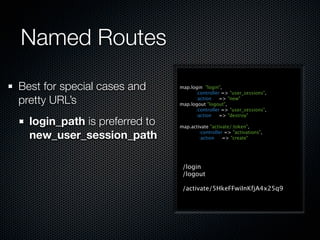
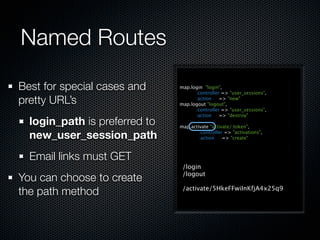
  login_path is preferred to   map.activate "activate/:token",

  new_user_session_path                :controller => "activations",
                                       :action    => "create"


                                /login
                                /logout

                                /activate/5HkeFFwiInKfjA4x25q9
Named Routes

Best for special cases and     map.login "login",
                                     :controller => "user_sessions",
pretty URL’s                         :action    => "new"
                               map.logout "logout",
                                     :controller => "user_sessions",
                                     :action    => "destroy"
  login_path is preferred to   map.activate "activate/:token",

  new_user_session_path                :controller => "activations",
                                       :action    => "create"


  Email links must GET
                                /login
                                /logout

                                /activate/5HkeFFwiInKfjA4x25q9
Named Routes

Best for special cases and     map.login "login",
                                     :controller => "user_sessions",
pretty URL’s                         :action    => "new"
                               map.logout "logout",
                                     :controller => "user_sessions",
                                     :action    => "destroy"
  login_path is preferred to   map.activate "activate/:token",

  new_user_session_path                :controller => "activations",
                                       :action    => "create"


  Email links must GET
                                /login
                                /logout
You can choose to create
the path method                 /activate/5HkeFFwiInKfjA4x25q9
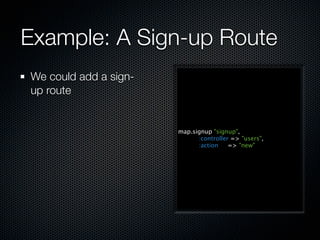
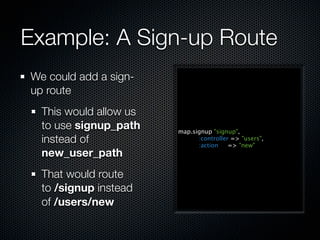
Example: A Sign-up Route
We could add a sign-
up route


                       map.signup "signup",
                             :controller => "users",
                             :action    => "new"
Example: A Sign-up Route
We could add a sign-
up route
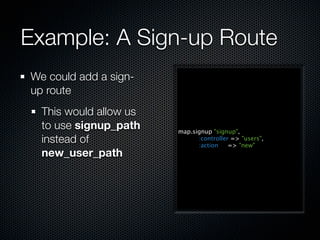
  This would allow us
  to use signup_path    map.signup "signup",
  instead of                  :controller => "users",
                              :action    => "new"
  new_user_path
Example: A Sign-up Route
We could add a sign-
up route
  This would allow us
  to use signup_path    map.signup "signup",
  instead of                  :controller => "users",
                              :action    => "new"
  new_user_path
  That would route
  to /signup instead
  of /users/new
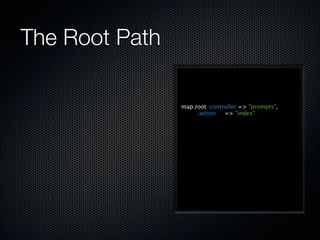
The Root Path
The Root Path

                map.root :controller => "prompts",
                     :action   => "index"
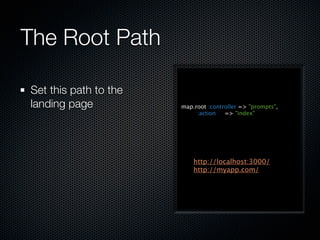
The Root Path

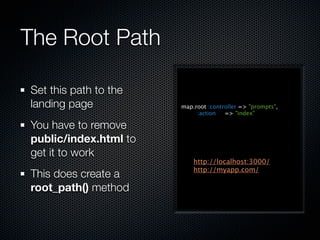
Set this path to the
landing page           map.root :controller => "prompts",
                            :action   => "index"


                           http://localhost:3000/
                           http://myapp.com/
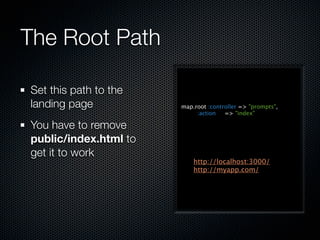
The Root Path

Set this path to the
landing page           map.root :controller => "prompts",
                            :action   => "index"

You have to remove
public/index.html to
get it to work
                           http://localhost:3000/
                           http://myapp.com/
The Root Path

Set this path to the
landing page           map.root :controller => "prompts",
                            :action   => "index"

You have to remove
public/index.html to
get it to work
                           http://localhost:3000/
                           http://myapp.com/
This does create a
root_path() method
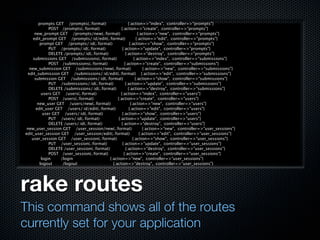
rake routes
This command shows all of the routes
currently set for your application
prompts GET /prompts(.:format)                     {:action=>"index", :controller=>"prompts"}
               POST /prompts(.:format)                {:action=>"create", :controller=>"prompts"}
      new_prompt GET /prompts/new(.:format)                         {:action=>"new", :controller=>"prompts"}
     edit_prompt GET /prompts/:id/edit(.:format)                   {:action=>"edit", :controller=>"prompts"}
          prompt GET /prompts/:id(.:format)                  {:action=>"show", :controller=>"prompts"}
               PUT /prompts/:id(.:format)              {:action=>"update", :controller=>"prompts"}
               DELETE /prompts/:id(.:format)              {:action=>"destroy", :controller=>"prompts"}
     submissions GET /submissions(.:format)                      {:action=>"index", :controller=>"submissions"}
               POST /submissions(.:format)               {:action=>"create", :controller=>"submissions"}
   new_submission GET /submissions/new(.:format)                        {:action=>"new", :controller=>"submissions"}
  edit_submission GET /submissions/:id/edit(.:format) {:action=>"edit", :controller=>"submissions"}
      submission GET /submissions/:id(.:format)                   {:action=>"show", :controller=>"submissions"}
               PUT /submissions/:id(.:format)             {:action=>"update", :controller=>"submissions"}
               DELETE /submissions/:id(.:format)            {:action=>"destroy", :controller=>"submissions"}
           users GET /users(.:format)                 {:action=>"index", :controller=>"users"}
               POST /users(.:format)               {:action=>"create", :controller=>"users"}
        new_user GET /users/new(.:format)                     {:action=>"new", :controller=>"users"}
       edit_user GET /users/:id/edit(.:format)               {:action=>"edit", :controller=>"users"}
            user GET /users/:id(.:format)              {:action=>"show", :controller=>"users"}
               PUT /users/:id(.:format)             {:action=>"update", :controller=>"users"}
               DELETE /users/:id(.:format)            {:action=>"destroy", :controller=>"users"}
 new_user_session GET /user_session/new(.:format)                      {:action=>"new", :controller=>"user_sessions"}
edit_user_session GET /user_session/edit(.:format)                   {:action=>"edit", :controller=>"user_sessions"}
    user_session GET /user_session(.:format)                    {:action=>"show", :controller=>"user_sessions"}
               PUT /user_session(.:format)             {:action=>"update", :controller=>"user_sessions"}
               DELETE /user_session(.:format)             {:action=>"destroy", :controller=>"user_sessions"}
               POST /user_session(.:format)             {:action=>"create", :controller=>"user_sessions"}
           login    /login                    {:action=>"new", :controller=>"user_sessions"}
          logout     /logout                    {:action=>"destroy", :controller=>"user_sessions"}


rake routes
This command shows all of the routes
currently set for your application
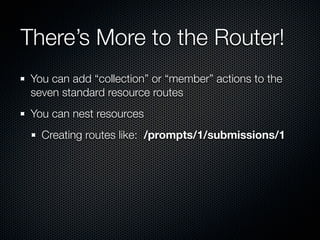
There’s More to the Router!
 You can add “collection” or “member” actions to the
 seven standard resource routes
There’s More to the Router!
 You can add “collection” or “member” actions to the
 seven standard resource routes
 You can nest resources
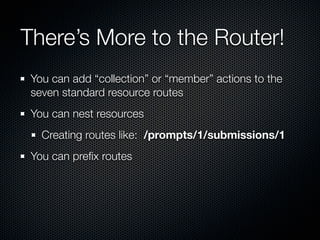
There’s More to the Router!
 You can add “collection” or “member” actions to the
 seven standard resource routes
 You can nest resources
   Creating routes like: /prompts/1/submissions/1
There’s More to the Router!
 You can add “collection” or “member” actions to the
 seven standard resource routes
 You can nest resources
   Creating routes like: /prompts/1/submissions/1
 You can prefix routes
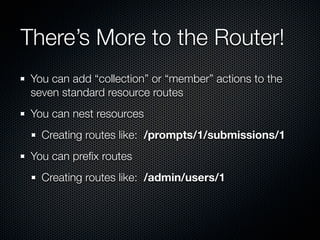
There’s More to the Router!
 You can add “collection” or “member” actions to the
 seven standard resource routes
 You can nest resources
   Creating routes like: /prompts/1/submissions/1
 You can prefix routes
   Creating routes like: /admin/users/1
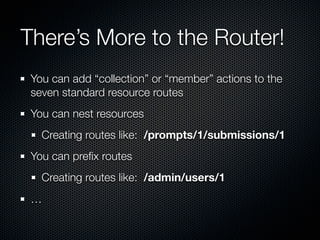
There’s More to the Router!
 You can add “collection” or “member” actions to the
 seven standard resource routes
 You can nest resources
   Creating routes like: /prompts/1/submissions/1
 You can prefix routes
   Creating routes like: /admin/users/1
 …
Rendering a Response
The different ways you can respond to a request
in Rails
What is Rendered?
What is Rendered?

If an action doesn’t call redirect_to() at some point,
some kind of render() generally takes place
What is Rendered?

If an action doesn’t call redirect_to() at some point,
some kind of render() generally takes place
If render() is called, Rails will try to satisfy that request
What is Rendered?

If an action doesn’t call redirect_to() at some point,
some kind of render() generally takes place
If render() is called, Rails will try to satisfy that request
Otherwise a default render happens
What is Rendered?

If an action doesn’t call redirect_to() at some point,
some kind of render() generally takes place
If render() is called, Rails will try to satisfy that request
Otherwise a default render happens
  Rails will hunt for a view named for the current action
What is Rendered?

If an action doesn’t call redirect_to() at some point,
some kind of render() generally takes place
If render() is called, Rails will try to satisfy that request
Otherwise a default render happens
  Rails will hunt for a view named for the current action
  Rails will try to honor the requested format
The Render Format
The Render Format

Both resource routes and the default routes include an
optional :format parameter
The Render Format

Both resource routes and the default routes include an
optional :format parameter
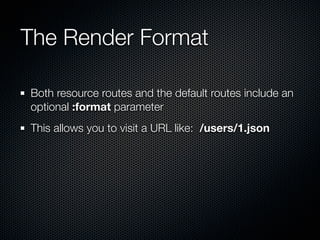
This allows you to visit a URL like: /users/1.json
The Render Format

Both resource routes and the default routes include an
optional :format parameter
This allows you to visit a URL like: /users/1.json
  The requested :format there is JSON instead of the
  default HTML
The Render Format

Both resource routes and the default routes include an
optional :format parameter
This allows you to visit a URL like: /users/1.json
  The requested :format there is JSON instead of the
  default HTML
Rails also honors the HTTP Accept header
Responding to Formats

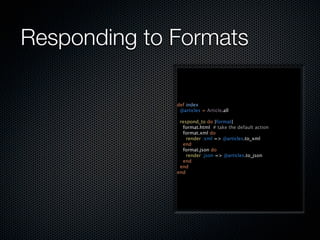
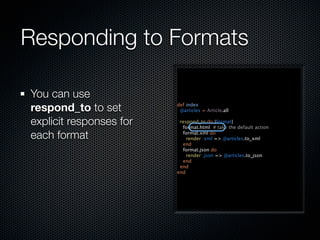
              def index
               @articles = Article.all

               respond_to do |format|
                format.html # take the default action
                format.xml do
                  render :xml => @articles.to_xml
                end
                format.json do
                  render :json => @articles.to_json
                end
               end
              end
Responding to Formats

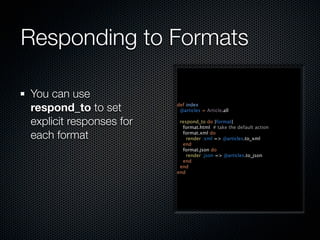
You can use
respond_to to set        def index
                          @articles = Article.all

explicit responses for    respond_to do |format|
                           format.html # take the default action

each format                format.xml do
                             render :xml => @articles.to_xml
                           end
                           format.json do
                             render :json => @articles.to_json
                           end
                          end
                         end
Responding to Formats

You can use
respond_to to set        def index
                          @articles = Article.all

explicit responses for    respond_to do |format|
                           format.html # take the default action

each format                format.xml do
                             render :xml => @articles.to_xml
                           end
                           format.json do
                             render :json => @articles.to_json
                           end
                          end
                         end
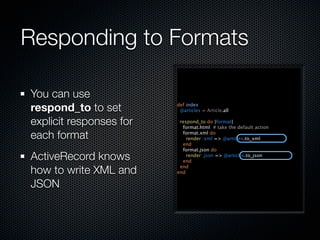
Responding to Formats

You can use
respond_to to set        def index
                          @articles = Article.all

explicit responses for    respond_to do |format|
                           format.html # take the default action

each format                format.xml do
                             render :xml => @articles.to_xml
                           end
                           format.json do
ActiveRecord knows           render :json => @articles.to_json
                           end

how to write XML and      end
                         end

JSON
The Accept Header
Note how the responses changed as I modified
the header but hit the URL
$ curl http://localhost:3000/articles
<!DOCTYPE HTML PUBLIC "-//W3C//DTD HTML 4.01//EN"
                "http://www.w3.org/TR/html4/strict.dtd">
<html>
…
$ curl -H 'Accept: application/xml' http://localhost:3000/articles
<?xml version="1.0" encoding="UTF-8"?>
<articles type="array">
  <article>
…
$ curl -H 'Accept: application/json' http://localhost:3000/articles
[{"article":{"updated_at":"2010-03-05T16:08:33Z",…}}]


The Accept Header
Note how the responses changed as I modified
the header but hit the URL
$ curl http://localhost:3000/articles
<!DOCTYPE HTML PUBLIC "-//W3C//DTD HTML 4.01//EN"
                "http://www.w3.org/TR/html4/strict.dtd">
<html>
…
$ curl -H 'Accept: application/xml' http://localhost:3000/articles
<?xml version="1.0" encoding="UTF-8"?>
<articles type="array">
  <article>
…
$ curl -H 'Accept: application/json' http://localhost:3000/articles
[{"article":{"updated_at":"2010-03-05T16:08:33Z",…}}]


The Accept Header
Note how the responses changed as I modified
the header but hit the URL
Atom Feeds
Atom Feeds

A very popular use of response formats is to create
Atom feeds
Atom Feeds

A very popular use of response formats is to create
Atom feeds
Rails adds a little syntactic sugar for this with some
helper methods and the use of the Builder library
Atom Feeds

A very popular use of response formats is to create
Atom feeds
Rails adds a little syntactic sugar for this with some
helper methods and the use of the Builder library
  Builder allows you to generate XML with a Ruby DSL
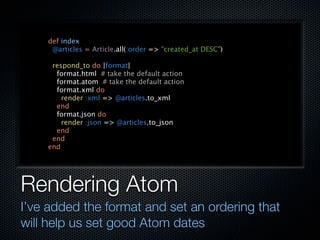
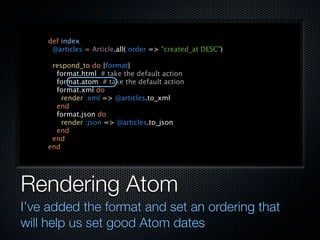
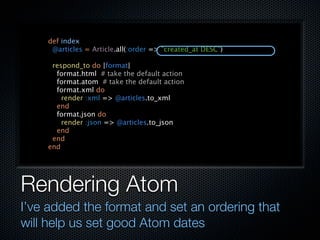
Rendering Atom
I’ve added the format and set an ordering that
will help us set good Atom dates
def index
     @articles = Article.all(:order => "created_at DESC")

     respond_to do |format|
      format.html # take the default action
      format.atom # take the default action
      format.xml do
        render :xml => @articles.to_xml
      end
      format.json do
        render :json => @articles.to_json
      end
     end
    end


Rendering Atom
I’ve added the format and set an ordering that
will help us set good Atom dates
def index
     @articles = Article.all(:order => "created_at DESC")

     respond_to do |format|
      format.html # take the default action
      format.atom # take the default action
      format.xml do
        render :xml => @articles.to_xml
      end
      format.json do
        render :json => @articles.to_json
      end
     end
    end


Rendering Atom
I’ve added the format and set an ordering that
will help us set good Atom dates
def index
     @articles = Article.all(:order => "created_at DESC")

     respond_to do |format|
      format.html # take the default action
      format.atom # take the default action
      format.xml do
        render :xml => @articles.to_xml
      end
      format.json do
        render :json => @articles.to_json
      end
     end
    end


Rendering Atom
I’ve added the format and set an ordering that
will help us set good Atom dates
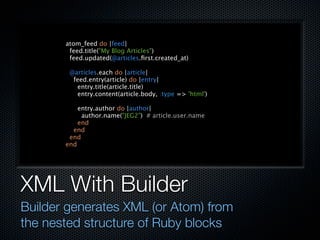
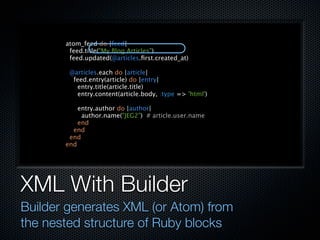
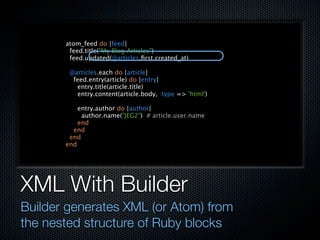
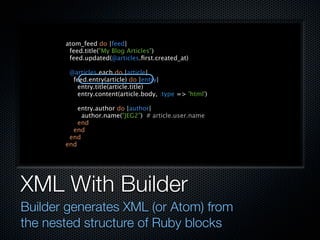
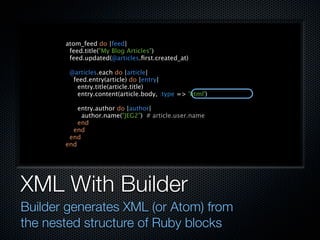
XML With Builder
Builder generates XML (or Atom) from
the nested structure of Ruby blocks
atom_feed do |feed|
        feed.title("My Blog Articles")
        feed.updated(@articles.first.created_at)

        @articles.each do |article|
         feed.entry(article) do |entry|
          entry.title(article.title)
          entry.content(article.body, :type => 'html')

           entry.author do |author|
            author.name("JEG2") # article.user.name
           end
         end
        end
       end


XML With Builder
Builder generates XML (or Atom) from
the nested structure of Ruby blocks
atom_feed do |feed|
        feed.title("My Blog Articles")
        feed.updated(@articles.first.created_at)

        @articles.each do |article|
         feed.entry(article) do |entry|
          entry.title(article.title)
          entry.content(article.body, :type => 'html')

           entry.author do |author|
            author.name("JEG2") # article.user.name
           end
         end
        end
       end


XML With Builder
Builder generates XML (or Atom) from
the nested structure of Ruby blocks
atom_feed do |feed|
        feed.title("My Blog Articles")
        feed.updated(@articles.first.created_at)

        @articles.each do |article|
         feed.entry(article) do |entry|
          entry.title(article.title)
          entry.content(article.body, :type => 'html')

           entry.author do |author|
            author.name("JEG2") # article.user.name
           end
         end
        end
       end


XML With Builder
Builder generates XML (or Atom) from
the nested structure of Ruby blocks
atom_feed do |feed|
        feed.title("My Blog Articles")
        feed.updated(@articles.first.created_at)

        @articles.each do |article|
         feed.entry(article) do |entry|
          entry.title(article.title)
          entry.content(article.body, :type => 'html')

           entry.author do |author|
            author.name("JEG2") # article.user.name
           end
         end
        end
       end


XML With Builder
Builder generates XML (or Atom) from
the nested structure of Ruby blocks
atom_feed do |feed|
        feed.title("My Blog Articles")
        feed.updated(@articles.first.created_at)

        @articles.each do |article|
         feed.entry(article) do |entry|
          entry.title(article.title)
          entry.content(article.body, :type => 'html')

           entry.author do |author|
            author.name("JEG2") # article.user.name
           end
         end
        end
       end


XML With Builder
Builder generates XML (or Atom) from
the nested structure of Ruby blocks
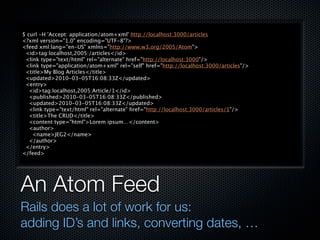
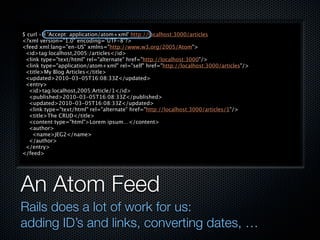
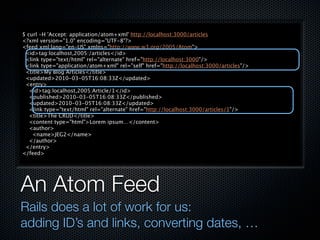
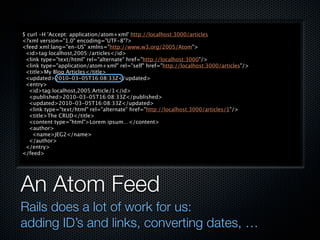
An Atom Feed
Rails does a lot of work for us:
adding ID’s and links, converting dates, …
$ curl -H 'Accept: application/atom+xml' http://localhost:3000/articles
<?xml version="1.0" encoding="UTF-8"?>
<feed xml:lang="en-US" xmlns="http://www.w3.org/2005/Atom">
 <id>tag:localhost,2005:/articles</id>
 <link type="text/html" rel="alternate" href="http://localhost:3000"/>
 <link type="application/atom+xml" rel="self" href="http://localhost:3000/articles"/>
 <title>My Blog Articles</title>
 <updated>2010-03-05T16:08:33Z</updated>
 <entry>
   <id>tag:localhost,2005:Article/1</id>
   <published>2010-03-05T16:08:33Z</published>
   <updated>2010-03-05T16:08:33Z</updated>
   <link type="text/html" rel="alternate" href="http://localhost:3000/articles/1"/>
   <title>The CRUD</title>
   <content type="html">Lorem ipsum…</content>
   <author>
    <name>JEG2</name>
   </author>
 </entry>
</feed>


An Atom Feed
Rails does a lot of work for us:
adding ID’s and links, converting dates, …
$ curl -H 'Accept: application/atom+xml' http://localhost:3000/articles
<?xml version="1.0" encoding="UTF-8"?>
<feed xml:lang="en-US" xmlns="http://www.w3.org/2005/Atom">
 <id>tag:localhost,2005:/articles</id>
 <link type="text/html" rel="alternate" href="http://localhost:3000"/>
 <link type="application/atom+xml" rel="self" href="http://localhost:3000/articles"/>
 <title>My Blog Articles</title>
 <updated>2010-03-05T16:08:33Z</updated>
 <entry>
   <id>tag:localhost,2005:Article/1</id>
   <published>2010-03-05T16:08:33Z</published>
   <updated>2010-03-05T16:08:33Z</updated>
   <link type="text/html" rel="alternate" href="http://localhost:3000/articles/1"/>
   <title>The CRUD</title>
   <content type="html">Lorem ipsum…</content>
   <author>
    <name>JEG2</name>
   </author>
 </entry>
</feed>


An Atom Feed
Rails does a lot of work for us:
adding ID’s and links, converting dates, …
$ curl -H 'Accept: application/atom+xml' http://localhost:3000/articles
<?xml version="1.0" encoding="UTF-8"?>
<feed xml:lang="en-US" xmlns="http://www.w3.org/2005/Atom">
 <id>tag:localhost,2005:/articles</id>
 <link type="text/html" rel="alternate" href="http://localhost:3000"/>
 <link type="application/atom+xml" rel="self" href="http://localhost:3000/articles"/>
 <title>My Blog Articles</title>
 <updated>2010-03-05T16:08:33Z</updated>
 <entry>
   <id>tag:localhost,2005:Article/1</id>
   <published>2010-03-05T16:08:33Z</published>
   <updated>2010-03-05T16:08:33Z</updated>
   <link type="text/html" rel="alternate" href="http://localhost:3000/articles/1"/>
   <title>The CRUD</title>
   <content type="html">Lorem ipsum…</content>
   <author>
    <name>JEG2</name>
   </author>
 </entry>
</feed>


An Atom Feed
Rails does a lot of work for us:
adding ID’s and links, converting dates, …
$ curl -H 'Accept: application/atom+xml' http://localhost:3000/articles
<?xml version="1.0" encoding="UTF-8"?>
<feed xml:lang="en-US" xmlns="http://www.w3.org/2005/Atom">
 <id>tag:localhost,2005:/articles</id>
 <link type="text/html" rel="alternate" href="http://localhost:3000"/>
 <link type="application/atom+xml" rel="self" href="http://localhost:3000/articles"/>
 <title>My Blog Articles</title>
 <updated>2010-03-05T16:08:33Z</updated>
 <entry>
   <id>tag:localhost,2005:Article/1</id>
   <published>2010-03-05T16:08:33Z</published>
   <updated>2010-03-05T16:08:33Z</updated>
   <link type="text/html" rel="alternate" href="http://localhost:3000/articles/1"/>
   <title>The CRUD</title>
   <content type="html">Lorem ipsum…</content>
   <author>
    <name>JEG2</name>
   </author>
 </entry>
</feed>


An Atom Feed
Rails does a lot of work for us:
adding ID’s and links, converting dates, …
Support Head Content
I have inserted a placeholder that will allow pages
to insert content into the document head
<!DOCTYPE HTML PUBLIC "-//W3C//DTD HTML 4.01//EN"
             "http://www.w3.org/TR/html4/strict.dtd">
<html>
  <head>
    <meta http-equiv="Content-type" content="text/html; charset=utf-8">
    <title>
      <%= ["My Blog", yield(:page_title)].compact.join(" : ") %>
    </title>
    <%= yield :head %>
  </head>
  <body>
    <%= yield %>
  </body>
</html>


Support Head Content
I have inserted a placeholder that will allow pages
to insert content into the document head
<!DOCTYPE HTML PUBLIC "-//W3C//DTD HTML 4.01//EN"
             "http://www.w3.org/TR/html4/strict.dtd">
<html>
  <head>
    <meta http-equiv="Content-type" content="text/html; charset=utf-8">
    <title>
      <%= ["My Blog", yield(:page_title)].compact.join(" : ") %>
    </title>
    <%= yield :head %>
  </head>
  <body>
    <%= yield %>
  </body>
</html>


Support Head Content
I have inserted a placeholder that will allow pages
to insert content into the document head
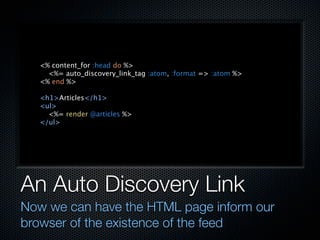
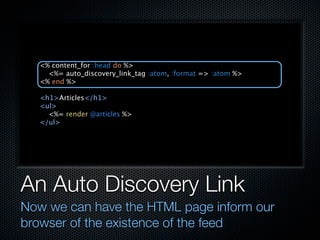
An Auto Discovery Link
Now we can have the HTML page inform our
browser of the existence of the feed
<% content_for :head do %>
     <%= auto_discovery_link_tag :atom, :format => :atom %>
   <% end %>

   <h1>Articles</h1>
   <ul>
     <%= render @articles %>
   </ul>


An Auto Discovery Link
Now we can have the HTML page inform our
browser of the existence of the feed
<% content_for :head do %>
     <%= auto_discovery_link_tag :atom, :format => :atom %>
   <% end %>

   <h1>Articles</h1>
   <ul>
     <%= render @articles %>
   </ul>


An Auto Discovery Link
Now we can have the HTML page inform our
browser of the existence of the feed
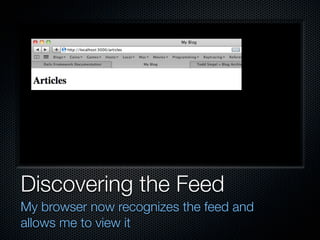
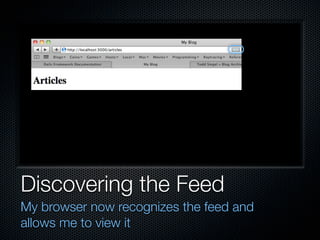
Discovering the Feed
My browser now recognizes the feed and
allows me to view it
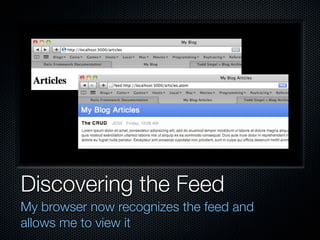
Discovering the Feed
My browser now recognizes the feed and
allows me to view it
Discovering the Feed
My browser now recognizes the feed and
allows me to view it
Discovering the Feed
My browser now recognizes the feed and
allows me to view it
Other Types of Renders

Rails can respond to any Mime Type format
Other Types of Renders

Rails can respond to any Mime Type format
You can also choose to send a file back to the browser
Other Types of Renders

Rails can respond to any Mime Type format
You can also choose to send a file back to the browser
  Or generate data programmatically that is passed as
  a file
Other Types of Renders

Rails can respond to any Mime Type format
You can also choose to send a file back to the browser
  Or generate data programmatically that is passed as
  a file
    I use this to stream CSV back to browsers
Questions?
Adding Atom Feeds Lab
Your book has instructions for how to add
a couple of feeds to your application

Rails Routing And Rendering

  • 1.
    Routing and Rendering Anunder the hood look at how Rails receives requests and writes responses
  • 2.
    The Router How Railsdecides where to send each request
  • 3.
  • 4.
    The Router’s Job Eachtime a request comes in, Rails needs to send it to some action in some controller
  • 5.
    The Router’s Job Eachtime a request comes in, Rails needs to send it to some action in some controller That’s what the router does
  • 6.
    The Router’s Job Eachtime a request comes in, Rails needs to send it to some action in some controller That’s what the router does The router primarily maps URL’s to actions
  • 7.
    The Router’s Job Eachtime a request comes in, Rails needs to send it to some action in some controller That’s what the router does The router primarily maps URL’s to actions It may also route based on HTTP verbs
  • 8.
    The Router’s Job Eachtime a request comes in, Rails needs to send it to some action in some controller That’s what the router does The router primarily maps URL’s to actions It may also route based on HTTP verbs It can be made to route on additional criteria, like host name
  • 9.
    config/routes.rb The routing filefor your application probably looks something like this by now
  • 10.
    ActionController::Routing::Routes.draw do |map| map.resources :prompts map.resources :submissions map.resources :users map.resource :user_session map.login "login", :controller => "user_sessions", :action => "new" map.logout "logout", :controller => "user_sessions", :action => "destroy" map.activate "activate/:token", :controller => "activations", :action => "create" map.connect ':controller/:action/:id' map.connect ':controller/:action/:id.:format' end config/routes.rb The routing file for your application probably looks something like this by now
  • 11.
    ActionController::Routing::Routes.draw do |map| map.resources :prompts map.resources :submissions map.resources :users map.resource :user_session map.login "login", :controller => "user_sessions", :action => "new" map.logout "logout", :controller => "user_sessions", :action => "destroy" map.activate "activate/:token", :controller => "activations", :action => "create" map.connect ':controller/:action/:id' map.connect ':controller/:action/:id.:format' end config/routes.rb The routing file for your application probably looks something like this by now
  • 12.
    ActionController::Routing::Routes.draw do |map| map.resources :prompts map.resources :submissions map.resources :users map.resource :user_session map.login "login", :controller => "user_sessions", :action => "new" map.logout "logout", :controller => "user_sessions", :action => "destroy" map.activate "activate/:token", :controller => "activations", :action => "create" map.connect ':controller/:action/:id' map.connect ':controller/:action/:id.:format' end config/routes.rb The routing file for your application probably looks something like this by now
  • 13.
    ActionController::Routing::Routes.draw do |map| map.resources :prompts map.resources :submissions map.resources :users map.resource :user_session map.login "login", :controller => "user_sessions", :action => "new" map.logout "logout", :controller => "user_sessions", :action => "destroy" map.activate "activate/:token", :controller => "activations", :action => "create" map.connect ':controller/:action/:id' map.connect ':controller/:action/:id.:format' end config/routes.rb The routing file for your application probably looks something like this by now
  • 14.
    ActionController::Routing::Routes.draw do |map| map.resources :prompts map.resources :submissions map.resources :users map.resource :user_session map.login "login", :controller => "user_sessions", :action => "new" map.logout "logout", :controller => "user_sessions", :action => "destroy" map.activate "activate/:token", :controller => "activations", :action => "create" map.connect ':controller/:action/:id' map.connect ':controller/:action/:id.:format' end config/routes.rb The routing file for your application probably looks something like this by now
  • 15.
  • 16.
    The Default Routes map.connect ':controller/:action/:id' map.connect ':controller/:action/:id.:format'
  • 17.
    The Default Routes map.connect ':controller/:action/:id' These rules support an map.connect ':controller/:action/:id.:format' older style of Rail routing /prompts /prompts/new /prompts/create /prompts/show/1 /prompts/edit/1 /prompts/update/1 /prompts/destroy/1
  • 18.
    The Default Routes map.connect ':controller/:action/:id' These rules support an map.connect ':controller/:action/:id.:format' older style of Rail routing It has fallen out of /prompts /prompts/new fashion /prompts/create /prompts/show/1 /prompts/edit/1 /prompts/update/1 /prompts/destroy/1
  • 19.
    The Default Routes map.connect ':controller/:action/:id' These rules support an map.connect ':controller/:action/:id.:format' older style of Rail routing It has fallen out of /prompts /prompts/new fashion /prompts/create /prompts/show/1 Some people now /prompts/edit/1 /prompts/update/1 remove these rules /prompts/destroy/1
  • 20.
  • 21.
    Route Priority Routesare matches matched in top to bottom order as they appear in the routes file
  • 22.
    Route Priority Routesare matches matched in top to bottom order as they appear in the routes file The first route to match an incoming request wins
  • 23.
    Route Priority Routesare matches matched in top to bottom order as they appear in the routes file The first route to match an incoming request wins Lower routes may never fire, if a higher route hides them by matching requests
  • 24.
    Route Priority Routesare matches matched in top to bottom order as they appear in the routes file The first route to match an incoming request wins Lower routes may never fire, if a higher route hides them by matching requests This is why the default routes are at the bottom of the file: they are the last resort
  • 25.
  • 26.
    Resource Routing map.resources :prompts map.resources :submissions map.resources :users
  • 27.
    Resource Routing This isthe modern map.resources :prompts Rails routing style map.resources :submissions map.resources :users GET /prompts GET /prompts/new POST /prompts GET /prompts/1 GET /prompts/1/edit PUT /prompts/1 DELETE /prompts/1
  • 28.
    Resource Routing This isthe modern map.resources :prompts Rails routing style map.resources :submissions map.resources :users You can add non- standard actions GET /prompts GET /prompts/new POST /prompts GET /prompts/1 GET /prompts/1/edit PUT /prompts/1 DELETE /prompts/1
  • 29.
    Resource Routing This isthe modern map.resources :prompts Rails routing style map.resources :submissions map.resources :users You can add non- standard actions GET /prompts It routes based on GET /prompts/new HTTP verbs POST /prompts GET /prompts/1 GET /prompts/1/edit PUT /prompts/1 DELETE /prompts/1
  • 30.
    Resource Routing This isthe modern map.resources :prompts Rails routing style map.resources :submissions map.resources :users You can add non- standard actions GET /prompts It routes based on GET /prompts/new HTTP verbs POST /prompts GET /prompts/1 GET /prompts/1/edit You get named path/url PUT /prompts/1 DELETE /prompts/1 methods for free
  • 31.
  • 32.
    What are HTTPVerbs? The Web’s transport protocol understands a powerful language of verbs and objects
  • 33.
    What are HTTPVerbs? The Web’s transport protocol understands a powerful language of verbs and objects Browser’s are generally dumb and do not
  • 34.
    What are HTTPVerbs? The Web’s transport protocol understands a powerful language of verbs and objects Browser’s are generally dumb and do not They use only GET (links) and POST (forms)
  • 35.
    What are HTTPVerbs? The Web’s transport protocol understands a powerful language of verbs and objects Browser’s are generally dumb and do not They use only GET (links) and POST (forms) Rails fakes it with browsers using hidden parameters
  • 36.
    What are HTTPVerbs? The Web’s transport protocol understands a powerful language of verbs and objects Browser’s are generally dumb and do not They use only GET (links) and POST (forms) Rails fakes it with browsers using hidden parameters It also supports the real verbs from smart agents
  • 37.
    What are HTTPVerbs? The Web’s transport protocol understands a powerful language of verbs and objects Browser’s are generally dumb and do not They use only GET (links) and POST (forms) Rails fakes it with browsers using hidden parameters It also supports the real verbs from smart agents This is very nice when building API’s
  • 38.
  • 39.
  • 40.
  • 41.
    Resource Path Methods new_user_path() GET for new edit_user_path()
  • 42.
    Resource Path Methods new_user_path() GET for new edit_user_path() GET for edit
  • 43.
    Resource Path Methods new_user_path() GET for new edit_user_path() GET for edit users_path()
  • 44.
    Resource Path Methods new_user_path() GET for new edit_user_path() GET for edit users_path() GET for index
  • 45.
    Resource Path Methods new_user_path() GET for new edit_user_path() GET for edit users_path() GET for index POST for create
  • 46.
    Resource Path Methods new_user_path() user_path(user) GET for new edit_user_path() GET for edit users_path() GET for index POST for create
  • 47.
    Resource Path Methods new_user_path() user_path(user) GET for new GET for show edit_user_path() GET for edit users_path() GET for index POST for create
  • 48.
    Resource Path Methods new_user_path() user_path(user) GET for new GET for show edit_user_path() PUT for update GET for edit users_path() GET for index POST for create
  • 49.
    Resource Path Methods new_user_path() user_path(user) GET for new GET for show edit_user_path() PUT for update GET for edit DELETE for destroy users_path() GET for index POST for create
  • 50.
  • 51.
    Singleton Resources map.resource :user_session
  • 52.
    Singleton Resources A specialcase of map.resource :user_session resource routing GET /user_session/new POST /user_session GET /user_session GET /user_session/edit PUT /user_session DELETE /user_session new_user_session_path edit_user_session_path user_session_path
  • 53.
    Singleton Resources A specialcase of map.resource :user_session resource routing GET /user_session/new For unique to the user POST /user_session GET /user_session resources GET /user_session/edit PUT /user_session DELETE /user_session new_user_session_path edit_user_session_path user_session_path
  • 54.
    Singleton Resources A specialcase of map.resource :user_session resource routing GET /user_session/new For unique to the user POST /user_session GET /user_session resources GET /user_session/edit PUT /user_session DELETE /user_session Logins new_user_session_path edit_user_session_path user_session_path
  • 55.
    Singleton Resources A specialcase of map.resource :user_session resource routing GET /user_session/new For unique to the user POST /user_session GET /user_session resources GET /user_session/edit PUT /user_session DELETE /user_session Logins The user’s account new_user_session_path edit_user_session_path user_session_path
  • 56.
    Singleton Resources A specialcase of map.resource :user_session resource routing GET /user_session/new For unique to the user POST /user_session GET /user_session resources GET /user_session/edit PUT /user_session DELETE /user_session Logins The user’s account new_user_session_path edit_user_session_path user_session_path …
  • 57.
  • 58.
    Named Routes map.login "login", :controller => "user_sessions", :action => "new" map.logout "logout", :controller => "user_sessions", :action => "destroy" map.activate "activate/:token", :controller => "activations", :action => "create"
  • 59.
    Named Routes Best forspecial cases and map.login "login", :controller => "user_sessions", pretty URL’s :action => "new" map.logout "logout", :controller => "user_sessions", :action => "destroy" map.activate "activate/:token", :controller => "activations", :action => "create"
  • 60.
    Named Routes Best forspecial cases and map.login "login", :controller => "user_sessions", pretty URL’s :action => "new" map.logout "logout", :controller => "user_sessions", :action => "destroy" map.activate "activate/:token", :controller => "activations", :action => "create"
  • 61.
    Named Routes Best forspecial cases and map.login "login", :controller => "user_sessions", pretty URL’s :action => "new" map.logout "logout", :controller => "user_sessions", :action => "destroy" map.activate "activate/:token", :controller => "activations", :action => "create"
  • 62.
    Named Routes Best forspecial cases and map.login "login", :controller => "user_sessions", pretty URL’s :action => "new" map.logout "logout", :controller => "user_sessions", :action => "destroy" login_path is preferred to map.activate "activate/:token", new_user_session_path :controller => "activations", :action => "create" /login /logout /activate/5HkeFFwiInKfjA4x25q9
  • 63.
    Named Routes Best forspecial cases and map.login "login", :controller => "user_sessions", pretty URL’s :action => "new" map.logout "logout", :controller => "user_sessions", :action => "destroy" login_path is preferred to map.activate "activate/:token", new_user_session_path :controller => "activations", :action => "create" Email links must GET /login /logout /activate/5HkeFFwiInKfjA4x25q9
  • 64.
    Named Routes Best forspecial cases and map.login "login", :controller => "user_sessions", pretty URL’s :action => "new" map.logout "logout", :controller => "user_sessions", :action => "destroy" login_path is preferred to map.activate "activate/:token", new_user_session_path :controller => "activations", :action => "create" Email links must GET /login /logout You can choose to create the path method /activate/5HkeFFwiInKfjA4x25q9
  • 65.
  • 66.
    Example: A Sign-upRoute We could add a sign- up route map.signup "signup", :controller => "users", :action => "new"
  • 67.
    Example: A Sign-upRoute We could add a sign- up route This would allow us to use signup_path map.signup "signup", instead of :controller => "users", :action => "new" new_user_path
  • 68.
    Example: A Sign-upRoute We could add a sign- up route This would allow us to use signup_path map.signup "signup", instead of :controller => "users", :action => "new" new_user_path That would route to /signup instead of /users/new
  • 69.
  • 70.
    The Root Path map.root :controller => "prompts", :action => "index"
  • 71.
    The Root Path Setthis path to the landing page map.root :controller => "prompts", :action => "index" http://localhost:3000/ http://myapp.com/
  • 72.
    The Root Path Setthis path to the landing page map.root :controller => "prompts", :action => "index" You have to remove public/index.html to get it to work http://localhost:3000/ http://myapp.com/
  • 73.
    The Root Path Setthis path to the landing page map.root :controller => "prompts", :action => "index" You have to remove public/index.html to get it to work http://localhost:3000/ http://myapp.com/ This does create a root_path() method
  • 74.
    rake routes This commandshows all of the routes currently set for your application
  • 75.
    prompts GET /prompts(.:format) {:action=>"index", :controller=>"prompts"} POST /prompts(.:format) {:action=>"create", :controller=>"prompts"} new_prompt GET /prompts/new(.:format) {:action=>"new", :controller=>"prompts"} edit_prompt GET /prompts/:id/edit(.:format) {:action=>"edit", :controller=>"prompts"} prompt GET /prompts/:id(.:format) {:action=>"show", :controller=>"prompts"} PUT /prompts/:id(.:format) {:action=>"update", :controller=>"prompts"} DELETE /prompts/:id(.:format) {:action=>"destroy", :controller=>"prompts"} submissions GET /submissions(.:format) {:action=>"index", :controller=>"submissions"} POST /submissions(.:format) {:action=>"create", :controller=>"submissions"} new_submission GET /submissions/new(.:format) {:action=>"new", :controller=>"submissions"} edit_submission GET /submissions/:id/edit(.:format) {:action=>"edit", :controller=>"submissions"} submission GET /submissions/:id(.:format) {:action=>"show", :controller=>"submissions"} PUT /submissions/:id(.:format) {:action=>"update", :controller=>"submissions"} DELETE /submissions/:id(.:format) {:action=>"destroy", :controller=>"submissions"} users GET /users(.:format) {:action=>"index", :controller=>"users"} POST /users(.:format) {:action=>"create", :controller=>"users"} new_user GET /users/new(.:format) {:action=>"new", :controller=>"users"} edit_user GET /users/:id/edit(.:format) {:action=>"edit", :controller=>"users"} user GET /users/:id(.:format) {:action=>"show", :controller=>"users"} PUT /users/:id(.:format) {:action=>"update", :controller=>"users"} DELETE /users/:id(.:format) {:action=>"destroy", :controller=>"users"} new_user_session GET /user_session/new(.:format) {:action=>"new", :controller=>"user_sessions"} edit_user_session GET /user_session/edit(.:format) {:action=>"edit", :controller=>"user_sessions"} user_session GET /user_session(.:format) {:action=>"show", :controller=>"user_sessions"} PUT /user_session(.:format) {:action=>"update", :controller=>"user_sessions"} DELETE /user_session(.:format) {:action=>"destroy", :controller=>"user_sessions"} POST /user_session(.:format) {:action=>"create", :controller=>"user_sessions"} login /login {:action=>"new", :controller=>"user_sessions"} logout /logout {:action=>"destroy", :controller=>"user_sessions"} rake routes This command shows all of the routes currently set for your application
  • 76.
    There’s More tothe Router!
  • 77.
    There’s More tothe Router! You can add “collection” or “member” actions to the seven standard resource routes
  • 78.
    There’s More tothe Router! You can add “collection” or “member” actions to the seven standard resource routes You can nest resources
  • 79.
    There’s More tothe Router! You can add “collection” or “member” actions to the seven standard resource routes You can nest resources Creating routes like: /prompts/1/submissions/1
  • 80.
    There’s More tothe Router! You can add “collection” or “member” actions to the seven standard resource routes You can nest resources Creating routes like: /prompts/1/submissions/1 You can prefix routes
  • 81.
    There’s More tothe Router! You can add “collection” or “member” actions to the seven standard resource routes You can nest resources Creating routes like: /prompts/1/submissions/1 You can prefix routes Creating routes like: /admin/users/1
  • 82.
    There’s More tothe Router! You can add “collection” or “member” actions to the seven standard resource routes You can nest resources Creating routes like: /prompts/1/submissions/1 You can prefix routes Creating routes like: /admin/users/1 …
  • 83.
    Rendering a Response Thedifferent ways you can respond to a request in Rails
  • 84.
  • 85.
    What is Rendered? Ifan action doesn’t call redirect_to() at some point, some kind of render() generally takes place
  • 86.
    What is Rendered? Ifan action doesn’t call redirect_to() at some point, some kind of render() generally takes place If render() is called, Rails will try to satisfy that request
  • 87.
    What is Rendered? Ifan action doesn’t call redirect_to() at some point, some kind of render() generally takes place If render() is called, Rails will try to satisfy that request Otherwise a default render happens
  • 88.
    What is Rendered? Ifan action doesn’t call redirect_to() at some point, some kind of render() generally takes place If render() is called, Rails will try to satisfy that request Otherwise a default render happens Rails will hunt for a view named for the current action
  • 89.
    What is Rendered? Ifan action doesn’t call redirect_to() at some point, some kind of render() generally takes place If render() is called, Rails will try to satisfy that request Otherwise a default render happens Rails will hunt for a view named for the current action Rails will try to honor the requested format
  • 90.
  • 91.
    The Render Format Bothresource routes and the default routes include an optional :format parameter
  • 92.
    The Render Format Bothresource routes and the default routes include an optional :format parameter This allows you to visit a URL like: /users/1.json
  • 93.
    The Render Format Bothresource routes and the default routes include an optional :format parameter This allows you to visit a URL like: /users/1.json The requested :format there is JSON instead of the default HTML
  • 94.
    The Render Format Bothresource routes and the default routes include an optional :format parameter This allows you to visit a URL like: /users/1.json The requested :format there is JSON instead of the default HTML Rails also honors the HTTP Accept header
  • 95.
  • 96.
    Responding to Formats def index @articles = Article.all respond_to do |format| format.html # take the default action format.xml do render :xml => @articles.to_xml end format.json do render :json => @articles.to_json end end end
  • 97.
    Responding to Formats Youcan use respond_to to set def index @articles = Article.all explicit responses for respond_to do |format| format.html # take the default action each format format.xml do render :xml => @articles.to_xml end format.json do render :json => @articles.to_json end end end
  • 98.
    Responding to Formats Youcan use respond_to to set def index @articles = Article.all explicit responses for respond_to do |format| format.html # take the default action each format format.xml do render :xml => @articles.to_xml end format.json do render :json => @articles.to_json end end end
  • 99.
    Responding to Formats Youcan use respond_to to set def index @articles = Article.all explicit responses for respond_to do |format| format.html # take the default action each format format.xml do render :xml => @articles.to_xml end format.json do ActiveRecord knows render :json => @articles.to_json end how to write XML and end end JSON
  • 100.
    The Accept Header Notehow the responses changed as I modified the header but hit the URL
  • 101.
    $ curl http://localhost:3000/articles <!DOCTYPEHTML PUBLIC "-//W3C//DTD HTML 4.01//EN" "http://www.w3.org/TR/html4/strict.dtd"> <html> … $ curl -H 'Accept: application/xml' http://localhost:3000/articles <?xml version="1.0" encoding="UTF-8"?> <articles type="array"> <article> … $ curl -H 'Accept: application/json' http://localhost:3000/articles [{"article":{"updated_at":"2010-03-05T16:08:33Z",…}}] The Accept Header Note how the responses changed as I modified the header but hit the URL
  • 102.
    $ curl http://localhost:3000/articles <!DOCTYPEHTML PUBLIC "-//W3C//DTD HTML 4.01//EN" "http://www.w3.org/TR/html4/strict.dtd"> <html> … $ curl -H 'Accept: application/xml' http://localhost:3000/articles <?xml version="1.0" encoding="UTF-8"?> <articles type="array"> <article> … $ curl -H 'Accept: application/json' http://localhost:3000/articles [{"article":{"updated_at":"2010-03-05T16:08:33Z",…}}] The Accept Header Note how the responses changed as I modified the header but hit the URL
  • 103.
  • 104.
    Atom Feeds A verypopular use of response formats is to create Atom feeds
  • 105.
    Atom Feeds A verypopular use of response formats is to create Atom feeds Rails adds a little syntactic sugar for this with some helper methods and the use of the Builder library
  • 106.
    Atom Feeds A verypopular use of response formats is to create Atom feeds Rails adds a little syntactic sugar for this with some helper methods and the use of the Builder library Builder allows you to generate XML with a Ruby DSL
  • 107.
    Rendering Atom I’ve addedthe format and set an ordering that will help us set good Atom dates
  • 108.
    def index @articles = Article.all(:order => "created_at DESC") respond_to do |format| format.html # take the default action format.atom # take the default action format.xml do render :xml => @articles.to_xml end format.json do render :json => @articles.to_json end end end Rendering Atom I’ve added the format and set an ordering that will help us set good Atom dates
  • 109.
    def index @articles = Article.all(:order => "created_at DESC") respond_to do |format| format.html # take the default action format.atom # take the default action format.xml do render :xml => @articles.to_xml end format.json do render :json => @articles.to_json end end end Rendering Atom I’ve added the format and set an ordering that will help us set good Atom dates
  • 110.
    def index @articles = Article.all(:order => "created_at DESC") respond_to do |format| format.html # take the default action format.atom # take the default action format.xml do render :xml => @articles.to_xml end format.json do render :json => @articles.to_json end end end Rendering Atom I’ve added the format and set an ordering that will help us set good Atom dates
  • 111.
    XML With Builder Buildergenerates XML (or Atom) from the nested structure of Ruby blocks
  • 112.
    atom_feed do |feed| feed.title("My Blog Articles") feed.updated(@articles.first.created_at) @articles.each do |article| feed.entry(article) do |entry| entry.title(article.title) entry.content(article.body, :type => 'html') entry.author do |author| author.name("JEG2") # article.user.name end end end end XML With Builder Builder generates XML (or Atom) from the nested structure of Ruby blocks
  • 113.
    atom_feed do |feed| feed.title("My Blog Articles") feed.updated(@articles.first.created_at) @articles.each do |article| feed.entry(article) do |entry| entry.title(article.title) entry.content(article.body, :type => 'html') entry.author do |author| author.name("JEG2") # article.user.name end end end end XML With Builder Builder generates XML (or Atom) from the nested structure of Ruby blocks
  • 114.
    atom_feed do |feed| feed.title("My Blog Articles") feed.updated(@articles.first.created_at) @articles.each do |article| feed.entry(article) do |entry| entry.title(article.title) entry.content(article.body, :type => 'html') entry.author do |author| author.name("JEG2") # article.user.name end end end end XML With Builder Builder generates XML (or Atom) from the nested structure of Ruby blocks
  • 115.
    atom_feed do |feed| feed.title("My Blog Articles") feed.updated(@articles.first.created_at) @articles.each do |article| feed.entry(article) do |entry| entry.title(article.title) entry.content(article.body, :type => 'html') entry.author do |author| author.name("JEG2") # article.user.name end end end end XML With Builder Builder generates XML (or Atom) from the nested structure of Ruby blocks
  • 116.
    atom_feed do |feed| feed.title("My Blog Articles") feed.updated(@articles.first.created_at) @articles.each do |article| feed.entry(article) do |entry| entry.title(article.title) entry.content(article.body, :type => 'html') entry.author do |author| author.name("JEG2") # article.user.name end end end end XML With Builder Builder generates XML (or Atom) from the nested structure of Ruby blocks
  • 117.
    An Atom Feed Railsdoes a lot of work for us: adding ID’s and links, converting dates, …
  • 118.
    $ curl -H'Accept: application/atom+xml' http://localhost:3000/articles <?xml version="1.0" encoding="UTF-8"?> <feed xml:lang="en-US" xmlns="http://www.w3.org/2005/Atom"> <id>tag:localhost,2005:/articles</id> <link type="text/html" rel="alternate" href="http://localhost:3000"/> <link type="application/atom+xml" rel="self" href="http://localhost:3000/articles"/> <title>My Blog Articles</title> <updated>2010-03-05T16:08:33Z</updated> <entry> <id>tag:localhost,2005:Article/1</id> <published>2010-03-05T16:08:33Z</published> <updated>2010-03-05T16:08:33Z</updated> <link type="text/html" rel="alternate" href="http://localhost:3000/articles/1"/> <title>The CRUD</title> <content type="html">Lorem ipsum…</content> <author> <name>JEG2</name> </author> </entry> </feed> An Atom Feed Rails does a lot of work for us: adding ID’s and links, converting dates, …
  • 119.
    $ curl -H'Accept: application/atom+xml' http://localhost:3000/articles <?xml version="1.0" encoding="UTF-8"?> <feed xml:lang="en-US" xmlns="http://www.w3.org/2005/Atom"> <id>tag:localhost,2005:/articles</id> <link type="text/html" rel="alternate" href="http://localhost:3000"/> <link type="application/atom+xml" rel="self" href="http://localhost:3000/articles"/> <title>My Blog Articles</title> <updated>2010-03-05T16:08:33Z</updated> <entry> <id>tag:localhost,2005:Article/1</id> <published>2010-03-05T16:08:33Z</published> <updated>2010-03-05T16:08:33Z</updated> <link type="text/html" rel="alternate" href="http://localhost:3000/articles/1"/> <title>The CRUD</title> <content type="html">Lorem ipsum…</content> <author> <name>JEG2</name> </author> </entry> </feed> An Atom Feed Rails does a lot of work for us: adding ID’s and links, converting dates, …
  • 120.
    $ curl -H'Accept: application/atom+xml' http://localhost:3000/articles <?xml version="1.0" encoding="UTF-8"?> <feed xml:lang="en-US" xmlns="http://www.w3.org/2005/Atom"> <id>tag:localhost,2005:/articles</id> <link type="text/html" rel="alternate" href="http://localhost:3000"/> <link type="application/atom+xml" rel="self" href="http://localhost:3000/articles"/> <title>My Blog Articles</title> <updated>2010-03-05T16:08:33Z</updated> <entry> <id>tag:localhost,2005:Article/1</id> <published>2010-03-05T16:08:33Z</published> <updated>2010-03-05T16:08:33Z</updated> <link type="text/html" rel="alternate" href="http://localhost:3000/articles/1"/> <title>The CRUD</title> <content type="html">Lorem ipsum…</content> <author> <name>JEG2</name> </author> </entry> </feed> An Atom Feed Rails does a lot of work for us: adding ID’s and links, converting dates, …
  • 121.
    $ curl -H'Accept: application/atom+xml' http://localhost:3000/articles <?xml version="1.0" encoding="UTF-8"?> <feed xml:lang="en-US" xmlns="http://www.w3.org/2005/Atom"> <id>tag:localhost,2005:/articles</id> <link type="text/html" rel="alternate" href="http://localhost:3000"/> <link type="application/atom+xml" rel="self" href="http://localhost:3000/articles"/> <title>My Blog Articles</title> <updated>2010-03-05T16:08:33Z</updated> <entry> <id>tag:localhost,2005:Article/1</id> <published>2010-03-05T16:08:33Z</published> <updated>2010-03-05T16:08:33Z</updated> <link type="text/html" rel="alternate" href="http://localhost:3000/articles/1"/> <title>The CRUD</title> <content type="html">Lorem ipsum…</content> <author> <name>JEG2</name> </author> </entry> </feed> An Atom Feed Rails does a lot of work for us: adding ID’s and links, converting dates, …
  • 122.
    Support Head Content Ihave inserted a placeholder that will allow pages to insert content into the document head
  • 123.
    <!DOCTYPE HTML PUBLIC"-//W3C//DTD HTML 4.01//EN" "http://www.w3.org/TR/html4/strict.dtd"> <html> <head> <meta http-equiv="Content-type" content="text/html; charset=utf-8"> <title> <%= ["My Blog", yield(:page_title)].compact.join(" : ") %> </title> <%= yield :head %> </head> <body> <%= yield %> </body> </html> Support Head Content I have inserted a placeholder that will allow pages to insert content into the document head
  • 124.
    <!DOCTYPE HTML PUBLIC"-//W3C//DTD HTML 4.01//EN" "http://www.w3.org/TR/html4/strict.dtd"> <html> <head> <meta http-equiv="Content-type" content="text/html; charset=utf-8"> <title> <%= ["My Blog", yield(:page_title)].compact.join(" : ") %> </title> <%= yield :head %> </head> <body> <%= yield %> </body> </html> Support Head Content I have inserted a placeholder that will allow pages to insert content into the document head
  • 125.
    An Auto DiscoveryLink Now we can have the HTML page inform our browser of the existence of the feed
  • 126.
    <% content_for :headdo %> <%= auto_discovery_link_tag :atom, :format => :atom %> <% end %> <h1>Articles</h1> <ul> <%= render @articles %> </ul> An Auto Discovery Link Now we can have the HTML page inform our browser of the existence of the feed
  • 127.
    <% content_for :headdo %> <%= auto_discovery_link_tag :atom, :format => :atom %> <% end %> <h1>Articles</h1> <ul> <%= render @articles %> </ul> An Auto Discovery Link Now we can have the HTML page inform our browser of the existence of the feed
  • 128.
    Discovering the Feed Mybrowser now recognizes the feed and allows me to view it
  • 129.
    Discovering the Feed Mybrowser now recognizes the feed and allows me to view it
  • 130.
    Discovering the Feed Mybrowser now recognizes the feed and allows me to view it
  • 131.
    Discovering the Feed Mybrowser now recognizes the feed and allows me to view it
  • 132.
  • 133.
    Other Types ofRenders Rails can respond to any Mime Type format
  • 134.
    Other Types ofRenders Rails can respond to any Mime Type format You can also choose to send a file back to the browser
  • 135.
    Other Types ofRenders Rails can respond to any Mime Type format You can also choose to send a file back to the browser Or generate data programmatically that is passed as a file
  • 136.
    Other Types ofRenders Rails can respond to any Mime Type format You can also choose to send a file back to the browser Or generate data programmatically that is passed as a file I use this to stream CSV back to browsers
  • 137.
  • 138.
    Adding Atom FeedsLab Your book has instructions for how to add a couple of feeds to your application