Download as PDF, PPTX


![Anatomy of a ring handler
(defn handler [request]
{:status 200
:headers {"Content-Type" "text/plain"}
:body "Hello World"})
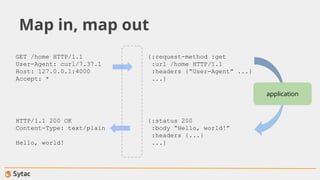
Following the simplicity of the ring abstraction, ring handlers are plain functions. Compare this to a Java
Servlet.](https://image.slidesharecdn.com/webdevelopment-150423080629-conversion-gate02/85/Clojure-Workshop-Web-development-4-320.jpg)
![How to run a ring application
(ns my.web
(:use ring.jetty.adapter))
(defn handler [request]
{:status 200
:headers {"Content-Type" "text/plain"}
:body "Hello World"})
(run-jetty handler 8080)
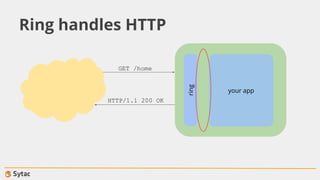
You can find ring adapters (-> wrappers) for the most common app servers. Ring will dispatch HTTP
requests to your handler.](https://image.slidesharecdn.com/webdevelopment-150423080629-conversion-gate02/85/Clojure-Workshop-Web-development-5-320.jpg)
![How to run a ring application
; in project.clj:
:plugins [[lein-ring "0.9.3"]]
:ring {:handler hello-world.core/handler}
$ lein ring server
Started nREPL server on port 4500
2015-04-20 20:19:37.495:INFO:oejs.Server:jetty-7.6.13.v20130916
2015-04-20 20:19:37.548:INFO:oejs.AbstractConnector:Started
SelectChannelConnector@0.0.0.0:8090
Started server on port 8090
An alternative way to start your application is to run it from sources.](https://image.slidesharecdn.com/webdevelopment-150423080629-conversion-gate02/85/Clojure-Workshop-Web-development-6-320.jpg)
![How to run a ring application
; in project.clj:
:plugins [[lein-ring "0.9.3"]]
:ring {:handler hello-world.core/handler}
$ lein ring uberwar
Created /Users/skuro/demo/target/demo-1.0-standalone.war
If you need a standard packaging, that’s available also.](https://image.slidesharecdn.com/webdevelopment-150423080629-conversion-gate02/85/Clojure-Workshop-Web-development-7-320.jpg)
![Filtering with middleware
(defn wrap-content-type [handler type]
(fn [request]
(let [response (handler request)]
(assoc-in response [:headers “Content-Type”] type))))
(def wrapped
(wrap-content-type handler “text/plain”))
Middleware functions wrap regular handlers to enhance their functionalities. They accept in input a
handler plus other arguments, and must return a new handler. Compare them to Servlet Filters.](https://image.slidesharecdn.com/webdevelopment-150423080629-conversion-gate02/85/Clojure-Workshop-Web-development-8-320.jpg)
![Compojure to route requests
(ns hello-world.core
(:require [compojure.core :refer :all]
[compojure.route :as route]))
(defn surname [name]
({"Alfred" "Hitchcock"} name))
(defroutes app
(GET "/:name" [name] (surname name)
(route/not-found "<h1>Page not found</h1>"))
Compojure helps you route request to the correct function depending on the request details. Route
matches are attempted in lexical order.](https://image.slidesharecdn.com/webdevelopment-150423080629-conversion-gate02/85/Clojure-Workshop-Web-development-9-320.jpg)
![Compojure to route requests
(defroutes my-api
(context "/api" []
(GET "/people" [] (list-people)
(GET "/people/:name" [name] (describe-person name))))
; the above registers handles for these URLs:
; /api/people
; /api/people/:name
Routes can be grouped together via context, which establishes a common prefix and common
destructured parameters.](https://image.slidesharecdn.com/webdevelopment-150423080629-conversion-gate02/85/Clojure-Workshop-Web-development-10-320.jpg)
![Middleware to convert to JSON
(use '[ring.middleware.json :only [wrap-json-response]]
'[ring.util.response :only [response]])
(defn handler [request]
(response {:foo "bar"}))
(def app
(wrap-json-response handler))
An handler can translate automatically your response bodies into JSON, and will also translate the
incoming request bodies into Clojure datastructures.](https://image.slidesharecdn.com/webdevelopment-150423080629-conversion-gate02/85/Clojure-Workshop-Web-development-11-320.jpg)

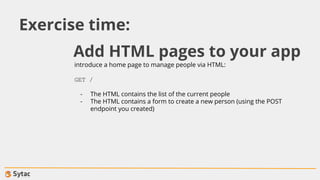
![create a JSON-based REST API that provides the following endpoints:
GET /people
Lists the current people. Ex.:
[{"id": 0, "name": "Carlo"}]
GET /people/:name
Returns the details of the selected person
POST /people
Adds a new person. The body is of the form:
{"name": "Carlo"}
Exercise time:
$ lein new compojure folks](https://image.slidesharecdn.com/webdevelopment-150423080629-conversion-gate02/85/Clojure-Workshop-Web-development-13-320.jpg)
![A Clojure DSL for HTML
; in your project.clj
:dependencies [[hiccup "1.0.5"]]
user=> (use ‘hiccup.core)
nil
user=> (html [:span {:class "foo"} "bar"])
"<span class="foo">bar</span>"
Hiccup is a library that translates Clojure datastructures into HTML.](https://image.slidesharecdn.com/webdevelopment-150423080629-conversion-gate02/85/Clojure-Workshop-Web-development-14-320.jpg)


The document provides an overview of web development using the Ring framework in Clojure, detailing how to create a simple HTTP handler that responds with 'hello world!' and how to run a Ring application using Jetty. It also discusses the use of middleware for enhancing handlers, routing requests with Compojure, and constructing a JSON-based REST API for managing people information. Additionally, it briefly covers using Hiccup for generating HTML in conjunction with the created API.


