Copyright	
  ©	
  2015	
  Splunk	
  Inc.	
  
Jon	
  Thies	
  
	
  -­‐	
  CTO,	
  Qwasi	
  
ScoB	
  Hall	
  
	
  -­‐	
  Sr.	
  Technical	
  Manager,	
  NCR	
  
Where	
  Mobile	
  meets	
  	
  
In-­‐Store	
  &	
  Point	
  of	
  Sale:	
  
Data	
  Collides	
  
Disclaimer	
  
2	
  
During	
  the	
  course	
  of	
  this	
  presentaPon,	
  we	
  may	
  make	
  forward	
  looking	
  statements	
  regarding	
  future	
  
events	
  or	
  the	
  expected	
  performance	
  of	
  the	
  company.	
  We	
  cauPon	
  you	
  that	
  such	
  statements	
  reflect	
  our	
  
current	
  expectaPons	
  and	
  esPmates	
  based	
  on	
  factors	
  currently	
  known	
  to	
  us	
  and	
  that	
  actual	
  events	
  or	
  
results	
  could	
  differ	
  materially.	
  For	
  important	
  factors	
  that	
  may	
  cause	
  actual	
  results	
  to	
  differ	
  from	
  those	
  
contained	
  in	
  our	
  forward-­‐looking	
  statements,	
  please	
  review	
  our	
  filings	
  with	
  the	
  SEC.	
  The	
  forward-­‐
looking	
  statements	
  made	
  in	
  the	
  this	
  presentaPon	
  are	
  being	
  made	
  as	
  of	
  the	
  Pme	
  and	
  date	
  of	
  its	
  live	
  
presentaPon.	
  If	
  reviewed	
  aXer	
  its	
  live	
  presentaPon,	
  this	
  presentaPon	
  may	
  not	
  contain	
  current	
  or	
  
accurate	
  informaPon.	
  We	
  do	
  not	
  assume	
  any	
  obligaPon	
  to	
  update	
  any	
  forward	
  looking	
  statements	
  we	
  
may	
  make.	


In	
  addiPon,	
  any	
  informaPon	
  about	
  our	
  roadmap	
  outlines	
  our	
  general	
  product	
  direcPon	
  and	
  is	
  subject	
  to	
  
change	
  at	
  any	
  Pme	
  without	
  noPce.	
  It	
  is	
  for	
  informaPonal	
  purposes	
  only	
  and	
  shall	
  not,	
  be	
  incorporated	
  
into	
  any	
  contract	
  or	
  other	
  commitment.	
  Splunk	
  undertakes	
  no	
  obligaPon	
  either	
  to	
  develop	
  the	
  features	
  
or	
  funcPonality	
  described	
  or	
  to	
  include	
  any	
  such	
  feature	
  or	
  funcPonality	
  in	
  a	
  future	
  release.	
  
Agenda	
  
!   Speaker	
  /	
  Company	
  Bios	
  
!   Why	
  and	
  How	
  we	
  uPlize	
  Splunk	
  
!   SoluPon	
  DescripPon	
  
!   Technical	
  ExecuPon	
  with	
  Splunk	
  
!   Demo	
  
!   Q&A	


3	
  
IntroducPons	
  
Scott Hall
Sr. Technical Solution Manager - NCR
5	
  
Jon Thies
CTO - QWASI
6	
  
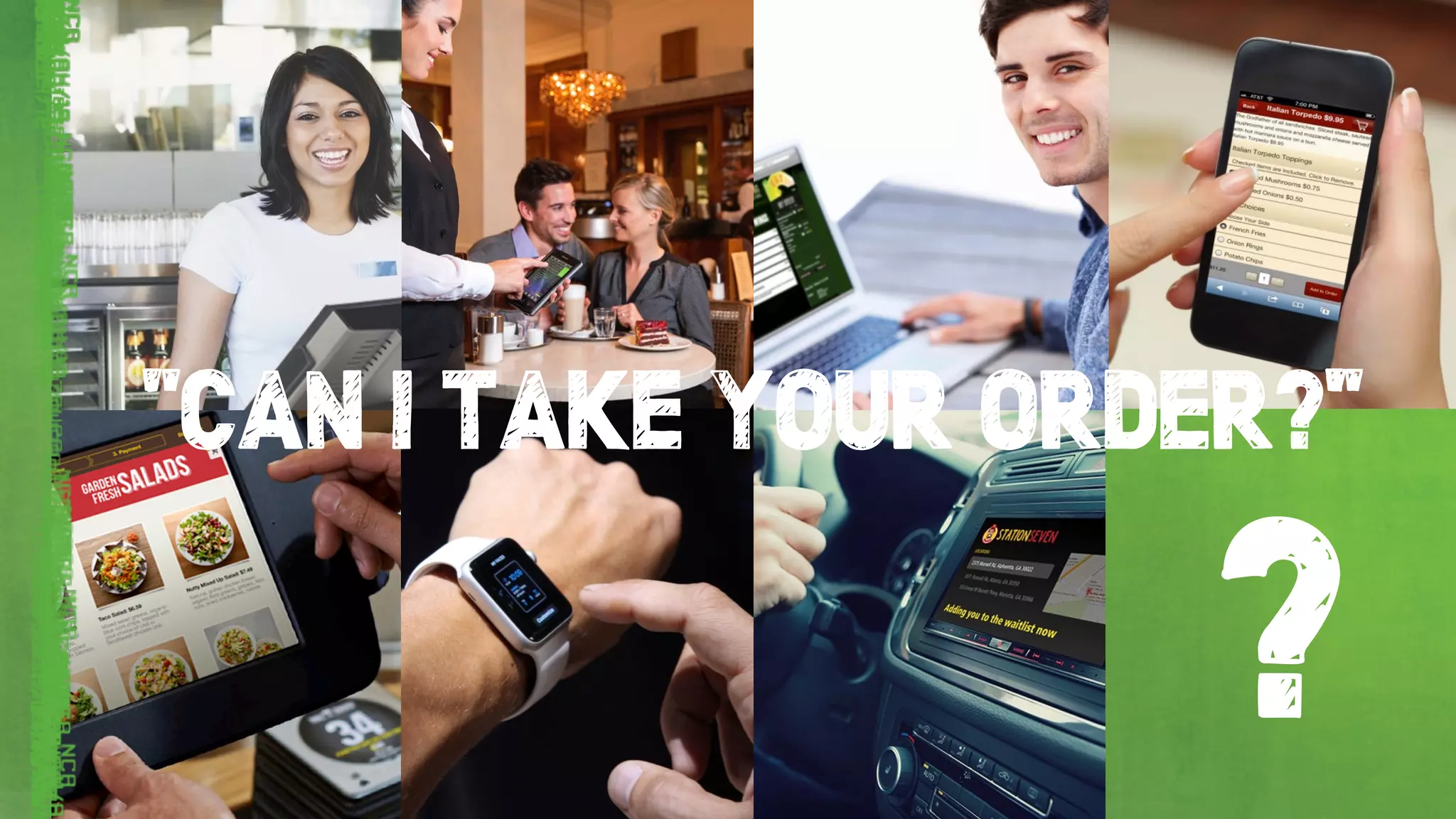
?
“CAN I TAKE YOUR ORDER?”
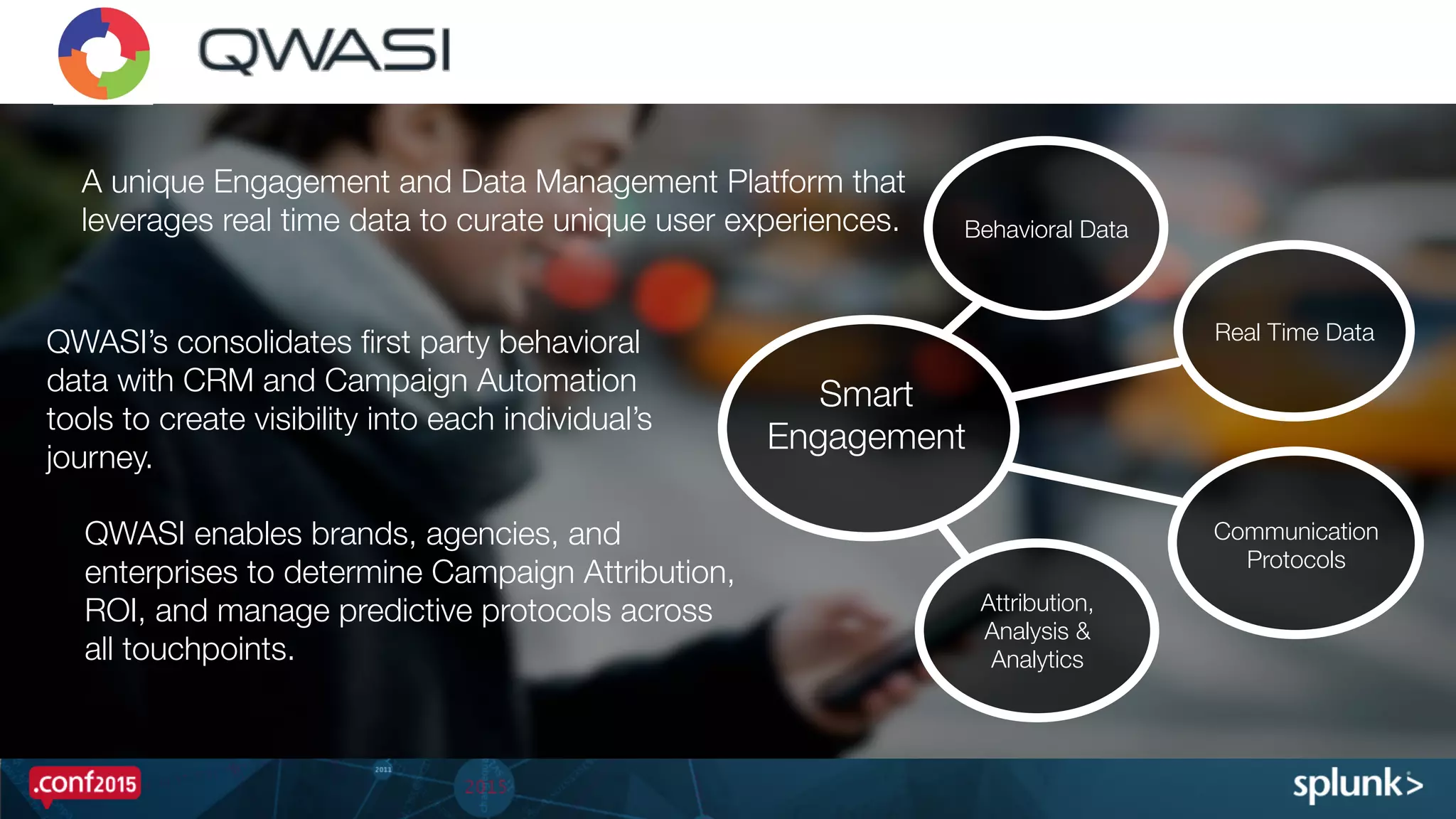
•  A US-based software-as-a-service (SaaS)
platform technology company. 

•  QWASI aggregates all real time customer
events so brands can create contextual
experiences over Push, SMS, Email, Social,
and IVR from one platform.

•  QWASI’s scales and integrates with any
Mobile App, CRM, POS, Beacon, NFC, to
activate all customer events for real time
communication. 

Real Time Data
Attribution,
Analysis &
Analytics
Behavioral Data
A unique Engagement and Data Management Platform that
leverages real time data to curate unique user experiences.


Smart
Engagement
Communication
Protocols

QWASI’s consolidates first party behavioral
data with CRM and Campaign Automation
tools to create visibility into each individual’s
journey. 


 QWASI enables brands, agencies, and
enterprises to determine Campaign Attribution,
ROI, and manage predictive protocols across
all touchpoints.
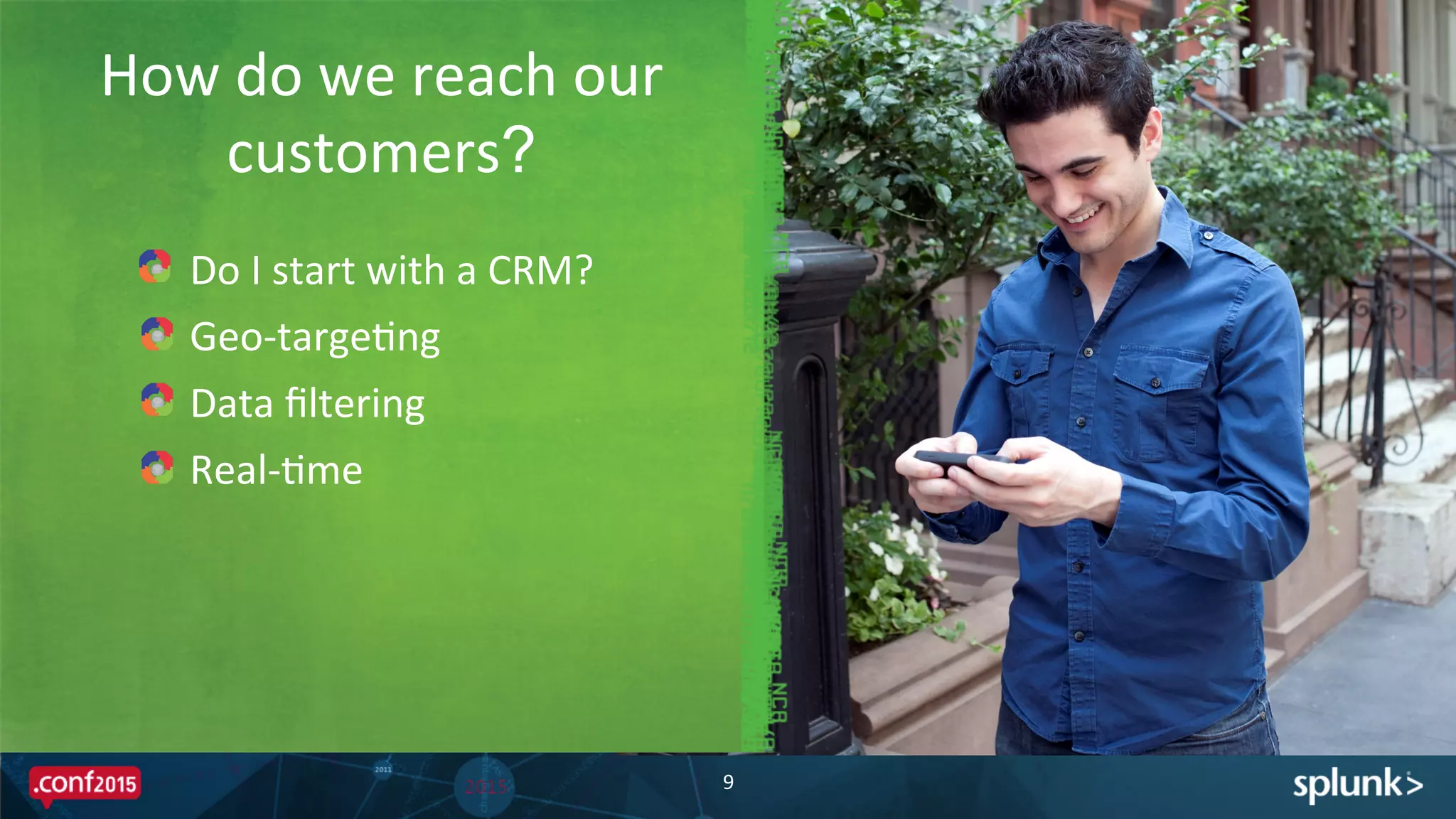
How	
  do	
  we	
  reach	
  our	
  
customers?
9	
  
!   Do	
  I	
  start	
  with	
  a	
  CRM?	
  
!   Geo-­‐targePng	
  
!   Data	
  filtering	
  
!   Real-­‐Pme	
  
Why	
  Splunk?	
  
!   Splunk	
  simplifies	
  boring	
  tasks	
  
–  Monthly	
  invoicing	
  -­‐	
  It	
  would	
  take	
  an	
  enPre	
  day	
  to	
  review	
  all	
  the	
  accounts	
  
–  TroubleshooPng	
  Customer	
  Issues	
  
!   Splunk	
  increases	
  our	
  ability	
  to	
  detect	
  system	
  failures	
  and	
  errors	
  before	
  our	
  
customers	
  do	
  
!   Splunk	
  saved	
  our	
  bacon	
  
–  Our	
  pladorm	
  was	
  new,	
  our	
  biggest	
  customer	
  was	
  ready	
  to	
  leave	
  for	
  a	
  
compePtor.	
  	
  The	
  biggest	
  feature	
  gap	
  in	
  our	
  pladorm	
  was	
  reporPng.	
  
–  We	
  	
  created	
  a	
  Splunk	
  App	
  in	
  two	
  weeks	
  that	
  addressed	
  every	
  imaginable	
  report	
  
they	
  needed.	
  
Value	
  of	
  Splunk	
  
11	
  
Event	
  Lifecycle	
  
ApplicaPon	
  Events	
  
12	
  
NoPficaPon	
  Events	
  Custom	
  Events	
  
ApplicaPons	
  	
  
w/	
  Qwasi	
  SDK	
  
Point	
  of	
  Sale	
  
NCR	
  Cloud	
  Connect	
  
Qwasi	
  Cloud	
  
Every	
  InteracPon	
  is	
  an	
  Event	
  
!   Applica'on	
  Events	
  –	
  automaPc	
  events	
  generated	
  using	
  our	
  SDK	
  or	
  API	
  
–  ApplicaPon	
  Install/Open/Close	
  
–  User	
  RegistraPon	
  
–  LocaPon	
  –	
  LocaPon	
  Update,	
  Geofence	
  and	
  Beacon	
  Enter/Dwell/Exit	
  
!   Custom	
  Events	
  –	
  events	
  defined	
  by	
  Developers	
  
–  For	
  reporPng	
  and	
  analyPcs	
  purposes	
  	
  
–  For	
  triggering	
  a	
  workflow	
  
!   No'fica'on	
  Events	
  –	
  events	
  from	
  QWASI	
  to	
  ApplicaPon	
  via	
  SDK	
  or	
  SMS	
  
–  Sent	
  
–  Delivery	
  Report	
  :	
  Accepted/Delivered/Read	
  
–  Failed	
  
13	
  
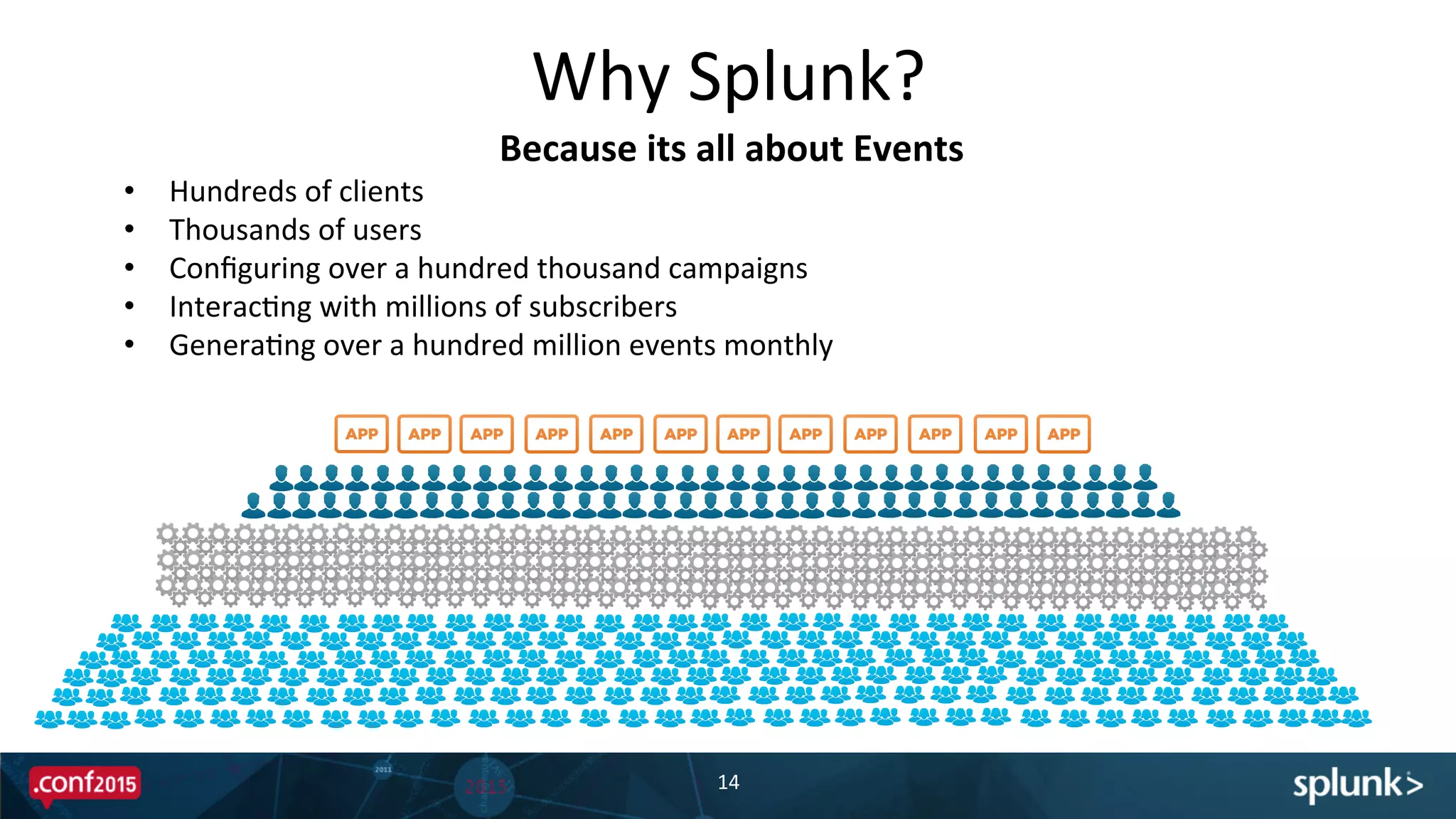
Why	
  Splunk?	
  
14	
  
•  Hundreds	
  of	
  clients	
  	
  
•  Thousands	
  of	
  users	
  	
  
•  Configuring	
  over	
  a	
  hundred	
  thousand	
  campaigns	
  
•  InteracPng	
  with	
  millions	
  of	
  subscribers	
  	
  
•  GeneraPng	
  over	
  a	
  hundred	
  million	
  events	
  monthly	
  	
  
Because	
  its	
  all	
  about	
  Events	
  
Distributed	
  event	
  based	
  pladorm	
  -­‐	
  combinaPon	
  of	
  dedicated	
  
servers,	
  cloud	
  instances,	
  and	
  Docker	
  containers.	
  
!   Gain	
  insight	
  of	
  usage	
  at	
  broad	
  and	
  granular	
  levels	
  
–  Passive	
  monitoring	
  across	
  data	
  centers	
  and	
  deployments	
  
–  System	
  Health	
  and	
  Usage	
  Monitoring	
  
!   Historical	
  ReporPng	
  and	
  AnalyPcs	
  that	
  will	
  not	
  impact	
  runPme	
  systems	
  
!   Embed	
  a	
  flexible	
  Splunk	
  Dashboard	
  into	
  our	
  user	
  interface	
  using	
  SplunkJS	
  	
  
Why	
  Splunk?	
  
15	
  
Because	
  its	
  all	
  about	
  events	
  
Every	
  Event	
  Needs	
  Context	
  
!   Events	
  are	
  always	
  'ed	
  to	
  a	
  device	
  and	
  member	
  profile	
  
!   NCR’s	
  Cloud	
  Connect	
  –	
  Point	
  of	
  Sale	
  Integra'on	
  
–  Customer	
  Loyalty	
  Data	
  (profile)	
  
–  Eligible	
  RedempPons	
  and	
  Bonus	
  Offers	
  
–  Purchase	
  History	
  
!   Event	
  Triggers	
  –	
  workflows	
  that	
  fire	
  as	
  a	
  result	
  of	
  a	
  specific	
  event	
  
within	
  a	
  predefined	
  context.	
  
!   Scheduled	
  Triggers	
  –	
  workflows	
  that	
  review	
  the	
  state	
  of	
  members	
  
profile	
  and	
  event	
  history	
  and	
  iniPate	
  workflows	
  based	
  on	
  a	
  schedule	
  
16	
  
SoluPon	
  DescripPon	
  
How	
  the	
  SoluPon	
  UPlizes	
  Splunk	
  
18	
  
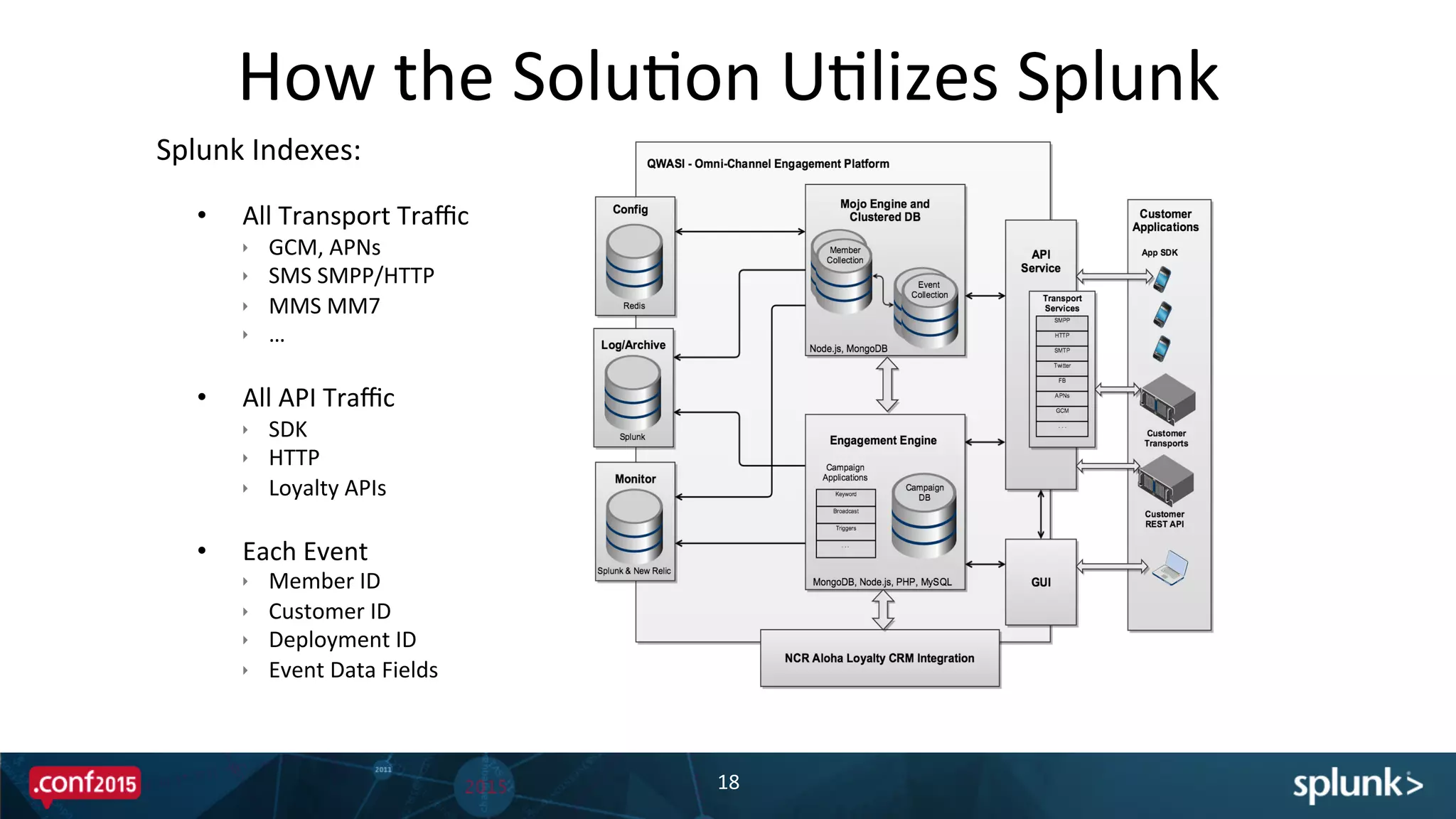
Splunk	
  Indexes:	


•  All	
  Transport	
  Traffic	
  
ê  GCM,	
  APNs	
  
ê  SMS	
  SMPP/HTTP	
  
ê  MMS	
  MM7	
  
ê  …	
  
•  All	
  API	
  Traffic	
  
ê  SDK	
  
ê  HTTP	
  
ê  Loyalty	
  APIs	
  
•  Each	
  Event	
  
ê  Member	
  ID	
  
ê  Customer	
  ID	
  
ê  Deployment	
  ID	
  
ê  Event	
  Data	
  Fields	
  
How	
  the	
  SoluPon	
  UPlizes	
  Splunk	
  
19	
  
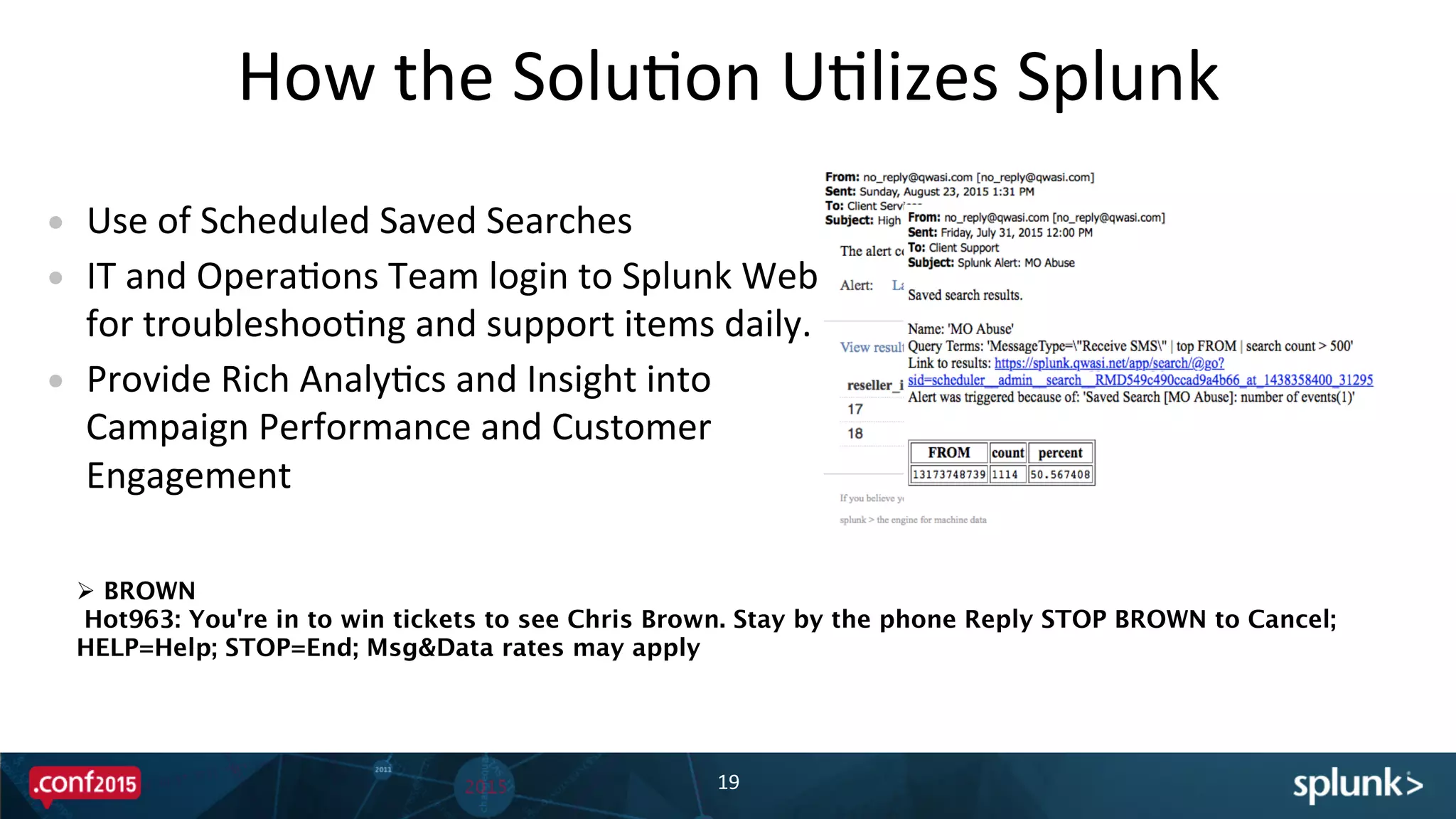
•  Use	
  of	
  Scheduled	
  Saved	
  Searches	
  
•  IT	
  and	
  OperaPons	
  Team	
  login	
  to	
  Splunk	
  Web	
  
for	
  troubleshooPng	
  and	
  support	
  items	
  daily.	
  
•  Provide	
  Rich	
  AnalyPcs	
  and	
  Insight	
  into	
  
Campaign	
  Performance	
  and	
  Customer	
  
Engagement	
  
Ø  BROWN
Hot963: You're in to win tickets to see Chris Brown. Stay by the phone Reply STOP BROWN to Cancel;
HELP=Help; STOP=End; Msg&Data rates may apply
DemonstraPon	
  
Technical	
  ExecuPon	
  
The	
  Data	
  
22	
  
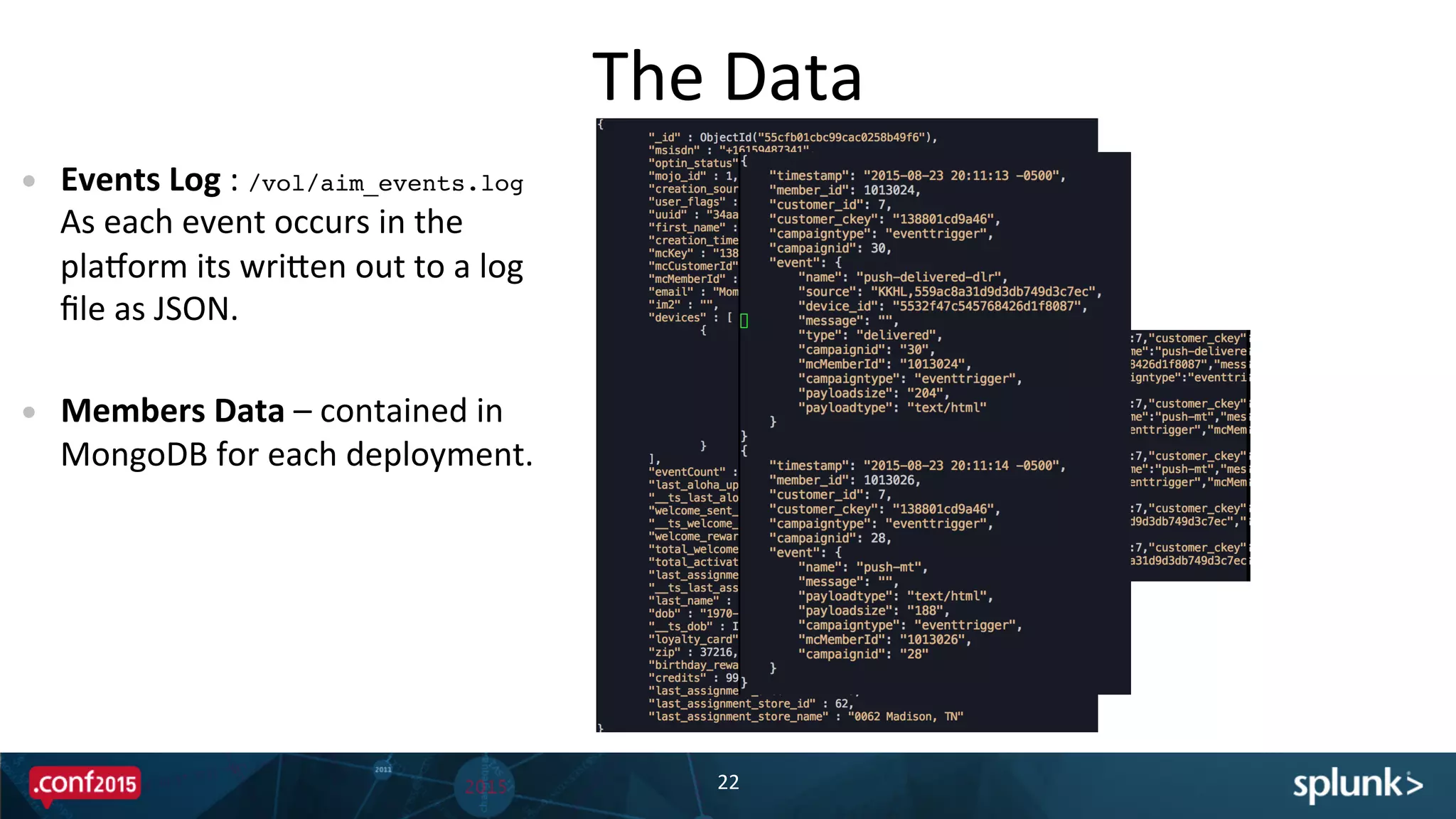
•  Events	
  Log	
  :	
  /vol/aim_events.log	
  	
  
As	
  each	
  event	
  occurs	
  in	
  the	
  
pladorm	
  its	
  wriBen	
  out	
  to	
  a	
  log	
  
file	
  as	
  JSON.	
  
•  Members	
  Data	
  –	
  contained	
  in	
  
MongoDB	
  for	
  each	
  deployment.	


Member	
  Lookup	
  Table	
  
23	
  
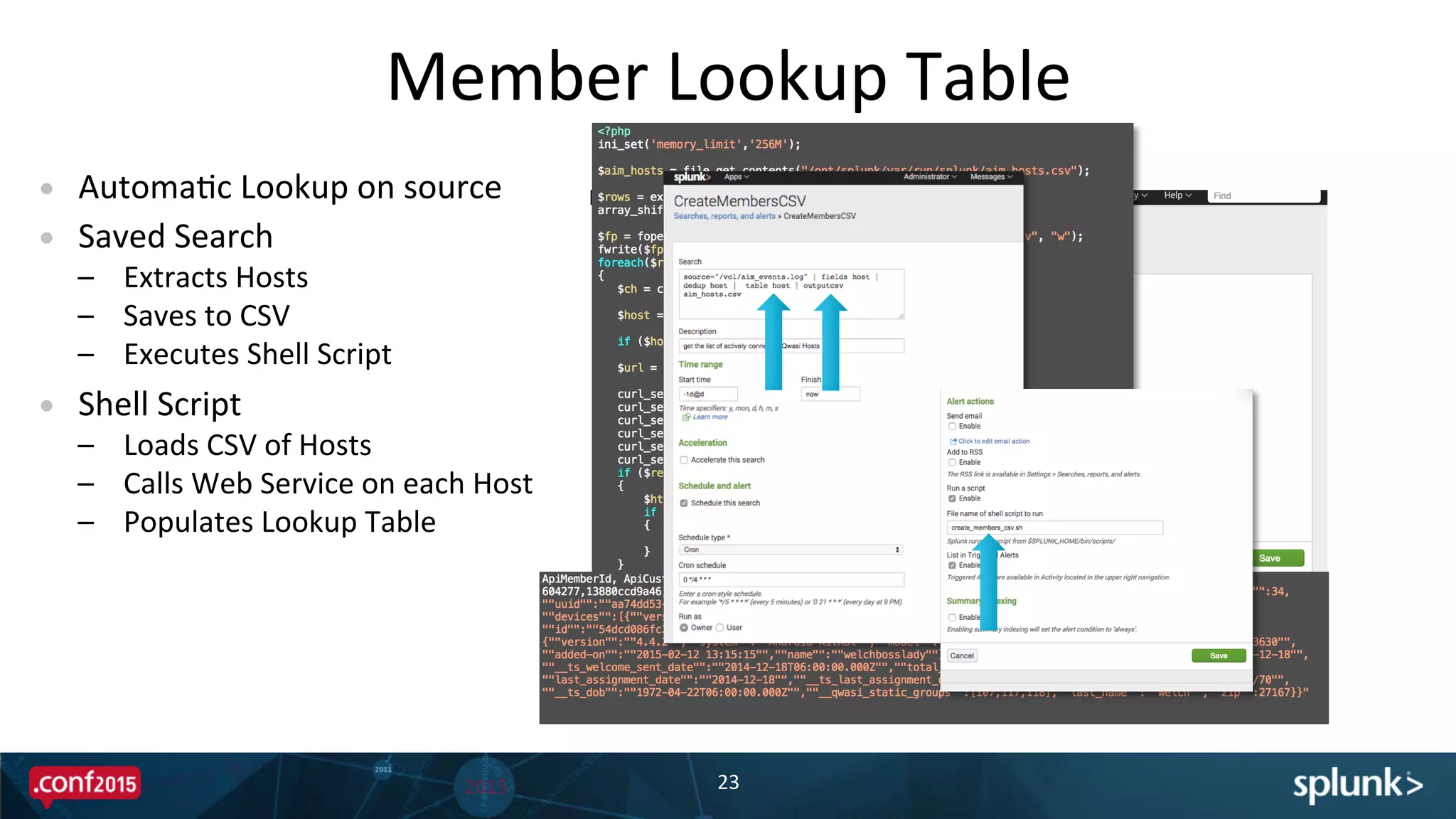
•  AutomaPc	
  Lookup	
  on	
  source	
  
•  Saved	
  Search	
  
–  Extracts	
  Hosts	
  
–  Saves	
  to	
  CSV	
  
–  Executes	
  Shell	
  Script	
  
•  Shell	
  Script	
  
–  Loads	
  CSV	
  of	
  Hosts	
  
–  Calls	
  Web	
  Service	
  on	
  each	
  Host	
  
–  Populates	
  Lookup	
  Table	
  
Member	
  Lookup	
  Table	
  
24	
  
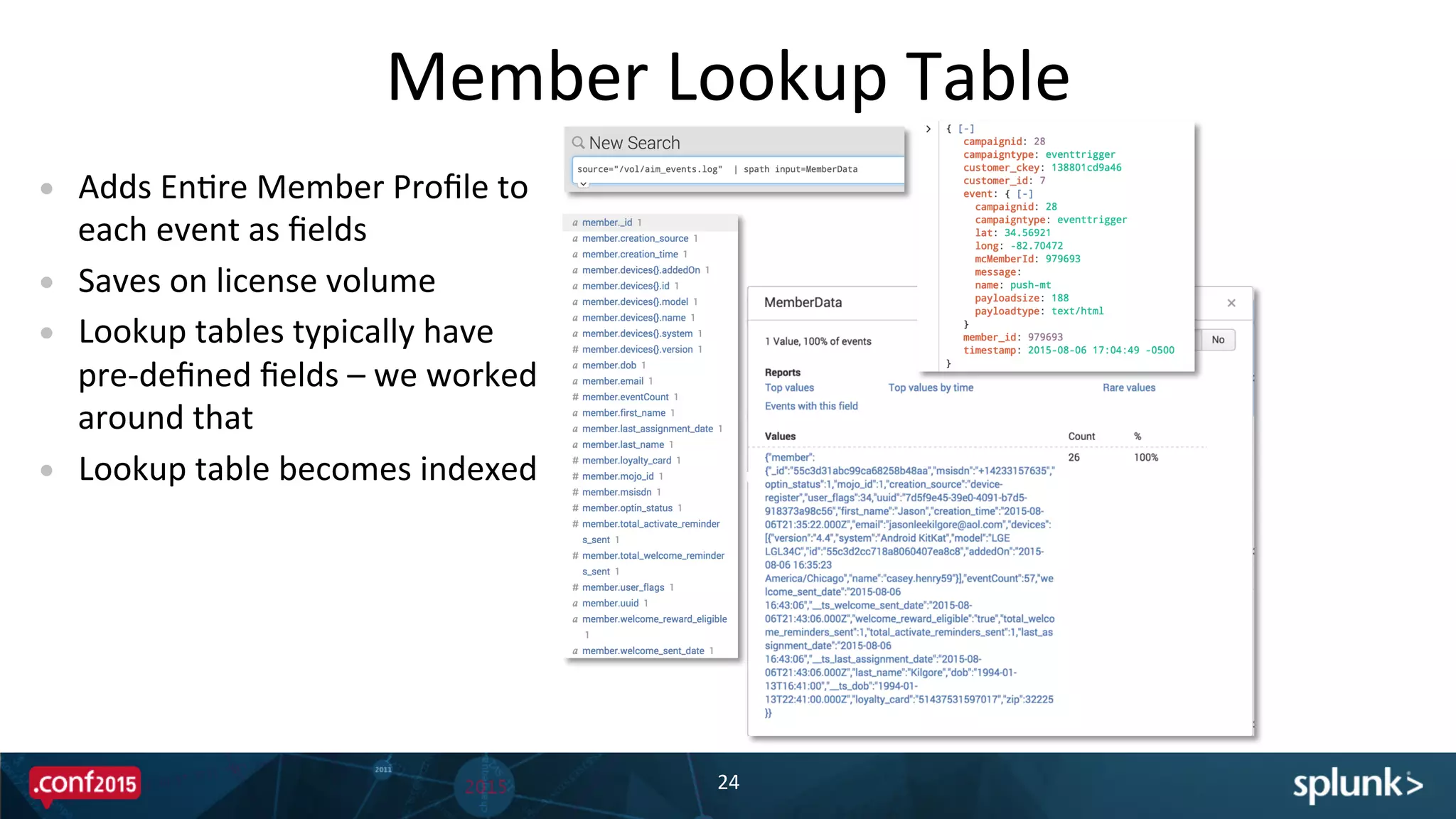
•  Adds	
  EnPre	
  Member	
  Profile	
  to	
  
each	
  event	
  as	
  fields	
  
•  Saves	
  on	
  license	
  volume	
  
•  Lookup	
  tables	
  typically	
  have	
  
pre-­‐defined	
  fields	
  –	
  we	
  worked	
  
around	
  that	
  
•  Lookup	
  table	
  becomes	
  indexed	
  	
  
Dynamic	
  Reports	
  Using	
  SplunkJS	
  
25	
  
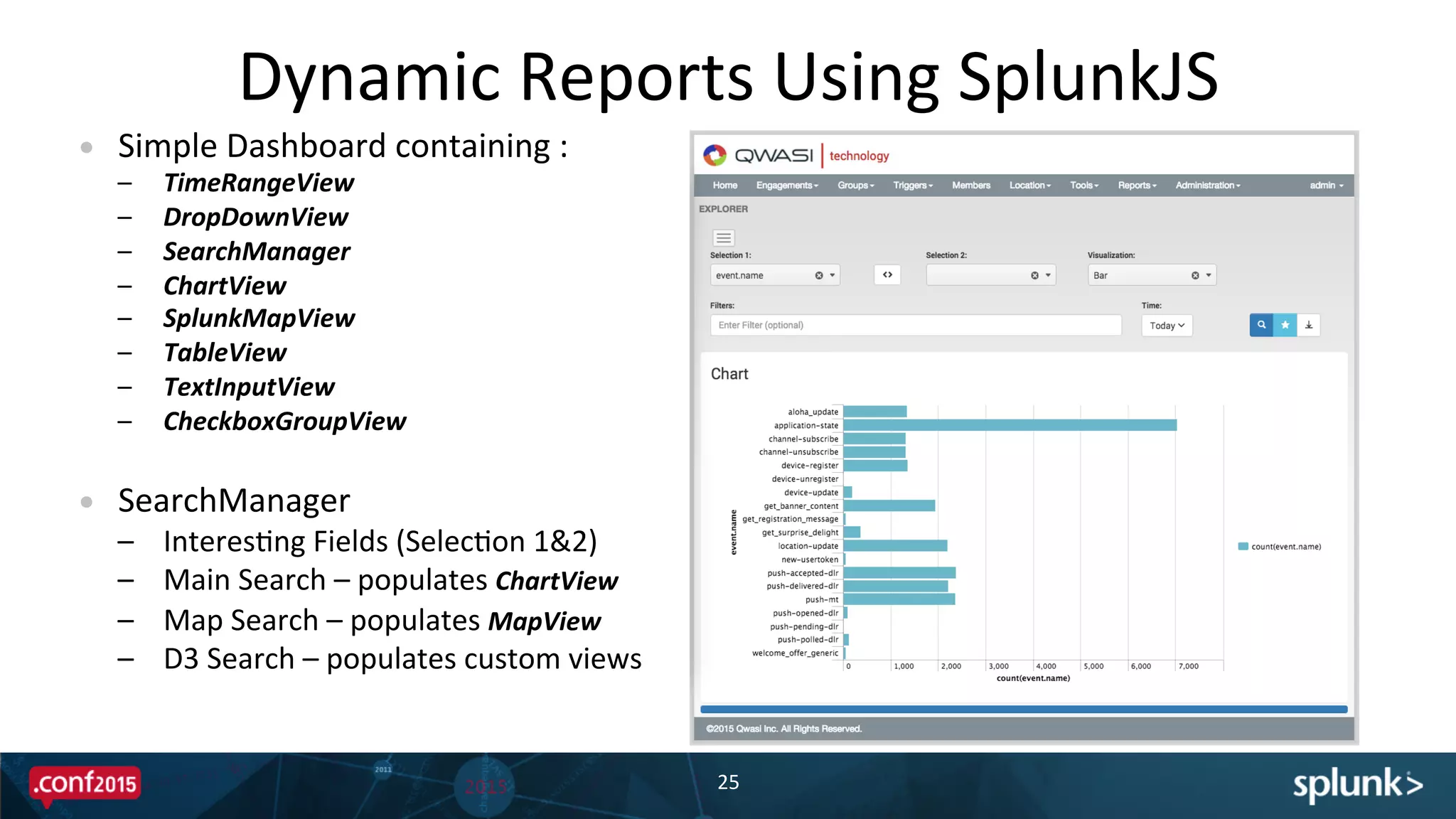
•  Simple	
  Dashboard	
  containing	
  :	
  
–  TimeRangeView	
  
–  DropDownView	
  
–  SearchManager	
  
–  ChartView	
  
–  SplunkMapView	
  
–  TableView	
  
–  TextInputView	
  
–  CheckboxGroupView	


•  SearchManager	
  
–  InteresPng	
  Fields	
  (SelecPon	
  1&2)	
  
–  Main	
  Search	
  –	
  populates	
  ChartView	
  
–  Map	
  Search	
  –	
  populates	
  MapView	
  
–  D3	
  Search	
  –	
  populates	
  custom	
  views	
  	
  
Screenshot	
  here	
  
Dynamic	
  Reports	
  Using	
  SplunkJS	
  
26	
  
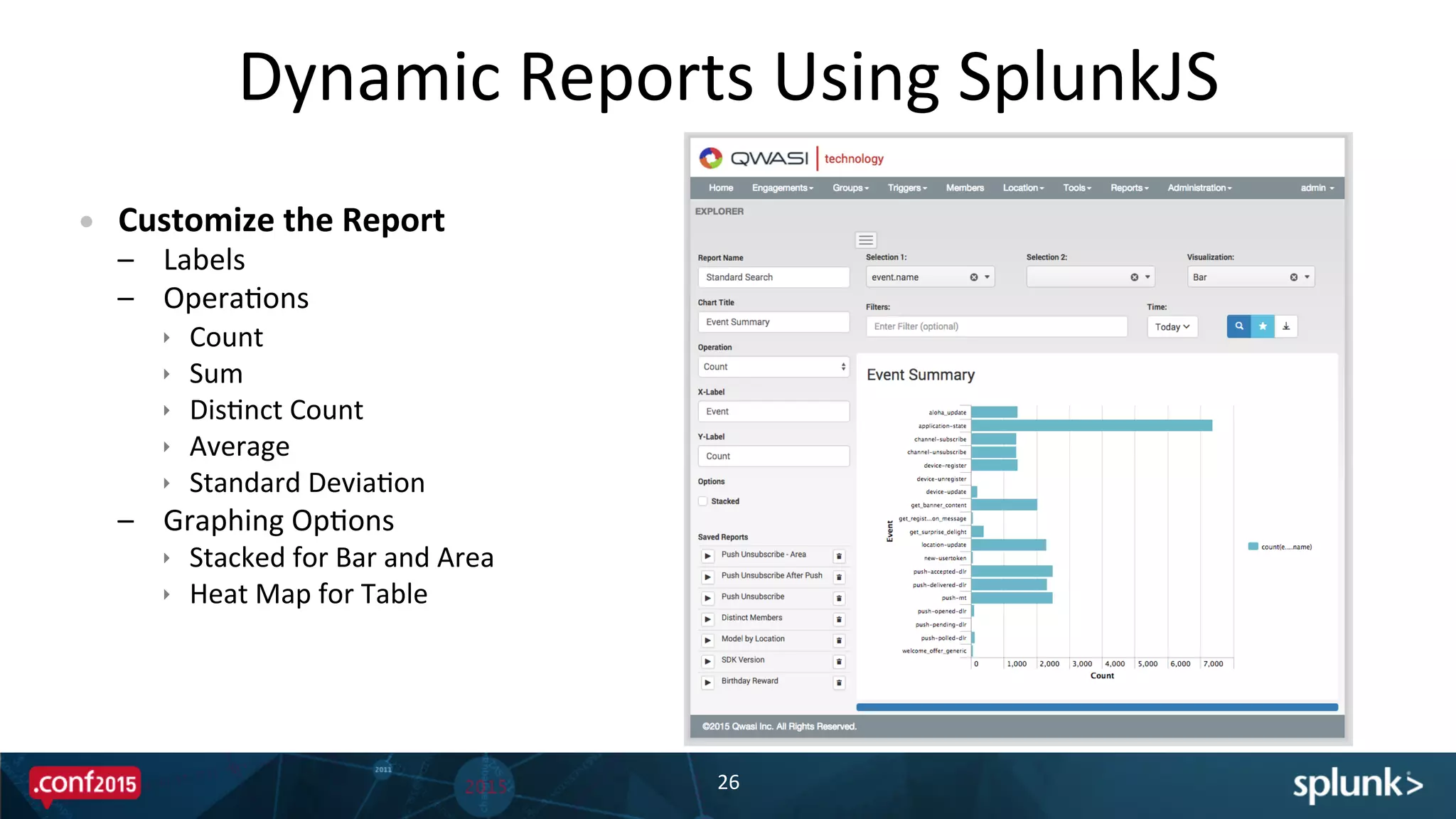
•  Customize	
  the	
  Report	
  
–  Labels	
  
–  OperaPons	
  
ê  Count	
  
ê  Sum	
  
ê  DisPnct	
  Count	
  
ê  Average	
  
ê  Standard	
  DeviaPon	
  
–  Graphing	
  OpPons	
  
ê  Stacked	
  for	
  Bar	
  and	
  Area	
  
ê  Heat	
  Map	
  for	
  Table	
  
Screenshot	
  here	
  
Dynamic	
  Reports	
  Using	
  SplunkJS	
  
27	
  
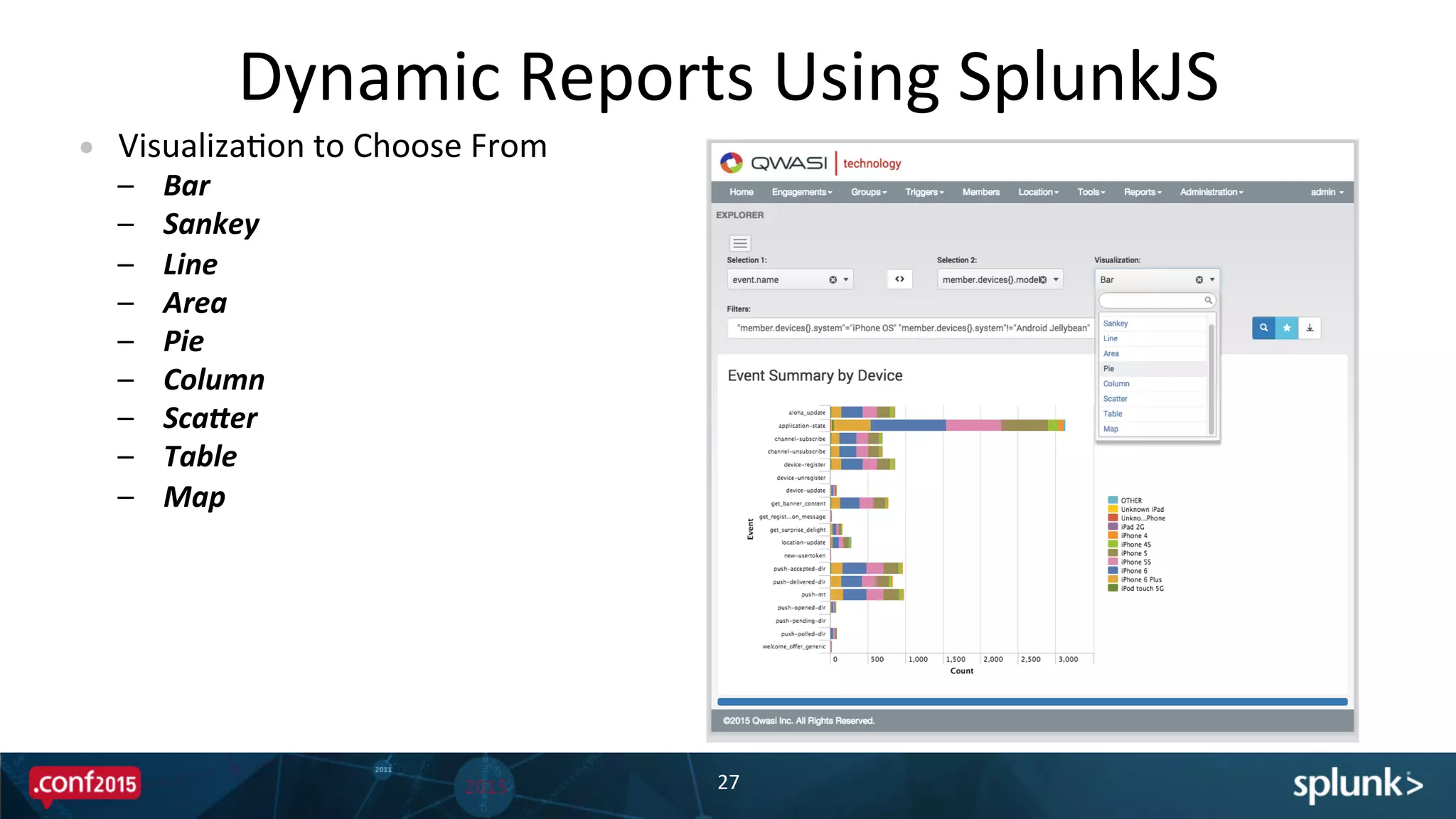
•  VisualizaPon	
  to	
  Choose	
  From	
  
–  Bar	
  
–  Sankey	
  
–  Line	
  
–  Area	
  
–  Pie	
  
–  Column	
  
–  ScaBer	
  
–  Table	
  
–  Map	
  
Dynamic	
  Reports	
  Using	
  SplunkJS	
  
28	


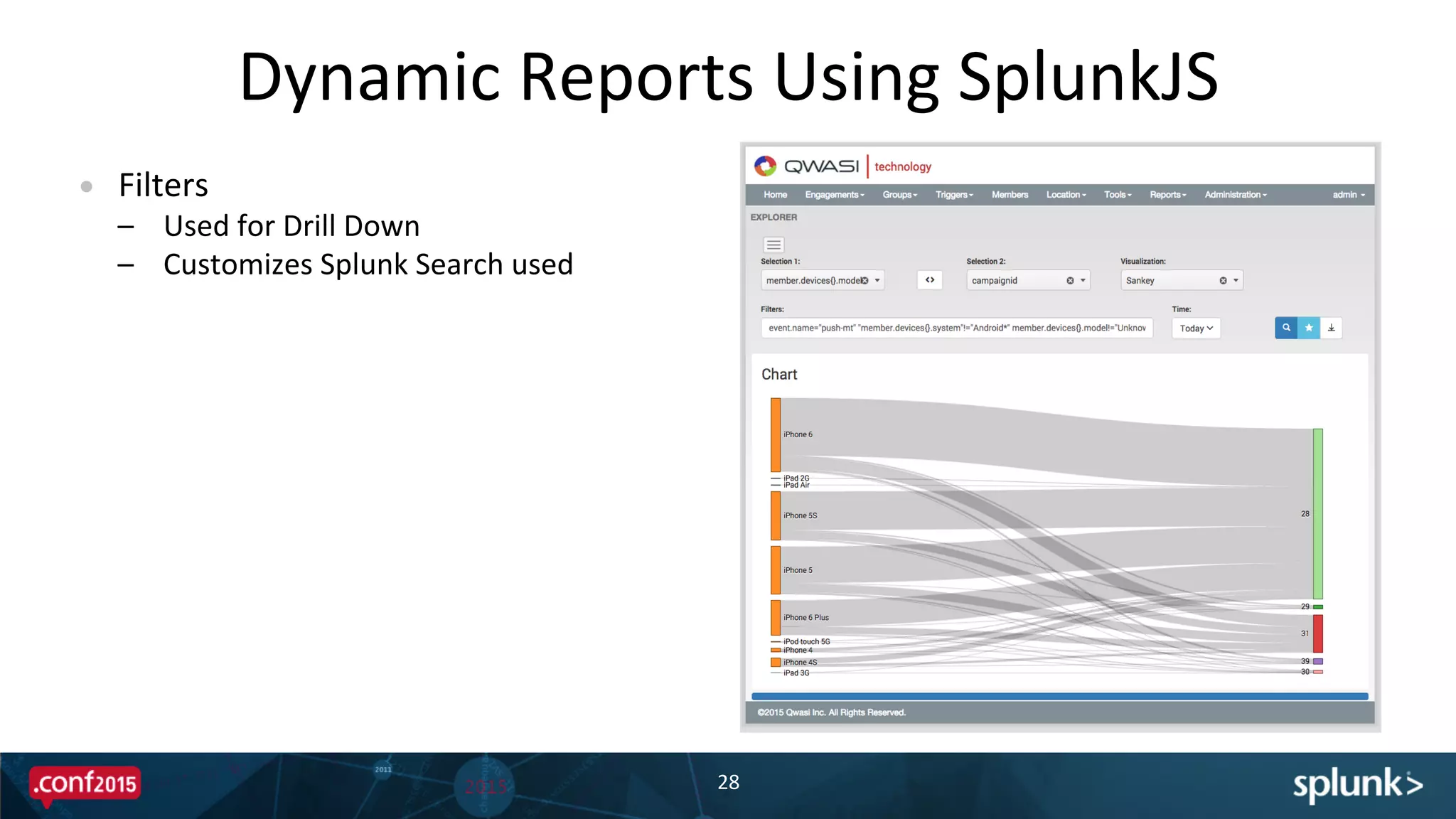
•  Filters	
  
–  Used	
  for	
  Drill	
  Down	
  
–  Customizes	
  Splunk	
  Search	
  used	
  
ConsideraPons	
  Using	
  SplunkJS	
  
29	


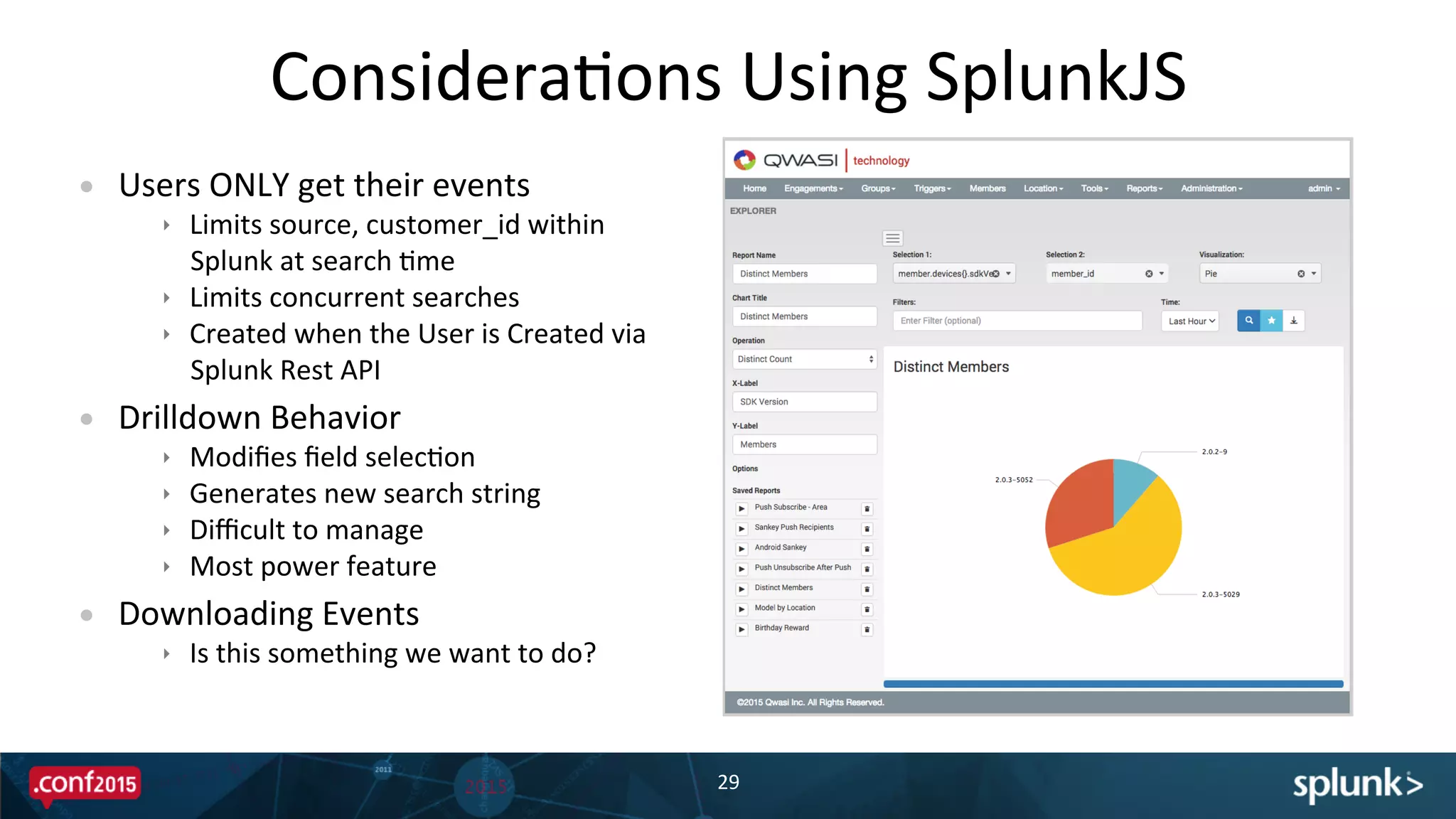
•  Users	
  ONLY	
  get	
  their	
  events	
  
ê  Limits	
  source,	
  customer_id	
  within	
  
Splunk	
  at	
  search	
  Pme	
  
ê  Limits	
  concurrent	
  searches	
  
ê  Created	
  when	
  the	
  User	
  is	
  Created	
  via	
  
Splunk	
  Rest	
  API	
  
•  Drilldown	
  Behavior	
  
ê  Modifies	
  field	
  selecPon	
  
ê  Generates	
  new	
  search	
  string	
  
ê  Difficult	
  to	
  manage	
  
ê  Most	
  power	
  feature	
  
•  Downloading	
  Events	
  
ê  Is	
  this	
  something	
  we	
  want	
  to	
  do?	
  
Future	
  Enhancements	
  
30	


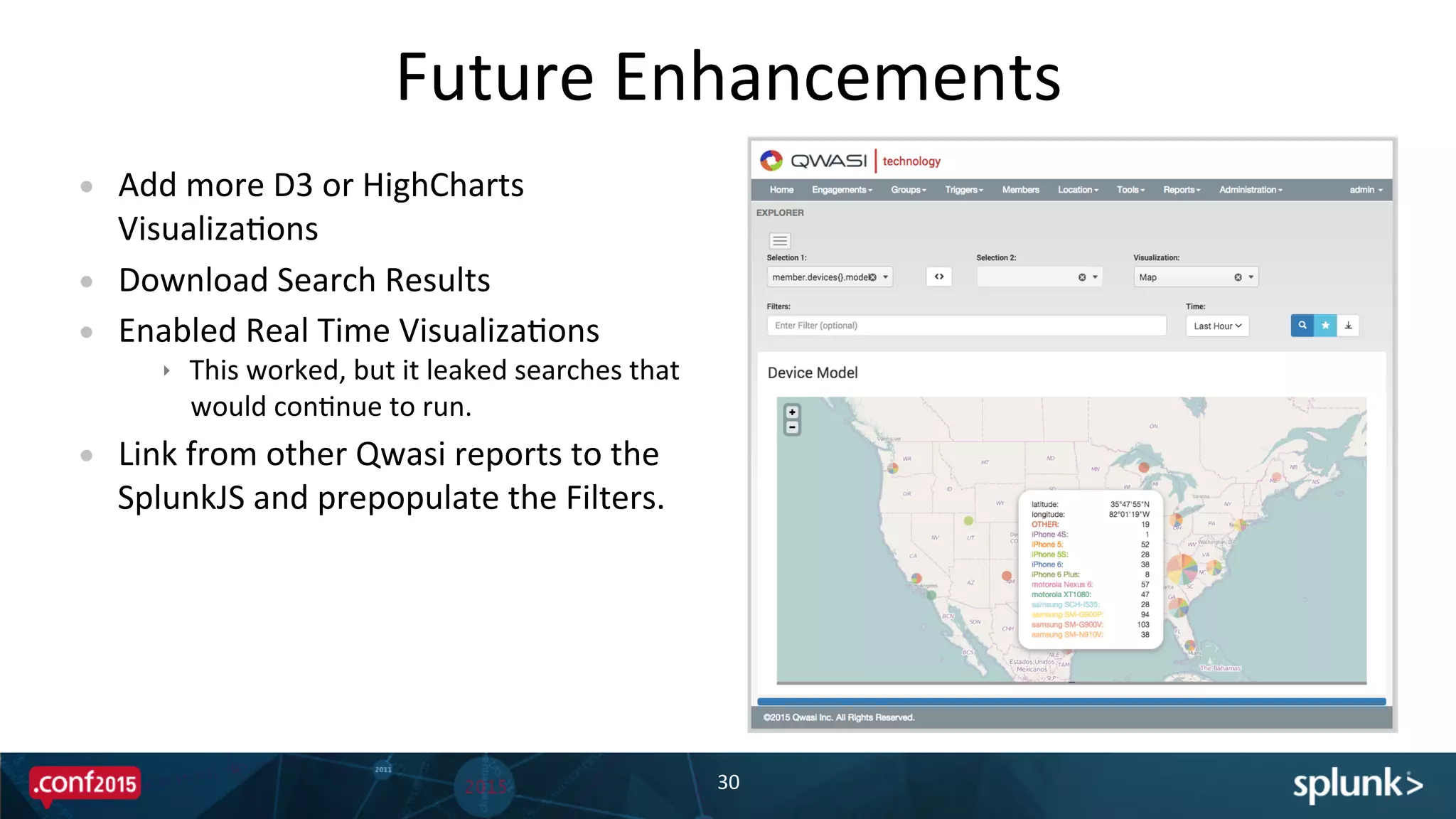
•  Add	
  more	
  D3	
  or	
  HighCharts	
  
VisualizaPons	
  
•  Download	
  Search	
  Results	
  
•  Enabled	
  Real	
  Time	
  VisualizaPons	
  
ê  This	
  worked,	
  but	
  it	
  leaked	
  searches	
  that	
  
would	
  conPnue	
  to	
  run.	
  
•  Link	
  from	
  other	
  Qwasi	
  reports	
  to	
  the	
  
SplunkJS	
  and	
  prepopulate	
  the	
  Filters.	
  
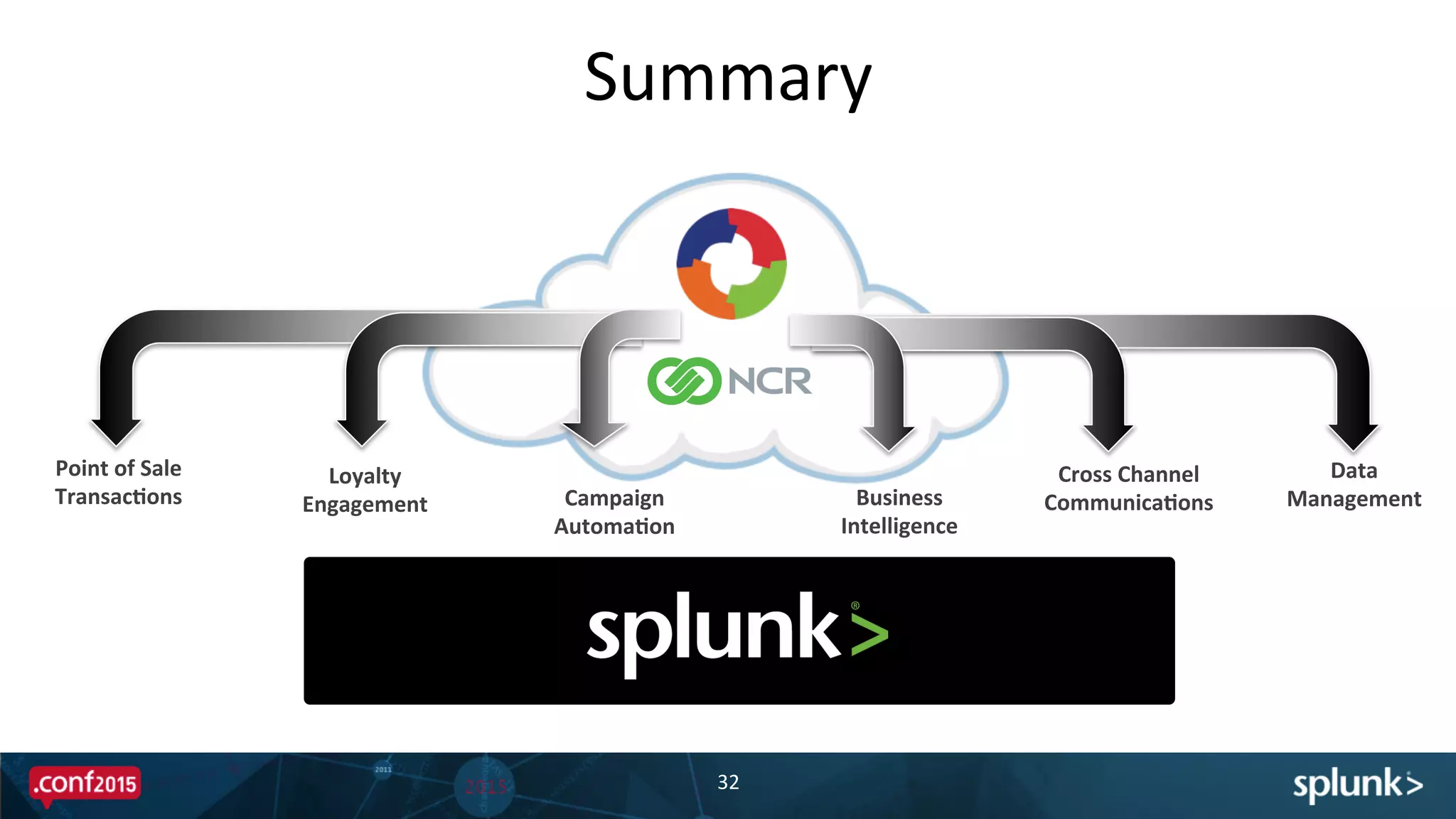
Summary	
  
Summary	
  
32	
  
Campaign	
  
Automa'on	
  
Loyalty	
  
Engagement	
  
Point	
  of	
  Sale	
  
Transac'ons	
   Business	
  
Intelligence	
  
Cross	
  Channel	
  
Communica'ons	
  
Data	
  
Management	
  
QuesPons?	
  
THANK	
  YOU	
  
jon.thies@qwasi.com	


scoB.hall@ncr.com	
  

Qwasi Splunk and NCR Integration: Business Analytics

  • 1.
    Copyright  ©  2015  Splunk  Inc.   Jon  Thies    -­‐  CTO,  Qwasi   ScoB  Hall    -­‐  Sr.  Technical  Manager,  NCR   Where  Mobile  meets     In-­‐Store  &  Point  of  Sale:   Data  Collides  
  • 2.
    Disclaimer   2   During  the  course  of  this  presentaPon,  we  may  make  forward  looking  statements  regarding  future   events  or  the  expected  performance  of  the  company.  We  cauPon  you  that  such  statements  reflect  our   current  expectaPons  and  esPmates  based  on  factors  currently  known  to  us  and  that  actual  events  or   results  could  differ  materially.  For  important  factors  that  may  cause  actual  results  to  differ  from  those   contained  in  our  forward-­‐looking  statements,  please  review  our  filings  with  the  SEC.  The  forward-­‐ looking  statements  made  in  the  this  presentaPon  are  being  made  as  of  the  Pme  and  date  of  its  live   presentaPon.  If  reviewed  aXer  its  live  presentaPon,  this  presentaPon  may  not  contain  current  or   accurate  informaPon.  We  do  not  assume  any  obligaPon  to  update  any  forward  looking  statements  we   may  make.       In  addiPon,  any  informaPon  about  our  roadmap  outlines  our  general  product  direcPon  and  is  subject  to   change  at  any  Pme  without  noPce.  It  is  for  informaPonal  purposes  only  and  shall  not,  be  incorporated   into  any  contract  or  other  commitment.  Splunk  undertakes  no  obligaPon  either  to  develop  the  features   or  funcPonality  described  or  to  include  any  such  feature  or  funcPonality  in  a  future  release.  
  • 3.
    Agenda   !  Speaker  /  Company  Bios   !   Why  and  How  we  uPlize  Splunk   !   SoluPon  DescripPon   !   Technical  ExecuPon  with  Splunk   !   Demo   !   Q&A     3  
  • 4.
  • 5.
    Scott Hall Sr. TechnicalSolution Manager - NCR 5  
  • 6.
    Jon Thies CTO -QWASI 6  
  • 7.
    ? “CAN I TAKEYOUR ORDER?”
  • 8.
    •  A US-basedsoftware-as-a-service (SaaS) platform technology company. •  QWASI aggregates all real time customer events so brands can create contextual experiences over Push, SMS, Email, Social, and IVR from one platform. •  QWASI’s scales and integrates with any Mobile App, CRM, POS, Beacon, NFC, to activate all customer events for real time communication. Real Time Data Attribution, Analysis & Analytics Behavioral Data A unique Engagement and Data Management Platform that leverages real time data to curate unique user experiences. Smart Engagement Communication Protocols QWASI’s consolidates first party behavioral data with CRM and Campaign Automation tools to create visibility into each individual’s journey. QWASI enables brands, agencies, and enterprises to determine Campaign Attribution, ROI, and manage predictive protocols across all touchpoints.
  • 9.
    How  do  we  reach  our   customers? 9   !   Do  I  start  with  a  CRM?   !   Geo-­‐targePng   !   Data  filtering   !   Real-­‐Pme  
  • 10.
  • 11.
    !   Splunk  simplifies  boring  tasks   –  Monthly  invoicing  -­‐  It  would  take  an  enPre  day  to  review  all  the  accounts   –  TroubleshooPng  Customer  Issues   !   Splunk  increases  our  ability  to  detect  system  failures  and  errors  before  our   customers  do   !   Splunk  saved  our  bacon   –  Our  pladorm  was  new,  our  biggest  customer  was  ready  to  leave  for  a   compePtor.    The  biggest  feature  gap  in  our  pladorm  was  reporPng.   –  We    created  a  Splunk  App  in  two  weeks  that  addressed  every  imaginable  report   they  needed.   Value  of  Splunk   11  
  • 12.
    Event  Lifecycle   ApplicaPon  Events   12   NoPficaPon  Events  Custom  Events   ApplicaPons     w/  Qwasi  SDK   Point  of  Sale   NCR  Cloud  Connect   Qwasi  Cloud  
  • 13.
    Every  InteracPon  is  an  Event   !   Applica'on  Events  –  automaPc  events  generated  using  our  SDK  or  API   –  ApplicaPon  Install/Open/Close   –  User  RegistraPon   –  LocaPon  –  LocaPon  Update,  Geofence  and  Beacon  Enter/Dwell/Exit   !   Custom  Events  –  events  defined  by  Developers   –  For  reporPng  and  analyPcs  purposes     –  For  triggering  a  workflow   !   No'fica'on  Events  –  events  from  QWASI  to  ApplicaPon  via  SDK  or  SMS   –  Sent   –  Delivery  Report  :  Accepted/Delivered/Read   –  Failed   13  
  • 14.
    Why  Splunk?   14   •  Hundreds  of  clients     •  Thousands  of  users     •  Configuring  over  a  hundred  thousand  campaigns   •  InteracPng  with  millions  of  subscribers     •  GeneraPng  over  a  hundred  million  events  monthly     Because  its  all  about  Events  
  • 15.
    Distributed  event  based  pladorm  -­‐  combinaPon  of  dedicated   servers,  cloud  instances,  and  Docker  containers.   !   Gain  insight  of  usage  at  broad  and  granular  levels   –  Passive  monitoring  across  data  centers  and  deployments   –  System  Health  and  Usage  Monitoring   !   Historical  ReporPng  and  AnalyPcs  that  will  not  impact  runPme  systems   !   Embed  a  flexible  Splunk  Dashboard  into  our  user  interface  using  SplunkJS     Why  Splunk?   15   Because  its  all  about  events  
  • 16.
    Every  Event  Needs  Context   !   Events  are  always  'ed  to  a  device  and  member  profile   !   NCR’s  Cloud  Connect  –  Point  of  Sale  Integra'on   –  Customer  Loyalty  Data  (profile)   –  Eligible  RedempPons  and  Bonus  Offers   –  Purchase  History   !   Event  Triggers  –  workflows  that  fire  as  a  result  of  a  specific  event   within  a  predefined  context.   !   Scheduled  Triggers  –  workflows  that  review  the  state  of  members   profile  and  event  history  and  iniPate  workflows  based  on  a  schedule   16  
  • 17.
  • 18.
    How  the  SoluPon  UPlizes  Splunk   18   Splunk  Indexes:     •  All  Transport  Traffic   ê  GCM,  APNs   ê  SMS  SMPP/HTTP   ê  MMS  MM7   ê  …   •  All  API  Traffic   ê  SDK   ê  HTTP   ê  Loyalty  APIs   •  Each  Event   ê  Member  ID   ê  Customer  ID   ê  Deployment  ID   ê  Event  Data  Fields  
  • 19.
    How  the  SoluPon  UPlizes  Splunk   19   •  Use  of  Scheduled  Saved  Searches   •  IT  and  OperaPons  Team  login  to  Splunk  Web   for  troubleshooPng  and  support  items  daily.   •  Provide  Rich  AnalyPcs  and  Insight  into   Campaign  Performance  and  Customer   Engagement   Ø  BROWN Hot963: You're in to win tickets to see Chris Brown. Stay by the phone Reply STOP BROWN to Cancel; HELP=Help; STOP=End; Msg&Data rates may apply
  • 20.
  • 21.
  • 22.
    The  Data   22   •  Events  Log  :  /vol/aim_events.log     As  each  event  occurs  in  the   pladorm  its  wriBen  out  to  a  log   file  as  JSON.   •  Members  Data  –  contained  in   MongoDB  for  each  deployment.        
  • 23.
    Member  Lookup  Table   23   •  AutomaPc  Lookup  on  source   •  Saved  Search   –  Extracts  Hosts   –  Saves  to  CSV   –  Executes  Shell  Script   •  Shell  Script   –  Loads  CSV  of  Hosts   –  Calls  Web  Service  on  each  Host   –  Populates  Lookup  Table  
  • 24.
    Member  Lookup  Table   24   •  Adds  EnPre  Member  Profile  to   each  event  as  fields   •  Saves  on  license  volume   •  Lookup  tables  typically  have   pre-­‐defined  fields  –  we  worked   around  that   •  Lookup  table  becomes  indexed    
  • 25.
    Dynamic  Reports  Using  SplunkJS   25   •  Simple  Dashboard  containing  :   –  TimeRangeView   –  DropDownView   –  SearchManager   –  ChartView   –  SplunkMapView   –  TableView   –  TextInputView   –  CheckboxGroupView       •  SearchManager   –  InteresPng  Fields  (SelecPon  1&2)   –  Main  Search  –  populates  ChartView   –  Map  Search  –  populates  MapView   –  D3  Search  –  populates  custom  views     Screenshot  here  
  • 26.
    Dynamic  Reports  Using  SplunkJS   26   •  Customize  the  Report   –  Labels   –  OperaPons   ê  Count   ê  Sum   ê  DisPnct  Count   ê  Average   ê  Standard  DeviaPon   –  Graphing  OpPons   ê  Stacked  for  Bar  and  Area   ê  Heat  Map  for  Table   Screenshot  here  
  • 27.
    Dynamic  Reports  Using  SplunkJS   27   •  VisualizaPon  to  Choose  From   –  Bar   –  Sankey   –  Line   –  Area   –  Pie   –  Column   –  ScaBer   –  Table   –  Map  
  • 28.
    Dynamic  Reports  Using  SplunkJS   28     •  Filters   –  Used  for  Drill  Down   –  Customizes  Splunk  Search  used  
  • 29.
    ConsideraPons  Using  SplunkJS   29     •  Users  ONLY  get  their  events   ê  Limits  source,  customer_id  within   Splunk  at  search  Pme   ê  Limits  concurrent  searches   ê  Created  when  the  User  is  Created  via   Splunk  Rest  API   •  Drilldown  Behavior   ê  Modifies  field  selecPon   ê  Generates  new  search  string   ê  Difficult  to  manage   ê  Most  power  feature   •  Downloading  Events   ê  Is  this  something  we  want  to  do?  
  • 30.
    Future  Enhancements   30     •  Add  more  D3  or  HighCharts   VisualizaPons   •  Download  Search  Results   •  Enabled  Real  Time  VisualizaPons   ê  This  worked,  but  it  leaked  searches  that   would  conPnue  to  run.   •  Link  from  other  Qwasi  reports  to  the   SplunkJS  and  prepopulate  the  Filters.  
  • 31.
  • 32.
    Summary   32   Campaign   Automa'on   Loyalty   Engagement   Point  of  Sale   Transac'ons   Business   Intelligence   Cross  Channel   Communica'ons   Data   Management  
  • 33.
  • 34.
    THANK  YOU   jon.thies@qwasi.com     scoB.hall@ncr.com