How did you use new media
technologies in the construction and
research, planning and evaluation
stages?
Research And Planning
 When we first started with our research, we focused on teaser conventions and
analysing teaser trailers. To do this we used the internet to research and
watched videos on You Tube which I then embedded into my Mahara profile
when explaining them.
 We then did teaser remakes, I remade 'The Hunger Games' Teaser trailer. I had
to use Final Cut Pro X on the Mac's and used a screen recording programme in
order to get film snapshots from the original teaser to use in my own.
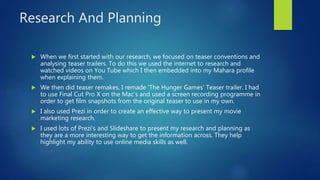
 I also used Prezi in order to create an effective way to present my movie
marketing research.
 I used lots of Prezi's and Slideshare to present my research and planning as
they are a more interesting way to get the information across. They help
highlight my ability to use online media skills as well.
Research and Planning
 Our iPhones were also very important in the research and planning as
we used them to take pictures of work we had created and of test shots
that we did for our poster and magazine. We used these before we had the
proper camera's to use and therefore they were highly important in
helping us creating a real image of what we thought our actual products
would look like.
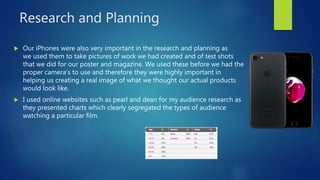
 I used online websites such as pearl and dean for my audience research as
they presented charts which clearly segregated the types of audience
watching a particular film.
Poster and Magazine Draft
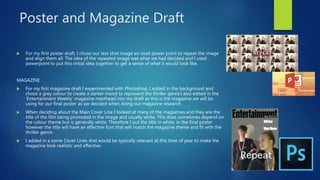
 For my first poster draft, I chose our test shot image an used power point to repeat the image
and align them all. The idea of the repeated image was what we had decided and I used
powerpoint to put this initial idea together to get a sense of what it would look like.
MAGAZINE
 For my first magazine draft I experimented with Photoshop. I edited in the background and
chose a grey colour to create a darker mood to represent the thriller genre.I also edited in the
'Entertainment Weekly' magazine masthead into my draft as this is the magazine we will be
using for our final poster as we decided when doing our magazine research.
 When deciding about the Main Cover Line I looked at many of the magazines and they are the
title of the film being promoted in the image and usually white. This does sometimes depend on
the colour theme but is generally white. Therefore I put the title in white, in the final poster
however the title will have an effective font that will match the magazine theme and fit with the
thriller genre.
 I added in a some Cover Lines that would be typically relevant at this time of year to make the
magazine look realistic and effective.
Final Cut Pro
X
WE FIRST USED FINAL CUT TO PUT
OUR ANIMATIC TOGETHER. THIS WAS
A VERY SIMPLE TASK THAT JUST
REQUIRED US TO PLACE THE
IMAGES IN ORDER ON
THE APPLICATION.
Final Cut Pro X
 We originally sorted out our clips by using the 'f' button to favourite the clips we felt
were necessary and the best. We then cut them all down to the lengths we need and put
them in order.
 We then learnt to use the blade tool 'b' in order to section and cut up parts of clips to
get the best bits.
 Colour correction board - trying different levels of shadows, midtowns, exposure and
highlights in order to see what would give the teaser a thriller effect. We took the
highlights down which got rid of orange lighting and set the mood down to a grey
which gave a thriller feeling.
 Learnt how to add sound by importing the sound and exporting it from garage band.
 We also added the narrative sound to Final Cut, we cut this up using the blade tool to
select certain parts that we wanted as all the sound was one whole file.
Garage Band
 Experimenting with Garage Band in order start making a soundtrack for our
teaser. I was playing around with different sounds and loops in order to get an
idea of what mood we wanted our music to convey.
 We also recorded our sound that we will be using to narrate the teaser
trailer. We went up to Castlefield and into the cornered off quiet room in order
to record the voiceover. We had a MacBook and a microphone and we recorded
all the sound onto Garage Band.
 They all recorded their lines more than once to make sure we had a backup if
one was wrong and then we listened to them back to make sure the sound was
efficient.
 When moving the sound from Garage Band to Final Cut, we exported it from
garage band and saved a copy. I then uploaded this to YouTube as well so that
we had an extra copy. We then imported the soundtrack into Final Cut and
placed it and cut it where necessary.
 I then uploaded the final backing track I had made onto You Tube so we could
import it whenever necessary.
Poster – Photoshop and Illustrator
 We first started by using Illustrator, we couldn't achieve our final product by using Illustrator so we moved
over to Photoshop.
 Editing Louisa out of the picture we were using of her - In order to do this I first used the Magic Eraser to
cut large chunks of shape from the picture. I then had to use the normal eraser tool, changing the size and
edge of the eraser to give a fine or blurry cut around Louisa's shape. I had to change this in order to make
the hair outline look natural, therefore I used a more blurred cut around this. When erasing around her
jacket I used a finer cut to make the shape obvious.
 editing and pulling together the final picture for the poster.
 Once I had finished cutting Louisa out of the original picture I moved that image onto the image of
Nathan, who was also cut out.
 The picture of Nathan and Louisa were separate photos so they both had to be erased and cut separately
and then put together.
 Once I had joined the two photos up, I turned down the opacity and used the eraser to blur the images
together so the fitted and looked like one whole picture.
 I also had to do this when adding the background. When adding the background we chose I had to blur
the characters outline slightly so that they didn't stand out too boldly in front of the background image.
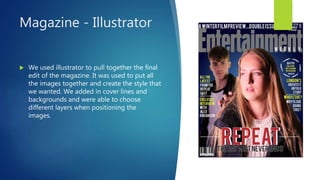
Magazine - Illustrator
 We used illustrator to pull together the final
edit of the magazine. It was used to put all
the images together and create the style that
we wanted. We added in cover lines and
backgrounds and were able to choose
different layers when positioning the
images.
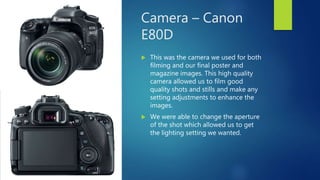
Camera – Canon
E80D
 This was the camera we used for both
filming and our final poster and
magazine images. This high quality
camera allowed us to film good
quality shots and stills and make any
setting adjustments to enhance the
images.
 We were able to change the aperture
of the shot which allowed us to get
the lighting setting we wanted.
YouTube
 We used YouTube a lot for all our research. Teaser trailer research, sound
research, ident research.
 Illustrator and Photoshop research and guides.
 Final Cut guides.
 We also used it for uploading sound from garage band so we could then
import it to Final Cut.
 We used it to upload all of our rough cuts and final cuts.
 All of this technology allowed us to research our teaser trailer effectively
and produce a good quality and detailed final product portfolio.
 It was challenging when learning how to use photoshop and illustrator and
learning to use new tools in Final Cut. However, once we got to grips with
it they were rewarding as we were able to produce effective final products.
 By using YouTube to look up guides to using the apps aswell we were able
to better enhance pour skills.

Question 4 evaluation

  • 1.
    How did youuse new media technologies in the construction and research, planning and evaluation stages?
  • 2.
    Research And Planning When we first started with our research, we focused on teaser conventions and analysing teaser trailers. To do this we used the internet to research and watched videos on You Tube which I then embedded into my Mahara profile when explaining them.  We then did teaser remakes, I remade 'The Hunger Games' Teaser trailer. I had to use Final Cut Pro X on the Mac's and used a screen recording programme in order to get film snapshots from the original teaser to use in my own.  I also used Prezi in order to create an effective way to present my movie marketing research.  I used lots of Prezi's and Slideshare to present my research and planning as they are a more interesting way to get the information across. They help highlight my ability to use online media skills as well.
  • 3.
    Research and Planning Our iPhones were also very important in the research and planning as we used them to take pictures of work we had created and of test shots that we did for our poster and magazine. We used these before we had the proper camera's to use and therefore they were highly important in helping us creating a real image of what we thought our actual products would look like.  I used online websites such as pearl and dean for my audience research as they presented charts which clearly segregated the types of audience watching a particular film.
  • 4.
    Poster and MagazineDraft  For my first poster draft, I chose our test shot image an used power point to repeat the image and align them all. The idea of the repeated image was what we had decided and I used powerpoint to put this initial idea together to get a sense of what it would look like. MAGAZINE  For my first magazine draft I experimented with Photoshop. I edited in the background and chose a grey colour to create a darker mood to represent the thriller genre.I also edited in the 'Entertainment Weekly' magazine masthead into my draft as this is the magazine we will be using for our final poster as we decided when doing our magazine research.  When deciding about the Main Cover Line I looked at many of the magazines and they are the title of the film being promoted in the image and usually white. This does sometimes depend on the colour theme but is generally white. Therefore I put the title in white, in the final poster however the title will have an effective font that will match the magazine theme and fit with the thriller genre.  I added in a some Cover Lines that would be typically relevant at this time of year to make the magazine look realistic and effective.
  • 5.
    Final Cut Pro X WEFIRST USED FINAL CUT TO PUT OUR ANIMATIC TOGETHER. THIS WAS A VERY SIMPLE TASK THAT JUST REQUIRED US TO PLACE THE IMAGES IN ORDER ON THE APPLICATION.
  • 6.
    Final Cut ProX  We originally sorted out our clips by using the 'f' button to favourite the clips we felt were necessary and the best. We then cut them all down to the lengths we need and put them in order.  We then learnt to use the blade tool 'b' in order to section and cut up parts of clips to get the best bits.  Colour correction board - trying different levels of shadows, midtowns, exposure and highlights in order to see what would give the teaser a thriller effect. We took the highlights down which got rid of orange lighting and set the mood down to a grey which gave a thriller feeling.  Learnt how to add sound by importing the sound and exporting it from garage band.  We also added the narrative sound to Final Cut, we cut this up using the blade tool to select certain parts that we wanted as all the sound was one whole file.
  • 7.
    Garage Band  Experimentingwith Garage Band in order start making a soundtrack for our teaser. I was playing around with different sounds and loops in order to get an idea of what mood we wanted our music to convey.  We also recorded our sound that we will be using to narrate the teaser trailer. We went up to Castlefield and into the cornered off quiet room in order to record the voiceover. We had a MacBook and a microphone and we recorded all the sound onto Garage Band.  They all recorded their lines more than once to make sure we had a backup if one was wrong and then we listened to them back to make sure the sound was efficient.  When moving the sound from Garage Band to Final Cut, we exported it from garage band and saved a copy. I then uploaded this to YouTube as well so that we had an extra copy. We then imported the soundtrack into Final Cut and placed it and cut it where necessary.  I then uploaded the final backing track I had made onto You Tube so we could import it whenever necessary.
  • 8.
    Poster – Photoshopand Illustrator  We first started by using Illustrator, we couldn't achieve our final product by using Illustrator so we moved over to Photoshop.  Editing Louisa out of the picture we were using of her - In order to do this I first used the Magic Eraser to cut large chunks of shape from the picture. I then had to use the normal eraser tool, changing the size and edge of the eraser to give a fine or blurry cut around Louisa's shape. I had to change this in order to make the hair outline look natural, therefore I used a more blurred cut around this. When erasing around her jacket I used a finer cut to make the shape obvious.  editing and pulling together the final picture for the poster.  Once I had finished cutting Louisa out of the original picture I moved that image onto the image of Nathan, who was also cut out.  The picture of Nathan and Louisa were separate photos so they both had to be erased and cut separately and then put together.  Once I had joined the two photos up, I turned down the opacity and used the eraser to blur the images together so the fitted and looked like one whole picture.  I also had to do this when adding the background. When adding the background we chose I had to blur the characters outline slightly so that they didn't stand out too boldly in front of the background image.
  • 9.
    Magazine - Illustrator We used illustrator to pull together the final edit of the magazine. It was used to put all the images together and create the style that we wanted. We added in cover lines and backgrounds and were able to choose different layers when positioning the images.
  • 10.
    Camera – Canon E80D This was the camera we used for both filming and our final poster and magazine images. This high quality camera allowed us to film good quality shots and stills and make any setting adjustments to enhance the images.  We were able to change the aperture of the shot which allowed us to get the lighting setting we wanted.
  • 11.
    YouTube  We usedYouTube a lot for all our research. Teaser trailer research, sound research, ident research.  Illustrator and Photoshop research and guides.  Final Cut guides.  We also used it for uploading sound from garage band so we could then import it to Final Cut.  We used it to upload all of our rough cuts and final cuts.
  • 12.
     All ofthis technology allowed us to research our teaser trailer effectively and produce a good quality and detailed final product portfolio.  It was challenging when learning how to use photoshop and illustrator and learning to use new tools in Final Cut. However, once we got to grips with it they were rewarding as we were able to produce effective final products.  By using YouTube to look up guides to using the apps aswell we were able to better enhance pour skills.