Q-BASIC PROGRAMMING
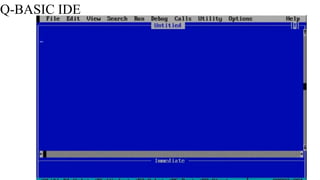
Q-BASIC IDE
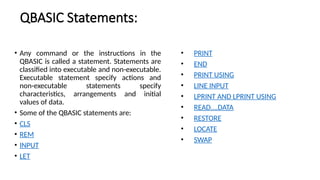
QBASIC Statements:
• Any command or the instructions in the
QBASIC is called a statement. Statements are
classified into executable and non-executable.
Executable statement specify actions and
non-executable statements specify
characteristics, arrangements and initial
values of data.
• Some of the QBASIC statements are:
• CLS
• REM
• INPUT
• LET
• PRINT
• END
• PRINT USING
• LINE INPUT
• LPRINT AND LPRINT USING
• READ….DATA
• RESTORE
• LOCATE
• SWAP
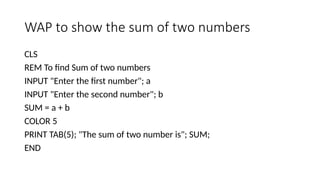
WAP to show the sum of two numbers
CLS
REM To find Sum of two numbers
INPUT "Enter the first number"; a
INPUT "Enter the second number"; b
SUM = a + b
COLOR 5
PRINT TAB(5); "The sum of two number is"; SUM;
END
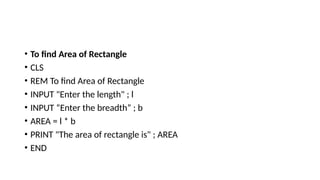
• To find Area of Rectangle
• CLS
• REM To find Area of Rectangle
• INPUT "Enter the length" ; l
• INPUT “Enter the breadth” ; b
• AREA = l * b
• PRINT "The area of rectangle is" ; AREA
• END
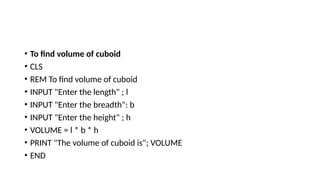
• To find volume of cuboid
• CLS
• REM To find volume of cuboid
• INPUT "Enter the length" ; l
• INPUT "Enter the breadth": b
• INPUT "Enter the height" ; h
• VOLUME = l * b * h
• PRINT "The volume of cuboid is"; VOLUME
• END
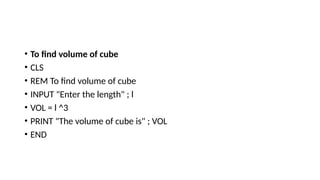
• To find volume of cube
• CLS
• REM To find volume of cube
• INPUT "Enter the length" ; l
• VOL = l ^3
• PRINT "The volume of cube is" ; VOL
• END
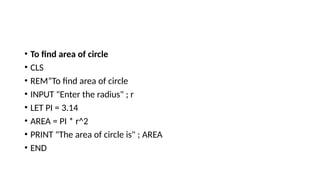
• To find area of circle
• CLS
• REM”To find area of circle
• INPUT "Enter the radius" ; r
• LET PI = 3.14
• AREA = PI * r^2
• PRINT "The area of circle is" ; AREA
• END
• o find area of circle if radius is 6 cm
• CLS
• REM To find area of circle if radius is 6 cm
• LET r = 6
• LET PI = 3.14
• AREA = PI * r ^ 2
• PRINT "The area of circle is" ; AREA
• END
• To input student’s name, marks of any three subjects. Find total and percentage
• CLS
• REM “To find result”
• INPUT "Enter the name of student" ; n$
• INPUT "Enter the marks of English"; eng
• INPUT "Enter the marks of Nepali" ; nep
• INPUT "Enter the marks of Computer"; com
• TOTAL = eng + nep + com
• PER = eng + nep + com / 300 * 100
• PRINT "Student’s name" ; n$
• PRINT "Total marks of student" ; TOTAL
• PRINT " Percentage of student"; PER
• END
Q.N 5 Textbook
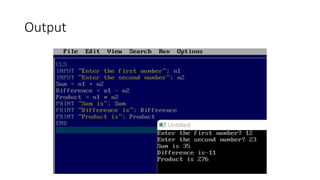
CLS
INPUT “Enter the first number”; n1
INPUT “Enter the second number”; n2
Sum= n1+n2
Difference= n1-n2
Product= n1*n2
Print “Sum is”; Sum
Print “Difference is”; Difference
PRINT “Product is”; Product
End
Output
Q.N.6
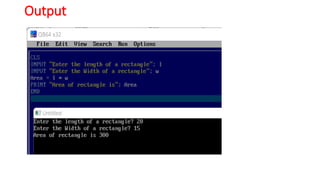
CLS
INPUT “Enter the length of a rectangle”; l
INPUT “Enter the Width of a rectangle”; w
Area=l*w
PRINT “area of rectangle is…”; Area
End
Output
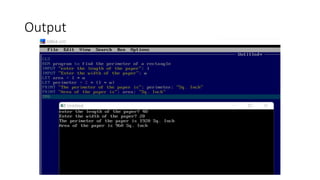
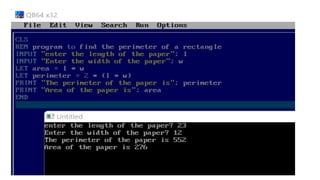
Q.N.7
CLS
REM program to find the perimeter of a rectangle
INPUT "enter the length of the paper"; l
INPUT "Enter the width of the paper"; w
LET area = l * w
LET perimeter = 2 * (l * w)
PRINT "The perimeter of the paper is"; perimeter
PRINT "Area of the paper is"; area
END
Output
QBASIC Programming for the beginners to larn the basic ideas of QB Programming.pptx

QBASIC Programming for the beginners to larn the basic ideas of QB Programming.pptx

  • 1.
  • 2.
  • 3.
    QBASIC Statements: • Anycommand or the instructions in the QBASIC is called a statement. Statements are classified into executable and non-executable. Executable statement specify actions and non-executable statements specify characteristics, arrangements and initial values of data. • Some of the QBASIC statements are: • CLS • REM • INPUT • LET • PRINT • END • PRINT USING • LINE INPUT • LPRINT AND LPRINT USING • READ….DATA • RESTORE • LOCATE • SWAP
  • 7.
    WAP to showthe sum of two numbers CLS REM To find Sum of two numbers INPUT "Enter the first number"; a INPUT "Enter the second number"; b SUM = a + b COLOR 5 PRINT TAB(5); "The sum of two number is"; SUM; END
  • 8.
    • To findArea of Rectangle • CLS • REM To find Area of Rectangle • INPUT "Enter the length" ; l • INPUT “Enter the breadth” ; b • AREA = l * b • PRINT "The area of rectangle is" ; AREA • END
  • 9.
    • To findvolume of cuboid • CLS • REM To find volume of cuboid • INPUT "Enter the length" ; l • INPUT "Enter the breadth": b • INPUT "Enter the height" ; h • VOLUME = l * b * h • PRINT "The volume of cuboid is"; VOLUME • END
  • 10.
    • To findvolume of cube • CLS • REM To find volume of cube • INPUT "Enter the length" ; l • VOL = l ^3 • PRINT "The volume of cube is" ; VOL • END
  • 11.
    • To findarea of circle • CLS • REM”To find area of circle • INPUT "Enter the radius" ; r • LET PI = 3.14 • AREA = PI * r^2 • PRINT "The area of circle is" ; AREA • END
  • 12.
    • o findarea of circle if radius is 6 cm • CLS • REM To find area of circle if radius is 6 cm • LET r = 6 • LET PI = 3.14 • AREA = PI * r ^ 2 • PRINT "The area of circle is" ; AREA • END
  • 13.
    • To inputstudent’s name, marks of any three subjects. Find total and percentage • CLS • REM “To find result” • INPUT "Enter the name of student" ; n$ • INPUT "Enter the marks of English"; eng • INPUT "Enter the marks of Nepali" ; nep • INPUT "Enter the marks of Computer"; com • TOTAL = eng + nep + com • PER = eng + nep + com / 300 * 100 • PRINT "Student’s name" ; n$ • PRINT "Total marks of student" ; TOTAL • PRINT " Percentage of student"; PER • END
  • 14.
    Q.N 5 Textbook CLS INPUT“Enter the first number”; n1 INPUT “Enter the second number”; n2 Sum= n1+n2 Difference= n1-n2 Product= n1*n2 Print “Sum is”; Sum Print “Difference is”; Difference PRINT “Product is”; Product End
  • 15.
  • 16.
    Q.N.6 CLS INPUT “Enter thelength of a rectangle”; l INPUT “Enter the Width of a rectangle”; w Area=l*w PRINT “area of rectangle is…”; Area End
  • 17.
  • 18.
    Q.N.7 CLS REM program tofind the perimeter of a rectangle INPUT "enter the length of the paper"; l INPUT "Enter the width of the paper"; w LET area = l * w LET perimeter = 2 * (l * w) PRINT "The perimeter of the paper is"; perimeter PRINT "Area of the paper is"; area END
  • 19.